DSA710 - Measurement Rigol - Free user manual and instructions
Find the device manual for free DSA710 Rigol in PDF.


| Product Type | Spectrum Analyzer |
| Brand | Rigol |
| Model | DSA710 |
| Frequency Range | 100 kHz to 1 GHz |
| Resolution Bandwidth (RBW) | 10 Hz to 1 MHz (1-3-10 steps) |
| Video Bandwidth (VBW) | 1 Hz to 3 MHz (1-3-10 steps) |
| Phase Noise | Typical -80 dBc/Hz @ 10 kHz offset |
| Display | 8.4-inch color TFT LCD, 800x600 pixels |
| Input Impedance | 50 Ω |
| Input Connector | N-type female |
| Maximum Input Power | +30 dBm (1 W) continuous, +50 dBm peak |
| Interfaces | USB (Device & Host), LAN, GPIB (via USB-GPIB adapter) |
| Power Supply | 100-240 V AC, 50/60 Hz |
| Power Consumption | Approximately 50 W |
| Dimensions (W×H×D) | 350 mm × 180 mm × 100 mm |
| Weight | Approximately 4.2 kg |
| Operating Temperature | 0°C to +40°C |
| Safety | Overvoltage protection, grounded power cord, fuse protection |
| Calibration | Auto calibration supported, manual self-calibration |
| Tracking Generator | None (optional for DSA705/DSA710) |
| Marker Functions | Normal, Delta, Delta Pair, Span Pair, Peak Search, N dB bandwidth, Noise Marker |
| Measurement Modes | ACPR, Channel Power, C/N, OBW, EBW, Harmonic Distortion, TOI, T-Power |
| Programming | SCPI commands via USB/LAN/GPIB |
Frequently Asked Questions - DSA710 Rigol
User questions about DSA710 Rigol
0 question about this device. Answer the ones you know or ask your own.
Ask a new question about this device
Download the instructions for your Measurement in PDF format for free! Find your manual DSA710 - Rigol and take your electronic device back in hand. On this page are published all the documents necessary for the use of your device. DSA710 by Rigol.
USER MANUAL DSA710 Rigol
Guaranty and Declaration
Copyright
© 2016 RIGOL TECHNOLOGIES, INC. All Rights Reserved.
Trademark Information
RIGOL is a registered trademark of RIGOL TECHNOLOGIES, INC.
Publication Number
PGD18101-1110
Software Version
DSA705/DSA710:00.01.17
Software upgrade might change or add product features. Please acquire the latest version of the manual from RIGOL website or contact RIGOL to upgrade the software.
Notices
● RIGOL products are covered by P.R.C. and foreign patents, issued and pending.
- RIGOL reserves the right to modify or change parts of or all the specifications and pricing policies at the company's sole decision.
● Information in this publication replaces all previously released materials.
● Information in this publication is subject to change without notice.
- RIGOL shall not be liable for either incidental or consequential losses in connection with the furnishing, use or performance of this manual as well as any information contained.
- Any part of this document is forbidden to be copied, photocopied or rearranged without prior written approval of RIGOL.
Product Certification
RIGOL guarantees that this product conforms to the national and industrial standards in China as well as the ISO9001:2008 standard and the ISO14001:2004 standard. Other international standard conformance certifications are in progress.
Contact Us
If you have any problem or requirement when using our products or this manual, please contact RIGOL.
E-mail: service@rigol.com
Website: www.rigol.com
Safety Requirement
General Safety Summary
Please review the following safety precautions carefully before putting the instrument into operation so as to avoid any personal injury or damage to the instrument and any product connected to it. To prevent potential hazards, please follow the instructions specified in this manual to use the instrument properly.
Use Proper Power Cord.
Only the exclusive power cord designed for the instrument and authorized for use within the local country could be used.
Ground the Instrument.
The instrument is grounded through the Protective Earth lead of the power cord. To avoid electric shock, connect the earth terminal of the power cord to the Protective Earth terminal before connecting any input or output terminals.
Connect the Probe Correctly.
If a probe is used, the probe ground lead must be connected to earth ground. Do not connect the ground lead to high voltage. Improper way of connection could result in dangerous voltages being present on the connectors, controls or other surfaces of the oscilloscope and probes, which will cause potential hazards for operators.
Observe All Terminal Ratings.
To avoid fire or shock hazard, observe all ratings and markers on the instrument and check your manual for more information about ratings before connecting the instrument.
Use Proper Overvoltage Protection.
Ensure that no overvoltage (such as that caused by a bolt of lightning) can reach the product. Otherwise, the operator might be exposed to the danger of an electric shock.
Do Not Operate Without Covers.
Do not operate the instrument with covers or panels removed.
Do Not Insert Objects Into the Air Outlet.
Do not insert objects into the air outlet, as doing so may cause damage to the instrument.
Use Proper Fuse.
Please use the specified fuses.
Avoid Circuit or Wire Exposure.
Do not touch exposed junctions and components when the unit is powered on.
Do Not Operate With Suspected Failures.
If you suspect damage occurs to the instrument, have it inspected by RIGOL authorized personnel before further operations. Any maintenance, adjustment or replacement especially to circuits or accessories must be performed by RIGOL authorized personnel.
Provide Adequate Ventilation.
Inadequate ventilation may cause an increase of temperature in the instrument, which would cause damage to the instrument. So please keep the instrument well ventilated and inspect the air outlet and the fan regularly.
Do Not Operate in Wet Conditions.
To avoid short circuit inside the instrument or electric shock, never operate the instrument in a humid
environment.
Do Not Operate in an Explosive Atmosphere.
To avoid personal injuries or damage to the instrument, never operate the instrument in an explosive atmosphere.
Keep Instrument Surfaces Clean and Dry.
To avoid dust or moisture from affecting the performance of the instrument, keep the surfaces of the instrument clean and dry.
Prevent Electrostatic Impact.
Operate the instrument in an electrostatic discharge protective environment to avoid damage induced by static discharges. Always ground both the internal and external conductors of cables to release static before making connections.
Use the Battery Properly.
Do not expose the battery (if available) to high temperature or fire.
Keep it out of the reach of children. Improper change of a battery (lithium battery) may cause an explosion.
Use the RIGOL specified battery only.
Handle with Caution.
Please handle with care during transportation to avoid damage to keys, knobs, interfaces and other parts on the panels.
Safety Notices and Symbols
Safety Notices in this Manual:

WARNING
Indicates a potentially hazardous situation or practice which, if not avoided, will result in serious injury or death.

CAUTION
Indicates a potentially hazardous situation or practice which, if not avoided, could result in damage to the product or loss of important data.
Safety Terms on the Product:
DANGER It calls attention to an operation, if not correctly performed, could result in injury or hazard immediately.
WARNING It calls attention to an operation, if not correctly performed, could result in potential injury or hazard.
CAUTION It calls attention to an operation, if not correctly performed, could result in damage to the product or other devices connected to the product.
Safety Symbols on the Product:

Hazardous Voltage

Safety Warning

Protective Earth Terminal

Chassis Ground

Test Ground
This manual introduces how to program and control RIGOL DSA700 series spectrum analyzer using SCPI commands through USB, LAN or GPIB (via USB-GPIB interface converter) interface.
Main Topics in this Manual:
Chapter 1 SCPI Overview
This chapter provides a brief introduction of the SCPI commands.
Chapter 2 Command System
This chapter introduces the syntax, function, parameter and using instruction of each DSA700 command in alphabetical order (from A to Z).
Chapter 3 Programming Demos
This chapter introduces how to program and control DSA700 using development tools, such as Visual C++, Visual Basic and LabVIEW.
Tip
The latest version of this manual can be downloaded from www.rigol.com.
Format Conventions in this Manual:
1. Key:
The key at the front panel is denoted by the format of "Key Name (Bold) + Text Box" in the manual. For example, FREQ denotes the FREQ key.
2. Menu:
The menu is denoted by the format of "Menu Word (Bold) + Character Shading" in the manual. For example, Center Freq denotes the center frequency menu item under the FREQ function key.
3. Connector:
The connector at the front or rear panel is denoted by the format of "Connector Name (Bold) + Square Brackets (Bold)" in the manual. For example, [GEN OUTPUT 50Ω].
4. Operation step:
The operation for the next step is denoted by an arrow "→" in the manual. For example, FREQ → Center Freq denotes that you first press FREQ on the front panel and then press Center Freq.
Content Conventions in this Manual:
DSA700 series spectrum analyzer includes the following two models. The introductions of the DSA700 series commands in this manual are based on DSA710, unless otherwise noted.
| Model | Frequency Range | Tracking Generator |
| DSA705 | 100 kHz to 500 MHz | None |
| DSA710 | 100 kHz to 1 GHz | None |
Contents
Guaranty and Declaration .... I
Safety Requirement....II
General Safety Summary...... II
Safety Notices and Symbols....IV
Symbol Description 1-2
Parameter Type 1-3
Command Abbreviation....1-3
Chapter 2 Command System....2-1
:ABORt....2-2
:CALCulate Subsystem 2-2
:CALCulate:BANDwidth:NDB 2-4
:CALCulate:BANDwidth:RESult? 2-4
:CALCulate:LLINe:ALL:DELe te....2-4
:CALCulate:LLINe:CONTROL:DOMAIN 2-5
:CALCulate:LLINe:FAIL? 2-5
:CALCulate:LLINe:FAIL:RATIO? 2-6
:CALCulate:LLINe:FAIL:STOP:STATE 2-6
:CALCulate:LLINe
:CALCulate:LLINe
:CALCulate:LLINe
:CALCulate:LLINe
:CALCulate:LLINe
:CALCulate:LLINe
:CALCulate:LLINe
:CALCulate:MARKer:AOFF 2-11
:CALCulate:MARKer:FCOunt:RESolution 2-11
:CALCulate:MARKer:FCOunt:RESolution:AUTO 2-12
:CALCulate:MARKer:FCOunt:X? 2-12
:CALCulate:MARKer:FCOunt[:STATE] 2-13
:CALCulate:MARKer
:CALCulate:MARKer
:CALCulate:MARKer
:CALCulate:MARKer
:CALCulate:MARKer
:CALCulate:MARKer
:CALCulate:MARKer
:CALCulate:MARKer
:CALCulate:MARKer
:CALCulate:MARKer
:CALCulate:MARKer
:CALCulate:MARKer
:CALCulate:MARKer
:CALCulate:MARKer
:CALCulate:MARKer
:CALCulate:MARKer
:CALCulate:MARKer
:CALCulate:MARKer
:CALCulate:MARKer
:CALCulate:MARKer
:CALCulate:MARKer
:CALCulate:MARKer
:CALCulate:MARKer
:CALCulate:MARKer
:CALCulate:MARKer
:CALCulate:MARKer
:CALCulate:MARKer
:CALCulate:MARKer
:CALCulate:MARKer
:CALCulate:MARKer
:CALCulate:MARKer
:CALCulate:MARKer
:CALCulate:MARKer
:CALCulate:MARKer
:CALCulate:MARKer
:CALCulate:MARKer:TABLE:STATE 2-32
:CALCulate:MARKer:TRACKing:STATE 2-33
:CALibration Subsystem....2-34
:CALibration:[ALL] 2-34
:CALibration:AUTO....2-34
:CONFigure Subsystem....2-35
:CONFigure? 2-35
:CONFigure:ACPower 2-35
:CONFigure:CHPower 2-36
:CONFigure: CNRatio 2-36
:CONFigure:EBWidth....2-36
:CONFigure:HDIST 2-37
:CONFigure:OBWidth 2-37
:CONFigure:PF 2-37
:CONFigure:SANalyzer 2-37
:CONFigure:TOI 2-38
:CONFigure:TPOWer 2-38
:COUPLE Subsystem....2-39
:COUPIe 2-39
:DISPLAY Subsystem 2-40
:DISPLAY:AFUnction:POSition....2-41
:DISPLAY:ANNotation:CLOCK[:STATE] 2-41
:DISPLAY:BRIGHTness 2-42
:DISPLAY:ENABLE....2-42
:DISPLAY:MSGswitch:STATE 2-43
:DISPLAY:UKEY:STATE....2-43
:DISPLAY:WINdow:TRACe:GRATicule:GRID 2-44
:DISPLAY:WINdow:TRACe:X[:SCALe]:SPACING 2-44
:DISPLAY:WINDOW:TRACe:Y:DLINe 2-45
:DISPLAY:WINDOW:TRACe:Y:DLINe:STATE....2-45
:DISPLAY:WINdow:TRACe:Y[:SCALe]:PDI Vision 2-46
:DISPLAY:WINdow:TRACe:Y[:SCALe]:RLEVel....2-46
:DISPLAY:WINDOW:TRACe:Y[:SCALe]:RLEVel:OFFSET....2-47
:DISPLAY:WINDOW:TRACe:Y[:SCALe]:SPACING 2-47
:FETCH Subsystem 2-48
:FETCH:ACPower? 2-49
:FETCH:ACPower:LOWer? 2-49
:FETCH:ACPower:MAIN? 2-50
:FETCH:ACPower:UPPer? 2-50
:FETCH:CHPower? 2-51
:FETCH:CHPower:CHPower? 2-51
:FETCH:CHPower:DENSITY? 2-52
:FETCH: CNRatio? 2-52
:FETCH: CNRatio:CARRier? 2-53
:FETCH: CNRatio: CNRatio? 2-53
:FETCH: CNRatio: NOISE? 2-54
:FETCH:EBWidth? 2-54
:FETCH:HARMonics:AMPLitude:ALL? 2-55
:FETCH:HARMonics:AMPLitude?
:FETCH:HARMonics[:DI STortion]? 2-56
:FETCH:HARMonics:FREQuency:ALL? 2-56
:FETCH:HARMonics:FREQUENCY?
:FETCH:HARMonics:FUNDamental? 2-57
:FETCH:OBWidth? 2-58
:FETCH:OBWidth:OBWidth? 2-58
:FETCH:OBWidth:OBWidth:FERRor? 2-59
:FETCH:TOIntercept? 2-59
:FETCH:TOIntercept:IP3? 2-60
:FETCH:TPOWer? 2-60
:FORMAT Subsystem....2-61
:FORMAT:BORDER 2-61
:FORMAT[:TRACe][:DATA] 2-62
:HCOPy Subsystem 2-63
:HCOPy:ABORt 2-63
:HCOPy:IMAGe:COLor[:STATE] 2-63
:HCOPy:IMAGe:FTYPE 2-64
:HCOPy:IMAGe:INVert 2-64
:HCOPy:IMAGe:PTIMe 2-65
:HCOPy:IMAGe:QUALity 2-65
:HCOPy[:IMMediate] 2-66
:HCOPy:PAGE:ORIENTATION 2-66
:HCOPy:PAGE:PRINts 2-67
:HCOPy:PAGE:SIZE 2-67
:HCOPy:RESume 2-68
IEEE 488.2 Common Commands....2-69
* CLS 2-69
* ESE 2-69
*ESR? 2-70
* IDN? 2-70
* OPC....2-71
* RST 2-71
* SRE 2-71
* STB? 2-72
* TRG 2-72
* TST? 2-72
* WAI 2-72
:INITiate Subsystem 2-73
:INITiate:CONTinuous 2-73
:INITiate[:IMMediate] 2-74
:INITiate:PAUSe....2-74
:INITiate:RESTart 2-74
:INITiate:RESume 2-74
:INPut Subsystem 2-75
:INPut:IMPedance 2-75
:MMEMory Subsystem....2-76
:MMEMory:DElete....2-76
:MMEMory:DISK:INFormation? 2-77
:MMEMory:LOAD:CORRection 2-77
:MMEMory:LOAD:LI Mit 2-78
:MMEMory:LOAD:MTABle 2-78
:MMEMory:LOAD:SETUp 2-79
:MMEMory:LOAD:STATE 2-79
:MMEMory:LOAD:TRACe 2-80
:MMEMory:MOVE....2-80
:MMEMory:STORE:CORRection 2-81
:MMEMory:STORe:MTABle....2-82
:MMEMory:STORE:PTABLE 2-82
:MMEMory:STORE:RESults 2-83
:MMEMory:STORe:SCReen 2-83
:MMEMory:STORE:SETUp....2-84
:MMEMory:STORe:STATE 2-84
:MMEMory:STORE:TRACe 2-85
:READ Subsystem 2-86
:READ:ACPower? 2-87
:READ:ACPower:LOWer? 2-87
:READ:ACPower:MAIN? 2-87
:READ:ACPower:UPPer? 2-88
:READ:CHPower? 2-88
:READ:CHPower:CHPower? 2-88
:READ:CHPower:DENSITY?......2-89
:READ: CNRatio? 2-89
:READ: CNRatio:CARRier? 2-89
:READ: CNRatio: CNRatio? 2-90
:READ: CNRatio: NOI Se? 2-90
:READ:EBWidth? 2-90
:READ:HARMonics:AMPLitude:ALL? 2-91
:READ:HARMonics:AMPLitude?
:READ:HARMonics[:DISTortion]? 2-92
:READ:HARMonics:FREQuency:ALL? 2-92
:READ:HARMonics:FREQuency?
:READ:HARMonics:FUNDamental? 2-93
:READ:OBWidth? 2-93
:READ:OBWidth:OBWidth? 2-94
:READ:OBWidth:OBWidth:FERRor? 2-94
:READ:TOIntercept? 2-94
:READ:TOIntercept:IP3? 2-95
:READ:TPOWer? 2-95
:SENSe Subsystem 2-96
:SENSe:ACPower:AVERAGE:COUNT 2-99
:SENSe:ACPower:AVERAGE[:STATE] 2-99
:SENSe:ACPower:BANDwidth:ACHannel 2-100
:SENSe:ACPower:CSPacing 2-102
:SENSe:BANDwidth:EMI Filter:STATE 2-102
:SENSe:BANDwidth[:RESolution]:AUTO 2-103
:SENSe:BANDwidth:VIDeo:AUTO 2-104
:SENSe:BANDwidth:VIDeo:RATio 2-105
:SENSe:CHPower:AVERAGE:COUNT 2-105
:SENSe:CHPower:AVERAGE[:STATE] 2-106
:SENSe:CHPower:AVERAGE:TCONtrol 2-106
:SENSe:CHPower:BANDwidth:INTegration 2-107
:SENSe:CHPower:FREQuency:SPAN 2-107
:SENSe:CNRatio:AVERAGE:COUNT 2-108
:SENSe:CNRatio:AVERAGE[:STATE] 2-109
:SENSe:CNRatio:AVERAGE:TCONtrol.... 2-109
:SENSe:CNRatio:BANDwidth:INTegration 2-110
:SENSe: CNRatio:BANDwidth:NOISE 2-111
:SENSe:CNRatio:OFFSET.... 2-111
:SENSe:CORRection:CSET:ALL:DELete 2-112
:SENSe:CORRection:CSET:ALL[:STATE] 2-112
:SENSe:CORRection:CSET
:SENSe:CORRection:CSET
:SENSe:CORRection:CSET
:SENSe:CORRection:CSET
:SENSe:CORRection:CSET
:SENSe:CORRection:CSET:TABLe:STATE 2-115
:SENSe:DEMod.... 2-116
:SENSe:DEMod:GAIN:AUTO 2-116
:SENSe:DEMod:GAIN:INCRement 2-117
:SENSe:DEMod:STATE 2-117
:SENSe:DEMod:TIME 2-118
:SENSe:DETector[:FUNCTION] 2-118
:SENSe:EBWidth:AVERAGE:COUNT 2-119
:SENSe:EBWidth:AVERAGE[:STATE] 2-120
:SENSe:EBWidth:AVERAGE:TCONtrol 2-120
:SENSe:EBWidth:MAXHold:STATE 2-122
:SENSe:EBWidth:XDB 2-122
:SENSe:EXTRef[:STATe]? 2-123
:SENSe:FREQUENCY:CENTer.... 2-123
:SENSe:FREQUENCY:CENTER:DOWN 2-124
:SENSe:FREQUENCY:CENTER:SET:STEP 2-124
:SENSe:FREQUENCY:CENTER:STEP:AUTO 2-124
:SENSe:FREQUENCY:CENTer:STEP[:INCRement] 2-125
:SENSe:FREQUENCY:CENTer:UP 2-125
:SENSe:FREQUENCY:OFFSET.... 2-125
:SENSe:FREQuency:SPAN 2-126
:SENSe:FREQUENCY:SPAN:FULL 2-126
:SENSe:FREQUENCY:SPAN:PREVIOUS 2-127
:SENSe:FREQuency:SPAN:ZIN 2-127
:SENSe:FREQuency:SPAN:ZOUT 2-127
:SENSe:FREQUENCY:START 2-127
:SENSe:FREQUENCY:STOP 2-128
:SENSe:HDISt:AVERAGE:COUNt 2-128
:SENSe:HDISt:AVERAGE[:STATE] 2-129
:SENSe:HDISt:TIME:AUTO[:STATE] 2-131
:SENSe:OBWidth:AVERAGE:COUNT 2-132
:SENSe:OBWidth:AVERAGE[:STATE] 2-132
:SENSe:OBWidth:AVERAGE:TCONtrol 2-133
:SENSe:OBWidth:FREQuency:SPAN 2-133
:SENSe:OBWidth:MAXHold:STATE 2-134
:SENSe:OBWidth:PERCent 2-135
:SENSe:POWer:ARANge 2-135
:SENSe:POWer:ASCale 2-135
:SENSe:POWer:ATUNe 2-136
:SENSe:POWer[:RF]:ATTenuation 2-136
:SENSe:POWer[:RF]:ATTenuation:AUTO.... 2-137
:SENSe:POWer[:RF]:GAIN[:STATE] 2-137
:SENSe:POWer[:RF]:MIXer:RANGE[:UPPer] 2-138
:SENSe:SIGCapture[:STATE] 2-138
:SENSe:SIGCapture:SIGC[:STATe] 2-139
:SENSe:SIGCapture:MAXHold[:STATe] 2-139
:SENSe:SIGCapture:RESET 2-140
:SENSe:SIGCapture:2FSK:RESET 2-140
:SENSe:SIGCapture:2FSK:MAXHold[:STATe] 2-141
:SENSe:SIGCapture:2FSK:PFSWitch 2-141
:SENSe:SIGCapture:2FSK:SIGNal 2-142
:SENSe:SIGCapture:2FSK:AMPDown 2-143
:SENSe:SIGCapture:2FSK:MARK1:Switch[:STATE] 2-144
:SENSe:SIGCapture:2FSK:MARK2:Switch[:STATE] 2-145
:SENSe:SWEep:COUNT 2-145
:SENSe:SWEep:COUNT:CURRENT? 2-146
:SENSe:SWEep:TIME 2-146
:SENSe:SWEep:TIME:AUTO:RULes 2-147
:SENSe:TOI:AVERAGE:COUNT 2-148
:SENSe:TOI:AVERAGE[:STATE] 2-148
:SENSe:TOI:AVERAGE:TCONtrol 2-149
:SENSe:TOI:FREQuency:SPAN 2-149
:SENSe:TPOWer:AVERAGE:COUNT 2-150
:SENSe:TPOWer:LLIMit 2-151
:SENSe:TPOWer:MODE 2-152
:SENSe:TPOWer:RLIMit 2-153
:STATus Subsystem 2-154
:STATus:OPERation:CONDITION? 2-155
:STATUS:OPERation:ENABLE 2-155
:STATus:OPERation[:EVENT]? 2-156
:STATus:PRESet 2-156
:STATus:QUESTIONable:CONDITION? 2-156
:STATus:QUESTIONable:ENABLE....2-157
:STATus:QUESTIONable[:EVENT]?......2-157
:SYSTem Subsystem....2-158
:SYSTem:BEEPer:STATE 2-159
:SYSTem:CLEar 2-159
:SYSTem:COMMunicate:APORt 2-160
:SYSTem:COMMunicate:BRMT 2-160
:SYSTem:COMMunicate:GPIB[:SELF]:ADDRESS 2-161
:SYSTem:COMMunicate:LAN[:SELF]:AUToip:STATE....2-161
:SYSTem:COMMunicate:LAN[:SELF]:DHCP:STATE 2-162
:SYSTem:COMMunicate:LAN[:SELF]:IP:ADDRESS 2-162
:SYSTem:COMMunicate:LAN[:SELF]:IP:DNSServer 2-163
:SYSTem:COMMunicate:LAN[:SELF]:IP:GATeway 2-163
:SYSTem:COMMunicate:LAN[:SELF]:IP:SUBMask 2-164
:SYSTem:COMMunicate:LAN[:SELF]:MANuip:STATe....2-164
:SYSTem:COMMunicate:LAN[:SELF]:RESet 2-165
:SYSTem:COMMunicate:USB[:SELF]:ADDRess? 2-165
:SYSTem:COMMunicate:USB[:SELF]:CLASs....2-165
:SYSTem:CONFigure:INFormation? 2-166
:SYSTem:CONFigure:MESSage? 2-166
:SYSTem:DATE 2-167
:SYSTem:USERkey:CONFirm 2-176
:SYSTEM:USERkey:KEYCmd 2-176
:SYSTEM:VERSION? 2-177
:TRACe Subsystem 2-178
:TRACe:AVERAGE:CLEar....2-178
:TRACe:AVERAGE:COUNT 2-178
:TRACe:AVERAGE:COUNT:CURRENT? 2-179
:TRACe:AVERAGE:RESet 2-179
:TRACe:CLEar:ALL 2-179
:TRACe[:DATA] 2-180
:TRACe:MATH:A....2-181
:TRACe:MATH:B....2-181
:TRACe:MATH:CONST 2-182
:TRACe:MATH:PEAK[:DATA]? 2-182
:TRACe:MATH:PEAK:POINTS? 2-183
:TRACe:MATH:PEAK:SORT 2-183
:TRACe:MATH:PEAK:TABLE:STATE 2-183
:TRACe:MATH:PEAK:THReshold 2-184
:TRACe:MATH:STATE 2-184
:TRACe:MATH:TYPE 2-185
:TRACe
:TRACe
:TRIGger Subsystem.... 2-187
:TRIGger:SEQUence:EXTernal:READY? 2-187
:TRIGger:SEQUence:EXTernal:SLOPe....2-187
:TRIGger:SEQUence:SOURce 2-188
:TRIGger:SEQUence:VIDeo:LEVel.... 2-189
:UNIT Subsystem.... 2-190
:UNIT:POWer 2-190
Chapter 3 Programming Demos....3-1
Programming Instructions 3-2
Programming Preparations 3-2
Visual C++ 6.0 Programming Demo....3-5
Visual Basic 6.0 Programming Demo 3-13
LabVIEW 8.6 Programming Demo 3-17
Linux Programming Demo 3-21
Linux Programming Preparations....3-21
Linux Programming Procedures....3-24
Chapter 1 SCPI Overview
SCPI (Standard Commands for Programmable Instruments) is standardized instrument programming language that is based on the standard IEEE488.1 and IEEE 488.2 and conforms to various standards (such as the floating point operation rule in IEEE754 standard, ISO646 7-bit coded character for information interchange (equivalent to ASCII programming).
Main topics of this chapter:
◆ Syntax
Symbol Description
◆ Parameter Type
◆ Command Abbreviation
Syntax
SCPI commands present a hierarchical tree structure and contain multiple sub-systems, each of which is made up of a root keyword and one or more sub-keywords. The command string usually starts with ":", the keywords are separated by ":" and are followed by the parameter settings available, "?" is added at the end of the command string to indicate query and the command and parameter are separated by a space.
For example,
:CALCulate:BANDwidth:NDB
:CALCulate:BANDwidth:NDB?
CALCulate is the root keyword of the command. BANDwidth and NDB are the second-level and third-level keywords respectively. The command string starts with ":" which separates the multiple-level keywords.
", " is generally used for separating different parameters contained in the same command, for example,
:SYSTem:DATE
Symbol Description
The following four symbols are not the content of SCPI commands and will not be sent with the commands, but are usually used to describe the parameters in the commands.
Braces { }
The parameters enclosed in the braces are optional and can be ignored or set for one or more times. For example,
In the :SENSe:CORRection:CSET
Vertical Bar |
The vertical bar is used to separate multiple parameters and one of the parameters must be selected when sending the command. For example,
In the :DISPLAY:ANNotation:CLOCK[:STATe] OFF|ON|0|1 command, the command parameters available are "OFF", "ON", "0" or "1".
Square Brackets [ ]
The content (command keyword) enclosed in the square brackets can be omitted. For example, for the :SENSe:POWer[:RF]:ATTenuation? command, sending any of the four commands below can generate the same effect:
:POWer:ATTenuation?
:POWer:RF:ATTenuation?
:SENSe:POWer:ATTenuation?
:SENSe:POWer:RF:ATTenuation?
Triangle Brackets < >
The parameter enclosed in the triangle brackets must be replaced by an effective value. For example, send the :DISPlay:BRIGHTness
Parameter Type
The command parameters introduced in this manual include 6 types: Bool, Keyword, Integer, Consecutive Real Number, Discrete and ASCII String.
Bool
The parameter could be "OFF", "ON", "0" or "1". For example, :DISPLAY:ANNotation:CLOCK[:STATE] OFF|ON|0|1
Keyword
The parameter could be any of the values listed. For example, :DISPlay:AFUnction:POSition BOTTom|CENTer|TOP The parameter could be "BOTTom", "CENTer" or "TOP".
Integer
Unless otherwise noted, the parameter can be any integer within the effective value range. Note that do not set the parameter to a decimal; otherwise errors will occur. For example,
:DISPLAY:BRIGHTness
Consecutive Real Number
The parameter could be any value within the effective value range according to the accuracy requirement (by default, there are 6 digits after the decimal points). For example,
:CALCulate:BANDwidth:NDB
Discrete
The parameter could only be one of the specified values and these values are discontinuous. For example, :CALCulate:MARKer
ASCII String
The parameter should be the combinations of ASCII characters. For example, :SYSTem:DATE
Command Abbreviation
Since all the commands are case-insensitive, you can use any of them. But if abbreviation is used, all the capital letters in the command must be written completely. For example, :CALCulate:BANDwidth:NDB? can be abbreviated to :CALC:BAND:NDB?
Chapter 2 Command System
In this chapter, the DSA700 series spectrum analyzer command subsystems are introduced in alphabetical order (from A to Z).
Main topics of this chapter:
◆ :ABORt
◆ :CALCulate Subsystem
◆ :CALibration Subsystem
◆ :CONFigure Subsystem
◆ :COUPLE Subsystem
◆ :DISPLAY Subsystem
:FETCH Subsystem
:FORMAT Subsystem
◆ :HCOPy Subsystem
◆ IEEE 488.2 Common Commands
◆ :INITiate Subsystem
◆ :INPut Subsystem
◆ :MMEMory Subsystem
◆ :READ Subsystem
:SENSe Subsystem
◆ :STATus Subsystem
◆ :SYSTem Subsystem
◆ :TRACe Subsystem
◆ :TRIGger Subsystem
◆ :UNIT Subsystem
Explanation:
- In this command set, commands relating to Quasi-peak detector, EMI filter, advanced measurement, Sig Capture and TX1000 are only applicable to DSA700 installed with the corresponding options. For the details, refer to the explanation in each command subsystem.
- In this command set, unless otherwise noted, the query returns "N/A" (quotation marks excluded) if the corresponding option is not installed and returns "ERR" (quotation marks excluded) if the corresponding function is not enabled or the type does not match.
- In this manual, the parameter ranges of the commands are based on DSA710.
:ABORt
Syntax
:ABORt
Description
Give up the current operation and restart the sweep.
:CALCulate Subsystem
Command List:
◆ :CALCulate:BANDwidth:NDB
◆ :CALCulate:BANDwidth:RESult?
◆ :CALCulate:LLINe:ALL:DELe te
◆ :CALCulate:LLINe:CONTrol:DOMain
◆ :CALCulate:LLINe:FAIL?
◆ :CALCulate:LLINe:FAIL:RATIO?
◆ :CALCulate:LLINe:FAIL:STOP:STATE
◆ :CALCulate:LLINe
◆ :CALCulate:LLINe
◆ :CALCulate:LLINe
◆ :CALCulate:LLINe
◆ :CALCulate:LLINe
◆ :CALCulate:LLINe
◆ :CALCulate:LLINe
◆ :CALCulate:MARKer:AOFF
◆ :CALCulate:MARKer:FCOunt:RESolution
◆ :CALCulate:MARKer:FCOunt:RESolution:AUTO
◆ :CALCulate:MARKer:FCOunt:X?
◆ :CALCulate:MARKer:FCOunt[:STATE]
◆ :CALCulate:MARKer
◆ :CALCulate:MARKer
◆ :CALCulate:MARKer
◆ :CALCulate:MARKer
◆ :CALCulate:MARKer
◆ :CALCulate:MARKer
◆ :CALCulate:MARKer
◆ :CALCulate:MARKer
◆ :CALCulate:MARKer
◆ :CALCulate:MARKer
◆ :CALCulate:MARKer
◆ :CALCulate:MARKer
◆ :CALCulate:MARKer
◆ :CALCulate:MARKer
◆ :CALCulate:MARKer
CALCulate:MARKer
◆ :CALCulate:MARKer
◆ :CALCulate:MARKer
◆ :CALCulate:MARKer
◆ :CALCulate:MARKer
◆ :CALCulate:MARKer
◆ :CALCulate:MARKer
◆ :CALCulate:MARKer
◆ :CALCulate:MARKer
◆ :CALCulate:MARKer
◆ :CALCulate:MARKer
◆ :CALCulate:MARKer
◆ :CALCulate:MARKer
◆ :CALCulate:MARKer
◆ :CALCulate:MARKer
◆ :CALCulate:MARKer
◆ :CALCulate:MARKer
◆ :CALCulate:MARKer
◆ :CALCulate:MARKer
◆ :CALCulate:MARKer
◆ :CALCulate:MARKer:TABLE:STATE
◆ :CALCulate:MARKer:TRACking:STATE
:CALCulate:BANDwidth:NDB
Syntax
:CALCulate:BANDwidth:NDB
:CALCulate:BANDwidth:NDB?
Description
Set the value of N in N dB bandwidth measurement.
Query the value of N in N dB bandwidth measurement.
Parameter
| Name | Type | Range | Default |
| Consecutive Real Number | -100 dB to 100 dB | -3 dB |
Return Format
The query returns the value of N in scientific notation.
Example
The command below sets N to -4.
:CALCulate:BANDwidth:NDB -4
The query below returns -4.000000E+00.
:CALCulate:BANDwidth:NDB?
:CALCulate:BANDwidth:RESult?
Syntax
:CALCulate:BANDwidth:RESult?
Description
Query the measurement result of N dB bandwidth and the unit is Hz.
Return Format
The query returns the bandwidth in integer (in Hz).
If points that are located on both sides of the current marker and with N dB fall or rise in amplitude are not found, the query returns ----.
:CALCulate:LLI Ne:ALL:DELe te
Syntax
:CALCulate:LLINe:ALL:DELete
Description
Delete the limit line currently edited.
:CALCulate:LLI Ne:CONTROL:DOMAIN
Syntax
:CALCulate:LLINe:CONTROL:DOMAIN FREQUENCY|TIME
:CALCulate:LLINe:CONTROL:DOMain?
Description
Set the X axis to denote frequency or time in the Pass/Fail test.
Query the type of the X axis in the Pass/Fail test.
Parameter
| Name | Type | Range | Default |
| -- | Keyword | FREQuency|TIME | FREQuency |
Explanation
This setting is applicable to both the upper and lower limit lines.
All the points of the current limit line will be deleted when the X axis type is changed.
Return Format
The query returns FREQ or TIME.
Example
The command below sets the X axis to time.
:CALCulate:LLINe:CONTROL:DOMAIN TIME
The query below returns TIME.
:CALCulate:LLINe:CONTROL:DOMAIN?
:CALCulate:LLI Ne:FAI L?
Syntax
:CALCulate:LLINe:FAIL?
Description
Query the result of the Pass/Fail test.
Return Format
The query returns PASS or FAIL. The query returns UNMEAS if the test is not finished.
:CALCulate:LLI Ne:FAI L:RATI o?
Syntax
:CALCulate:LLINe:FAIL:RATIO?
Description
Query the fail ratio of the Pass/Fail test.
Return Format
The query returns the fail ratio in scientific notation.
Example
The query below returns 5.490000E+00.
:CALCulate:LLINe:FAIL:RATIO?
:CALCulate:LLI Ne:FAI L:STOP:STATe
Syntax
:CALCulate:LLINe:FAIL:STOP:STATE OFF|ON|0|1
:CALCulate:LLINe:FAIL:STOP:STATe?
Description
Set whether to stop the test if the test fails.
Query whether to stop the test if the test fails.
Parameter
| Name | Type | Range | Default |
| -- | Bool | OFF|ON|0|1 | ON|1 |
Explanation
If the parameter is set to ON or 1, the test stops when the test fails and the test continues if the parameter is set to OFF or 0.
Return Format
The query returns 0 or 1.
Example
The command below sets the instrument to stop the test when the test fails.
:CALCulate:LLINe:FAIL:STOP:STATE ON or :CALCulate:LLINe:FAIL:STOP:STATE 1
The query below returns 1.
:CALCulate:LLINe:FAIL:STOP:STATe?
:CALCulate:LLI Ne:CONTROL:I NTerpolate:TYPE
Syntax
:CALCulate:LLINe
:CALCulate:LLINe
Description
Set the frequency interpolation mode in the Pass/Fail test to log or linear.
Query the frequency interpolation mode.
Parameter
| Name | Type | Range | Default |
| Discrete 1|2 -- | |||
| -- | Keyword | LOGarithmic|LINear | LINear |
Explanation
In log mode, both the frequency and amplitude use log unit to make interpolation operation.
In linear mode, the frequency uses a linear unit and the amplitude uses a log unit for interpolation operation.
Return Format
The query returns LOG or LIN.
Example
The command below sets the frequency interpolation mode of the lower limit line to log.
:CALCulate:LLINe1:CONTROL:INTerpolate:TYPE LOGarithmic
The query below returns LOG.
:CALCulate:LLINe1:CONTROL:INTERpolate:TYPE?
:CALCulate:LLINe:DATA
Syntax
:CALCulate:LLINe
:CALCulate:LLINe
Description
Create a limit line of the Pass/Fail test.
Query the limit line information.
Parameter
| Name | Type | Range | Default |
| Discrete | 1|2 | 2 | |
| Consecutive Real Number | 0 Hz to 1 GHz (the X axis denotes frequency)0 us to 1 ks (the X axis denotes time) | -- | |
| Consecutive Real Number | -400 dBm to 320 dBm | -- | |
| Discrete 0|1 | 0 |
Explanation
Note that for the first point, only 0 is available.
Up to 200 points can be edited for each limit line.
Return Format
The query returns the specified limit line information in
If no point is edited of the specified limit line, the query returns NULL.
Example
The command below creates an upper limit line with 3 points.
:CALCulate:LLINe2:DATA 50,100,0,100,150,1,200,200,1
The query below returns 50,100.000000,0,100,150.000000,1,200,200.000000,1.
:CALCulate:LLINe2:DATA?
:CALCulate:LLINe:DATA:MERGe
Syntax
:CALCulate:LLINe
Description
In the Pass/Fail test, add points onto the limit line being edited.
Parameter
| Name | Type | Range | Default |
| Discrete 1|2 2 | |||
| Consecutive Real Number | 0 Hz to 1 GHz (X axis denotes frequency)0 us to 1 ks (X axis denotes time) | -- | |
| Consecutive Real Number | -400 dBm to 320 dBm | -- | |
| Discrete | 0|1 | 0 |
Explanation
Note that for the first point, only 0 is available.
Up to 200 points can be edited for each limit line.
Example
The command below adds two points onto the upper limit line.
:CALCulate:LLINe2:DATA:MERG 250,200,1,300,250,1
:CALCulate:LLINe:DELe te
Syntax
:CALCulate:LLINe
Description
Delete the specified limit line of the Pass/Fail test.
Parameter
| Name | Type | Range | Default |
| Discrete 1|2 -- |
Explanation
Example
The command below deletes the lower limit line.
:CALCulate:LLINe1:DElete
:CALCulate:LLINe:RELAmpt[:STATe]
Syntax
:CALCulate:LLINe
:CALCulate:LLINe
Description
Enable or disable the REL Amplitude.
Query the status of the REL Amplitude.
Parameter
| Name | Type | Range | Default |
| Discrete | 1|2 | -- | |
| -- | Bool | OFF|ON|0|1 | OFF|0 |
Explanation
When the REL Amplitude is enabled, the amplitude set is the difference between the amplitude of the current point and the current reference level.
Return Format
The query returns 0 or 1.
Example
The command below enables the REL Amplitude.
:CALCulate:LLINe1:RELAmpt:STATE ON or :CALCulate:LLINe1:RELAmpt:STATE 1
The query below returns 1.
:CALCulate:LLINe1:RELAmpt?
:CALCulate:LLINe:RELFreq[:STATe]
Syntax
:CALCulate:LLINe
:CALCulate:LLINe
Description
Enable or disable the REL Frequency.
Query the status of the REL Frequency.
Parameter
| Name | Type | Range | Default |
| Discrete 1|2 -- | |||
| -- | Bool | OFF|ON|0|1 | OFF|0 |
Explanation
When the REL Frequency is enabled, the frequency set is the difference between the frequency of the current point and the current center frequency.
Return Format
The query returns 0 or 1.
Example
The command below enables the REL Frequency.
:CALCulate:LLINe1:RELFreq:STATE ON or :CALCulate:LLINe1:RELFreq:STATE 1
The query below returns 1.
:CALCulate:LLINe1:RELFreq?
:CALCulate:LLINe:STATe
Syntax
:CALCulate:LLINe
:CALCulate:LLINe
Description
Enable or disable the upper/lower limit line.
Query the status of the limit lines.
Parameter
| Name | Type | Range | Default |
| Discrete 1|2 -- | |||
| -- | Bool | OFF|ON|0|1 | OFF|0 |
Explanation
Return Format
The query returns 0 or 1.
Example
The command below enables the upper limit line.
:CALCulate:LLINe2:STATe ON or :CALCulate:LLINe2:STATe 1
The query below returns 1.
:CALCulate:LLINe2:STATe?
:CALCulate:MARKer:AOFF
Syntax
:CALCulate:MARKer:AOFF
Description
Disable all the markers currently enabled as well as all the functions based on the markers.
:CALCulate:MARKer:FCOunt:RESolution
Syntax
:CALCulate:MARKer:FCOunt:RESolution
:CALCulate:MARKer:FCOunt:RESolution?
Description
Set the resolution of the frequency counter.
Query the resolution of the frequency counter.
Parameter
| Name | Type | Range | Default |
| Discrete | 1 Hz|10 Hz|100 Hz|1 kHz|10 kHz|100 kHz | 1 kHz |
Explanation
When
Use the :CALCulate:MARKer:FCOunt:RESolution:AUTO command to set the resolution setting to auto mode.
Return Format
The query returns the resolution in integer and the unit is Hz.
Example
The command below sets the resolution of the frequency counter to 1 kHz.
:CALCulate:MARKer:FCOunt:RESolution 1000 or :CALCulate:MARKer:FCOunt:RESolution 1kHz
The query below returns 1000.
:CALCulate:MARKer:FCOunt:RESolution?
:CALCulate:MARKer:FCOunt:RESolution:AUTO
Syntax
:CALCulate:MARKer:FCOunt:RESolution:AUTO OFF|ON|0|1
:CALCulate:MARKer:FCOunt:RESolution:AUTO?
Description
Set the resolution of the frequency counter automatically.
Query the status of the auto setting of the resolution of the frequency counter.
Parameter
| Name | Type | Range | Default |
| -- | Bool | OFF|ON|0|1 | ON|1 |
Return Format
The query returns 0 or 1.
Example
The command below disables the auto setting of the resolution of the frequency counter.
:CALCulate:MARKer:FCOunt:RESolution:AUTO OFF or :CALCulate:MARKer:FCOunt:RESolution:AUTO 0
The query below returns 0.
:CALCulate:MARKer:FCOunt:RESolution:AUTO?
:CALCulate:MARKer:FCOunt:X?
Syntax
:CALCulate:MARKer:FCOunt:X?
Description
Query the reading of the frequency counter.
Return Format
The query returns the reading in integer and the unit is Hz.
The query returns 90000000000000 when the frequency counter is disabled.
:CALCulate:MARKer:FCOunt[:STATE]
Syntax
:CALCulate:MARKer:FCOunt[:STATE] OFF|ON|0|1
:CALCulate:MARKer:FCOunt[:STATE]?
Description
Enable or disable the frequency counter.
Query the status of the frequency counter.
Parameter
| Name | Type | Range | Default |
| -- | Bool | OFF|ON|0|1 | OFF|0 |
Explanation
Use the :CALCulate:MARKer:FCOunt:X? command to query the reading of the frequency counter.
Return Format
The query returns 0 or 1.
Example
The command below enables the frequency counter.
:CALCulate:MARKer:FCOunt:STATE ON or :CALCulate:MARKer:FCOunt:STATE 1
The query below returns 1.
:CALCulate:MARKer:FCOunt:STATe?
:CALCulate:MARKer:CPEak[:STATe]
Syntax
:CALCulate:MARKer
:CALCulate:MARKer
Description
Enable continuous peak search and mark the peak using the specified marker or disable continuous peak search.
Query the status of continuous peak search.
Parameter
| Name | Type | Range | Default |
| Discrete 1|2|3|4 | |||
| -- | Bool | OFF|ON|0|1 | OFF|0 |
Return Format
The query returns 0 or 1.
Example
The command below enables continuous peak search and marks the peak using marker 2.
:CALCulate:MARKer2:CPEak:STATE ON or :CALCulate:MARKer2:CPEak:STATE 1
The query below returns 1.
:CALCulate:MARKer2:CPEak:STATE?
:CALCulate:MARKer:DELTa[:SET]:CENTer
Syntax
:CALCulate:MARKer
Description
Set the center frequency of the spectrum analyzer to the frequency difference of the specified Delta, Delta Pair or Span Pair marker.
Parameter
| Name | Type | Range | Default |
| Discrete | 1|2|3|4 | -- |
Explanation
Use the :CALCulate:MARKer
Example
The command below sets the center frequency to the frequency difference of marker 1 (Delta Pair marker). :CALCulate:MARKer1:DELTa:SET:CENTer
:CALCulate:MARKer:DELTa[:SET]:SPAN
Syntax
:CALCulate:MARKer
Description
Set the span of the spectrum analyzer to the frequency difference of the specified Delta, Delta Pair or Span Pair marker.
Parameter
| Name | Type Range | Default | |
| Discrete | 1|2|3|4 | -- |
Explanation
Use the :CALCulate:MARKer
Example
The command below sets the span of the spectrum analyzer to the frequency difference of marker 1 (Delta Pair marker).
:CALCulate:MARKer1:DELTa:SET:SPAN
:CALCulate:MARKer:FUNCTION
Syntax
:CALCulate:MARKer
:CALCulate:MARKer
Description
Select special measurement type for the specified marker.
Query the special measurement type of the specified marker.
Parameter
| Name | Type | Range | Default |
| Discrete | 1|2|3|4 | -- | |
| -- | Keyword | NDB|NOISE|OFF | OFF |
Explanation
NDB: N dB bandwidth.
NOISE: noise marker.
OFF: disable all the measurements.
Return Format
The query returns NDB, NOIS or OFF.
Example
The command below sets the measurement type of marker 1 to N dB bandwidth.
:CALCulate:MARKer1:FUNCTION NDB
The query below returns NDB.
:CALCulate:MARKer1:FUNCTION?
:CALCulate:MARKer:MAXimum:LEFT
Syntax
:CALCulate:MARKer
Description
Search and mark the nearest peak which is located at the left side of the current peak on the trace and meets the peak search condition.
Parameter
| Name | Type Range Default | ||
| Discrete | 1|2|3|4 | -- | |
Explanation
When no peak is found, "No peak found" is displayed on the screen.
:CALCulate:MARKer:MAXimum:MAX
Syntax
:CALCulate:MARKer
Description
Execute a peak search according to the search mode set by
the :CALCulate:MARKer
Parameter
| Name | Type | Range | Default |
| Discrete | 1|2|3|4 | -- |
Example
The command below executes a peak search and marks the peak using marker 2.
:CALCulate:MARKer2:MAXimum:MAX
:CALCulate:MARKer:MAXimum:NEXT
Syntax
:CALCulate:MARKer
Description
Search and mark the peak whose amplitude is closest to that of the current peak and which meets the peak search condition.
Parameter
| Name | Type | Range | Default |
| Discrete | 1|2|3|4 | -- |
Explanation
When no peak is found, "No peak found" is displayed on the screen.
:CALCulate:MARKer:MAXimum:RI GHt
Syntax
:CALCulate:MARKer
Description
Search and mark the nearest peak which is located at the right side of the current peak and meets the peak search condition.
Parameter
| Name | Type | Range | Default |
| Discrete | 1|2|3|4 | -- |
Explanation
When no peak is found, "No peak found" is displayed on the screen.
:CALCulate:MARKer:MI Nimum
Syntax
:CALCulate:MARKer
Description
Search and mark the peak on the trace with the minimum amplitude.
Parameter
| Name | Type | Range | Default |
| Discrete | 1|2|3|4 | -- |
Explanation
When no peak is found, "No peak found" is displayed on the screen.
:CALCulate:MARKer:MODE
Syntax
:CALCulate:MARKer
:CALCulate:MARKer
Description
Set the type of the specified marker.
Query the type of the specified marker.
Parameter
| Name | Type Range Default | ||
| Discrete | 1|2|3|4 | -- | |
| -- | Keyword | POSITION|DELTa|BAND|SPAN | POSITION |
Explanation
POSITION: Normal
DELTa: Delta
BAND: Delta Pair
SPAN: Span Pair
Return Format
The query returns POS, DELT, BAND or SPAN.
Example
The command below sets the type of marker 1 to Normal.
:CALCulate:MARKer1:MODE POSITION
The query below returns POS.
:CALCulate:MARKer1:MODE?
:CALCulate:MARKer:PEAK:EXCursion
Syntax
:CALCulate:MARKer
:CALCulate:MARKer
Description
Set the peak excursion and the unit is dB.
Query the peak excursion.
Parameter
| Name | Type | Range | Default |
| Discrete | 1|2|3|4 | -- | |
| Consecutive Real Number | 0 dB to 200 dB | 10 dB |
Return Format
The query returns the peak excursion in scientific notation.
Example
The command below sets the peak excursion to 12 dB.
:CALCulate:MARKer1:PEAK:EXCursion 12
The query below returns 1.200000E+01.
:CALCulate:MARKer1:PEAK:EXCursion?
:CALCulate:MARKer:PEAK:SEARch:MODE
Syntax
:CALCulate:MARKer
:CALCulate:MARKer
Description
Set the peak search mode.
Query the peak search mode.
Parameter
| Name | Type | Range | Default |
| Discrete | 1|2|3|4 | -- | |
| -- | Keyword | PARameter|MAXimum | MAXimum |
Explanation
PARameter: parameter. Search and mark the peak which meets the search parameter conditions (peak excursion and peak threshold).
MAXimum: maximum. Search and mark the maximum on the trace.
This command applies only to the peak search executed by sending
the :CALCulate:MARKer
Return Format
The query returns PAR or MAX.
Example
The command below sets the peak search mode of trace 1 to parameter and marks the peak using marker 1.
:CALCulate:MARKer1:PEAK:SEARch:MODE PARameter
The query below returns PAR.
:CALCulate:MARKer1:PEAK:SEARch:MODE?
:CALCulate:MARKer:PEAK[:SET]:CF
Syntax
:CALCulate:MARKer
Description
Execute a peak search (mark the peak using the specified marker) and set the center frequency of the spectrum analyzer to the frequency of the current peak.
Parameter
| Name | Type | Range | Default |
| Discrete | 1|2|3|4 | -- |
Example
The command below executes a peak search (marks the peak using marker 1) and sets the center frequency of the spectrum analyzer to the frequency of the current peak.
:CALCulate:MARKer1:PEAK:SET:CF
:CALCulate:MARKer:PEAK:THReshold
Syntax
:CALCulate:MARKer
:CALCulate:MARKer
Description
Set the peak threshold and the unit is dBm.
Query the peak threshold.
Parameter
| Name | Type | Range | Default |
| Discrete | 1|2|3|4 | -- | |
| Consecutive Real Number | -200 dBm to 0 dBm | -90 dBm |
Return Format
The query returns the peak threshold in scientific notation.
Example
The command below sets the peak threshold of marker 1 to -100 dBm.
:CALCulate:MARKer1:PEAK:THReshold -100
The query below returns -1.000000E+02.
:CALCulate:MARKer1:PEAK:THReshold?
:CALCulate:MARKer:PTPeak
Syntax
:CALCulate:MARKer
Description
Execute peak-peak search and mark the peak using the specified marker.
Parameter
| Name | Type | Range | Default |
| Discrete | 1|2|3|4 | -- |
Explanation
The marker type of the specified marker will automatically change to Delta Pair after executing this command. The reference marker and delta marker are used to mark the peak-peak positions respectively.
Example
The command below executes peak-peak search. The reference marker 1R and delta marker 1 mark the peak-peak positions respectively.
:CALCulate:MARKer1:PTPeak
:CALCulate:MARKer[:SET]:CENTER
Syntax
:CALCulate:MARKer
Description
Set the center frequency of the spectrum analyzer to the frequency of the specified marker.
Parameter
| Name | Type | Range | Default |
| Discrete | 1|2|3|4 | -- |
Explanation
If the specified marker is Normal marker, the center frequency will be set to the frequency of the marker. If the specified marker is Delta, Delta Pair or Span Pair marker, the center frequency will be set to the frequency of the delta marker.
This command is only available when the specified marker is enabled.
This function is invalid in zero span mode.
Example
The command below sets the center frequency of the spectrum analyze to the frequency of marker 1 (Normal marker).
:CALCulate:MARKer1:SET:CENTer
:CALCulate:MARKer[:SET]:RLEVel
Syntax
:CALCulate:MARKer
Description
Set the reference level of the spectrum analyzer to the amplitude of the specified marker.
Parameter
| Name | Type Range Default | ||
| Discrete | 1|2|3|4 | -- | |
Explanation
If the specified marker is Normal marker, the reference level will be set to the amplitude of the marker. If the specified marker is Delta, Delta Pair or Span Pair marker, the reference level will be set to the amplitude of the delta marker.
This command is only available when the specified marker is enabled.
Example
The command below sets the reference level of the spectrum analyzer to the amplitude of marker 2 (Normal marker).
:CALCulate:MARKer2:SET:RLEVel
:CALCulate:MARKer[:SET]:START
Syntax
:CALCulate:MARKer
Description
Set the start frequency of the spectrum analyzer to the frequency of the specified marker.
Parameter
| Name | Type | Range | Default |
| Discrete 1|2|3|4 | -- |
Explanation
If the specified marker is Normal marker, the start frequency will be set to the frequency of the marker. If the specified marker is Delta, Delta Pair or Span Pair marker, the start frequency will be set to the frequency of the delta marker.
This command is only available when the specified marker is enabled.
This function is invalid in zero span mode.
Example
The command below sets the start frequency of the spectrum analyzer to the frequency of marker 3 (Normal marker).
:CALCulate:MARKer3:SET:START
:CALCulate:MARKer[:SET]:STEP
Syntax
:CALCulate:MARKer
Description
Set the center frequency step of the spectrum analyzer to the frequency of the specified marker.
Parameter
| Name | Type | Range | Default |
| Discrete | 1|2|3|4 | -- |
Explanation
If the specified marker is Normal marker, the center frequency step will be set to the frequency of the marker.
If the specified marker is Delta, Delta Pair or Span Pair marker, the center frequency step will be set to the frequency of the delta marker.
This command is only available when the specified marker is enabled.
This function is invalid in zero span mode.
Example
The command below sets the center frequency step of the spectrum analyzer to the frequency of marker 4 (Normal marker).
:CALCulate:MARKer4:SET:STEP
:CALCulate:MARKer[:SET]:STOP
Syntax
:CALCulate:MARKer
Description
Set the stop frequency of the spectrum analyzer to the frequency of the specified marker.
Parameter
| Name | Type | Range | Default |
| Discrete | 1|2|3|4 | -- |
Explanation
If the specified marker is Normal marker, the stop frequency will be set to the frequency of the marker. If the specified marker is Delta, Delta Pair or Span Pair marker, the stop frequency will be set to the frequency of the delta marker.
This command is only available when the specified marker is enabled.
This function is invalid in zero span mode.
Example
The command below sets the stop frequency of the spectrum analyzer to the frequency of marker 2 (Normal marker).
:CALCulate:MARKer2:SET:STOP
:CALCulate:MARKer:STATe
Syntax
:CALCulate:MARKer
:CALCulate:MARKer
Description
Enable or disable the specified marker.
Query the status of the specified marker.
Parameter
| Name | Type | Range | Default |
| Discrete | 1|2|3|4 | -- | |
| -- | Bool | OFF|ON|0|1 | OFF|0 |
Explanation
If the specified marker is not enabled currently, it will be set to Normal marker (POSITION) when this command is sent to enable it.
Return Format
The query returns 0 or 1.
Example
The command below enables marker 1.
:CALCulate:MARKer1:STATE ON or :CALCulate:MARKer1:STATE 1
The query below returns 1.
:CALCulate:MARKer1:STATe?
:CALCulate:MARKer:TRACe
Syntax
:CALCulate:MARKer
Description
Set the trace to be marked by the specified marker. Query the marker trace of the specified marker.
Parameter
| Name | Type Range | Default | |
| Discrete | 1|2|3|4 | -- | |
| Discrete | 1|2|3|4 | 1 |
Explanation
You can also use the :CALCulate:MARKer
Return Format
The query returns 1, 2, 3 or 4.
If the marker trace is set to Auto, the query returns the number of the trace marked by the marker.
Example
The command below sets the marker trace of marker 1 to trace 2.
:CALCulate:MARKer1:TRACe 2
The query below returns 2.
:CALCulate:MARKer1:TRACe?
:CALCulate:MARKer:TRACe:AUTO
Syntax
:CALCulate:MARKer
:CALCulate:MARKer
Description
Set the marker trace of the specified marker to Auto.
Query whether the marker trace is set to Auto.
Parameter
| Name | Type | Range | Default |
| Discrete 1|2|3|4 -- | |||
| -- | Bool | OFF|ON|0|1 | ON|1 |
Explanation
When AUTO is disabled, the current marker will hold on the corresponding trace.
Return Format
The query returns 0 or 1.
Example
The command below sets the marker trace of marker 1 to Auto.
:CALCulate:MARKer1:TRACe:AUTO ON or :CALCulate:MARKer1:TRACe:AUTO 1
The query below returns 1.
:CALCulate:MARKer1:TRACe:AUTO?
:CALCulate:MARKer:X
Syntax
:CALCulate:MARKer
:CALCulate:MARKer
Description
Set the X-axis value of the specified marker and the default unit is Hz.
Query the X-axis value of the specified marker.
Parameter
| Name | Type | Range | Default |
| Discrete | 1|2|3|4 | -- | |
| Consecutive Real Number | Refer to Explanation | -- |
Explanation
can be any value within the range currently available of the X axis.
If the readout mode is frequency, it cannot exceed the frequency range of the sweep and the units available are Hz (default), kHz, MHz and GHz.
If the readout mode is time, it cannot exceed the time range of the sweep and the units available are s (default), us, ms and ks.
If the specified marker type is Normal, this command sets the X value of the marker.
If the specified marker type is Delta, this command sets the X value of the delta marker relative to the reference marker.
If the specified marker type is Delta Pair, this command sets the X value of the reference or delta marker according to the current menu state.
If the specified marker type is Span Pair, this command sets the X value of the span or center of the reference marker and delta marker according to the current menu state.
Return Format
When the readout mode is frequency or the reciprocal of time, the query returns the X-axis value of the marker in integer.
When the readout mode is time or period, the query returns the X-axis value of the marker in scientific notation.
Example
The command below sets the X-axis value of marker 1 to 150 MHz (the readout mode is frequency).
:CALCulate:MARKer1:X 15000000
The query returns 15000000.
:CALCulate:MARKer1:X?
:CALCulate:MARKer:X:CENTER
Syntax
:CALCulate:MARKer
:CALCulate:MARKer
Description
Set the X-axis center value of the specified Span Pair marker.
Query the X-axis center value of the specified Span Pair marker.
Parameter
| Name | Type | Range | Default |
| Discrete | 1|2|3|4 | -- | |
| Consecutive Real Number | Refer to Explanation | -- |
Explanation
can be any value within the range currently available of the X axis.
If the readout mode is frequency, it cannot exceed the frequency range of the sweep and the units available are Hz (default), kHz, MHz and GHz.
If the readout mode is time, it cannot exceed the time range of the sweep and the units available are s (default), us, ms and ks.
Return Format
When the readout mode is frequency, the query returns the X-axis center value of the marker in integer and the unit is Hz.
When the readout mode is time or period, the query returns the X-axis center value of the marker in scientific notation and the unit is s.
Example
The command below sets the X-axis center value of marker 1 (Span Pair marker) to 1500000000 Hz (the readout mode is frequency).
:CALCulate:MARKe1:X:CENTer 1500000000 or :CALCulate:MARKe1:X:CENTer 1.5GHz
The query below returns 1500000000.
:CALCulate:MARKe1:X:CENTer?
:CALCulate:MARKer:X:POSITION
Syntax
:CALCulate:MARKer
:CALCulate:MARKer
Description
Set the position of the specified Normal marker.
Query the position of the specified Normal marker.
Parameter
| Name | Type Range Default | ||
| Discrete | 1|2|3|4 | -- | |
| Integer | 0 to 600 | 300 | |
Return Format
The query returns the position of the marker in integer.
Example
The command below sets the position of marker 1 (Normal marker) to 100.
:CALCulate:MARKer1:X:POSITION 100
The query below returns 100.
:CALCulate:MARKer1:X:POSITION?
:CALCulate:MARKer:X:POSITION:CENTER
Syntax
:CALCulate:MARKer
:CALCulate:MARKer
Description
Set the center position of the specified Span Pair marker.
Query the center position of the specified Span Pair marker.
Parameter
| Name | Type | Range | Default |
| Discrete | 1|2|3|4 | -- | |
| Integer | 0 to 600 | 300 |
Return Format
The query returns the center position of the specified marker in integer.
Example
The command below sets the center position of marker 1 (Span Pair marker) to 200.
:CALCulate:MARKer1:X:POSITION:CENTer 200
The query below returns 200.
:CALCulate:MARKer1:X:POSITION:CENTER?
:CALCulate:MARKer:X:POSITION:SPAN
Syntax
:CALCulate:MARKer
:CALCulate:MARKer
Description
Set the number of points corresponding to the span of the specified Span Pair marker.
Query the number of points corresponding to the span of the specified Span Pair marker.
Parameter
| Name | Type | Range | Default |
| Discrete | 1|2|3|4 | -- | |
| Integer | 0 to 600 | 0 |
Return Format
The query returns the number of points corresponding to the span of the specified Span Pair marker in integer.
Example
The command below sets the number of points corresponding to the span of marker 1 (Span Pair marker) to 150.
:CALCulate:MARKer1:X:POSITION:SPAN 150
The query below returns 150.
:CALCulate:MARKer1:X:POSITION:SPAN?
:CALCulate:MARKer:X:POSITION:START
Syntax
:CALCulate:MARKer
:CALCulate:MARKer
Description
Set the position of the reference marker of the specified Delta Pair marker.
Query the position of the reference marker of the specified Delta Pair marker.
Parameter
| Name | Type | Range | Default |
| Discrete | 1|2|3|4 | -- | |
| Integer | 0 to 600 | 300 |
Return Format
The query returns the position of the reference marker in integer.
Example
The command below sets the position of the reference marker of marker 1 (Delta Pair marker) to 100.
:CALCulate:MARKer1:X:POSITION:START 100
The query below returns 100.
:CALCulate:MARKer1:X:POSITION:STARt?
:CALCulate:MARKer:X:POSITION:STOP
Syntax
:CALCulate:MARKer
Description
Set the position of the delta marker of the specified Delta Pair marker. Query the position of the delta marker of the specified Delta Pair marker.
Parameter
| Name | Type | Range | Default |
| Discrete | 1|2|3|4 | -- | |
| Integer | 0 to 600 | 300 |
Return Format
The query returns the position of the delta marker in integer.
Example
The command below sets the position of the delta marker of marker 1 (Delta Pair marker) to 300. :CALCulate:MARKer1:X:POSITION:STOP 300
The query below returns 300. :CALCulate:MARKer1:X:POSITION:STOP?
:CALCulate:MARKer:X:READout
Syntax
:CALCulate:MARKer
Description
Set the readout mode of the X axis of the specified marker. Query the readout mode of the X axis of the specified marker.
Parameter
| Name | Type Range | Default | |
| Discrete | 1|2|3|4 | -- | |
| -- | Keyword | FREQUENCY|TIME|ITIME|PERiod | Refer to Explanation |
Explanation
FREQUENCY: frequency. The default readout mode in non-zero span mode. TIME: time. The default readout mode in zero span mode. ITIME: the reciprocal of time. Only available in zero span mode when Delta Pair marker is used. PERiod: period. Not available in zero span mode.
Return Format
The query returns FREQ, TIME, ITIM or PER.
Example
The command below sets the readout mode of the X axis of marker 1 to time. :CALCulate:MARKer1:X:READout TIME
The query below returns TIME. :CALCulate:MARKer1:X:READout?
:CALCulate:MARKer:X:SPAN
Syntax
:CALCulate:MARKer
:CALCulate:MARKer
Description
Set the X value corresponding to the span of the specified Span Pair marker. Query the X value corresponding to the span of the specified Span Pair marker.
Parameter
| Name | Type | Range | Default |
| Discrete | 1|2|3|4 | -- | |
| Consecutive Real Number | Refer to Explanation | 0 |
Explanation
can be any value within the range currently available of the X axis.
If the current readout mode is frequency, it cannot exceed the frequency range of the sweep and the units available are Hz (default), kHz, MHz and GHz.
If the current readout mode is time, it cannot exceed the time range of the sweep and the units available are s (default), us, ms and ks.
Return Format
When the readout mode is frequency, the query returns the X value of the span of the marker in integer and the unit is Hz.
When the readout mode is time or period, the query returns the X value of the span of the marker in scientific notation and the unit is s.
Example
The command below sets the X value of the span of marker 1 (Span Pair marker) to 500 MHz (the readout mode is frequency).
:CALCulate:MARKer1:X:SPAN 500000000
The query below returns 500000000.
:CALCulate:MARKer1:X:SPAN?
:CALCulate:MARKer:X:START
Syntax
:CALCulate:MARKer
:CALCulate:MARKer
Description
Set the X value of the reference marker of the specified Delta Pair marker. Query the X value of the reference marker of the specified Delta Pair marker.
Parameter
| Name | Type | Range | Default |
| Discrete | 1|2|3|4 | -- | |
| Consecutive Real Number | Refer to Explanation | -- |
Explanation
can be any value within the range currently available of the X axis.
If the current readout mode is frequency, it cannot exceed the frequency range of the sweep and the units available are Hz (default), kHz, MHz and GHz.
If the current readout mode is time. it cannot exceed the time range of the sweep and the units available are s (default), us, ms and ks.
Return Format
When the readout mode is frequency, the query returns the X value of the reference marker in integer and the unit is Hz.
When the readout mode is time or period, the query returns the X value of the reference marker in scientific notation and the unit is s.
Example
The command below sets the X value of the reference marker of marker 1 (Delta Pair marker) to 750 MHz (the readout mode is frequency).
:CALCulate:MARKer1:X:START 750000000
The query below returns 750000000.
:CALCulate:MARKer1:X:START?
:CALCulate:MARKer:X:STOP
Syntax
:CALCulate:MARKer
:CALCulate:MARKer
Description
Set the X value of the delta marker of the specified Delta Pair marker.
Query the X value of the delta marker of the specified Delta Pair marker.
Parameter
| Name | Type Range Default | ||
| Discrete | 1|2|3|4 | -- | |
| Consecutive Real Number | Refer to Explanation | -- | |
Explanation
can be any value within the range currently available of the X axis.
If the current readout mode is frequency, it cannot exceed the frequency range of the sweep and the units available are Hz (default), kHz, MHz and GHz.
If the current readout mode is time, it cannot exceed the time range of the sweep and the units available are s (default), us, ms and ks.
Return Format
When the readout mode is frequency, the query returns the X value of the delta marker in integer and the unit is Hz.
When the readout mode is time or period, the query returns the X value of the delta marker in scientific notation and the unit is s.
Example
The command below sets the X value of the delta marker of marker 1 (Delta Pair marker) to 350 MHz (the readout mode is frequency).
:CALCulate:MARKer1:X:STOP 350000000
The query below returns 350000000.
:CALCulate:MARKer1:X:STOP?
:CALCulate:MARKer:Y?
Syntax
:CALCulate:MARKer
Description
Query the Y-axis value of the specified marker and the default unit is dBm.
Parameter
| Name | Type | Range | Default |
| Discrete | 1|2|3|4 | -- |
Explanation
If the specified marker is normal marker, query the Y value of the marker.
If the specified marker is Delta, Delta Pair or Span Pair marker, query the Y-axis difference between the reference marker and the delta marker.
Return Format
The query returns the Y-axis value in scientific notation.
Example
The query below returns 5.960000E+00.
:CALCulate:MARKer1:Y?
:CALCulate:MARKer:TABLE:STATE
Syntax
:CALCulate:MARKer:TABLE:STATE OFF|ON|0|1
:CALCulate:MARKer:TABLE:STATE?
Description
Enable or disable the marker table.
Query the status of the marker table.
Parameter
| Name | Type | Range | Default |
| -- | Bool | OFF|ON|0|1 | OFF|0 |
Return Format
The query returns 0 or 1.
Example
The command below disables the marker table.
:CALCulate:MARKer:TABLE:STATE OFF or :CALCulate:MARKer:TABLE:STATE 0
The query below returns 0.
:CALCulate:MARKer:TABLE:STATE?
:CALCulate:MARKer:TRACking:STATE
Syntax
:CALCulate:MARKer:TRACKing:STATE OFF|ON|0|1
:CALCulate:MARKer:TRACKing:STATE?
Description
Enable or disable the signal track.
Query the status of the signal track.
Parameter
| Name | Type | Range | Default |
| -- | Bool | OFF|ON|0|1 | OFF|0 |
Explanation
When signal track is enabled, the instrument will execute a peak search after each sweep and set the center frequency to the frequency of the current peak to hold the signal at the center of the screen.
Return Format
The query returns 0 or 1.
Example
The command below enables the signal track.
:CALCulate:MARKer:TRACKing:STATE ON or :CALCulate:MARKer:TRACKing:STATE 1
The query below returns 1.
:CALCulate:MARKer:TRACKing:STATE?
:CALibration Subsystem
Command List:
◆ :CALibration:[ALL]
◆ :CALibration:AUTO
:CALibration:[ALL]
Syntax
:CALibration:[ALL]
Description
Execute self-calibration immediately.
Example
The command below makes the instrument execute self-calibration immediately.
:CALibration:ALL
:CALibration:AUTO
Syntax
:CALibration:AUTO OFF|ON|0|1
:CALibration:AUTO?
Description
Enable or disable auto calibration.
Query the status of auto calibration.
Parameter
| Name | Type | Range | Default |
| -- | Bool | OFF|ON|0|1 | ON|1 |
Explanation
By default, auto calibration is enabled. But the instrument will use the last setting at the next power-on if users change this setting.
Return Format
The query returns 0 or 1.
Example
The command below enables auto calibration.
:CALibration:AUTO ON or :CALibration:AUTO 1
The query below returns 1.
:CALibration:AUTO?
:CONFigure Subsystem
Command List:
◆ :CONFigure?
◆ :CONFigure:ACPower *
◆ :CONFigure:CHPower*
◆ :CONFigure: CNRatio*
◆ :CONFigure:EBWidth*
◆ :CONFigure:HDIST*
◆ :CONFigure:OBWidth*
◆ :CONFigure:PF
◆ :CONFigure:SANalyzer *
◆ :CONFigure:TOI*
◆ :CONFigure:TPOWer*
Explanation:
Commands marked with "*" are only available for DSA700 installed with the advanced measurement kit (option).
:CONFigure?
Syntax
:CONFigure?
Description
Query the current measurement function.
Return Format
The query returns OFF, TPOW, ACP, CHP, OBW, EBW, CNR, HD, TOI or PF.
:CONFigure:ACPower
Syntax
:CONFigure:ACPower
Description
Set the spectrum analyzer to the adjacent channel power measurement state.
Explanation
This command stops the current measurement and sets the instrument to the default state of the specified measurement.
When any of the measurement settings is changed, use the :READ command to initialize the measurement without restoring it to the default value.
:CONFigure:CHPower
Syntax
:CONFigure:CHPower
Description
Set the spectrum analyzer to the channel power measurement state.
Explanation
This command stops the current measurement and sets the instrument to the default state of the specified measurement.
When any of the measurement settings is changed, use the :READ command to initialize the measurement without restoring it to the default value.
:CONFigure: CNRatio
Syntax
:CONFigure: CNRatio
Description
Set the spectrum analyzer to the C/N ratio measurement state.
Explanation
This command stops the current measurement and sets the instrument to the default state of the specified measurement.
When any of the measurement settings is changed, use the :READ command to initialize the measurement without restoring it to the default value.
:CONFigure:EBWidth
Syntax
:CONFigure:EBWidth
Description
Set the spectrum analyzer to the emission bandwidth measurement state.
Explanation
This command stops the current measurement and sets the instrument to the default state of the specified measurement.
When any of the measurement settings is changed, use the :READ command to initialize the measurement without restoring it to the default value.
:CONFigure:HDI St
Syntax
:CONFigure:HDIST
Description
Set the spectrum analyzer to the harmonic distortion measurement state.
Explanation
This command stops the current measurement and sets the instrument to the default state of the specified measurement.
When any of the measurement settings is changed, use the :READ command to initialize the measurement without restoring it to the default value.
:CONFigure:OBWidth
Syntax
:CONFigure:OBWidth
Description
Set the spectrum analyzer to the occupied bandwidth measurement state.
Explanation
This command stops the current measurement and sets the instrument to the default state of the specified measurement.
When any of the measurement settings is changed, use the :READ command to initialize the measurement without restoring it to the default value.
:CONFigure:PF
Syntax
:CONFigure:PF
Description
Enable the Pass/Fail test function.
:CONFigure:SANalyzer
Syntax
:CONFigure:SANalyzer
Description
This command will disable the current measurement function and set the spectrum analyzer to sweep mode.
:CONFigure:TOI
Syntax
:CONFigure:TOI
Description
Set the spectrum analyzer to the TOI measurement state.
Explanation
This command stops the current measurement and sets the instrument to the default state of the specified measurement.
When any of the measurement settings is changed, use the :READ command to initialize the measurement without restoring it to the default value.
:CONFigure:TPOWer
Syntax
:CONFigure:TPOWer
Description
Set the spectrum analyzer to the T-power measurement state.
Explanation
This command stops the current measurement and sets the instrument to the default state of the specified measurement.
When any of the measurement settings is changed, use the :READ command to initialize the measurement without restoring it to the default value.
:COUPLE Subsystem
Command List:
◆ :COUPIe
:COUPle
Syntax
:COUPIe ALL|NONE
:COUPIe?
Description
Set all the related parameters automatically according to the coupling relationship.
Query the status of the coupling linked setting.
Parameter
| Name | Type | Range | Default |
| -- | Keyword | ALL|NONE | ALL |
Explanation
The following parameters have coupling relationships.
CF step
Reference level
Input attenuation
Resolution bandwidth (RBW)
Video bandwidth (VBW)
Sweep time
Return Format
The query returns ALL or NONE.
Example
The command below disables the linked setting of parameters that have coupling relationships.
:COUPIe NONE
The query below returns NONE.
:COUPIe?
:DI SPlay Subsystem
Command List:
◆ :DISPLAY:AFUnction:POSITION
◆ :DISPLAY:ANNotation:CLOCK[:STATE]
◆ :DISPLAY:BRIGHTness
◆ :DISPLAY:ENABLE
◆ :DISPLAY:MSGswitch:STATE
◆ :DISPLAY:UKEY:STATE
◆ :DISPLAY:WINDOW:TRACe:GRATicule:GRID
◆ :DISPLAY:WINdow:TRACe:X[:SCALe]:SPACing
◆ :DISPLAY:WINDOW:TRACe:Y:DLINe
◆ :DISPLAY:WINdow:TRACe:Y:DLINe:STATE
◆ :DISPLAY:WINdow:TRACe:Y[:SCALe]:PDIVision
◆ :DISPLAY:WINdow:TRACe:Y[:SCALe]:RLEVel
◆ :DISPLAY:WINdow:TRACe:Y[:SCALe]:RLEVel:OFFSET
◆ :DISPLAY:WINDOW:TRACe:Y[:SCALe]:SPACING
:DI SPlay:AFUnction:POSITION
Syntax
:DISPLAY:AFUnction:POSITION BOTTOM|CENTER|TOP
:DISPLAY:AFUnction:POSITION?
Description
Set the position of the active function area on the screen.
Query the position of the active function area on the screen.
Parameter
| Name | Type | Range | Default |
| -- | Keyword | BOTTOM|CENTER|TOP | TOP |
Explanation
BOTTOM: bottom
CENTer: center
TOP: top
Return Format
The query returns BOTT, CENT or TOP.
Example
The command below sets the position of the active function area to the screen center.
:DISPLAY:AFUnction:POSITION CENTER
The query below returns CENT.
:DISPLAY:AFUnction:POSITION?
:DI SPlay:ANNotation:CLOCK[:STATE]
Syntax
:DISPLAY:ANNotation:CLOCK[:STATE] OFF|ON|0|1
:DISPLAY:ANNotation:CLOCK[:STATE]?
Description
Enable or disable the display of the time and date.
Query the status of the display of the time and date.
Parameter
| Name | Type | Range | Default |
| -- | Bool | OFF|ON|0|1 | ON|1 |
Return Format
The query returns 0 or 1.
Example
The command below enables the display of the time and date.
:DISPLAY:ANNotation:CLOCK:STATE ON or :DISPLAY:ANNotation:CLOCK:STATE 1
The query below returns 1.
:DISPLAY:ANNotation:CLOCK:STATE?
:DI SPlay:BRI Ghtness
Syntax
:DISPLAY:BRIGHTness
:DISPLAY:BRIGHTness?
Description
Set the screen brightness.
Query the screen brightness.
Parameter
| Name | Type | Range | Default |
| Integer | 0 to 7 | 2 |
Return Format
The query returns the brightness in integer.
Example
The command below sets the brightness to 6.
:DISPLAY:BRIGHTness 6
The query below returns 6.
:DISPLAY:BRIGHTness?
:DI SPlay:ENABLE
Syntax
:DISPLAY:ENABLE OFF|ON|0|1
:DISPLAY:ENABLE?
Description
Set the on/off state of the screen.
Query the on/off state of the screen.
Parameter
| Name | Type | Range | Default |
| -- | Bool | OFF|ON|0|1 | ON|1 |
Explanation
When OFF|0 is selected, the screen is locked. At this point, the screen stops refreshing and the measurement speed is improved. You can press Esc to unlock the screen.
Return Format
The query returns 0 or 1.
Example
The command below locks the screen.
:DISPLAY:ENABLE OFF or :DISPLAY:ENABLE 0
The query below returns 0.
:DISPLAY:ENABLE?
:DI SPlay:MSGswitch:STATE
Syntax
:DISPLAY:MSGswitch:STATE OFF|ON|0|1
:DISPLAY:MSGswitch:STATE?
Description
Enable or disable the message display.
Query the status of message display.
Parameter
| Name | Type | Range | Default |
| -- | Bool | OFF|ON|0|1 | ON|1 |
Return Format
The query returns 0 or 1.
Example
The command below disables the message display.
:DISPLAY:MSGswitch:STATE OFF or :DISPLAY:MSGswitch:STATE 0
The query below returns 0.
:DISPLAY:MSGswitch:STATE?
:DI SPlay:UKEY:STATE
Syntax
:DISPLAY:UKEY:STATE OFF|ON|0|1
:DISPLAY:UKEY:STATE?
Description
Enable or disable the display of the UserKey definition in the user interface.
Query whether the UserKey definition is displayed in the user interface.
Parameter
| Name | Type | Range | Default |
| -- | Bool | OFF|ON|0|1 | ON|1 |
Return Format
The query returns 0 or 1.
Example
The command below enables the display of the UserKey definition in the user interface.
:DISPLAY:UKEY:STATE ON or :DISPLAY:UKEY:STATE 1
The query below returns 1.
:DISPLAY:UKEY:STATE?
:DI SPlay:WI Ndow:TRACe:GRATicule:GRI D
Syntax
:DISPLAY:WINdow:TRACe:GRATicule:GRID
:DISPLAY:WINDOW:TRACE:GRATicule:GRID?
Description
Set the brightness of the screen grid.
Query the brightness of the screen grid.
Parameter
| Name | Type | Range | Default |
| Integer 0 | to 10 3 |
Return Format
The query returns the brightness of the screen grid in integer.
Example
The command below sets the screen grid brightness to 2.
:DISPLAY:WINDOW:TRACe:GRATicule:GRID 2
The query below returns 2.
:DISPLAY:WINDOW:TRACe:GRATicule:GRID?
:DI SPlay:WI Ndow:TRACe:X[:SCALe]:SPACing
Syntax
:DISPLAY:WINdow:TRACe:X[:SCALe]:SPACING LINear|LOGarithmic
:DISPLAY:WINdow:TRACe:X[:SCALe]:SPACING?
Description
Set the scale type of X-axis.
Query the scale type of X-axis.
Parameter
| Name | Type | Range | Default |
| -- | Keyword | LINear|LOGarithmic | LINear |
Explanation
LINear: linear
LOGarithmic: log
Return Format
The query returns LIN or LOG.
Example
The command below sets the scale type of X-axis to LOG.
:DISPLAY:WINdow:TRACE:X:SCALe:SPACING LOGarithmic
The query below returns LOG.
:DISPLAY:WINDOW:TRACe:X:SCALe:SPACING?
:DI SPlay:WI Ndow:TRACe:Y:DLI Ne
Syntax
:DISPLAY:WINDOW:TRACe:Y:DLINe
:DISPLAY:WINDOW:TRACE:Y:DLINe?
Description
Set the position of the display line on the screen and the default unit is dBm.
Query the position of the display line.
Parameter
| Name | Type | Range | Default |
| Consecutive Real Number | The current amplitude range | 0 dBm |
Explanation
By default, the display line is disabled. When the display line is enabled for the first time, its position is 0 dBm. This parameter is not affected by the preset setting and always uses the last setting.
Return Format
The query returns the position of the display line in scientific notation.
Example
The command below sets the position of the display line to -10 dBm.
:DISPLAY:WINDOW:TRACe:Y:DLINe -10
The query below returns -1.000000E+01.
:DISPLAY:WINDOW:TRACe:Y:DLINe?
:DI SPlay:WI Ndow:TRACe:Y:DLI Ne:STATe
Syntax
:DISPLAY:WINdow:TRACe:Y:DLINe:STATE OFF|ON|0|1
:DISPLAY:WINDOW:TRACe:Y:DLINe:STATE?
Description
Enable or disable the display line.
Query the status of the display line.
Parameter
| Name | Type | Range | Default |
| -- | Bool | OFF|ON|0|1 | OFF|0 |
Return Format
The query returns 0 or 1.
Example
The command below enables the display line.
:DISPLAY:WINdow:TRACe:Y:DLINe:STATE ON or :DISPLAY:WINdow:TRACe:Y:DLINe:STATE 1
The query below returns 1.
:DISPLAY:WINDOW:TRACe:Y:DLINe:STATe?
:DI SPlay:WI Ndow:TRACe:Y[:SCALe]:PDI Vision
Syntax
:DISPLAY:WINdow:TRACe:Y[:SCALe]:PDIVision
:DISPLAY:WINdow:TRACe:Y[:SCALe]:PDIVision?
Description
| Name | Type | Range | Default |
| Consecutive Real Number | 0.1 dB to 20 dB | 10 dB |
Return Format
The query returns the Y-axis scale in scientific notation.
Example
The command below sets the Y-axis scale to 15 dB.
:DISPLAY:WINdow:TRACe:Y:SCALe:PDIVision 15
The query below returns 1.500000E+01.
:DISPLAY:WINdow:TRACe:Y:SCALe:PDI Vision?
:DI SPlay:WI Ndow:TRACe:Y[:SCALe]:RLEVel
Syntax
:DISPLAY:WINdow:TRACe:Y[:SCALe]:RLEVel
:DISPLAY:WINdow:TRACe:Y[:SCALe]:RLEVel?
Description
Set the reference level.
Query the reference level.
Parameter
| Name | Type | Range | Default |
| Consecutive Real Number | -100 dBm to 20 dBm | 0 dBm |
Return Format
The query returns the reference level in scientific notation.
Example
The command below sets the reference level to -10 dBm.
:DISPLAY:WINdow:TRACe:Y:SCALe:RLEVel -10
The query below returns -1.000000E+01.
:DISPLAY:WINDOW:TRACe:Y:SCALe:RLEVel?
:DI SPlay:WI Ndow:TRACe:Y[:SCALe]:RLEVel:OFFSET
Syntax
:DISPLAY:WINDOW:TRACe:Y[:SCALe]:RLEVel:OFFSET
:DISPLAY:WINDOW:TRACe:Y[:SCALe]:RLEVel:OFFSET?
Description
Set the offset of the reference level.
Query the offset of the reference level.
Parameter
| Name | Type | Range | Default |
| Consecutive Real Number | -300 dB to 300 dB | 0 dB |
Explanation
The offset of the reference level modifies the reference level and amplitude readout of the marker; but does not change the position of the curve.
Return Format
The query returns the offset of the reference level in scientific notation.
Example
The command below sets the offset of the reference level to 10 dB.
:DISPLAY:WINdow:TRACe:Y:SCALe:RLEVel:OFFSET 10
The query below returns 1.000000E+01.
:DISPLAY:WINDOW:TRACe:Y:SCALe:RLEVel:OFFSET?
:DI SPlay:WI Ndow:TRACe:Y[:SCALe]:SPACing
Syntax
:DISPLAY:WINDOW:TRACe:Y[:SCALe]:SPACING LINear|LOGarithmic
:DISPLAY:WINdow:TRACe:Y[:SCALe]:SPACING?
Description
Set the scale type of Y-axis.
Query the scale type of Y-axis.
Parameter
| Name | Type | Range | Default |
| -- | Keyword | LINear|LOGarithmic | LOGarithmic |
Explanation
LINear: linear
LOGarithmic: log
Return Format
The query returns LIN or LOG.
Example
The command below sets the scale type of Y-axis to log.
:DISPLAY:WINdow:TRACE:Y:SCALe:SPACING LOGarithmic
The query below returns LOG.
:DISPLAY:WINdow:TRACe:Y:SCALe:SPACING?
:FETCH Subsystem
Command List:
◆ :FETCH:ACPower?
◆ :FETCH:ACPower:LOWer?
◆ :FETCH:ACPower:MAIN?
◆ :FETCH:ACPower:UPPer?
◆ :FETCH:CHPower?
◆ :FETCH:CHPower:CHPower?
◆ :FETCH:CHPower:DENSITY?
◆ :FETCH: CNRatio?
◆ :FETCH: CNRatio: CARRier?
◆ :FETCH: CNRatio: CNRatio?
◆ :FETCH: CNRatio:NOI Se?
◆ :FETCH:EBWidth?
◆ :FETCh:HARMonics:AMPLitude:ALL?
◆ :FETCH:HARMonics:AMPLitude?
◆ :FETCH:HARMonics[:DISTortion]?
◆ :FETCH:HARMonics:FREQuency:ALL?
◆ :FETCH:HARMonics:FREQuency?
◆ :FETCH:HARMonics:FUNDamental?
◆ :FETCH:OBWidth?
◆ :FETCH:OBWidth:OBWidth?
◆ :FETCH:OBWidth:OBWidth:FERRor?
◆ :FETCH:TOIntercept?
◆ :FETCH:TOIntercept:IP3?
◆ :FETCH:TPOWer?
Explanation:
The :FETCH commands are only available for DSA700 installed with the advanced measurement kit (option).
:FETCH:ACPower?
Syntax
:FETCH:ACPower?
Description
Query the results of adjacent channel power measurement.
Explanation
This command is only available when the adjacent channel power measurement is enabled.
The power unit of the return values is the same with the current Y-axis unit.
This command will select data from the latest measurement results and transmit the data to the output buffer.
Return Format
The query returns 5 values (main channel power, upper channel power as well as the power difference between the upper channel and main channel (in dBc), the lower channel power as well as the power difference between the lower channel and the main channel (in dBc)) in scientific notation (separated by commas).
Example
The query below returns -5.150423E+01,-5.173441E+01,-2.301865E-01,-5.142665E+01,7.757568E-02.
:FETCH:ACPower?
:FETCH:ACPower:LOWer?
Syntax
:FETCH:ACPower:LOWER?
Description
Query the lower channel power of adjacent channel power measurement.
Explanation
This command is only available when the adjacent channel power measurement is enabled.
The power unit of the return value is the same with the current Y-axis unit.
This command will select data from the latest measurement results and transmit the data to the output buffer.
Return Format
The query returns the lower channel power in scientific notation.
Example
The query below returns -5.142665E+01.
:FETCH:ACPower:LOWer?
:FETCH:ACPower:MAIN?
Syntax
:FETCH:ACPower:MAIN?
Description
Query the main channel power of adjacent channel power measurement.
Explanation
This command is only available when the adjacent channel power measurement is enabled.
The power unit of the return value is the same with the current Y-axis unit.
This command will select data from the latest measurement results and transmit the data to the output buffer.
Return Format
The query returns the main channel power in scientific notation.
Example
The query below returns -5.150423E+01.
:FETCH:ACPower:MAIN?
:FETCH:ACPower:UPPer?
Syntax
:FETCH:ACPower:UPPer?
Description
Query the upper channel power of adjacent channel power measurement.
Explanation
This command is only available when the adjacent channel power measurement is enabled.
The power unit of the return value is the same with the current Y-axis unit.
This command will select data from the latest measurement results and transmit the data to the output buffer.
Return Format
The query returns the upper channel power in scientific notation.
Example
The query below returns -5.173441E+01.
:FETCH:ACPower:UPPer?
:FETCH:CHPower?
Syntax
:FETCH:CHPower?
Description
Query the results of channel power measurement.
Explanation
This command is only available when the channel power measurement is enabled.
The power unit of the return values is the same with the current Y-axis unit.
This command will select data from the latest measurement results and transmit the data to the output buffer.
Return Format
The query returns the channel power and the power spectral density in scientific notation (separated by comma).
Example
The query below returns -1.599480E+01,-7.900511E+01.
:FETCH:CHPower?
:FETCH:CHPower:CHPower?
Syntax
:FETCH:CHPower:CHPower?
Description
Query the channel power.
Explanation
This command is only available when the channel power measurement is enabled.
The power unit of the return value is the same with the current Y-axis unit.
This command will select data from the latest measurement results and transmit the data to the output buffer.
Return Format
The query returns the channel power in scientific notation.
Example
The query below returns -1.599480E+01.
:FETCH:CHPower:CHPower?
:FETCH:CHPower:DENSITY?
Syntax
:FETCH:CHPower:DENSITY?
Description
Query the channel power spectral density.
Explanation
This command is only available when the channel power measurement is enabled.
The power unit of the return value is the same with the current Y-axis unit.
This command will select data from the latest measurement results and transmit the data to the output buffer.
Return Format
The query returns the channel power spectral density in scientific notation.
Example
The query below returns -7.900511E+01.
:FETCH:CHPower:DENSITY?
:FETCH: CNRatio?
Syntax
:FETCH: CNRatio?
Description
Query the results of C/N ratio measurement.
Explanation
This command is only available when the C/N ratio measurement is enabled.
The power unit of the return values is the same with the current Y-axis unit.
This command will select data from the latest measurement results and transmit the data to the output buffer.
Return Format
The query returns the carrier power, noise power and C/N ratio (in dB) in scientific notation (separated by commas).
Example
The query below returns -6.048788E+01,-6.186192E+01,1.374039E+00.
:FETCH: CNRatio?
:FETCH: CNRatio: CARRier?
Syntax
:FETCH: CNRatio: CARRier?
Description
Query the carrier power.
Explanation
This command is only available when the C/N ratio measurement is enabled.
The power unit of the return value is the same with the current Y-axis unit.
This command will select data from the latest measurement results and transmit the data to the output buffer.
Return Format
The query returns the carrier power in scientific notation.
Example
The query below returns -1.484203E+01.
:FETCH: CNRatio: CARRier?
:FETCH: CNRatio: CNRatio?
Syntax
:FETCH: CNRatio: CNRatio?
Description
Query the C/N ratio.
Explanation
This command is only available when the C/N ratio measurement is enabled.
This command will select data from the latest measurement results and transmit the data to the output buffer.
Return Format
The query returns the C/N ratio in scientific notation.
Example
The query below returns 8.956909E-02.
:FETCH: CNRatio: CNRatio?
:FETCH: CNRatio: NOI Se?
Syntax
:FETCH: CNRatio: NOI Se?
Description
Query the noise power.
Explanation
This command is only available when the C/N ratio measurement is enabled.
The power unit of the return value is the same with the current Y-axis unit.
This command will select data from the latest measurement results and transmit the data to the output buffer.
Return Format
The query returns the noise power in scientific notation.
Example
The query below returns -1.442294E+01.
:FETCH: CNRatio: NOI Se?
:FETCH:EBWidth?
Syntax
:FETCH:EBWidth?
Description
Query the result of emission bandwidth measurement.
Explanation
This command is only available when the emission bandwidth measurement is enabled.
This command will select data from the latest measurement results and transmit the data to the output buffer.
Return Format
The query returns the emission bandwidth in integer and the unit is Hz.
Example
The query below returns 50000.
:FETCH:EBWidth?
:FETCH:HARMonics:AMPLitude:ALL?
Syntax
:FETCH:HARMonics:AMPLitude:ALL?
Description
Query the amplitudes of the first 10 harmonics and the first harmonic is the fundamental waveform.
Explanation
This command is only available when the harmonic distortion measurement is enabled.
The amplitude unit of the return values is the same with the current Y-axis unit.
This command will select data from the latest measurement results and transmit the data to the output buffer.
Return Format
The query returns the amplitudes of the first 10 harmonics in scientific notation (separated by commas). If the number of harmonics under measurement is less than 10, the harmonics that are not measured do not have return values.
Example
The query below returns
-1.692102E+01,-6.458423E+01,-7.509421E+01,-7.924328E+01,-7.847027E+01,-7.885457E+01,-7.882358E+01,-7.921457E+01,-7.923057E+01,-7.915358E+01.
:FETCH:HARMonics:AMPLitude:ALL?
:FETCH:HARMonics:AMPLitude?
Syntax
:FETCH:HARMonics:AMPLitude?
Description
Query the amplitude of the specified harmonic.
Parameter
| Name | Type | Range | Default |
| Integer | 1 to 10 | -- |
Explanation
This command is only available when the harmonic distortion measurement is enabled.
The amplitude unit of the return value is the same with the current Y-axis unit.
The query returns --- when the harmonic read does not have data.
This command will select data from the latest measurement results and transmit the data to the output buffer.
Return Format
The query returns the amplitude of the specified harmonic in scientific notation.
Example
The query below returns -1.692102E+01.
:FETCH:HARMonics:AMPLitude? 1
:FETCH:HARMonics[:DI STortion]?
Syntax
:FETCH:HARMonics[:DISTortion]?
Description
Query the percentage of the total harmonic distortion.
Explanation
This command is only available when the harmonic distortion measurement is enabled.
This command will select data from the latest measurement results and transmit the data to the output buffer.
Return Format
The query returns the percentage of the total harmonic distortion in scientific notation.
Example
The query below returns 2.490393E+02.
:FETCH:HARMonics:DISTortion?
:FETCH:HARMonics:FREQuency:ALL?
Syntax
:FETCH:HARMonics:FREQUENCY:ALL?
Description
Query the frequencies of the first 10 harmonics and the first harmonic is the fundamental waveform.
Explanation
This command is only available when the harmonic distortion measurement is enabled.
This command will select data from the latest measurement results and transmit the data to the output buffer.
Return Format
The query returns the frequencies of the first 10 harmonics in integer (separated by commas) and the unit is Hz.
If the number of harmonics under measurement is less than 10, the harmonics that are not measured do not have return values.
Example
The query below returns
45500000,91000000,136500000,182000000,227500000,273000000,318500000,364000000,409500000,455000000.
:FETCH:HARMonics:FREQuency:ALL?
:FETCH:HARMonics:FREQUENCY?
Syntax
:FETCH:HARMonics:FREQuency?
Description
Query the frequency of the specified harmonic.
Parameter
| Name | Type Range Default | ||
| Integer | 1 to 10 | -- | |
Explanation
This command is only available when the harmonic distortion measurement is enabled.
The query returns --- when the harmonic read does not have data.
This command will select data from the latest measurement results and transmit the data to the output buffer.
Return Format
The query returns the frequency of the specified harmonic in integer and the unit is Hz.
Example
The query below returns 45500000.
:FETCH:HARMonics:FREQuency? 1
:FETCH:HARMonics:FUNDamental?
Syntax
:FETCH:HARMonics:FUNDamental?
Description
Query the frequency of the fundamental waveform.
Explanation
This command is only available when the harmonic distortion measurement is enabled.
This command is equivalent to the :FETCH:HARMonics:FREQuency? 1 command.
This command will select data from the latest measurement results and transmit the data to the output buffer.
Return Format
The query returns the frequency of the fundamental waveform in integer and the unit is Hz.
Example
The query below returns 45500000.
:FETCH:HARMonics:FUNDamental?
:FETCH:OBWidth?
Syntax
:FETCH:OBWidth?
Description
Query the results of occupied bandwidth measurement.
Explanation
This command is only available when the occupied bandwidth measurement is enabled.
This command will select data from the latest measurement results and transmit the data to the output buffer.
Return Format
The query returns the occupied bandwidth (Hz) and the transmit frequency error (Hz) in integer (separated by comma).
Example
The query below returns 1860000,20000.
:FETCH:OBWidth?
:FETCH:OBWidth:OBWidth?
Syntax
:FETCH:OBWidth:OBWidth?
Description
Query the occupied bandwidth.
Explanation
This command is only available when the occupied bandwidth measurement is enabled.
This command will select data from the latest measurement results and transmit the data to the output buffer.
Return Format
The query returns the occupied bandwidth in integer and the unit is Hz.
Example
The query below returns 1860000.
:FETCH:OBWidth:OBWidth?
:FETCH:OBWidth:OBWidth:FERRor?
Syntax
:FETCH:OBWidth:OBWidth:FERRor?
Description
Query the transmit frequency error.
Explanation
This command is only available when the occupied bandwidth measurement is enabled. This command will select data from the latest measurement results and transmit the data to the output buffer.
Return Format
The query returns the transmit frequency error in integer and the unit is Hz.
Example
The query below returns 20000.
:FETCH:OBWidth:OBWidth:FERRor?
:FETCH:TOI ntercept?
Syntax
:FETCH:TOIntercept?
Description
Query the results of TOI measurement.
Explanation
This command is only available when the TOI measurement is enabled. The amplitude unit of the return values is the same with the current Y-axis unit. This command will select data from the latest measurement results and transmit the data to the output buffer.
Return Format
The query returns the measurement results of TOI in the following format: the Base Lower frequency (Hz), amplitude, the Base Upper frequency (Hz), amplitude, the 3rd Order Lower frequency (Hz), amplitude, intercept, the 3rd Order Upper frequency (Hz), amplitude, intercept.
Example
The query below returns 1500450000,-8.131735E+01,1500450000,-8.131735E+01,1500450000,-8.131735E+01,-8.131735E+01,1500450000,-8.131735E+01,-8.131735E+01. :FETCH:TOIntercept?
:FETCH:TOI ntercept:I P3?
Syntax
:FETCH:TOIntercept:IP3?
Description
Query the minor one of the intercepts of the Third Order Lower and the Third Order Upper.
Explanation
This command is only available when the TOI measurement is enabled.
This command will select data from the latest measurement results and transmit the data to the output buffer.
Return Format
The query returns the minor one in scientific notation.
Example
The query below returns -8.131735E+01.
:FETCH:TOIntercept:IP3?
:FETCH:TPOWer?
Syntax
:FETCH:TPOWer?
Description
Query the result of T-power measurement.
Explanation
This command is only available when the T-power measurement is enabled.
The power unit of the return value is the same with the current Y-axis unit.
This command will select data from the latest measurement results and transmit the data to the output buffer.
Return Format
The query returns the T-power measurement result in scientific notation.
Example
The query below returns -1.658941E+01.
:FETCH:TPOWer?
:FORMAT Subsystem
Command List:
◆ :FORMAT:BORDER
◆ :FORMAT[:TRACe][:DATA]
:FORMAT:BORDER
Syntax
:FORMAT:BORDER NORMAL|SWAPped
:FORMAT:BORDER?
Description
Set the byte order of binary data transmission.
Query the byte order of binary data transmission.
Parameter
| Name | Type | Range | Default |
| -- | Keyword | NORMAL| SWAPped | NORMAL |
Explanation
NORMAL: the transmission starts with the MSB (Most Significant Byte) and ends with the LSB (Least Significant Byte).
SWAPped: the transmission starts with the LSB (Least Significant Byte) and ends with the MSB (Most Significant Byte).
Return Format
The query returns NORM or SWAP.
Example
The command below sets the byte order of binary data transmission to NORMAL.
:FORMAT:BORDER NORMAL
The query below returns NORM.
:FORMAT:BORDER?
:FORMAT[:TRACe][:DATA]
Syntax
:FORMAT[:TRACe][:DATA] ASCii|REAL[,32]
:FORMAT[:TRACe][:DATA]?
Description
Set the input/output format of the trace data.
Query the input/output format of the trace data.
Parameter
| Name | Type | Range | Default |
| -- | Keyword | ASCII| REAL[,32] | ASCII |
Explanation
ASCII: the data points are ASCII characters separated by commas.
REAL[,32]: the data points are a 32 bit binary number.
Return Format
The query returns ASCII or REAL,32.
Example
The command below sets the input/output format of the trace data to REAL,32.
:FORMAT:TRACe:DATA REAL,32
The query below returns REAL,32.
:FORMAT:TRACe:DATA?
:HCOPy Subsystem
Command List:
◆ :HCOPy:ABORt
◆ :HCOPy:IMAGe:COLor[:STATe]
◆ :HCOPy:IMAGe:FTYPE
◆ :HCOPy:IMAGe:INVert
◆ :HCOPy:IMAGe:PTIMe
◆ :HCOPy:IMAGe:QUALity
◆ :HCOPy[:IMMediate]
◆ :HCOPy:PAGE:ORIENTATION
◆ :HCOPy:PAGE:PRINts
◆ :HCOPy:PAGE:SIZE
◆ :HCOPy:RESume
:HCOPy:ABORt
Syntax
:HCOPy:ABORt
Description
Cancel the current print operation.
:HCOPy:IMAGe:COLor[:STATe]
Syntax
:HCOPy:IMAGe:COLor[:STATE] OFF|ON|0|1
:HCOPy:IMAGe:COLor[:STATe]?
Description
Set the print color to gray or color.
Query the print color.
Parameter
| Name | Type | Range | Default |
| -- | Bool | OFF|ON|0|1 | OFF|0 |
Explanation
OFF|0: gray
ON|1: color
Return Format
The query returns 0 or 1.
Example
The command below sets the print color to gray.
:HCOPy:IMAGe:COLor:STATe OFF or :HCOPy:IMAGe:COLor:STATe 0
The query below returns 0.
:HCOPy:IMAGe:COLor:STATe?
:HCOPy:IMAGe:FTYPE
Syntax
:HCOPy:IMAGe:FTYPE DEFault|EXIFjpeg
:HCOPy:IMAGe:FTYPE?
Description
Set the image type of the print to default or Exif/JPEG.
Parameter
| Name | Type | Range | Default |
| -- | Keyword | DEFault|EXIFjpeg | DEFault |
Return Format
The query returns DEF or EXIF.
Example
The command below sets the image type of the print to Exif/JPEG.
:HCOPy:IMAGe:FTYPE EXIFjpeg
The query below returns EXIF.
:HCOPy:IMAGe:FTYPE?
:HCOPy:I MAGe:I NVert
Syntax
:HCOPy:IMAGe:INVert OFF|ON|0|1
:HCOPy:IMAGe:INVert?
Description
Enable or disable inverted print.
Query the status of inverted print.
Parameter
| Name | Type | Range | Default |
| -- | Bool | OFF|ON|0|1 | OFF|0 |
Explanation
OFF|0: disable inverted print.
ON|1: enable inverted print.
Return Format
The query returns 0 or 1.
Example
The command below enables inverted print.
:HCOPy:IMAGe:INVert ON or :HCOPy:IMAGe:INVert 1
The query below returns 1.
:HCOPy:IMAGe:INVert?
:HCOPy:IMAGe:PTI Me
Syntax
:HCOPy:IMAGe:PTIMe OFF|ON|0|1
:HCOPy:IMAGe:PTIME?
Description
Enable or disable date print.
Query the status of date print.
Parameter
| Name | Type | Range | Default |
| -- | Bool | OFF|ON|0|1 | OFF|0 |
Explanation
OFF|0: disable date print.
ON|1: enable date print.
Return Format
The query returns 0 or 1.
Example
The command below enables date print.
:HCOPy:IMAGe:PTIMe ON or :HCOPy:IMAGe:PTIMe 1
The query below returns 1.
:HCOPy:IMAGe:PTIMe?
:HCOPy:IMAGe:QUALity
Syntax
:HCOPy:IMAGE:QUALity DEFault|NORMal|DRAFT|FINE
:HCOPy:IMAGe:QUALity?
Description
Set the print quality.
Query the print quality.
Parameter
| Name | Type | Range | Default |
| -- | Keyword | DEFault|NORMal|DRAFt|FINE | DEFault |
Explanation
DEFault: default
NORMAL: normal
DRAFT: draft
FINE: fine
Return Format
The query returns DEF, NORM, DRAF or FINE.
Example
The command below sets the print quality to draft.
:HCOPy:IMAGe:QUALity DRAFT
The query below returns DRAF.
:HCOPy:IMAGe:QUALity?
:HCOPy[:IMMediate]
Syntax
:HCOPy[:IMMediate]
Description
Execute the print operation.
:HCOPy:PAGE:ORI entation
Syntax
:HCOPy:PAGE:ORIENTATION LANDscape|PORTrait
:HCOPy:PAGE:ORI entation?
Description
Set the print orientation to landscape or portrait.
Query the print orientation.
Parameter
| Name | Type | Range | Default |
| -- | Keyword | LANDscape|PORTrait | LANDscape |
Explanation
LANDscape: landscape
PORTrait: portrait
Return Format
The query returns LAND or PORT.
Example
The command below sets the print orientation to portrait.
:HCOPy:PAGE:ORIENTATION PORTrait
The query below returns PORT.
:HCOPy:PAGE:ORIENTATION?
:HCOPy:PAGE:PRI Nts
Syntax
:HCOPy:PAGE:PRINTs
:HCOPy:PAGE:PRINTs?
Description
Set the print copies.
Query the print copies.
Parameter
| Name | Type | Range | Default |
| Integer | 1 to 999 | 1 |
Return Format
The query returns the print copies in integer.
Example
The command below sets the print copies to 10.
:HCOPy:PAGE:PRINts 10
The query below returns 10.
:HCOPy:PAGE:PRINTs?
:HCOPy:PAGE:SIZE
Syntax
:HCOPy:PAGE:SIZE DEFault|A4|A5|A6|B5
:HCOPY:PAGE:SIZE?
Description
Set the page size of the print.
Query the page size of the print.
Parameter
| Name | Type | Range | Default |
| -- | Keyword | DEFault|A4|A5|A6|B5 | DEFault |
Return Format
The query returns DEF, A4, A5, A6 or B5.
Example
The command below sets the page size of the print to A5.
:HCOPy:PAGE:SIZE A5
The query below returns A5.
:HCOPy:PAGE:SIZE?
:HCOPy:RESume
Syntax
:HCOPy:RESume
Description
Resume the paused print task.
IEEE 488.2 Common Commands
IEEE 488.2 common commands are used to operate or query the status registers. About the structure of the status registers, please refer to :STATus Subsystem.
Command List:
* CLS
* ESE
*ESR?
* IDN?
* OPC
* RST
* SRE
*STB?
*TRG
* TST?
* WAI
\* CLS
Syntax
* CLS
Description
Clear all the event registers and clear the error queue.
\* ESE
Syntax
* ESE
* ESE?
Description
Set the enable register for the standard event status register.
Query the enable register for the standard event status register.
Parameter
| Name | Type | Range | Default |
| Integer | Refer to Explanation | 0 |
Explanation
The bit 2, bit 3, bit 4 and bit 7 are reserved; you can set their values but they will not affect the instrument. The bit 1 and bit 6 are not used and are always treated as 0; therefore, the range of
Return Format
The query returns an integer which equals the sum of the weights of all the bits that have already been set in the register. For example, the query returns 144 if bit 4 (16 in decimal) and bit 7 (128 in decimal) are enabled.
Example
The command below sets the enable register of the standard event status register to 16.
* ESE 16
The query below returns 16.
* ESE?
\* ESR?
Syntax
*ESR?
Description
Query and clear the event register for the standard event status register.
Explanation
The bit 1 and bit 6 of the standard event status register are not used and are always treated as 0; therefore, the range of
Return Format
The query returns an integer which equals the sum of the weights of all the bits that have already been set in the register. For example, the query returns 144 if bit 4 (16 in decimal) and bit 7 (128 in decimal) are enabled.
Example
The query below returns 24 (bit 3 and bit 4 have already been set).
* ESR?
\* IDN?
Syntax
* IDN?
Description
Query the ID string of the instrument.
Return Format
The query returns the ID string in the format below.
Rigol Technologies,
XX.XX.XX.XX.XX: software version of the instrument
Example
The query below returns Rigol Technologies, DSA710, DSA8A134400008, 00.01.16.00.03.
* IDN?
\* OPC
Syntax
* OPC
* OPC?
Description
The * OPC command sets bit 0 of the standard event status register to 1 after the current operation is finished.
The *OPC? command queries whether the current operation is finished.
Return Format
The query returns 1 if the current operation is finished, otherwise returns 0.
\* RST
Syntax
* RST
Description
Restore the instrument to its default state.
\* SRE
Syntax
* SRE
* SRE?
Description
Set the enable register for the status byte register.
Query the enable register for the status byte register.
Parameter
| Name | Type | Range | Default |
| Integer | Refer to Explanation | 0 |
Explanation
The bit 0 and bit 1 of the status byte register are not used and are always treated as 0; therefore, the range of
Return Format
The query returns an integer which equals the sum of the weights of all the bits that have already been set in the register. For example, the query returns 144 if bit 4 (16 in decimal) and bit 7 (128 in decimal) are enabled.
Example
The command below sets the enable register of the status byte register to 16.
* SRE 16
The query below returns 16.
* SRE?
\* STB?
Syntax
* STB?
Description
Query the event register for the status byte register.
Explanation
The bit 0 and bit 1 of the status byte register are not used and are always treated as 0; therefore, the query returns the decimal numbers corresponding to the binary numbers ranging from 00000000 (0 in decimal) to 11111111 (255 in decimal) and of which the bit 0 and bit 1 are 0.
Return Format
The query returns an integer which equals the sum of the weights of all the bits set in the register. For example, the query returns 144 if bit 4 (16 in decimal) and bit 7 (128 in decimal) are enabled.
Example
The query below returns 24 (bit 3 and bit 4 have already been set).
* STB?
\* TRG
Syntax
* TRG
Description
Trigger a sweep or measurement immediately.
\* TST?
Syntax
*TST?
Description
Query whether the self-check operation is finished.
\* WAI
Syntax
* WAI
Description
Wait for the operation to finish.
: I NI Tiate Subsystem
Command List:
◆ :INITiate:CONTinuous
◆ :INITiate[:IMMediate]
◆ : INITiate: PAUSE *
◆ : INITiate: RESTART*
◆ : INITiate:RESume*
Explanation:
Commands marked with "*" are only available for DSA700 installed with the advanced measurement kit (option).
:I NI Tiate:CONTinuous
Syntax
: INITiate: CONTinuous OFF|ON|0|1
: INITiate:CONTinuous?
Description
In non-measurement state, select continuous (ON|1) or single (OFF|0) sweep. In measurement state, select continuous (ON|1) or single (OFF|0) measurement.
Query the sweep or measurement mode.
Parameter
| Name | Type Range Default | ||
| -- | Bool | OFF|ON|0|1 | ON|1 |
Return Format
The query returns 0 or 1.
Example
The command below sets the instrument to sweep continuously (the instrument is in non-measurement state).
:INITiate:CONTINUOUS ON or :INITiate:CONTINUOUS 1
The query below returns 1.
: INITiate:CONTinuous?
:I NI Tiate[:I MMediate]
Syntax
:INITiate[:IMMediate]
Description
In non-measurement state, initialize a sweep. In measurement state, trigger a measurement.
Explanation
The instrument must be in single measurement mode. This command will be ignored if the :INITiate:CONTINUOUS command is set to ON or 1. Use the :FETCH? command to transmit a measurement result from the internal memory to the output buffer.
: I NI Tiate: PAUSE
Syntax
:INITiate:PAUSe
Description
Switch the measurement state of the instrument from "Wait for Trigger" to "Pause".
Explanation
This command is only available when the measurement function is enabled and continuous measurement mode is selected.
:I NI Tiate:RESTART
Syntax
:INITiate:RESTart
Description
Restart the current measurement when the instrument is in idle state.
Explanation
This command is only available when the measurement function is enabled.
:INI Tiate:RESume
Syntax
:INITiate:RESume
Description
Restore the measurement state of the instrument from "Pause" to "Wait for Trigger".
Explanation
This command is only available when the measurement function is enabled and continuous measurement mode is selected.
:INPut Subsystem
Command List:
◆ :INPut:IMPedance
:INPut:IMPedance
Syntax
:INPut:IMPedance 50|75
:INPut:IMPedance?
Description
Set the input impedance for the voltage-to-power conversion and the unit is .
Query the input impedance for the voltage-to-power conversion.
Parameter
| Name | Type | Range | Default |
| -- | Discrete | 50|75 | 50 |
Explanation
If the output impedance of the system under measurement is 75 Ω, you should use a 75 Ω to 50 Ω adapter (option) supplied by RIGOL to connect the spectrum analyzer with the system under test and then set the input impedance of the spectrum analyzer to 75 Ω.
Return Format
The query returns 50 or 75.
Example
The command below sets the input impedance to 75 Ω.
:INPut:IMPedance 75
The query below returns 75.
:INPut:IMPedance?
:MMEMory Subsystem
Command List:
◆ :MMEMory:DElete
◆ :MMEMory:DISK:INFormation?
◆ :MMEMory:LOAD:CORRection
◆ :MMEMory:LOAD:LIMit
◆ :MMEMory:LOAD:MTABle
◆ :MMEMory:LOAD:SETUp
◆ :MMEMory:LOAD:STATE
◆ :MMEMory:LOAD:TRACe
◆ :MMEMory:MOVE
◆ :MMEMory:STORe:CORRection
◆ :MMEMory:STORRe:LIMit
◆ :MMEMory:STORe:MTABle
◆ :MMEMory:STORe:PTABle
◆ :MMEMory:STORe:RESults
◆ :MMEMory:STORe:SCReen
◆ :MMEMory:STORE:SETUp
◆ :MMEMory:STORe:STATE
◆ :MMEMory:STORe:TRACe
:MMEMory:DElete
Syntax
:MMEMory:DElete
Description
Delete the file with the specified filename.
Parameter
| Name | Type | Range | Default |
| ASCII String -- | -- |
Explanation
This operation fails if the file with the specified filename does not exist.
Example
The command below deletes the Trace1.trc file under the Rigol folder in the USB storage device.
:MMEMory:DElete E:\Rigol\Trace1.trc
:MMEMory:DI SK:INFormation?
Syntax
:MMEMory:DISK:INFormation?
Description
Query the disk information of the current USB storage device.
Return Format
The query returns the disk information (include the disk name, type, file system, space used and total capacity) in string.
Example
The return values of the query below are as follows.
Disk Name: E
Type: Mobile Disk
File System: FAT32
Space Used: 2.15 MB
Total Capacity: 3.73 GB
:MMEMory:DISK:INFormation?
:MMEMory:LOAD:CORRection
Syntax
:MMEMory:LOAD:CORRection ANTenna|CABLE|OTHER|USER,
Description
Load the data of the specified file (.cbl) and execute amplitude correction.
Parameter
| Name | Type | Range | Default |
| -- | Keyword | ANTenna|CABLE|OTHER|USER | -- |
| ASCII String -- -- |
Explanation
This operation fails when the specified file does not exist.
Example
The command below loads the 123.cbl file in the D disk and executes amplitude correction.
:MMEMory:LOAD:CORRection ANT,D:\Corr0:123.cbl
Load the edited limit line file (.lim) into the instrument.
Parameter
| Name | Type | Range | Default |
| ASCII String | -- | -- |
Explanation
This operation fails when the specified file does not exist.
Example
The command below loads the limit line file upp1.lim in the D disk into the instrument. :MMEM:LOAD:LIM D:\Limit1:upp1.lim
:MMEMory:LOAD:MTABle
Syntax
:MMEMory:LOAD:MTABle
Description
Load the stored marker table file (.mkr) into the instrument.
Parameter
| Name | Type | Range | Default |
| ASCII String | -- | -- |
Explanation
The marker table file can only be stored in external memory and can only be loaded into the instrument from external memory.
This operation fails if the specified file does not exist.
Example
The command below loads the marker table file Mark.mkr in the USB storage device into the instrument. :MMEMory:LOAD:MTABLE E:\Mak.mkr
:MMEMory:LOAD:SETUp
Syntax
:MMEMory:LOAD:SETUp
Description
Load the specified setup file (.set).
Parameter
| Name | Type | Range | Default |
| ASCII String | -- | -- |
Explanation
This operation fails if the specified file does not exist.
Example
The command below loads the setup file pf.set in the D disk into the instrument.
:MMEMory:LOAD:SETUp D:\Setup0:pf.set
:MMEMory:LOAD:STATE
Syntax
:MMEMory:LOAD:STATE 1,
Description
Load the specified state file (.sta).
Parameter
| Name | Type | Range | Default |
| ASCII String | -- | -- |
Explanation
This operation fails if the specified file does not exist.
Example
The command below loads the state file default.sta in the D disk into the instrument.
:MMEMory:LOAD:STATE 1,D:\State0:default.sta
:MMEMory:LOAD:TRACe
Syntax
:MMEMory:LOAD:TRACe
Description
Load the specified trace file (.trc).
Parameter
| Name | Type | Range | Default |
| ASCII String | -- | -- |
Explanation
This operation fails if the specified file does not exist.
Example
The comamnd below loads the trace file t1.trc in the D disk into the instrument.
:MMEMory:LOAD:TRACe D:\Trace0:t1.trc
:MMEMory:MOVE
Syntax
:MMEMory:MOVE
Description
Rename the file specified in
Parameter
| Name | Type | Range | Default |
| ASCII String | -- | -- | |
| ASCII String | -- | -- |
Explanation
This operation fails if the specified file does not exist.
Example
The command below rename file1.bmp in the USB storage device as file2.bmp.
:MMEM:MOVE E:\file1.bmp, E:\file2.bmp
:MMEMory:STORe:CORRection
Syntax
:MMEMory:STORE:CORRection ANTenna|CABLE|OTHER|USER,
Description
Save the amplitude correction data file with the specified filename (.cbl or .csv).
Parameter
| Name | Type | Range | Default |
| -- | Keyword | ANTenna|CABLE|OTHER|USER | -- |
| ASCII String | -- | -- |
Explanation
You can save the amplitude correction file in the D disk or E disk. The .csv format file can only be stored in the E disk.
If the specified file already exists, it will be overwritten.
Example
The command below store the amplitude correction file to the D disk with the filename ANT.cbl.
:MMEMory:STORE:CORRection ANT,D:\Corr1:ANT.cbl
:MMEMory:STORe:LI Mit
Syntax
:MMEMory:STORE:LIMIT
Description
Save the limit line currently edited with the specified filename (.lim).
Parameter
| Name | Type | Range | Default |
| ASCII String | -- | -- |
Explanation
You can save the limit file in the D disk or E disk.
If the specified file already exists, it will be overwritten.
Example
The command below stores the limit line currently edited in the D disk with the filename low.liml.
:MMEMory:STORE:LIMIT D:\Limit0:low.lim
:MMEMory:STORe:MTABlE
Syntax
:MMEMory:STORe:MTABle
Description
Save the marker table in the USB storage device with the specified filename (.mkr or .csv).
Parameter
| Name | Type | Range | Default |
| ASCII String | -- | -- |
Explanation
If the specified file already exists, it will be overwritten.
Example
The command below stores the marker table to the USB storage device with the filename MAK1.mkr. :MMEMory:STORE:PTABLE E:\MAK1.mkr
:MMEMory:STORe:PTABLE
Syntax
:MMEMory:STORe:PTABLE
Description
Save the peak table in the USB storage device with the specified filename (.csv).
Parameter
| Name | Type | Range | Default |
| ASCII String | -- | -- |
Explanation
If the specified file already exists, it will be overwritten.
Example
The command below stores the peak table in the USB storage device with the filename PT1.csv. :MMEMory:STORE:PTABLE E:\PT1.csv
:MMEMory:STORe:RESults
Syntax
:MMEMory:STORE:RESults
Description
Save the current measurement results in the USB storage device with the specified filename (.csv).
Parameter
| Name | Type | Range | Default |
| ASCII String | -- | -- |
Explanation
If the specified file already exists, it will be overwritten.
Example
The command below stores the current measurement results in the USB storage device with the filename ACP.csv.
:MMEMory:STORE:RESults E:\ACP.csv
:MMEMory:STORe:SCReen
Syntax
:MMEMory:STORe:SCReen
Description
Save the current screen image in the USB storage device with the specified filename (.bmp).
Parameter
| Name | Type | Range | Default |
| ASCII String | -- | -- |
Explanation
If the specified file already exists, it will be overwritten.
Example
The command below stores the current screen image in the USB storage device with the filename screen.bmp.
:MMEMory:STORE:SCReen E:\screen.bmp
:MMEMory:STORe:SETUp
Syntax
:MMEMory:STORE:SETUp
Description
Save the current setting with the specified filename (.set).
Parameter
| Name | Type | Range | Default |
| ASCII String | -- | -- |
Explanation
You can save the setup file in the D disk or E disk.
If the specified file already exists, it will be overwritten.
Example
The command below stores the current setting in the USB storage device with the filename ST1.set.
:MMEMory:STORE:SETUp D:\Setup1:ST1.set
:MMEMory:STORe:STATE
Syntax
:MMEMory:STORe:STATE 1,
Description
Save the current instrument state with the specified filename (.sta).
Parameter
| Name | Type | Range | Default |
| ASCII String | -- | -- |
Explanation
You can save the state file in the C disk, D disk or E disk.
If the specified file already exists, it will be overwritten.
Example
The command below stores the current instrument state in the USB storage device with the filename state.sta.
:MMEMory:STORE:STATE 1,E:\state.sta
:MMEMory:STORe:TRACe
Syntax
:MMEMory:STORE:TRACE
Description
Save the specified trace with the specified filename (.trc or .csv).
Parameter
| Name | Type | Range | Default |
| Keyword | TRACE1|TRACE2|TRACE3|MATH|ALL | -- | |
| ASCII String | -- | -- |
Explanation
You can save the trace file in the D disk or E disk. The .csv format file can only be stored in the E disk.
If the specified file already exists, it will be overwritten.
Example
The command below stores trace 1 in the D disk with the filename T1.trc.
:MMEMory:STORE:TRACE TRACE1,D:\Trace1:T1.trc
:READ Subsystem
Both the :READ commands and the :FETCH commands are used to acquire the measurement results. The difference between them lies in that the :FETCH commands acquire the measurement results immediately while the :READ commands start a measurement and return the measurement results after the measurement finishes.
Command List:
◆ :READ:ACPower?
◆ :READ:ACPower:LOWer?
◆ :READ:ACPower:MAIN?
◆ :READ:ACPower:UPPer?
:READ:CHPower?
◆ :READ:CHPower:CHPower?
◆ :READ:CHPower:DENSITY?
◆ :READ: CNRatio?
◆ :READ: CNRatio: CARRIER?
◆ :READ: CNRatio: CNRatio?
◆ :READ: CNRatio: NOI Se?
◆ :READ:EBWidth?
◆ :READ:HARMonics:AMPLitude:ALL?
◆ :READ:HARMonics:AMPLitude?
◆ :READ:HARMonics[:DISTortion]?
◆ :READ:HARMonics:FREQuency:ALL?
◆ :READ:HARMonics:FREQuency?
◆ :READ:HARMonics:FUNDamental?
◆ :READ:OBWidth?
◆ :READ:OBWidth:OBWidth?
◆ :READ:OBWidth:OBWidth:FERRor?
◆ :READ:TOIntercept?
◆ :READ:TOIntercept:IP3?
◆ :READ:TPOWer?
Explanation:
The :READ commands are only available for DSA700 installed with the advanced measurement kit (option).
:READ:ACPower?
Syntax
:READ:ACPower?
Description
Execute an adjacent channel power measurement and return the measurement results.
Explanation
The power unit of the return values is the same with the current Y-axis unit.
This command will select data from the latest measurement results and transmit the data to the output buffer.
Return Format
The query returns 5 values (main channel power, upper channel power as well as the power difference between the upper channel and main channel (in dBc), the lower channel power as well as the power difference between the lower channel and the main channel (in dBc)) in scientific notation (separated by commas). For example, -5.150423E+01,-5.173441E+01,-2.301865E-01,-5.142665E+01,7.757568E-02.
:READ:ACPower:LOWer?
Syntax
:READ:ACPower:LOWer?
Description
Execute an adjacent channel power measurement and return the lower channel power.
Explanation
The power unit of the return value is the same with the current Y-axis unit.
This command will select data from the latest measurement results and transmit the data to the output buffer.
Return Format
The query returns the lower channel power in scientific notation. For example, -5.142665E+01.
:READ:ACPower:MAI N?
Syntax
:READ:ACPower:MAIN?
Description
Execute an adjacent channel power measurement and return the main channel power.
Explanation
The power unit of the return value is the same with the current Y-axis unit.
This command will select data from the latest measurement results and transmit the data to the output buffer.
Return Format
The query returns the main channel power in scientific notation. For example, -5.150423E+01 .
:READ:ACPower:UPPer?
Syntax
:READ:ACPower:UPPer?
Description
Execute an adjacent channel power measurement and return the upper channel power.
Explanation
The power unit of the return value is the same with the current Y-axis unit.
This command will select data from the latest measurement results and transmit the data to the output buffer.
Return Format
The query returns the upper channel power in scientific notation. For example, -5.173441E+01 .
:READ:CHPower?
Syntax
:READ:CHPower?
Description
Execute a channel power measurement and return the measurement results.
Explanation
The power unit of the return values is the same with the current Y-axis unit.
This command will select data from the latest measurement results and transmit the data to the output buffer.
Return Format
The query returns the channel power and the power spectral density in scientific notation (separated by comma). For example, -1.599480E+01 , -7.900511E+01 .
:READ:CHPower:CHPower?
Syntax
:READ:CHPower:CHPower?
Description
Execute a channel power measurement and return the channel power.
Explanation
The power unit of the return value is the same with the current Y-axis unit.
This command will select data from the latest measurement results and transmit the data to the output buffer.
Return Format
The query returns the channel power in scientific notation. For example, -1.599480E+01.
:READ:CHPower:DENSITY?
Syntax
:READ:CHPower:DENSITY?
Description
Execute a channel power measurement and return the channel power spectral density.
Explanation
The power unit of the return value is the same with the current Y-axis unit.
This command will select data from the latest measurement results and transmit the data to the output buffer.
Return Format
The query returns the channel power spectral density in scientific notation. For example, -7.900511E+01 .
:READ: CNRatio?
Syntax
:READ: CNRatio?
Description
Execute a C/N ratio measurement and return the measurement results.
Explanation
The power unit of the return values is the same with the current Y-axis unit.
This command will select data from the latest measurement results and transmit the data to the output buffer.
Return Format
The query returns the carrier power, noise power and C/N ratio (in dB) in scientific notation (separated by commas).
For example, -6.048788E+01,-6.186192E+01,1.374039E+00.
:READ: CNRatio:CARRier?
Syntax
:READ: CNRatio: CARRier?
Description
Execute a C/N ratio measurement and return the carrier power.
Explanation
The power unit of the return value is the same with the current Y-axis unit.
This command will select data from the latest measurement results and transmit the data to the output buffer.
Return Format
The query returns the carrier power in scientific notation. For example, -1.484203E+01.
:READ: CNRatio: CNRatio?
Syntax
:READ: CNRatio: CNRatio?
Description
Execute a C/N ratio measurement and return the C/N ratio.
Explanation
This command will select data from the latest measurement results and transmit the data to the output buffer.
Return Format
The query returns the C/N ratio in scientific notation. For example, 8.956909E-02.
:READ: CNRatio:NOI Se?
Syntax
:READ: CNRatio: NOI Se?
Description
Execute a C/N ratio measurement and return the noise power.
Explanation
The power unit of the return value is the same with the current Y-axis unit.
This command will select data from the latest measurement results and transmit the data to the output buffer.
Return Format
The query returns the noise power in scientific notation. For example, -1.442294E+01.
:READ:EBWidth?
Syntax
:READ:EBWidth?
Description
Execute an emission bandwidth measurement and return the measurement result.
Explanation
This command will select data from the latest measurement results and transmit the data to the output buffer.
Return Format
The query returns the emission bandwidth in integer and the unit is Hz. For example, 50000.
:READ:HARMonics:AMPLitude:ALL?
Syntax
:READ:HARMonics:AMPLitude:ALL?
Description
Execute a harmonic distortion measurement and return the amplitudes of the first 10 harmonics.
Explanation
If the number of harmonics under measurement is less than 10, the harmonics that are not measured do not have return values.
The amplitude unit of the return values is the same with the current Y-axis unit.
This command will select data from the latest measurement results and transmit the data to the output buffer.
Return Format
The query returns the amplitudes of the first 10 harmonics in scientific notation (separated by commas).
For example,
-1.692102E+01,-6.458423E+01,-7.509421E+01,-7.924328E+01,-7.847027E+01,-7.885457E+01,-7.882358E+01,-7.921457E+01,-7.923057E+01,-7.915358E+01.
:READ:HARMonics:AMPLitude?
Syntax
:READ:HARMonics:AMPLitude?
Description
Execute a harmonic distortion measurement and return the amplitude of the specified harmonic.
Parameter
| Name | Type | Range | Default |
| Integer | 1 to 10 | -- |
Explanation
The amplitude unit of the return value is the same with the current Y-axis unit.
The query returns --- when the harmonic read does not have data.
This command will select data from the latest measurement results and transmit the data to the output buffer.
Return Format
The query returns the amplitude of the specified harmonic in scientific notation. For example, -1.692102E+01.
:READ:HARMonics[:DI STortion]?
Syntax
:READ:HARMonics[:DISTortion]?
Description
Execute a harmonic distortion measurement and return the percentage of the total harmonic distortion.
Explanation
This command will select data from the latest measurement results and transmit the data to the output buffer.
Return Format
The query returns the percentage of the total harmonic distortion in scientific notation. For example, 2.490393E+02.
:READ:HARMonics:FREQuency:ALL?
Syntax
:READ:HARMonics:FREQuency:ALL?
Description
Execute a harmonic distortion measurement and return the frequencies of the first 10 harmonics.
Explanation
If the number of harmonics under measurement is less than 10, the harmonics that are not measured do not have return values.
This command will select data from the latest measurement results and transmit the data to the output buffer.
Return Format
The query returns the frequencies in integer (separated by commas) and the unit is Hz.
For example, 45500000,91000000,136500000,182000000,
227500000,273000000,318500000,364000000,409500000,455000000.
:READ:HARMonics:FREQuency?
Syntax
:READ:HARMonics:FREQUENCY?
Description
Execute a harmonic distortion measurement and return the frequency of the specified harmonic.
Parameter
| Name | Type | Range | Default |
| Integer | 1 to 10 | -- |
Explanation
The query returns --- when the harmonic read does not have data.
This command will select data from the latest measurement results and transmit the data to the output buffer.
Return Format
The query returns the frequency of the specified harmonic in integer and the unit is Hz. For example, 45500000.
:READ:HARMonics:FUNDamental?
Syntax
:READ:HARMonics:FUNDamental?
Description
Execute a harmonic distortion measurement and return the frequency of the fundamental waveform.
Explanation
This command is equivalent to the :READ:HARMonics:FREQuency? 1 command.
This command will select data from the latest measurement results and transmit the data to the output buffer.
Return Format
The query returns the frequency of the fundamental waveform in integer and the unit is Hz. For example, 45500000.
:READ:OBWidth?
Syntax
:READ:OBWidth?
Description
Execute an occupied bandwidth measurement and return the measurement results.
Explanation
This command will select data from the latest measurement results and transmit the data to the output buffer.
Return Format
The query returns the occupied bandwidth (Hz) and the transmit frequency error (Hz) in integer (separated by comma). For example, 1860000,20000.
:READ:OBWidth:OBWidth?
Syntax
:READ:OBWidth:OBWidth?
Description
Execute an occupied bandwidth measurement and return the occupied bandwidth.
Explanation
This command will select data from the latest measurement results and transmit the data to the output buffer.
Return Format
The query returns the occupied bandwidth in integer and the unit is Hz. For example, 1860000.
:READ:OBWidth:OBWidth:FERRor?
Syntax
:READ:OBWidth:OBWidth:FERRor?
Description
Execute an occupied bandwidth measurement and return the transmit frequency error.
Explanation
This command will select data from the latest measurement results and transmit the data to the output buffer.
Return Format
The query returns the transmit frequency error in integer and the unit is Hz. For example, 20000.
:READ:TOI ntercept?
Syntax
:READ:TOIntercept?
Description
Execute a TOI measurement and return the measurement results.
Explanation
The power unit of the return value is the same with the current Y-axis unit.
This command will select data from the latest measurement results and transmit the data to the output buffer.
Return Format
The query returns the measurement results of TOI in the following format:
the Base Lower frequency (Hz), amplitude, the Base Upper frequency (Hz), amplitude, the 3rd Order Lower frequency (Hz), amplitude, intercept, the 3rd Order Upper frequency (Hz), amplitude, intercept.
For example,
1500450000,-8.131735E+01,1500450000,-8.131735E+01,1500450000,-8.131735E+01,-8.131735E+01,1500450000,-8.131735E+01,-8.131735E+01.
:READ:TOI ntercept:I P3?
Syntax
:READ:TOIntercept:IP3?
Description
Execute a TOI measurement and return the minor one of the intercepts of the 3rd Order Lower and the 3rd Order Upper.
Explanation
This command will select data from the latest measurement results and transmit the data to the output buffer.
Return Format
The query returns the minor one in scientific notation. For example, -8.131735E+01.
:READ:TPOWer?
Syntax
:READ:TPOWer?
Description
Execute a T-power measurement and return the measurement result.
Explanation
The power unit of the return value is the same with the current Y-axis unit.
This command will select data from the latest measurement results and transmit the data to the output buffer.
Return Format
The query returns the T-power measurement result in scientific notation. For example, -1.658941E+01.
[:SENSe] Subsystem
Command List:
◆ :SENSe:ACPower:AVERAGE:COUNT *
◆ :SENSe:ACPower:AVERage[:STATE]*
◆ :SENSe:ACPower:AVERAGE:TCONtrol*
◆ :SENSe:ACPower:BANDwidth:INTegration*
◆ :SENSe:ACPower:CSPacing*
◆ :SENSe:BANDwidth:EMI Filter:STATe
◆ :SENSe:BANDwidth[:RESolution]
◆ :SENSe:BANDwidth:VIDeo
◆ :SENSe:BANDwidth:VIDEO:AUTO
◆ :SENSe:BANDwidth:VIDeo:RATio
◆ :SENSe:CHPower:AVERage:COUNT *
◆ :SENSe:CHPower:AVERage[:STATE]*
◆ :SENSe:CHPower:AVERAGE:TCONtrol*
◆ :SENSe:CHPower:BANDwidth:INTegration*
◆ :SENSe:CHPower:FREQuency:SPAN*
◆ :SENSe: CNRatio:AVERAGE:COUNT*
◆ :SENSe: CNRatio:AVERAGE[:STATE]*
◆ :SENSe: CNRatio: AVERAGE: TCONtrol*
:SENSe: CNRatio:BANDwidth: INTegration*
◆ :SENSe: CNRatio:BANDwidth:NOI Se*
◆ :SENSe: CNRatio: OFFSET*
◆ :SENSe:CORRection:CSET:ALL:DELe te
◆ :SENSe:CORRection:CSET
◆ :SENSe:CORRection:CSET
◆ :SENSe:CORRection:CSET:TABLE:STATE
◆ :SENSe:DEMod:TIME
◆ :SENSe:EBWidth:AVERage:COUNT *
◆ :SENSe:EBWidth:FREQuency:SPAN*
◆ :SENSe:EBWidth:XDB*
◆ :SENSe:FREQuency:CENTer
◆ :SENSe:FREQUENCY:CENTer:SET:STEP
◆ :SENSe:FREQuency:CENTer:STEP:AUTO
◆ :SENSe:FREQUENCY:CENTer:UP
◆ :SENSe:FREQUENCY:OFFSET
◆ :SENSe:FREQUENCY:SPAN
◆ :SENSe:FREQUENCY:SPAN:FULL
◆ :SENSe:FREQuency:SPAN:PREVious
◆ :SENSe:FREQUENCY:SPAN:ZIN
◆ :SENSe:FREQuency:SPAN:ZOUT
◆ :SENSe:FREQuency:STARt
◆ :SENSe:FREQUENCY:STOP
◆ :SENSe:HDISt:AVERAGE:COUNt *
◆ :SENSe:HDISt:AVERAGE:TCONtrol*
◆ :SENSe:HDISt:TIME*
:SENSe:HDI St:TIME:AUTO[:STATe]*
◆ :SENSe:OBWidth:AVERAGE:COUNT*
◆ :SENSe:OBWidth:FREQuency:SPAN*
◆ :SENSe:OBWidth:PERCent*
◆ :SENSe:POWer:ARANge
◆ :SENSe:POWer:ASCale
◆ :SENSe:POWer:ATUNe
◆ :SENSe:SIGCapture[:STATe]***
◆ :SENSe:SIGCapture:SIGC[:STATe]***
◆ :SENSe:SIGCapture:RESet***
◆ :SENSe:SIGCapture:2FSK:STATe***
◆ :SENSe:SIGCapture:2FSK:RESet***
◆ :SENSe:SIGCapture:2FSK:MAXHold[:STATe]***
◆ :SENSe:SIGCapture:2FSK:SIGNaI***
◆ :SENSe:SIGCapture:2FSK:AMPUp***
◆ :SENSe:SIGCapture:2FSK:AMPDown***
◆ :SENSe:SWEep:COUNT
◆ :SENSe:SWEep:COUNT:CURRENT?
◆ :SENSe:SWEep:TIME
◆ :SENSe:SWEep:TIME:AUTO
◆ :SENSe:SWEep:TIME:AUTO:RULes
◆ :SENSe:TOI:AVERAGE:COUNT *
◆ :SENSe:TOI:AVERAGE[:STATE]*
◆ :SENSe:TOI:FREQuency:SPAN*
◆ :SENSe:TPOWer:AVERage[:STATE]*
◆ :SENSe:TPOWer:AVERage:TCONtrol*
◆ :SENSe:TPOWer:LLIMit*
◆ :SENSe:TPOWer:MODE*
Explanation:
Commands marked with "*" are only available for DSA700 installed with the advanced measurement kit (option); commands marked with "****" are only available for DSA700 installed with the signal seamless capture kit (option).
[:SENSe]:ACPower:AVERAGE:COUNT
Syntax
:SENSe:ACPower:AVERAGE:COUNT
Description
Set the number of averages of the adjacent channel power measurement.
Query the number of averages of the adjacent channel power measurement.
Parameter
| Name | Type | Range | Default |
| Integer | 1 to 1000 | 10 |
Explanation
This command is only available when the adjacent channel power function is enabled.
Return Format
The query returns the number of averages in integer.
Example
The command below sets the number of averages to 100.
:SENSe:ACPower:AVERAGE:COUNT 100
The query below returns 100.
:SENSe:ACPower:AVERAGE:COUNT?
[:SENSe]:ACPower:AVERAGE[:STATe]
Syntax
:SENSe:ACPower:AVERAGE[:STATE] OFF|ON|0|1
Description
Enable or disable the average measurement function of the adjacent channel power measurement.
Query the status of the average measurement function of the adjacent channel power measurement.
Parameter
| Name | Type | Range | Default |
| -- | Bool | OFF|ON|0|1 | OFF|0 |
Explanation
This command is only available when the adjacent channel power measurement is enabled.
The number of averages of the average measurement function can be set through the
:SENSe:ACPower:AVERAGE:COUNt command.
Return Format
The query returns 0 or 1.
Example
The command below enables the average measurement function.
:SENSe:ACPower:AVERAGE:STATE ON or :SENSe:ACPower:AVERAGE:STATE 1
The query below returns 1.
:SENSe:ACPower:AVERage:STATe?
[:SENSe]:ACPower:AVERAGE:TCONtrol
Syntax
:SENSe:ACPower:AVERAGE:TCONtrol EXPonential|REPeat
Description
Set the average mode of the adjacent channel power measurement.
Query the average mode of the adjacent channel power measurement.
Parameter
| Name | Type | Range | Default |
| -- | Keyword | EXPonential|REPeat | EXPonential |
Explanation
EXPonential: exponential average
REPeat: repeat average
When exponential average is selected, the result is the exponential average of the latest N (specified by the:SENSe:ACPower:AVERAGE:COUNT command) measurement results.
When repeat average is selected, the result is the arithmetic average of the latest N (specified by the:SENSe:ACPower:AVERAGE:COUNT command) measurement results.
This command is only available when the adjacent channel power measurement is enabled.
Return Format
The query returns EXP or REP.
Example
The command below sets the average mode to repeat average.
:SENSe:ACPower:AVERage:TCONtrol REPeat
The query below returns REP.
:SENSe:ACPower:AVERAGE:TCONtrol?
[:SENSe]:ACPower:BANDwidth:ACHannel
Syntax
:SENSe:ACPower:BANDwidth:ACHannel
Description
Set the adjacent channel bandwidth.
Query the adjacent channel bandwidth.
Parameter
| Name | Type | Range | Default |
| Consecutive Real Number | 33 Hz to 333.33333 MHz | 2 MHz |
Explanation
This command is only available when the adjacent channel power measurement is enabled.
The adjacent channel bandwidth is related to the main channel bandwidth. Its range is from Main Channel Bandwidth/20 to Main Channel Bandwidth×20.
Return Format
The query returns the adjacent channel bandwidth in integer and the unit is Hz.
Example
The command below sets the adjacent channel bandwidth to 1 MHz.
:SENSe:ACPower:BANDwidth:ACHannel 1000000
The query below returns 1000000.
:SENSe:ACPower:BANDwidth:ACHannel?
[:SENSe]:ACPower:BANDwidth:INTegration
Syntax
:SENSe:ACPower:BANDwidth:INTegration
Description
Set the main channel bandwidth.
Query the main channel bandwidth.
Parameter
| Name | Type | Range | Default |
| Consecutive Real Number | 33 Hz to 333.33333 MHz | 2 MHz |
Explanation
This command is only available when the adjacent channel power measurement is enabled.
Return Format
The query returns the main channel bandwidth in integer and the unit is Hz.
Example
The command below sets the main channel bandwidth to 1 MHz.
:SENSe:ACPower:BANDwidth:INTegration 1000000
The query below returns 1000000.
:SENSe:ACPower:BANDwidth:INTegration?
[:SENSe]:ACPower:CSPacing
Syntax
:SENSe:ACPower:CSPacing
Description
Set the center frequency difference (channel spacing) between the main channel and the adjacent channels. Query the channel spacing.
Parameter
| Name | Type | Range | Default |
| Consecutive Real Number | 33 Hz to 333.33333 MHz | 2 MHz |
Explanation
This command is only available when the adjacent channel power measurement is enabled.
Return Format
The query returns the channel spacing in integer and the unit is Hz.
Example
The command below sets the channel spacing to 1 MHz.
:SENSe:ACPower:CSPacing 1000000
The query below returns 1000000.
:SENSe:ACPower:CSPacing?
[:SENSe]:BANDwidth:EMI Filter:STATE
Syntax
:SENSe:BANDwidth:EMIFilter:STATE OFF|ON|0|1
Description
Enable or disable the EMI filter.
Query the status of the EMI filter.
Parameter
| Name | Type | Range | Default |
| -- | Bool | OFF|ON|0|1 | OFF|0 |
Explanation
ON: select the EMI filter (-6 dB bandwidth).
OFF: select the Gauss filter (-3 dB bandwidth).
Return Format
The query returns 0 or 1.
Example
The command below selects the EMI filter.
:SENSe:BANDwidth:EMIFilter:STATE ON or :SENSe:BANDwidth:EMIFilter:STATE 1
The query below returns 1.
:SENSe:BANDwidth:EMI Filter:STATE?
[:SENSe]:BANDwidth[:RESolution]
Syntax
:SENSe:BANDwidth[:RESolution]
Description
Set the resolution bandwidth (RBW).
Query the resolution bandwidth.
Parameter
| Name | Type | Range | Default |
| Discrete | 100 Hz to 1 MHz, at 1-3-10 step | 1 MHz |
Explanation
When the detector type is Quasi-Peak (refer to the :SENSe:DETector[:FUNCTION] command) or the filter type is EMI (refer to the :SENSe:BANDwidth:EMIFilter:STATE command), the resolution bandwidth could only be 200 Hz, 9 kHz or 120 kHz.
Return Format
The query returns the resolution bandwidth in integer and the unit is Hz.
Example
The command below sets the RBW to 1000 Hz.
:SENSe:BANDwidth:RESolution 1000
The query below returns 1000.
:SENSe:BANDwidth:RESolution?
[:SENSe]:BANDwidth[:RESolution]:AUTO
Syntax
:SENSe:BANDwidth[:RESolution]:AUTO OFF|ON|0|1
Description
Enable or disable the auto setting mode of RBW.
Query the status of the auto setting mode of RBW.
Parameter
| Name | Type | Range | Default |
| -- | Bool | OFF|ON|0|1 | ON|1 |
Explanation
In auto mode, the resolution bandwidth changes with the span (non-zero span).
Return Format
The query returns 0 or 1.
Example
The command below enables the auto setting mode of RBW.
:SENSe:BANDwidth:RESolution:AUTO ON or :SENSe:BANDwidth:RESolution:AUTO 1
The query below returns 1.
:SENSe:BANDwidth:RESolution:AUTO?
[:SENSe]:BANDwidth:VI Deo
Syntax
:SENSe:BANDwidth:VlDeo
Description
Set the video bandwidth (VBW).
Query the video bandwidth.
Parameter
| Name | Type | Range | Default |
| Discrete | 1 Hz to 3 MHz, at 1-3-10 step | 1 MHz |
Return Format
The query returns the video bandwidth in integer and the unit is Hz.
Example
The command below sets the video bandwidth to 1000 Hz.
:SENSe:BANDwidth:VIDeo 1000
The query below returns 1000.
:SENSe:BANDwidth:VIDeo?
[:SENSe]:BANDwidth:VI Deo:AUTO
Syntax
:SENSe:BANDwidth:VIDeo:AUTO OFF|ON|0|1
Description
Enable or disable the auto setting mode of VBW.
Query the status of the auto setting mode of VBW.
Parameter
| Name | Type | Range | Default |
| -- | Bool | OFF|ON|0|1 | ON|1 |
Return Format
The query returns 0 or 1.
Example
The command below enables the auto setting mode of VBW.
:SENSe:BANDwidth:VIDeo:AUTO ON or :SENSe:BANDwidth:VIDeo:AUTO 1
The query below returns 1.
:SENSe:BANDwidth:VIDEO:AUTO?
[:SENSe]:BANDwidth:VI Deo:RATio
Syntax
:SENSe:BANDwidth:VIDeo:RATio
Description
Set the V/R ratio, namely the ratio of VBW to RBW.
Query the V/R ratio.
Parameter
| Name | Type Range | Default | |
| Discrete | 0.000001 to 30000, at 1-3-10 step | 1 |
Return Format
The query returns the V/R ratio in scientific notation.
Example
The command below sets the V/R ratio to 0.01.
:SENSe:BANDwidth:VIDeo:RATio 0.01
The query below returns 1.000000E-02.
:SENSe:BANDwidth:VIDeo:RATio?
[:SENSe]:CHPower:AVERAGE:COUNT
Syntax
:SENSe:CHPower:AVERAGE:COUNT
Description
Set the number of averages of the channel power measurement.
Query the number of averages of the channel power measurement.
Parameter
| Name | Type | Range | Default |
| Integer | 1 to 1000 | 10 |
Explanation
This command is only available when the channel power measurement is enabled.
Return Format
The query returns the number of averages in integer.
Example
The command below sets the number of averages to 100.
:SENSe:CHPower:AVERAGE:COUNT 100
The query below returns 100.
:SENSe:CHPower:AVERage:COUNT?
[:SENSe]:CHPower:AVERAGE[:STATE]
Syntax
:SENSe:CHPower:AVERAGE[:STATE] OFF|ON|0|1
Description
Enable or disable the average measurement function of the channel power measurement. Query the status of the average measurement function of the channel power measurement.
Parameter
| Name | Type | Range | Default |
| -- | Bool | OFF|ON|0|1 | OFF|0 |
Explanation
This command is only available when the channel power measurement function is enabled.
Return Format
The query returns 0 or 1.
Example
The command below enables the average measurement function. :SENSe:CHPower:AVERage:STATE ON or :SENSe:CHPower:AVERage:STATE 1
The query below returns 1. :SENSe:CHPower:AVERAGE:STATE?
[:SENSe]:CHPower:AVERAGE:TCONtrol
Syntax
:SENSe:CHPower:AVERAGE:TCONtrol EXPonential|REPeat
Description
Set the average mode of the channel power measurement. Query the average mode of the channel power measurement.
Parameter
| Name | Type | Range | Default |
| -- | Keyword | EXPonential|REPeat | EXPonential |
Explanation
EXPonential: exponential average REPeat: repeat average When exponential average is selected, the result is the exponential average of the latest N (specified by the:SENSe:CHPower:AVERAGE:COUNT command) measurement results. When repeat average is selected, the result is the arithmetic average of the latest N (specified by the:SENSe:CHPower:AVERAGE:COUNT command) measurement results. This command is only available when the channel power measurement is enabled.
Return Format
The query returns EXP or REP.
Example
The command below sets the average mode to repeat average.
:SENSe:CHPower:AVERAGE:TCONtrol REPeat
The query below returns REP.
:SENSe:CHPower:AVERage:TCONtrol?
[:SENSe]:CHPower:BANDwidth:INTegration
Syntax
:SENSe:CHPower:BANDwidth:INTegration
Description
Set the integration bandwidth of the channel power measurement.
Query the integration bandwidth.
Parameter
| Name | Type | Range | Default |
| Consecutive Real Number | 100 Hz to 1 GHz | 2 MHz |
Explanation
This command is only available when the channel power measurement is enabled.
Return Format
The query returns the integration bandwidth in integer and the unit is Hz.
Example
The command below sets the integration bandwidth to 1 MHz.
:SENSe:CHPower:BANDwidth:INTegration 1000000
The query below returns 1000000.
:SENSe:CHPower:BANDwidth:INTegration?
[:SENSe]:CHPower:FREQuency:SPAN
Syntax
:SENSe:CHPower:FREQuency:SPAN
Description
Set the channel span of the channel power measurement.
Query the channel span of the channel power measurement.
Parameter
| Name | Type Range Default | ||
| Consecutive Real Number | 100 Hz to 1 GHz | 3 MHz | |
Explanation
This command is only available when the channel power measurement is enabled.
The channel span is related to the integration bandwidth and the range is from integration bandwidth to integration bandwidth×20.
Return Format
The query returns the channel span in integer and the unit is Hz.
Example
The command below sets the channel span to 1 MHz.
:SENSe:CHPower:FREQuency:SPAN 1000000
The query below returns 1000000.
:SENSe:CHPower:FREQuency:SPAN?
[:SENSe]: CNRatio: AVERAGE: COUNT
Syntax
:SENSe: CNRatio: AVERAGE: COUNT
:SENSe: CNRatio: AVERAGE: COUNT?
Description
Set the number of averages of the C/N ratio measurement.
Query the number of averages of the C/N ratio measurement.
Parameter
| Name | Type | Range | Default |
| Integer | 1 to 1000 | 10 |
Explanation
This command is only available when the C/N ratio measurement is enabled.
Return Format
The query returns the number of averages in integer.
Example
The command below sets the number of averages to 100.
:SENSe: CNRatio: AVERAGE: COUNT 100
The query below returns 100.
:SENSe: CNRatio: AVERAGE: COUNT?
[:SENSe]: CNRatio: AVERAGE[:STATe]
Syntax
:SENSe: CNRatio:AVERAGE[:STATE] OFF|ON|0|1
Description
Enable or disable the average measurement function of the C/N ratio measurement. Query the status of the average measurement function of the C/N ratio measurement.
Parameter
| Name | Type | Range | Default |
| -- | Bool | OFF|ON|0|1 | OFF|0 |
Explanation
This command is only available when the C/N ratio measurement is enabled.
Return Format
The query returns 0 or 1.
Example
The command below enables the average measurement function. :SENSe: CNRatio: AVERAGE: STATe ON or :SENSe: CNRatio: AVERAGE: STATe 1
The query below returns 1. :SENSe: CNRatio: AVERage: STATe?
[:SENSe]: CNRatio: AVERAGE: TCONtrol
Syntax
:SENSe: CNRatio: AVERAGE: TCONtrol EXPonential|REPeat :SENSe: CNRatio: AVERAGE: TCONtrol?
Description
Set the average mode of the C/N ratio measurement. Query the average mode of the C/N ratio measurement.
Parameter
| Name | Type | Range | Default |
| -- | Keyword | EXPonential|REPeat | EXPonential |
Explanation
EXPonential: exponential average REPeat: repeat average When exponential average is selected, the result is the exponential average of the latest N (specified by the :SENSe:CNRatio:AVERAGE:COUNT command) measurement results. When repeat average is selected, the result is the arithmetic average of the latest N (specified by the :SENSe:CNRatio:AVERAGE:COUNT command) measurement results. This command is only available when the C/N ratio measurement is enabled.
Return Format
The query returns EXP or REP.
Example
The command below sets the average mode to repeat average.
:SENSe: CNRatio: AVERAGE: TCONtrol REPeat
The query below returns REP.
:SENSe: CNRatio: AVERage: TCONtrol?
[:SENSe]: CNRatio:BANDwidth:INTegration
Syntax
:SENSe: CNRatio:BANDwidth:INTegration
Description
Set the carrier bandwidth.
Query the carrier bandwidth.
Parameter
| Name | Type | Range | Default |
| Consecutive Real Number | 33 Hz to 333.33333 MHz | 2 MHz |
Explanation
This command is only available when the C/N ratio measurement is enabled.
The Carrier bandwidth is related to the noise bandwidth. Its range is from noise bandwidth/20 to noise bandwidth×20.
Return Format
The query returns the carrier bandwidth in integer and the unit is Hz.
Example
The command below sets the carrier bandwidth to 1 MHz.
:SENSe: CNRatio: BANDwidth: INTegration 1000000 or :SENSe: CNRatio: BANDwidth: INTegration 1MHz
The query below returns 1000000.
:SENSe: CNRatio:BANDwidth: INTegration?
Set the noise bandwidth.
Query the noise bandwidth.
Parameter
| Name | Type | Range | Default |
| Consecutive Real Number | 33 Hz to 333.33333 MHz | 2 MHz |
Explanation
This command is only available when the C/N ratio measurement is enabled.
Return Format
The query returns the noise bandwidth in integer and the unit is Hz.
Example
The command below sets the noise bandwidth to 1 MHz.
:SENSe: CNRatio:BANDwidth:NOISE 1000000
The query below returns 1000000.
:SENSe: CNRatio: BANDwidth: NOISE?
[:SENSe]: CNRatio: OFFSET
Syntax
:SENSe: CNRatio: OFFSET
:SENSe: CNRatio: OFFSET?
Description
Set the center frequency difference (offset frequency) between the carrier waveform and the noise.
Query the offset frequency.
Parameter
| Name | Type | Range | Default |
| Consecutive Real Number | 33 Hz to 333.33333 MHz | 2 MHz |
Explanation
This command is only available when the C/N ratio measurement is enabled.
Return Format
The query returns the offset frequency in integer and the unit is Hz.
Example
The command below sets the offset frequency to 1 MHz.
:SENSe: CNRatio: OFFSET 1000000
The query below returns 1000000.
:SENSe: CNRatio: OFFSET?
[:SENSe]:CORRection:CSET:ALL:DElete
Syntax
Description
Delete all the amplitude correction data.
[:SENSe]:CORRection:CSET:ALL[:STATe]
Syntax
:SENSe:CORRection:CSET:ALL[:STATE] OFF|ON|0|1
Description
Enable or disable the amplitude correction function.
Query the status of the amplitude correction function.
Parameter
| Name | Type | Range | Default |
| -- | Bool | OFF|ON|0|1 | OFF|0 |
Explanation
When the function is enabled, all the correction settings are enabled and by default, Antenna correction is used.
When the function is disabled, all the correction settings are disabled.
To enable or disable a single correction setting, refer to the :SENSe:CORRection:CSET
Return Format
The query returns 0 or 1.
Example
The comamnd below enables the amplitude correction function.
:SENSe:CORRection:CSET:ALL:STATE ON or :SENSe:CORRection:CSET:ALL:STATE 1
The query below returns 1.
:SENSe:CORRection:CSET:ALL:STATe?
[:SENSe]:CORRection:CSET:DATA
Syntax
:SENSe:CORRection:CSET
Description
Create an amplitude correction curve using the specified data.
Query the specified amplitude correction data.
Parameter
| Name | Type | Range | Default |
| Discrete | 1|2|3|4 | -- | |
| Consecutive Real Number | 0 Hz to 1 GHz | -- | |
| Consecutive Real Number | -120 dB to 100 dB | -- |
Explanation
The range of the number of points for editing is from 1 to 200.
Return Format
The query returns the specified amplitude correction data in
Example
The command below creates an amplitude correction curve.
:SENSe:CORRection:CSET1:DATA 900E6,0.3,1.0E9,0.35,1.3E9,0.2
The query below returns 900000000,0.300000,1000000000,0.350000,1300000000,0.200000.
:SENSe:CORRection:CSET1:DATA?
[:SENSe]:CORRection:CSET:DATA:MERGe
Syntax
:SENSe:CORRection:CSET
Description
Add correction data onto the current correction curve.
Parameter
| Name | Type | Range | Default |
| Discrete | 1|2|3|4 | -- | |
| Consecutive Real Number | 0 Hz to 1 GHz | -- | |
| Consecutive Real Number | -120 dB to 100 dB | -- |
Explanation
The range of the number of points for editing is from 1 to 200.
Example
The command below adds two points onto the current correction curve.
:SENSe:CORRection:CSET1:DATA:MERGe 950E6,0.32,1.4E9,0.1
[:SENSe]:CORRection:CSET:DELe te
Syntax
:SENSe:CORRection:CSET
Description
Delete the specified amplitude correction setting.
Parameter
| Name | Type | Range | Default |
| Discrete 1|2|3|4 | -- |
Explanation
Example
The command below deletes the Antenna correction setting.
:SENSe:CORRection:CSET1:DElete
[:SENSe]:CORRection:CSET[:STATe]
Syntax
:SENSe:CORRection:CSET
Description
Enable or disable the specified amplitude correction function.
Query the status of the specified amplitude correction function.
Parameter
| Name | Type | Range | Default |
| Discrete | 1|2|3|4 | -- | |
| -- | Bool | OFF|ON|0|1 | OFF|0 |
Explanation
Return Format
The query returns 0 or 1.
Example
The command below disables the Antenna amplitude correction function.
:SENSe:CORRection:CSET1:STATE OFF or :SENSe:CORRection:CSET1:STATE 0
The query below returns 0.
:SENSe:CORRection:CSET1:STATe?
[:SENSe]:CORRection:CSET:X:SPACing
Syntax
:SENSe:CORRection:CSET
Description
Set the frequency interpolation mode of the amplitude correction.
Query the frequency interpolation mode of the amplitude correction.
Parameter
| Name | Type | Range | Default |
| Discrete 1|2|3|4 -- | |||
| -- | Keyword | LINear|LOGarithmic | LINear |
Explanation
In linear (LINear) mode, the frequency uses a Lin unit and the amplitude uses a Log unit to perform interpolation.
In log (LOGarithmic) mode, both of the frequency and amplitude use a Log unit to perform interpolation.
Return Format
The query returns LIN or LOG.
Example
The command below sets the frequency interpolation mode to linear.
:SENSe:CORRection:CSET1:X:SPACing LINear
The query below returns LIN.
:SENSe:CORRection:CSET1:X:SPACing?
[:SENSe]:CORRection:CSET:TABLE:STATE
Syntax
:SENSe:CORRection:CSET:TABLE:STATE OFF|ON|0|1
Description
Enable or disable the correction table.
Query the status of the correction table.
Parameter
| Name | Type | Range | Default |
| -- | Bool | OFF|ON|0|1 | OFF|0 |
Return Format
The query returns 0 or 1.
Example
The command below enables the correction table.
:SENSe:CORRection:CSET:TABLE:STATE ON or :SENSe:CORRection:CSET:TABLE:STATE 1
The query below returns 1.
:SENSe:CORRection:CSET:TABLE:STATE?
[:SENSe]:DEMod
Syntax
:SENSe:DEMod AM|FM|OFF
Description
Set the demodulation type or disable the demodulation.
Query the demodulation type.
Parameter
| Name | Type | Range | Default |
| -- | Keyword | AM|FM|OFF | OFF |
Explanation
AM: amplitude modulation
FM: frequency modulation
OFF: off
When AM or FM is selected, the spectrum analyzer enables the demodulation function automatically. At this point, the :SENSe:DEMod:STATe? command returns 1.
When OFF is selected (equivalent to the :SENSe:DEMod:STATe OFF|0 command), the spectrum analyzer disables the demodulation function. At this point, the command :SENSe:DEMod:STATe? returns 0.
Return Format
The query returns AM, FM or OFF.
Example
The command below sets the demodulation type to AM.
:SENSe:DEMod AM
The query below returns AM.
:SENSe:DEMod?
[:SENSe]:DEMod:GAIN:AUTO
Syntax
:SENSe:DEMod:GAIN:AUTO OFF|ON|0|1
Description
Enable or disable the auto setting mode of the signal gain.
Query the status of the auto setting mode of the signal gain.
Parameter
| Name | Type | Range | Default |
| -- | Bool | OFF|ON|0|1 | ON|1 |
Explanation
When the demodulation function is enabled (namely AM or FM is selected), this command is valid.
Return Format
The query returns 0 or 1.
Example
The command below enables the auto setting mode of the signal gain.
:SENSe:DEMod:GAIN:AUTO ON or :SENSe:DEMod:GAIN:AUTO 1
The query below returns 1.
:SENSe:DEMod:GAIN:AUTO?
[:SENSe]:DEMod:GAIN:INCRement
Syntax
:SENSe:DEMod:GAIN:INCRement
Description
Set the signal gain.
Query the signal gain.
Parameter
| Name | Type | Range | Default |
| Integer | 1 to 7 | 7 |
Explanation
When the demodulation function is enabled (namely AM or FM is selected), this command is valid.
Return Format
The query returns the signal gain in integer.
Example
The command below sets the signal gain to 4.
:SENSe:DEMod:GAIN:INCRement 4
The query below returns 4.
:SENSe:DEMod:GAIN:INCRement?
[:SENSe]:DEMod:STATE
Syntax
:SENSe:DEMod:STATe OFF|ON|0|1
Description
Enable or disable the demodulation function.
Query the status of the demodulation function.
Parameter
| Name | Type Range | Default | |
| -- | Bool | OFF|ON|0|1 | OFF|0 |
Explanation
When the demodulation function is enabled, AM demodulation is selected by default.
Return Format
The query returns 0 or 1.
Example
The command below enables the demodulation function.
:SENSe:DEMod:STATE ON or :SENSe:DEMod:STATE 1
The query below returns 1.
:SENSe:DEMod:STATe?
[:SENSe]:DEMod:TIME
Syntax
:SENSe:DEMod:TIME
Description
Set the demodulation time.
Query the demodulation time.
Parameter
| Name | Type | Range | Default |
| Consecutive Real Number | 5 ms to 1000 s | 100 ms |
Return Format
The query returns the demodulation time in scientific notation and the unit is s.
Example
The command below sets the demodulation time to 500 ms.
:SENSe:DEMod:TIME 0.5 or :SENSe:DEMod:TIME 500ms
The query below returns 5.000000E-01.
:SENSe:DEMod:TIME?
[:SENSe]:DETEctor[:FUNCTION]
Syntax
:SENSe: DETector[:FUNCTION] NEGative|NORMal|POSitive|RMS|SAMPLE|VAverage|QPEak
Description
Set the detector type.
Query the detector type.
Parameter
| Name | Type | Range | Default |
| -- Keyword | NEGative|NORMaI|POSitive|RMS|SAMPLE|VAverage|QPEak | POSitive |
Explanation
NEGative: negative peak
NORMAL: normal detector
POSitive: positive peak
RMS: RMS average
SAMPLE: sample detector
VAverage: voltage average
QPEak: Quasi-Peak
Return Format
The query returns NEG, NORM, POS, RMS, SAMP, VAV or QPEAK.
Example
The command below sets the detector type to Quasi-Peak.
:SENSe:DETector:FUNCTION QPEak
The query below returns QPEAK.
:SENSe:DETector:FUNCTION?
[:SENSe]:EBWidth:AVERAGE:COUNT
Syntax
:SENSe:EBWidth:AVERAGE:COUNT
Description
Set the number of averages of the emission bandwidth measurement.
Query the number of averages of the emission bandwidth measurement.
Parameter
| Name | Type Range Default | ||
| Integer | 1 to 1000 | 10 | |
Explanation
This command is only available when the emission bandwidth measurement is enabled.
Return Format
The query returns the number of averages in integer.
Example
The command below sets the number of averages to 100.
:SENSe:EBWidth:AVERage:COUNT 100
The query below returns 100.
:SENSe:EBWidth:AVERAGE:COUNT?
[:SENSe]:EBWidth:AVERAGE[:STATE]
Syntax
:SENSe:EBWidth:AVERAGE[:STATE] OFF|ON|0|1
Description
Enable or disable the average measurement function of the emission bandwidth measurement. Query the status of the average measurement function of the emission bandwidth measurement.
Parameter
| Name | Type | Range | Default |
| -- | Bool | OFF|ON|0|1 | OFF|0 |
Explanation
This command is only available when the emission bandwidth measurement is enabled.
Return Format
The query returns 0 or 1.
Example
The command below enables the average measurement function. :SENSe:EBWidth:AVERAGE:STATE ON or :SENSe:EBWidth:AVERAGE:STATE 1
The query below returns 1. :SENSe:EBWidth:AVERAGE:STATe?
[:SENSe]:EBWidth:AVERage:TCONtrol
Syntax
:SENSe:EBWidth:AVERAGE:TCONtrol EXPonential|REPeat
Description
Set the average mode of the emission bandwidth measurement. Query the average mode of the emission bandwidth measurement.
Parameter
| Name | Type | Range | Default |
| -- | Keyword | EXPonential|REPeat | EXPonential |
Explanation
EXPonential: exponential average REPeat: repeat average When exponential average is selected, the result is the exponential average of the latest N (specified by the:SENSe:EBWidth:AVERage:COUNT command) measurement results. When repeat average is selected, the result is the arithmetic average of the latest N (specified by the:SENSe:EBWidth:AVERage:COUNT command) measurement results. This command is only available when the emission bandwidth measurement is enabled.
Return Format
The query returns EXP or REP.
Example
The command below sets the average mode to repeat average.
:SENSe:EBWidth:AVERAGE:TCONtrol REPeat
The query below returns REP.
:SENSe:EBWidth:AVERage:TCONtrol?
[:SENSe]:EBWidth:FREQuency:SPAN
Syntax
:SENSe:EBWidth:FREQUENCY:SPAN
Description
Set the span of the emission bandwidth measurement.
Query the span of the emission bandwidth measurement.
Parameter
| Name | Type | Range | Default |
| Consecutive Real Number | 100 Hz to 1 GHz | 2 MHz |
Explanation
This command is only available when the emission bandwidth measurement is enabled.
This setting changes the span of the spectrum analyzer.
Return Format
The query returns the span in integer and the unit is Hz.
Example
The command below sets the span to 10 MHz.
:SENSe:EBWidth:FREQuency:SPAN 10000000
The query below returns 10000000.
:SENSe:EBWidth:FREQuency:SPAN?
[:SENSe]:EBWidth:MAXHold:STATE
Syntax
:SENSe:EBWidth:MAXHold:STATE OFF|ON|0|1
Description
Enable or disable the Max Hold.
Query the status of the Max Hold.
Parameter
| Name | Type | Range | Default |
| -- | Bool | OFF|ON|0|1 | OFF|0 |
Explanation
This command is only available when the emission bandwidth measurement is enabled.
When Max Hold is enabled, each measurement result is compared with the previous result and the maximum is displayed.
When Max Hold is disabled, the current measurement result is displayed.
Max Hold and the average measurement function are mutually exclusive and the average measurement function will be automatically disabled when Max Hold is enabled.
Return Format
The query returns 0 or 1.
Example
The command below enables the Max Hold.
:SENSe:EBWidth:MAXHold:STATE ON or :SENSe:EBWidth:MAXHold:STATE 1
The query below returns 1.
:SENSe:EBWidth:MAXHold:STATe?
[:SENSe]:EBWidth:XDB
Syntax
:SENSe:EBWidth:XDB
Description
Set the value of X dB of the EBW measurement.
Query the value of X dB of the EBW measurement.
Parameter
| Name | Type | Range | Default |
| Consecutive Real Number | -100 dB to -0.1 dB | -10 dB |
Explanation
This command is only available when the emission bandwidth measurement is enabled.
Return Format
The query returns the value of X dB in scientific notation.
Example
The command below sets the value of X dB to -20 dB.
:SENSe:EBWidth:XDB -20
The query below returns -2.000000E+01.
:SENSe:EBWidth:XDB?
[:SENSe]:EXTRef[:STATe]?
Syntax
Description
Query the reference state of the instrument.
Explanation
The query returns 1: the instrument is using external reference oscillator.
The query returns 0: the instrument is using internal reference oscillator.
Return Format
The query returns 1 or 0.
[:SENSe]:FREQuency:CENTer
Syntax
:SENSe:FREQUENCY:CENTER
Description
Set the center frequency.
Query the center frequency.
Parameter
| Name | Type | Range | Default |
| Consecutive Real Number | 0 Hz to 1 GHz | 500 MHz |
Return Format
The query returns the center frequency in integer and the unit is Hz.
Example
The command below sets the center frequency to 1 MHz.
:SENSe:FREQuency:CENTER 1000000
The query below returns 1000000.
:SENSe:FREQuency:CENTer?
[:SENSe]:FREQuency:CENTER:DOWN
Syntax
Description
Decrease the center frequency at the center frequency step.
[:SENSe]:FREQuency:CENTer:SET:STEP
Syntax
Description
Set the CF step to the current center frequency.
[:SENSe]:FREQuency:CENTer:STEP:AUTO
Syntax
:SENSe:FREQUENCY:CENTer:STEP:AUTO OFF|ON|0|1
Description
Enable or disable the auto setting mode of the CF step.
Query the status of the auto setting mode of the CF step.
Parameter
| Name | Type | Range | Default |
| -- | Bool | OFF|ON|0|1 | ON|1 |
Return Format
The query returns 0 or 1.
Example
The command below enables the auto setting mode.
:SENSe:FREQUENCY:CENTER:STEP:AUTO ON or :SENSe:FREQUENCY:CENTER:STEP:AUTO 1
The query below returns 1.
:SENSe:FREQuency:CENTer:STEP:AUTO?
[:SENSe]:FREQUENCY:CENTER:STEP[:INCRement]
Syntax
:SENSe:FREQUENCY:CENTER:STEP[:INCRement]
Description
Set the CF step.
Query the CF step.
Parameter
| Name | Type | Range | Default |
| Consecutive Real Number | 1 Hz to 1 GHz | 100 MHz |
Return Format
The query returns the CF step in integer and the unit is Hz.
Example
The command below sets the CF step to 100 kHz.
:SENSe:FREQuency:CENTER:STEP:INCRement 100000 or :SENSe:FREQuency:CENTER:STEP:INCRement 100KHz
The query below returns 100000.
:SENSe:FREQuency:CENTer:STEP:INCRement?
[:SENSe]:FREQUENCY:CENTER:UP
Syntax
Description
Increase the center frequency at the center frequency step.
[:SENSe]:FREQuency:OFFSET
Syntax
:SENSe:FREQUENCY:OFFSET
Description
Set the frequency offset.
Query the frequency offset.
Parameter
| Name | Type Range | Default | |
| Consecutive Real Number | -100 GHz to 100 GHz | 0 Hz |
Return Format
The query returns the frequency offset in integer and the unit is Hz.
The frequency offset changes the display values of the center frequency, start frequency and stop frequency; but does not affect the hardware setting of the spectrum analyzer.
Example
The command below sets the frequency offset to 1 MHz.
:SENSe:FREQuency:OFFSET 1000000
The query below returns 1000000.
:SENSe:FREQuency:OFFSET?
[:SENSe]:FREQuency:SPAN
Syntax
:SENSe:FREQUENCY:SPAN
Description
Set the span.
Query the span.
Parameter
| Name | Type | Range | Default |
| Consecutive Real Number | 0 Hz to 1 GHz | 1 GHz |
Explanation
When the span is set to 0, the instrument enters the zero span mode; the X axis changes from frequency to time and the instrument only displays signals of which the frequency equals the center frequency.
Return Format
The query returns the span in integer and the unit is Hz.
Example
The command below sets the span to 20 MHz.
:SENSe:FREQuency:SPAN 20000000
The query below returns 20000000.
:SENSe:FREQuency:SPAN?
[:SENSe]:FREQuency:SPAN:FULL
Syntax
Description
Set the span to its maximum (full span).
[:SENSe]:FREQuency:SPAN:PREVIOUS
Syntax
Description
Set the span to the previous span setting.
[:SENSe]:FREQuency:SPAN:ZIN
Syntax
Description
Set the span to half of the current value.
[:SENSe]:FREQuency:SPAN:ZOUT
Syntax
Description
Set the span to twice of the current value.
[:SENSe]:FREQuency:STARt
Syntax
:SENSe:FREQUENCY:START
Description
Set the start frequency.
Query the start frequency.
Parameter
| Name | Type | Range | Default |
| Consecutive Real Number | 0 Hz to 1 GHz | 0 Hz |
Return Format
The query returns the start frequency in integer and the unit is Hz.
Example
The command below sets the start frequency to 10 MHz.
:SENSe:FREQuency:START 10000000
The query below returns 10000000.
:SENSe:FREQuency:STARt?
[:SENSe]:FREQuency:STOP
Syntax
:SENSe:FREQUENCY:STOP
Description
Set the stop frequency.
Query the stop frequency.
Parameter
| Name | Type | Range | Default |
| Consecutive Real Number | 0 Hz to 1 GHz | 1 GHz |
Return Format
The query returns the stop frequency in integer and the unit is Hz.
Example
The command below sets the stop frequency to 10 MHz.
:SENSe:FREQuency:STOP 10000000
The query below returns 10000000.
:SENSe:FREQuency:STOP?
[:SENSe]:HDI St: AVERAGE:COUNT
Syntax
:SENSe:HDIST:AVERAGE:COUNT
Description
Set the number of averages of the harmonic distortion measurement.
Query the number of averages of the harmonic distortion measurement.
Parameter
| Name | Type | Range | Default |
| Integer | 1 to 1000 | 10 |
Explanation
This command is only available when the harmonic distortion measurement is enabled.
Return Format
The query returns the number of averages in integer.
Example
The command below sets the number of averages to 100.
:SENSe:HDIST:AVERAGE:COUNT 100
The query below returns 100.
:SENSe:HDIST:AVERAGE:COUNT?
[:SENSe]:HDI St:AVERAGE[:STATE]
Syntax
:SENSe:HDISt:AVERAGE[:STATE] OFF|ON|0|1
Description
Enable or disable the average measurement function of the harmonic distortion measurement. Query the status of the average measurement function of the harmonic distortion measurement.
Parameter
| Name | Type | Range | Default |
| -- | Bool | OFF|ON|0|1 | OFF|0 |
Explanation
This command is only available when the harmonic distortion measurement is enabled.
Return Format
The query returns 0 or 1.
Example
The command below enables the average measurement function. :SENSe:HDIST:AVERAGE:STATE ON or :SENSe:HDIST:AVERAGE:STATE 1
The query below returns 1. :SENSe:HDIST:AVERAGE:STATe?
[:SENSe]:HDI St: AVERAGE:TCONtrol
Syntax
:SENSe:HDISt:AVERAGE:TCONtrol EXPonential|REPeat
Description
Set the average mode of the harmonic distortion measurement. Query the average mode of the harmonic distortion measurement.
Parameter
| Name | Type | Range | Default |
| -- | Keyword | EXPonential|REPeat | EXPonential |
Explanation
EXPonential: exponential average REPeat: repeat average When exponential average is selected, the result is the exponential average of the latest N (specified by the:SENSe:HDISt:AVERage:COUNT command) measurement results. When repeat average is selected, the result is the arithmetic average of the latest N (specified by the:SENSe:HDISt:AVERage:COUNT command) measurement results. This command is only available when the harmonic distortion measurement is enabled.
Return Format
The query returns EXP or REP.
Example
The command below sets the average mode to repeat average.
:SENSe:HDISt:AVERage:TCONtrol REPeat
The query below returns REP.
:SENSe:HDIST:AVERAGE:TCONtrol?
[:SENSe]:HDI St:NUMBers
Syntax
:SENSe:HDIST:NUMBERS
Description
Set the number of the harmonics to be measured.
Query the number of the harmonics to be measured.
Parameter
| Name | Type | Range | Default |
| Integer | 2 to 10 | 10 |
Explanation
This command is only available when the harmonic distortion measurement is enabled.
Return Format
The query returns the number of harmonics in integer.
Example
The command below sets the number of harmonics to 5.
:SENSe:HDIST:NUMBERS 5
The query below returns 5.
:SENSe:HDISt:NUMBERS?
[:SENSe]:HDI St:TI ME
Syntax
:SENSe:HDIST:TIME
Description
Set the sweep time of the harmonic distortion measurement.
Query the sweep time of the harmonic distortion measurement.
Parameter
| Name | Type | Range | Default |
| Consecutive Real Number | 20 us to 1 ks | 33.333 ms |
Explanation
This command is only available when the harmonic distortion measurement is enabled.
Return Format
The query returns the sweep time in scientific notation and the unit is s.
Example
The command below sets the sweep time to 100 ms.
:SENSe:HDIST:TIME 0.1
The query below returns 1.000000E-01.
:SENSe:HDIST:TIME?
[:SENSe]:HDI St:TI ME:AUTO[:STATe]
Syntax
:SENSe:HDISt:TIME:AUTO[:STATe] OFF|ON|0|1
Description
Enable or disable the auto setting mode of the sweep time of the harmonic distortion measurement. Query the status of the auto setting mode of the sweep time of the harmonic distortion measurement.
Parameter
| Name | Type | Range | Default |
| -- | Bool | OFF|ON|0|1 | ON|1 |
Explanation
This command is only available when the harmonic distortion measurement is enabled.
This setting changes the sweep time of the spectrum analyzer.
Return Format
The query returns 0 or 1.
Example
The command below enables the auto setting mode of the sweep time.
:SENSe:HDIST:TIME:AUTO:STATE ON or :SENSe:HDIST:TIME:AUTO:STATE 1
The query below returns 1.
:SENSe:HDIST:TIME:AUTO:STATe?
[:SENSe]:OBWidth:AVERAGE:COUNT
Syntax
:SENSe:OBWidth:AVERAGE:COUNT
Description
Set the number of averages of the occupied bandwidth measurement. Query the number of averages of the occupied bandwidth measurement.
Parameter
| Name | Type | Range | Default |
| Integer | 1 to 1000 | 10 |
Explanation
This commend is only available when the occupied bandwidth measurement is enabled.
Return Format
The query returns the number of averages in integer.
Example
The command below sets the number of averages to 100. :SENSe:OBWidth:AVERAGE:COUNT 100
The query below returns 100. :SENSe:OBWidth:AVERAGE:COUNT?
[:SENSe]:OBWidth:AVERAGE[:STATE]
Syntax
:SENSe:OBWidth:AVERAGE[:STATE] OFF|ON|0|1
Description
Enable or disable the average measurement function of the occupied bandwidth measurement. Query the status of the average measurement function of the occupied bandwidth measurement.
Parameter
| Name | Type | Range | Default |
| -- | Bool | OFF|ON|0|1 | OFF|0 |
Explanation
This commend is only available when the occupied bandwidth measurement is enabled.
Return Format
The query returns 0 or 1.
Example
The command below enables the average measurement function. :SENSe:OBWidth:AVERage:STATE ON or :SENSe:OBWidth:AVERage:STATE 1
The query below returns 1. :SENSe:OBWidth:AVERage:STATE?
[:SENSe]:OBWidth:AVERage:TCONtrol
Syntax
:SENSe:OBWidth:AVERAGE:TCONtrol EXPonential|REPeat
Description
Set the average mode of the occupied bandwidth measurement.
Query the average mode of the occupied bandwidth measurement.
Parameter
| Name | Type | Range | Default |
| -- | Keyword | EXPonential|REPeat | EXPonential |
Explanation
EXPonential: exponential average
REPeat: repeat average
When exponential average is selected, the result is the exponential average of the latest N (specified by the:SENSe:OBWidth:AVERAGE:COUNT command) measurement results.
When repeat average is selected, the result is the arithmetic average of the latest N (specified by the:SENSe:OBWidth:AVERAGE:COUNt command) measurement results.
This command is only available when the occupied bandwidth measurement is enabled.
Return Format
The query returns EXP or REP.
Example
The command below sets the average mode to repeat average.
:SENSe:OBWidth:AVERage:TCONtrol REPeat
The query below returns REP.
:SENSe:OBWidth:AVERAGE:TCONtrol?
[:SENSe]:OBWidth:FREQuency:SPAN
Syntax
:SENSe:OBWidth:FREQuency:SPAN
Description
Set the span of the occupied bandwidth measurement.
Query the span of the occupied bandwidth measurement.
Parameter
| Name | Type | Range | Default |
| Consecutive Real Number | 100 Hz to 1 GHz | 2 MHz |
Explanation
This command is only available when the occupied bandwidth measurement is enabled.
This setting changes the span of the spectrum analyzer.
Return Format
The query returns the span in integer and the unit is Hz.
Example
The command below sets the span to 1 MHz.
:SENSe:OBWidth:FREQuency:SPAN 1000000
The query below returns 1000000.
:SENSe:OBWidth:FREQuency:SPAN?
[:SENSe]:OBWidth:MAXHold:STATE
Syntax
:SENSe:OBWidth:MAXHold:STATE OFF|ON|0|1
Description
Enable or disable the Max Hold of the occupied bandwidth measurement.
Query the status of the Max Hold of the occupied bandwidth measurement.
Parameter
| Name | Type | Range | Default |
| -- | Bool | OFF|ON|0|1 | OFF|0 |
Explanation
This command is only available when the occupied bandwidth measurement is enabled.
When Max Hold is enabled, each measurement result is compared with the previous result and the maximum is displayed.
When Max Hold is disabled, the current measurement result is displayed.
Max Hold and the average measurement function are mutually exclusive and the average measurement function will be automatically disabled when Max Hold is enabled.
Return Format
The query returns 0 or 1.
Example
The command below enables the Max Hold.
:SENSe:OBWidth:MAXHold:STATE ON or :SENSe:OBWidth:MAXHold:STATE 1
The query below returns 1.
:SENSe:OBWidth:MAXHold:STATe?
[:SENSe]:OBWidth:PERCent
Syntax
:SENSe:OBWidth:PERCent
Description
Set the percentage (power ratio) the signal power takes up in the whole span power.
Query the power ratio of the occupied bandwidth measurement.
Parameter
| Name | Type | Range | Default |
| Consecutive Real Number | 1 to 99.99 | 99 |
Explanation
This command is only available when the occupied bandwidth measurement is enabled.
The range (1 to 99.99) of
Return Format
The query returns the percentage in scientific notation.
Example
The command below sets the power ratio to 90%.
:SENSe:OBWidth:PERCent 90
The query below returns 9.000000E+01.
:SENSe:OBWidth:PERCent?
[:SENSe]:POWer:ARANge
Syntax
Description
Execute auto range; namely adjust the amplitude-related parameters within the current span for easy observation of the signal.
[:SENSe]:POWer:ASCale
Syntax
Description
Execute auto scale; namely adjust the reference level and scale automatically to display the peak of the signal in the upmost grid as far as possible for easy observation of the trace.
[:SENSe]:POWer:ATUNe
Syntax
Description
Search for signals within the full frequency range and adjust the frequency and amplitude for optimum display effect of the signal.
[:SENSe]:POWer[:RF]:ATTenuation
Syntax
:SENSe:POWer[:RF]:ATTenuation
Description
Set the attenuation of the RF attenuator.
Query the attenuation of the RF attenuator.
Parameter
| Name | Type | Range | Default |
| Integer | 0 dB to 30 dB | 10 dB |
Return Format
The query returns the attenuation in integer and the unit is dB.
Example
The command below sets the attenuation to 20 dB.
:SENSe:POWer:RF:ATTenuation 20
The query below returns 20.
:SENSe:POWer:RF:ATTenuation?
[:SENSe]:POWer[:RF]:ATTenuation:AUTO
Syntax
:SENSe:POWer[:RF]:ATTenuation:AUTO OFF|ON|0|1
Description
Enable or disable the auto setting mode of the input attenuation.
Query the status of the auto setting mode of the input attenuation.
Parameter
| Name | Type | Range | Default |
| -- | Bool OFF | |ON|0|1 ON|1 |
Return Format
The query returns 0 or 1.
Example
The command below disables the auto setting mode of the input attenuation.
:SENSe:POWer:RF:ATTenuation:AUTO OFF or :SENSe:POWer:RF:ATTenuation:AUTO 0
The query below returns 0.
:SENSe:POWer:RF:ATTenuation:AUTO?
[:SENSe]:POWer[:RF]:GAIN[:STATE]
Syntax
:SENSe:POWER[:RF]:GAIN[:STATE] OFF|ON|0|1
Description
Enable or disable the preamplifier.
Query the status of the preamplifier.
Parameter
| Name | Type | Range | Default |
| -- | Bool | OFF|ON|0|1 | OFF|0 |
Return Format
The query returns 0 or 1.
Example
The command below enables the preamplifier.
:SENSe:POWER:RF:GAIN:STATE ON or :SENSe:POWER:RF:GAIN:STATE 1
The query below returns 1.
:SENSe:POWer:RF:GAIN:STATe?
[:SENSe]:POWer[:RF]:MI Xer:RANGE[:UPPer]
Syntax
:SENSe:POWER[:RF]:MIXer:RANGE[:UPPer]
Description
Set the maximum power of the input mixer. Query the maximum power of the input mixer.
Parameter
| Name | Type | Range | Default |
| Integer | -30 dBm to 0 dBm | -10 dBm |
Return Format
The query returns the maximum power of the input mixer in scientific notation and the unit is dBm.
Example
The command below sets the maximum power of the input mixer to -20 dBm. :SENSe:POWer:RF:MIXer:RANGE:UPPer -20
The query below returns -2.000000E+01. :SENSe:POWer:RF:MIXer:RANGE:UPPer?
[:SENSe]:SI GCapture[:STATe]
Syntax
:SENSe:SIGCapture[:STATe] OFF|ON|0|1
Description
Turn the Sig Capture function on or off. Query the on/off status of the Sig Capture function.
Parameter
| Name | Type | Range | Default |
| —— | Bool OFF|ON|0|1 OFF|0 | ||
Return Format
The query returns 0 or 1.
Example
The command below turns the Sig Capture function on. :SENSe:SIGCapture:STATE ON or :SENSe:SIGCapture:STATE 1
The query below returns 1. :SENSe:SIGCapture:STATe?
[:SENSe]:SI GCapture:SI GC[:STATe]
Syntax
:SENSe:SIGCapture:SIGC[:STATe] OFF|ON|0|1
Description
Turn the real time trace on or off.
Query the on/off status of the real time trace.
Parameter
| Name | Type | Range | Default |
| —— | Bool | OFF|ON|0|1 OFF|0 |
Explanation
The real time trace, max hold and 2FSK are mutually exclusive.
Return Format
The query returns 0 or 1.
Example
The command below turns the real time trace on.
:SENSe:SIGCapture:SIGC:STATE ON or :SENSe:SIGCapture:SIGC:STATE 1
The query below returns 1.
:SENSe:SIGCapture:SIGC:STATe?
[:SENSe]:SI GCapture:MAXHold[:STATe]
Syntax
:SENSe:SIGCapture:MAXHold[:STATE] OFF|ON|0|1
Description
Turn the max hold on or off.
Query the on/off status of the max hold.
Parameter
| Name | Type | Range | Default |
| —— | Bool | OFF|ON|0|1 | OFF|0 |
Explanation
The max hold, real time trace and 2FSK are mutually exclusive.
Return Format
The query returns 0 or 1.
Example
The command below turns the max hold on.
:SENSe:SIGCapture:MAXHold:STATE ON or :SENSe:SIGCapture:MAXHold:STATE 1
The query below returns 1.
:SENSe:SIGCapture:MAXHold:STATe?
[:SENSe]:SI GCapture:RESet
Syntax
Description
Reset the max hold.
Explanation
This command is valide only when the Sig Capture function is turned on.
[:SENSe]:SI GCapture:2FSK[:STATe]
Syntax
:SENSe:SIGCapture:2FSK[:STATe] OFF|ON|0|1
Description
Turn 2FSK on or off.
Query the on/off status of 2FSK.
Parameter
| Name | Type | Range | Default |
| —— | Bool OFF|ON|0|1 OFF|0 | ||
Explanation
2FSK, the max hold and real time trace are mutually exclusive.
Return Format
The query returns 0 or 1.
Example
The command below turns 2FSK on.
:SENSe:SIGCapture:2FSK:STATE ON or :SENSe:SIGCapture:2FSK:STATE 1
The query below returns 1.
:SENSe:SIGCapture:2FSK:STATe?
[:SENSe]:SI GCapture:2FSK:RESet
Syntax
Description
Reset the max hold of 2FSK.
Explanation
This command is valid only when 2FSK is turned on.
[:SENSe]:SI GCapture:2FSK:MAXHold[:STATe]
Syntax
:SENSe:SIGCapture:2FSK:MAXHold[:STATe] OFF|ON|0|1
Description
Turn the max hold of 2FSK on or off.
Query the on/off status of the max hold of 2FSK.
Parameter
| Name | Type | Range | Default |
| —— | Bool OFF|ON|0|1 OFF|0 | ||
Explanation
This command is valid only when 2FSK is turned on.
Return Format
The query returns 0 or 1.
Example
The command below turns the max hold of 2FSK on.
:SENSe:SIGCapture:2FSK:MAXHold:STATE ON or :SENSe:SIGCapture:2FSK:MAXHold:STATE 1
The query below returns 1.
:SENSe:SIGCapture:2FSK:MAXHold:STATe?
[:SENSe]:SI GCapture:2FSK:PFSWitch
Syntax
:SENSe:SIGCapture:2FSK:PFSWitch OFF|ON|0|1
Description
Turn the pass/fail function of 2FSK on or off.
Query the on/off status of the pass/fail function of 2FSK.
Parameter
| Name | Type | Range | Default |
| —— | Bool OFF | ON|0|1 OFF|0 |
Explanation
This command is valid only when 2FSK is turned on.
Return Format
The query returns 0 or 1.
Example
The command below turns the pass/fail function of 2FSK on.
:SENSe:SIGCapture:2FSK:PFSWitch ON or :SENSe:SIGCapture:2FSK:PFSWitch 1
The query below returns 1.
:SENSe:SIGCapture:2FSK:PFSWitch?
[:SENSe]:SI GCapture:2FSK:SI GNaI
Syntax
:SENSe:SIGCapture:2FSK:SIGNal 0|1|2
Description
Select the desired 2FSK signal for editing its amplitude limits of pass/fail test.
Query the 2FSK signal selected currently.
Parameter
| Name | Type | Range | Default |
| —— | Discrete 0|1|2 0 |
Explanation
0: Modify the first 2FSK signal (Peak 1 and Peak 2).
1: Modify the second 2FSK signal (Peak 3 and Peak 4).
2: Modify the third 2FSK signal (Peak 5 and Peak 6).
This command is valid only when 2FSK is turned on.
Return Format
The query returns 0 or 1.
Example
The command below selects the first 2FSK signal.
:SENSe:SIGCapture:2FSK:SIGNal 0
The query below returns 0.
:SENSe:SIGCapture:2FSK:SIGNal?
[:SENSe]:SI GCapture:2FSK:AMPUp
Syntax
:SENSe:SIGCapture:2FSK:AMPUp
Description
Set the amplitude upper limit of the specified 2FSK signal.
Query the amplitude upper limit of the specified 2FSK signal.
Parameter
| Name | Type | Range | Default |
| Consecutive Real Number | The amplitude lower limit to 320 dBm | -10 dBm |
Explanation
This command is valid only when 2FSK is turned on.
Return Format
The query returns the amplitude upper limit in scientific notation.
Example
The command below sets the amplitude upper limit to -20 dBm.
:SENSe:SIGCapture:2FSK:AMPUp -20
The query below returns -2.000000E+01.
:SENSe:SIGCapture:2FSK:AMPUp?
[:SENSe]:SI GCapture:2FSK:AMPDown
Syntax
:SENSe:SIGCapture:2FSK:AMPDown
Description
Set the amplitude lower limit of the specified 2FSK signal.
Query the amplitude lower limit of the specified 2FSK signal.
Parameter
| Name | Type | Range | Default |
| Consecutive Real Number | -400 dBm to the amplitude upper limit | -100 dBm |
Explanation
This command is valid only when 2FSK is turned on.
Return Format
The query returns the amplitude lower limit in scientific notation.
Example
The command below sets the amplitude upper limit to -20 dBm.
:SENSe:SIGCapture:2FSK:AMPDown -20
The query below returns -2.000000E+01.
:SENSe:SIGCapture:2FSK:AMPDown?
[:SENSe]:SI GCapture:2FSK:MARK1[:FREQ]
Syntax
:SENSe:SIGCapture:2FSK:MARK1[:FREQ]
Description
Set the frequency of Marker 1.
Query the frequency of Marker 1.
Parameter
| Name | Type | Range | Default |
| Consecutive Real Number | (Center Freq -Span/2) to (Center Freq + Span/2) Wherein, Span fixes as 1.5 MHz | Center Freq + Span/2 |
Explanation
This command is valid only when 2FSK is turned on.
Return Format
The query returns the frequency of Marker 1 in integer and the unit is Hz.
Example
The command below sets the frequency of Marker 1 to 750 MHz.
:SENSe:SIGCapture:2FSK:MARK1:FREQ 750000000
The query below returns 750000000.
:SENSe:SIGCapture:2FSK:MARK1:FREQ?
[:SENSe]:SI GCapture:2FSK:MARK1:Switch[:STATe]
Syntax
:SENSe:SIGCapture:2FSK:MARK1:Switch[:STATE] OFF|ON|0|1
Description
Turn the Marker 1 on or off.
Query the on/off of Marker 1.
Parameter
| Name | Type | Range | Default |
| —— | Bool OFF|ON|0|1 OFF|0 | ||
Explanation
This command is valid only when 2FSK is turned on.
Return Format
The query returns 0 or 1.
Example
The command below turns the Marker 1 on.
:SENSe:SIGCapture:2FSK:MARK1:Switch:STATE ON or :SENSe:SIGCapture:2FSK:MARK1:Switch:STATE 1
The query below returns 1.
:SENSe:SIGCapture:2FSK:MARK1:Switch:STATe?
[:SENSe]:SI GCapture:2FSK:MARK2[:FREQ]
Syntax
:SENSe:SIGCapture:2FSK:MARK2[:FREQ]
Description
Set the frequency of Marker 2.
Query the frequency of Marker 2.
Parameter
| Name | Type | Range | Default |
| Consecutive Real Number | (Center Freq -Span/2) to (Center Freq + Span/2) Wherein, Span fixes as 1.5 MHz | Center Freq + Span/2 |
Explanation
This command is valid only when 2FSK is turned on.
Return Format
The query returns the frequency of Marker 2 in integer and the unit is Hz.
Example
The command below sets the frequency of Marker 2 to 750 MHz.
:SENSe:SIGCapture:2FSK:MARK2:FREQ 750000000
The query below returns 750000000.
:SENSe:SIGCapture:2FSK:MARK2:FREQ?
[:SENSe]:SI GCapture:2FSK:MARK2:Switch[:STATe]
Syntax
:SENSe:SIGCapture:2FSK:MARK2:Switch[:STATE] OFF|ON|0|1
Description
Turn the Marker 2 on or off.
Query the on/off of Marker 2.
Parameter
| Name | Type | Range | Default |
| — | Bool | OFF|ON|0|1 | OFF|0 |
Explanation
This command is valid only when 2FSK is turned on.
Return Format
The query returns 0 or 1.
Example
The command below turns the Marker 2 on.
:SENSe:SIGCapture:2FSK:MARK2:Switch:STATE ON or :SENSe:SIGCapture:2FSK:MARK2:Switch:STATE 1
The query below returns 1.
:SENSe:SIGCapture:2FSK:MARK2:Switch:STATE?
[:SENSe]:SWEep:COUNT
Syntax
:SENSe:SWEep:COUNT
Description
Set the number of sweeps for a single sweep.
Query the number of sweeps for a single sweep.
Parameter
| Name | Type | Range | Default |
| Integer | 1 to 9999 | 1 |
Return Format
The query returns the number of sweeps in integer.
Example
The command below sets the number of sweeps to 10.
:SENSe:SWEep:COUNT 10
The query below returns 10.
:SENSe:SWEep:COUNT?
[:SENSe]:SWEep:COUNT:CURRent?
Syntax
Description
Query the number of sweeps that have been finished in single sweep.
Explanation
The :SENSe:SWEep:COUNT? command queries the number of sweeps to be executed in a single sweep. While, this command queries the number of sweeps that have been finished in single sweep.
Return Format
The query returns the number in integer
[:SENSe]:SWEep:TIME
Syntax
:SENSe:SWEep:TIME
Description
Set the sweep time. Query the sweep time.
Parameter
| Name | Type | Range | Default |
| Consecutive Real Number | 20 us to 1000 s | 33.333 ms |
Return Format
The query returns the sweep time in scientific notation and the unit is s.
Example
The command below sets the sweep time to 0.1 s. :SENSe:SWEep:TIME 0.1
The query below returns 1.000000E-01. :SENSe:SWEep:TIME?
[:SENSe]:SWEep:TIME:AUTO
Syntax
:SENSe:SWEep:TIME:AUTO OFF|ON|0|1
Description
Enable or disable the auto sweep time.
Query the status of the auto sweep time.
Parameter
| Name | Type | Range | Default |
| -- | Bool | OFF|ON|0|1 | ON|1 |
Return Format
The query returns 0 or 1.
Example
The command below enables the auto sweep time.
:SENSe:SWEep:TIME:AUTO ON or :SENSe:SWEep:TIME:AUTO 1
The query below returns 1.
:SENSe:SWEep:TIME:AUTO?
[:SENSe]:SWEep:TIME:AUTO:RULes
Syntax
:SENSe:SWEep:TIME:AUTO:RULEs NORMAL|ACCuracy
Description
Set the setting method of the auto sweep time.
Query the setting method of the auto sweep time.
Parameter
| Name | Type | Range | Default |
| -- | Keyword | NORMal|ACCuracy | NORMAL |
Return Format
The query returns NORM or ACC.
Example
The command below sets the setting method of the auto sweep time to accuracy.
:SENSe:SWEep:TIME:AUTO:RULEs ACCuracy
The query below returns ACC.
:SENSe:SWEep:TIME:AUTO:RULEs?
[:SENSe]:TOI:AVERAGE:COUNT
Syntax
:SENSe:TOI:AVERAGE:COUNT
Description
Set the number of averages of the TOI measurement.
Query the number of averages of the TOI measurement.
Parameter
| Name | Type | Range | Default |
| Integer | 1 to 1000 | 10 |
Explanation
This command is only available when the TOI measurement is enabled.
Return Format
The query returns the number of averages in integer.
Example
The command below sets the number of averages to 100.
:SENSe:TOI:AVERAGE:COUNT 100
The query below returns 100.
:SENSe:TOI:AVERAGE:COUNt?
[:SENSe]:TOI:AVERAGE[:STATE]
Syntax
:SENSe:TOI:AVERAGE[:STATE] OFF|ON|0|1
Description
Enable or disable the average measurement function of the TOI measurement.
Query the status of the average measurement function of the TOI measurement.
Parameter
| Name | Type | Range | Default |
| -- | Bool | OFF|ON|0|1 | OFF|0 |
Explanation
This command is only available when the TOI measurement is enabled.
Return Format
The query returns 0 or 1.
Example
The command below enables the average measurement.
:SENSe:TOI:AVERAGE:STATE ON or :SENSe:TOI:AVERAGE:STATE 1
The query below returns 1.
:SENSe:TOI:AVERAGE:STATe?
[:SENSe]:TOI:AVERAGE:TCONtrol
Syntax
:SENSe:TOI:AVERAGE:TCONtrol EXPonential|REPeat
Description
Set the average mode of the TOI measurement.
Query the average mode of the TOI measurement.
Parameter
| Name | Type | Range | Default |
| -- | Keyword | EXPonential| REPeat | EXPonential |
Explanation
EXPonential: exponential average
REPeat: repeat average
When exponential average is selected, the result is the exponential average of the latest N (specified by the :SENSe:TOI:AVERAGE:COUNt command) measurement results.
When repeat average is selected, the result is the arithmetic average of the latest N (specified by the :SENSe:TOI:AVERAGE:COUNt command) measurement results.
This command is only available when the TOI measurement is enabled.
Return Format
The query returns EXP or REP.
Example
The command below sets the average mode to repeat average.
:SENSe:TOI:AVERAGE:TCONtrol REPeat
The query below returns REP.
:SENSe:TOI:AVERage:TCONtrol?
[:SENSe]:TOI :FREQuency:SPAN
Syntax
:SENSe:TOI:FREQuency:SPAN
Description
Set the span of the TOI measurement.
Query the span of the TOI measurement.
Parameter
| Name | Type Range Default | ||
| Consecutive Real Number | 100 Hz to 1 GHz | 2 MHz | |
Explanation
This command is only available when the TOI measurement is enabled.
This setting changes the span of the spectrum analyzer.
Return Format
The query returns the span in integer and the unit is Hz.
Example
The command below sets the span to 1 MHz.
:SENSe:TOI:FREQuency:SPAN 1000000
The query below returns 1000000.
:SENSe:TOI:FREQuency:SPAN?
[:SENSe]:TPOWer:AVERAGE:COUNT
Syntax
:SENSe:TPOWer:AVERAGE:COUNT
Description
Set the number of averages of the T-power measurement.
Query the number of averages of the T-power measurement.
Parameter
| Name | Type | Range | Default |
| Integer | 1 to 1000 | 10 |
Explanation
This command is only available when the T-power measurement is enabled.
Return Format
The query returns the number of averages in integer.
Example
The command below sets the number of averages to 100.
:SENSe:TPOWer:AVERAGE:COUNT 100
The query below returns 100.
:SENSe:TPOWer:AVERage:COUNT?
[:SENSe]:TPOWer:AVERage[:STATE]
Syntax
:SENSe:TPOWer:AVERAGE[:STATE] OFF|ON|0|1
Description
Enable or disable the average measurement function of the T-power measurement.
Query the status of the average measurement function of the T-power measurement.
Parameter
| Name | Type Range Default | ||
| -- | Bool | OFF|ON|0|1 | OFF|0 |
Explanation
This command is only available when the T-power measurement is enabled.
Return Format
The query returns 0 or 1.
Example
The command below enables the average measurement.
:SENSe:TPOWer:AVERAGE:STATE ON or :SENSe:TPOWer:AVERAGE:STATE 1
The query below returns 1.
:SENSe:TPOWer:AVERage:STATE?
[:SENSe]:TPOWer:AVERage:TCONtrol
Syntax
:SENSe:TPOWer:AVERAGE:TCONtrol EXPonential|REPeat
Description
Set the average mode of the T-power measurement.
Query the average mode of the T-power measurement.
Parameter
| Name | Type | Range | Default |
| -- | Keyword | EXPonential|REPeat | EXPonential |
Explanation
EXPonential: exponential average
REPeat: repeat average
When exponential average is selected, the result is the exponential average of the latest N (specified by the :SENSe:TPOWer:AVERAGE:COUNt command) measurement results.
When repeat average is selected, the result is the arithmetic average of the latest N (specified by the :SENSe:TPOWer:AVERage:COUNt command) measurement results.
This command is only available when the T-power measurement is enabled.
Return Format
The query returns EXP or REP.
Example
The command below sets the average mode to repeat average.
:SENSe:TPOWer:AVERAGE:TCONtrol REPeat
The query below returns REP.
:SENSe:TPOWer:AVERage:TCONtrol?
[:SENSe]:TPOWer:LLI Mit
Syntax
Set the start line of the T-power measurement.
Query the start line of the T-power measurement.
Parameter
| Name | Type | Range | Default |
| Consecutive Real Number | 0 us to the stop line | 0 us |
Explanation
This command is only available when the T-power measurement is enabled.
Return Format
The query returns the start line in scientific notation and the unit is s.
Example
The command below sets the start line to 5 ms.
:SENSe:TPOWer:LLIMit 0.005
The query below returns 5.000000E-03.
:SENSe:TPOWer:LLIMit?
[:SENSe]:TPOWer:MODE
Syntax
:SENSe:TPOWer:MODE AVERAGE|PEAK|RMS
Description
Set the power type of the T-power measurement.
Query the power type of the T-power measurement.
Parameter
| Name | Type | Range | Default |
| -- | Keyword | AVERAGE|PEAK|RMS | PEAK |
Explanation
AVERAGE: average power
PEAK: peak power
RMS: RMS power
This command is only available when the T-power measurement is enabled.
Return Format
The query returns AVER, PEAK or RMS.
Example
The command below sets the power type to average power.
:SENSe:TPOWer:MODE AVERage
The query below returns AVER.
:SENSe:TPOWer:MODE?
[:SENSe]:TPOWer:RLI Mit
Syntax
:SENSe:TPOWer:RLIMit
Description
Set the stop line of the T-power measurement.
Query the stop line of the T-power measurement.
Parameter
| Name | Type | Range | Default |
| Consecutive Real Number | Start line to the sweep time | 50 ms |
Explanation
This command is only available when the T-power measurement is enabled.
Return Format
The query returns the stop line in scientific notation and the unit is s.
Example
The command below sets the stop line to 10 ms.
:SENSe:TPOWer:RLIMit 0.01
The query below returns 1.000000E-02.
:SENSe:TPOWer:RLIMit?
:STATus Subsystem
The :STATus command system and IEEE 488.2 Common Commands are used to operate and query the status registers. The structure of the status registers, including Questionable Status Register, Operation Status Register, Standard Event Status Register, Status Byte Register and Error Queue, is shown below. The :STATus commands are used to set and query the Questionable Status Register and Operation Status Register. IEEE488.2 common commands are used to operate the Standard Event Status Register and Status Byte Register. The :SYSTem:ERRor[:NEXT]? command is used to query and delete the error messages in the error queue.
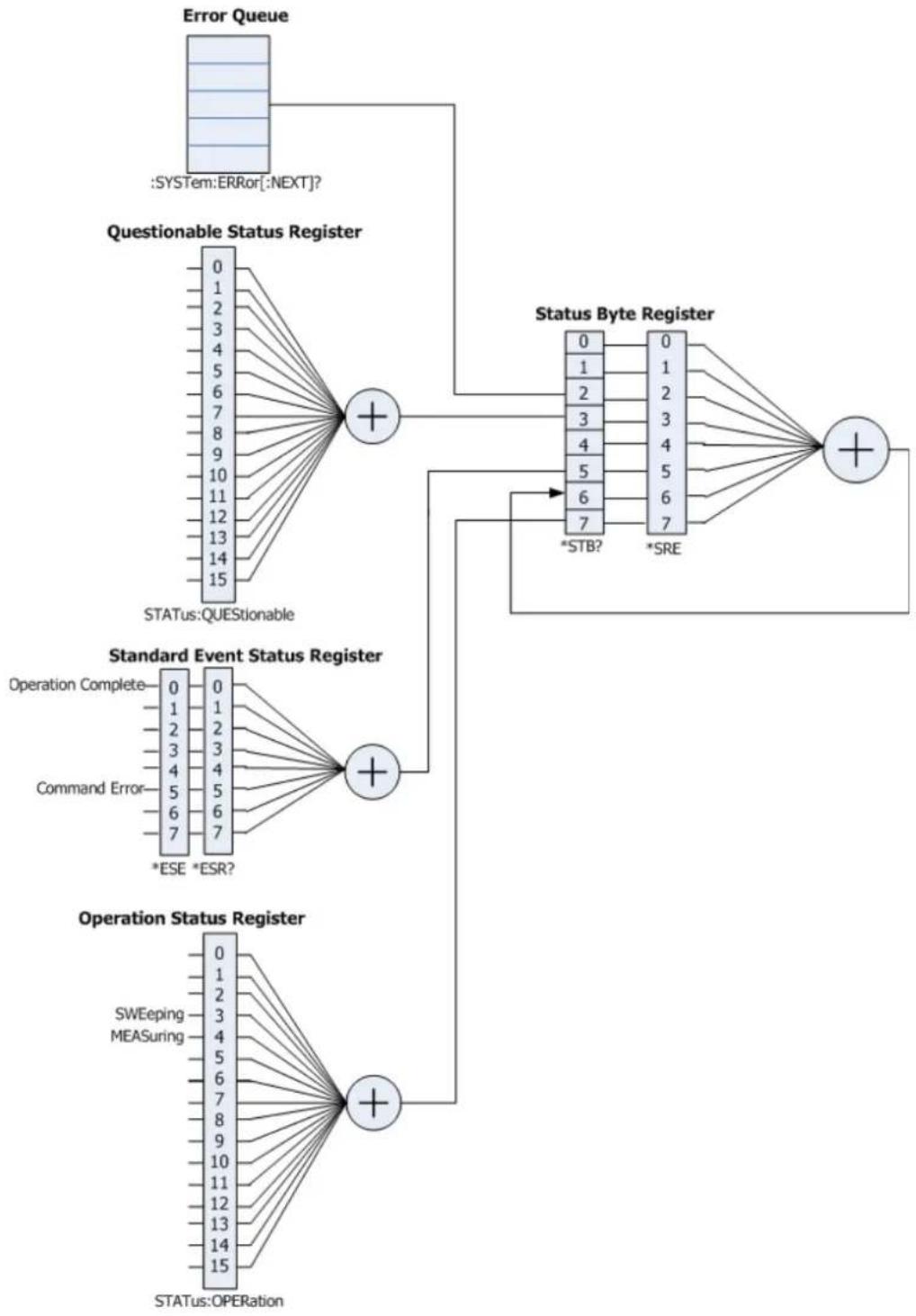
flowchart
graph TD
    A["Error Queue"] --> B["Questionable Status Register"]
    B --> C["Status:QUESTIONABLE"]
    B --> D["Status Byte Register"]
    D --> E["0"]
    D --> F["1"]
    D --> G["2"]
    D --> H["3"]
    D --> I["4"]
    D --> J["5"]
    D --> K["6"]
    D --> L["*STB?"]
    D --> M["*SRE"]
    E --> N["Standard Event Status Register"]
    N --> O["Operation Complete"]
    N --> P["Command Error"]
    N --> Q["*ESE *ESR?"]
    E --> R["Operation Status Register"]
    R --> S["SWEeping"]
    R --> T["MEASuring"]
    R --> U["STATUS:OPERATION"]
Command List:
◆ :STATUS:OPERation:CONDITION?
◆ :STATUS:OPERation:ENABLE
◆ :STATUS:OPERation[:EVENT]?
◆ :STATus:PRESet
◆ :STATUS:QUESTIONable:CONDITION?
◆ :STATUS:QUESTIONable:ENABLE
◆ :STATUS:QUESTIONable[:EVENT]?
:STATUS:OPERation:CONDITION?
Syntax
:STATus:OPERation:CONDITION?
Description
Query the value of the condition register for the operation status register.
Return Format
The query returns the value of the condition register in integer. For example, 24.
:STATus:OPERation:ENABLE
Syntax
:STATUS:OPERation:ENABLE
:STATUS:OPERation:ENABLE?
Description
Set the value of the enable register for the operation status register.
Query the value of the enable register for the operation status register.
Parameter
| Name | Type | Range | Default |
| Integer | Refer to Explanation | 0 |
Explanation
The following table lists the bit definitions for the operation status register. The bit 0 to bit 2, bit 5 to bit 7, bit 13 and bit 14 are reserved; they can be set but will not affect the instrument. The bit 15 and bit 12 to bit 8 are not used and are always treated as 0; therefore, the range of
| Bit | Value | Definition |
| 0 1 Reserved | ||
| 1 2 Reserved | ||
| 2 | 4 | Reserved |
| 3 | 8 | SWEeping |
| 4 | 16 | MEASuring |
| 5 | 32 | Reserved |
| 6 64 Reserved |
| 7 128 Reserved | |
| 8 0 Not Used | |
| 9 0 Not Used | |
| 10 0 Not Used | |
| 11 0 Not Used | |
| 12 0 Not Used | |
| 13 8192 Reserved | |
| 14 16384 Reserved | |
| 15 0 Not Used |
Return Format
The query returns the value of the enable register of the operation status register in integer.
Example
The command below sets the value of the enable register of the operation status register to 100.
:STATUS:OPERation:ENABLE 100
The query below returns 100.
:STATus:OPERation:ENABLE?
:STATus:OPERation[:EVENT]?
Syntax
:STATUS:OPERation[:EVENT]?
Description
Query the value of the event register for the operation status register.
Return Format
The query returns the value of the event register in integer. For example, 24.
:STATus:PRESet
Syntax
:STATus:PRESet
Description
Clear the enable registers of the operation status register and the questionable status register.
:STATus:QUESTIONable:CONDITION?
Syntax
:STATUS:QUESTIONable:CONDITION?
Description
Query the value of the condition register for the questionable status register.
Return Format
The query returns the value of the condition register of the questionable status register in integer. For example, 0.
:STATus:QUESTIONable:ENABLE
Syntax
:STATUS:QUESTIONable:ENABLE
:STATUS:QUESTIONable:ENABLE?
Description
Set the value of the enable register for the questionable status register.
Query the value of the enable register for the questionable status register.
Parameter
| Name | Type | Range | Default |
| Integer | Refer to Explanation | 0 |
Explanation
The following table lists the bit definitions for the questionable status register. The bit 0 to bit 8, bit 13 and bit 14 are reserved; they can be set but will not affect the instrument. The bit 15 and bit 12 to bit 9 are not used and are always treated as 0; therefore, the range of
| Bit | Value | Definition |
| 0 1 Reserved | ||
| 1 2 Reserved | ||
| 2 4 Reserved | ||
| 3 8 Reserved | ||
| 4 16 Reserved | ||
| 5 32 Reserved | ||
| 6 | 64 | Reserved |
| 7 | 128 | Reserved |
| 8 | 256 | Reserved |
| 9 | 0 | Not Used |
| 10 0 Not Used | ||
| 11 0 Not Used | ||
| 12 0 Not Used | ||
| 13 8192 Reserved | ||
| 14 16384 Reserved | ||
| 15 0 Not Used |
Return Format
The query returns the value of the enable register of the questionable status register in integer.
:STATus:QUESTIONable[:EVENT]?
Syntax
:STATUS:QUESTIONable[:EVENT]?
Description
Query the value of the event register for the questionable status register.
Return Format
The query returns the value of the event register of the questionable status register in integer. For example, 0.
:SYSTem Subsystem
Command List:
◆ :SYSTem:BEEPer:STATe
◆ :SYSTem:CLEar
◆ :SYSTem:COMMunicate:APORt
◆ :SYSTem:COMMunicate:BRMT
◆ :SYSTem:COMMunicate:GPI B[:SELF]:ADDRess
◆ :SYSTem:COMMunicate:LAN[:SELF]:AUTOip:STATe
◆ :SYSTem:COMMunicate:LAN[:SELF]:DHCP:STATe
◆ :SYSTem:COMMunicate:LAN[:SELF]:IP:ADDress
◆ :SYSTem:COMMunicate:LAN[:SELF]:IP:DNSServer
◆ :SYSTem:COMMunicate:LAN[:SELF]:IP:GATeway
◆ :SYSTem:COMMunicate:LAN[:SELF]:IP:SUBMask
◆ :SYSTem:COMMunicate:LAN[:SELF]:MANuip:STATE
◆ :SYSTem:COMMunicate:LAN[:SELF]:RESet
◆ :SYSTem:COMMunicate:USB[:SELF]:ADDRess?
◆ :SYSTem:COMMunicate:USB[:SELF]:CLASs
◆ :SYSTem:CONFigure:INFormation?
◆ :SYSTem:CONFigure:MESSage?
◆ :SYSTem:DATE
◆ :SYSTem:ERRor[:NEXT]?
◆ :SYSTem:FSWItch[:STATE]
◆ :SYSTem:KLOCk
◆ :SYSTem:LANGUAGE
◆ :SYSTem:LINemod:STATe?
◆ :SYSTem:LINemod:TYPE
◆ :SYSTem:LKEY
◆ :SYSTem:OPTIONS?
◆ :SYSTem:PON:TYPE
◆ :SYSTem:PRESet
◆ :SYSTem:PRESet:SAVE
◆ :SYSTem:PRESet:TYPE
◆ :SYSTem:SPEaker[:STATE]
◆ :SYSTem:SPEaker:VOLume
◆ :SYSTem:TIME
◆ :SYSTem:TX:STATE? **
◆ :SYSTem:TX:SWset**
◆ :SYSTem:TX:SWSTa?**
Commands marked with "***" are only available for DSA700 installed with the RF Demo kit (option).
:SYSTem:BEEPer:STATe
Syntax
:SYSTem:BEEPer:STATE OFF|ON|0|1
:SYSTem:BEEPer:STATE?
Description
Enable or disable the beeper in Pass/Fail test.
Query the status of the beeper.
Parameter
| Name | Type | Range | Default |
| -- | Bool | OFF|ON|0|1 | OFF|0 |
Return Format
The query returns 0 or 1.
Example
The command below enables the beeper.
:SYSTem:BEEPer:STATE ON or :SYSTem:BEEPer:STATE 1
The query below returns 1.
:SYSTem:BEEPer:STATe?
:SYSTem:CLEar
Syntax
:SYSTem:CLEar
Description
Clear all the data of user settings.
Explanation
After clearing the user data, restore the settings to the factory state, including:
— Restore the user data stored in NVRAM and NorFlash to factory settings.
— restore the HOST NAME, IP address and password in the LXI to factory settings.
:SYSTem:COMMunicate:APORt
Syntax
:SYSTem:COMMunicate:APORt GPIB|LAN|USB|OFF
:SYSTem:COMMunicate:APORt?
Description
Select the current communication port or disable all the communication ports.
Query the communication port currently selected.
Parameter
| Name | Type | Range | Default |
| -- | Keyword | GPIB|LAN|USB|OFF | OFF |
Return Format
The query returns GPIB, LAN, USB or OFF.
Example
The command below set the communication port to LAN.
:SYSTem:COMMunicate:APORt LAN
The query below returns LAN.
:SYSTem:COMMunicate:APORt?
:SYSTem:COMMunicate:BRMT
Syntax
:SYSTem:COMMunicate:BRMT OFF|ON|0|1
:SYSTem:COMMunicate:BRMT?
Description
Switch the instrument state to local or remote mode.
Query the current operation state of the instrument.
Parameter
| Name | Type | Range | Default |
| -- | Bool | OFF|ON|0|1 | -- |
Explanation
OFF|0: switch the instrument state to local mode.
On|1: switch the instrument state to remote mode.
Return Format
The query returns 0 or 1.
Example
The command below switches the instrument to local mode.
:SYSTem:COMMunicate:BRMT OFF or :SYSTem:COMMunicate:BRMT 0
The query below returns 0.
:SYSTem:COMMunicate:BRMT?
:SYSTem:COMMunicate:GPI B[:SELF]:ADDRess
Syntax
:SYSTem:COMMunicate:GPIB[:SELF]:ADDRess
:SYSTEM:COMMunicate:GPI B[:SELF]:ADDRess?
Description
Set the GPIB address.
Query the GPIB address.
Parameter
| Name | Type | Range | Default |
| Integer | 0 to 30 | 18 |
Return Format
The query returns the GPIB address in integer.
Example
The command below sets the GPIB address to 16.
:SYSTem:COMMunicate:GPIB:SELF:ADDRess 16
The query below returns 16.
:SYSTEM:COMMunicate:GPIB:SELF:ADDRess?
:SYSTem:COMMunicate:LAN[:SELF]:AUTOip:STATE
Syntax
:SYSTem:COMMunicate:LAN[:SELF]:AUTOip:STATE OFF|ON|0|1
:SYSTem:COMMunicate:LAN[:SELF]:AUTOip:STATe?
Description
Enable or disable the auto IP setting mode.
Query the status of the auto IP setting mode.
Parameter
| Name | Type | Range | Default |
| -- | Bool | OFF|ON|0|1 | ON|1 |
Explanation
The spectrum analyzer always tries to get the IP address configuration in the order of DHCP, auto IP and manual IP. The three setting modes cannot be turned off at the same time.
Return Format
The query returns 0 or 1.
Example
The command below disables the auto IP setting mode.
:SYSTem:COMMunicate:LAN:SELF:AUTOip:STATE OFF
or :SYSTem:COMMunicate:LAN:SELF:AUTOip:STATE 0
The query below returns 0.
:SYSTem:COMMunicate:LAN:SELF:AUTOip:STATe?
:SYSTem:COMMunicate:LAN[:SELF]:DHCP:STATE
Syntax
:SYSTem:COMMunicate:LAN[:SELF]:DHCP:STATE OFF|ON|0|1
:SYSTem:COMMunicate:LAN[:SELF]:DHCP:STATE?
Description
Enable or disable the DHCP mode.
Query the status of the DHCP mode.
Parameter
| Name | Type | Range | Default |
| -- | Bool | OFF|ON|0|1 | ON|1 |
Explanation
The spectrum analyzer always tries to get the IP address configuration in the order of DHCP, auto IP and manual IP. The three setting modes cannot be turned off at the same time.
Return Format
The query returns 0 or 1.
Example
The command below disables the DHCP mode.
:SYSTem:COMMunicate:LAN:SELF:DHCP:STATE OFF or :SYSTem:COMMunicate:LAN:SELF:DHCP:STATE 0
The query below returns 0.
:SYSTem:COMMunicate:LAN:SELF:DHCP:STATE?
:SYSTem:COMMunicate:LAN[:SELF]:IP:ADDRESS
Syntax
:SYSTem:COMMunicate:LAN[:SELF]:IP:ADDRESS
:SYSTEM:COMMunicate:LAN[:SELF]:IP:ADDRESS?
Description
Set the IP address.
Query the IP address.
Parameter
| Name | Type | Range | Default |
| ASCII STRING | Refer to Explanation -- |
Explanation
The format of
Return Format
The query returns the current IP address in nnn.nnn.nnn.nnn format.
Example
The command below sets the IP address to 172.16.3.199.
:SYSTem:COMMunicate:LAN:SELF:IP:ADDRESS 172.16.3.199
The query below returns 172.16.3.199.
:SYSTem:COMMunicate:LAN:SELF:IP:ADDress?
:SYSTem:COMMunicate:LAN[:SELF]:IP:DNSServer
Syntax
:SYSTem:COMMunicate:LAN[:SELF]:IP:DNSServer
:SYSTem:COMMunicate:LAN[:SELF]:IP:DNSServer?
Description
Set the DNS address.
Query the DNS address.
Parameter
| Name | Type Range | Default | |
| ASCII STRING | Refer to Explanation | -- |
Explanation
The format of
Return Format
The query returns the current DNS address in nnn.nnn.nnn.nnn format.
Example
The command below sets the DNS address to 172.16.2.2.
:SYSTem:COMMunicate:LAN:SELF:IP:DNSServer 172.16.2.2
The query below returns 172.16.2.2.
:SYSTem:COMMunicate:LAN:SELF:IP:DNSServer?
:SYSTem:COMMunicate:LAN[:SELF]:IP:GATeway
Syntax
:SYSTem:COMMunicate:LAN[:SELF]:IP:GATeway
:SYSTem:COMMunicate:LAN[:SELF]:IP:GATeway?
Description
Set the default gateway.
Query the default gateway.
Parameter
| Name | Type Range | Default | |
| ASCII STRING | Refer to Explanation | -- |
Explanation
The format of
Return Format
The query returns the current default gateway in nnn.nnn.nnn.nnn format.
Example
The command below sets the default gateway to 172.16.3.1.
:SYSTem:COMMunicate:LAN:SELF:IP:GATeway 172.16.3.1
The query below returns 172.16.3.1.
:SYSTem:COMMunicate:LAN:SELF:IP:GATeway?
:SYSTem:COMMunicate:LAN[:SELF]:IP:SUBMask
Syntax
:SYSTem:COMMunicate:LAN[:SELF]:IP:SUBMask
:SYSTem:COMMunicate:LAN[:SELF]:IP:SUBMask?
Description
Set the subnet mask.
Query the subnet mask.
Parameter
| Name | Type | Range | Default |
| ASCII STRING | Refer to Explanation -- |
Explanation
The format of
Return Format
The query returns the current subnet mask in nnn.nnn.nnn.nnn format.
Example
The command below sets the subnet mask to 255.255.255.0.
:SYSTem:COMMunicate:LAN:SELF:IP:SUBMask 255.255.255.0
The query below returns 255.255.255.0.
:SYSTem:COMMunicate:LAN:SELF:IP:SUBMask?
:SYSTem:COMMunicate:LAN[:SELF]:MANuip:STATE
Syntax
:SYSTem:COMMunicate:LAN[:SELF]:MANuip:STATE OFF|ON|0|1
:SYSTem:COMMunicate:LAN[:SELF]:MANuip:STATe?
Description
Enable or disable the manual IP setting mode.
Query the status of the manual IP setting mode.
Parameter
| Name | Type | Range | Default |
| -- | Bool | OFF|ON|0|1 | OFF|0 |
Explanation
The spectrum analyzer always tries to get the IP address configuration in the order of DHCP, auto IP and manual IP. The three setting modes cannot be turned off at the same time.
Return Format
The query returns 0 or 1.
Example
The command below enables the manual IP setting mode.
:SYSTem:COMMunicate:LAN:SELF:MANuip:STATE ON
or :SYSTem:COMMunicate:LAN:SELF:MANuip:STATE 1
The query below returns 1.
:SYSTem:COMMunicate:LAN:SELF:MANuip:STATE?
:SYSTem:COMMunicate:LAN[:SELF]:RESet
Syntax
:SYSTem:COMMunicate:LAN[:SELF]:RESET
Description
Reset the LAN setting: enable the DHCP and Auto IP, disable the Manual IP.
:SYSTem:COMMunicate:USB[:SELF]:ADDRess?
Syntax
:SYSTem:COMMunicate:USB[:SELF]:ADDRess?
Description
Query the USB device address.
Return Format
The query returns the USB device address; for example, 1.
:SYSTem:COMMunicate:USB[:SELF]:CLASs
Syntax
:SYSTem:COMMunicate:USB[:SELF]:CLASs TMC|PRINter|AUTO
:SYSTem:COMMunicate:USB[:SELF]:CLASs?
Description
Set the USB device class.
Query the USB device class.
Parameter
| Name | Type | Range | Default |
| -- | Keyword | TMC|PRINter|AUTO | TMC |
Explanation
When AUTO is selected, the device class is decided by the USB main device.
When TMC is selected, the spectrum analyzer is used as Test & Measurement Class device.
When PRINter is selected, the spectrum analyzer is used as Printer Class device. At this point, the instrument is disconnected from the PC. To control the instrument remotely, you need to connect them again.
Return Format
The query returns TMC or PRIN.
Example
The command below sets the USB device class to printer.
:SYSTem:COMMunicate:USB:SELF:CLASs PRINter
The query below returns PRIN.
:SYSTem:COMMunicate:USB:SELF:CLASs?
:SYSTem:CONFigure:INFormation?
Syntax
:SYSTem:CONFigure:INFormation?
Description
Query the system information of the spectrum analyzer.
Explanation
The system information includes the model, serial number, software and hardware versions.
Return Format
The query returns the system information (the language depends on the current system language). For example,
Model: DSA710
Serial Number: DSA8A134400008
Version of Main Board: 00.07
Version of Radio Frequency Board FPGA: 00.05
Version of Digital Board FPGA: 00.05
:SYSTem:CONFigure:MESSage?
Syntax
:SYSTEM:CONFigure:MESSage?
Description
Query the system message displayed lately.
Explanation
Up to 71 history messages can be displayed.
Return Format
The query returns the system messages lately displayed (the language depends on the current system language). For example,
470|Calibration memory lost.|2016-05-16 09:38:36
10|U Disk connected.|2016-05-16 09:49:48
:SYSTem:DATE
Syntax
:SYSTem:DATE
:SYSTem:DATE?
Description
Set the date of the instrument.
Query the date of the instrument.
Parameter
| Name | Type | Range | Default |
| ASCII String | 2000 to 2099 | -- | |
| ASCII String | 01 to 12 | -- | |
| ASCII String | 01 to 31 | -- |
Return Format
The query returns the current date in YYYY,MM,DD format.
Example
The command below sets the date of the instrument to 2016/05/16.
:SYSTem:DATE 2016,05,16
The query below returns 2016,05,16.
:SYSTem:DATE?
Query and delete the last message that entered the error queue.
Explanation
If no error currently exists, the query returns 0,"No Error".
Use the *CLS command to delete all the messages in the error queue.
Return Format
The query returns the error message in "Error Number," Error Message"" format. For example, -110," Command header error".
Enable or disable the front panel power switch.
Query the status of the front panel power switch.
Parameter
| Name | Type | Range | Default |
| -- | Bool | OFF|ON|0|1 | ON|1 |
Return Format
The query returns 0 or 1.
Example
The command below disables the front panel power switch. :SYSTem:FSWItch:STATE OFF or :SYSTem:FSWItch:STATE 0
The query below returns 0. :SYSTem:FSWItch:STATE?
:SYSTem:KLOCk
Syntax
:SYSTem:KLOCk OFF|ON|0|1,
Description
Lock or unlock the specified function key. Query whether the specified key is locked.
Parameter
| Name | Type | Range | Default |
| -- | Bool | OFF|ON|0|1 | OFF|0 |
| Keyword | Refer to Explanation | -- |
Explanation
The parameter
FREQ|SPAN|AMP| /*FREQ, SPAN, AMPT keys*/ BW|SWEEP|TRACE| /*BW/Det, Sweep/Trig, Trace/P/F keys*/ MARK|MARKFUNC|MARKTO|PEAK| /*Marker, Marker Fctn, Marker->, Peak keys*/ TUNE| /*Auto key*/ MEAS|MEASSET|DEMOD| /*Meas, Meas Setup, Demod keys*/ SYSTEM|PRINTSETUP|STORAGE| /*System, Print Setup, Storage keys*/ PRESET|PRINT /* Preset, Print keys*/
ON|1: lock the specified key. OFF|0: unlock the specified key. When more than one key is locked or unlocked at the same time, please use "," to separate the keys. To lock all keys at the front panel (except power switch), please use :SYSTem:KLOCK ON| 1,ALL command; to unlock all keys, please use :SYSTem:KLOCK OFF| 0,ALL command.
Return Format
The query returns "keyname 0" or "keyname 1".
Example
The command below locks the FREQ key.
:SYSTem:KLOCK ON,FREQ or :SYSTem:KLOCK 1,FREQ
The query below returns FREQ 1.
:SYSTem:KLOCK? FREQ
:SYSTem:LANGUAGE
Syntax
:SYSTem:LANGUAGE ENGLISH|CHINese|JAPan|PORTugese|GERMan|POLish|KORea|TCHinese :SYSTem:LANGUAGE?
Description
Set the language of the instrument.
Query the language of the instrument.
Parameter
| Name | Type | Range | Default |
| -- Keyword | ENGLISH|CHINese|JAPan|PORTugese|GERMan|POLish|KORea|TCHinese | ENGLISH | |
Return Format
The query returns ENGL, CHIN, JAP, PORT, GERM, POL, KOR or TCHinese.
Example
The command below sets the language to Chinese.
Query the status of line mode.
Return Format
The query returns 0 (non-line mode) or 1 (line mode).
Example
The query below returns 1.
:SYSTem:LINemod:STATe?
:SYSTem:LI Nemod:TYPE
Syntax
:SYSTem:LINemod:TYPE FACTory|USER1|USER2|USER3|USER4|USER5|USER6|OFF
Description
Set the preset setting used in line mode or exit line mode.
Parameter
| Name | Type | Range | Default |
| -- Keyword | FACTory|USER1|USER2|USER3|USER4|USER5|USER6|OFF | OFF |
Example
The command below sets the preset setting used in line mode to USER4.
:SYSTem:LINemod:TYPE USER4
:SYSTem:LKEY
Syntax
:SYSTem:LKEY
:SYSTem:LKEY?
Description
Install and activate the specified option.
Query the serial number of the specified option.
Parameter
| Name | Type | Range | Default |
| ASCII STRING | -- | -- | |
| Integer | 1 to 2 | -- |
Explanation
- Guaranty and Declaration
- Copyright
- Trademark Information
- Publication Number
- Software Version
- Notices
- Product Certification
- Contact Us
- Safety Requirement
- General Safety Summary
- Use Proper Power Cord.
- Ground the Instrument.
- Connect the Probe Correctly.
- Observe All Terminal Ratings.
- Use Proper Overvoltage Protection.
- Do Not Operate Without Covers.
- Do Not Insert Objects Into the Air Outlet.
- Use Proper Fuse.
- Avoid Circuit or Wire Exposure.
- Do Not Operate With Suspected Failures.
- Provide Adequate Ventilation.
- Do Not Operate in Wet Conditions.
- Do Not Operate in an Explosive Atmosphere.
- Keep Instrument Surfaces Clean and Dry.
- Prevent Electrostatic Impact.
- Use the Battery Properly.
- Handle with Caution.
- Safety Notices and Symbols
- WARNING
- CAUTION
- Safety Terms on the Product:
- Safety Symbols on the Product:
- Main Topics in this Manual:
- Chapter 1 SCPI Overview
- Chapter 2 Command System
- Chapter 3 Programming Demos
- Tip
- Format Conventions in this Manual:
- Key:
- Menu:
- Connector:
- Operation step:
- Content Conventions in this Manual:
- Contents
- Guaranty and Declaration .... I
- Safety Requirement....II
- Chapter 2 Command System....2-1
- Main topics of this chapter:
- Syntax
- Symbol Description
- Braces { }
- Vertical Bar |
- Square Brackets [ ]
- Triangle Brackets < >
- Parameter Type
- Bool
- Keyword
- Integer
- Consecutive Real Number
- Discrete
- ASCII String
- Command Abbreviation
- Explanation:
- :ABORt
- Description
- :CALCulate Subsystem
- Command List:
- :CALCulate:BANDwidth:NDB
- Return Format
- Example
- :CALCulate:BANDwidth:RESult?
- :CALCulate:LLI Ne:ALL:DELe te
- :CALCulate:LLI Ne:CONTROL:DOMAIN
- Explanation
- :CALCulate:LLI Ne:FAI L?
- :CALCulate:LLI Ne:FAI L:RATI o?
- :CALCulate:LLI Ne:FAI L:STOP:STATe
- :CALCulate:LLI Ne:CONTROL:I NTerpolate:TYPE
- :CALCulate:LLINe:DATA
- :CALCulate:LLINe:DATA:MERGe
- :CALCulate:LLINe:DELe te
- :CALCulate:LLINe:RELAmpt[:STATe]
- :CALCulate:LLINe:RELFreq[:STATe]
- :CALCulate:LLINe:STATe
- :CALCulate:MARKer:AOFF
- :CALCulate:MARKer:FCOunt:RESolution
- :CALCulate:MARKer:FCOunt:RESolution:AUTO
- :CALCulate:MARKer:FCOunt:X?
- :CALCulate:MARKer:FCOunt[:STATE]
- :CALCulate:MARKer:CPEak[:STATe]
- :CALCulate:MARKer:DELTa[:SET]:CENTer
- :CALCulate:MARKer:DELTa[:SET]:SPAN
- :CALCulate:MARKer:FUNCTION
- :CALCulate:MARKer:MAXimum:LEFT
- :CALCulate:MARKer:MAXimum:MAX
- :CALCulate:MARKer:MAXimum:NEXT
- :CALCulate:MARKer:MAXimum:RI GHt
- :CALCulate:MARKer:MI Nimum
- :CALCulate:MARKer:MODE
- :CALCulate:MARKer:PEAK:EXCursion
- :CALCulate:MARKer:PEAK:SEARch:MODE
- :CALCulate:MARKer:PEAK[:SET]:CF
- :CALCulate:MARKer:PEAK:THReshold
- :CALCulate:MARKer:PTPeak
- :CALCulate:MARKer[:SET]:CENTER
- :CALCulate:MARKer[:SET]:RLEVel
- :CALCulate:MARKer[:SET]:START
- :CALCulate:MARKer[:SET]:STEP
- :CALCulate:MARKer[:SET]:STOP
- :CALCulate:MARKer:STATe
- :CALCulate:MARKer:TRACe
- :CALCulate:MARKer:TRACe:AUTO
- :CALCulate:MARKer:X
- :CALCulate:MARKer:X:CENTER
- :CALCulate:MARKer:X:POSITION
- :CALCulate:MARKer:X:POSITION:CENTER
- :CALCulate:MARKer:X:POSITION:SPAN
- :CALCulate:MARKer:X:POSITION:START
- :CALCulate:MARKer:X:POSITION:STOP
- :CALCulate:MARKer:X:READout
- :CALCulate:MARKer:X:SPAN
- :CALCulate:MARKer:X:START
- :CALCulate:MARKer:X:STOP
- :CALCulate:MARKer:Y?
- :CALCulate:MARKer:TABLE:STATE
- :CALCulate:MARKer:TRACking:STATE
- :CALibration Subsystem
- :CALibration:[ALL]
- :CALibration:AUTO
- :CONFigure Subsystem
- :CONFigure?
- :CONFigure:ACPower
- :CONFigure:CHPower
- :CONFigure: CNRatio
- :CONFigure:EBWidth
- :CONFigure:HDI St
- :CONFigure:OBWidth
- :CONFigure:PF
- :CONFigure:SANalyzer
- :CONFigure:TOI
- :CONFigure:TPOWer
- :COUPLE Subsystem
- :COUPle
- :DI SPlay Subsystem
- :DI SPlay:AFUnction:POSITION
- :DI SPlay:ANNotation:CLOCK[:STATE]
- :DI SPlay:BRI Ghtness
- :DI SPlay:ENABLE
- :DI SPlay:MSGswitch:STATE
- :DI SPlay:UKEY:STATE
- :DI SPlay:WI Ndow:TRACe:GRATicule:GRI D
- :DI SPlay:WI Ndow:TRACe:X[:SCALe]:SPACing
- :DI SPlay:WI Ndow:TRACe:Y:DLI Ne
- :DI SPlay:WI Ndow:TRACe:Y:DLI Ne:STATe
- :DI SPlay:WI Ndow:TRACe:Y[:SCALe]:PDI Vision
- :DI SPlay:WI Ndow:TRACe:Y[:SCALe]:RLEVel
- :DI SPlay:WI Ndow:TRACe:Y[:SCALe]:RLEVel:OFFSET
- :DI SPlay:WI Ndow:TRACe:Y[:SCALe]:SPACing
- :FETCH Subsystem
- :FETCH:ACPower?
- :FETCH:ACPower:LOWer?
- :FETCH:ACPower:MAIN?
- :FETCH:ACPower:UPPer?
- :FETCH:CHPower?
- :FETCH:CHPower:CHPower?
- :FETCH:CHPower:DENSITY?
- :FETCH: CNRatio?
- :FETCH: CNRatio: CARRier?
- :FETCH: CNRatio: CNRatio?
- :FETCH: CNRatio: NOI Se?
- :FETCH:EBWidth?
- :FETCH:HARMonics:AMPLitude:ALL?
- :FETCH:HARMonics:AMPLitude?
- :FETCH:HARMonics[:DI STortion]?
- :FETCH:HARMonics:FREQuency:ALL?
- :FETCH:HARMonics:FREQUENCY?
- :FETCH:HARMonics:FUNDamental?
- :FETCH:OBWidth?
- :FETCH:OBWidth:OBWidth?
- :FETCH:OBWidth:OBWidth:FERRor?
- :FETCH:TOI ntercept?
- :FETCH:TOI ntercept:I P3?
- :FETCH:TPOWer?
- :FORMAT Subsystem
- :FORMAT:BORDER
- :FORMAT[:TRACe][:DATA]
- :HCOPy Subsystem
- :HCOPy:ABORt
- :HCOPy:IMAGe:COLor[:STATe]
- :HCOPy:IMAGe:FTYPE
- :HCOPy:I MAGe:I NVert
- :HCOPy:IMAGe:PTI Me
- :HCOPy:IMAGe:QUALity
- :HCOPy[:IMMediate]
- :HCOPy:PAGE:ORI entation
- :HCOPy:PAGE:PRI Nts
- :HCOPy:PAGE:SIZE
- :HCOPy:RESume
- IEEE 488.2 Common Commands
- \* CLS
- \* ESE
- \* ESR?
- \* IDN?
- \* OPC
- \* RST
- \* SRE
- \* STB?
- \* TRG
- \* TST?
- \* WAI
- : I NI Tiate Subsystem
- :I NI Tiate:CONTinuous
- :I NI Tiate[:I MMediate]
- : I NI Tiate: PAUSE
- :I NI Tiate:RESTART
- :INI Tiate:RESume
- :INPut Subsystem
- :INPut:IMPedance
- :MMEMory Subsystem
- :MMEMory:DElete
- :MMEMory:DI SK:INFormation?
- :MMEMory:LOAD:CORRection
- :MMEMory:LOAD:MTABle
- :MMEMory:LOAD:SETUp
- :MMEMory:LOAD:STATE
- :MMEMory:LOAD:TRACe
- :MMEMory:MOVE
- :MMEMory:STORe:CORRection
- :MMEMory:STORe:LI Mit
- :MMEMory:STORe:MTABlE
- :MMEMory:STORe:PTABLE
- :MMEMory:STORe:RESults
- :MMEMory:STORe:SCReen
- :MMEMory:STORe:SETUp
- :MMEMory:STORe:STATE
- :MMEMory:STORe:TRACe
- :READ Subsystem
- :READ:ACPower?
- :READ:ACPower:LOWer?
- :READ:ACPower:MAI N?
- :READ:ACPower:UPPer?
- :READ:CHPower?
- :READ:CHPower:CHPower?
- :READ:CHPower:DENSITY?
- :READ: CNRatio?
- :READ: CNRatio:CARRier?
- :READ: CNRatio: CNRatio?
- :READ: CNRatio:NOI Se?
- :READ:EBWidth?
- :READ:HARMonics:AMPLitude:ALL?
- :READ:HARMonics:AMPLitude?
- :READ:HARMonics[:DI STortion]?
- :READ:HARMonics:FREQuency:ALL?
- :READ:HARMonics:FREQuency?
- :READ:HARMonics:FUNDamental?
- :READ:OBWidth?
- :READ:OBWidth:OBWidth?
- :READ:OBWidth:OBWidth:FERRor?
- :READ:TOI ntercept?
- :READ:TOI ntercept:I P3?
- :READ:TPOWer?
- [:SENSe] Subsystem
- [:SENSe]:ACPower:AVERAGE:COUNT
- [:SENSe]:ACPower:AVERAGE[:STATe]
- [:SENSe]:ACPower:AVERAGE:TCONtrol
- [:SENSe]:ACPower:BANDwidth:ACHannel
- [:SENSe]:ACPower:BANDwidth:INTegration
- [:SENSe]:ACPower:CSPacing
- [:SENSe]:BANDwidth:EMI Filter:STATE
- [:SENSe]:BANDwidth[:RESolution]
- [:SENSe]:BANDwidth[:RESolution]:AUTO
- [:SENSe]:BANDwidth:VI Deo
- [:SENSe]:BANDwidth:VI Deo:AUTO
- [:SENSe]:BANDwidth:VI Deo:RATio
- [:SENSe]:CHPower:AVERAGE:COUNT
- [:SENSe]:CHPower:AVERAGE[:STATE]
- [:SENSe]:CHPower:AVERAGE:TCONtrol
- [:SENSe]:CHPower:BANDwidth:INTegration
- [:SENSe]:CHPower:FREQuency:SPAN
- [:SENSe]: CNRatio: AVERAGE: COUNT
- [:SENSe]: CNRatio: AVERAGE[:STATe]
- [:SENSe]: CNRatio: AVERAGE: TCONtrol
- [:SENSe]: CNRatio:BANDwidth:INTegration
- [:SENSe]: CNRatio: OFFSET
- [:SENSe]:CORRection:CSET:ALL:DElete
- [:SENSe]:CORRection:CSET:ALL[:STATe]
- [:SENSe]:CORRection:CSET:DATA
- [:SENSe]:CORRection:CSET:DATA:MERGe
- [:SENSe]:CORRection:CSET:DELe te
- [:SENSe]:CORRection:CSET[:STATe]
- [:SENSe]:CORRection:CSET:X:SPACing
- [:SENSe]:CORRection:CSET:TABLE:STATE
- [:SENSe]:DEMod
- [:SENSe]:DEMod:GAIN:AUTO
- [:SENSe]:DEMod:GAIN:INCRement
- [:SENSe]:DEMod:STATE
- [:SENSe]:DEMod:TIME
- [:SENSe]:DETEctor[:FUNCTION]
- [:SENSe]:EBWidth:AVERAGE:COUNT
- [:SENSe]:EBWidth:AVERAGE[:STATE]
- [:SENSe]:EBWidth:AVERage:TCONtrol
- [:SENSe]:EBWidth:FREQuency:SPAN
- [:SENSe]:EBWidth:MAXHold:STATE
- [:SENSe]:EBWidth:XDB
- [:SENSe]:EXTRef[:STATe]?
- [:SENSe]:FREQuency:CENTer
- [:SENSe]:FREQuency:CENTER:DOWN
- [:SENSe]:FREQuency:CENTer:SET:STEP
- [:SENSe]:FREQuency:CENTer:STEP:AUTO
- [:SENSe]:FREQUENCY:CENTER:STEP[:INCRement]
- [:SENSe]:FREQUENCY:CENTER:UP
- [:SENSe]:FREQuency:OFFSET
- [:SENSe]:FREQuency:SPAN
- [:SENSe]:FREQuency:SPAN:FULL
- [:SENSe]:FREQuency:SPAN:PREVIOUS
- [:SENSe]:FREQuency:SPAN:ZIN
- [:SENSe]:FREQuency:SPAN:ZOUT
- [:SENSe]:FREQuency:STARt
- [:SENSe]:FREQuency:STOP
- [:SENSe]:HDI St: AVERAGE:COUNT
- [:SENSe]:HDI St:AVERAGE[:STATE]
- [:SENSe]:HDI St: AVERAGE:TCONtrol
- [:SENSe]:HDI St:NUMBers
- [:SENSe]:HDI St:TI ME
- [:SENSe]:HDI St:TI ME:AUTO[:STATe]
- [:SENSe]:OBWidth:AVERAGE:COUNT
- [:SENSe]:OBWidth:AVERAGE[:STATE]
- [:SENSe]:OBWidth:AVERage:TCONtrol
- [:SENSe]:OBWidth:FREQuency:SPAN
- [:SENSe]:OBWidth:MAXHold:STATE
- [:SENSe]:OBWidth:PERCent
- [:SENSe]:POWer:ARANge
- [:SENSe]:POWer:ASCale
- [:SENSe]:POWer:ATUNe
- [:SENSe]:POWer[:RF]:ATTenuation
- [:SENSe]:POWer[:RF]:ATTenuation:AUTO
- [:SENSe]:POWer[:RF]:GAIN[:STATE]
- [:SENSe]:POWer[:RF]:MI Xer:RANGE[:UPPer]
- [:SENSe]:SI GCapture[:STATe]
- [:SENSe]:SI GCapture:SI GC[:STATe]
- [:SENSe]:SI GCapture:MAXHold[:STATe]
- [:SENSe]:SI GCapture:RESet
- [:SENSe]:SI GCapture:2FSK[:STATe]
- [:SENSe]:SI GCapture:2FSK:RESet
- [:SENSe]:SI GCapture:2FSK:MAXHold[:STATe]
- [:SENSe]:SI GCapture:2FSK:PFSWitch
- [:SENSe]:SI GCapture:2FSK:SI GNaI
- [:SENSe]:SI GCapture:2FSK:AMPUp
- [:SENSe]:SI GCapture:2FSK:AMPDown
- [:SENSe]:SI GCapture:2FSK:MARK1[:FREQ]
- [:SENSe]:SI GCapture:2FSK:MARK1:Switch[:STATe]
- [:SENSe]:SI GCapture:2FSK:MARK2[:FREQ]
- [:SENSe]:SI GCapture:2FSK:MARK2:Switch[:STATe]
- [:SENSe]:SWEep:COUNT
- [:SENSe]:SWEep:COUNT:CURRent?
- [:SENSe]:SWEep:TIME
- [:SENSe]:SWEep:TIME:AUTO
- [:SENSe]:SWEep:TIME:AUTO:RULes
- [:SENSe]:TOI:AVERAGE:COUNT
- [:SENSe]:TOI:AVERAGE[:STATE]
- [:SENSe]:TOI:AVERAGE:TCONtrol
- [:SENSe]:TOI :FREQuency:SPAN
- [:SENSe]:TPOWer:AVERAGE:COUNT
- [:SENSe]:TPOWer:AVERage[:STATE]
- [:SENSe]:TPOWer:AVERage:TCONtrol
- [:SENSe]:TPOWer:LLI Mit
- [:SENSe]:TPOWer:MODE
- [:SENSe]:TPOWer:RLI Mit
- :STATus Subsystem
- :STATUS:OPERation:CONDITION?
- :STATus:OPERation:ENABLE
- :STATus:OPERation[:EVENT]?
- :STATus:PRESet
- :STATus:QUESTIONable:CONDITION?
- :STATus:QUESTIONable:ENABLE
- :STATus:QUESTIONable[:EVENT]?
- :SYSTem Subsystem
- :SYSTem:BEEPer:STATe
- :SYSTem:CLEar
- :SYSTem:COMMunicate:APORt
- :SYSTem:COMMunicate:BRMT
- :SYSTem:COMMunicate:GPI B[:SELF]:ADDRess
- :SYSTem:COMMunicate:LAN[:SELF]:AUTOip:STATE
- :SYSTem:COMMunicate:LAN[:SELF]:DHCP:STATE
- :SYSTem:COMMunicate:LAN[:SELF]:IP:ADDRESS
- :SYSTem:COMMunicate:LAN[:SELF]:IP:DNSServer
- :SYSTem:COMMunicate:LAN[:SELF]:IP:GATeway
- :SYSTem:COMMunicate:LAN[:SELF]:IP:SUBMask
- :SYSTem:COMMunicate:LAN[:SELF]:MANuip:STATE
- :SYSTem:COMMunicate:LAN[:SELF]:RESet
- :SYSTem:COMMunicate:USB[:SELF]:ADDRess?
- :SYSTem:COMMunicate:USB[:SELF]:CLASs
- :SYSTem:CONFigure:INFormation?
- :SYSTem:CONFigure:MESSage?
- :SYSTem:DATE
- :SYSTem:KLOCk
- :SYSTem:LANGUAGE
- :SYSTem:LI Nemod:TYPE
- :SYSTem:LKEY
- :SYSTem:OPTIONS?
- :SYSTem:PON:TYPE
- :SYSTem:PRESet
- :SYSTem:PRESet:SAVE
- :SYSTem:PRESet:TYPE
- :SYSTem:SPEaker[:STATE]
- :SYSTem:SPEaker:VOLume
- :SYSTem:TIME
- :SYSTem:TX:STATe?
- :SYSTem:TX:SWset
- :SYSTem:TX:SWSTa?
- :SYSTem:USERkey:CONFirm
- :SYSTem:USERkey:KEYCmd
- :SYSTem:USERkey:STATE
- :SYSTem:VERSION?
- :TRACe Subsystem
- :TRACe:AVERage:CLEar
- :TRACe:AVERage:COUNT
- :TRACe:AVERage:COUNT:CURRent?
- :TRACe:AVERage:RESet
- :TRACe:CLEar:ALL
- :TRACe[:DATA]
- Example [2]
- When the data format is ASCii
- When the data format is REAL[,32]
- Remark:
- :TRACe:MATH:A
- :TRACe:MATH:B
- :TRACe:MATH:CONST
- :TRACe:MATH:PEAK[:DATA]?
- :TRACe:MATH:PEAK:POI Nts?
- :TRACe:MATH:PEAK:SORT
- :TRACe:MATH:PEAK:TABLE:STATE
- :TRACe:MATH:PEAK:THReshold
- Return Format The query returns NORM, DLM or DLL. Example
- :TRACe:MATH:STATe
- :TRACe:MATH:TYPE
- :TRACe:AVERAGE:TYPE
- :TRACe:MODE
- :TRIGger Subsystem
- :TRIGger:SEQUence:EXTernal:READY?
- :TRIGger:SEQUence:EXTernal:SLOPe
- :TRI Gger:SEQUence:SOURce
- :TRI Gger:SEQUence:VI Deo:LEVel
- :UNIT Subsystem
- :UNIT:POWER
- Programming Instructions
- Programming Preparations
- Visual C++ 6.0 Programming Demo
- Visual Basic 6.0 Programming Demo
- LabVIEW 8.6 Programming Demo
- Linux Programming Demo
- Linux Programming Preparations
- Linux Programming Procedures
- Execution Result
Brand : Rigol
Model : DSA710
Category : Measurement