
AMD08 - Receiver Mercury - Free user manual and instructions
Find the device manual for free AMD08 Mercury in PDF.


| Brand | Mercury |
| Model | AMD08 |
| Product Type | 4G Ready VHF/UHF Distribution Amplifier |
| Number of Inputs | 2 (VHF and UHF separate) |
| Number of Outputs | 8 + Full (total 9 outputs) |
| Frequency Response | 47-230 MHz (VHF), 470-790 MHz (UHF) |
| Max Output Level | 87 dBμV |
| Gain per Split | 8 dB |
| Gain on Full Output | 20 dB |
| Noise Figure | < 4 dB |
| Isolation Loss | 22 dB |
| Dimensions (W x H x D) | 269.5 x 70 x 44.4 mm |
| Weight | 500 g |
| Power Supply | AC 230V 50Hz |
| Built-in 4G LTE Filter | Yes |
| Surge Protection | Yes (LED indicator) |
| Short Circuit Protection | Yes (LED indicator) |
| DC Pass for Magic Eye | Yes |
| Compatible Signals | Digital Terrestrial, Satellite, Cable TV, DAB/FM radio |
| Installation | Indoor wall mountable with coaxial or F-type connectors |
| Cleaning | Use a damp cloth; do not clean while powered on |
| Safety | Indoor use only; keep dry; do not repair yourself |
| Repairability | No user-serviceable parts; professional repair required |
| Warranty | Invalidated if tampered or opened |
Frequently Asked Questions - AMD08 Mercury
User questions about AMD08 Mercury
0 question about this device. Answer the ones you know or ask your own.
Ask a new question about this device
Download the instructions for your Receiver in PDF format for free! Find your manual AMD08 - Mercury and take your electronic device back in hand. On this page are published all the documents necessary for the use of your device. AMD08 by Mercury.
USER MANUAL AMD08 Mercury
4G Ready VHF/UHF Distribution Amplifiers
AMD02/04/06/08
Item ref:
130.030/031/032/033UK
User Manual
CAUTION
Please read through this manual carefully before use. This product is strictly for indoor use only and must be kept in a dry and cool environment and out of reach from children and pets.
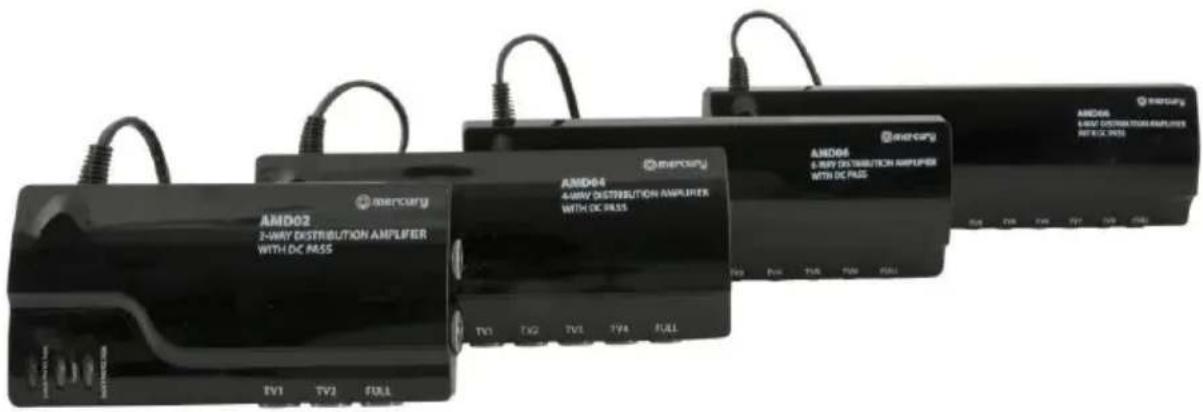
A range of Distribution amplifiers with built in 4G LTE filter, designed to improve the quality of audio and video by amplifying weak VHF/UHF signals and distributing them across a designated area. Suitable for both professional and domestic installations and fully compatible with Digital Terrestrial/Satellite/Cable TV and DAB/FM radio signals.
Features:
- Fully screened amplifier compatible with Digital Terrestrial/Satellite/Cable TV and DAB/FM radio signals
• Integrated LTE signal filter avoids interference and channel loss from 4G mobile signals
• Coaxial socket connection, F socket adaptors included to allow F-Type connection
• Built in low noise amplifier with wideband output
• Built in surge protection – LED lights when a power surge is detected
- Short circuit protection – LED illuminates when a short circuit is detected on an output
• Maximum output limiter prevents overload
• High gain output for additional distribution connection
- Separate inputs for VHF and UHF
• DC pass allows the control of satellite via Magic Eye remote extender (124.157)
- Side mounted terminals allow easy cable management
Specifications:
| AMD02 | AMD04 | AMD06 | AMD08 | |
| No of inputs | 2 | 2 | 2 | 2 |
| No of outputs | 2+Full | 4+Full | 6+Full | 8+Full |
| Frequency response | 47-230MHz, 470-790MHz | 47-230MHz, 470-790MHz | 47-230MHz, 470-790MHz | 47-230MHz, 470-790MHz |
| Max output level | 94dBμV | 90dBμV | 87dBμV | 87dBμV |
| Gain per split | 12dB | 8dB | 8dB | 8dB |
| Gain on Full | 20dB | 20dB | 20dB | 20dB |
| Noise | <4dB | <4dB | <4dB | <4dB |
| Isolation loss | 22dB | 22dB | 22dB | 22dB |
| Dimension | 134.5 x 70 x 44.4mm | 179.5 x 70 x 44.4mm | 224.5 x 70 x 44.4mm | 269.5 x 70 x 44.4mm |
| Weight | 270g | 350g | 420g | 500g |
Installation:
Before installation please ensure all devices to be connected to the amplifier are switched off and disconnected from the mains. The unit is designed to be connected via coaxial connectors, although f-type adaptors are also supplied for additional compatibility. On the back of the casing there are also two mounting holes which allow the unit to be fixed to the wall.
AV:Link distribution amplifiers are designed to amplify weak, poor quality signals and distribute them to different destinations. For installations that are close to a TV transmitter or any other form of radio transmitter or high-power source, you may experience blocking or a frozen picture. In this instance an attenuator is required for turning down the signal to suitable levels for TV viewing.
flowchart
graph TD
    A["AC 230V 50Hz"] --> B["Central Display"]
    B --> C["Satellite Receiver"]
    C --> D["Satellite Array"]
    D --> E["To further signal distribution set up"]
    E --> F["DTV"]
    E --> G["DTV"]
    E --> H["DTV"]
    E --> I["DTV"]
    F --> J["Refrigerator"]
    G --> K["Refrigerator"]
    H --> L["Refrigerator"]
    I --> M["Refrigerator"]
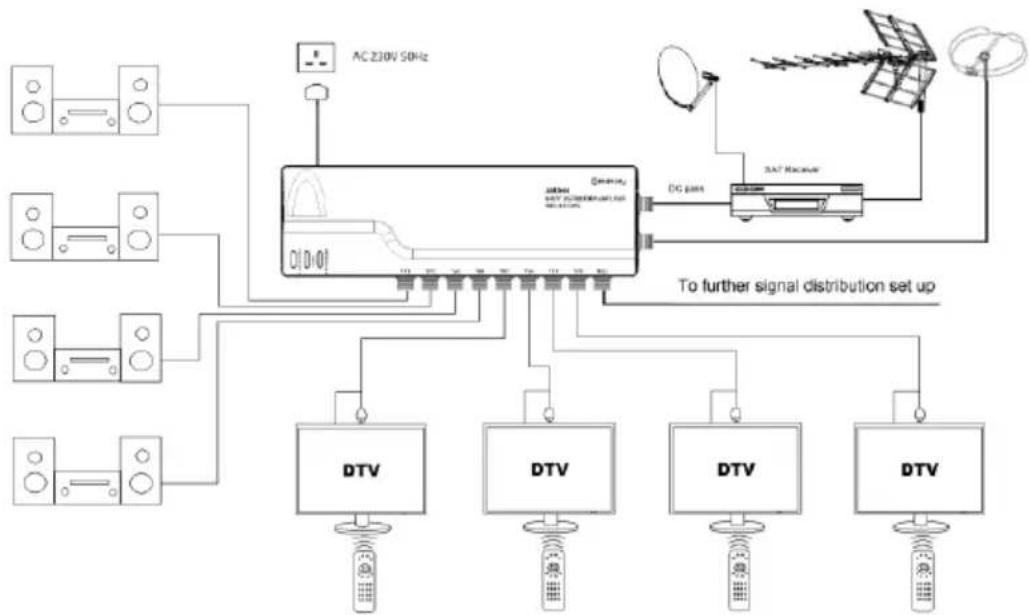
The above diagram shows AMD08 receiving TV signals from the Satellite receiver and FM/DAB aerial and distribute the signals to 4 individual hi-fi and 4 TV units. The AMD series amplifier is designed with DC pass function. All 4 TV's can also be set up with a "Magic eye" (remote extension unit) to allow remote control of the satellite receiver when the TV is not the same room. This can only be done when you connect the RF2 output to the UHF input of the amplifier. Note: only one satellite channel can be viewed at any time from the Satellite receiver.
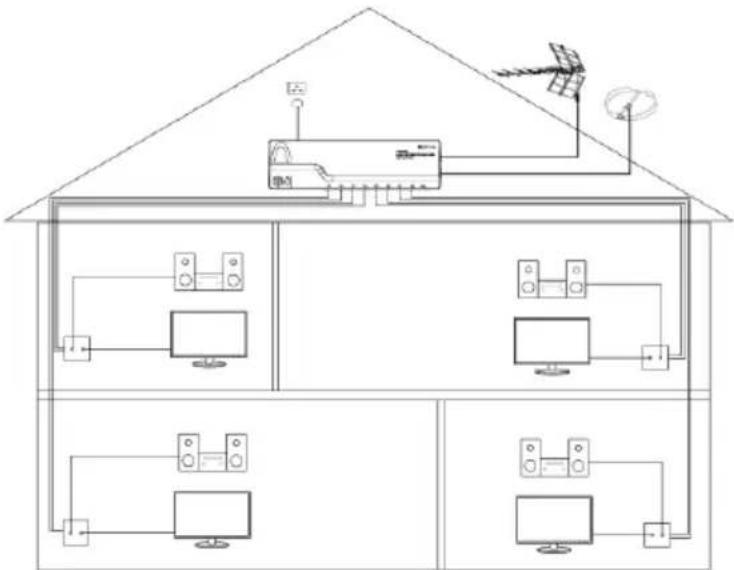
It is also suitable for upgrading or replacing existing UHF/VHF signal distribution units, simply reconnect the existing connector from the previous unit to the AMD amplifier. Ensure the UHF aerial is connected to the UHF input of the amplifier and FM/DAB aerials are connected to the VHF input of the amplifier. For loft distribution installation please ensure the unit is kept away from moisture and water.
Safety warnings:
- Do not use this appliance if it is damaged in any way.
- Do not attempt to repair this appliance or take apart under any circumstances, as this will invalidate your warranty.
• Do not use this appliance for anything other than its intended purpose, and do not use outdoors. - Use only a damp cloth to clean the surface of the appliance and never attempt to clean while it is on or still hot.
- Please ensure you have read these instructions thoroughly before first use and keep them for future reference.

This product is classed as Electrical or Electronic equipment and should not be disposed with other household or commercial waste at the end of its useful life. The goods must be disposed of according to your local council guidelines.
Brand : Mercury
Model : AMD08
Category : Receiver