V-400 - Microphone Valcom - Free user manual and instructions
Find the device manual for free V-400 Valcom in PDF.


| Product Type | Dynamic Desk Paging Microphone |
| Brand | Valcom |
| Model | V-400 |
| Element Type | Dynamic |
| Polar Pattern | Omnidirectional |
| Frequency Response | 50 Hz – 12 kHz |
| Output Impedance | 400 Ohms (Low Z) |
| Output Level | -58 dB (1 mW/10 microbars) / -152 dB EIA |
| Dimensions (H x W x D) | 9.4" x 4.0" x 6.0" (23.9 cm x 10.2 cm x 15.2 cm) |
| Weight | 1.4 lbs (0.64 kg) |
| Housing Material | Cycolac (ABS plastic) |
| Base Material | Die cast zinc |
| Cable | Heavy duty 4-conductor shielded |
| Push-to-Talk | Yes, with locking push bar |
| Lift Switch | Enable/Disable for muting |
| Output Selection | Switchable High Z / Low Z |
| Application | Valcom Paging Systems |
| Compatibility | Valcom V-9939A Microphone Adapter |
| Output Connections | Color-coded wires: red (+), black (-), white, green, shield |
| Warranty | 1 year limited |
| Power Requirement | Passive (no external power needed) |
| Repair Policy | Factory service only; not field repairable |
Frequently Asked Questions - V-400 Valcom
User questions about V-400 Valcom
0 question about this device. Answer the ones you know or ask your own.
Ask a new question about this device
Download the instructions for your Microphone in PDF format for free! Find your manual V-400 - Valcom and take your electronic device back in hand. On this page are published all the documents necessary for the use of your device. V-400 by Valcom.
USER MANUAL V-400 Valcom
These instructions contain the specifications and information necessary to install, operate and maintain the V-400 Dynamic Desk Paging Microphone.
SPECIFICATIONS
Applications
- Valcom Paging Systems
Features
• Dynamic element
- Omnidirectional pickup pattern
• Cycolac housing with die cast base
- Push to Talk push bar with lock
• Heavy duty four conductor shielded cable
- Low impedance (balanced)
Dimensions/Weight
- 9.4"H x 4.0"W x 6.0"D (23.9cm H x 10.2cm W x 15.2cm D)
• 1.4 lbs. (0.64 kg)
Specifications
- Element Dynamic
• Pattern Omnidirectional
• Freq. Response 50 to 12KHz
• Output Impedance Lo Z, 400 Ohms
• Output Level Lo Z, -58dB
$$ (0 \mathrm{dB} = 1 \mathrm{mw} / 1 0 \text { microbars }) $$
$$ - 1 5 2 \mathrm{dB} E I A $$
INSTALLATION
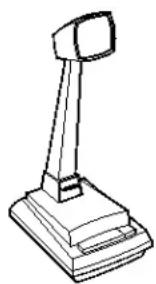
Figure 1 (on reverse) depicts the V-400 connected to the Valcom V-9939A microphone adapter.
natural_image
Line drawing of a desktop computer with a stand and tower (no text or symbols)TECHNICAL ASSISTANCE
When trouble is reported, verify the unit is turned on and there are no broken connections leading to this unit. Assistance in troubleshooting is available from the factory. When calling, have a VOM and a test set available and call from the job site. Call (540) 563-2000 and press 1 for Technical Support or visit our website at http://www.valcom.com.
Valcom equipment is not field repairable. Valcom, Inc. maintains service facilities in Roanoke, VA. Should repairs be necessary, attach a tag to the unit clearly stating your company name, address, phone number, contact person and the nature of the problem. Send the unit to:
Valcom, Inc.
Repair and Return Dept.
5614 Hollins Road
Roanoke, VA 24019-5056
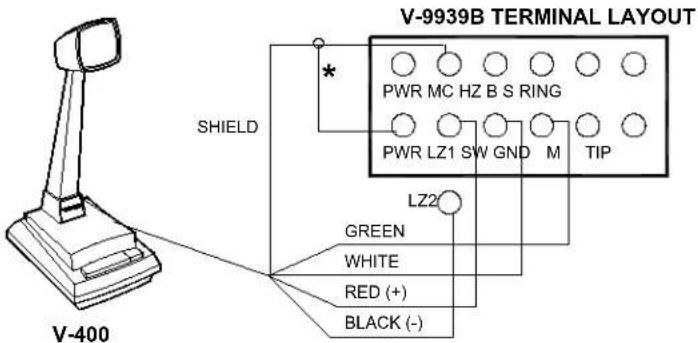
* Strap shield to positive power lead.
FIGURE 1 - CONNECTING ARRANGEMENT
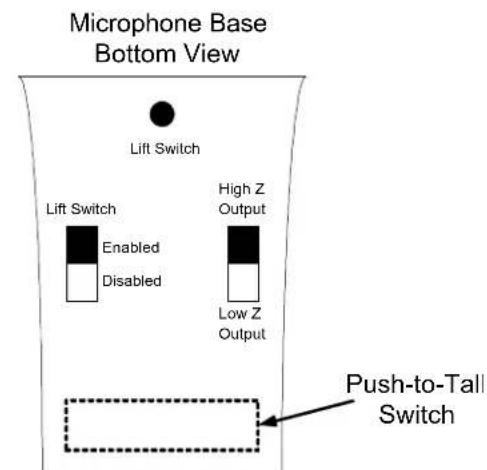
FIGURE 2 - SWITCH FUNCTIONS
VALCOM LIMITED WARRANTY
Valcom, Inc. warrants its products to be free from defects in materials and workmanship under conditions of normal use and service for a period of one year from the date of shipment. The obligation under this warranty shall be limited to the replacement, repair or refund of any such defective device within the warranty period, provided that:
- inspection by Valcom, Inc. indicates the validity of the claim;
- the defect is not the result of damage, misuse, or negligence after the original shipment;
- the product has not been altered in any way or repaired by others and that factory sealed units are unopened (a service charge plus parts and labor will be applied to units defaced or physically damaged);
- freight charges for the return of products to Valcom are prepaid;
- all units 'out of warranty' are subject to a service charge. The service charge will cover minor repairs (major repairs will be subject to additional charges for parts and labor).
This warranty is in lieu of and excludes all other warranties, expressed or implied and in no event shall Valcom, Inc. be liable for any anticipated profits, consequential damages, loss of time or other losses incurred by the buyer in connection with the purchase, operation, or use of the product.
This warranty specifically excludes damage incurred in shipment. In the event a product is received in damaged condition, the carrier should be notified immediately. Claims for such damage should be filed with the carrier involved in accordance with the F.O.B. point.
Headquarters: In Canada
Valcom, Inc. CMX Corporation
5614 Hollins Road 35 Van Kirk Drive #11 and 12
Roanoke, VA 24019-5056 Brampton, Ontario L7A 1A5
Phone: (540) 563-2000 Phone: (905) 456-1072
FAX: (540) 362-9800 FAX: (905) 456-2269
Brand : Valcom
Model : V-400
Category : Microphone