Vess R3600 - NAS Promise Technology - Free user manual and instructions
Find the device manual for free Vess R3600 Promise Technology in PDF.


Pick your language and provide your email: we'll send you a specifically translated version.
| Product Type | NAS (Network Attached Storage) |
| Model | Vess R3600 |
| Brand | Promise Technology |
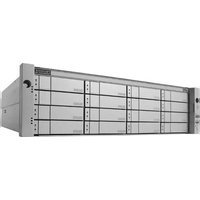
| Form Factor | 2U rackmount |
| Dimensions (W x D x H) | 430 x 660 x 88 mm |
| Weight | 15 kg (without drives) |
| Power Supply | Dual redundant 400W hot-swappable |
| Processor | Intel Xeon D-1521 (quad-core, 2.4 GHz) |
| Memory | 16 GB DDR4 ECC (expandable to 128 GB) |
| Drive Bays | 12 x 3.5" SATA/SAS hot-swappable |
| Maximum Raw Capacity | Up to 168 TB (using 14 TB drives) |
| Network Interfaces | 4 x 1GbE RJ-45, 2 x 10GbE SFP+ |
| RAID Levels Supported | 0, 1, 5, 6, 10, 50, 60, JBOD |
| Supported File Systems | EXT4, XFS, Btrfs, ZFS (via add-on) |
| Operating System | Promise VessOS (based on Linux) |
| Management | Web GUI, CLI, SNMP, SMB, NFS, iSCSI |
| Cooling | 3 x hot-swappable fans |
| Power Consumption (typical) | 150 W (with 12 HDDs) |
| Operating Temperature | 0°C to 40°C (32°F to 104°F) |
| Certifications | CE, FCC, UL, RoHS |
| Warranty | 3 years limited |
| Maintenance | Clean dust filters monthly; use compressed air for ventilation |
| Safety | Power off before cleaning; secure rack mounting |
| Repairability | Hot-swappable drives, redundant PSUs, field-replaceable fans |
Frequently Asked Questions - Vess R3600 Promise Technology
How do I set up the Vess R3600 for the first time?
Connect the NAS to your network via the 1GbE or 10GbE ports. Power it on and use the Web GUI (default IP: 192.168.1.100) to run the setup wizard. Create a RAID array, configure network settings, and create shared folders.
What RAID levels are supported and which should I choose?
Supported RAID levels are 0, 1, 5, 6, 10, 50, 60, and JBOD. For a balance of performance and redundancy, RAID 5 or RAID 6 is recommended. Use RAID 10 for high performance.
How can I access the NAS from my computer?
Use SMB (Windows) or NFS (Linux/Mac) to map a network drive. Alternatively, enable iSCSI for block-level access. Ensure the NAS and computer are on the same subnet.
Can I recover data if a hard drive fails?
Yes, if you configured a redundant RAID level (e.g., RAID 5 or RAID 6). Simply replace the failed drive with a new one of equal or larger capacity, and the RAID controller will rebuild the array automatically.
How do I update the firmware on the Vess R3600?
Download the latest firmware from the Promise Technology support website. In the Web GUI, go to System Management > Firmware Update, upload the file, and confirm. The system will reboot. Do not interrupt power during the update.
How can I back up data from the NAS to an external drive?
Connect a USB or eSATA external drive to the NAS. In the Web GUI, use the Backup utility to schedule a local backup or remote replication. You can also use rsync via the command line.
How do I set up user permissions and shared folders?
In the Web GUI, go to Storage > Shared Folders to create folders. Then under Access Control > Users, add users and assign read/write or read-only permissions per folder. For AD integration, join the NAS to your domain.
What happens if there is a power failure?
The Vess R3600 has a UPS detection feature. Connect it to a UPS via USB. In the Web GUI, configure Power Management to automatically shut down the NAS after a power loss. Data integrity is protected by cache flushing.
How do I replace a hot-swappable drive?
Locate the failed drive by the status LED (usually amber or red). Push the release latch, pull the drive carrier out, install the new drive, and push it back in. The array will automatically begin rebuilding. Ensure the new drive is compatible.
How can I improve the NAS performance?
Use SSDs for caching (if supported) or choose RAID 10 for best speed. Connect via 10GbE for higher throughput. Adjust network jumbo frames to 9000 MTU. Avoid running multiple CPU-intensive services simultaneously.
User questions about Vess R3600 Promise Technology
0 question about this device. Answer the ones you know or ask your own.
Ask a new question about this device
No questions yet. Be the first to ask one.
Download the instructions for your NAS in PDF format for free! Find your manual Vess R3600 - Promise Technology and take your electronic device back in hand. On this page are published all the documents necessary for the use of your device. Vess R3600 by Promise Technology.
USER MANUAL Vess R3600 Promise Technology
Manual assistant
Powered by Anthropic
Waiting for your message
Product information
Brand : Promise Technology
Model : Vess R3600
Category : NAS