
M3300SF - Loudspeaker EDIFIER - Free user manual and instructions
Find the device manual for free M3300SF EDIFIER in PDF.


Pick your language and provide your email: we'll send you a specifically translated version.
| Product Type | 2.1 Speaker System |
| Model | M3300SF |
| Brand | Edifier |
| Total Power Output | 40W RMS |
| Frequency Response | 20Hz - 20kHz |
| Signal-to-Noise Ratio | ≥85 dBA |
| Input Sensitivity | 500mV ±50mV |
| Speaker Drivers | Subwoofer: 5.25 inches; Satellite: 2.75 inches |
| Dimensions (Subwoofer) | 230 x 255 x 275 mm |
| Dimensions (Satellite) | 90 x 180 x 125 mm |
| Weight (Subwoofer) | 4.2 kg |
| Weight (Satellite per unit) | 0.8 kg |
| Input Interface | 3.5mm stereo, RCA |
| Power Supply | AC 220V, 50/60Hz |
| Control | Wired remote control with volume, bass, treble |
| Cable Length (Remote) | 1.5m |
| Material | Wooden subwoofer, plastic satellites |
| Color | Black |
| Compatible Devices | PC, TV, mobile devices, game consoles |
| Standby Power Consumption | <1W |
| Operating Temperature | 0°C to 40°C |
Frequently Asked Questions - M3300SF EDIFIER
How do I connect the Edifier M3300SF to my computer?
Use the included 3.5mm audio cable to connect the speaker's AUX input to your computer's headphone or line-out jack. Ensure the speaker is powered on and select the correct input mode.
Does the M3300SF support Bluetooth?
No, the Edifier M3300SF is a wired speaker system and does not have Bluetooth connectivity. Use the 3.5mm or RCA inputs.
What is the total power output of the M3300SF?
The total RMS power output is 40 watts, with 20W for the subwoofer and 10W per satellite.
Can I connect the speaker to my TV?
Yes, if your TV has a 3.5mm headphone jack or RCA output. Use the appropriate cable (not included) to connect to the speaker's AUX or RCA input.
How do I adjust the bass and treble?
The wired remote control has knobs for volume, bass, and treble. Adjust them to your preference. The remote connects to the subwoofer.
What should I do if there is no sound?
Check that the speaker is powered on, the volume is turned up, the correct input is selected, and the audio source is playing. Also ensure cables are securely connected.
Can I use the M3300SF with a gaming console?
Yes, if your console has a 3.5mm audio output (e.g., via controller) or RCA output. Connect accordingly. Note that the system is not HDMI compatible.
Is the subwoofer magnetically shielded?
The subwoofer is not magnetically shielded. Keep it away from CRT monitors, hard drives, or other magnetic sensitive devices to avoid interference.
How do I clean the speaker grilles?
Gently vacuum the grille with a soft brush attachment. For stubborn dirt, lightly dab with a slightly damp cloth. Do not use solvents or immerse in water.
What are the dimensions of the satellite speakers?
Each satellite measures approximately 90 x 180 x 125 mm (width x height x depth). They are compact and suitable for desktop placement.
User questions about M3300SF EDIFIER
0 question about this device. Answer the ones you know or ask your own.
Ask a new question about this device
No questions yet. Be the first to ask one.
Download the instructions for your Loudspeaker in PDF format for free! Find your manual M3300SF - EDIFIER and take your electronic device back in hand. On this page are published all the documents necessary for the use of your device. M3300SF by EDIFIER.
USER MANUAL M3300SF EDIFIER
| NOTICE: For the need of technical improvement and system upgrade, information contained herein may be subject to change from time to line without prior notice Copyright © 2008 All Rights Reserved. Manual Edition 1.0, Mar. 2008 Printed In China | Edifier® English |
| Edifier® www.edifier.com EDIFIER INTERNATIONAL LIMITED Made in China | M3300SF Multimedia Speaker User's Manual Please carefully read this manual before operating the system |
| IMPORTANT SAFETY INSTRUCTION | |
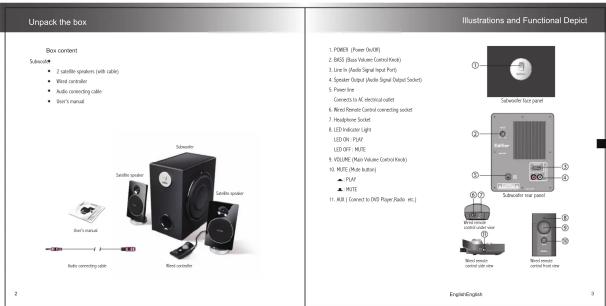
| Thank you for purchasing the Editor product. For generations, Editor tries to provide prevent speaker products to satisfy the rest of our end and centers, use the rest intervening one. This product can apply by your own entertainment, personal computer, and make how theater great sound performance. Please read this manual carefully to obtain the best of this option. | |
| AVERAGE | |
| The lighting flash with an envelope of the triangles is divided into a row to the presence of an unsolicited appreciation schedule that the product's resources may be for a different magnitude in candidate to a role of which flash to process. | |
| SAVETY INSTRUCTIONSPlease read all the instructions givenPlease hold a safety partnershipPlease select an envelope control to a comfortable level and designing your holding and the operation:Do you report this operator to rank or resolve?Do you can use the speaker water, and do not resemble flesh as liquid or pure any liquid objectsProtect the power cord line being walked on or separated particularly at plug, convenience rectangles, and paint when they need the help you respond:Do you adopt protection during lighting storms, although speakers the electrical outlet can occur in the computer:Ships the assistant where about 100 gm of vehicles. Please the speakers away from that street, such as houses, streets, and direct sunlight.Den't buy the opening of the speaker capsules. Never push agents' speaker rates to states. Prevent risk of three or electric shock hazards, and provide sufficient power around the operator for proven ventilation.Please the speakers a couple closer to that is set off call counting devices to the speakers or body team.Ships the speakers from the computer and the electrical outlet below (electrically) have a dirty club.Sensing is required when the operator has been engaged in any way, such as the power supply cord at plug and slipped; lipids have spiked its objects have fallen the upper envelope, the operator has been exposed to rain or noise, does not operate normally, or has been dropped. Follow all sending a qualified service personnel only.For the plug or the couple list to discuss with notes. | |
| English | 1 |
| Troubleshooting | |
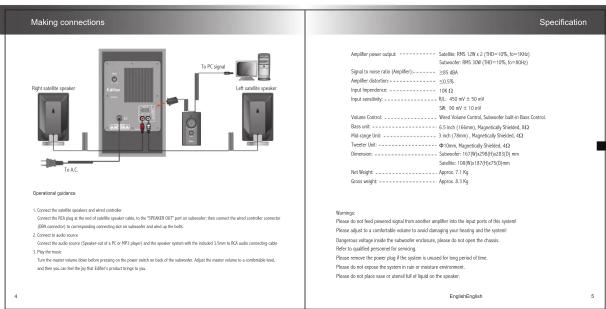
| ■ Not all speakers function:Please find check if the speaker needs are connected security;then check if I feel in connection are normal, click also if the audio source is at full.○ One satellite speaker does not function when playing CO from computer:This level of pheromance is taken to happen on new computer systems that use satellite does not happen when playingCO, but system wire has been playing RIF (noted file).This is notily due to the fault correction of CO ROP and sound control, that one channel of digit is secreted to the ground.Please record to the main level of CO ROP and sound can't about the digit connection. | |
| ■ System does not work at all:1. Please check Fower is correct, and it the real audio is switched on.2. Please check if the amplifier is still a STEM issue3. Please check if the audio return is turned to screen4. Please check if the audio signal calls is corrected correctly5. Please check if there is logit from audio source | |
| ■ Noise coming from speakersAmplifier scrutiny of this protein generates little noise, while the background noise of sets VSS/VO players or camera sound coil is too highPlease keep the system in active mode and remove the audio source, first sound can be heard at 1 meter away from the system. You then is so problems with this product. | |
| ■ Magnetic interference:This system's complex regionally divided, and can be placed near TV or receptor.Bat once urgent of the radiotherapy times is larger, some corresponding leakage is needed when the system is too clear to be removed, and it's recommended to keep a meter distance between the speaker generated and out of TV or radio. | |
| ■ If you have any further questions or concerns regarding Edit#: EpoferstPlease visit raw website at www.edifler.com, or email Edit#: Support for further assistance at man@edifler.com, if you prefer, you may contact us by phone.To-Use: 1-877-69DFER (304-3437). | |
| English | |


Manual assistant
Powered by Anthropic
Waiting for your message
Product information
Brand : EDIFIER
Model : M3300SF
Category : Loudspeaker