
JTA-222 - Turntable JENSEN - Free user manual and instructions
Find the device manual for free JTA-222 JENSEN in PDF.


| Product Type | Turntable with AM/FM Radio and Built-in Speakers |
| Brand | Jensen |
| Model | JTA-222 |
| Power Supply | AC 120V, 60Hz |
| Power Consumption | Not specified in manual |
| Speakers | Built-in left and right speakers; external speaker terminals (4 ohm, 3W) |
| Radio Bands | AM, FM, FM-Stereo |
| Turntable Speeds | 33 1/3, 45, 78 RPM (speed selector) |
| Turntable Drive | Belt drive (assumed typical) |
| Auto Stop | Yes, with switch on/off |
| Tonearm | With rest and clip |
| Stylus | Removable stylus protector included |
| 45 RPM Adapter | Yes, included |
| Headphone Jack | 3.5mm (assumed) |
| FM Antenna | Built-in wire antenna |
| AM Antenna | Built-in bar antenna |
| Safety Features | Double insulation, polarized plug |
| Dimensions (Approx.) | 400 x 300 x 150 mm (estimated) |
| Weight (Approx.) | 3 kg (estimated) |
| Warranty | 90 days limited (U.S. only) |
Frequently Asked Questions - JTA-222 JENSEN
User questions about JTA-222 JENSEN
0 question about this device. Answer the ones you know or ask your own.
Ask a new question about this device
Download the instructions for your Turntable in PDF format for free! Find your manual JTA-222 - JENSEN and take your electronic device back in hand. On this page are published all the documents necessary for the use of your device. JTA-222 by JENSEN.
USER MANUAL JTA-222 JENSEN
natural_image
Vintage JENSEN radio tab with open lid and control knobs (no visible text or symbols on main body)PLEASE READ THIS USER MANUAL COMPLETELY BEFORE OPERATING THIS UNIT AND RETAIN THIS BOOKLET FOR FUTURE REFERENCE.
WARNING
TO PREVENT FIRE OR SHOCK HAZARD, DO NOT USE THIS PLUG WITH AN EXTENSION CORD, RECEPTACLE OR OTHER OUTLET UNLESS THE BLADES CAN BE FULLY INSERTED TO PREVENT BLADE EXPOSURE. TO PREVENT FIRE OR SHOCK HAZARD, DO NOT EXPOSE THIS APPLIANCE TO RAIN OR MOISTURE.

natural_image
Black triangular warning symbol with a lightning bolt inside, indicating electrical hazard (no text)The lightning flash with arrowhead symbol, within an equilateral triangle is intended to alert the user to the presence of uninsulated dangerous voltage within the product is endosure that may be of sufficient magnitude to constitute a risk of electric shock to persons.
CAUTION
RISK OF ELECTRIC SHOCK DO NOT OPEN
CAUTION. TO REDUCE THE RISK OF ELECTRICSHOCK, DO NOT REMOVE COVER (OR BACK). NO USER-SERVICEABLE PARTS INSIDE. REFERSERVICING TO QUALIFIED SERVICE PERSONEL.

natural_image
Black triangular warning symbol with exclamation mark (no text or numbers)The exclamation point within an equilateral triangle is intended to alert the user to the presence of important operating and maintenance (servicing) instructions in the literature accomoanying the appliance.
The Caution Marking is located at the bottom enclosure of the apparatus. The Rating plate is located at the bottom enclosure of the apparatus
IMPORTANT SAFETY INSTRUCTIONS
- Read these instructions.
- Keep these instructions.
- Heed all warnings.
- Follow all instructions.
- Do not use this apparatus near water.
- Cleaning – Unplug this product from the wall outlet before cleaning. Do not use liquid cleaners or aerosol cleaners. Clean only with a dry cloth.
- Do not block any ventilation openings. Install in accordance with the manufacturer's instructions.
- Do not install near any heat sources such as radiators, heat registers, stoves, or other apparatus (including amplifiers) that produce heat.
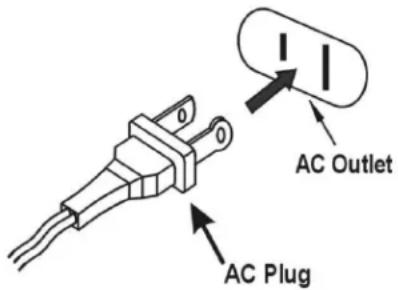
- Do not defeat the safety purpose of the polarized or grounding-type plug. A polarized plug has two blades with one wider than the other. A grounding type plug has two blades and a third grounding prong. The wide blade or the third prong is provided for your safety. If the provided plug does not fit into your outlet, consult an electrician for replacement of the obsolete outlet.
- Protect the power cord from being walked on or pinched particularly at plugs, convenience receptacles, and the point where they exit from the apparatus.
- Only use attachments/accessories specified by the manufacturer.
- Use only with a cart, stand, tripod, bracket, or table specified by the manufacturer, or sold with the apparatus. When a cart is used, use caution when moving the cart apparatus combination to avoid injury from tip-over.
- Unplug this apparatus during lightning storms or when unused for long periods of time.
- Refer all servicing to qualified service personnel. Servicing is required when the apparatus has been damaged in any way, such as power-supply cord or plug is damaged, liquid has been spilled or objects have fallen into the apparatus, the apparatus has been exposed to rain or moisture, does not operate normally, or has been dropped.
- This appliance shall not be exposed to dripping or splashing water and that no object filled with liquids such as vases shall be placed on the apparatus.

- Do not overload wall outlet. Use only power source as indicated.
- Use replacement part as specified by the manufacturer.
- Upon completion of any service or repairs to this product, ask the service technician to perform safety checks.
- Power Sources - This product should be operated only from the type of power source indicated on the marking label. If you are not sure of the type of power supply to your home, consult your product dealer or local power company. For products intended to operate from battery power, or other sources, refer to the operating instruction.
- Object and Liquid Entry - Never push objects of any kind into this product through openings as they may touch dangerous voltage points or short-out parts that could result in a fire or electric shock. Never spill liquid of any kind on the product.
- Mains plug is used as disconnect device and it should remain readily operable during intended use. In order to disconnect the apparatus from the mains completely, the mains plug should be disconnected from the mains socket outlet completely.
- Excessive sound pressure from earphones and headphone can cause hearing loss.
CAUTION:
TO PREVENT ELECTRIC SHOCK,
MATCH WIDE BLADE OF AC PLUG TO WIDE SLOT. FULLY INSERT.
This symbol indicates that this product incorporates double insulation between hazardous mains voltage and user accessible parts

SAVE THESE INSTRUCTIONS
COMPLIANCE WITH FCC REGULATIONS
This device complies with Part 15 of the FCC Rules. Operation is subject to the following two conditions:
(1) This device may not cause harmful interference, and
(2) This device must accept any interference received, including interference that may cause undesired operation.
This equipment has been tested and found to comply with the limits for a Class B Digital Device, pursuant to Part 15 of the FCC Rules. These limits are designed to provide reasonable protection against harmful interference in a residential installation. This equipment generates, uses and can radiate radio frequency energy, if not installed and used in accordance with the instructions, may cause harmful interference to radio communications. However, there is no guarantee that interference will not occur in a particular installation. If this equipment does cause harmful interference to radio or television reception, which can be determined by turning the equipment off and on, the user is encouraged to try to correct the interference by one or more of the following measures:
■ Reorient or relocate the receiving antenna.
- Increase the separation between the equipment and receiver.
- Connect the equipment into an outlet on a circuit different from that to which the receiver is connected.
- Consult the dealer or an experienced radio/TV technician for help.
WARNING
Changes or modifications to this unit not expressly approved by the party responsible for compliance could void the user's authority to operate the equipment.
Dear JENSEN Customer
Selecting fine audio equipment such as the unit you've just purchased is only the start of your musical enjoyment. Now it's time to consider how you can maximize the fun and excitement your equipment offers. This manufacturer and the Electronic Industries Association's Consumer Electronics Group want you to get the most out of your equipment by playing it at a safe level. One that lets the sound come through loud and clear without annoying blaring or distortion and, most importantly, without affecting your sensitive hearing. Sound can be deceiving. Over time your hearing "comfort level" adapts to higher volumes of sound. So what sounds "normal" can actually be loud and harmful to your hearing. Guard against this by setting your equipment at a safe level BEFORE your hearing adapts.
To establish a safe level:
- Start your volume control at a low setting.
■ Slowly increase the sound until you can hear it comfortably and clearly, and without distortion. - Once you have established a comfortable sound level: Set the dial and leave it there.
Take a minute to do this now will help to prevent hearing damage or loss in the future. After all, we want you listening for a lifetime.
We Want You Listening For a Lifetime
Used wisely, your new sound equipment will provide a lifetime of fun and enjoyment. Since hearing damage from loud noise is often undetectable until it is too late, this manufacturer and the Electronic Industries Association's Consumer Electronics Group recommend you avoid prolonged exposure to excessive noise.


Customer's Record:
The serial number of this product is found on its bottom. You should note the serial number of this unit in the space provided as a permanent record of your purchase to aid in identification in the event of theft of loss.
Model Number: JTA-222 Serial Number: ____
PROTECT YOUR FURNITURE!!
This system is equipped with non-skid rubber ‘feet’ to prevent the product from moving when you operate the controls. These ‘feet’ are made from non-migrating rubber material specially formulated to avoid leaving any marks or stains on your furniture. However certain types of oil based furniture polishes, wood preservatives, or cleaning sprays may cause the rubber ‘feet’ to soften, and leave marks or a rubber residue on the furniture. To prevent any damage to your furniture we strongly recommend that you purchase small self-adhesive felt pads, available at hardware stores and home improvement centers everywhere, and apply these pads to the bottom of the rubber ‘feet’ before you place the product on fine wooden furniture.
LOCATION OF CONTROLS
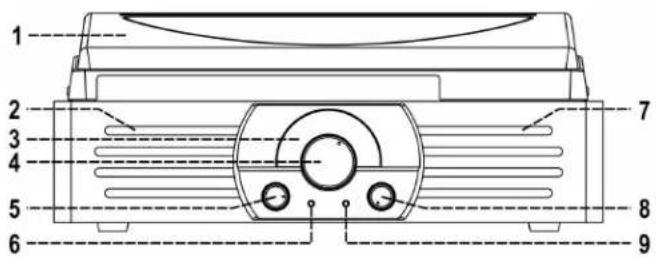
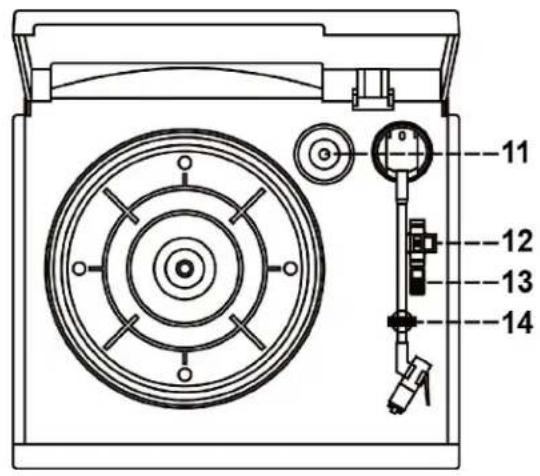
LOCATION OF CONTROLS
1) DUST COVER
2) LEFT SPEAKER
3) DIAL POINTER
4) TUNING KNOB
5) FUNCTION SELECTOR
6) FM STEREO INDICATOR
7) RIGHT SPEAKER
8) POWER ON/OFF AND VOLUME CONTROL KNOB
9) POWER LED INDICATOR
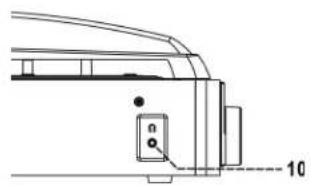
10) EARPHONE JACK
11) 45 RPM ADAPTER
12) SPEED SELECTOR
13) AUTO STOP SWITCH
14) TONE ARM REST
15) EXTERNAL SPEAKER TERMINALS
16) FM ANTENNA
17) INTERNAL SPEAKER SHUT-OFF SWITCH
18) AC POWER CORD
natural_image
Technical line drawing of a mechanical component with no visible text or symbols
IMPORTANT NOTES
Avoid installing the unit in locations described below:
- Places exposed to direct sunlight or close to heat radiating appliances such as electric heaters.
■ Dusty places. - Places subject to constant vibration.
■ Humid or moist places. - Do not cover any vents and make sure that there is a space of several centimeters around the unit for ventilation.
POWER SOURCES
This Music System operates on 120V\~60Hz. Do not attempt to operate the unit on any other power source. You could cause damage to the unit and void your warranty.
Please be sure the power outlet you plug this unit into is working and receives constant (unswitched) power.
AC OPERATION
- Plug the AC POWER CORD (#18) into a 120V AC \~ 60Hz outlet.
- Rotate the Power ON/OFF and volume control knob (#8) to turn on the system.
- The power LED indicator (#9) will light. Now your system is ready to play the music.
RADIO OPERATION
- Rotate the function selector (#5) to select the desired band (AM or FM or FM-stereo).
- Tune to the required station by turning the tuning knob (#4).
- Adjust volume knob (#8) to the desired volume level.
- When you wish to turn off the Radio, rotate the Power on/off and volume knob (#8) to Off position.
FM & FM-stereo reception
- Rotate the function selector (#5) to “FM” position. Programs are received in mono mode. In particular when stereo signals are weak. It is preferable to receive the program in mono.
- Rotate the function selector (#5) to "FM-St" position for receiving FM stereo programs. The LED "FM-ST" indicator (#6) will light up to show FM stereo program is receiving.
Hints for best reception:-
- AM : The receiver has a built-in AM bar antenna. If AM reception is weak, slightly rotate or change the position of the unit will usually improve the AM reception.
- FM : The receiver has a build-in FM wire antenna (#16) hanging at the rear cabinet. This wire should be totally unraveled and extended for best reception.
PHONO OPERATION
Noted :
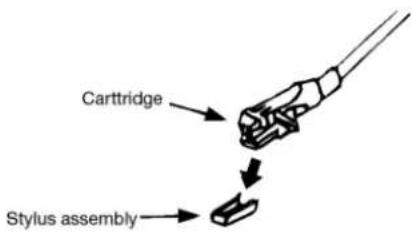
- Remove the stylus protector.
-
Be sure that the tone arm is being detached from the tone arm rest before operating and re-secured again afterwards.
-
Rotate the function selector (#5) to PHONO position.
- Set the Speed selector (#12) to the proper position depending on the record to be played.
- Place the record on the platter; use the 45 RPM adapter (#11) if required.
- Lift the tone arm from the rest and slowly move it to the record side. The platter will start to rotate.
- Place the tone arm to the desired position of the record.
- Adjust the volume to the desired level.
- At the end of record, the platter will automatically stop rotating. Lift the tone arm from the record and return it to the rest.
- To stop manually, lift the tone arm from the record and return it to the rest.
natural_image
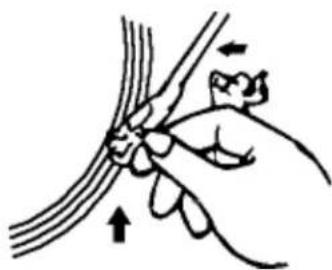
Illustration of a hand holding a thin bundle of wires with an arrow indicating force or movement (no text or symbols)Remark : As some kinds of record the auto-stop area was out of the unit setting, so it will stop before the last rack finish. In this case, select the auto-stop switch (#13) to "off" position, then it will run to the end of the record but will not stop automatically (turn off the unit by power button or switch back the auto-stop switch (#13) to "on" position to stop the platter rotate). Then put back the tone arm to the rest position.
EXTERNAL SPEAKER CONNECTION
You can connect the system to your external speaker (4 ohm/ 3Watts) to get better sound quality. Connect the red/white wire of your speaker to red terminal (#15) of the unit and black wire connect to black terminal (#15) then slide the built in speaker shut-off switch (#17) to "OFF" position.
Remark : Please do not connect external speaker and built in speaker shut-off switch (#17) set to "ON" position, it will damage the unit.
USING HEADPHONE (NOT INCLUDED)
You can enjoy the music personally by connect your earphone to the earphone jack (10) of the unit.
Remark: To avoid damage your listening, please set the volume level (8) in low position during use earphone.
TROUBLESHOOTING GUIDE
If you experience difficulties in the use of this music system please check the following or call 1-800-777-5331 for Customer Service and Support.
| PROBLEM POSSIBLE CAUSE REMEDY | ||
| The unit will not play | • The unit is disconnected from the AC outlet | • Connect to an outlet. |
| • The AC outlet has no power • Try the unit on another outlet | ||
| Poor AM or FM reception | • Weak signal on distant stations | • AM mode, Rotate or change the position of the unit for better reception.• FM mode, Fully extend the FM wire antenna. |
| Unit ON but there is low or no volume | • The volume Control has been turned all the way down | • Turn the Volume control to a higher output |
| • Headphones are inserted into the Headphone jack | • Pull the headphone out | |
| Sound is distorted | • Volume level is set too high • Decrease the volume | |
SPECTRA GREEN NOTICE

At Spectra, environmental and social responsibility is a core value of our business. We are dedicated to continuous implementation of responsible initiatives with an aim to conserve and maintain the
environment through responsible recycling.
Please visit us at http://www.spectraintl.com/green.htm for more information on Spectra's green initiatives or to find a recycler in your area.
90 DAY LIMITED WARRANTY AND SERVICE VALID IN THE U.S.A. ONLY
SPECTRA MERCHANDISING INTERNATIONAL, INC. warrants this unit to be free from defective materials or factory workmanship for a period of 90 days from the date of original customer purchase and provided the product is utilized within the U.S.A. This warranty is not assignable or transferable. Our obligation under this warranty is the repair or replacement of the defective unit or any part thereof, except batteries, when it is returned to the SPECTRA Service Department, accompanied by proof of the date of original consumer purchase, such as a duplicate copy of a sales receipt.
You must pay all shipping charges required to ship the product to SPECTRA for warranty service. If the product is repaired or replaced under warranty, the return charges will be at SPECTRA's expense. There are no other express warranties other than those stated herein.
This warranty is valid only in accordance with the conditions set forth below:
- The warranty applies to the SPECTRA product only while:
a. It remains in the possession of the original purchaser and proof of purchase is demonstrated.
b. It has not been subjected to accident, misuse, abuse, improper service, usage outside the descriptions and warnings covered within the user manual or non-SPECTRA approved modifications.
c. Claims are made within the warranty period.
-
This warranty does not cover damage or equipment failure caused by electrical wiring not in compliance with electrical codes or SPECTRA user manual specifications, or failure to provide reasonable care and necessary maintenance as outlined in the user manual.
-
Warranty of all SPECTRA products applies to residential use only and is void when products are used in nonresidential environment or installed outside the United States.
This warranty gives you specific legal rights, and you may also have other rights which vary from state to state. TO OBTAIN SERVICE please remove all batteries (if any) and pack the unit carefully and send it freight prepaid to SPECTRA at the address shown below. IF THE UNIT IS RETURNED WITHIN THE WARRANTY PERIOD shown above, please include a proof of purchase (dated cash register receipt) so that we may establish you religibility for warranty service and repair of the unit without cost. Also include a note with a description explaining how the unit is defective. A customer service representative may need to contact you regarding the status of your repair, so please include your name, address, phone number and email address to expedite the process.
IF THE UNIT IS OUTSIDE THE WARRANTY PERIOD, please include a check for \$35.00 to cover the cost of repair, handling and return postage. All out of warranty returns must be sent prepaid.
It is recommended that you contact SPECTRA first at 1-800-777-5331 or by email at custserv@spectraintl.com for updated information on the unit requiring service. In some cases the model you have may be discontinued, and SPECTRA reserves the right to offer alternative options for repair or replacement.
SPECTRA MERCHANDISING INTERNATIONAL, INC.
4230 North Normandy Avenue,
Chicago, IL60634, USA. 1-800-777-5331
To register your product, visit the link on the website below to enter your information. http://www.spectraintl.com/wform.htm
0114
Printed in China


- WARNING
- CAUTION
- RISK OF ELECTRIC SHOCK DO NOT OPEN
- IMPORTANT SAFETY INSTRUCTIONS
- CAUTION:
- SAVE THESE INSTRUCTIONS
- COMPLIANCE WITH FCC REGULATIONS
- Dear JENSEN Customer
- To establish a safe level:
- We Want You Listening For a Lifetime
- Customer's Record:
- PROTECT YOUR FURNITURE!!
- LOCATION OF CONTROLS
- IMPORTANT NOTES
- Avoid installing the unit in locations described below:
- POWER SOURCES
- AC OPERATION
- RADIO OPERATION
- FM & FM-stereo reception
- Hints for best reception:-
- PHONO OPERATION
- Noted :
- EXTERNAL SPEAKER CONNECTION
- USING HEADPHONE (NOT INCLUDED)
- TROUBLESHOOTING GUIDE
- SPECTRA GREEN NOTICE
- DAY LIMITED WARRANTY AND SERVICE VALID IN THE U.S.A. ONLY
Brand : JENSEN
Model : JTA-222
Category : Turntable