Highwire VHW-HW - Uncategorized Veracity - Free user manual and instructions
Find the device manual for free Highwire VHW-HW Veracity in PDF.


| Product Type | High Speed Data Converter |
| Model Number | VHW-HW01 |
| Brand | Veracity |
| Power Supply | 12V DC or 24V AC (automatic detection) |
| Power Consumption | 2-5 W (typical) |
| Ethernet Port | RJ45, supports Cat5/Cat6 patch & crossover cables |
| Coaxial Port | BNC socket for 75ohm coax (e.g., RG59) |
| LED Indicators | Green (power/link), Amber (network activity) |
| Mounting Options | Wall bracket (VHW-VWMB), Rack panel (VHW-1U) for up to 8 units, DIN rail (VHW-DMB) |
| Compliance | CE, FCC Part 15, EMC Directive 89/336/EEC |
| Key Feature | Converts Ethernet signal for transmission over 75ohm coaxial cable |
| PoE Capability | Up to 6.5W IEEE Class 1 or 2 (VHW-HWPO version) |
| Installation Environment | Indoor or in rated enclosure |
| Power Supply Class | Requires Class II isolated power supply |
| Polarity | Indicated on top panel; observe polarity |
Frequently Asked Questions - Highwire VHW-HW Veracity
User questions about Highwire VHW-HW Veracity
0 question about this device. Answer the ones you know or ask your own.
Ask a new question about this device
Download the instructions for your Uncategorized in PDF format for free! Find your manual Highwire VHW-HW - Veracity and take your electronic device back in hand. On this page are published all the documents necessary for the use of your device. Highwire VHW-HW by Veracity.
USER MANUAL Highwire VHW-HW Veracity
HIGHWIRE units are used to convert conventional Ethernet to a signal that can be carried by 75ohm coaxial video cables such as RG59.
HIGHWIRE makes it possible to upgrade installed analogue cameras to high-quality digital IP cameras without the expense of replacing existing cabling.
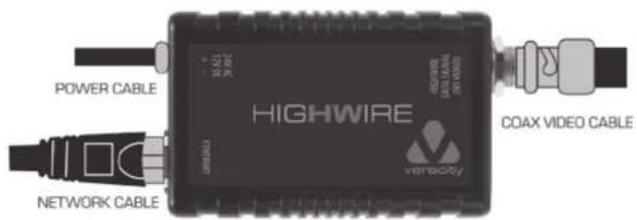
In the example shown a pair of HIGHWIRE units is used to allow an IP (network) camera to communicate with other network devices over an existing coaxial video cable.
CABLE CONNECTION DIAGRAM
EC DECLARATION OF CONFORMITY
In accordance with EN 45014:1998 We, Veracity UK Ltd. of Prestwick International Aerospace Park, 4 Dow Road, Prestwick, KA9 2TU, United Kingdom, declare that the equipment HIGHWIRE High speed data converter model number VHW-HW01 conforms to the essential protection requirements of the EMC Directive B9/336/EEC as amended.
The following EMC standards have been applied: BS EN 55022:1998 Emissions (Class B Radiated), BS EN 55024:1998 Immunity, BS EN 61000-4-2:1995 Immunity to ESD. BS EN 61000-4-3:2000 Immunity to Radiated RF Fields (3V/m).
I hereby declare that the equipment named above has been found to comply with the relevant sections of the above referenced specifications. The unit complies with all essential requirements of the EMC Directive.
Responsible Person Mr Alastair McLeod, Director Issued 25th September 2006 at Prestwick.
This device complies with Part 15 of the FCC Rules. Operation is subject to the following two conditions: [1] this device may not cause harmful interference, and [2] this device must accept any interference received, including interference that may cause undesired operation.
NOTE: This equipment has been tested and found in our way with the limits for a Clean A digital device, pursuant to Part 15 of the ECE-Hules. These limits are designed to provide reasonable protection against harmful interference when the equipment is operated in a commercial environment. This equipment generates, uses, and can radiate radio frequency energy and, not installed and used in accordance with the instruction manual, may cause harmful interference to radio communications. Operation of this equipment in a residential area is likely to cause harmful interference in which case the user will be required to correct the interference at his own expense.
INSTALLATION SEQUENCE
1. MOUNTING
The HIGHWIRE unit should only be installed indoors or in an appropriately rated enclosure.
The unit should be securely mounted and should not be supported by the attached cables. Mounting bracket part no VHW-VWMB can be used for bolting the unit to a wall or structure.
Rack panel part no VHW-1U allows installation of up to eight HIGHWIRE units in 1U of a 19 inch rack.
DIN rail part no VHW-DMB can be used to mount the unit onto a DIN rail.
2. POWER CONNECTION
HIGHWIRE should only be used with a Class II Isolated power supply.
The unit can be powered from either a 12V DC or 24V AC power supply (PSU), and adjusts to its type and voltage automatically.
If the PSU is shared with other equipment such as a camera, ensure that the total load current will not exceed the PSU's rated output.
The power supply voltage should be within the range specified. If in any doubt, measure the voltage at the PSU's connector before and then after connecting the HIGHWIRE or other equipment.
If an existing power supply is not available, up to two HIGHWIRE units can be powered by PSU part no VWH-12VPSU-xx (xx = UK, EU or USA). Part number VHW-RMPSU-xx is designed for rackmount installations and can power up to eight units.
The PSU cables should be bared, tinned and securely connected to the HIGHWIRE power plug before switching on the PSU. Only one wire should be connected to each of the power plug's screw terminals, with polarity as indicated on the unit's top panel.
The green LED will blink every 1 - 2 seconds to indicate the presence of power.
3. COAXIAL CABLE CONNECTION
Connect the unit's BNC socket to the coaxial cable. If another HIGHWIRE unit is connected at the far end and powered up, then the green LED will light steadily to indicate a good connection.
In some installations, cable condition will force the units to reduce their connection speed, and this is indicated by the green LED flashing (approx. half-on, half-off).
Only two units should be connected, one at each end of the cable. HIGHVIRE is not compatible with other equipment such as analogue video amplifiers.
4. ETHERNET CABLE CONNECTION
Connect the unit's RJ45 Ethernet jack to the camera or other network equipment using a standard Ethernet cable. Both patch and crossover type Cat5 or Cat6 cables are supported.
The amber LED will light to indicate a network connection, and will blink off during network activity.
POWER OVER ETHERNET
Using the VHW-HWPO [Power Over Ethernet version], HIGHWIRE can automatically enable up to 6.5 watts of POE (IEEE Class 1 or 2) to compatible network devices, via its Ethernet port.
A minimum 12 watt PSU is required for the VHW/HWPO version of HIGHVIRE for example, part no VPSU-12V-U
Brand : Veracity
Model : Highwire VHW-HW
Category : Uncategorized