
BP-975 - Battery CANON - Free user manual and instructions
Find the device manual for free BP-975 CANON in PDF.


| Product Type | Rechargeable Battery Pack |
| Brand | Canon |
| Model | BP-975 |
| Chemistry | Lithium-Ion (Li-Ion) |
| Nominal Voltage | 7.2 V |
| Capacity | 9.75 Wh (approx. 1350 mAh) |
| Dimensions (W x H x D) | Approx. 70 x 90 x 40 mm |
| Weight | Approx. 180 g |
| Operating Temperature | 0°C to 40°C (charging), -20°C to 60°C (discharging) |
| Charging Time | Approx. 2.5 hours with Canon CG-800 charger |
| Compatible Devices | Canon XF series, XA series, and other compatible camcorders |
| Protection Features | Overcharge, over-discharge, short circuit, and temperature protection |
| Cycle Life | Approx. 300 charge/discharge cycles |
| Memory Effect | None (Lithium-Ion) |
| Self-Discharge Rate | Approx. 1-2% per month |
| Storage Temperature | 10°C to 30°C (recommended, at 40-60% charge) |
| Safety Certifications | UN38.3, CE, RoHS |
Frequently Asked Questions - BP-975 CANON
User questions about BP-975 CANON
0 question about this device. Answer the ones you know or ask your own.
Ask a new question about this device
Download the instructions for your Battery in PDF format for free! Find your manual BP-975 - CANON and take your electronic device back in hand. On this page are published all the documents necessary for the use of your device. BP-975 by CANON.
USER MANUAL BP-975 CANON
Safety Instructions and Important Information
For details about charging and using the battery pack, please refer to the instruction manual of your camcorder.
DANGER!
- Keep the battery pack away from fire (or it might explode).
- Do not expose it to temperatures greater than 60 °C (140 °F). Do not leave it near a heater, or inside a car in hot weather, for example.
- Do not try to disassemble or modify it.
- Do not drop it or subject it to shocks.
- Do not get it wet.
About the terminal cover
Attach the terminal cover whenever the battery pack is not being used. The battery terminal cover has a □ shaped hole. This is useful when you wish to differentiate between charged and uncharged battery packs.
Terminal cover attached
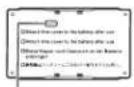
Charged
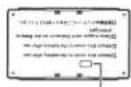
Uncharged
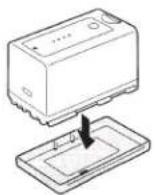
Specifications
| BP-955 | BP-975 | |
| Battery type | Rechargeable lithium ion battery | |
| Operating temperature | 0 - 40 °C (32 - 104 °F) | |
| Rated voltage | 7.4 V DC | |
| Battery capacity | 5,200 mAh (typical) | 7,800 mAh (typical) |
| 37 Wh / 4,900 mAh (minimum) | 55 Wh / 7,350 mAh (minimum) | |
| Dimensions | 38.2 × 43.5 × 70.5 mm(1.5 × 1.7 × 2.8 in.) | 38.2 × 62.1 × 70.5 mm(1.5 × 2.4 × 2.8 in.) |
| Weight | 220 g (7.8 oz.) | 320 g (11.3 oz.) |
Weight and dimensions are approximate. Errors and omissions excepted. Subject to change without notice.

USA and Canada only:
The Lithium ion/polymer battery is recyclable. Please call 1-800-8-BATTERY for information on how to recycle this battery.
Canadian Radio Interference Regulations
The Class B digital apparatus complies with Canadian ICES-003.
This device complies with Part 15 of the FCC Rules. Operation is subject to the following two conditions;
(1) this device may not cause harmful interference, and
(2) this device must accept any interference received, including interference that may cause undesired operation.
Note: This equipment has been tested and found to comply with the limits for class B digital device, pursuant to Part 15 of the FCC Rules. These limits are designed to provide reasonable protection against harmful interference in a residential installation. This equipment generates, uses and can radiate radio frequency energy and, if not installed and used in accordance with the instructions, may cause harmful interference to radio communications. However, there is no guarantee that interference will not occur in a particular installation. If this equipment does cause harmful interference to radio or television reception, which can be determined by turning the equipment off and on, the user is encouraged to try to correct the interference by one or more of the following measures:
- Reorient or relocate the receiving antenna.
- Increase the separation between the equipment and receiver.
- Connect the equipment into an outlet on a circuit different from that to which the receiver is connected.
- Consult the dealer or an experienced radio/TV technician for help.
Do not make any changes or modifications to the equipment unless otherwise specified in the manual. If such changes or modifications should be made, you could be required to stop operation of the equipment.
日本語
お使いになる前に
Brand : CANON
Model : BP-975
Category : Battery