
TW100-S4W1CA - Router TRENDNET - Free user manual and instructions
Find the device manual for free TW100-S4W1CA TRENDNET in PDF.


| Product Type | Broadband Router |
| Brand | TRENDnet |
| Model | TW100-S4W1CA |
| Dimensions (L x W x H) | 6.7 x 4.3 x 1.2 inches |
| Weight | 0.6 lbs |
| Power Supply | 9V DC 1A |
| WAN Port | 1 x 10/100 Mbps RJ-45 |
| LAN Ports | 4 x 10/100 Mbps RJ-45 |
| Wireless | None (wired only) |
| Supported Protocols | TCP/IP, UDP, ICMP, DHCP, PPPoE, PPTP, L2TP |
| NAT Firewall | Yes |
| VPN Pass-Through | PPTP, L2TP, IPSec |
| DHCP Server | Built-in (up to 253 users) |
| Maximum Users | 253 |
| LED Indicators | Power, Link/Act per port, Collision |
| Operating Temperature | 0°C to 40°C (32°F to 104°F) |
| Operating Humidity | 10% to 90% non-condensing |
| Installation | Desktop or wall-mountable (feet included) |
| Maintenance & Cleaning | Use a dry cloth; avoid liquids and solvents |
| Safety | Use only included power adapter; keep away from water |
| Spare Parts Availability | Power adapter available from TRENDnet |
| Repairability | No user-serviceable parts; contact support for issues |
Frequently Asked Questions - TW100-S4W1CA TRENDNET
User questions about TW100-S4W1CA TRENDNET
0 question about this device. Answer the ones you know or ask your own.
Ask a new question about this device
Download the instructions for your Router in PDF format for free! Find your manual TW100-S4W1CA - TRENDNET and take your electronic device back in hand. On this page are published all the documents necessary for the use of your device. TW100-S4W1CA by TRENDNET.
USER MANUAL TW100-S4W1CA TRENDNET
This equipment has been tested and found to comply with the limits for a Class B digital device, pursuant to Part 15 of the FCC Rules. These limits are designed to provide reasonable protection against harmful interference in a commercial environment.
This equipment generates, uses and radiates radio frequency energy. If not installed and used in accordance with the instructions, it may cause harmful interference to radio communications. Operation of this equipment in a residential area is likely to cause harmful interference. In this case the user will be required to correct the interference at their own expense.
CE Mark Warning
This is a Class B product. In a domestic environment, this product may cause radio interference, in which case the user may be required to take adequate measures.

TABLE OF CONTENTS
About This Guide.... 1
Purpose....1
Overview of this User's Guide....1
Introducon 3
Applicaons: 4
Features: 5
Unpacking and Setup 5
Unpacking 5
Setup 5
Hardware InstalLaon....7
Front Panel....7
Rear Panel 8
Side Panel....9
Hardware connecons....10
Connect the Internet Broadband Router 10
Check the installaon.... 11
PC Network TCP/IP Seng 11
Windows 7/ Vista 11
Windows XP/2000....12
Windows NT4.0....12
Windows 95/98/ME 14
4-Port Broadband Router Conguraon....16
Login into the 4-Port Broadband Router....16
Quick Setup 17
Advanced Setup 22
Technical Specifications 44
Limited Warranty 46
ABOUT THIS GUIDE
Congratulaons on your purchase of this 4-Port Broadband Router! This device integrates 100Mbps Fast Ethernet and 10Mbps Ethernet network capabilities. This router is a complete soluon for sharing the Internet and other oce resources.
Purpose
This manual discusses how to install the 4-Port Broadband Router.
Overview of this User's Guide
Introducon. Describes the Broadband Router and its features.
Unpacking and Setup. Helps you get started with the basic installaon of the Router.
Idenfying External Components. Describes the front panel, rear panel, and LED indicators of the Router.
Connecng the Router. Explains how you connect the Router to your xDSL/Cable Modem.
Technical Specicaons. Lists the technical (general, physical and environmental, performance and Routers sengs) specicaons of the Broadband Router.
With the explosive growth of the Internet, accessing informaon and services at any me, day or night, has become standard fare for most people. The era of the standalone PC is waning. Networking technology is moving out of the exclusive domain of corporaons and into homes with at least two computers.
Broadband network access is also gaining ground. Allowing more than two computers to access the Internet at the same me, however, has typically entailed significantly higher costs. Thus, there is a great demand for technology that enables users to share a single Internet conncon.
Employing a router to share an Internet conncon solves the problem of high network access costs. Using such a device, each networked computer is able to make full use of broadband capabilities.
This device not only comes equipped with a wide range of features but also can be installed and congured right out of the box. This device supports a simple local area network and Internet access sharing.
A local area network connects home computers and enables users to access the Internet, share resources, and play online games – the essenals of the family compung lifestyle.
Applicaons:
Broadband Internet access sharing:
Enable several computers to share a single high-speed broadband Internet conncon (LAN and WAN-Internet).
Resource sharing:
Share printers, scanners, and other peripherals.
File sharing:
Exchange data, messages, and les -- thus making good use of hard disk space.
Online gaming:
Your local area network allows you to play online games and use e-commerce services.
Firewall:
A built-in rewall funcon protects against hackers.
Features:
- 1 x 10/100Mbps port (WAN/Internet)
- 4 x 10/100Mbps Auto-MDIX ports (LAN)
- Supports Cable/DSL Modems with Dynamic IP, Fixed IP, PPPoE, and PPTP conncon types
- Provides Network Address Translaon (NAT) Firewall
- Supports Virtual Servers (Port Forwarding 10 Entries) and DMZ (5 Entries)
• Supports stac routes (20 entries) - Client Filtering by Date/Time (6 Entries and Special Applicaons Filter 10 Entries)
• MAC Address control to allow or deny access (32 entries)
• Supports Dynamic DNS service - Mulple VPN pass-through sessions for IPsec, L2TP, and PPTP (8 VPN sessions)
- Web URL Filtering (32 URL entries)
- Universal Plug and Play (UPnP) and Applicaon Level Gateway support for Internet applicaons such as email, FTP, gaming, and more
- Easy Web browser conguraon and remote management
This chapter provides unpacking and setup informaon for the Broadband Router.
Unpacking
The box should contain the following items:
◆ TW100-S4W1CA
◆ Mul-Language Quick Installaon Guide
◆ CD-ROM (User's Guide)
◆ Network cable (1.5 m / 5.)
◆ Power adapter (5V DC, 1A or 7.5V DC, 1A)
If any item is found missing or damaged, please contact your local reseller for replacement.
Setup
The setup of the 4-Port Broadband Router can be performed using the following steps:
◆ The power outlet should be within 1.82 meters (6 feet) of the Broadband Router.
◆ Visually inspect the DC power jack and make sure that it is connected securely to the power adapter.
Make sure that there is proper heat dissipaton from and adequate venlaon around the Broadband Router. Do not place heavy objects on the 4-Port Broadband Router.
Front Panel
The gure below shows the front panel of the 4-Port Broadband Router.

4-Port Broadband Router Front Panel
POWER
This indicator lights green when the hub is receiving power. Otherwise, it is o.
WAN
This indicator lights green when the WAN port is connected to an xDSL/Cable modem successfully.
This indicator blinks green while the WAN port is transming data to or receiving data from the xDSL/Cable modem.
LAN (Link/ACT)The port 1 - 4 indicators light green when they're connected to a 100Mbps Fast Ethernet staon. If the indicator blinks green, the corresponding LAN port is transming or receiving data.
Rear Panel
The gure below shows the rear panel of the 4-Port Broadband Router.

natural_image
Black wireless router device with four Ethernet ports and a WAN indicator (no visible text or symbols on the device body)4-Port Broadband Router Rear Panel
WAN
On the 4-Port Broadband Router, there is an RJ-45 10/100Mbps Auto-MDIX WAN port. This port connects to your xDSL/Cable modem.
LAN (1-4)
Four RJ-45 10/100Mbps Auto-MDIX ports for connecng to either 10Mbps or 100Mbps Ethernet connecns.
Side Panel
The gure below shows the side panel of the 4-Port Broadband Router.

natural_image
Exterior view of a black rectangular electronic device with a circular button labeled 'RESOUR' and a logo on top (no readable text beyond branding)4-Port Broadband Router Side Panel
Power Port
Plug the power adapter jack into this port
RESET
Use a pin-shaped object (such as a paperclip) to reset this device to factory default sengs (Hold for 10 seconds and release). Reseng the device will also reset the login password to the default.

flowchart
graph TD
    A["Router Network Solution"] --> B["4-Port Broadband Router (TW100-S4W1CA)"]
    B --> C["Internet"]
    B --> D["Cable/DSL Modem"]
    B --> E["Laptop"]
    B --> F["Server with 10/100Mbps PCI Adapter (TE100-PCIWN)"]
    B --> G["Workstations with 10/100Mbps PCI Adapter (TE100-PCIWN)"]
    B --> H["10/100Mbps"]
Connect the Internet Broadband Router
- Connect one end of the network cable to the WAN port of the 4-Port Broadband Router.
- Connect the other end of the network cable to the Ethernet port of the xDSL or Cable modem.
- Connect one end of another network cable to the computer's Ethernet card and the other end of the cable to one of the Router's
LAN ports. Since the Broadband Router has four ports, you can connect up to four computers directly to the unit. You do not have to buy a switch to connect these computers since the Internet Broadband Router funcons as both an Internet conncon-sharing unit and as a switch.
Check the installaon
The LEDs of the Internet Broadband Router are clearly visible and the status of the network link can be seen immediately:
- Once the device is connected to the broadband modem and the Power is connected, the Power, LAN, and WAN port link LEDs of the 4-Port Broadband Router will light up.
- If the WAN port is linked to the ADSL/Cable modem, the WAN port's Link/ACT LED will light up.
- If the LAN port is linked to the computer system, the LAN port's Link/ACT LED will light up.
The network TCP/IP sengs dier based on the computer's operang system (Windows 7/Vista/XP/2000/NT/ME/98SE) and are as follows.
Windows 7/ Vista
- Go to Control Panel and select Network and Share Center
- Click on View Status and click Properes.
- Click on Internet Protocol Version 4 (TCP/IPv4) and select Properes.
- Select Obtain an IP Address Automacally.
- Select Obtain DNS Server Address Automacally.

Windows XP/2000
- Right click My Network Places and select Properes
- Double-click on the Local Area Connecon icon and click Properes.
- Click on Internet Protocol (TCP/IP) and select Properes.
- Select Obtain an IP Address Automacally.
- Select Obtain DNS Server Address Automacally.
- Click OK.

Windows NT4.0
Click on the "Start" buon located on the lower le corner of the menu bar.
Select "Sengs" and then "Control panel."
In the “Control panel” window, select “Network” to enter the TCP/IP sengs window.
- Set "IP address" to "Obtain an IP address automacally."
- Set "DNS" to "Disable DNS."
![Network My Computer Network Neighborhood Inbox Internet Explicit Recycle Bin Install Internet Information Identification Services Protocols Adapters Bindings Network Protocols 3" DLC Protocol 3" TOP/IP Protocol Add... Remove Properties... Open Description Transport ControlProtocol/Internet Protocol. The default wide area network protocol that provides communication across diverse interconnected networks. Microsoft TCP/IP Properties IP Address DNS WINS Address DHCP Relay Routing AnIP address can be automatically assigned to the network card by a DHCP server. If your network does not have a DHCP server, ask your network administrator for an address, and then type it in the space below. Adapters [1] Packet, RT L81 3x61BX Family PCI Fast Ethernet Adapter C:\Program Files\System\DHCP\Server\ Specify an IP address IP Address: 192.168.1.220 Subnet Mask: 255.255.255.0 Default Gateway: 192.168.1.1 Advanced... OK Cancel Apply Start 12:30 PM](/content/2026/05/950040/images/25359703b20ed1f8773a357abdedf07f2c49788d1503b19b35ac0a6471806f68.jpg)
Windows 95/98/ME
- Right click on the "Network neighborhood" icon and select properes.
- Select the TCP/IP for your Ethernet adapter and then click properes.
- Select "Obtain an IP address automacally" in the "IP Address" tab.

- Click on the DNS conguraon tab and select "Disable DNS".
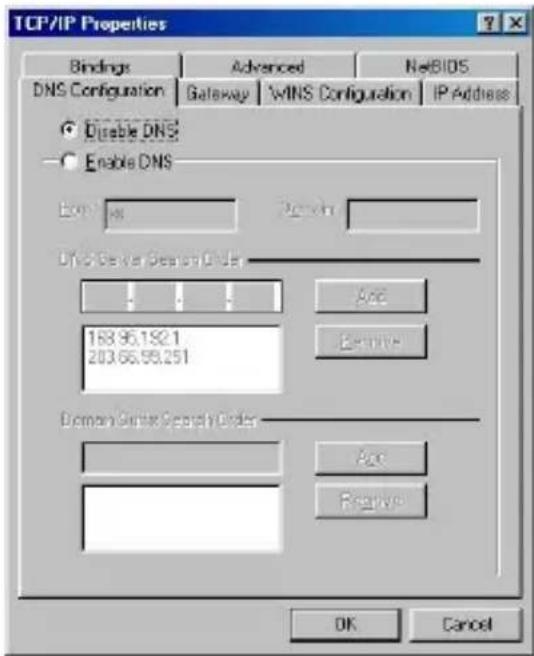
- Click on the Gateway tab. If there are any Installed gateways, select the gateway and click Remove.

- Click OK.
4-PORT BROADBAND ROUTER CONFIGURATION
First, make sure that the network connecons are funconing normally.
This Internet Broadband Router can be congured using Internet Explorer 6.0 or later.
Login into the 4-Port Broadband Router
- Open Internet Explorer 6.0 or higher.
- Enter hp://192.168.10.1 (the factory-default IP address seng) in the address bar.

http://192.168.10.1
- When the following dialog box appears, type in admin for the user name. Type in admin for the password and click OK.

Note: If you need to set a password, refer to the Administrator Sengs in Advanced Setup.
- Two setup opons appear: Quick Setup or Advanced Setup. It is recommended that you use Quick Setup if you are a beginner. It will lead you through the conguraon step-by-step.

Quick Setup
On the main webpage, select "Quick Setup" to specify the Time Zone and the WAN conncon type.
1- 1 Time Zone
Select the appropriate me zone so your system clock can synchronize itself through the SNTP Server.

1-2 WAN Connecon Type
To select the WAN conncon-type, click Dynamic IP (Cable Modem), Stac IP (Fixed-IP), PPPoE (Dial-up xDSL) or PPTP

1-2-1 Dynamic IP (Cable Modem)
To connect to a Dynamic IP (Cable Modem) Internet conncon with the Broadband Router, check the cable modem with the related user's guide. The Cable modem will automacally congregate itself, and the Broadband Router is congrured to automacally assign addresses to each PC.
If required by your ISP, input a host name and MAC address.


1-2-2 Stac IP
If your Internet Service Provider (ISP) has assigned you a xed IP address, select this opon. Enter the assigned IP address, subnet mask, and gateway IP for your Broadband Router.
| Static IP (Fixed-IP xDSL) | |
| IP address assigned by your ISP | 0.0.0.0 |
| Subnet Mask | 255.255.255.0 |
| ISP Gateway Address | 0.0.0.0 |

1-2-3 PPPoE (Dial-up xDSL)
If your DSL Internet conncon is PPPoE (Dial-up xDSL), your ISP will provide a Password and Username. Select this opon, and enter the required informaon. If your ISP provides a Service Name, enter it in the Service Name eld. Otherwise, leave it blank.
The Service Name, IP Address, and DNS Address elds must be completed if your ISP provided you with this informaon. If your ISP Provider provides a Dynamic IP Address, you should skip these elds.

Back
Next
The MTU feature species the largest packet size permied for network transmission. Enter the value desired; for most DSL users, 1492 is recommended. By default, MTU is set at 1492.
The Maximum Idle Time feature can control the conncon me if you want to reduce conncon fees charged by your ISP (default me=0, always connect). Check the Connect-on-demand box to enable your router to connect your ISP whenever an Internet conncon is required.
1-2-4 PPTP
If connecng to the Internet using a PPTP xDSL Modem, enter the PPTP Account Name, PPTP Password, Host Name, Service IP Address, your IP Address, and your Subnet Mask as provided by your ISP in the
appropriate elds. If your ISP has provided you with a Connecon ID, enter it in the Connecon ID eld. Otherwise, leave it blank.
| PPTP Account | |
| PPTP Password | |
| Please retype your password | |
| Host Name | |
| Service IP Address | 0.0.0.0 |
| My IP Address | 0.0.0.0 |
| My Subnet Mask | 255.255.255.0 |
| Connection ID | (Optional) |
| MTU (546-1460) | 1460 |
| Maximum Idle Time | 5 (1-60 minutes) |
| Connect mode select | ● Always-on ○ Manual ○ Connect-on-demand |
Back Next
The MTU feature species the largest packet size permied for network transmission. Enter the value desired; for most DSL users, 1492 is recommended. By default, MTU is set at 1492.
The Maximum Idle Time feature can control the conncon me (default me=0, always connect). Check the Connect-on-demand box to enable your router to connect your ISP whenever an Internet conncon is required.
1-3 DNS
The Domain Name System (DNS) is the way that Internet domain names are translated into Internet Protocol (IP) addresses.
| Primary DNS address | |
| Secondary DNS address |

If your ISP provided at least one DNS Server IP Address, type that IP Address in the Primary DNS address elds. You may also enter another DNS Server IP Address; the Router will ulize these simultaneously for quicker access to funconing DNS Servers.
Advanced Setup
The Broadband Router supports advanced funcons like System sengs, WAN sengs, LAN sengs, NAT Sengs, and Firewall sengs.
2-1 System
This page includes all of the basic conguraon tools for the Broadband Router. Choose from the selecons on the le side of the menu screen.

2-1-1 System Time
Connecng to a Simple Network Time Protocol (SNTP) server allows the Broadband Router to synchronize the system clock to the global Internet me through the SNTP Server. The synchronized clock in the Broadband Router is used to record the system log and control client ltering.


2-1-2 Administrator Sengs
- Password Sengs
Set a password if you wish to restrict management access to the Broadband Router.

- Remote Management
To manage the Broadband Router from a remote locaon (outside of the local network), you must specify the IP address of

the remote PC. Leave the IP address as 0.0.0.0, to allow open access to the router.
• UPnP (Universal Plug and Play)
To enable UPnP funconality, check the Enable box. The Adverse Time is the interval the router will send out UPnP adversements. By default, the router will send out an adversement every 1800 seconds.

2-1-3 Firmware Upgrade
Upgrading rmware for this Broadband Router improves funconality and performance. Enter the path and name of the upgrade le then click the APPLY buon below. You will be prompted to conrm the upgrade.

While updang the rmware, please wait aer pressing the Apply buon, and follow the instrucons on the screen; the Power Light on the front panel will start blinking when the rmware has been upgraded successfully.

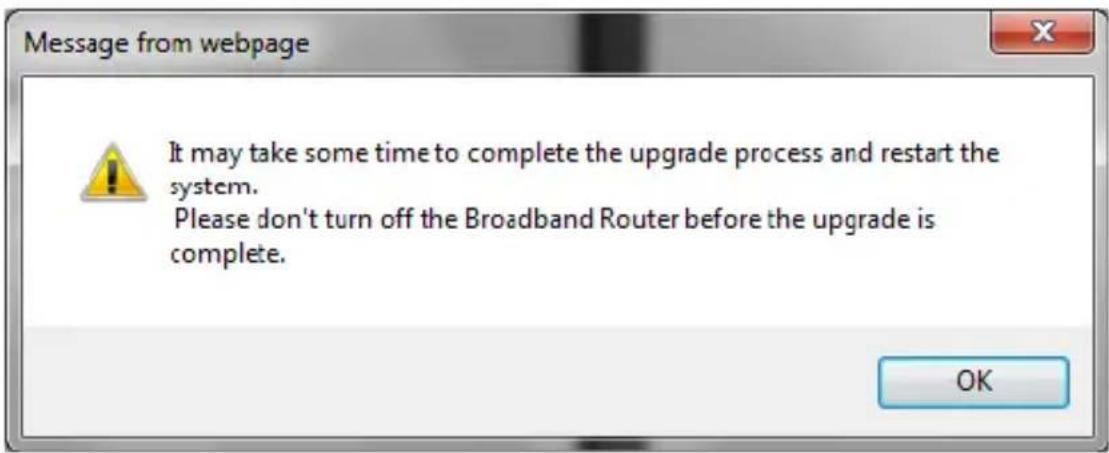
Upload firmware complete!!
And wait for rebooting...
2-1-4 Conguraon Tools
Use the "Backup Sengs" tool to save the Broadband Router's current conguraon to a le named "cong.bin" on your PC. You can then use
the "Restore Sengs" tool to restore the saved conguraon of the Broadband Router that was set previously. Select "Restore to Factory Defaults" tool to force the Broadband Router to reset and restore the original factory sengs.


- Restore Factory Default
To restore the factory default sengs of the Broadband Router, select the “Restore Factory Default Conguraon” opon. -
Backup Sengs
Select the "Backup Sengs" opon to save the current sengs in a le called "cong.bin," or save to a lename of your choosing. -
Restore Sengs
To restore the backup le to the Broadband Router, enter the path and lename of the backup le (i.e. cong.bin).
2-1-5 Status
The status screen will display the Broadband Routers' WAN/LAN interfaces, rmware and hardware version numbers, and the number of connected clients to the network.
WAN
| Connection Type | Dynamic IP |
| WAN IP | 192.168.12.108 |
| Subnet Mask | 255.255.255.0 |
| Gateway | 192.168.12.1 |
| DNS | 192.168.12.1 |
| Secondary DNS | 0.0.0.0 |
| Cable/DSL | Connected |
| Release Renew |
LAN
| IP Address | 192.168.10.1 |
| Subnet Mask | 256.255.255.0 |
| DHCP Server | Enabled |
INFORMATION
| System Time | Thu Jan 01 08:01:29 1970 |
| System Boot Up Time | 00.01.29 |
| Connected Clients | 1 |
| Runtime Code Version | 2.3.25 |
| Boot Code Version | 0.0.9.6 |
| LAN MAC Address | 00:E0:52:AE:D5:0B |
| WAN MAC Address | 00:E0:52:AE:D5:0C |
2-1-6 System Log
View any aempts that have been made to gain access to the network.

2-1-7 Reset
In the event that the Broadband Router stops responding correctly or in some way stops functioning, you can perform a reset. Your settings will not be changed. To perform the reset, click on the "Reset" button below. You will be asked to confirm your decision. The reset will be complete when the system light starts blinking.
Reset
2-2 WAN
The Broadband Router supports the following types of Internet connecons: Dynamic IP Address, Stac IP Address, PPPoE, and PPTP.
| Dynamic IP(Cable modem) | Obtain an IP address automatically from your service provider. |
| Static IP(Fixed-IP xDSL) | Uses a static IP address. Your service provider gives a static IP address to access Internet services. |
| PPPoE(Dial-Up xDSL) | PPP over Ethernet is a common connection method used for xDSL. |
| PPTP | PPTP is a popular connection method used for xDSL in Europe. |

2-2-1 Dynamic IP
The Host Name is oponal, but may be required by some Service Providers. The default MAC address is set to the WAN's physical interface on the Broadband Router. If the Service Provider requires the MAC address, type it in. Click the "Clone MAC Address" buon to copy the MAC address of the Network Interface Card installed in the PC. The WAN MAC address will be replaced by this MAC address.
If your ISP is BigPond (Australia), check the Enable box.


2-2-2 Stac IP
If the Service Provider has assigned a xed IP address, enter the assigned IP address subnet mask and gateway address provided. Click “yes” if are using two or more IP addresses.
| IP address assigned by your ISP | 0.0.0.0 |
| Subnet Mask | 255.255.255.0 |
| ISP Gateway Address | 0.0.0.0 |
| Does ISP provide more IP addresses | □Yes |

2-2-3 PPPoE (Dial-up xDSL)
If you're connecng to the Internet using a PPPoE (Dial-up xDSL) Modem and your ISP has provided you with a Password and Username, then your ISP uses PPPoE. Select this opon, and enter the required informaon. If the ISP provided a Service Name, enter it in the Service Name eld. Otherwise, leave it blank.
| User Name | |
| Password | |
| Please retype your password | |
| Service Name | (optional) |
| IP Address | (optional) |
| Primary DNS Address | (optional) |
| Secondary DNS Address | (optional) |
| MTU (546-1492) | 1492 |
| Maximum Idle Time | 5 (1-60 minutes) |
| Connect mode select | ○ Always-on ○ Manual ● Connect-on-demand |


The Service Name, IP Address, and DNS Address elds must be completed if your ISP provides you with this informaon. If your ISP provides a Dynamic IP Address, skip these elds.
The MTU feature species the largest packet size permied for network transmission. Enter the value desired; for most DSL users, 1492 is recommended. By default, MTU is set at 1492.
The Maximum Idle Time feature can control the conncon me (default me=0, always connect). Check the Connect-on-demand box to enable your router to connect your ISP whenever an Internet conncon is required.
2-2-4 PPTP
If connecng to the Internet using a PPTP Modem, enter the PPTP Account Name, PPTP Password, Host Name, Service IP Address, your IP Address, and your Subnet Mask as provided by your ISP in the appropriate elds. If your ISP has provided you with a Connecon ID, enter it in the Connecon ID eld. Otherwise, leave it blank.
The MTU feature species the largest packet size permied for network transmission. Enter the value desired; for most DSL users, 1492 is recommended. By default, MTU is set at 1492.


The Maximum Idle Time feature can control the conncon me (default me=0, always connect). Check the Connect-on-demand box to enable your router to connect your ISP whenever an Internet conncon is required.
2-2-5 DNS
The Domain Name System (DNS) is the way that Internet domain names are translated into Internet Protocol (IP) addresses.
| Domain Name Server (DNS) Address | |
| Secondary DNS Address (optional) |


If your ISP provided at least one DNS Server IP Address, type that IP Address in the Primary DNS address elds. You may also enter another DNS Server IP Address; the Router will ulize these simultaneously for quicker access to funconing DNS Servers.
2-2-6 Dynamic DNS
The Dynamic DNS feature allows you to host a server (Web, FTP, Game Server, etc.) using a host name with your dynamically assigned IP address. Most broadband Internet Service Providers assign dynamic IP addresses. When you use a Dynamic DNS service provider, your friends can enter your host name to connect to your server, no maer what your IP address is.

Apply Cancel
- Use Dynamic DNS
Check this opon to enable Dynamic DNS.
• Service Provider
Select a Dynamic DNS service provider from the dropdown list.
- Host Name
Enter the host name your Dynamic DNS service provider has assigned to you; for example: myhost.mydomain.net.
- User Name
Enter the username provided by your Dynamic DNS service provider.
- Password
Enter the password provided by your Dynamic DNS service provider.
2-3 LAN
To set the LAN's IP Address and congure DHCP server sengs.
2-3-1 LAN Sengs
The default value is 192.168.10.1 for the IP address and 255.255.255.0 for the Subnet Mask. You may change the value according to your needs.
To enable the DHCP server to allocate dynamic IP addresses to the clients PCs, click “Enable”. The client can get an IP Address that is between the IP Pool Starng Address and the IP Pool Ending Address. You may also change the IP Pool range value.


The Lease Time is the amount of me a network user will be allowed to connect to the Router with his/her current dynamic IP address. Enter the amount of me, in hours, days or weeks, which the user will be “leased” this dynamic IP address.
You can enter your local domain name in the Local Domain Name elds.
2-3-2 DHCP Client List
The DHCP client list allows you to see which clients are connected to the router via IP address, host name, and MAC address.
| IP Address | Host Name | MAC Address |
| 192.168.10.101 | 48:5B:39:2C:FB:36 |
Refresh
2-4 NAT
Network Address Translaon (NAT) allows mulple users at the local site to access the Internet through a single public IP address.
2-4-1 Special Applicaon
Some applicaons require mulple connecons, such as Internet gaming, video conferencing, and Internet telephony. These applicaons cannot work when Network Address Translaon (NAT) is enabled. When users send this type of request to your network via the Internet, the Router will forward those requests to the appropriate PC. If you need to run applicaons that require mulple connecons, specify the port normally associated with an applicaon in the "Trigger Port" eld, select the protocol type as TCP or UDP, then enter the public ports associated with the trigger port to open them for inbound trac. Up to 10 entries.
- TCP (Transmission Control Protocol) - A method (protocol) used along with the Internet Protocol (Internet Protocol) to send data in the form of message units between computers over the Internet. While IP takes care of handling the actual delivery of the data, TCP takes care of keeping track of the individual units of data (called packets) that a message is divided into for ecient round through the Internet.
- UDP (User Datagram Protocol) - A communicaons method (protocol) that oers a limited amount of service when messages are exchanged between computers in a network that use the Internet Protocol (IP). UDP is an alternate to the TCP and, together with IP, is somemes referred to as UDP/IP. Like the Transmission Control Protocol, UDP uses the Internet Protocol to actually get a data unit (called a datagram) from one computer to another. Unlike TCP, however, UDP does not provide the service of dividing a message into packets (datagrams) and reassembling it at the other end. Specifically, UDP doesn't provide sequencing of the packets that the data arrives in. This means that the applicaon program that uses UDP must be able to make sure that the enre message has arrived and is in the right order. Network applicaons that want to save processing me because they have very small data units to exchange (and therefore very lile message reassembling to do) may prefer UDP to TCP.
Example:
| ID | Trigger Port | Trigger Type | Public Port | Public Type | Comment |
| 1 | 28800 | UDP | 2300-2400, 47624 | UDP | MSN Game Zone |
| 2 | 28800 | UDP | 2300-2400, 47624 | TCP | MSN Game Zone |
| Trigger Port | Trigger Type | Public Port | Public Type | Enabled | |
| 1. | 28800 | TCP UDP | 2300-2400,47624 | TCP UDP | ☑ |
| 2. | 28800 | TCP UDP | 2300-2400,47624 | TCP UDP | ☑ |
| 3. | TCP UDP | TCP UDP | ☐ | ||
| 4. | TCP UDP | TCP UDP | ☐ | ||
| 5. | TCP UDP | TCP UDP | ☐ | ||
| 6. | TCP UDP | TCP UDP | ☐ | ||
| 7. | TCP UDP | TCP UDP | ☐ | ||
| 8. | TCP UDP | TCP UDP | ☐ | ||
| 9. | TCP UDP | TCP UDP | ☐ | ||
| 10. | TCP UDP | TCP UDP | ☐ |
2-4-2 Virtual Server
The virtual server opon allows you to dene port number on your router for redirecon to an internal LAN IP address. This feature is useful for hosng online services such as FTP or Web servers. Up to 10 entries. Example:
| ID | Server IP | Mapping Port | Type | Comment |
| 1 | 192.168.10.20 | 80 | TCP | Web Server |
| 2 | 192.168.10.12 | 20 | TCP | FTP Server |
| 3 | 192.168.10.12 | 21 | TCP | FTP Server |
| 4 | 192.168.10.28 | 23 | TCP | Telnet Server |
| Server IP | Mapping Ports | Type | Enabled | |
| 1. | 192.168.10.20 | 80 | TCP ○ UDP | ☑ |
| 2. | 192.168.10.12 | 20 | TCP ○ UDP | ☑ |
| 3. | 192.168.10.12 | 21 | TCP ○ UDP | ☑ |
| 4. | 192.168.10.28 | 23 | TCP ○ UDP | ☑ |
| 5. | 192.168.10. | TCP ○ UDP | ☐ | |
| 6. | 192.168.10. | TCP ○ UDP | ☐ | |
| 7. | 192.168.10. | TCP ○ UDP | ☐ | |
| 8. | 192.168.10. | TCP ○ UDP | ☐ | |
| 9. | 192.168.10. | TCP ○ UDP | ☐ | |
| 10. | 192.168.10. | TCP ○ UDP | ☐ |
Apply
Cancel
2-5 Firewall
The 4-Port Broadband Router provides extensive rewall protecon by restricng conncon parameters to limit the risk of hacker aacks and by defending against a wide array of common hacker aacks.
The 4-Port Broadband Router provides packet Itering rules by restrictive service ports, IP address or MAC address. However, for applications that require unrestricted access to the Internet, you may congregate a specific client/server as a demilitarized zone (DMZ).
2-5-1 Block WAN Ping
When "Block PING from WAN side" is checked, it is causes the public WAN IP address on the Broadband Router to ignore ping requests. Pinging public WAN IP addresses is a common method used by hackers to test whether the WAN IP address is valid.
Block PING from WAN side

Apply
Cancel
2-5-2 Client Filtering
To block certain client PCs from accessing the Internet:
You can Iter Internet access for local clients based on IP addresses, applicaon types, (i.e., HTTP port), and me of day.
For example, this screen shows that clients in the address range 192.168.10.50-99 are permanently restricted from using FTP (Port 21), while clients in the address range 192.168.10.110-119 are blocked from browsing the Internet (port 80) from Monday to Friday and from 12:00AM to 11:00 PM. Up to 6 entries.
Example:
| IP | Port | Type | Block Time | Day | Time | Enable | ||
| 1. | 192.168.10. | 50 ~ 99 | 21 ~ 21 | TCP UDP | Always Block | |||
| 2. | 192.168.10. | 110 ~ 119 | 80 ~ 80 | TCP UDP | Always Block | MON FRI | 12:00am ~ 11:00pm | |
| 3. | 192.168.10. | TCP UDP | Always Block | |||||
| 4. | 192.168.10. | TCP UDP | Always Block | |||||
| 5. | 192.168.10. | TCP UDP | Always Block | |||||
| 6. | 192.168.10. | TCP UDP | Always Block | |||||

2-5-3 MAC Address Control
MAC Address Control allows you to block certain client PCs from accessing the Internet based on MAC addresses. Up to 32 entries.


2-5-4 DMZ (Demilitarized Zone)
If a local client PC cannot run an Internet applicaon properly from behind the NAT rewall, open the client up to unrestricted two-way Internet access by dening a PC as a virtual DMZ Host. Up to 5 clients can be mapped to specic public IP addresses. Mulple DMZ entries only apply if you are using a stac IP address from your ISP and you have mulple stac public IP addresses assigned by your ISP. To add mulple stac public IP addresses, click on WAN > Stac IP and check the box that says “Yes” under “Does ISP provide more IP addresses”.


2-5-5 URL Filter
The URL Itering feature will allow you to deny access to specific websites.


2-6 Roung
Allows you to create or dene stac routes on the LAN.
Up to 20 stac round entries.
2-6-1 Stac Roung
Stac round allows you to denote routes to other networks to round devices or routers that are located on your LAN network.
| Destination LAN IP | Subnet Mask | Gateway | |
| << Add |

TECHNICAL SPECIFICATIONS
| Hardware | |
| Standards | IEEE 802.3 10BASE-T Ethernet; IEEE 802.3u 100BASE-TX Fast Ethernet |
| Network Protocols | TCP/IP, NAT, PPPoE, UPnP, HTTP, DHCP Server, SNTP |
| WAN | 1 x 10/100Mbps Auto-MDIX port (Internet) |
| LAN | 4 x 10/100Mbps Auto-MDIX ports |
| Cabling | Ethernet: Cat. 5 up to100 mFast Ethernet: Cat. 5, 5e, 6 up to 100 m |
| Data Transfer Rate | Ethernet : 10Mbps/20Mbps (Half-Duplex/Full-Duplex)Fast Ethernet: 100Mbps/200Mbps (Half-Duplex/Full-Duplex) |
| LED Indicators | Power, WAN, Link/Act, LAN ports 1-4 |
| Dimension | 97 x 78 x 33 mm (3.8 x 3.1 x 0.1 in.) |
| Weight | 113 g (4 oz.) |
| Temperature | Operang: 0 °~ 40 °C (32 °~ 104 °F)Storage: -40 ° ~ 70 °C (-40 ° ~ 158 ° F) |
| Humidity | Max. 90% (non-condensing) |
| Power Adapter | 5V DC, 1A or 7.5V DC, 1A |
| Power Consumpon | 2.93 W (max) |
| Cercaons | CE, FCC |
| Router | |
| Connecon Type | Dynamic IP, Stac (Fixed) IP, PPPoE, PPTP |
| Firewall | NATUPnPIP / MAC Address Filter (32 entries)Domain / URL Blocking (32 entries)Scheduling (6 entries)Special Applicaons (10 entries)Virtual Servers (6 entries)DMZ (5 entries) |
| Roung | Stac Routes (20 entries) |
| VPN | IPSec, L2TP, PPTP pass-through (Up to 8 VPN sessions) |
| Management | Web browser conguraon |
TRENDnet warrants its products against defects in material and workmanship, under normal use and service, for the following lengths of me from the date of purchase.
TW100-S4W1CA – 3 Years Warranty
AC/DC Power Adapter, Cooling Fan, and Power Supply carry 1 year warranty.
If a product does not operate as warranted during the applicable warranty period, TRENDnet shall reserve the right, at its expense, to repair or replace the defective product or part and deliver an equivalent product or part to the customer. The repair/replacement unit's warranty connues from the original date of purchase. All products that are replaced become the property of TRENDnet. Replacement products may be new or reconditioned. TRENDnet does not issue refunds or credit. Please contact the point-of-purchase for their return policies.
TRENDnet shall not be responsible for any soware, rmware, informaon, or memory data of customer contained in, stored on, or integrated with any products returned to TRENDnet pursuant to any warranty.
There are no user serviceable parts inside the product. Do not remove or aempt to service the product by any unauthorized service center. This warranty is voided if (i) the product has been modified or repaired by any unauthorized service center, (ii) the product was subject to accident,
abuse, or improper use (iii) the product was subject to conditions more severe than those specied in the manual.
Warranty service may be obtained by contacng TRENDnet within the applicable warranty period and providing a copy of the dated proof of the purchase. Upon proper submission of required documentaon a Return Material Authorizaon (RMA) number will be issued. An RMA number is required in order to initiate warranty service support for all TRENDnet products. Products that are sent to TRENDnet for RMA service must have the RMA number marked on the outside of return packages and sent to TRENDnet prepaid, insured and packaged appropriately for safe shipment. Customers shipping from outside of the USA and Canada are responsible for return shipping fees. Customers shipping from outside of the USA are responsible for custom charges, including but not limited to, duty, tax, and other fees.
WARRANTIES EXCLUSIVE: IF THE TRENDNET PRODUCT DOES NOT OPERATE AS WARRANTED ABOVE, THE CUSTOMER'S SOLE REMEDY SHALL BE, AT TRENDNET'S OPTION, REPAIR OR REPLACE. THE FOREGOING WARRANTIES AND REMEDIES ARE EXCLUSIVE AND ARE IN LIEU OF ALL OTHER WARRANTIES, EXPRESSED OR IMPLIED, EITHER IN FACT OR BY OPERATION OF LAW, STATUTORY OR OTHERWISE, INCLUDING WARRANTIES OF MERCHANTABILITY AND FITNESS FOR A PARTICULAR PURPOSE. TRENDNET NEITHER ASSUMES NOR AUTHORIZES ANY OTHER PERSON TO ASSUME FOR IT ANY OTHER LIABILITY IN CONNECTION WITH THE SALE, INSTALLATION MAINTENANCE OR USE OF TRENDNET'S PRODUCTS.
TRENDNET SHALL NOT BE LIABLE UNDER THIS WARRANTY IF ITS TESTING AND EXAMINATION DISCLOSE THAT THE ALLEGED DEFECT IN THE
PRODUCT DOES NOT EXIST OR WAS CAUSED BY CUSTOMER'S OR ANY THIRD PERSON'S MISUSE, NEGLECT, IMPROPER INSTALLATION OR TESTING, UNAUTHORIZED ATTEMPTS TO REPAIR OR MODIFY, OR ANY OTHER CAUSE BEYOND THE RANGE OF THE INTENDED USE, OR BY ACCIDENT, FIRE, LIGHTNING, OR OTHER HAZARD.
LIMITATION OF LIABILITY: TO THE FULL EXTENT ALLOWED BY LAW TRENDNET ALSO EXCLUDES FOR ITSELF AND ITS SUPPLIERS ANY LIABILITY, WHETHER BASED IN CONTRACT OR TORT (INCLUDING NEGLIGENCE), FOR INCIDENTAL, CONSEQUENTIAL, INDIRECT, SPECIAL, OR PUNITIVE DAMAGES OF ANY KIND, OR FOR LOSS OF REVENUE OR PROFITS, LOSS OF BUSINESS, LOSS OF INFORMATION OR DATE, OR OTHER FINANCIAL LOSS ARISING OUT OF OR IN CONNECTION WITH THE SALE, INSTALLATION, MAINTENANCE, USE, PERFORMANCE, FAILURE, OR INTERRUPTION OF THE POSSIBILITY OF SUCH DAMAGES, AND LIMITS ITS LIABILITY TO REPAIR, REPLACEMENT, OR REFUND OF THE PURCHASE PRICE PAID, AT TRENDNET'S OPTION. THIS DISCLAIMER OF LIABILITY FOR DAMAGES WILL NOT BE AFFECTED IF ANY REMEDY PROVIDED HEREIN SHALL FAIL OF ITS ESSENTIAL PURPOSE.
Governing Law: This Limited Warranty shall be governed by the laws of the state of California.
Some TRENDnet products include soware code written by third party developers. These codes are subject to the GNU General Public License ("GPL") or GNU Lesser General Public License ("LGPL").
Go to hp://www.trendnet.com/gpl or hp://www.trendnet.com
Download secon and look for the desired TRENDnet product to access to the GPL Code or LGPL Code. These codes are distributed WITHOUT WARRANTY and are subject to the copyrights of the developers.
TRENDnet does not provide technical support for these codes. Please go to hp://www.gnu.org/licenses/gpl.txt or
hp://www.gnu.org/licenses/lgpl.txt for specific terms of each license.
PWP05202009v2

TRENDNET®
Product Warranty Registration
Please take a moment to register your product online. Go to TRENDnet's website at http://www.trendnet.com/register
- CE Mark Warning
- TABLE OF CONTENTS
- ABOUT THIS GUIDE
- Purpose
- Overview of this User's Guide
- Applicaons:
- Broadband Internet access sharing:
- Resource sharing:
- File sharing:
- Online gaming:
- Firewall:
- Features:
- Unpacking
- Setup
- Front Panel
- 4-Port Broadband Router Front Panel
- POWER
- WAN
- Rear Panel
- LAN (1-4)
- Side Panel
- Power Port
- RESET
- Connect the Internet Broadband Router
- Check the installaon
- Windows 7/ Vista
- Windows XP/2000
- Windows NT4.0
- Windows 95/98/ME
- 4-PORT BROADBAND ROUTER CONFIGURATION
- Login into the 4-Port Broadband Router
- Quick Setup
- 1- 1 Time Zone
- 1-2 WAN Connecon Type
- 1-2-1 Dynamic IP (Cable Modem)
- 1-2-2 Stac IP
- 1-2-3 PPPoE (Dial-up xDSL)
- Back
- Next
- 1-2-4 PPTP
- Back Next
- 1-3 DNS
- Advanced Setup
- 2-1 System
- 2-1-1 System Time
- 2-1-2 Administrator Sengs
- 2-1-3 Firmware Upgrade
- Upload firmware complete!!
- 2-1-4 Conguraon Tools
- 2-1-5 Status
- 2-1-6 System Log
- 2-1-7 Reset
- 2-2 WAN
- 2-2-1 Dynamic IP
- 2-2-2 Stac IP
- 2-2-3 PPPoE (Dial-up xDSL)
- 2-2-4 PPTP
- 2-2-5 DNS
- 2-2-6 Dynamic DNS
- Apply Cancel
- 2-3 LAN
- 2-3-1 LAN Sengs
- 2-3-2 DHCP Client List
- Refresh
- 2-4 NAT
- 2-4-1 Special Applicaon
- 2-4-2 Virtual Server
- 2-5 Firewall
- 2-5-1 Block WAN Ping
- Apply
- Cancel
- 2-5-2 Client Filtering
- 2-5-3 MAC Address Control
- 2-5-4 DMZ (Demilitarized Zone)
- 2-5-5 URL Filter
- 2-6 Roung
- 2-6-1 Stac Roung
- TRENDNET®
- Product Warranty Registration
Brand : TRENDNET
Model : TW100-S4W1CA
Category : Router