
HEV620W - Humidifier HONEYWELL - Free user manual and instructions
Find the device manual for free HEV620W HONEYWELL in PDF.


| Product Type | Evaporative Humidifier |
| Model | HEV620W |
| Brand | Honeywell |
| Water Tank Capacity | 1.7 gallons (6.4 liters) |
| Power Supply | 120V, 60 Hz, 43 Watts |
| Humidification Technology | Evaporative with wicking filter |
| Filter Type | Wicking filter (replacement model HFT600) |
| Moisture Output Settings | Low, Medium, High |
| Humidity Control Range | 30% – 69% relative humidity (settable) |
| Timer Settings | 4, 8, 12 hours (auto shut-off) |
| Indicator Lights | Refill (orange), Check Filter (orange), Humidity Reached (blue) |
| Automatic Shut-Off | Yes (when tank empty or set humidity reached) |
| Placement Requirements | Firm, flat, waterproof surface; ≥12 in. from walls; ≥4 ft. from bedside |
| Polarized Plug | Yes (safety feature) |
| Warranty | 3 years limited |
| Recommended Replacement Filter | Honeywell HFT600 |
| Accessories (not included) | Honeywell HHM10 Humidity Monitor |
Frequently Asked Questions - HEV620W HONEYWELL
User questions about HEV620W HONEYWELL
0 question about this device. Answer the ones you know or ask your own.
Ask a new question about this device
Download the instructions for your Humidifier in PDF format for free! Find your manual HEV620W - HONEYWELL and take your electronic device back in hand. On this page are published all the documents necessary for the use of your device. HEV620W by HONEYWELL.
USER MANUAL HEV620W HONEYWELL
natural_image
Two Honeywell electric heating devices shown from different angles, one white and one gray, with no visible text or symbols on the devices themselves.⚠️ IMPORTANT SAFETY INSTRUCTIONS READ AND SAVE THESE SAFETY INSTRUCTIONS BEFORE USING THIS HUMIDIFIER
When using electrical appliances, basic precautions should always be followed to reduce the risk of fire, electric shock, and injury to persons, including the following:
- The humidifier should ALWAYS be placed on a firm, flat, waterproof surface at least four feet (1.2 m) away from bedside, twelve inches (30 cm) from the wall, and out of reach of children and pets.
- Be sure the humidifier is in a stable position and the power cord is away from heated surfaces and out of the way to prevent the humidifier from being tipped over.
- Before using the humidifier, extend the cord and inspect for any signs of damage. DO NOT use the unit if the cord has been damaged.
- The humidifier has a polarized plug (one blade is wider than the other) as a safety feature. This plug will fit into a polarized outlet only one way. If the plug does not fit fully into the outlet, reverse the plug. If it still does not fit, contact a qualified electrician. DO NOT attempt to defeat this safety feature.
- ⚠️ CAUTION: To avoid fire or shock hazard, plug the humidifier directly into a 120V AC electrical outlet. To avoid risk of fire, shock or personal injury DO NOT use an extension cord or power strip.
-
Shut off and unplug humidifier before moving. The humidifier should ALWAYS be unplugged and emptied when not in operation or while being cleaned. DO NOT move or tilt humidifier while it is in operation. Plug and unplug humidifier with dry hands. NEVER pull by cord.
-
When moving or lifting the full Water Tank, use two hands; one hand on the Tank Handle and the other on the bottom of the Tank.
- DO NOT add any medications, inhalants, scented products or essential oils into Base, Water Reservoir or Water Tank.
- DO NOT cover or insert objects into any openings on the humidifier.
- DO NOT block intake or output vents.
- DO NOT operate the humidifier without water. Turn off and unplug unit when Tank is empty.
- Humidifier requires regular cleaning. Refer to, and follow, cleaning instructions.
- DO NOT operate outdoors; this appliance is intended for indoor use.
- DO NOT attempt to repair or adjust any electrical or mechanical functions on this humidifier. Doing so will void your warranty.
- For residential use only.
SAVE THESE INSTRUCTIONS
GETTING TO KNOW YOUR HUMIDIFIER
Invisible moisture
- Evaporative humidification means you will NOT see the moisture output.
- With evaporative humidification, a fan pulls dry air from the room through the saturated wicking filter. Moisture from the wicking filter evaporates and is pushed into the room with the help of the fan.
- Evaporative humidification adjusts moisture output to the amount of moisture the air can hold. The drier (less humid) the air in the room, the more moisture the humidifier will add to the air. An evaporative humidifier cannot add more moisture to the room than the air can hold. The amount of moisture the air can hold depends on many factors including relative humidity level, temperature and size of room.

Filter
- A wicking filter is required for this unit to operate (one included).
- The wicking filter will help to capture minerals from your water and will help to prevent white dust (calcium deposits from hard water).
- If you have hard water, you will need to replace your filter more frequently.
- See "Caring for your Filter" section for tips on prolonging the life of your wicking filter.
Humidity Level
• A comfortable indoor humidity level is 40-60%.
- Use a Honeywell humidity monitor (HHM10) to check your indoor humidity level (not included).


GETTING TO KNOW YOUR HUMIDIFIER (CONTINUED)
How It Works:
Water is released into the Reservoir when the Float Paddle engages the Plunger at the bottom of the water tank. A Wicking Filter absorbs water from the Reservoir. A fan pulls dry air from the room into the humidifier where it passes through the saturated Wicking Filter. The filter captures minerals and other impurities from the water, before the moisture is evaporated back into the dry room with the help of the fan. The amount of moisture output depends on many factors, including the current room humidity and temperature. As the humidity level in the room increases, the moisture output decreases, which prevents over humidification.

Components
- Grill
- Control Panel
- Housing
- Tank Cover
-
Tank Handle
-
Water Tank
- Tank Feet
- Plunger (under tank)
- Filter Cartridge
-
Reservoir
-
Base
- Float Paddle
- Locking Knob
- Filter Cartridge Handle
-
Wicking Filter
-
Filter Cartridge Door
- Air Input Grill
SETTING UP YOUR HUMIDIFIER
Unpack the Humidifier
Keep this instruction manual for reference.
- Remove packaging materials.
Locate Float Paddle and set aside.
This is required for operation. - Remove twist tie and extend power cord.
Place on a firm, level, water resistant surface
a minimum of 12 inches (30 cm) from walls.


Float Paddle Installation - required for humidifier to operate
This humidifier uses a float system to regulate the water flow from the Tank to the Reservoir.
The Float Paddle must be properly installed for the unit to operate. If not properly installed, water may not flow into the Reservoir or it may leak from the Base. The Float Paddle is designed to be easy to install and remove.

CAUTION: IMPROPER PLACEMENT OF THE FLOAT PADDLE COULD RESULT IN LEAKING OR WATER NOT FEEDING TO THE RESERVOIR.


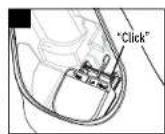


- Remove Water Tank.
- Line up Float Paddle with the float paddle shape on the bottom of the Reservoir.
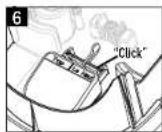
- Place Float Rod over the Brackets and press firmly until you hear it click into place.
- Pull gently up on the Float Rod to be sure it doesn't pop out of the Brackets.
- Place Water Tank back in Base.
FILLING / REFILLING THE WATER TANK
DO NOT ADD ESSENTIAL OILS to the water tank. Doing so could cause damage to the humidifier and void the warranty.
This humidifier holds a maximum of 1.7 gallons (6.4 liters) of water.
FILLING/REFILLING THE WATER TANK (CONTINUED)
The Tank can be filled in two ways:
Option 1: At the Humidifier Option 2: At the Sink
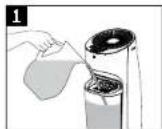

Both filling options can be performed with or without the Tank Cover in place. Be sure to replace the Cover before using the humidifier to keep objects and debris out of the water.
Note: Ensure the Float Paddle has been placed correctly in the Reservoir before filling. See Float Paddle Installation instructions if necessary
Consumer assumes all responsibility for properly damage resulting from improperly filled humidifier.
Option 1: To Fill Tank at the Humidifier
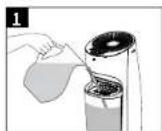

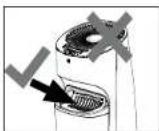
- Pour cool water from a pitcher or jug directly into the Water Tank. It is not necessary to remove the Tank Cover. DO NOT overfill.
CAUTION: DO NOT POUR WATER INTO THE GRILL
Option 2: To Fill Tank at the Sink


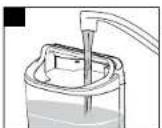
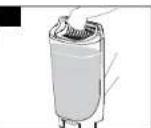
- Grasp Tank Handle and pull Tank forward to remove from Base. Carry Tank to sink.
- Remove Tank Cover if desired. Tank may also be filled through the openings in the Tank Cover.
- Fill Tank with cool water. DO NOT overfill. Replace the Tank Cover if it was removed.
- Carry Water Tank back to humidifier and replace on Base.
CAUTION: USE CARE WHEN HANDLING WATER TANK TO AVOID UNNECESSARY IMPACT. BANGING OR DROPPING THE WATER TANK COULD RESULT IN DAMAGE TO THE TANK THAT MAY CAUSE LEAKING.
USING YOUR HUMIDIFIER - HEV620

Power
- Plug humidifier into a 120V outlet.
CAUTION: TO AVOID ELECTRIC SHOCK, DO NOT PLUG HUMIDIFIER INTO OUTLET WITH WET HANDS.
2. Press Power Button (A).
Humidifier will turn on to high output and high humidity settings. Press again to turn off. If humidifier was programmed before turning off, previous settings will be remembered. Unplugging the humidifier resets to default settings.
Moisture Output
- Press the Moisture Output button (16) to toggle through low, medium, and high moisture output settings.
A higher setting will provide more moisture output. The fan will pull more moisture off the Wicking Filter and into the air. The water level in the Water Tank will decrease faster with a higher setting, since more moisture is going into the air.
A lower setting will provide less moisture output. The fan will run quieter, and the Water Tank will not have to be filled as frequently, since less moisture is going into the air.
NOTE: While the humidifier is operating, you will hear the fan running but will not see the moisture output. This is normal for an evaporative humidifier.
Humidity Control
- Press the Humidity Control arrows Ⓞ to set the desired humidity level.
To scroll through the numbers faster, press and hold the arrow for 3 seconds.
Release the button once the desired level is shown. Display will blink three times showing the SET humidity level, then the display will return to show the current room humidity level.
CURRENT will illuminate on the display to indicate the current room humidity level.
USING YOUR HUMIDIFIER - HEV620 (CONTINUED) USING YOUR HUMIDIFIER - HEV615
The humidistat can be set between 30%-69%. Below 30%, LO will illuminate on the display to indicate the minimum humidity level. Above 69%, the display will show HI to indicate the maximum humidity level is set.
NOTE: The % number displayed on the control panel represents the relative humidity (RH) as measured at the Humidistat sensor. The relative humidity in your room may vary from the number displayed on the humidifier. To measure the RH level in your room, consider using a Honeywell humidity monitor (HHM10, not included) that can be moved around in the room.
Humidity Reached (US models only)
When the set humidity level is reached HUMIDITY REACHED will appear on the display and the humidifier will turn off. As long as HUMIDITY REACHED is illuminated, the fan will not run.
Once the humidity level drops below the set level, HUMIDITY REACHED will disappear and the humidifier will start running again.
To increase the set humidity level, press the Humidity Control arrows
Timer
Press the Button (D) to set the Timer to 4, 8 or 12 Hours.
NOTE: Humidifier will continue to cycle on and off to maintain the set humidity level while the Timer is set. At the end of the timed cycle, the humidifier will power off, regardless of the humidity setting. Any time the humidifier is manually turned off (with the power button or by unplugging) the timer will reset to OFF setting.
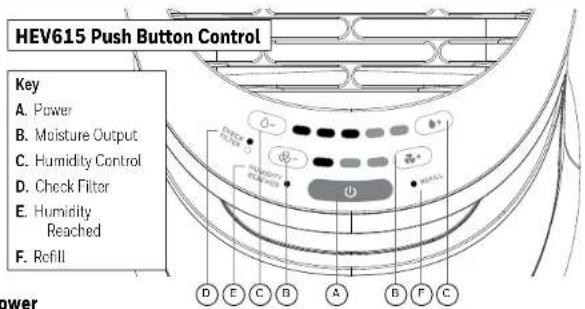
Power
- Plug humidifier into a 120V outlet.
CAUTION: TO AVOID ELECTRIC SHOCK, DO NOT PLUG HUMIDIFIER INTO OUTLET WITH WET HANDS.
2. Press Power button
Humidifier will turn on to high output and high humidity settings. Press again to turn off. If humidifier was programmed before turning off, previous settings will be remembered. Unplugging the humidifier resets to default settings.
Moisture Output
- Press the Moisture Output buttons (B) to adjust the moisture output level accordingly.
A higher setting will provide more moisture output. The fan will pull more moisture off the Wicking Filter and into the air. The water level in the Water Tank will decrease faster with a higher setting, since more moisture is going into the air. A lower setting will provide less moisture output. The fan will run quieter, and the Water Tank will not have to be filled as frequently, since less moisture is going into the air.
Humidity Control
- Press the Humidity Control buttons or - (C) to set the desired humidity level.
It is recommended to run the humidifier for at least an hour, or until a comfortable humidity level is reached. Then adjust the Humidity Control button down until the Humidity Reached Indicator light illuminates and the humidifier turns off. This is your desired humidity level. The humidifier will turn on and off to maintain this setting.
Humidity Reached
When the set humidity level is reached, the blue Humidity Reached Indicator light (E) will illuminate, and the humidifier will turn off. As long as this light is illuminated, the fan will not run. Once the humidity level drops below the set humidity level, the blue light will turn off, and the humidifier will start running again. To increase the set humidity level, press the 🔊+ button.
INDICATOR LIGHTS (ALL MODELS)
Refill
When the Water Tank is empty, the humidifier will automatically shut off and the orange Refill Indicator (F) will illuminate. Turn off the humidifier and refill the Tank. See Filling/Refilling Water Tank on previous pages.
NOTE: If the humidifier will not be used for more than a few days, empty the water from the Water Tank and Water Reservoir and dry out the Filter.
Check Filter
After 30 days the orange Check Filter indicator will illuminate to remind you to check your Wicking Filter. Remove the Filter Cartridge from the back of the humidifier, and check to see if it needs to be replaced. To reset this light, press and hold the Check Filter button for 2 seconds. If humidifier is unplugged, the 30 day counter will start over.
CARING FOR YOUR FILTER
To remove the filter
CAUTION: FILTER MAY BE SATURATED WITH WATER. REMOVE SLOWLY TO GIVE FILTER TIME TO DRAIN BEFORE REMOVING. THIS WILL HELP PREVENT DRIPPING ON YOUR FLOOR OR OTHER SURFACES.
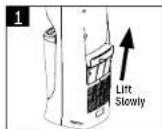

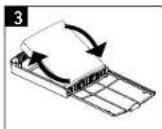
- Pull the Filter Cartridge Handle straight up slowly, listening for water dripping from the filter.
- With the Cartridge fully removed, flip the Cartridge Door open.
- Remove the filter, and either
a. Flip top to bottom to ensure the top does not dry out OR b. Replace with a new filter.
To prolong the life of your Wicking Filter, turn it over each time you fill the Water Tank. This will keep the top of the Filter from drying out and will help the Filter to age more evenly.
If you notice the Filter getting hard, you may soak it in cool water to loosen mineral buildup. This will temporarily improve performance of the Wicking Filter until a replacement Filter is purchased.
DO NOT attempt to clean the Wicking Filter with vinegar, soap or any chemical solutions. Doing so may damage the Filter.
It is recommended you change your Wicking Filter every 30-60 days depending on water quality and usage.
If you have hard water, you may need to replace your Filter more frequently. Change your Filter if you notice:
• The Filter is hard and crusty
- The Filter starts to give off an odor
- Moisture output is decreased
CARING FOR YOUR FILTER (CONTINUED)
Be sure to use only genuine Honeywell Replacement Filters.
Humidifier Filters and accessories require replacement and are not covered under warranty.
Find replacement filters at retailers or at
www.HoneywellPluggedIn.com

Replacement Filter
HFT600
CLEANING YOUR HUMIDIFIER
To keep your humidifier running efficiently, clean it regularly. Weekly cleaning is recommended. All maintenance should be done in the kitchen or bathroom on a water resistant surface near a faucet.
To properly clean your humidifier we recommend the separate processes of Scale Removal and Disinfecting.
These two processes must be performed separately.


Before Cleaning
- Turn off and unplug humidifier. NEVER clean the humidifier when it is running.
- Remove Water Tank and Tank Cover. Empty water from Tank.
- Remove Wicking Filter. Pull the Filter Cartridge Handle straight up slowly, listening for water dripping from the filter.
CAUTION: FILTER MAY BE SATURATED WITH WATER. REMOVE SLOWLY TO GIVE FILTER TIME TO DRAIN BEFORE REMOVING. THIS WILL HELP PREVENT DRIPPING ON YOUR FLOOR OR OTHER SURFACES.
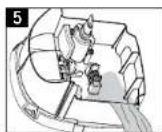
- Remove Housing from Base.
a. Turn Locking Knob to the right toward the unlock symbol.
b. Lift Housing from the Base and set aside. - Holding the Base, empty water from the Reservoir.
CLEANING YOUR HUMIDIFIER (CONTINUED)
Scale Removal
Follow steps 1-5 in Before Cleaning section, then follow the additional steps below
Note: Filter must be removed from humidifier before cleaning; DO NOT clean Filter with vinegar.


- Pour a minimum of 3 cups (.7 liters) of undiluted distilled white vinegar in the Water Tank. Gently swish vinegar around in the Tank to wet entire inside of Tank.
- Place Tank on Base. Vinegar will drain into the Water Reservoir and loosen mineral buildup (scale) in the Reservoir and bottom of the Water Tank. There should be enough vinegar to cover the bottom inside of the Tank.
- Soak for 20 minutes, then remove Water Tank and slowly empty vinegar into sink. Rinse with tap water until the smell of vinegar is gone.
- Remove Float Paddle from Reservoir by lifting up on Float Rod and set aside. Wipe Float Paddle and Reservoir area with a soft cloth to remove loosened minerals.
- Empty vinegar from Base and Reservoir area: rinse with water until the smell of vinegar is gone.
- Place Float Paddle back in Reservoir, ensuring Float Rod is secured in brackets. For detailed instructions, refer to the Float Paddle Installation section.
CAUTION: IMPROPER PLACEMENT OF THE FLOAT PADDLE COULD RESULT IN LEAKING OR WATER NOT FEEDING TO THE RESERVOIR.
CLEANING YOUR HUMIDIFIER (CONTINUED)
Disinfecting
Follow steps 1-5 in Before Cleaning section, then follow the additional steps below.
Filter must be removed from humidifier before cleaning. DO NOT clean Filter with bleach solution.
Note: Bleach may stain clothes. It is recommended that you wear rubber gloves during this process to protect your hands.
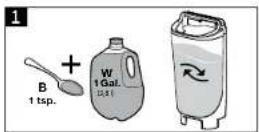


- Add 1 teaspoon of bleach to 1 gallon (3.8 L) of water. Pour the bleach solution into the Tank.
Note: Using more than 1 teaspoon of bleach to 1 gallon (3.8L) of water may result in damage to the humidifier.
- Place Tank on Base. Bleach solution will drain into the Water Reservoir.
- Soak for 20 minutes, then remove the Water Tank and slowly empty bleach solution into sink. Rinse Tank with tap water until the smell of bleach is gone.
- Remove Float Paddle from Reservoir by lifting up on Float Rod and set aside.
- Empty bleach solution from Base and Reservoir area; rinse with water until the smell of bleach is gone.
- Place Float Paddle back in Reservoir, ensuring Float Rod is secured in brackets. For detailed instructions, refer to the Float Paddle Installation section.
CAUTION: IMPROPER PLACEMENT OF THE FLOAT PADDLE COULD RESULT IN LEAKING OR WATER NOT FEEDING TO THE RESERVOIR.
CLEANING YOUR HUMIDIFIER (CONTINUED)
Reassembling
After descaling and disinfecting, follow these steps to reassemble the unit:

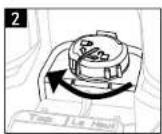


- Place Housing on Base.
- Turn Locking Knob to the left toward the lock symbol.
- Ensure Float Rod is secured in brackets. For detailed instructions, refer to Float Paddle Installation section.
CAUTION: IMPROPER PLACEMENT OF THE FLOAT PADDLE COULD RESULT IN LEAKING OR WATER NOT FEEDING TO THE RESERVOIR.
- Place Tank on Base. Replace Tank Cover.
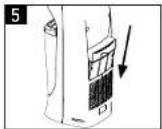
- Install Filter Cartridge in back of Housing. See Caring for Your Filter section for tips about changing and maintaining your Wicking Filter.
End of Season Cleaning and Storage
Follow the cleaning instructions when the humidifier will not be used for at least one week, or at the end of the season.
At the end of the season, remove any accessories and discard. Allow the humidifier and all components to dry completely before storing.
DO NOT store humidifier with water inside the Reservoir or Water Tank. Pack unit safely and store in cool dry location.
TROUBLESHOOTING
If your humidifier is not working properly, refer to the following:
| PROBLEM POSSIBLE CAUSE SOLUTION | ||
| Humidifier shuts off Set Humidity level has been reachedWater Tank is emptyTimer has expired (HEV620 only) | Increase Moisture Output Setting. See Using Your Humidifier sectionFill the Tank with WaterTurn on humidifier by pressing the Power button. Set Moisture Output and Humidity Control. See Using Your Humidifier | |
| Water is not draining into Reservoir | Float Paddle not installed correctlyPlunger is stuck | See Float Paddle Installation instructions in Setting Up Your HumidifierPush and release Plunger to be sure it is moving frocly |
| Water Is leaking from Base or Reservoir | Float Paddle is not installed correctlyPlunger is damagedPlunger is stickingPlunger may have foreign material stuck under the Tank GasketTank is cracked | See Float Paddle Installation instructions in Setting Up Your HumidifierContact Consumer RelationsPush and release Plunger to be sure it is moving froclyAt sink, push and release Plunger system so water may flowInspect tank for damage; contact Consumer Relations |
| Tank and Base are slimy | Need to clean | See Caring for your Humidifier |
| Odor coming from Grill Filter needs to be replaced Replace with Honeywell HFT600 replacement wicking filter | ||
| Water drips on floor when removing filter | Saturated wicking filter removed too quickly | Remove Filter Cartridge slowly to allow excess water to drain |
| Fan is running but water level is not going down | Filter is clogged with mineral depositsRelative humidity level in room is too high | Replace with Honeywell HFT600 replacement wicking filterIf running humidifier in closed room, open doors to ventilate |
For additional troubleshooting help, call Consumer Relations at 800-332-1110.
ACCESSORIES NOT INCLUDED
To help you get the most out of your humidifier experience, consider these helpful accessories:
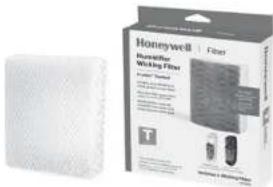
Honeywell Replacement Wicking Filter
Honeywell HFT600
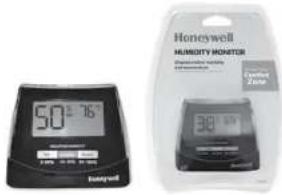
Humidity Monitor
Displays relative humidity and room temperature so you can maintain a comfortable humidity level in your home.
Honeywell HHM10
Available at retailers or www.HoneywellPluggedIn.com
CONSUMER RELATIONS
For questions, technical support or to order replacement parts, contact Consumer Relations.
Call us toll-free at: 800-332-1110
Hours: Mon-Fri 8:00AM-7:00PM EST
Or visit our website at: HoneywellPluggedIn.com/contact-us
Please be sure to specify Model number HEV615 or HEV620.
SPECIFICATIONS
Electrical rating: 120V, 60 Hz, 43 Watts
Capacity: 1.7 gallons (6.4 liters)
If you experience a problem, please contact Consumer Relations. Do not return this humidifier to the original place of purchase.
DO NOT attempt to open the motor housing or tamper with the product yourself. Doing so may void your warranty and cause personal injury or damage to the product.
3 YEAR LIMITED WARRANTY
You should first read all instructions before attempting to use this product.
A. This 3 year limited warranty applies to repair or replacement of product found to be defective in material or workmanship. This warranty does not apply to damage resulting from commercial, abusive, unreasonable use or supplemental damage. Defects that are the result of normal wear and tear will not be considered manufacturing defects under this warranty. KAZ IS NOT LIABLE FOR INCIDENTAL OR CONSEQUENTIAL DAMAGES OF ANY NATURE, ANY IMPLIED WARRANTY OF MERCHANTABILITY OR FITNESS FOR A PARTICULAR PURPOSE ON THIS PRODUCT IS LIMITED IN DURATION TO THE DURATION OF THIS WARRANTY. Some jurisdictions do not allow the exclusion or limitation of incidental or consequential damages or limitations on how long an implied warranty lasts, so the above limitations or exclusions may not apply to you. This warranty gives you specific legal rights, and you also may have other rights which vary from jurisdiction to jurisdiction. This warranty applies only to the original purchaser of this product from the original date of purchase.
B. At its option, Kaz will repair or replace this product if it is found to be defective in material or workmanship.
C. This warranty does not cover damage resulting from any unauthorized attempts to repair or from any use not in accordance with the instruction manual.
D. This warranty does not cover the filters, pre-filters, UV bulbs or other accessories (if included) except for material or workmanship defects.
Call us toll-free at 800-332-1110 or contact us at www.HoneywellPluggedIn.com/contact-us
Please be sure to specify a model number located on the box and the back and bottom of your unit. NOTE: IF YOU EXPERIENCE A PROBLEM, PLEASE CONTACT CONSUMER RELATIONS FIRST OR SEE YOUR WARRANTY. DO NOT RETURN THE PRODUCT TO THE ORIGINAL PLACE OF PURCHASE. DO NOT ATTEMPT TO OPEN THE MOTOR HOUSING YOURSELF, DOING SO MAY VOID YOUR WARRANTY AND CAUSE DAMAGE TO THE PRODUCT OR PERSONAL INJURY.
Honeywell
HUMEDAD FRÍA LLENADO POR ARRIBA
Humidificador
natural_image
Two anthropomorphic water heaters with visible fan blades and ventilation slots, one white and one gray, labeled 'Renewell' and 'Renewell Propirtario' respectively (no additional text or symbols on devices)For additional troubleshooting help, call Consumer Relations at 800-332-1110.
© 2023 All Rights Reserved.
Kaz USA, Inc., a Helen of Troy Company
Marlborough, MA 01752
Honeywell is a trademark of Honeywell International Inc., used under license by Helen of Troy Limited.
Honeywell International Inc. makes no representation or warranties with respect to this product.
To contact us call 1-800-332-1110 or visit our website at www.HoneywellPluggedIn.com
Made in China.
Artwork Specifications
Honeywell
Humidifier
HEV615 HEV620 OM
Artwork Part #: A008170R1
Subject: Owner's Manual
Region: US
Flat Size: IN: W11.00 x H8.50
MM: W280 x H203
Folded Size: IN: W5.50 x H8.50
MM: W140 x H203
Scale: 1/1
Material: 70G WOOD PAPER
# of Pages: 36 (English, Spanish)
Revision: 2
Date: 23JUN23
Release Date: 30JUN23
Re-Release Date: 00MON00
Colors Spot Colors
Coating: N/A
Bindery: Saddle Stitch
Special Instructions:
Quality Requirement of Artwork
Clarification Process of Artwork Printing:
Meet Eng-QS-06&02
Helen of Troy Creative Services
Marlborough, MA 01752 USA
Questions? Contact your representative


- ⚠️ IMPORTANT SAFETY INSTRUCTIONS READ AND SAVE THESE SAFETY INSTRUCTIONS BEFORE USING THIS HUMIDIFIER
- SAVE THESE INSTRUCTIONS
- GETTING TO KNOW YOUR HUMIDIFIER
- Invisible moisture
- Filter
- Humidity Level
- GETTING TO KNOW YOUR HUMIDIFIER (CONTINUED)
- How It Works:
- Components
- SETTING UP YOUR HUMIDIFIER
- Unpack the Humidifier
- Float Paddle Installation - required for humidifier to operate
- FILLING / REFILLING THE WATER TANK
- FILLING/REFILLING THE WATER TANK (CONTINUED)
- The Tank can be filled in two ways:
- CAUTION: DO NOT POUR WATER INTO THE GRILL
- Power
- CAUTION: TO AVOID ELECTRIC SHOCK, DO NOT PLUG HUMIDIFIER INTO OUTLET WITH WET HANDS.
- Press Power Button (A).
- Moisture Output
- Humidity Control
- USING YOUR HUMIDIFIER - HEV620 (CONTINUED) USING YOUR HUMIDIFIER - HEV615
- Humidity Reached (US models only)
- Timer
- Press Power button
- Humidity Reached
- INDICATOR LIGHTS (ALL MODELS)
- Refill
- Check Filter
- CARING FOR YOUR FILTER
- To remove the filter
- CARING FOR YOUR FILTER (CONTINUED)
- CLEANING YOUR HUMIDIFIER
- Before Cleaning
- CLEANING YOUR HUMIDIFIER (CONTINUED)
- Scale Removal
- Disinfecting
- Reassembling
- CAUTION: IMPROPER PLACEMENT OF THE FLOAT PADDLE COULD RESULT IN LEAKING OR WATER NOT FEEDING TO THE RESERVOIR.
- End of Season Cleaning and Storage
- TROUBLESHOOTING
- ACCESSORIES NOT INCLUDED
- Honeywell Replacement Wicking Filter
- Humidity Monitor
- CONSUMER RELATIONS
- SPECIFICATIONS
- YEAR LIMITED WARRANTY
- Honeywell
- HUMEDAD FRÍA LLENADO POR ARRIBA
Brand : HONEYWELL
Model : HEV620W
Category : Humidifier