ZSB9232NSS - Oven Monogram - Free user manual and instructions
Find the device manual for free ZSB9232NSS Monogram in PDF.


| Product Type | Built-in Electric Single Oven |
| Brand | Monogram |
| Model | ZSB9232NSS |
| Color | Stainless Steel |
| Width | 29 7/8 inches |
| Height | 51 1/2 inches |
| Depth | 26 3/4 inches |
| Weight | 200 lbs |
| Capacity | 4.7 cu. ft. |
| Power Requirements | 240V / 40A |
| Cooking Modes | Bake, Broil, Convection Bake, Convection Roast, Self-Clean, Proof, Warm |
| Control Type | Touch and Knob |
| Oven Features | Temperature Probe, Sabbath Mode, Delay Start, Auto Shut-off |
| Cleaning | Self-Clean with Steam Clean Option |
| Safety | Child Lock, Oven Door Lock during Self-Clean |
| Warranty | 2 Year Limited Warranty |
| Repairability | Replacement parts available via Monogram service |
Frequently Asked Questions - ZSB9232NSS Monogram
User questions about ZSB9232NSS Monogram
0 question about this device. Answer the ones you know or ask your own.
Ask a new question about this device
Download the instructions for your Oven in PDF format for free! Find your manual ZSB9232NSS - Monogram and take your electronic device back in hand. On this page are published all the documents necessary for the use of your device. ZSB9232NSS by Monogram.
USER MANUAL ZSB9232NSS Monogram
Things that are Normal....14
CONVECTION BAKING....15
BROILING AND TOASTING 16
WARMING AND PROOFING....17
MICROWAVING 18
Cookware 18
Pre-Set Selections 18
Express 19
Power Level 19
Cooking Tips....19
Defrost. 20
Sensor Cooking 21
Sensor Cooking Cookware 21
Steam Cook Feature....22
Things that are Normal 22
SETTINGS....23
OTHER FEATURES 24
CARE AND CLEANING
Steam Clean 25
Inside of Oven and Accessory Storage Drawer (with some models) 25
Removable Turntable 25
Cooking Trays and Wire Oven Rack 26
Mica Sheet 26
Outside of Oven and Accessory Storage Drawer (with some models) 26
TROUBLESHOOTING 27
LIMITED WARRANTY 29
MODEL INFORMATION
MODEL NUMBERS
ZSB923
WRITE DOWN THE MODEL AND SERIAL NUMBERS
You can find them on a label located on the backside of the Advantium.
These numbers are also on the Consumer Product Ownership Registration Card packed separately with your Advantium
Please write these numbers here:
Model Number
Serial Number
Use these numbers in any correspondence or service calls concerning your appliance..
CONSUMER SUPPORT
MONOGRAM WEBSITE
Have a question or need assistance with your appliance? Try the Monogram website 24 hours a day, any day of the year! You can also shop for more great Monogram products and take advantage of all our on-line support services designed for your convenience. In the US: monogram.com
REGISTER YOUR APPLIANCE
Register your new appliance on-line at your convenience! Timely product registration will allow for enhanced communication and prompt service under the terms of your warranty, should the need arise. You may also mail in the pre-printed registration card included in the packing material. In the US: monogram.com/register
SCHEDULE SERVICE
Expert Monogram repair service is only one step away from your door. To request service, call (800) 444-1845 or visit our website at monogram.com/contact
REMOTE CONNECTIVITY
For assistance with wireless network connectivity (for models with remote enable), visit our website at monogram.com/connect
PARTS AND ACCESSORIES
Individuals qualified to service their own appliances can have parts or accessories sent directly to their homes (VISA, MasterCard and Discover cards are accepted). Order on-line today 24 hours every day. In the US: monogram.com/use-and-care/parts
Instructions contained in this manual cover procedures to be performed by any user. Other servicing generally should be referred to qualified service personnel. Caution must be exercised, since improper servicing may cause unsafe operation.
CONTACT US
If you are not satisfied with the service you receive from Monogram, contact us on our website with all the details including your phone number, or write to:
In the US: General Manager, Customer Relations | Monogram Appliances, Appliance Park | Louisville, KY 40225 monogram.com/contact
IMPORTANT SAFETY INFORMATION READ ALL INSTRUCTIONS BEFORE USING THE APPLIANCE
WARNING
To reduce the risk of burns, electric shock, fire, injury to persons, or excessive microwave energy:
When using electrical appliances, basic safety precautions should be followed, including the following:
- Read all instructions before using this appliance.
- Read and follow the specific precautions in the PRECAUTIONS TO AVOID POSSIBLE EXPOSURE TO EXCESSIVE MICROWAVE ENERGY section on page 8.
■ Use this appliance only for its intended use as described in this manual. Do not use corrosive chemicals or vapors in this appliance. This oven is specifically designed to heat, dry or cook food, and is not intended for laboratory or industrial use.
■ This appliance must only be serviced by qualified service personnel. Contact nearest authorized service facility for examination, repair or adjustment.
INSTALLATION
■ Install or locate this appliance only in accordance with the provided installation instructions.
This appliance must be grounded. Connect only to properly grounded outlet. See "GROUNDING INSTRUCTIONS" found on page 8.
This microwave is UL listed for standard wall installation. See installation instructions for approved appliances to mount over and under the microwave.
■ Do not operate this appliance if it has a damaged power cord or plug, if it is not working properly, or if it has been damaged or dropped.
- Keep cord away from heated surfaces.
■ Do not let cord hang over the edge of the table or counter
■ Do not immerse cord or plug in water.
■ Do not cover or block any openings on the appliance.
■ Do not store this appliance outdoors. Do not use this product near water—for example, in a wet basement, near a swimming pool, near a sink or in similar locations.
■ Do not mount this appliance over a sink.
TO REDUCE THE RISK OF FIRE IN THE CAVITY:
■ Do not overcook food. Carefully attend appliance when paper, plastic or other combustible materials are placed inside the oven to facilitate cooking.
■ Remove wire twist-ties and metal handles from paper or plastic containers before placing them in the oven.
If materials inside the oven ignite, keep the oven door closed, turn the oven off and disconnect the power cord or shut off power at the fuse or circuit breaker panel.
■ Do not store any materials in this oven when not in use. Do not leave paper products, cooking utensils or food in the cavity when not in use. All racks should be removed from oven when not in use.
■ Do not operate the microwave feature without food in the oven.
- Do not use the Sensor Features twice in succession on the same food portion. If food is undercooked after the first countdown, use COOK BY TIME for additional cooking time.
■ The wire oven rack should not be used for Precision Cook or microwave cooking to prevent arcing.
■ Be careful when opening containers of hot food. Use pot holders and direct steam away from face and hands.
■ Vent, pierce, or slit containers, pouches, or plastic bags to prevent build-up of pressure.
■ Be careful when touching the turntable, door, racks, or walls of the oven which may become hot during use.
■ Liquids and certain foods heated in the microwave oven can present a risk of burn when removing them from the microwave. The potential for a burn is greater in young children, who should not be allowed to remove hot items from the microwave.
TO REDUCE THE RISK OF BURNS:
READ AND SAVE THESE INSTRUCTIONS
IMPORTANT SAFETY INFORMATION READ ALL INSTRUCTIONS BEFORE USING THE APPLIANCE
WARNING
Continued
OPERATING
■ As with any appliance, close supervision is necessary when used by children.
- Do not operate the oven without the turntable in place. The turntable must be unrestricted so it can turn.
- Do not store anything directly on top of the microwave oven surface when the microwave oven is in operation.
■ Oversized foods or oversized metal utensils should not be inserted in a microwave/convection oven as they may create a fire or risk of electric shock.
■ Do not use paper products in oven when appliance is operating in any cooking mode except microwave.
■ Some products such as whole eggs and sealed containers—for example, closed jars—are able to explode and should not be heated in this oven.
■ Do not overcook potatoes. They could dehydrate and catch fire, causing damage to your oven.
■ Do not cover racks or any other part of the oven with metal foil. This will cause overheating of the oven.
■ Cook meat and poultry thoroughly—meat to at least an INTERNAL temperature of 160^ F, and poultry to at least an INTERNAL temperature of 180^ F. Cooking to these temperatures usually protects against foodborne illness.
■ This oven is not approved or tested for marine use.
CLEANING
- Keep the oven free from grease buildup.
■ Do not clean with metal scouring pads. Pieces can burn off the pad and touch electrical parts involving a risk of electric shock.
■ When cleaning surfaces of door and oven that comes together on closing the door, use only mild, nonabrasive soaps, or detergents applied with a clean sponge or soft cloth. Rinse well.
SUPER HEATED WATER
■ Liquids, such as water, coffee, or tea, are able to be overheated beyond the boiling point without appearing to be boiling. Visible bubbling or boiling when the container is removed from the microwave oven is not always present. THIS COULD RESULT IN VERY HOT LIQUIDS SUDDENLY BOILING OVER WHEN THE CONTAINER IS DISTURBED OR A SPOON OR OTHER UTENSIL IS INSERTED INTO THE LIQUID.
■ To reduce the risk of injury to persons:
- Do not overheat the liquid.
- Stir the liquid both before and halfway through heating it.
- Do not use straight-sided containers with narrow necks.
- After heating, allow the container to stand in the microwave oven for a short time before removing the container.
- Use extreme care when inserting a spoon or other utensil into the container.
WARNING
Arcing can occur during both Precision Cooking and microwave you see arcing, press the CANCEL pad and correct the problem.
Arcing is the microwave term for sparks in the oven. Arcing is caused by:
■ Metal or foil touching the side of the oven.
■ Foil not molded to food (upturned edges act like antennas).
■ Use foil only as recommended in this manual.
■ Metal cookware used during either Precision Cook or microwave cooking (except for the pans provided with the oven).
■ Metal, such as twist-ties, poultry pins, or gold-rimmed dishes, in the oven.
■ Recycled paper towels containing small metal pieces being used in the oven.
READ AND SAVE THESE INSTRUCTIONS
IMPORTANT SAFETY INFORMATION READ ALL INSTRUCTIONS BEFORE USING THE APPLIANCE
WARNING
PRECISION COOK OVEN-SAFE COOKWARE
■ The oven and door will get very hot when Precision Cooking.
■ Cookware will become hot. Oven mitts will be needed to handle the cookware.
- Do not use coverings, containers or cooking/roasting bags made of foil, plastic, wax or paper when Precision Cooking.
■ Do not cover the turntable, metal trays or any part of the oven with metal foil. This will cause arcing in the oven.
■ Use the metal tray in the same way you would use a shallow baking pan or baking tray.
■ Do not use the wire oven rack for Precision Cook.
■ Place food directly on the metal trays when cooking unless prompted by the oven to do otherwise.
■ Any non-metal oven-safe dish can be used in your oven. Recipes in the Advantium Cookbook were tested in Pyrex® glass cookware and Corningware® ceramic casseroles. Cook times and results may vary when using other types of oven-safe dishes. Place them directly on the trays.
■ Use of the clear glass tray when Precision Cooking will result in inferior cooking performance and possible cracking of the glass tray.
■ Use only the metal trays specified for use with this oven. Other metal trays are not designed for use with this oven and will result in inferior cooking performance.

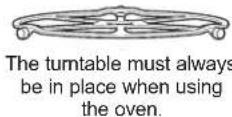
The turntable must always be in place when using the oven.

Put food directly on the metal grill tray to Precision Cook.

Put food directly on the metal tray to convection bake, warm or toast.
WARNING
OVEN-SAFE COOKWARE FOR BAKING, BROILING, WARMING, & TOASTING
■ The oven and door will get very hot when convection baking, broiling, warming or toasting.
■ Cookware will become hot. Oven mitts will be needed to handle the cookware.
- Do not cover dishes or use plastic containers, plastic cooking/roasting bags, plastic wrap, wax paper or paper when broiling or toasting.
■ Use the metal tray in the same way you would use a shallow baking pan or baking tray.
■ Use the wire oven rack when convection baking or warming on two levels.
■ Place food directly on the metal trays when cooking unless the recipe requires a dish.
■ Any oven-safe dish can be used in your oven. Recipes in the Advantium Cookbook were tested in Pyrex® glass cookware and Corningware® ceramic casseroles. Cook times and results may vary when using other types of oven-safe dishes. Place them directly on the trays.
■ Use of the clear glass tray when convection baking, broiling, warming or toasting will result in inferior cooking performance.

The turntable must always be in place when using the oven.

Put food directly on the metal grill tray to Precision Cook.

Put food directly on the metal tray to convection bake, warm or toast.

Put food directly on the wire rack or in the appropriate dish and place on the rack when baking or warming on multiple levels.
READ AND SAVE THESE INSTRUCTIONS
IMPORTANT SAFETY INFORMATION READ ALL INSTRUCTIONS BEFORE USING THE APPLIANCE
WARNING
MICROWAVE-SAFE COOKWARE
Make sure to use suitable cookware during microwave cooking. Most glass casseroles, cooking dishes, measuring cups, custard cups, pottery or china dinnerware which does not have metallic trim or glaze with a metallic sheen can be used. Some cookware is labeled “suitable for microwaving.”
■ Place food or microwavable container directly on the clear glass tray to cook your food.
■ Use of a metal tray during microwave cooking will result in inferior cooking performance.
■ Cookware may become hot because of heat transferred from the heated food. Oven mitts may be needed to handle the cookware.
- Do not use recycled paper products. Recycled paper towels, napkins and waxed paper can contain metal flecks which may cause arcing or ignite. Paper products containing nylon or nylon filaments should be avoided, as they may also ignite.
- Use foil only as directed in this manual. When using foil in the oven, keep the foil at least 1" away from the sides of the oven.
■ If you use a meat thermometer while cooking, make sure it is safe for use in microwave ovens.
■ Some foam trays (like those that meat is packaged on) have a thin strip of metal embedded in the bottom. When microwaved, the metal can burn the floor of the oven or ignite a paper towel.
■ Paper towels, waxed paper and plastic wrap can be used to cover dishes in order to retain moisture and prevent spattering. Be sure to vent plastic wrap so steam can escape.
■ Not all plastic wrap is suitable for use in microwave ovens. Check the package for proper use.
- “Boilable” cooking pouches and tightly closed plastic bags should be slit, pierced or vented as directed by package instructions. If they are not, plastic could burst during or immediately after cooking, possibly resulting in injury. Also, plastic storage containers should be at least partially uncovered because they form a tight seal. When cooking with containers tightly covered with plastic wrap, remove covering carefully and direct steam away from hands and face.
■ Plastic cookware—Plastic cookware designed for microwave cooking is very useful, but should be used carefully. Even microwave-safe plastic may not be as tolerant of overcooking conditions as are glass or ceramic materials. Plastic may soften or char if subjected to short periods of overcooking. In longer exposures to overcooking, the food and cookware could ignite.
■ Do not use the wire oven rack for microwaving.
Follow these guidelines:
- Use microwave-safe plastics only, and use them in strict compliance with the cookware manufacturer's recommendations.
- Do not microwave empty containers.
- Do not permit children to use plastic cookware without adult supervision.

The turntable must always be in place when using the oven.

The clear glass tray should always be in place when microwaving.
READ AND SAVE THESE INSTRUCTIONS
IMPORTANT SAFETY INFORMATION READ ALL INSTRUCTIONS BEFORE USING THE APPLIANCE
PRECAUTIONS TO AVOID POSSIBLE EXPOSURE TO EXCESSIVE MICROWAVE ENERGY
(a) Do Not Attempt to operate this oven with the door open since open-door operation can result in harmful exposure to microwave energy. It is important not to defeat or tamper with the safety interlocks.
(b) Do Not Place any object between the oven front face and the door or allow soil or cleaner residue to accumulate on sealing surfaces.
(c) Do Not Operate the oven if it is damaged. It is particularly important that the oven door close properly and that there is no damage to the:
(1) door (bent),
(2) hinges and latches (broken or loosened),
(3) door seals and sealing surfaces.
(d) The Oven Should Not be adjusted or repaired by anyone except properly qualified service personnel.
GROUNDING INSTRUCTIONS
⚠ WARNING
Improper use of the grounding plug can result in a risk of electric shock.
This appliance must be connected to a grounded, metallic, permanent wiring system, or an equipment grounding conductor should be run with the circuit conductors and connected to the equipment grounding terminal or lead on the appliance.
PACEMAKERS
Most pacemakers are shielded from interference from electronic products, including microwaves. However, patients with pacemakers may wish to consult their physicians if they have concerns.
READ AND SAVE THESE INSTRUCTIONS
GETTING TO KNOW ADVANTIUM
WHAT IS ADVANTIUM?
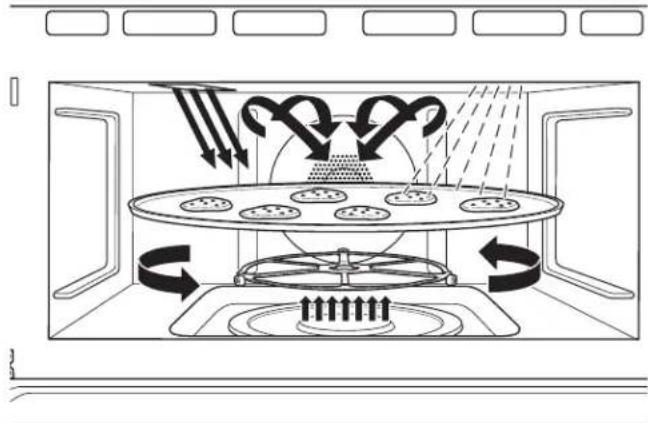
The new Advantium oven uses breakthrough Precision Cooking technology to harness the power of light. The Advantium oven cooks the outside of foods much like conventional radiant heat, while also penetrating the surface so the inside cooks simultaneously. While halogen light is the primary source of power, a “microwave boost” is added with certain foods. Foods cook evenly and fast, retaining their natural moisture.
The Advantium oven is capable of Precision Cooking, convection baking, broiling, toasting, warming, proofing and microwaving. The Precision Cook feature is the biggest benefit of the Advantium oven.
No preheating is required to Precision Cook. Place the food in the oven and start cooking immediately. You see timesaving because there is no preheat and because Precision Cook cooks faster.
natural_image
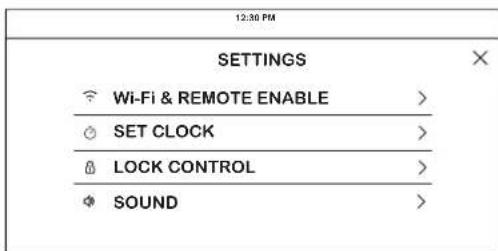
Diagram of a microwave oven with cooling fans and airflow arrows indicating heat transfer (no text or labels)Press the icon to access settings.
This feature allows you to set the clock and specifies how the time of day will be displayed. Options are for a standard 12-hour clock with AM and PM selections or 24-hour military time display.
Slide up and down to access all the settings
MICROWAVING WITH EXPRESS
- Select Express 30s to initiate a microwave cook mode. The oven will start immediately. Time can be added by pressing the +30s or +1m.
• The initial cook time can be modified to a preferred time up to 6 minutes. This can be changed in the SETTINGS.
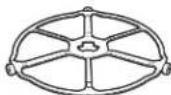
The turntable must always be in place when using the oven.
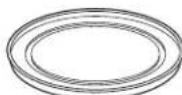
The clear glass tray should always be in place when microwaving.
FEATURES
Throughout this manual, features and appearance may vary from your model.
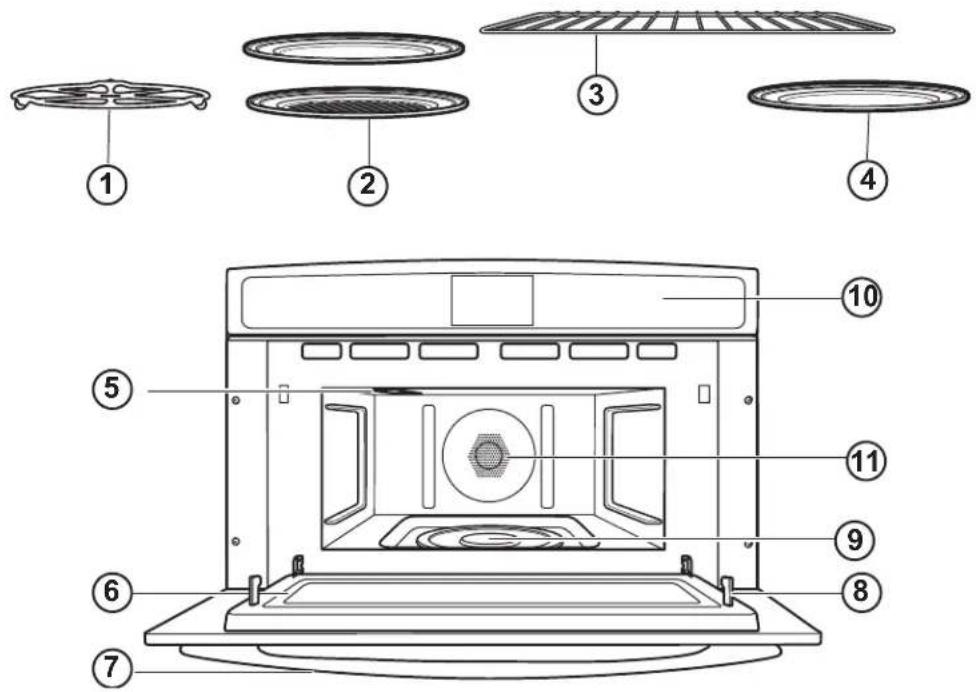
1. TURNTABLE
The turntable must always be in place, on the oven floor, for all cooking. Be sure the turntable is seated securely over the spindle in the center of the oven.
2. METAL TRAY OR METAL GRILL TRAY
Put food directly on the metal tray or metal grill tray and place on the turntable when using the Precision Cook, broil, toast, warm and convection bake features.
3. WIRE OVEN RACK
Put food directly on the metal tray or in an oven-safe dish on the wire oven rack only when convection baking on two levels.
4. CLEAR GLASS TRAY
Place on the turntable when using the microwave features. Place food or microwave-safe cookware directly on the tray.
5. UPPER HALOGEN LAMP
Two halogen lamps cook food from above in Precision Cook, broil and toast.
6. WINDOW
Allows cooking to be viewed while keeping microwaves confined in the oven.
7. DOOR HANDLE
Pull to open the door.
8. DOOR LATCHES
The door must be securely latched for the oven to operate.
9. LOWER CERAMIC HEATER
One ceramic heater cooks food from the bottom in Precision Cook, broil and toast.
10. CONTROL PANEL
Touch LCD is used to operate the oven. The LCD is located on the control panel.
11. REAR CONVECTION SYSTEM
One heating element cooks food with a convection fan circulating the hot air throughout the cavity in Precision Cook, broil, convection bake, toast and warm.
CONTROLS
With your Advantium oven, you can cook with high-intensity halogen lights, ceramic heaters and convection heating element, and/or conventional microwave energy.
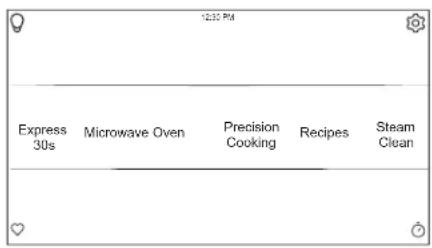
EXPRESS
Select to initiate a microwave cook mode. The oven will start immediately. Time can be added by pressing the +30s or +1m. The initial cook time can be modified to a preferred time up to 6 minutes. This can be changed in the Settings.
MICROWAVE
Select to access microwave only cook modes. These features include Beverage, Cook by Food Type, Cook by Time, Defrost, Popcorn, Reheat, Slow Cook, Soften/Melt, and Steam Cook.
OVEN
Select to access Broil, Convection Bake, Proof, Toast, and Warm features.
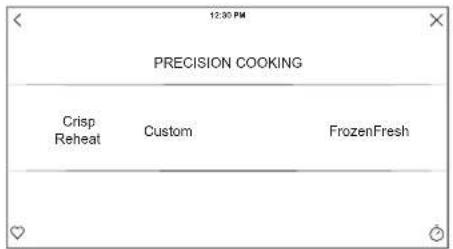
PRECISION COOKING
Precision Cooking is a suite of customized cooking cycles that have been designed for specific foods. The display will guide you through setting the oven and food appropriately for the cycle selected. An option to set custom cook times and power levels is also available.
RECIPES
This option allows you to access pre-loaded recipes for certain foods. New recipes can be loaded and followed through the Monogram App once your phone is connected. See the Wi-Fi Connect section for instructions on connecting your phone.
STEAM CLEAN
This feature will create heat and steam to loosen dirt in the oven. Once the cycle is terminated, wipe oven cavity with paper towel or cloth.
OVEN LIGHT
To turn on or off the oven cavity lights, press the 🔒
SETTINGS
Press the ⚙ to access the Settings. See the Settings section for more information.
FAVORITE ♥
This option allows you to save your favorite cycles for easy access in the future. After selecting a cooking mode and setting the temperature and any timers, press the ♥ to save it as a favorite for future use. After saving a cycle, press the ♥ on the main menu to quickly access the saved mode. The last cooked cycle is available in the favorites section.
KITCHEN TIMER
This feature works as a countdown timer. Press the ⏻, select the amount of time for the timer to operate, and press Start. The oven will continue to operate once the timer countdown is complete. To turn off the timer, select the ⏻ and press CANCEL TIMER.
COOK TIME
This function counts down cooking time and turns off the oven when the cooking time is complete. Press the ⏻ during a cycle, select the amount of cooking time, and press Start.
DELAY TIME
This feature delays the start time for an oven cycle. Use this feature to set a time when you want the oven to start. Select a cycle, then press the ☑Select the time of day for the oven to turn on and press Start. A cook time can also be programmed if desired.
PRECISION COOKING
⚠ WARNING
When using Precision Cook programs, remember that the oven, door and dishes will be very hot!
PRECISION COOK POWER LEVEL
The Advantium uses power from high intensity halogen lamps, a ceramic heater, a convection system and microwaves to cook food from the top, bottom and interior simultaneously to seal in moisture and flavor.
When using the pre-set menu foods, the power levels are already selected for you. However, power levels can be adjusted when using pre-set menu foods and Custom Precision Cook.
Each power level gives you halogen lamp or ceramic heater power and microwave energy for a certain percentage of the time or provides heating from the convection system.
For example:
U-07 Upper halogen lamp on 70% of the time.
L-07 Lower ceramic heater on 70% of the time.
C-06 Convection element heats oven to 350°F.
M-05 Microwave on 50% of the time.
NOTE: Be careful when adjusting power levels so that you do not over- or undercook food.
Follow these general guidelines when selecting the best U=, L=, M= and C= settings for your favorite recipe:
U = Select a higher setting for thin foods requiring a golden brown top (example: fish fillets, toast, boneless chicken breasts). Select a lower setting for thicker foods and foods with high sugar or fat content (example: muffins, roasts, casseroles) or that require a longer cook time.
L = Select a higher setting for thick or dense foods that may not cook quickly in the center (example: steaks, casseroles). Select a lower setting for thin foods (example: cookies).
M = Select a higher setting to shorten cooking time for dense or heavy foods (example: casseroles, whole chicken). Select a lower setting for delicate foods (example: breads) or foods requiring longer cook times for tender results (example: stew, pot roast).
C = Select a lower setting for more delicate foods that cook at lower temperatures. Select a higher setting (6 or above) for more robust foods or foods that cook at temperatures above 350°F
USING PRECISION COOK FEATURES
■ If the door is opened during cooking, the oven will stop Close the door and press the RESUME pad to resume cooking.
■ At any time during cooking you can change the cooking time. You can change power levels by pressing POWER.
■ Precision Cooking meats in the oven may produce smoke.
■ To cook for additional time after a cooking cycle has been completed, use the CONTINUE feature as instructed on the display.
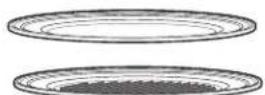
Put food directly on the metal tray or metal grill tray to Precision Cook.
PRECISION COOKING
COOKING TIPS
To ensure consistent and even browning when cooking foods directly on the non-stick metal tray, arrange food as shown below.
Foods can touch but should not overlap.
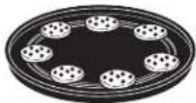
Circular pattern
(Example: biscuits, cookies)
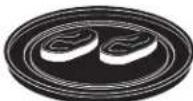
Side by side pattern
(Example: meats and poultry)
Fresh meat, chicken, fish or seafood that has been frozen should be thawed before cooking (the microwave defrost feature can be used). For other frozen prepackaged foods, follow package directions.
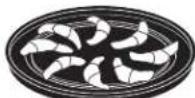
Spoke pattern (Example: crescent rolls, breadsticks)
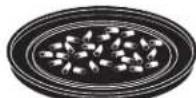
Single layer
(Example: appetizers)
PRECISION COOK COOKWARE
■ Follow cookware suggestions on the oven display.
■ Cookware will become hot. Oven mitts will be needed to handle the cookware.
■ Place food directly on the metal tray or metal grill tray when cooking, unless prompted by the oven to do otherwise.
■ Use the metal tray in the same way you would use a shallow baking pan or baking tray.
In addition to the cookware provided, you can use non-metal casserole dishes, pie plates and other heat-safe cookware. Place them directly on the turntable.
■ Be sure to select a size that will rotate easily.
■ Place the metal tray or metal grill tray on the turntable.
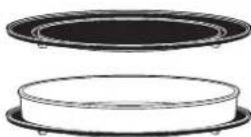
Place glass or ceramic cookware on the tray.
■ Do not use cookware or coverings made of paper, plastic, or foil when cooking during a Precision Cook cycle.
CRISP REHEAT PRECISION COOK
This feature is designed to reheat leftover food items that tend to lose their crispiness when reheated in a microwave.
■ Turn the food over when the oven signals TURN FOOD OVER (for certain foods).
■ When the oven signals CHECK FOR DONENESS, check to see if your food is done to your liking (for certain foods).
PRECISION COOKING
CUSTOM PRECISION COOK
Advantium gives you the flexibility to cook your favorite dishes.
If you want to cook a food item that is not among the pre-set selections, use Custom Precision Cook.
For power level and cooking time suggestions, use your cooking guide and the pre-set Precision Cook menu selections.
PRE-SET PRECISION COOK MENU
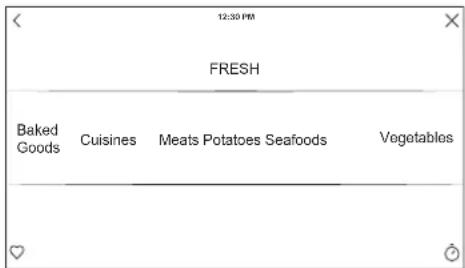
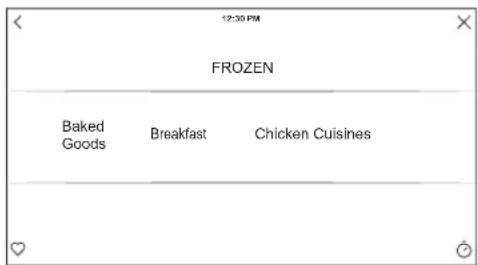
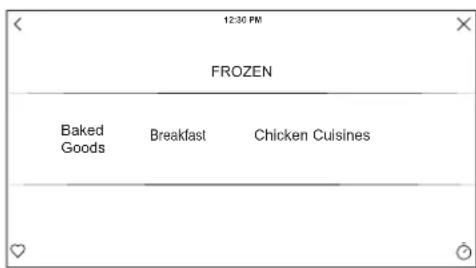
■ Advantium is already pre-set to cook over 175 popular dishes. The pre-set menu has been divided into Fresh and Frozen categories to simplify navigation to desired food items.
■ Turn the food over when the oven signals TURN FOOD OVER (for certain foods).
■ When the oven signals CHECK FOR DONENESS, check to see if your food is done to your liking (for certain foods).
THINGS THAT ARE NORMAL
Cooking Times
■ When Precision Cooking preprogrammed foods, you may see Adjusting Cook Time in the display several seconds after you press START. The oven automatically senses the electrical voltage level in your home and adjusts the cooking time up or down for proper cooking.
Cooling Fans
■ The fan will be on during cooking. At the end of cooking, the automatic fan may continue to run for a short time, and the display will read Oven is Cooling. The fan will automatically shut off when the internal parts of the oven have cooled.
■ The oven vent will emit warm air while the oven is on.
Lights
■ When the oven is on, light may be visible around the door or outer case.
■ The halogen lights will dim and cycle on and off during a Precision Cook cycle, sometimes even at full power levels. This is normal. The oven senses the heat level and adjusts automatically.
Oven Heat
■ No preheating time is required during Precision Cook cycles. The oven begins cooking immediately.
■ The door and inside of the oven will be very hot. Use caution when opening the door and removing food. Be cautious of steam or vapor that may escape from around the door.
■ Do not use cookware or coverings made of paper, plastic, or foil when cooking during a Precision Cook cycle.
■ When cooking for an extended period of time, the oven may automatically reduce the power levels to maintain the appropriate level of oven heat.
Sounds
- Clicks and a fan blowing are normal sounds during cooking. The relay board is turning components on and off.
Interference
■ TV/radio interference might be noticed while using the microwave, similar to the interference caused by other small appliances. It does not indicate a problem with the microwave. Move the radio or TV as far away from the microwave as possible, or check the position of the TV/radio antenna.
CONVECTION BAKING
WARNING
When baking, remember that the oven, door and dishes will be very hot!
Convection baking allows you to cook foods the same way as a conventional oven, using a heating element to raise the temperature of the air inside the oven. Any oven temperature from 250^ F to 450^ F may be set.
A fan gently circulates heated air throughout the oven, over and around the food. Because the heated air is kept constantly moving, not permitting a layer of cooler air to develop around the food, some foods cook slightly faster than in regular oven cooking.
Before you begin, make sure the turntable is in place. Use the metal tray at all times when single or two-level baking.

The turntable must always be in place when using the oven.

Put food directly on the metal grill tray to Convection Bake.

Put food directly on the metal tray or in the appropriate dish and place on wire oven rack when baking or warming on two levels.
COOKING TIPS FOR CONVECTION BAKING
■ Cook time maximum is 3 hours.
■ When cooking items that go directly onto the metal tray, do not place the tray into the oven during preheat. Place the food directly onto the tray, and place the metal tray with food onto the turntable after the oven is finished preheating.
■ When cooking items in a dish to be placed on the metal tray, place the metal tray in the oven during preheat for optimum cooking performance.
■ For two-level baking, install the wire rack on the 4 rack
supports and a metal tray on the turntable. Baking dishes can be placed directly onto the wire rack and the turntable.
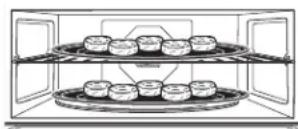
■ If baking trays are required for cooking foods like cookies or biscuits, use the metal trays supplied with the oven to place on the wire rack and on the turntable for best performance.
BROILING AND TOASTING
WARNING
When broiling or toasting, remember that the oven, door and dishes will be very hot!
Broil and toast use the upper lamps, lower heater and convection system to broil or toast food similar to a conventional oven.
Before you begin, make sure the turntable is in place. Use the metal tray when toasting and the metal tray or metal grill tray when broiling.

The turntable must always be in place when using the oven.


Put food directly on the metal tray or the metal grill tray to broil or toast.
COOKING TIPS FOR BROILING
■ Broiling times may be shorter in the Advantium oven because of the use of halogen lamps. Make sure to monitor food closely to get the desired results.
■ For best results when broiling, place food directly on the metal grill tray.
■ If preheating the oven to broil meat, preheat with the metal grill tray in the oven and place food on the hot metal tray for best searing of meat.
■ Broiling meats in the oven may produce smoke.
■ Most foods should be turned halfway through broiling time. Dense foods such as meaty, bone-in chicken pieces should be turned about 3/4 of the way through broiling time.
■ Remove thinner pieces as needed to prevent overcooking and drying.
COOKING TIPS FOR TOASTING
■ For best results when toasting, use the metal tray.
■ Most foods should be turned over 2/3 of the way through toasting time.
■ To crisp exterior but maintain moistness inside foods, preheat the oven.
■ To crisp exterior and crisp the inside too, do not preheat the oven.
■ Toast thicker pieces a longer time, thinner pieces a shorter time.
WARMING AND PROOFING
WARMING
The WARM feature will keep hot, cooked foods at serving temperature. Always start with hot food. Use cookware and utensils that can withstand temperatures up to 230^ F.
To Crisp Stale Items:
■ Place food or dishes directly on the black metal tray.
■ Preheat on LOW setting and select CRISP.
■ Check crispness after 45 minutes. Add time as needed.

The turntable must always be in place when using the oven.

Put food directly on the metal tray to warm.
Tips for Crisp Foods.
■ Leave food uncovered.
■ Do not use plastic containers or plastic wrap.
■ Preheating is not necessary except for crisping stale items. (See To Crisp Stale Items.)
Tips for Moist Foods:
■ Cover food with lid or aluminum foil.
■ Do not use plastic containers or plastic wrap.
■ Preheating is not necessary.
Temperature and Moisture Selection Chart
| Food Type Control Setting | Moisture Setting | |
| Bread, hard rolls MEDIUM CRISP | ||
| Bread, soft rolls MEDIUM MOIST | ||
| Casseroles MEDIUM MOIST | ||
| Fried foods HIGH CRISP | ||
| Meats* and fish MEDIUM CRISP | ||
| Pancakes, waffles HIGH CRISP | ||
| Pizza HIGH CRISP | ||
| Potatoes, baked HIGH CRISP | ||
| Potatoes, mashed MEDIUM MOIST | ||
| Poultry HIGH MOIST | ||
| Tortilla Chips LOW CRISP | ||
| Vegetables MEDIUM MOIST | ||
* USDA/FSIS recommends an internal temperature of 145°F as the minimum doneness for beef. Use a portable meat thermometer to check internal temperatures.
PROOFING
The proofing feature automatically provides the optimum temperature for the proofing process, and therefore does not have a temperature adjustment.
NOTES:
- Do not use the proofing mode for warming food or keeping food hot. The proofing oven temperature is not hot enough to hold foods at safe temperatures. Use the WARM feature to keep food warm.
■ Proofing will not operate if the oven is too hot. Allow the oven to cool before proofing.

The turntable must always be in place when using the oven.

Put bread dough in a bowl/bread pan and place on the metal tray to proof.
MICROWAVING
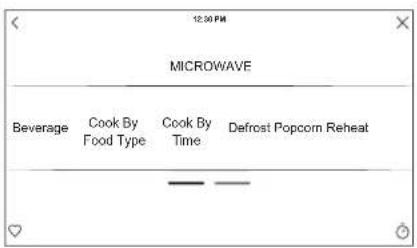
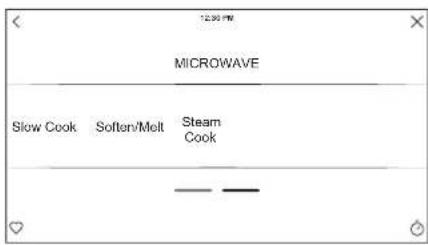
Make sure the turntable is in place with the side marked "TOP" facing up. Use the clear glass tray.
Place food or microwavable container directly on the clear glass tray to cook your food.

The turntable must always be in place when using the oven.

The clear glass tray should always be in place when microwaving.
Cookware
■ Make sure that cookware is suitable for microwaving.
■ Place food or microwavable container directly on the clear glass tray to cook your food.
MICROWAVE PRE-SET SELECTIONS
Microwave Auto Cook Selections
■ Beverage
- Water (8-12 oz)
- Coffee (8-12 oz)
- Tea (8-12 oz)
- Milk (8-12 oz)
- Hot Cocoa (8-12 oz)
■ Cook by Food Type
■ Cook by Time
■ Defrost
- 1.0 lb Quick
- By Time
- By Weight
- By Food Type
■ Popcorn
■ Reheat
- Casserole
- Chicken
- Pasta
- Pizza
- Plate of Food
- Rice
- Soup
- Steaks/Chops
- Vegetables
■ Soften/Melt
- Butter
- Caramel
- Cheese
- Chocolate Chips
- Cream Cheese
- Frosting (16 oz)
- Ice Cream
- Marshmallow
■ Steam Cook
MICROWAVING
EXPRESS
■ Select Express 30s to initiate a microwave cook mode. The oven will start immediately. Time can be added by pressing the +30s or +1m.
■ The initial cook time can be modified to a preferred time up to 6 minutes. This can be changed in the SETTINGS.
You can change the power level before or during a cooking program.
Here are some examples of uses for various power levels:
High 10: Fish, bacon, vegetables, boiling liquids.
Med-High 7: Gentle cooking of meat and poultry; baking casseroles and reheating.
Medium 5: Slow cooking and tenderizing for stews and less tender cuts of meat.
Low 2 or 3: Defrosting; simmering; delicate sauces.
Warm 1: Keeping food warm; softening butter.
COOKING TIPS
■ When cooking bacon, layer strips on a plate. Cover each layer with a paper towel.
■ When cooking vegetables, use a microwave-safe casserole or bowl. Cover with a microwave-safe lid or vented plastic wrap.
■ For frozen vegetables, follow the package instructions for adding water.
■ For fresh vegetables, add 2 tablespoons of water for each serving.
MICROWAVING
DEFROST
DEFROST BY FOOD TYPE: Automatically sets the defrosting times and power levels based on menu tree selection to give even defrosting results for food types, poultry and fish weighing up to 6 pounds.
DEFROST BY TIME: Allows user to set defrosting time. The power level defaults to 3.
DEFROST BY WEIGHT: Automatically sets the defrosting times and power levels based on the entered weight up to 6 pounds.
■ Turn the food over when the oven signals TURN FOOD OVER.
■ Remove defrosted meat or shield warm areas with small pieces of foil for even defrosting.
■ After defrosting, most meats need to stand 5 minutes to complete defrosting. Large roasts should stand for about 30 minutes.
Conversion Guide
If the weight of food is stated in pounds and ounces, the ounces must be converted to tenths (.1) of a pound.
| Weight of Food in Ounces | Enter Food Weight (tenths of a pound) |
| 1-2 .1 | |
| 3 | .2 |
| 4-5 .3 | |
| 6-7 .4 | |
| 8 | .5 |
| 9-10 .6 | |
| 11 .7 | |
| 12-13 .8 | |
| 14-15 .9 |
DEFROSTING TIPS
Use DEFROST BY FOOD TYPE for meat, poultry and fish. Use DEFROST BY TIME for most other frozen foods.
-
Foods frozen in paper or plastic can be defrosted in the package when using DEFROST BY TIME. Foods should be taken out of the package when using DEFROST BY FOOD TYPE. Closed packages should be slit, pierced or vented after food has partially defrosted. Plastic storage containers should be partially uncovered.
■ Family-size, prepackaged frozen dinners can be defrosted and microwaved. If the food is in a foil container, transfer it to a microwave-safe dish. -
Foods that spoil easily should not be allowed to sit out for more than one hour after defrosting. Room temperature promotes the growth of harmful bacteria.
■ For more even defrosting of larger foods, such as roasts, use DEFROST BY TIME. Be sure large meats are completely defrosted before cooking.
■ When defrosted, food should be cool but softened in all areas. If still slightly icy, return to the microwave very briefly, or let it stand a few minutes.
■ When defrosting 3 or more pounds of ground or cubed meat, remove defrosted portions at the turn signals.
MICROWAVING
Sensor Cooking
The Advantium's microwave mode features sensor cooking. The oven automatically senses when food is done and shuts itself off—eliminating the need to program cook times and power levels.
MICROWAVE SENSOR PROGRAMS:
■ Ground Meat
■ Soup
■ Rice
■ Vegetables (Canned, Fresh, Frozen)
■ Chicken Reheat
■ Pasta Reheat
■ Plate of Food Reheat
■ Soup Reheat
■ Vegetable Reheat
■ Popcorn – Prepackaged microwave popcorn, 3.0 oz. to 3.5 oz.
Do not open the oven door until time is counting down in the display. If the door is opened, close it and press RESUME immediately. If the food is not done enough, use COOK BY TIME in the microwave selector to cook for more time.
NOTE: Do not use the sensor features twice in succession on the same food portion—it may result in severely overcooked or burnt food. If the food is not done enough at the end of the sensor cook time, use Cook BY Time in the microwave selector to cook for more time.
■ If you have been cooking and the oven is hot, it may
indicate that it is too hot for sensor cooking. In that case, the oven will automatically change to time cooking and may prompt for weights or amounts of food.
■ To shorten or lengthen the cook time, wait until the time countdown shows in the display. Then use the pad to add or subtract time.
■ If you open the door while sensor cooking, follow instructions that appear on your screen.
Notes About the Reheat Program:
Reheated foods may have wide variations in temperature. Some areas may be extremely hot.
It is best to use COOK BY TIME and not REHEAT for these foods:
■ Bread products
■ Food that must be reheated uncovered.
■ Foods that need to be stirred or turned.
■ Foods calling for a dry look or crisp surface after reheating.
Sensor Cooking Cookware
The proper containers and covers are essential for best sensor cooking.
■ Always use microwave-safe containers and cover them with lids or vented plastic wrap. Never use tight sealing plastic containers—they can prevent steam from escaping and cause food to overcook.
■ Be sure the outside of the cooking containers and the inside of the oven are dry before placing food in the oven. Beads of moisture turning into steam can mislead the sensor.
■ Beverages are best heated uncovered.
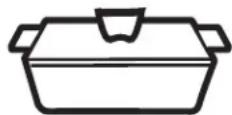
Covered
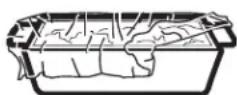
Vented
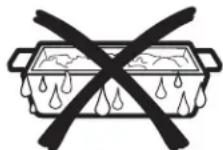
Dry off dishes so they don't mislead the sensor.
MICROWAVING
STEAM COOK FEATURE
For best results use steam or simmer bowl. Add 2 Tablespoons of water when steaming vegetables.
Menu Selection For Sensor Steam
For best results use 1-4 cups.
■ Asparagus
■ Brussels Sprouts
■ Carrots
■ Cauliflower
- Potatoes
■ Rice
■ Squash
■ Zucchini
Menu Selection For Timed Steam
| Asparagus 1 Cup | ||
| 2 Cups | ||
| 4 Cups | ||
| Broccoli 1 Cup | ||
| 2 Cups | ||
| 4 Cups | ||
| Brussels Sprouts 1 Cup | ||
| 2 Cups | ||
| 4 Cups | ||
| Carrots 1 Cup | ||
| 2 Cups | ||
| 4 Cups |
Menu Selection For Timed Steam (continued)
| Cauliflower 1 Cup | ||
| 2 Cups | ||
| 4 Cups | ||
| Chicken Breast 1 Piece 6-8 Ounces | ||
| 8-10 Ounces | ||
| Fish 1 Piece Thin Filet - 1/2" | ||
| Medium Filet - 1" | ||
| Thick Filet - 1 1/2" | ||
| Green Beans 1 Cup | ||
| 2 Cups | ||
| 4 Cups | ||
| Potatoes 1 Cup | ||
| 2 Cups | ||
| 4 Cups | ||
| Quinoa 1 Cup | ||
| Rice | 1 Cup | |
| Scallops | Bay Scallops | 6-10 Ounces |
| 10-16 Ounces | ||
| Sea Scallops | 6-10 Ounces | |
| 10-16 Ounces | ||
| Shrimp | 1/2 Pound | |
| 1 Pound | ||
| Squash | 1 Cup | |
| 2 Cups | ||
| 4 Cups | ||
| Zucchini | 1 Cup | |
| 2 Cups | ||
| 4 Cups | ||
THINGS THAT ARE NORMAL
Interference
■ TV/radio interference might be noticed while using the microwave. Similar to the interference caused by other small appliances, it does not indicate a problem with the microwave. Move the radio or TV as far away from the microwave as possible, or check the position of the TV/radio antenna.
Oven Heat
■ Cookware may become hot because of heat transferred from the heated food. Oven mitts may be needed to handle the cookware.
■ Steam or vapor may escape from around the door.
SETTINGS
There are numerous settings that are accessed by pressing ⚙ in the top right corner of the main screen.
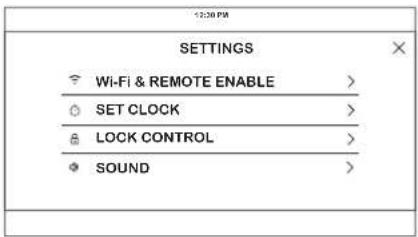
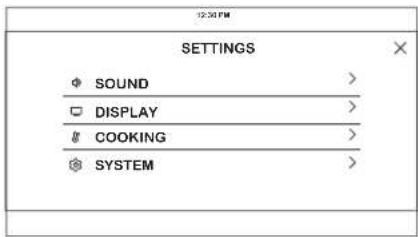
Slide up and down to access all the settings
SET CLOCK
This feature allows you to set the clock and specifies how the time of day will be displayed. Options are for a standard 12-hour clock with AM and PM selections or 24-hour military time display.
LOCK CONTROL
Select this option in order to lock the LCD from any undesired screen selections. To unlock the screen, press 🔒 and press Unlock on the next screen.
SOUND
This setting screen allows you to change the volume, the end of cycle tone, and turn on or off the touch sound.
DISPLAY
This screen shows the options for brightness, clock off, and energy saver. Clock off will remove the clock from the display when the screen is inactive, but it will be shown after pressing the screen.
COOKING
■ The oven is set to Fahrenheit, however, in this setting the cooking unit can be changed to Celsius.
■ Auto Recipe Conversion can be turned on in order to automatically reduce the programmed cooking temperature for Convection Bake or Convection Bake Multi. Note that this will only reduce the cooking temperature, not the baking time.
SYSTEM
This screen allows you to clear your saved user data and shows the current software version.
WI-FI & REMOTE ENABLE
This appliance is configurable to allow remote operation at any time. Do not store any flammable materials or temperature sensitive items inside or on top of this appliance. By using the Wi-Fi Connect feature, you will be able to control essential oven operations such as temperature settings, timers and cooking modes using your smartphone or tablet.*
Select the ⚙ then Wi-Fi & Remote Enable - follow the instructions on your oven display and phone app. It is necessary to turn on Wi-Fi before using Remote Enable on your oven.
Connecting your Wi-Fi Connect Enabled oven
- Have your smart phone or tablet ready with the ability to access the internet and download apps.
- You will need to know the password of your home Wi-Fi router. Have this password ready while you are setting up your Monogram Appliances oven.
- On your smart phone or tablet, visit monogram.com/connect to learn more about connected appliance features and to download the app to connect to your oven.
- Follow the onscreen instructions in the app to connect your Monogram Appliances oven. When connected, your oven should show that it is connected to your home Wi-Fi network.
- If there are issues connecting wirelessly to your oven, please call 800.220.6899 and ask for assistance regarding oven wireless connectivity.
To connect additional smart devices, repeat steps 3 and 4.
Remote Starting Your Advantium
Remote Enable ON/OFF is a selection under the menu selection WiFi & Remote Enable.
When Remote Enable is ON the □ icon will be active on the home screen and you can start an Advantium cook cycle from a remote source such as the Monogram Appliance app or Voice Commands from Amazon Alexa or Google Assistant. When starting a Precision cook or microwave cooking cycle, you will need to have opened the microwave door within the last 5 minutes. The 5 minute restriction is to help ensure food is in the microwave before starting the cooking cycle. There is not a 5 minute limitation with Oven/Convection cycles.
When Remote Enabled is OFF you can still view the cooking status from your app, you can turn off cooking modes, or you can use the timer and setting features from your smart device. With Remote enabled OFF you just will not be able to start a cooking cycle on a smart device.
To disable all WiFi features and remove the Advantium from the WiFi network, select Disconnect AND Forget WiFi option under the WiFi & Remote Enabled menu.
OTHER FEATURES
COOLING FANS
Two cooling fans automatically turn on as required to keep the internal oven components and control from overheating.
The fans will automatically turn off when the internal parts are cool. One or both may stay on for 30 minutes or more after the oven control is turned off.
ACCESSORY STORAGE DRAWER (WITH SOME MODELS)
The accessory storage drawer is designed to hold the cooking trays and wire oven rack provided with the oven. The accessory storage drawer is not intended for storing cloth, wood, paper or other combustible products.
Contents in the drawer can become hot to the touch while the oven is in use and while the oven is cooling. Use caution when removing items at these times.
COOK TIME COMPLETED
To remind you that you have food in the oven, the oven will display COMPLETED and beep once a minute until you either open the oven door or press DONE.
CARE AND CLEANING
STEAM CLEAN
This feature will create heat and steam to loosen dirt in the oven. To create enough steam pour a half cup of water into a microwave safe bowl.
■ Remember to use the glass tray. Once the cycle is terminated, wipe oven cavity with paper towel or cloth.
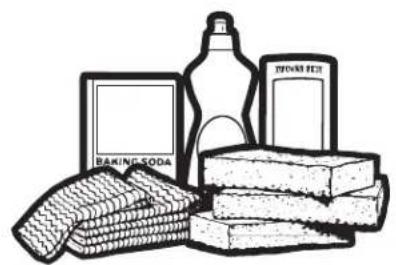
INSIDE OF OVEN AND ACCESSORY STORAGE DRAWER (WITH SOME MODELS)
Be certain the oven control is turned off and the oven is warm or cool to the touch before cleaning any part of this oven.
Clean the inside of the oven often for proper heating performance.
Some spatters can be removed with a paper towel, others may require a warm soapy cloth. Remove greasy spatters with a sudsy cloth, then rinse with a damp cloth.
If you notice yellowing on the metal inside the oven that cannot be removed with a warm sudsy cloth, use a stainless steel cleaner that removes heat discoloration and/or tarnishing. You can then clean the inside of the oven as you normally do.
Do not use abrasive cleaners or sharp utensils on oven walls or the accessory storage drawer.
Never use a commercial oven cleaner on any part of your oven or the accessory storage drawer.
Do not clean the inside of the oven or the accessory storage drawer with metal scouring pads. Pieces can break off the pad inside the oven, causing electrical shock as well as damaging the inside surface finish of the oven or the accessory storage drawer..
natural_image
Illustration of various household items including a baking soda, milk bottle, and stacked books (no text or symbols)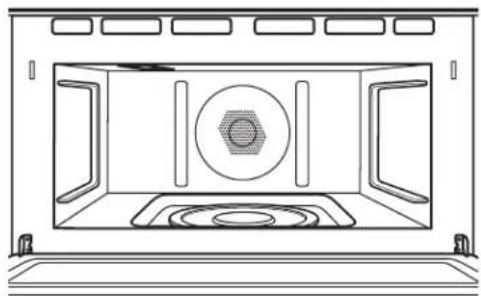
natural_image
Line drawing of a microwave oven with central vent and side grilles (no text or symbols)REMOVABLE TURNTABLE
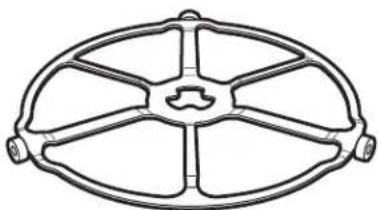
The area underneath the turntable should be cleaned frequently to avoid odors and smoking during a cooking cycle.
The turntable can be broken if dropped. Wash carefully in warm, sudsy water. Dry completely and replace.
To replace the turntable, place its center over the spindle in the center of the oven and turn it until it seats into place. (Make sure the smooth side of the turntable is facing up and that its center seats securely on the spindle.)
natural_image
Technical line drawing of a symmetrical mechanical component with six arms and central hub (no text or symbols)Turntable
Do not use the oven without the turntable in place.
Care and Cleaning
COOKING TRAYS AND WIRE OVEN RACK
To prevent breakage, allow the trays to cool completely before cleaning. Wash carefully in hot, sudsy water or in the dishwasher.
Do not use abrasives to clean the glass tray or wire oven rack, as they may damage the finish.
A soap-filled scouring pad may be used to clean the metal trays.

Wire oven rack

Clear glass tray

Metal tray

Metal grill tray
HALOGEN LAMP COVER AND MICA SHEET
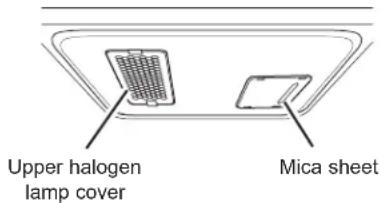
Do not remove the halogen lamp glass cover or the mica sheet.
The upper halogen lamp cover must be kept free of grease and food spatterings in order to operate effectively.
Clean the lamp glass cover and mica sheet often to avoid excess smoking and decreased cooking power.
To clean the upper lamp cover: Allow the oven and glass cover to cool completely. Wipe clean with a warm soapy cloth or plastic scrubbie.
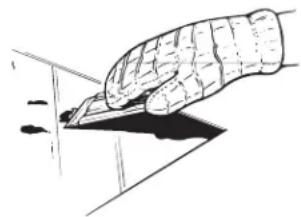
For heavy burned on soil, a cleaning scraper may be used to clean the halogen lamp cover. Wearing an oven mitt, hold the cleaning scraper at a 30^ angle. Scrape the glass clean and wipe up excess soil.
To clean the mica sheet: Allow the oven to cool completely. Wipe clean with a warm soapy cloth.
natural_image
Illustration of a hand holding a pen writing on a surface (no text or symbols present)For heavy or burned on soil
OUTSIDE OF OVEN AND ACCESSORY STORAGE DRAWER (WITH SOME MODELS)
We recommend against using cleaners with ammonia or alcohol, as they can damage the appearance of the oven or the accessory storage drawer. If you choose to use a common household cleaner, first apply the cleaner directly to a clean cloth, then wipe the soiled area.
Glass Control Panel, Door and Drawer
Wipe with a clean damp sponge. Dry thoroughly. Do not use cleaning sprays, large amounts of soap and water, abrasives or sharp objects on the panel—they can damage it.
Door Seal
It's important to keep the area clean where the door seals against the oven. Use only mild, non-abrasive detergents applied with a clean sponge or soft cloth. Rinse well.
Stainless Steel (on some models)
To clean the stainless steel surface, use warm sudsy water or a stainless steel cleaner or polish. Always wipe the surface in the direction of the grain. Follow the cleaner instructions for cleaning the stainless steel surface.
To inquire about purchasing stainless steel appliance cleaner or polish, or to find the location of a dealer nearest you, visit monogram.com.
FEDERAL COMMUNICATIONS COMMISSION RADIO FREQUENCY INTERFERENCE STATEMENT (U.S.A. ONLY)
This equipment generates and uses ISM frequency energy and if not installed and used properly, that is in strict accordance with the manufacturer's instructions, may cause interference to radio and television reception. It has been type tested and found to comply with limits for ISM Equipment pursuant to part 18 of FCC Rules, which are designed to part 18 of FCC Rules, which are designed to provide residential installation.
However, there is no guarantee that interference will not occur in a particular installation. If this equipment does cause interference to radio or television reception, which can be determined by turning the equipment off and on, the user is encouraged to try to correct the interference by one or more of the following:
■ Reorient the receiving antenna of the radio or television.
■ Relocate the Microwave Oven with respect to the receiver.
■ Move the microwave oven away from the receiver.
- Plug the microwave oven into a different outlet so that the microwave oven and the receiver are on different branch codes.
The manufacturer is not responsible for any radio of TV interference caused by unauthorized modification to this microwave oven. It is the responsibility of the user to correct such interference.
Supplier's Declaration of Conformity 47 CFR § 2.1077 Compliance Information
Unique Identifier: Microwave, ZSB923
Modular Component: Wireless LAN Module
Modular Component FCC ID: COF-WMBNBM26A
Responsible Party: GE Appliances
Appliance
Park,
Louisville,
KY
40225
monogram.com
FCC Compliance Statement: This device complies with part 18 of the FCC Rules.
FCC Compliance Statement: This device complies with part 15 of the FCC Rules. Operation is subject to the following two conditions: (1) This device may not cause harmful interference, and (2) this device must accept any interference received, including interference that may cause undesired operation.
NOTE: This equipment has been tested and found
to comply with the limits for a Class B digital device, pursuant to part 15 of the FCC Rules. These limits are designed to provide reasonable protection against harmful interference in a residential installation. This equipment generates, uses and can radiate radio frequency energy and, if not installed and used in accordance with the instructions, may cause harmful interference to radio communications. However, there is no guarantee that interference will not occur in a particular installation. If this equipment does cause harmful interference to radio or television reception, which can be determined by turning the equipment off and on, the user is encouraged to try to correct the interference by one or more of the following measures:
■ Reorient or relocate the receiving antenna.
■ Increase the separation between the equipment and receiver.
■ Connect the equipment into an outlet on a circuit different from that to which the receiver is connected.
■ Consult the dealer or an experienced radio/TV technician for help.
To satisfy FCC RF exposure requirements, a separation distance of 20 cm or more should be maintained between the antenna of this device and persons during device operation.
To ensure compliance, operations at closer than this distance is not recommended.
⚠ WARNING
Any changes or modifications to this unit not expressly approved by the party
responsible for compliance could void the user's authority to operate the equipment.
TROUBLESHOOTING TIPS
Save time and money! Review the charts on the following pages first and you may not need to call for service.
| Problem Possible Cause What To Do | ||
| LIGHTS | ||
| Light during a Precision Cooking cycle dims and cycles on and off, even at full power levels | This is normal. Power level has been automatically reduced because the oven is hot. | This is normal. The oven senses the heat level and adjusts automatically. |
| Light visible around the door and outer case while Precision Cooking | This is normal. When the oven is on, light may be visible around the door and outer case. | |
| COOLING FANS | ||
| Fan continues to run after cooking stops | The oven is cooling. The fans will automatically shut off when the internal parts of the oven have cooled. | |
| Oven vent emits warm air while oven is on | This is normal. | |
| Fan comes on automatically when using the microwave | This is normal. | |
| COOKING | ||
| The oven makes unusual sounds while cooking | Clicks are normal. The control is turning components on and off. | These sounds are normal. |
| Fan noise is normal. Fans are required to keep the oven components and controls cool. | These sounds are normal. | |
| Smoke comes out of the oven when I open the door | Food is high in fat content. Aerosol spray used on the pans. | Smoke is normal when cooking high-fat foods. |
| Food is not fully cooked or browned at the end of a cooking program | Programmed times may not match the size or amount of food you are cooking. | Adjust time for doneness or adjust the upper or lower lamps for browning and doneness. |
| DISPLAY | ||
| “F- and a number or letter” are displayed on LCD screen. | You have a function error code. Press Dismiss on the LCD screen. Allow the oven to cool for one hour. Put the oven back into operation. | |
| If the function code repeats. Disconnect all power to the oven for at least 30 seconds and then reconnect power. If the function error code repeats, call for service. | ||
| LCD is not functioning properly A fuse | in your home may be blown or the circuit breaker tripped. | Replace the fuse or reset the circuit breaker. |
| Oven controls improperly set. See the Cooking Modes or Settings section to ensure proper use. Ensure unit is updated to the most recent software update. | ||
| LCD screen is locked. | Unlock the screen by pressing the Unlock icon. If this does not correct the issue, cycle power at the circuit breaker and ensure unit is updated to the most recent software update. | |
| LCD is faulty. Cycle power at the circuit breaker and ensure unit is updated to the most recent software update. If issue persists, call service to assess the issue. | ||
| OTHER PROBLEMS | ||
| The door and inside of the oven feels hot | The heat lamps produce intense heat when ready. | This is normal. Use oven mitts to remove food when in a small space. |
| Oven will not start A fuse in your home | may be blown or the circuit breaker tripped. | Replace fuse or reset circuit breaker. |
ADVANTIUM OVEN LIMITED WARRANTY
Monogram.com
All warranty service is provided by our Factory Service Centers, or an authorized Customer Care® technician. To schedule service online, visit us at monogram.com/contact.
| For the period of Monogram Appliances will replace | |
| Two yearsFrom the date of the original purchase | Any part of the oven which fails due to a defect in materials or workmanship. During this limited two-year warranty, Monogram Appliances will also provide, free of charge, all labor and related service costs to replace the defective part. |
| Five yearsFrom the date of the original purchase | The magnetron tube, if the magnetron tube fails due to a defect in materials or workmanship. During this five-year limited warranty, you will be responsible for any labor or in-home service costs. |
What Monogram will not cover:
■ Service trips to your home to teach you how to use the product.
■ Improper installation, delivery or maintenance.
■ Product not accessible to provide required service.
■ Failure of the product or damage to the product if it is abused, misused (for example, cavity arcing from wire rack or metal/foil), or used for other than the intended purpose or used commercially.
■ Replacement of house fuses or resetting of circuit breakers.
■ Replacement of the cooktop light bulbs.
■ Damage to the product caused by accident, fire, floods or acts of God.
■ Incidental or consequential damage caused by possible defects with this appliance.
■ Damage caused after delivery.
EXCLUSION OF IMPLIED WARRANTIES
Your sole and exclusive remedy is product repair as provided in this Limited Warranty. Any implied warranties, including the implied warranties of merchantability or fitness for a particular purpose, are limited to two years or the shortest period allowed by law.
This limited warranty is extended to the original purchaser and any succeeding owner for products purchased for home use within the USA. If the product is located in an area where service by a Monogram Appliances Authorized Servicer is not available, you may be responsible for a trip charge or you may be required to bring the product to an Authorized Monogram Appliances Service location for service. In Alaska, the limited warranty excludes the cost of shipping or service calls to your home.
Some states do not allow the exclusion or limitation of incidental or consequential damages. This limited warranty gives you specific legal rights, and you may also have other rights which vary from state to state. To know what your legal rights are, consult your local or state consumer affairs office or your state's Attorney General.
Warrantor: GE Appliances, a Haier company
Louisville KY,40225
49-7000076 Rev.0
08-19 GEA
Printed in China

MONOGRAM
MANUAL DEL
PROPIETARIO
Horno Advantium® 240
ESPAÑOL
MONOGRAM.COM
ÍNDICE
natural_image
Diagram of a food processing or cooling system with rotating dishes and airflow arrows (no text or symbols)1. PLATO GIRATORIO
EXPRESS
natural_image
Illustration of a two-tier oven with two baked goods on top (no text or symbols)ASAR Y TOSTAR
ADVERTENCIA
| Weight of Food in Ounces | Enter Food Weight (tenths of a pound) |
| 1-2 .1 | |
| 3 | .2 |
| 4-5 .3 | |
| 6-7 .4 | |
| 8 | .5 |
| 9-10 .6 | |
| 11 .7 | |
| 12-13 .8 | |
| 14-15 .9 |
WI-FI Y ACCESO REMOTO
natural_image
Illustration of various food items including baking soda, rice cakes, and Denver blot (no text or symbols present)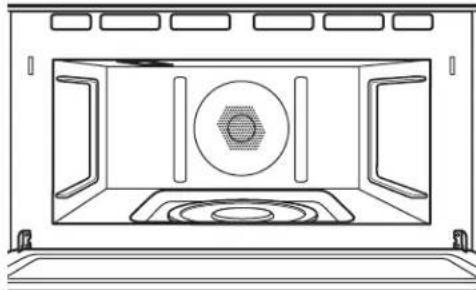
natural_image
Line drawing of an open oven with a circular vent and patterned base (no text or symbols)PLATO GIRATORIO REMOVIBLE
natural_image
Technical line drawing of an oval-shaped mechanical component with six symmetrical arms and a central hub (no text or symbols)natural_image
Simple line drawing of a ceiling-mounted device with two labeled components (no text or symbols)natural_image
Illustration of a hand holding a pen writing on a surface (no text or symbols present)Louisville, KY 40225
monogram.com
Louisville, KY 40225
monogram.com/extended-warranty
- MODEL INFORMATION
- MODEL NUMBERS
- WRITE DOWN THE MODEL AND SERIAL NUMBERS
- CONSUMER SUPPORT
- MONOGRAM WEBSITE
- REGISTER YOUR APPLIANCE
- SCHEDULE SERVICE
- REMOTE CONNECTIVITY
- PARTS AND ACCESSORIES
- CONTACT US
- IMPORTANT SAFETY INFORMATION READ ALL INSTRUCTIONS BEFORE USING THE APPLIANCE
- WARNING
- To reduce the risk of burns, electric shock, fire, injury to persons, or excessive microwave energy:
- INSTALLATION
- TO REDUCE THE RISK OF FIRE IN THE CAVITY:
- TO REDUCE THE RISK OF BURNS:
- READ AND SAVE THESE INSTRUCTIONS
- Continued
- OPERATING
- CLEANING
- SUPER HEATED WATER
- Arcing can occur during both Precision Cooking and microwave you see arcing, press the CANCEL pad and correct the problem.
- PRECISION COOK OVEN-SAFE COOKWARE
- OVEN-SAFE COOKWARE FOR BAKING, BROILING, WARMING, & TOASTING
- MICROWAVE-SAFE COOKWARE
- PRECAUTIONS TO AVOID POSSIBLE EXPOSURE TO EXCESSIVE MICROWAVE ENERGY
- GROUNDING INSTRUCTIONS
- ⚠ WARNING
- PACEMAKERS
- GETTING TO KNOW ADVANTIUM
- WHAT IS ADVANTIUM?
- MICROWAVING WITH EXPRESS
- FEATURES
- TURNTABLE
- METAL TRAY OR METAL GRILL TRAY
- WIRE OVEN RACK
- CLEAR GLASS TRAY
- UPPER HALOGEN LAMP
- WINDOW
- DOOR HANDLE
- DOOR LATCHES
- LOWER CERAMIC HEATER
- CONTROL PANEL
- REAR CONVECTION SYSTEM
- CONTROLS
- EXPRESS
- MICROWAVE
- OVEN
- PRECISION COOKING
- RECIPES
- STEAM CLEAN
- OVEN LIGHT
- SETTINGS
- FAVORITE ♥
- KITCHEN TIMER
- COOK TIME
- DELAY TIME
- PRECISION COOK POWER LEVEL
- USING PRECISION COOK FEATURES
- COOKING TIPS
- PRECISION COOK COOKWARE
- CRISP REHEAT PRECISION COOK
- CUSTOM PRECISION COOK
- PRE-SET PRECISION COOK MENU
- THINGS THAT ARE NORMAL
- Cooking Times
- Cooling Fans
- Lights
- Oven Heat
- Sounds
- Interference
- CONVECTION BAKING
- When baking, remember that the oven, door and dishes will be very hot!
- COOKING TIPS FOR CONVECTION BAKING
- BROILING AND TOASTING
- COOKING TIPS FOR BROILING
- COOKING TIPS FOR TOASTING
- WARMING AND PROOFING
- WARMING
- To Crisp Stale Items:
- Tips for Crisp Foods.
- Tips for Moist Foods:
- PROOFING
- NOTES:
- MICROWAVING
- Cookware
- MICROWAVE PRE-SET SELECTIONS
- Microwave Auto Cook Selections
- ■ Beverage
- ■ Cook by Food Type
- ■ Cook by Time
- ■ Defrost
- ■ Popcorn
- ■ Reheat
- ■ Soften/Melt
- ■ Steam Cook
- DEFROST
- Conversion Guide
- DEFROSTING TIPS
- Sensor Cooking
- MICROWAVE SENSOR PROGRAMS:
- Notes About the Reheat Program:
- Sensor Cooking Cookware
- STEAM COOK FEATURE
- Menu Selection For Sensor Steam
- SET CLOCK
- LOCK CONTROL
- SOUND
- DISPLAY
- COOKING
- SYSTEM
- WI-FI & REMOTE ENABLE
- Connecting your Wi-Fi Connect Enabled oven
- Remote Starting Your Advantium
- OTHER FEATURES
- ACCESSORY STORAGE DRAWER (WITH SOME MODELS)
- COOK TIME COMPLETED
- CARE AND CLEANING
- INSIDE OF OVEN AND ACCESSORY STORAGE DRAWER (WITH SOME MODELS)
- REMOVABLE TURNTABLE
- COOKING TRAYS AND WIRE OVEN RACK
- HALOGEN LAMP COVER AND MICA SHEET
- OUTSIDE OF OVEN AND ACCESSORY STORAGE DRAWER (WITH SOME MODELS)
- Glass Control Panel, Door and Drawer
- Door Seal
- Stainless Steel (on some models)
- FEDERAL COMMUNICATIONS COMMISSION RADIO FREQUENCY INTERFERENCE STATEMENT (U.S.A. ONLY)
- Supplier's Declaration of Conformity 47 CFR § 2.1077 Compliance Information
- TROUBLESHOOTING TIPS
- ADVANTIUM OVEN LIMITED WARRANTY
- Monogram.com
- What Monogram will not cover:
- EXCLUSION OF IMPLIED WARRANTIES
- MANUAL DEL
- PROPIETARIO
- ÍNDICE
- PLATO GIRATORIO
- ASAR Y TOSTAR
- ADVERTENCIA
- WI-FI Y ACCESO REMOTO
- PLATO GIRATORIO REMOVIBLE
Brand : Monogram
Model : ZSB9232NSS
Category : Oven