WGNBPA-730 - Sphygmomanometer Walgreens - Free user manual and instructions
Find the device manual for free WGNBPA-730 Walgreens in PDF.


| Product Type | Automatic Arm Blood Pressure Monitor |
| Brand | Walgreens |
| Model | WGNBPA-730 |
| Measurement Method | Oscillometric |
| Power Source | Four 1.5V DC "AAA" alkaline batteries |
| Pressure Measurement Range | 40–280 mmHg |
| Pulse Measurement Range | 40–199 beats/minute |
| Pressure Accuracy | ±3 mmHg |
| Pulse Accuracy | ±5% of reading |
| Memory Capacity | 60 readings |
| Cuff Size (Standard) | 9"–13" (23–33 cm) arm circumference |
| Dimensions (Monitor) | 3.98" x 5.31" x 2.07" (101 x 135 x 52.5 mm) |
| Weight (without batteries) | 0.49 lbs (221 g) |
| Display | LCD with symbols for risk category, irregular heartbeat, weak battery, pulse |
| Risk Category Index | Automatically compares readings to NIH blood pressure standards; displays color-coded cues |
| Irregular Heartbeat Detector | Detects pulse irregularities during measurement; displays IHB icon |
| Auto Shut-off | After 1 minute of inactivity |
| Operation Environment | Temperature: 41°F–104°F (5°C–40°C); Humidity: 15%–93% RH |
| Storage/Transport Environment | Temperature: -13°F–158°F (-25°C–70°C); Humidity: <93% RH |
| Warranty | 5-year limited |
| Included Accessories | 4 AAA batteries, arm cuff with tube, instruction manual |
| Cleaning Instructions | Clean monitor and cuff with a slightly damp soft cloth; do not use chemicals or immerse in water |
| Safety Notes | Not for use on infants, children, or persons under 18; not suitable for people with arrhythmias; consult physician for interpretation |
Frequently Asked Questions - WGNBPA-730 Walgreens
User questions about WGNBPA-730 Walgreens
0 question about this device. Answer the ones you know or ask your own.
Ask a new question about this device
Download the instructions for your Sphygmomanometer in PDF format for free! Find your manual WGNBPA-730 - Walgreens and take your electronic device back in hand. On this page are published all the documents necessary for the use of your device. WGNBPA-730 by Walgreens.
USER MANUAL WGNBPA-730 Walgreens
natural_image
Color palette bar with grayscale gradient from black to white (no text or symbols)Well at Walgreens
AUTOMATIC ARM
Blood Pressure Monitor
• 5-Year Limited Warranty
INTRODUCTORY INFORMATION:
Important Product Notices and Safety
Instructions ....3
About Blood Pressure....5
Blood Pressure Standard....5
How This Blood Pressure Monitor Works......7
USAGE INFORMATION:
Name/Function of Each Part......8
Display Explanations....9
Installing Batteries ....11
Date & Time Set Procedure....12
Using the Cuff....13
Measurement Procedure....17
Risk Category Index......19
Irregular Heartbeat Detector ....20
Recalling Values from Memory......21
Clearing Values from Memory....21

natural_image
Color palette bar with grayscale gradient from black to white (no text or symbols)
Important Notes Regarding Your Blood Pressure Measurement....22
Care, Maintenance & Cleaning ....23
Potential for Electromagnetic Interference .....25
Electromagnetic Compatibility (EMC)......26
Troubleshooting....28
Specifications 29
5 Year Limited Warranty....30
IMPORTANT PRODUCT NOTICES AND SAFETY INSTRUCTIONS
When using your blood pressure monitor, basic precautions should always be followed. Please read and follow all instructions and warnings before using this product.
Save these instructions for future reference.
- Please note that this is a home healthcare product only and it is not intended to serve as a substitute for the advice of a physician or medical professional.
- This device uses the oscillometric method to measure systolic and diastolic blood pressure, as well as heart rate.
- Do not use this device for diagnosis or treatment of any health problem or disease. Measurement results are for reference only. Consult a healthcare professional for interpretation of pressure measurements. Contact your physician if you have or suspect any medical problem. Do not change your medications without the advice of your physician or healthcare professional.
- Proper cuff size is critical for accurate measurements. Follow the instructions in this manual and printed on the arm cuff to ensure the appropriate size of cuff is being used.
-
This product is not suitable for people with arrhythmias. This device may have difficulty determining the proper blood pressure for pregnant women and for users with irregular heartbeat, diabetes, poor circulation of blood, kidney problems or for users who have suffered from a stroke.
-
Excessive use may result in blood flow interference, which is likely to cause uncomfortable sensations, such as partial subcutaneous hemorrhage, or temporary numbness to your arm. In general these symptoms should not last long. However, if you do not recover in time, please seek advice from a medical professional.
- The pulse display is not suitable for checking the frequency of heart pacemakers.
- Electromagnetic interference: The device contains sensitive electronic components. Avoid strong electrical or electromagnetic fields in the direct vicinity of the device (e.g. mobile telephones, microwave ovens). These may lead to temporary impairment of measurement accuracy.
- Consider the electromagnetic compatibility of the device (ex. power disturbance, radio frequency interference etc.) Please use this device indoors only.
• Use blood pressure monitor only for its intended use. - Do not wrap the cuff around body parts other than your arm.
- Do not use this device on infants, children, or those who cannot express their own intention.
• Not for use by or on persons under the age of 18.
• Use only 1.5V "AAA" alkaline batteries for power supply.
Blood pressure measurements determined with this device are equivalent to those obtained by a trained observer using the cuff/stethoscope auscultatory method, within the limits prescribed by the American National Standard, Manual, electronic, or automated sphygmomanometers.
ABOUT BLOOD PRESSURE
What is Blood Pressure?
Blood pressure is the pressure exerted on the artery walls while blood flows through the arteries. The pressure measured when the heart contracts and sends blood out of the heart is systolic (highest) blood pressure. The pressure measured when the heart dilates with blood flowing back into the heart is called diastolic (lowest) blood pressure.
Why Measure Your Blood Pressure?
Among today's various health problems, those associated with high blood pressure are very common. High blood pressure dangerously correlates with cardiovascular diseases. Therefore, blood pressure monitoring is important for identifying those at risk.
BLOOD PRESSURE STANDARD
The table on page 6 contains defined levels for hypertension that are publicly available from the National Heart Lung and Blood Institute at the U.S. National Institutes of Health (NIH) (http://www.nhlbi.nih.gov/health/dci/Diseases/Hbp/HBP_Whatls.html). Users can compare their own blood pressure readings against these defined levels to determine if they may be potentially at increased risk.
This table is applicable to most adults aged 18 and older.
Blood pressure tends to go up and down, even in people who normally don't have high readings. If your numbers stay above the "normal" range most of the time, you may be at increased risk and should consult your physician.
| Category | Systolic (mmHg) | Diastolic (mmHg) |
| Normal Less than 120 | and Less than 80 | |
| Prehypertension 120-139 or 80-89 | ||
| High Blood Pressure | ||
| Stage 1 140-159 or 90-99 | ||
| Stage 2 160 or higher | or 100 or higher |
Although one can easily find where their own blood pressure readings fall on this table, this monitor comes equipped with a Risk Category Index that automatically compares each reading to the defined levels and provides a helpful cue if your reading falls into one of the stages that could potentially indicate increased risk. See page 19 for more information on this feature.
Please note that cues provided by this monitor are only intended to assist you in using this table. The table and cues are only provided for convenience to help you understand your non-invasive blood pressure reading as it relates to the NIH information. They are not a substitute for a medical examination by your physician. It is important for you to consult with your physician regularly. Your physician will tell you your normal blood pressure range as well as the point at which you may actually be considered to be at risk.
HOW THIS BLOOD PRESSURE MONITOR WORKS
This monitor uses innovative technology to detect your blood pressure. This technology enables the monitor to automatically inflate and deflate at the appropriate level for each individual. With one touch of a button, the cuff will automatically inflate to block the blood flow through your artery. Next, the deflation process starts. Please note that any muscle movement during inflation or deflation will cause measurement error. When measurement is complete, the monitor will display your systolic pressure, diastolic pressure, and pulse readings.
The monitor automatically finds where your measurement results fall on the NIH's National Heart Lung and Blood Institute's table and provides a cue if your reading falls into one of the stages that could potentially indicate increased risk. Please refer to page 19 for more information on this feature.
The appearance of the IHB icon indicates that a pulse irregularity consistent with an irregular heartbeat was detected during measurement. Refer to page 20 for more information on the Irregular Heartbeat Detector.

natural_image
Color palette bar with grayscale gradient from black to white (no text or symbols)
NAME/FUNCTION OF EACH PART
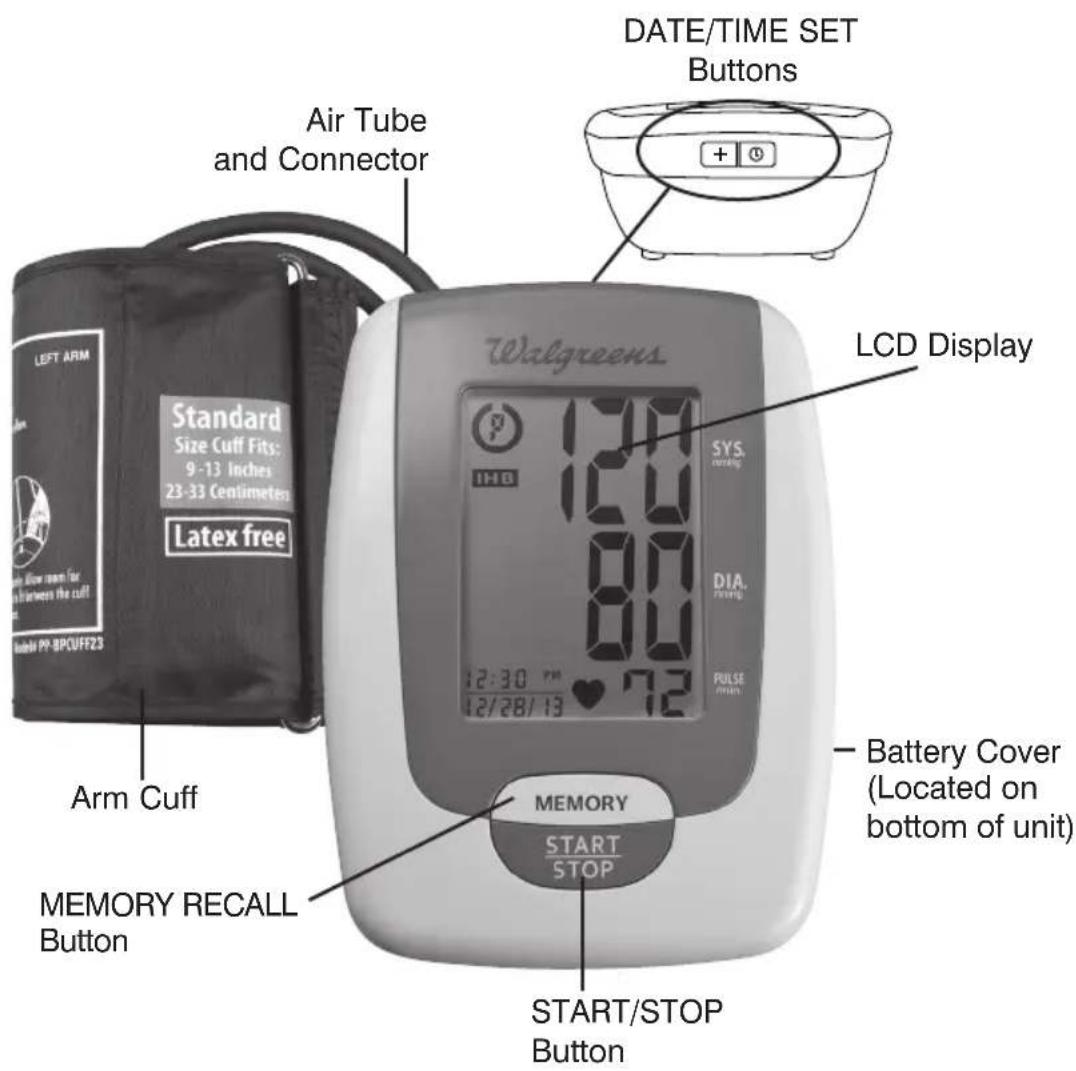
Other Accessories:
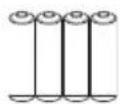
4 "AAA" size, 1.5V alkaline batteries (included)

natural_image
Color palette bar with grayscale gradient from black to white (no text or symbols)DISPLAY EXPLANATIONS
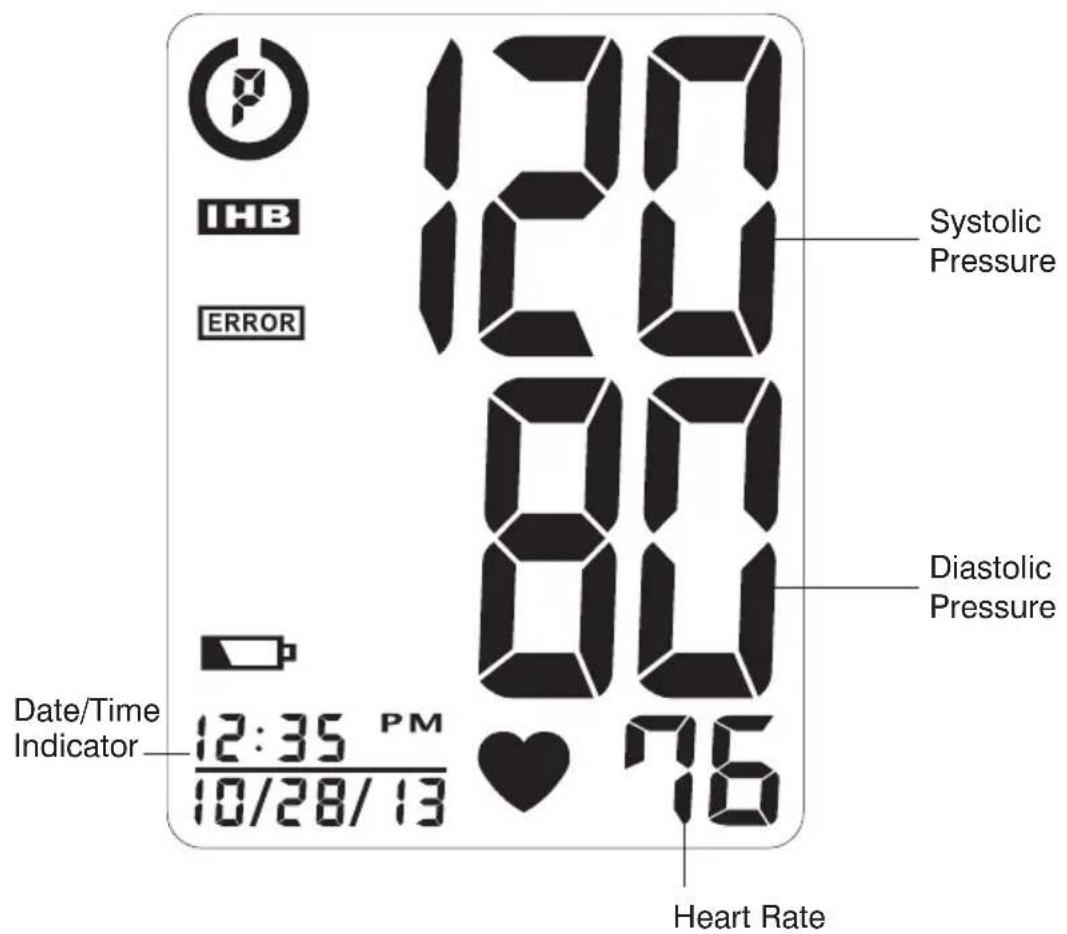
Display Symbols:
 | Weak Battery Symbol: Appears when batteries should be replaced. |
 | Pulse Symbol: Shows the heart rate per minute. |
 | Irregular Heartbeat Detector: See page 20 for more information. |
 | Risk Category Index: See page 19 for more information. |
If EARN or any of the following letters and numbers appear in the area that systolic pressure should be displayed, an error has occurred with your reading. See Troubleshooting section of this manual for more information.
| EE | Measurement Error: Wrap the cuff correctly and keep arm steady during measurement. Measure again. |
| E1 | Air Circuit Abnormality: Check cuff connection. Measure again. |
| E2 | Pressure Exceeding 300 mmHg: Turn the unit off to clear, then measure again. |
| E3 | Error Determining Measurement Data: Measure again. |
| EP | System Error: Measure again. |
INSTALLING BATTERIES
- Press down on latch and lift the battery cover to open the battery compartment.
- Install or replace 4 "AAA" sized batteries in the battery compartment according to the indications inside the compartment.
- Close the battery cover by pushing in the top end of the battery door.
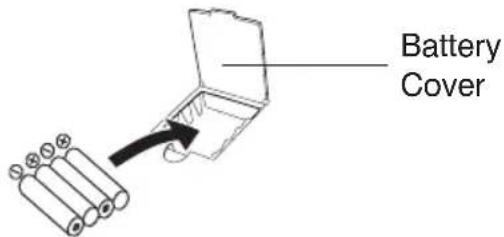
Replace the batteries if:
- The weak battery symbol appears on the display.
- Nothing appears on the display when the power is switched on.
As the supplied batteries are for test only, they may be discharged earlier than batteries you buy in stores. Replace all batteries at one time (as simultaneous set). Use only 1.5V "AAA" alkaline batteries. Remove batteries when unit is not in use for extended periods of time. Date and time will need to be reset if batteries are removed or replaced. Clean contacts on battery and in battery compartment with a soft dry cloth each time you install batteries.
Note:
Batteries are hazardous waste. Do not dispose of them together with the household garbage.

natural_image
Color palette bar with grayscale gradient from black to white (no text or symbols)
DATE & TIME SET PROCEDURE
- To adjust the date and time, press the DATE/TIME SET button ⏻ .
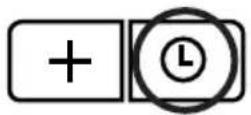
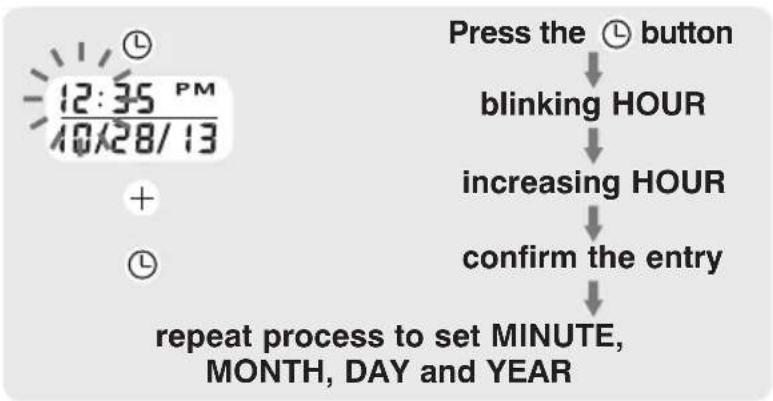
- The display will show a blinking number showing the HOUR. Change the HOUR by pressing the + button. Each press will increase the number by one in a cycling manner. Press the DATE/TIME SET button 📊 again to confirm the entry, and the screen will show a blinking number representing the MINUTE.
- Change the MINUTE, MONTH, DAY and YEAR as described in Step 2 above, using the + button to change the numbers and the DATE/TIME SET button Ⓛ to confirm the entries.
flowchart
graph TD
    A["Press the button"] --> B["blinking HOUR"]
    B --> C["increasing HOUR"]
    C --> D["confirm the entry"]
    D --> E["repeat process to set MINUTE, MONTH, DAY and YEAR"]

natural_image
Color palette bar with grayscale gradient from black to white (no text or symbols)
USING THE ARM CUFF
Very Important: Proper cuff size is critical to accurate measurement.
This monitor comes with a standard size arm cuff that fits arms 9"-13" (23 cm-33 cm).
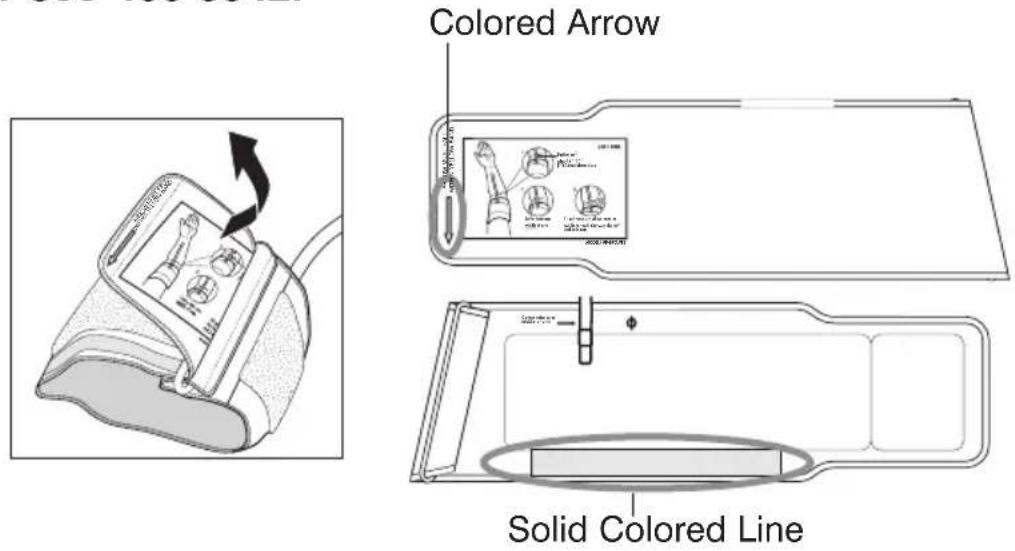
This cuff is suitable for your use if the colored arrow falls within the solid color line as shown below. If the arrow falls outside of the solid color line, you will need to contact HoMedics Consumer Relations for a Large Size arm cuff (13"-17", 33cm - 43cm) at 1-800-466-3342.

natural_image
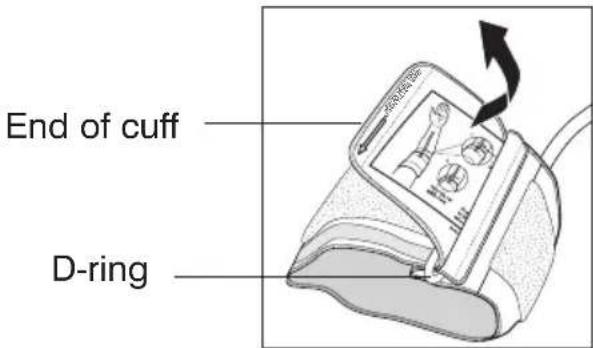
Color palette bar with grayscale gradient and a central crosshair (no text or symbols)- If the cuff is not assembled, pass the end of the cuff furthest away from the tubing through the metal D-ring in order to form a loop. The smooth side without the felt material should be on the inside of the cuff loop.
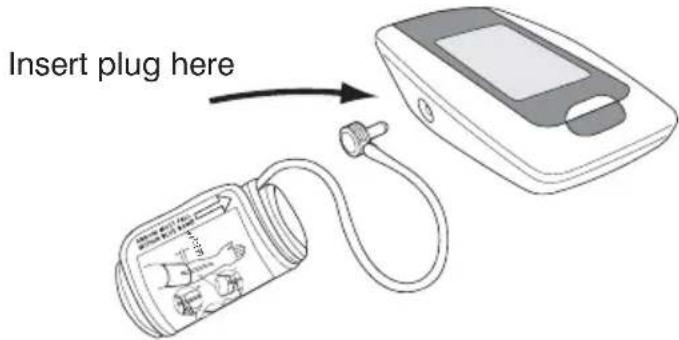
- Plug the cuff tube into the left side of the unit.
- Open the arm cuff so that your arm may be placed through it.
- Remove tight fitting clothing from your upper left arm so that the cuff can be wrapped around your exposed arm.

natural_image
Color palette bar with grayscale gradient from black to white (no text or symbols)
- Position cuff edge 0.8-1.2 inches (2-3 cm) above elbow.
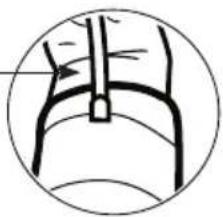
natural_image
Simple line drawing of a mechanical or fluidic component inside a circular frame (no text or symbols)- Center tube over middle of arm.
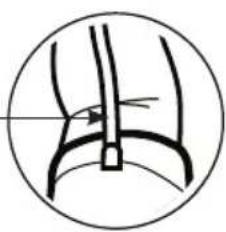
natural_image
Simple line drawing of a curved mechanical or anatomical structure inside a circle (no text or symbols)- Pull the end of the cuff so that it tightens evenly around your arm. Press the hook and loop material together to secure. Allow room for 2 fingers to fit between the cuff and your arm.
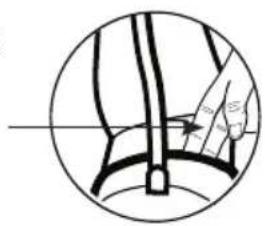
natural_image
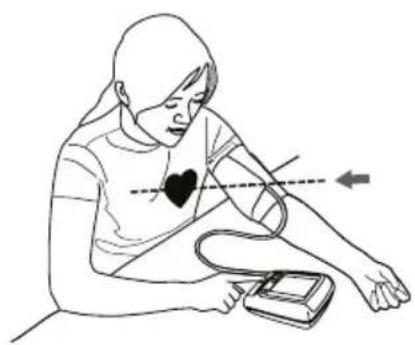
Simple line drawing of a hand holding a tool, no text or symbols present- Lay your arm on a table (palm upward) so the cuff is at the same height as your heart. Make sure the tube is not kinked.
natural_image
Line drawing of a person using a blood pressure monitor with a heart symbol on the chest (no text or labels)
natural_image
Color palette bar with grayscale gradient and a central crosshair (no text or symbols)Note:
- This device should not be used when your arm is wounded or injured.
- If it is not possible to fit the cuff on your left arm, it can also be placed on your right arm. However, all measurements should be made using the same arm.
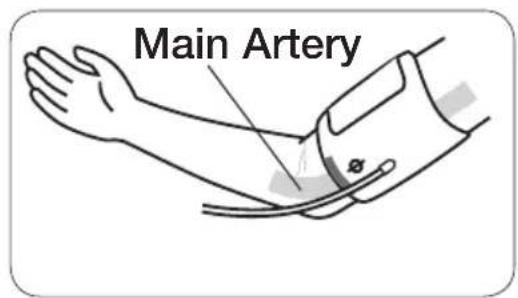
- To use on the right arm, you must position the artery symbol “Φ” over the main artery. Locate the main artery by pressing with two fingers approximately 1” (2 cm) above the bend of your elbow on the inside of your right arm. Identify where the pulse can be felt the strongest. This is your main artery.
MEASUREMENT PROCEDURE
Important Notes:
- Blood pressure changes with every heartbeat and is in constant fluctuation throughout the day.
- Blood pressure measurement can be affected by the position of the user, his or her physiologic condition and other factors. For greatest accuracy, wait 1 hour after exercising, bathing, eating, drinking beverages with alcohol or caffeine, or smoking to measure blood pressure.
- Before measurement, it is suggested that you sit quietly for 15 minutes as measurements taken during a relaxed state will have greater accuracy. You should not be physically tired or exhausted while taking a measurement.
- During the measurement, do not talk or move your arm or hand muscles.
• See page 22 for additional notes regarding your blood pressure measurement.
If you are using this blood pressure monitor for the first time, please remove the protective film from the screen.

natural_image
Color palette bar with grayscale gradient from black to white (no text or symbols)
- With the cuff wrapped around your arm, press the START/STOP button. Do not inflate the cuff unless it is wrapped around your arm. All digits will light up to check the display functions. The checking procedure will be completed after about 3 seconds.
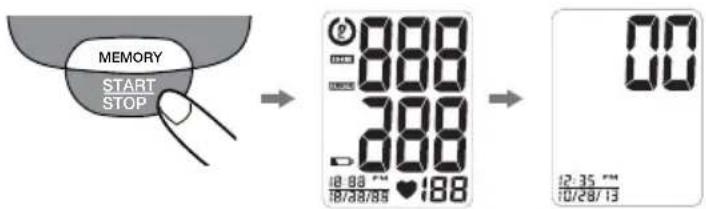
- After all symbols disappear, the display will show "00". The monitor is "Ready to Measure" and will automatically inflate the cuff to start measurement. The cuff will then begin deflating as measurement continues.
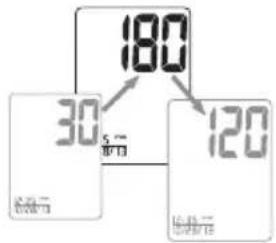
other
| Parameter | Value | |---|---| | Temperature (°C) | 30 | | Time (s) | 5 | | Value | 180 | | Temperature (°C) | 120 | | Time (s) | 120 |Note:
This monitor will re-inflate automatically if the system detects that your body requires more pressure for measurement.
- When the measurement is completed, the cuff will deflate entirely. Systolic pressure, diastolic pressure and pulse will be shown simultaneously on the LCD screen. The measurement is then automatically stored into memory.
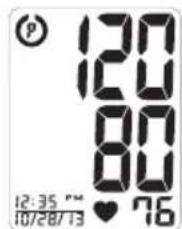
Note:
- This monitor automatically turns off approximately 1 minute after last operation. You may also press the START/STOP button to turn the unit off.
- To interrupt the measurement, you may press the START/STOP (recommended), MEMORY or DATE/TIME SET ( ⏻ ) buttons. The cuff will deflate immediately after a button is pressed.
RISK CATEGORY INDEX
This monitor comes equipped with a Risk Category Index that automatically compares each reading to defined levels established by the U.S. National Institutes of Health's (NIH) National Heart Lung and Blood Institute as described earlier in this manual, and provides a helpful cue if your reading falls into one of the stages that could potentially indicate increased risk. No cue is given if the reading falls in the normal range as defined by NIH. Please note that cues provided by this monitor are only intended to assist you in using this table. The table and cues are only provided for convenience to help you understand your non-invasive blood pressure reading as it relates to the NIH information. They are not a substitute for a medical examination by your physician. It is important for you to consult with your physician regularly. Your physician will tell you your normal blood pressure range as well as the point at which you may actually be considered to be at risk.

Stage 2 Hypertension

Prehypertension

Stage 1 Hypertension
Normal (No Symbol)
IRREGULAR HEARTBEAT DETECTOR (IHB)
The appearance of the IHE icon indicates that a pulse irregularity consistent with an irregular heartbeat was detected during measurement. Usually this is not a cause for concern. However, if the symbol appears often, we recommend you seek medical advice. Please note that the device does not replace a cardiac examination, but serves to detect pulse irregularities at an early stage.
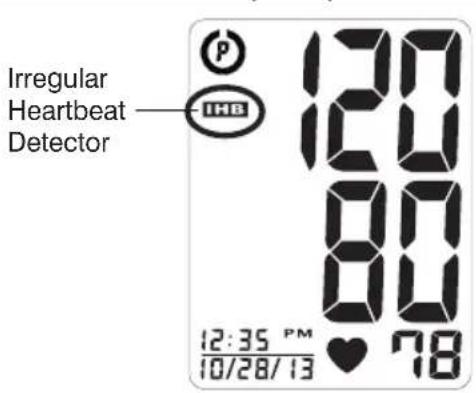
Movement, shaking or talking during the measurement can result in pulse irregularities that may cause the appearance of this icon. Therefore, it is of great importance to not move or talk during measurement.
To determine the presence of an irregular heartbeat, the average of the heartbeat intervals is calculated with the first 3 normal effective heartbeat values. It is important to note that the average is not a strict mathematical averaging of all recorded intervals. At least 3 beats with 25% or greater difference from the average heartbeat interval will generate the on the screen.
Important Information:
This blood pressure monitor is not designed for use by people with arrhythmias nor for diagnosing or treating an arrhythmia problem. As a safeguard, we recommend that if you have arrhythmias such as atrial or ventricular premature beats and atrial fibrillation or any other special conditions you should check with your physician before using your blood pressure monitor.

natural_image
Color palette bar with grayscale gradient from black to white (no text or symbols)
RECALLING VALUES FROM MEMORY
- Press the MEMORY button to access the memory.
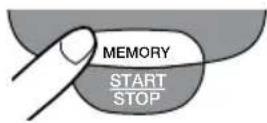
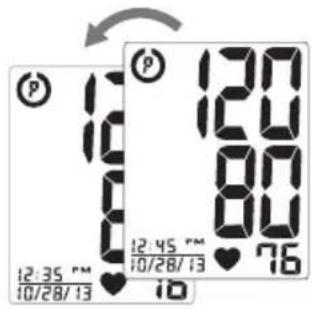
- Every new press of the MEMORY button will recall a previous reading. The latest reading will be recalled first.
CLEARING VALUES FROM MEMORY
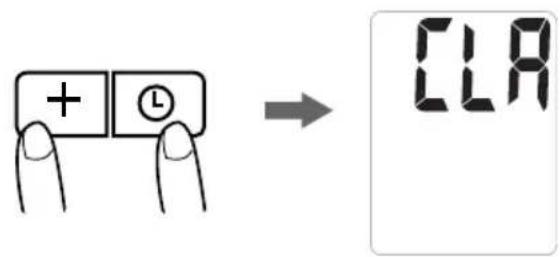
Press and hold the DATE/TIME SET buttons (💡 + ) at the same time while in memory recall mode, and the data will be erased automatically.
21
IMPORTANT NOTES REGARDING YOUR BLOOD PRESSURE MEASUREMENT
• Take your reading in a comfortable environment as measurements can be affected by hot or cold temperatures. Take your blood pressure at normal body temperature.
- Do not move or talk during measurement as this can elevate readings.
- Do not move or cross legs during measurement. Keep feet flat on floor.
- Do not touch cuff or monitor during measurement procedure.
- It is suggested that you take your measurements at the same time each day and use the same arm for consistency.
- Users should wait a minimum of 5 minutes before taking additional measurements. More time may be necessary depending upon your physiology.
- The measurement results that users receive are for reference only. If users have any blood pressure concerns, please consult a physician.
- Once inflation reaches 300 mmHg, the unit will deflate automatically for safety reasons.
- This product is not suitable for people with arrhythmias.
- This device may have difficulty determining the proper blood pressure for pregnant women and for users with irregular heartbeat, diabetes, poor circulation of blood, kidney problems, or for users who have suffered a stroke.
CARE, MAINTENANCE & CLEANING
- Clean the blood pressure monitor body and cuff carefully with a slightly damp, soft cloth. Do not press. Do not wash cuff or use chemical cleaner on it. Never use thinner, alcohol or petrol (gasoline) as cleaner.
- Leaky batteries can damage the unit. Remove the batteries when the unit will not be used for a long time.
- Follow local ordinances and recycling instructions regarding disposal or recycling of the device and device components, including batteries.
- If the unit is stored near freezing, allow it to acclimate to room temperature before use.
- This blood pressure monitor is not field serviceable. You should not use any tool to open the device nor should you attempt to adjust anything inside the device. If you have any problems with this device, please contact HoMedics Consumer Relations (contact information can be found on the warranty page).
- Do not immerse the unit in water as this will result in damage to the unit.
- Do not subject the monitor or cuff to extreme temperatures, humidity, moisture, or direct sunlight. Protect from dust.
- Do not fold the cuff and tubing tightly.

natural_image
Color palette bar with grayscale gradient and a central crosshair (no text or symbols)- Do not disassemble the monitor or cuff. If in need of repair, refer to the warranty section of this manual.
- Do not subject the monitor to extreme shocks (do not drop on floor).
- Do not inflate the cuff unless wrapped around arm.
- Do not wrap the cuff around body parts other than your arm.
- Do not drop or insert any object into any opening or hose.
- To avoid accidental strangulation keep this product away from children. Do not drape tube around neck.
- This monitor may not meet its performance specifications if stored or used outside of these temperature and humidity ranges:
- Storage/Transportation - Operating Environment - Environment
Temperature:
$$ - 1 3 ^ {\circ} \mathrm{F} \sim 1 5 8 ^ {\circ} \mathrm{F} (- 2 5 ^ {\circ} \mathrm{C} \sim 7 0 ^ {\circ} \mathrm{C}) $$
Humidity:
less than 93% RH
Temperature:
$$ 4 1 ^ {\circ} \mathrm{F} \sim 1 0 4 ^ {\circ} \mathrm{F} (5 ^ {\circ} \mathrm{C} \sim 4 0 ^ {\circ} \mathrm{C}) $$
Humidity:
15% \~ 93% RH
POTENTIAL FOR ELECTROMAGNETIC INTERFERENCE
To avoid inaccurate results caused by electromagnetic interference between electrical and electronic equipment, do not use the device near a cell phone or microwave oven. For most wireless communication devices, it is
recommended to maintain a distance of 10.8 feet (3.3m) in order to avoid electromagnetic interference.
This device complies with Part 15 of the FCC Rules. Operation is subject to the following two conditions: (1) this device may not cause harmful interference, and (2) this device must accept any interference received, including interference that may cause undesired operation.
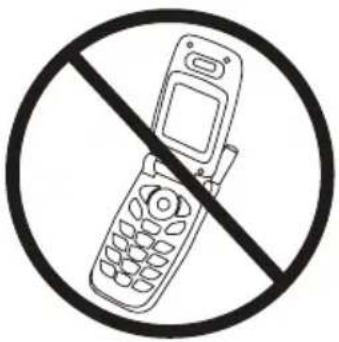
NOTE: The manufacturer is not responsible for any radio or TV interference caused by unauthorized modifications to this equipment. Such modifications could void the user authority to operate the equipment.
NOTE: This equipment has been tested and found to comply with the limits for a Class B digital device, pursuant to Part 15 of the FCC Rules. These limits are designed to provide reasonable protection against harmful interference in a residential installation. This equipment generates, uses and can radiate radio frequency energy and, if not installed and used in accordance with the instructions, may cause harmful interference to radio communications. However, there is no guarantee that interference will not occur in a particular installation. If this equipment does cause harmful interference to radio or television reception, which can be determined by turning the equipment off and on, the user is encouraged to try to correct the interference by one or more of the following measures:
• Reorient or relocate the receiving antenna.
- Increase the separation between the equipment and receiver.
- Connect the equipment into an outlet on a circuit different from that to which the receiver is connected.
- Consult the dealer or an experienced radio/TV technician for help.
ELECTROMAGNETIC COMPATIBILITY (EMC)
• Guidance and manufacturer's declaration – electromagnetic emissions
The device is intended for use in the electromagnetic environments listed below, and should only be used in such environments:
| Emissions test Compliance | Electromagnetic | environment – guidance |
| RF emissions CISPR 11 Group 1 RF energy is used only to maintain device’s operation.Therefore, its RF emissions are so low that it’s not likely to cause any interference in nearby electronic equipment. | ||
| RF emissions CISPR 11 Class B | ||
| Harmonic emissions IEC 61000-3-2 | Not Applicable | The device is suitable for use in all establishments, including domestic establishments, and those directly connected to the public low-voltage power supply network that supplies buildings used for domestic purposes. |
| Voltage fluctuations/ flicker emissions IEC 61000-3-3 | Not Applicable | |
• Guidance and manufacturer's declaration – electromagnetic immunity
The device is intended for use in the electromagnetic environments listed below, and should only be used in such environments:
| Immunity test IEC | 60601 test level | Compliance level | Electromagnetic environment-guidance |
| Electrostatic discharge (ESD)IEC 61000-4-2 | ± 6 kV contact± 8 kV air | ± 6 kV contact± 8 kV air | |
| Power frequency(50/60 Hz)magnetic fieldIEC 61000-4-8 | 3 A/m | 3 A/m | Power frequency magnetic fields |
- Recommended separation distances between portable and mobile RF communication equipment and the device.
The device is intended for use in an electromagnetic environment where radiated RF disturbances are under control. User can help prevent electromagnetic interference by keeping the device at a minimum distance from portable and mobile RF communications equipment (transmitters). Below table details the maximum output power of transmitter:
| Rated maximum output power of transmitter W | Separation distance according to frequency of transmitter m | ||
| 150 kHz to 80 MHzNot Applicable | 80 MHz to 800 MHz d = 1.2 | 800 MHz to 2.5 GHz d = 2.3 | |
| 0.01 NA 0.12 | 0.23 | ||
| 0.1 | NA 0.38 0.73 | ||
| 1 NA | 1.2 | 2.3 | |
| 10 | NA | 3.8 | 7.3 |
| 100 | NA | 12 | 23 |
For transmitters rated at a maximum output power not listed above, the recommended separation distance d in metres (m) can be estimated using the equation applicable to the frequency of the transmitter, where P is the maximum output power rating of the transmitter in watts (W) according to the transmitter manufacturer.
NOTE 1 At 80 MHz and 800 MHz, the separation distance for the higher frequency range applies. NOTE 2 These guidelines may not apply in all situations. Electromagnetic propagation is affected by absorption and reflection from structures, objects and people.
• Guidance and manufacturer's declaration – electromagnetic immunity
The device is intended for use in the electromagnetic environments listed below, and should only be used in such environments:
| Immunity test | IEC 60601 test level | Compliance level | Electromagnetic environment – guidance |
| Conducted RFIEC 61000-4-6Radiated RFIEC 61000-4-3 | 3 Vrms150 kHz to80 MHz3 V/m80 MHz to2.5 GHz | Not Applicable3 V/m | Portable and mobile RF communications equipment should be used no closer to any part of the device, including cables, than the recommended separation distance calculated from the equation applicable to the frequency of the transmitter.Recommended separation distanced = 1.2 80 MHz to 800 MHzd = 2 .3 800 MHz to 2.5 GHzwhere P is the maximum output power rating of the transmitter in watts (W) according to the transmitter manufacturer and d is the recommended separation distance in metres (m).Field strengths from fixed RF transmitters, as determined by an electromagnetic site survey, a should be less than the compliance level in each frequency range.bInterference may occur in the vicinity of equipment markedwith the following symbol:[IMAGE] |
| NOTE 1 At 80 MHz and 800 MHz, the higher frequency range applies.NOTE 2 These guidelines may not apply in all situations. Electromagnetic propagation is affected by absorption and reflection from structures, objects and people. | |||
| a Field strengths from fixed transmitters, such as base stations for radio (cellular/cordless) telephones and land mobile radios, amateur radio, AM and FM radio broadcast and TV broadcast cannot be predicted theoretically with accuracy. To assess the electromagnetic environment due to fixed RF transmitters, an electromagnetic site survey should be considered. If the measured field strength in the location in which the device is used exceeds the applicable RF compliance level above, the device should be observed to verify normal operation. If abnormal performance is observed, additional measures may be necessary, such as reorienting or relocating the device.b Over the frequency range 150 kHz to 80 MHz, field strengths should be less than 3 V/m. | |||
TROUBLESHOOTING
If any abnormality arises during use, please check the following points
| SYMPTOMS | POSSIBLE CAUSES | CORRECTION |
| Unit does not turn on when the START/ STOP button is pushed. | Batteries have run down. | Replace them with four new “AAA” alkaline batteries. |
| Battery polarities have been positioned incorrectly. | Re-insert the batteries in the correct positions. | |
| EE measurement error symbol shown on display or the blood pressure value is displayed excessively low (or high). | Cuff has been placed incorrectly. | Wrap the cuff properly so that it is positioned correctly. Measure again. |
| Did you talk or move during measurement? | Keep arm steady during measurement. Measure again. | |
| Shaking of the arm with the cuff on. | ||
| E1 error symbol shown on display | Air circuit abnormality. Cuff tube may not be plugged into monitor correctly. | Check cuff connection. Measure again. |
| E2 error symbol shown on display | Inflation pressure exceeding 300 mmHg. | Switch the unit off, then measure again. |
| E3 error symbol shown on display | Error determining measurement data. | Measure again. |
| EP error symbol shown on display | System error. Measure again. |
Note: If the unit still does not work, contact HoMedics Consumer Relations. Under no circumstance should you disassemble or attempt to repair the unit by yourself. Contact information for HoMedics Consumer Relations Department can be found on the warranty page.
SPECIFICATIONS
| Power Source: | Four 1.5V DC “AAA” alkaline batteries |
| Measurement Method: | Oscillometric |
| Measurement Range: | Pressure: 40~280 millimeters mercury (mmHg)Pulse: 40~199 beats/minute |
| Accuracy: | Pressure: ±3 mmHgPulse: ±5% of reading |
| Pressure Sensor: | Semi-conductor |
| Inflation: | Pump driven |
| Deflation: | Automatic Pressure release valve |
| Memory Capacity: | 60 memories |
| Auto-shut-off: | 1 minute after last button operation |
| Operation Environment: | Temperature: 41°F~104°F (5°C ~40°C)Humidity: 15% ~ 93% RH |
| Storage/Transportation Environment: | Temperature: -13°F~158°F (-25°C~70°C)Humidity: Less Than 93% RH |
| Weight: | 0.49 lbs (221 g) (without batteries) |
| Arm Circumference: | Standard size cuff: 9”-13” (23-33 cm)Large size cuff (not included):13”-17” (33-43 cm) |
| Dimensions: | 3.98”(L) x 5.31”(W) x 2.07”(H)101mm(L) x 135mm(W) x 52.5mm(H) |
| Accessories: | (4) “AAA” alkaline batteries, arm cuff with tube |
 | Internally Powered equipmentType BF EquipmentIPx0-No special protection against the ingress of waterNot suitable for use in presence of flammable anesthetic mixture with air, oxygen or nitrous oxide.Continuous operation with short-time loading. |
| Follow instructions for use. |
Note: These specifications are subject to change without notice.
Made exclusively for
Walgreens
For service or repair, do not return this unit to the retailer. Contact HoMedics Consumer Relations at:
Email:
cservice@
homedics.com
Phone:
1-800-466-3342
Business Hours:
8:30am-7pm ET
Monday-Friday
Distributed by
HOMEDICS®
HoMedics, LLC
3000 Pontiac Trail
Commerce Township, MI 48390
Printed in China
LIMITED FIVE YEAR WARRANTY
HoMedics sells its products with the intent that they are free of defects in manufacture and workmanship for a period of five years from the date of original purchase, except as noted below. HoMedics warrants that its products will be free of defects in material and workmanship under normal use and service. This blood pressure monitor meets the simulated measurement cycles test requirement per EN1060-3, part 8.10. This warranty extends only to consumers and does not extend to Retailers.
To obtain warranty service on your HoMedics product, contact a Consumer Relations Representative by telephone at 1-800-466-3342 for assistance. Please make sure to have the model number of the product available.
HoMedics does not authorize anyone, including, but not limited to, Retailers, the subsequent consumer purchaser of the product from a Retailer or remote purchasers, to obligate HoMedics in any way beyond the terms set forth herein. This warranty does not cover damage caused by misuse or abuse; accident; the attachment of any unauthorized accessory; alteration to the product; improper installation; unauthorized repairs or modifications; improper use of electrical/power supply; loss of power; dropped product; malfunction or damage of an operating part from failure to provide manufacturer's recommended maintenance; transportation damage; theft; neglect; vandalism; or environmental conditions; loss of use during the period the product is at a repair facility or otherwise awaiting parts or repair; or any other conditions whatsoever that are beyond the control of HoMedics. This warranty is effective only if the product is purchased and operated in the country in which the product is purchased. A product that requires modifications or adoption to enable it to operate in any other country than the country for which it was designed, manufactured, approved and/or authorized, or repair of products damaged by these modifications is not covered under this warranty.
THE WARRANTY PROVIDED HEREIN SHALL BE THE SOLE AND EXCLUSIVE WARRANTY. THERE SHALL BE NO OTHER WARRANTIES EXPRESS OR IMPLIED INCLUDING ANY IMPLIED WARRANTY OF MERCHANTABILITY OR FITNESS OR ANY OTHER OBLIGATION ON THE PART OF THE COMPANY WITH RESPECT TO PRODUCTS COVERED BY THIS WARRANTY. HOMEDICS SHALL HAVE NO LIABILITY FOR ANY INCIDENTAL, CONSEQUENTIAL OR SPECIAL DAMAGES. IN NO EVENT SHALL THIS WARRANTY REQUIRE MORE THAN THE REPAIR OR REPLACEMENT OF ANY PART OR PARTS WHICH ARE FOUND TO BE DEFECTIVE WITHIN THE EFFECTIVE PERIOD OF THE WARRANTY. NO REFUNDS WILL BE GIVEN. IF REPLACEMENT PARTS FOR DEFECTIVE MATERIALS ARE NOT AVAILABLE, HOMEDICS RESERVES THE RIGHT TO MAKE PRODUCT SUBSTITUTIONS IN LIEU OF REPAIR OR REPLACEMENT.
This warranty does not extend to the purchase of opened, used, repaired, repackaged and/or resealed products, including but not limited to sale of such products on Internet auction sites and/or sales of such products by surplus or bulk resellers. Any and all warranties or guarantees shall immediately cease and terminate as to any products or parts thereof which are repaired, replaced, altered, or modified, without the prior express and written consent of HoMedics.
This warranty provides you with specific legal rights. You may have additional rights which may vary from state to state. Because of individual state regulations, some of the above limitations and exclusions may not apply to you.
HoMedics® is a registered trademark of HoMedics, LLC.
© 2012-2013 HoMedics, LLC. All rights reserved.
IB-WGNBPA730A
P/N: 323102380 VER: 001

MONITOR AUTOMÁTICO
natural_image
Color palette bar with grayscale gradient from black to white (no text or symbols)
natural_image
Color palette bar with grayscale gradient and a central crosshair (no text or symbols)natural_image
Color palette bar with grayscale gradient from black to white (no text or symbols)
natural_image
Color palette bar with grayscale gradient from black to white (no text or symbols)natural_image
Color palette bar with grayscale gradient from black to white (no text or symbols)
USO DEL BRAZALLETE
natural_image
Color palette bar with grayscale gradient and a central crosshair (no text or symbols)natural_image
Color palette bar with grayscale gradient from black to white (no text or symbols)
natural_image
Simple line drawing of a mechanical or fluidic component inside a circular frame (no text or symbols)natural_image
Simple line drawing of a curved mechanical or anatomical structure inside a circle (no text or symbols)natural_image
Simple line drawing of a hand pressing down on a curved object inside a circle (no text or symbols)natural_image
Line drawing of a person measuring blood pressure using a sphygmomanometer (no text or symbols present)
natural_image
Color palette bar with grayscale gradient and crosshair symbol (no text or labels)Nota:
natural_image
Color palette bar with grayscale gradient from black to white (no text or symbols)
natural_image
Color palette bar with grayscale gradient from black to white (no text or symbols)
CÓMO RECUPERAR VALORES DE LA MEMORIA
natural_image
Color palette bar with grayscale gradient and a central crosshair (no text or symbols)Commerce Township, MI 48390
Impreso en China
GARANTÍA LIMITADA POR CINCO AÑOS
- AUTOMATIC ARM
- Blood Pressure Monitor
- INTRODUCTORY INFORMATION:
- USAGE INFORMATION:
- IMPORTANT PRODUCT NOTICES AND SAFETY INSTRUCTIONS
- ABOUT BLOOD PRESSURE
- What is Blood Pressure?
- Why Measure Your Blood Pressure?
- BLOOD PRESSURE STANDARD
- HOW THIS BLOOD PRESSURE MONITOR WORKS
- INSTALLING BATTERIES
- Replace the batteries if:
- Note:
- DATE & TIME SET PROCEDURE
- USING THE ARM CUFF
- MEASUREMENT PROCEDURE
- Important Notes:
- RISK CATEGORY INDEX
- IRREGULAR HEARTBEAT DETECTOR (IHB)
- Important Information:
- RECALLING VALUES FROM MEMORY
- CLEARING VALUES FROM MEMORY
- IMPORTANT NOTES REGARDING YOUR BLOOD PRESSURE MEASUREMENT
- CARE, MAINTENANCE & CLEANING
- - Storage/Transportation - Operating Environment - Environment
- POTENTIAL FOR ELECTROMAGNETIC INTERFERENCE
- ELECTROMAGNETIC COMPATIBILITY (EMC)
- • Guidance and manufacturer's declaration – electromagnetic immunity
- TROUBLESHOOTING
- Walgreens
- HOMEDICS®
- LIMITED FIVE YEAR WARRANTY
- MONITOR AUTOMÁTICO
- USO DEL BRAZALLETE
- Nota:
- CÓMO RECUPERAR VALORES DE LA MEMORIA
- GARANTÍA LIMITADA POR CINCO AÑOS
Brand : Walgreens
Model : WGNBPA-730
Category : Sphygmomanometer