
M4U 8 - Headphones PSB - Free user manual and instructions
Find the device manual for free M4U 8 PSB in PDF.


| Product Type | Over-ear wireless headphones with active noise cancelling |
| Weight | 332 grams |
| Operating Temperature Range | 5°C – 40°C |
| Power Input | 5 VDC, 1 A |
| Battery Type | Rechargeable 1.2 V, 750 mAh (also compatible with 2× AAA alkaline) |
| Battery Charging Time | 4 hours |
| Battery Life | Approximately 15 hours (varies with usage) |
| Bluetooth Version | Bluetooth 2.4 GHz (Classic) |
| NFC | Yes, for easy pairing |
| Wired Connectivity | 3.5 mm audio input (left or right ear cup); USB for audio and charging |
| Active Noise Cancelling | Yes, with 3-position power switch (ANC: green, Active amplifier: blue, Passive: off) |
| Transparency Mode | Yes, reduces audio by 30 dB to hear surroundings |
| Voice Assistant | Siri / Google Assistant (long press phone button) |
| Controls | Volume slider, phone button, ANC/amp switch |
| Portability | Fold-and-go design; includes protective case |
| Included Accessories | USB cable, 3.5 mm audio cable, 1/4" adapter, dual 3.5 mm airline adapter, protective case |
| Cleaning | Use slightly damp cloth; ear cushions removable for hand washing |
| Safety Compliance | FCC Part 15, IC RSS, EU Directive 2014/53/EU |
| Driver | Not specified (high-fidelity performance) |
| Manufacturer | PSB Speakers (Lenbrook Industries) |
Frequently Asked Questions - M4U 8 PSB
User questions about M4U 8 PSB
0 question about this device. Answer the ones you know or ask your own.
Ask a new question about this device
Download the instructions for your Headphones in PDF format for free! Find your manual M4U 8 - PSB and take your electronic device back in hand. On this page are published all the documents necessary for the use of your device. M4U 8 by PSB.
USER MANUAL M4U 8 PSB
natural_image
Line drawing of a modern multi-band headphones with earbuds and clips (no text or symbols)INTRODUCTION
Thank you for purchasing a pair of PSB Speakers M4U 8 Headphones. Producing natural musical dynamics and precisely imaged sound, these high fidelity headphones bring you closer to the music you love.
Engineered with over 45 years of audio excellence and research, the M4U Headphones deliver unmatched sound quality, all-day comfort and fold-and-go portability, for music enthusiasts and professionals. PSB's true-to-nature sound quality and stylish ergonomic design allow you to escape to a personal concert experience that travels anywhere with you.
REGULATORY INFORMATION
Operating Temperature Range: 5°C – 40°C
Operating Frequency Range: Bluetooth 2.4G
Max Output Power: 5.5mW
| Input Rating: | 5VDC, | 1A | |
| Battery Rating: | 1.2V, | 750mAh | |
| Battery Charging Time: | 4 hours | ||
| Weight: | 332 grams | ||
Is in compliance with the essential requirements and other relevant provisions of Directive 2014/53/EU.
Date of Manufacture: The first digit in the second part of the serial number indicates the year of manufacture; "7" is 2017.
Responsible Party: Lenbrook Industries Limited. 633 Granite Court, Pickering, Ontario, Canada L1W 3K1. Phone: (905) 831-6333, Facsimile: (905) 831-6936
The Bluetooth® word mark and logos are registered trademarks owned by Bluetooth SIG, Inc. and any use if such marks by NAD Electronics is under license.
The N-Mark is a trademark or registered trademark of the NFC Forum, Inc. in the United States and in other countries.
To prevent possible hearing damage, do not listen at high volume levels for long periods.

OSHA Guidelines for Noise Exposure Limits
The Occupational Safety Health Administration (OSHA) has issued headphone usage recommendations for maximum daily exposure and sound pressure levels [measured in decibels (dB)]. A decibel is a unit of sound measurement that increases exponentially with volume. For example, conversational speech is typically around 60dB, and a rock concert in a stadium is often about 110dB.
90dB 8 hours
95dB 4 hours
100dB 2 hours
105dB 1 Hour
110dB 30 minutes
115dB 15 minutes
120dB Avoid as damage may occur
SAFETY INFORMATION
Please read this booklet to ensure that you are getting the most out of your PSB product and music.
This device complies with Part 15 of the FCC Rules. Operation is subject to the following two conditions: (1) this device may not cause harmful interference, and (2) this device must accept any interference received, including interference that may cause undesired operation.
FCC ID: SVC-PSBM4U8 CMIIT ID: 2018DJ0453
This device complies with Industry Canada licence-exempt RSS standard(s). Operation is subject to the following two conditions: (1) this device may not cause interference, and (2) this device must accept any interference, including interference that may cause undesired operation of the device.
Radio Frequency Exposure Statement for IC
The device has been evaluated to meet general RF exposure requirements. The device can be used in mobile exposure conditions. The min separation distance is 25mm.

WARNING
- Warnings or announcements may be unnoticed when you are using the headphones. Please be aware of ambient sounds while wearing the headphones and recognize them as needed.
• To prevent possible hearing damage, do not listen at high volume levels for long periods.
• These headphones should only be connected to a USB interface of version USB2.0 or higher. - Risk of explosion if the battery is replaced by an incorrect type, dispose of used batteries according to the instructions.
- Be sure to read the Owner's Manual of the device that you want to connect to these headphones.
- Check the volume settings when using the headphones when in public places and ensure that you do not disturb people around you.
• These headphones are not guaranteed to work with all combinations of Bluetooth devices/mobile phones.
• These headphones do not support a connection with all Bluetooth devices/mobile phones. - Bluetooth wireless technology can communicate up to approximately 10 m. Obstructions (people, metallic objects, walls, etc.) and radio wave conditions affect the actual range.
- The Bluetooth device that you want to connect with must support the same profile as these headphones in order to use the Bluetooth function. For details on profiles that the Bluetooth device is compatible with, see the Bluetooth device Owner's Manual.
- Due to features of Bluetooth wireless technology, playback of audio on the headphones is slightly delayed compared to the playback on the transmitting device.
- Do not use your headphones while driving.
- Remove the headphones immediately if you experience a warming sensation or loss of audio.
- Do not use mobile phone adaptors to connect these headphones to airplane seat jacks, as this could cause overheating and result in injury or property damage.
• The headphones and accessories contain small parts which may be a choking hazard. Not suitable for children under age 3.
• This product contains magnetic material. Consult your physician on whether this might affect your implanted medical device. - Use this product only with an agency approved power supply which meets local regulatory requirements (e.g., UL, CSA, VDE, CCC).
- Do not expose products containing batteries to excessive heat (e.g. from storage in direct sunlight, fire or the like).
- Long-term exposure to loud music may cause permanent hearing damage. To avoid personal injury when using the headphones for extended periods, the volume should be kept at the described levels in Figure 1.
- Fire or shock may occur should water or other foreign substances permeate inside the device.
- Do not attempt to modify this product as it could result in personal injury and/or product failure.
- Keep batteries out of reach of children.
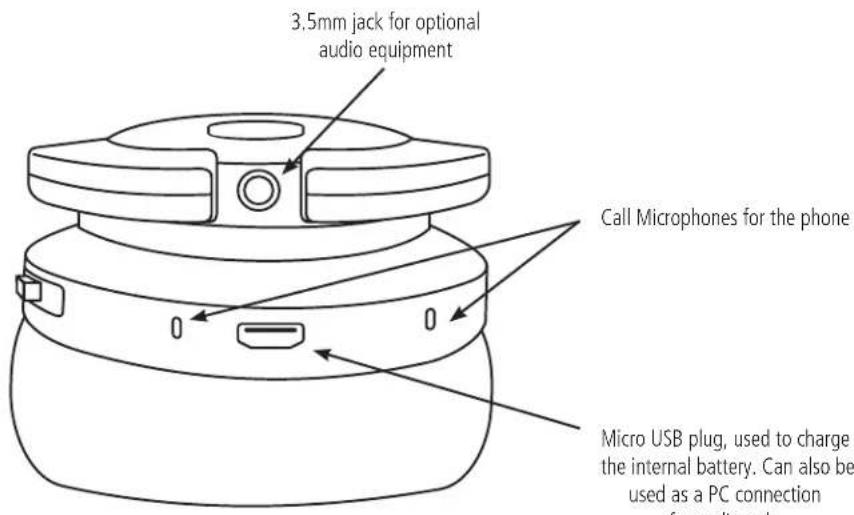
Bottom Right
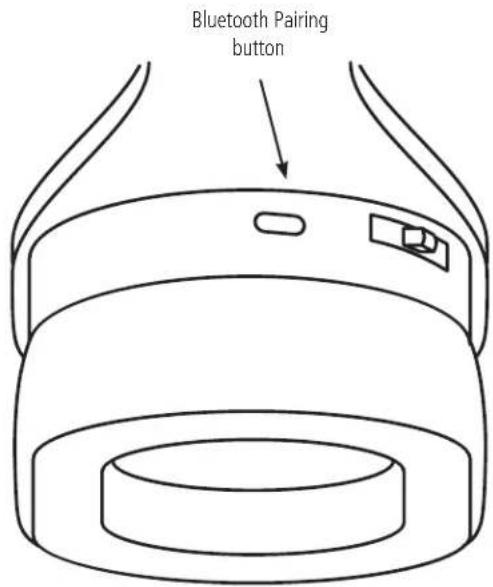
Top Right
CONNECTING...
Wired Connections
Before connecting your headphones, ensure your audio source is powered off, as severe damage to equipment and/or your ears could result.
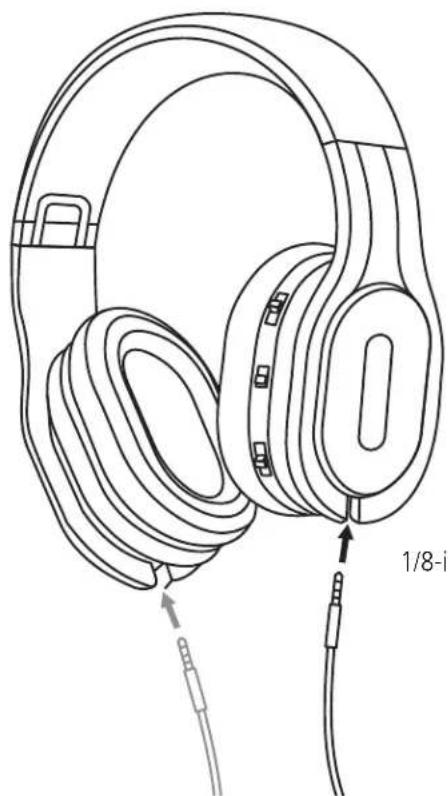
To connect your headphones, plug the 1/8-inch (3.5mm) straight connector into one of the inputs located at the base of the left (L) or right (R) ear cup. This allows you to pick a preferred side for a more comfortable listening setup as shown in Figure 2.
Figure 2
natural_image
Line drawing of an outdoor headphones with attached cable and ear connector (no text or symbols)1/8-inch (3.5mm) Straight Connector
If your audio equipment uses a 1/4-inch (6.3mm) output jack, use the included 1/4-inch adaptor.
USB Cable
Use the supplied USB cable to listen to music from you computer (audio only). This cable is used to charge your M4U 8 headphones.
Notes:
When connecting the USB cable to the charging port, be sure to match the cable connector with the shape of the socket. Forcing the connector into the socket will cause damage.
A rating of the charging output should be DC 5V, 2.4A or less
The usable time of the headphones differs depending on the temperature of the environment in which they are used and method or use.
EARPHONE MOUNTED CONTROLS...
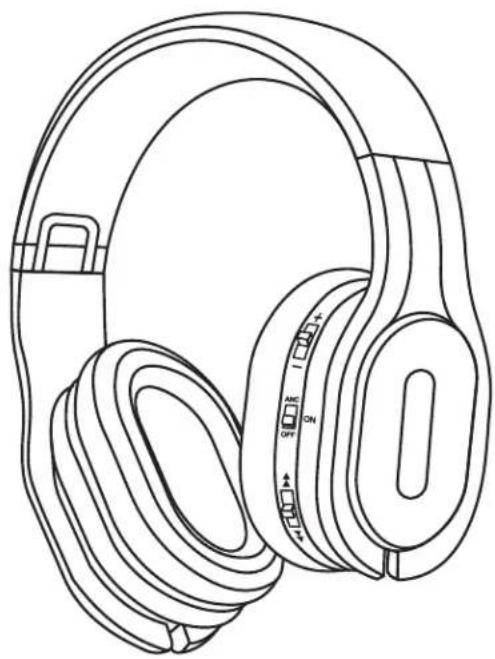
The main controls are located on the rear part of the right ear cup. They are used to control Volume, Noise Cancelling, and your smart device (tablet, iPod) as needed.
The Controls are used as follows:
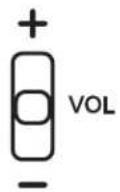
Volume and Active Monitor
Slide up towards the + sign to increase the volume.
Slide down towards the - sign to lower the volume.
Press the button VOL to engage the Transparency Mode and reduce your current audio track by 30dB. This will enable you to hear your surroundings, without leaving your personal space. The described function only works in powered modes. When activated, the surroundings will be amplified through the headphones.
natural_image
Line drawing of an outdoor headphones with adjustable buttons and earplands (no text or symbols)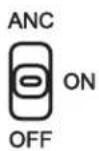
Active Noise Cancellation and Amplifier
The power modes use the internal (rechargeable) batteries.
In Active Noise Cancelling mode, the "Noise Cancelling" feature has been activated with the internal headphone amplifier. The 3-position Power Switch will be "GREEN".
In Active mode, the internal headphone amplifier is active. The 3-position Power Switch will be "BLUE".
In Passive mode (OFF), noise cancelling and amplifier are turned off. No power is required as the headphones are powered by your audio source. NOTE: Bluetooth connection will not work in this mode.
Phone Function
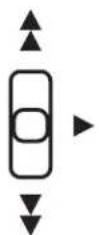
If you receive a phone call during a listening session press the phone button to answer the incoming call and pause your audio track. Once the call is complete, a single button press will end the call and resume audio play.
To activate Siri or Google Assistant, hold down the phone button for five seconds.
When listening to a handheld music device, this button can be used to change to the previous track, the next track or pause and resume music without reverting back to the controls of the handheld device.
Slide the button up for previous track.
Slide the button down for the next track.
NOTE: Phone function only works when connected by Bluetooth.
Wireless Pairing
Pairing is the process required to create a link between Bluetooth devices to allow wireless connection. You must pair a device with the PSB M4U 8 headphones to be able to make a BLUETOOTH connection for the first time.
Before you start pairing operation, make sure that:
The Bluetooth device is placed within 1 m (3 feet) of the headset.
The M4U 8 is charged sufficiently.
To pair your device:
- Turn on the Bluetooth feature on your source device.
- Open the Bluetooth settings on the source device.
- Switch the M4U 8 into a powered mode. The pairing LED will flash RED and BLUE.
- Select your M4U 8 headphones from the device list.
- Once the M4U 8's link has been established with the source device, the pairing LED will turn solid BLUE.
- If pairing fails, the pairing LED will turn solid RED.
NFC Wireless Pairing
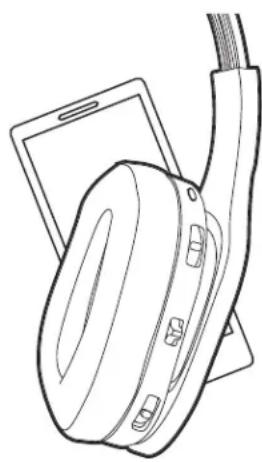
M4U 8 supports Near Field Communication (NFC) so you can easily pair your headphones. For pairing follow the instructions below.
To pair your device using NFC:
- Turn on NFC and Bluetooth on the device you are pairing.
- With the M4U 8 turned on in one of the powered modes, place your Bluetooth enabled device against the opposite side of the right ear cup where the controls are located.
- Accept the pairing on your device when prompted.
Note: NFC is a short-range wireless communication. Pairing devices are required to be within a few centimetres of the headphones to communicate. If pairing is unsuccessful, refer to the device's manual to find its NFC touchpoint. Repeat the steps shown and ensure the located touchpoint is placed against the right ear cup as directed in Step 2.
natural_image
Line drawing of a pair of headphones resting on a smartphone (no text or symbols)LISTENING...
With the volume set to low, turn on your audio source, find a comfortable listening level, and drift into a personal space filled with the sounds of your favourite audio/video collections.
Headphone Placement
Each ear cup is marked with "L" and "R" to indicate the left and right sides of the headphones. Be sure to put them on correctly to enjoy your audio as originally intended and maximize your personal music experience.
CONNECTING TO IN-FLIGHT ENTERTAINMENT SYSTEMS...
To connect to in-flight entertainment systems equipped with dual output connectors, use the supplied dual 3.5mm airline adaptor and the standard analogue cable.
NOTE:
- Audio output jack configurations may vary on airplanes. Airline audio quality may not equal what your home audio equipment, or portable sources provide.
- The supplied conversion plug may not be usable depending on the type of aircraft.
- Do not use these headphones when the use of electric devices on the aircraft is prohibited, or when the use of personal headphones to listen to on-board music service is prohibited.

WARNING
PSB Speakers recommends you do not use these headphones as aviation communication equipment. They are not engineered for many environmental conditions common in commercial or non-commercial aircraft (including, but not limited to: altitude, temperature, noise conditions, unpressurized aircraft) and could result in possible interference to critical communications.

WARNING
Liquids or cleaning solvents can cause irreparable damage to the electronics inside your headphones. The M4U warranty does not cover such damage.
M4U 8 HEADPHONE CARE
For safe, sanitary use, it is essential to maintain and clean your M4U Headphones periodically. However, excessive cleaning may cause damage and jeopardize the longevity of the product. When not in use, always store headphones in the supplied protective case, and store in a clean and dry environment. Avoid storing in extreme heat or cold temperatures and humidity, and avoid exposure to liquids.
Cleaning...
For regular cleaning, use a slightly damp cloth and gently clean each ear cup cushion, then use a dry cloth to remove any residual moisture.
If heavy cleaning is necessary after extended listening and use, follow these directions:
- Remove the ear cup cushions according to the Cushion Attachment/Detachment instruction section following.
- Clean the ear cup cushions by hand, using cold water.
- Add a very small amount of dish or laundry soap and gently clean the cushions.
• After cleaning the cushions, rinse with clean water.
• To dry the ear cup cushions, place them on a towel with the pads facing up. - Fold the towel over top of the cushions and press down to remove any excess water in the foam padding.
• Air-dry completely before reattaching.
Cushion Attachment/Detachment
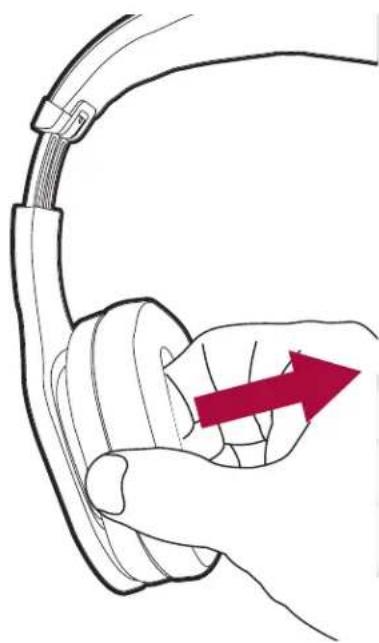
- To detach the ear cup cushion, grasp the headband over the ear cup cushion that needs to be removed.
- Using your other hand, grip the leather ear cup cushion and carefully stretch and pull the ear pad away from the ear cup. Repeat on the other ear cup if necessary.
- To reattach the ear cup cushion, grip the headband and cushion as described above, and clip the lip of the ear cup cushion back in place. The right side should be installed back on the ear cup with the controls.
NOTE:
- Be careful not to press down on or remove any other components inside the earcup as this could damage the headphones.
Storage in the protective case
- Remove the cable from the headphones, fold and insert them into the protective case.
NOTE:
- Do not force them into the protective case. Doing so may damage the headphones.

WARNING
When disconnecting your M4U Headphones, hold the plug at the end of the cable and pull to disconnect. Do not pull on the headphone cable to disconnect the headphones from your music player.
natural_image
Line drawing of a hand holding a cable with a red arrow pointing to the cable (no text or symbols)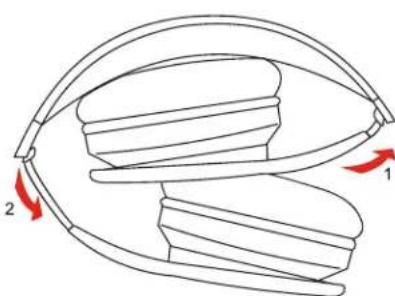
natural_image
Diagram of a curved mechanical component with two red arrows indicating direction (no text or symbols)Battery Life and Replacement with the Active M4U Headphones
natural_image
Line drawing of a pair of outdoor headphones with a red accent arrow (no text or symbols)Figure 4
When powered ON, the 3-Position Power Switch LED will be flashing the current power mode colour to indicate to the listener that there is approximately 1.5 hours of battery life remaining. Although battery life will vary upon usage, the average life is 15 hours. When in the low battery state, the headphone will also Beep every 15 minutes to warn the listener as well.
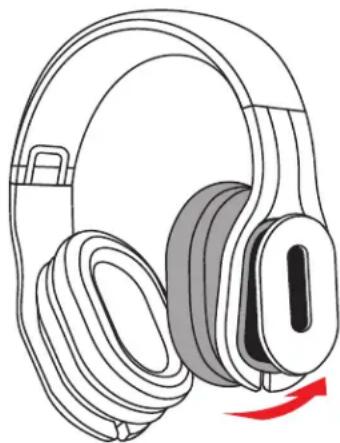
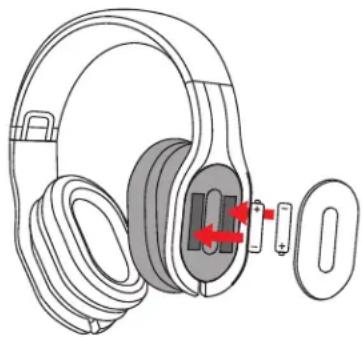
Upon needing replacement, simply grasp the headband and tilt the top of the left ear cup towards the right side to locate the two pull-tabs on the bottom as indicated in Figure 4. Placing two fingers inside both tabs, gently detach the battery compartment cover, and replace the used batteries with two AAA alkaline batteries (IEC LR03) as illustrated in Figure 5.
To reattach the front cover piece, insert the top two clips first, and proceed to press the remaining two clips into the provided slots.
Please dispose of used batteries properly, following any local regulations. Do not incinerate.
natural_image
Illustration of a pair of headphones with earbuds and a clip, showing mechanical adjustment arrows (no text or symbols)Figure 5
PROTECTING YOUR INVESTMENT....
For long lasting enjoyment of your headphones, you should respect their limits and avoid excessive volume levels for music or movie playback. Excessive volume levels can damage all headphones.
If your headphones are pushed to excessive volume levels, they could be driven into "clipping". This could result in severe or permanent injury. When using your headphones at loud levels, listen carefully for any sign of harsh, garbled midrange and diminishing intelligibility. If detected, turn the volume down immediately.
At the end of its useful life, this product should not be disposed of with regular household waste. It should be returned to a collection point for the recycling of electrical and electronic equipment.
The materials can be reused in accordance with their markings. Through re-use, recycling of raw materials, or other forms of recycling of old products, you are making an important contribution to the protection of our environment. The following symbols on the packaging indicate the recycling mandate.
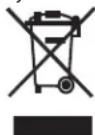
Your local administrative office can advise you of the responsible waste disposal location.
PSB and the PSB logo are trademarks of PSB Speakers, a division of Lenbrook Industries Limited. All rights reserved. No part of this publication may be reproduced, stored or transmitted in any form whatsoever without the written permission of PSB Speakers. While every effort has been made to ensure the contents are accurate at the time of publication, features and specifications may be subject to change without prior notice. 17-008 © 2017 PSB Speakers. Designed in Canada, Manufactured in China www.psbspeakers.com

- INTRODUCTION
- REGULATORY INFORMATION
- OSHA Guidelines for Noise Exposure Limits
- SAFETY INFORMATION
- WARNING
- CONNECTING...
- Wired Connections
- USB Cable
- Notes:
- EARPHONE MOUNTED CONTROLS...
- Volume and Active Monitor
- Active Noise Cancellation and Amplifier
- Phone Function
- Wireless Pairing
- NFC Wireless Pairing
- LISTENING...
- Headphone Placement
- CONNECTING TO IN-FLIGHT ENTERTAINMENT SYSTEMS...
- NOTE:
- M4U 8 HEADPHONE CARE
- Cleaning...
- Cushion Attachment/Detachment
- Storage in the protective case
- Battery Life and Replacement with the Active M4U Headphones
- PROTECTING YOUR INVESTMENT....
Brand : PSB
Model : M4U 8
Category : Headphones