
M4U 1 - Headphones PSB - Free user manual and instructions
Find the device manual for free M4U 1 PSB in PDF.


| Product Type | Over-ear headphones |
| Brand | PSB |
| Model | M4U 1 |
| Connectivity | Wired (3.5 mm stereo jack) |
| Driver Size | 40 mm |
| Frequency Response | 20 Hz – 20 kHz |
| Impedance | 32 ohms |
| Sensitivity | 115 dB SPL / 1 mW |
| Noise Cancellation | Active noise cancellation (ANC) |
| Power Source for ANC | 2 x AAA batteries (not included) |
| Battery Life (ANC) | About 40 hours |
| Weight | 260 g (9.2 oz) |
| Dimensions (folded) | 7.5 x 6.5 x 2.5 inches |
| Ear Cushion Material | Memory foam with leatherette |
| Headband Material | Stainless steel with padded leatherette |
| Design | Foldable for portability |
| Cable Length | 4 ft (1.2 m) detachable |
| Cleaning | Wipe with a soft, dry cloth |
| Safety | Do not use at high volume to prevent hearing damage |
| Warranty | 2 years limited warranty |
Frequently Asked Questions - M4U 1 PSB
User questions about M4U 1 PSB
0 question about this device. Answer the ones you know or ask your own.
Ask a new question about this device
Download the instructions for your Headphones in PDF format for free! Find your manual M4U 1 - PSB and take your electronic device back in hand. On this page are published all the documents necessary for the use of your device. M4U 1 by PSB.
USER MANUAL M4U 1 PSB
natural_image
Close-up of a black and silver headband device with visible branding (psb) and 'REVERGERS' logo, no readable text beyond branding.Music for You
M4U Over Ear Headphones Owner's Guide
INTRODUCTION
Thank you for purchasing a pair of PSB Speakers M4U Headphones, a highly developed set of headphones that captures all the sounds from your music and video collections, and brings them into your personal space. Producing natural musical dynamics and precisely imaged sound, these hi-fi headphones will bring you closer to the music you love.
Engineered with over 40 years of audio excellence and research, the M4U Headphones from PSB Speakers will deliver unmatched sound quality, all-day comfort and fold-and-go portability for today's music enthusiasts and professionals. With PSB's true-to-nature sound quality and stylish ergonomic designs, you can escape to a personal concert experience that will travel anywhere with you.
SAFETY INFORMATION
By supplying this Owner's Guide, we hope you will read through this booklet to help assure that you are getting the most out of your PSB product and your music.
This device complies with Part 15 of the FCC Rules. Operation is subject to the following two conditions: (1) this device may not cause harmful interference, and (2) this device must accept any interference received, including interference that may cause undesired operation.

OSHA Guidelines for Noise Exposure Limits
The Occupational Safety Health Administration (OSHA) has issued headphone usage recommendations for maximum daily exposure and sound pressure levels [measured in decibels (dB)]. A decibel is a unit of sound measurement that increases exponentially with volume. For example, conversational speech is typically around 60dB, and a rock concert in a stadium is often about 110dB.
Maximum Sound Pressure Level Recommended For Daily Use (see Figure 1 below):
| Figure 1 | 90dB | 8 Hours | 95dB | 4 Hours | 100dB | 2 Hours |
| 1 Hour | 110dB | 30 Minutes | 115dB | 15 Minutes | ||
| 120dB | Avoid as Damage May Occur | |||||

WARNING:
- Warnings or announcements may be unnoticed when you are using the headphones. You should be aware of ambient sounds while wearing the headphones, and recognize them as needed.
- Long-term exposure to loud music may cause permanent hearing damage. To avoid personal injury when using the headphones, the volume should be kept at the described levels in Figure 1, especially for extended listening periods.
• If water or other foreign substances permeate inside the device, fire or electric shock may result. - Do not attempt to modify this product as it could result in personal injury and/or product failure.
- Keep batteries out of reach of children.
CONNECTING...
Before making any connection, make sure your audio source is powered off as severe damage to equipment and/or your ears could result if audio source is left on.
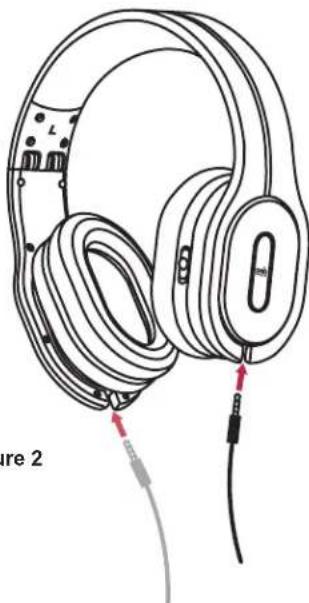
To connect your headphones, plug the 1/8-inch (3.5mm) straight connector into one of the inputs located at the base of the left (L) or right (R) ear cup, allowing the user to pick a preferred side for a more comfortable listening setup as shown in Figure 2.
1/4-inch Adaptor
If your audio equipment uses a 1/4-inch (6.3mm) output jack, use the included 1/4-inch adaptor.
natural_image
Line drawing of a pair of audio headphones with earbuds and cable connectors (no text or symbols)Figure 2
Power Switch Controls on the Active M4U Headphones
natural_image
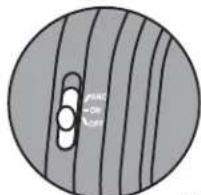
Circular diagram with three vertical lines and a central oval, no text or symbols presentPosition A: Passive Mode (Figure 3a)
In Passive mode, noise cancelling is turned off. The headphones are powered by your audio source. No power required.
Figure 3a
natural_image
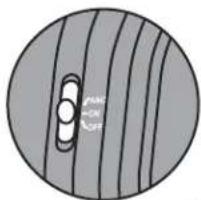
Circular diagram with diagonal stripes and a central oval, no text or symbols presentPosition B: Active Mode (Figure 3b)
In Active mode, the internal headphone amplifier is active. The 3-position Power Switch will be "RED". It requires two AAA batteries to be installed in the headphones.
Figure 3b
natural_image
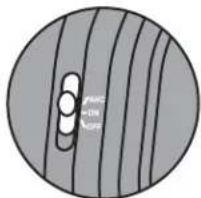
Circular diagram with diagonal lines and three circular cutouts, no text or symbols presentPosition C: Active Noise Cancelling Mode (Figure 3c)
In Active Noise Cancelling mode, you have activated the "Noise Cancelling" feature, and the internal headphone amplifier. The 3-Position Power Switch will be "GREEN". It requires two AAA batteries to be installed in the headphones.
Figure 3c
Low Battery Power Indicator
If in Position B or C (active), the 3-Position Power Switch will be "AMBER" if your battery power is low, therefore you will soon need to replace the batteries.
CONTROLLING...
Monitor Function
By simply pressing and holding the button, you can reduce your current audio track by 30dB to hear your surroundings, without ever leaving your personal space. The described function will only work in Active Noise Cancelling mode. When activated, the surroundings will be amplified through the headphones.
Audio Control Features with Active M4U Headphones
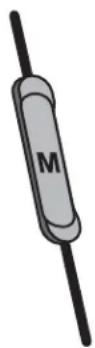
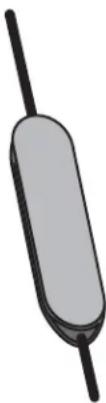
In your headphone package, we have included two 1.5m (59") audio cables. One cable is equipped with a monitor function, ergonomically positioned on the cable. The second cable is equipped with a 3-Push Function Button and monitor function for remote controllability/hands-free operation of your mobile phone.
If you receive a phone call during a listening session using the 3-Push Function Cable, a single button press will answer the incoming call and pause your audio track. Once the call is complete, a single button press will end the call and resume audio play.
When listening to a handheld music device such as an iPod, the 3-Push Function Button can be used to change to the next track or pause and resume music without reverting back to the controls of the handheld device.
natural_image
Simple 3D illustration of a cylindrical object with a straight shaft (no text or symbols)1x

2x

3x


LISTENING...
With the volume set to low, turn on your audio source, find a comfortable listening level, and drift into a personal space filled with the sounds of your favourite audio/video collections.
Headphone Placement
Each ear cup is marked with "L" and "R" to indicate the left and right sides of the headphones. Be sure to put them on correctly to enjoy your audio as originally intended and maximize your personal music experience.
Battery Life and Replacement with the Active M4U Headphones
The 3-Position Power Switch will be “AMBER” to indicate to the listener that there is approximately 3 hours of battery life remaining. Although battery life will vary upon usage, the average life is 55 hours. (which may vary further if using rechargeable batteries).
natural_image
Diagram of a pair of headphones with labeled parts and directional arrows, no text or symbols presentFigure 4
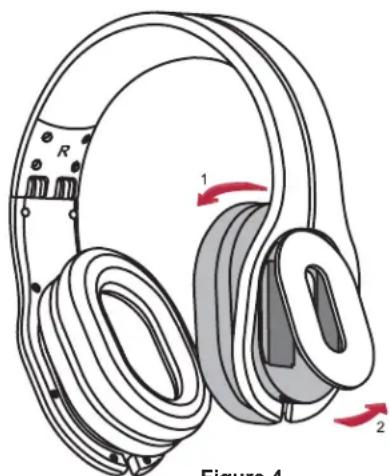
Upon needed replacement, simply grasp the headband and tilt the top of the left ear cup towards the right side to locate the two pull-tabs on the bottom as indicated in Figure 4. Placing two fingers inside both tabs, gently detach the
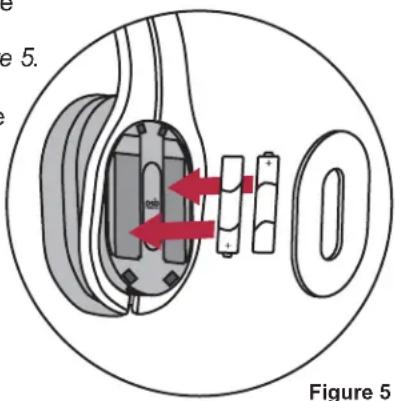
battery compartment cover, and replace the used batteries with two AAA alkaline batteries (IEC LR03) as illustrated in Figure 5.
To reattach the front cover piece, insert the top two clips first, and proceed to press the remaining two clips into the provided slots.
Please dispose of used batteries properly, following any local regulations. Do not incinerate.
CONNECTING TO IN-FLIGHT ENTERTAINMENT SYSTEMS...
In order to connect to in-flight entertainment systems equipped with dual output connectors, you must use the supplied dual 3.5mm airline adaptor and Active Monitor cable (with the Active M4U Headphones).
*NOTE: Audio output jack configurations may vary on airplanes. Airline audio may not equal the high quality you get from your home audio equipment, or a portable source.

WARNING:
- PSB Speakers recommends you do not use these headphones as aviation communication equipment as they are not engineered for many environmental conditions common in commercial or non-commercial aircrafts (including, but not limited to: altitude, temperature, noise conditions, unpressurized aircraft, etc.) resulting in possible interference to critical communications.
SERVICING...
Ear cup Removal for Replacement and Cleaning
The M4U ear cup cushions have been designed to be removable for cleaning and replacement purposes. Constant removal of the cushions is not recommended nor necessary. If accidental cushion removal occurs, please see following directions.

WARNING:
- Never wet the speaker or electronics inside of your M4U Headphones. Water or cleaning solvents may cause irreparable damage to the electronics inside your headphones. The M4U warranty does not cover such damage.
Cleaning
For regular cleaning, use a slightly damp cloth and gently clean each ear cup cushion, and then use a dry cloth to remove any residual moisture.
If heavy cleaning is necessary after extended listening and use, follow these directions:
- Clean the ear cup cushions by hand, fill a bowl or sink with cold water.
- Add a very small amount of dish or laundry soap, and gently clean the cushions.
- After cleaning the cushions, rinse with clean water.
- To dry the ear cup cushions, place them on a towel with the pads facing up.
- Fold the towel over top of the cushions and press down to remove any excess water in the foam padding.
- Air-dry completely before reattaching.
Cushion Attachment/Detachment
natural_image
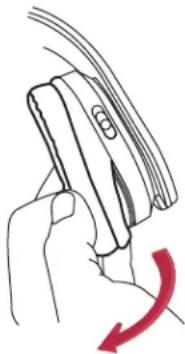
Hand holding a device with a red curved arrow indicating rotation (no text or symbols)1) To detach the ear cup cushion, grasp the headband over the ear cup cushion that needs to be removed.
2) Using your other hand, grip the leather ear cup cushion, and carefully stretch and pull the lip of the cushion away from the groove. If necessary, repeat on the other ear cup.
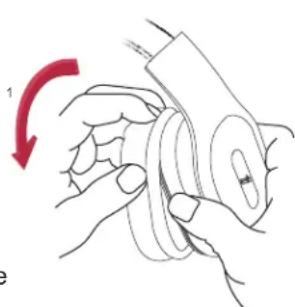
1) To reattach the ear cup cushion, grip the headband and cushion as described above, and fit the lip of the ear cup cushion into the provided groove/slot.
2) Using your finger, slowly work the leather lip into the groove of the ear cup until firmly inserted.
natural_image
Illustration of hands holding a mechanical component with a red arrow indicating rotation (no text or symbols)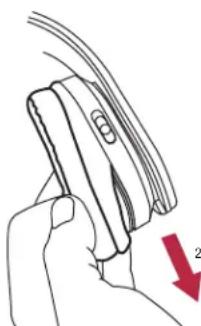
natural_image
Hand holding a device with a red arrow indicating direction (no text or symbols)M4U HEADPHONE CARE...
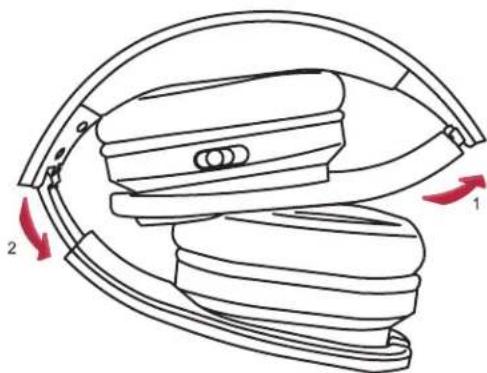
For safe, sanitary use, it is essential to maintain and clean your M4U Headphones periodically. However, excessive cleaning may cause damage and jeopardize the longevity of the product. When not in use, always store headphones in the supplied protective case, and store in a clean and dry environment. Avoid storing in extreme heat or cold temperatures and humidity, and avoid exposure to liquids.
natural_image
Diagram of a mechanical device with two red arrows indicating rotational or directional movement (no text or symbols)WARNING:
- When disconnecting your M4U Headphones, grasp the plug at the end of the cable and pull to disconnect. Never pull on the headphone cable to disconnect the headphones from your music player.
PROTECTING YOUR INVESTMENT
For long lasting enjoyment of your headphones, you should respect their limits and avoid excessive volume levels for music or movie playback. Excessive volume levels can damage all headphones.
If your headphones are pushed to excessive volume levels, they could be driven into "clipping", which could result in severe and/or permanent injury. If using your headphones at loud levels, listen carefully for any sign of harsh, garbled midrange and diminishing intelligibility and if detected, turn the volume down immediately.
At the end of its useful life, this product must not be disposed of with regular household waste but must be returned to a collection point for the recycling of electrical and electronic equipment. The symbol on the product, owner's manual and packaging, indicate this.

The materials can be reused in accordance with their markings. Through re-use, recycling of raw materials, or other forms of recycling of old products, you are making an important contribution to the protection of our environment.
Your local administrative office can advise you of the responsible waste disposal location.
TROUBLESHOOTING...
-
Issue: No Noise Cancelling (if applicable)
-
Ensure the 3-Position Power Switch is in the "Active Noise Cancelling" position on the headphone, and is illuminated "GREEN
-
If the 3-Position Power Switch is "AMBER", your battery power is low. Therefore, you will soon need to replace the batteries.
-
Issue: Low or No Volume Output
-
Check the audio source is powered on, and the audio is set to a medium volume level.
- Check the cable connection to the audio source, and the connection between the ear cup and audio source.
-
Also, ensure the audio source has not been muted on the 3-Push Function Button, or monitor function.
-
Issue: Crackling Noise or Intermittent Loss of Noise Cancelling (if applicable)
-
Check the cable is fully connected.
- Check the cable connection has not been damaged at the audio source and/or ear cup.
- If the 3-Position Power Switch is "AMBER", your battery power is low. Therefore, you will soon need to replace the batteries.
If you require service, please visit your local authorized PSB service centre, or www.psbspeakers.com. If you have moved since your purchase, the nearest authorized PSB dealer will be able to assist you. If the problem is not resolved, please contact us directly and provide the model name, serial number, date of purchase, dealer name, and a full detailed description of the issue.
We appreciate your purchase of the M4U Headphones, and thank you for taking the time to read this owner's guide. We hope you enjoy the exceptional satisfaction that PSB Speakers offer and wish you many years of enjoyable listening.
REAL SOUND for REAL PEOPLE.

- Music for You
- INTRODUCTION
- SAFETY INFORMATION
- OSHA Guidelines for Noise Exposure Limits
- WARNING:
- CONNECTING...
- CONTROLLING...
- Monitor Function
- Audio Control Features with Active M4U Headphones
- LISTENING...
- Headphone Placement
- Battery Life and Replacement with the Active M4U Headphones
- CONNECTING TO IN-FLIGHT ENTERTAINMENT SYSTEMS...
- SERVICING...
- Cleaning
- Cushion Attachment/Detachment
- M4U HEADPHONE CARE...
- PROTECTING YOUR INVESTMENT
- TROUBLESHOOTING...
Brand : PSB
Model : M4U 1
Category : Headphones