
SI-2100 - Receiver Niles - Free user manual and instructions
Find the device manual for free SI-2100 Niles in PDF.


| Product Type | Receiver (Stereo Power Amplifier) |
| Brand | Niles |
| Model | SI-2100 |
| Power Output (8 ohms) | 100 watts per channel (both channels driven) |
| Power Output (4 ohms) | 220 watts per channel (both channels driven) |
| Bridged Power (8 ohms) | 400 watts |
| Frequency Response | 5 Hz – 25 kHz (±0 dB/-3 dB) |
| Signal-to-Noise Ratio | >102 dB (unweighted, 20 Hz – 20 kHz) |
| Total Harmonic Distortion | 0.2% (20 Hz – 20 kHz) |
| Channel Separation | >70 dB @ 1 kHz |
| Dimensions (W x H x D) | 17.25 x 2.25 x 13.5 inches (43.8 x 5.7 x 34.3 cm) |
| Weight | 10.8 lb (4.9 kg) |
| Power Consumption | 300 W (AC 100-120/220-240 V~, 50/60 Hz) |
| Turn-On Modes | Audio Sense, 3-24V AC/DC Voltage Trigger, Constant (manual) |
| Inputs | Gold-plated RCA line-level inputs (stereo) |
| Outputs | Cascade RCA outputs, gold-plated binding posts (5-way, accept up to 12 AWG wire or banana plugs) |
| Control Output | 12V DC, 150 mA (3.5 mm jack) |
| Protection | Automatic shutdown on fault, bicolor status LED (green = on, red = protection) |
| Rack Mountable | Yes, 1U (single rack space) |
| Limited Warranty | 2 years parts and labor |
| Cleaning | Dry cloth; no abrasive or spray cleaners |
Frequently Asked Questions - SI-2100 Niles
User questions about SI-2100 Niles
0 question about this device. Answer the ones you know or ask your own.
Ask a new question about this device
Download the instructions for your Receiver in PDF format for free! Find your manual SI-2100 - Niles and take your electronic device back in hand. On this page are published all the documents necessary for the use of your device. SI-2100 by Niles.
USER MANUAL SI-2100 Niles
CONGRATULATIONS!
Thank you for purchasing a Niles Systems Integration Amplifier®, one of the most flexible and convenient amplifiers ever offered. Like all Niles products, your new amplifier is built to the highest standards of quality control and reliability. With proper installation and operation, you'll enjoy years of trouble-free use.
TABLE OF CONTENTS
| Introduction 4 |
| Features and benefits 5 |
| Installation Considerations 7 |
| Front and rear panel details 11 |
| Installation 13 |
| Operation 17 |
| Troubleshooting guide 18 |
| Specifications 20 |
IMPORTANT SAFETY INSTRUCTIONS
-
Read these instructions.
-
Keep these instructions.
-
Heed all warnings.
-
Follow all instructions.
-
Do not use this apparatus near water.
-
Clean only with a dry cloth.
-
Do not block any ventilation openings. Install in accordance with the manufacturer's instructions.
-
Do not install near any heat sources such as radiators, heat registers, stoves or other apparatus (including amplifiers) that produce heat.
-
Do not defeat the safety purpose of the polarized or grounding-type plug. A polarized plug has two blades with one wider than the other. A grounding-type plug has two blades and a third grounding prong. The wide blade or the third prong is provided for your safety. If the provided plug does not fit into your outlet, consult an electrician for replacement of the obsolete outlet.
-
Protect the power cord from being walked on or pinched, particularly at plugs, convenience receptacles and the point where they exit from the apparatus.
-
Only use attachments/accessories specified by the manufacturer.
-
Use only with the cart, stand, tripod, bracket or table specified by the manufacturer or sold with the apparatus. When a cart is used, use caution when moving the cart/apparatus combination to avoid injury from tip-over.

-
Unplug this apparatus during lightning storms or when unused for long periods of time.
-
Refer all servicing to qualified service personnel. Servicing is required when the apparatus has been damaged in any way, such as power supply cord or plug is damaged, liquid has been spilled or objects have fallen into the apparatus, the apparatus has been exposed to rain or moisture, does not operate normally, or has been dropped.
-
Do not expose this apparatus to dripping or splashing and ensure that no objects filled with liquids, such as vases, are placed on the apparatus.
-
To completely disconnect this apparatus from the AC Mains, disconnect the power supply cord plug from the AC receptacle.
-
The power supply cord (sometimes referred to as the "Mains Plug") is used as the disconnect device and shall remain accessible and operable at all times.
-
Do not expose batteries to excessive heat such as sunshine, fire or the like.
-
Open flame sources, such as lighted candles, should NOT be placed on the apparatus.
WARNING: To reduce the risk of fire or electric shock, do not expose this apparatus to rain or moisture.

The lightning flash with arrowhead symbol, within an equilateral triangle, is intended to alert the user to the presence of uninsulated “dangerous voltage” within the product’s enclosure
that may be of sufficient magnitude to constitute a risk of electric shock to persons.

The exclamation point within an equilateral triangle is intended to alert the user to the presence of important operating and maintenance (servicing)
instructions in the literature accompanying the product.
FCC Required Text:
NOTE: This equipment has been tested and found to comply with the limits for a Class B digital device, pursuant to part 15 of the FCC Rules. These limits are designed to provide reasonable protection against harmful interference in a residential installation. This equipment generates, uses, and can radiate, radio frequency energy and, if not installed and used in accordance with the instructions, may cause harmful interference to radio communications. However, there is no guarantee that interference will not occur in a particular installation. If this equipment does cause harmful interference to radio or television reception, which can be determined by turning the equipment off and on, the user is encouraged to try to correct the interference by one or more of the following measures:
—Reorient or relocate the receiving antenna.
—Increase the separation between the equipment and receiver.
—Connect the equipment into an outlet on a circuit different from that to which the receiver is connected.
—Consult the dealer or an experienced radio/TV technician for help.
Changes or modifications not expressly approved by the party responsible for compliance could void the user's authority to operate the equipment.
INTRODUCTION
The Niles SI-250, the Niles SI-2100 and the Niles SI-2150 are members of the award-winning Niles Systems Integration Amplifier® family. They are designed for home theaters and whole house audio systems requiring high power. The Niles System Integration Amplifier family is specifically created to solve the problems of interfacing with different brands and models of equipment, different acoustic environments in different rooms, and different kinds of applications: home theater, stereo, and background music. The Niles Systems Integration Amplifier family brings extremely high current power to a custom installed A/V System in a remarkably convenient way.
This guide contains information for the proper use of the Niles SI-250 (50 watts x 2), the Niles SI-2100 (100 watts x 2) and the Niles SI-2150 (150 watts x 2) System Integration Amplifiers®.
BRIDGABLE POWER AMPLIFIERS

SI-250
SI-2100
SI-2150
FEATURES AND BENEFITS
REAL WORLD POWER
The SI-250, the SI-2100 and the SI-2150 deliver 50 watts, 100 watts, and 150 watts per channel at 8 ohms and 100 watts, 220 watts, 270 watts per channel at 4 ohms respectively. You'll get tremendous bass and dynamics from every pair of speakers connected.
TRANSPARENT SOUND
The audio circuitry of the Niles System Integration Amplifiers® is constructed using the finest parts available; including 1% metal film resistors, high quality capacitors, and oversized heat sinks. All this attention to technical detail creates a sound that is clear and uncolored with phenomenal imaging.
FREEDOM FROM CROSSTALK
Each channel of the Niles System Integration Amplifier is powered via its own independent power supply. This increases the isolation between the two channels and eliminates cross talk, guaranteeing you absolute silence as the backdrop to your music.
CURRENT FOR REACTIVE LOADS
The high current design of the Niles System Integration Amplifiers assures that even unusual and reactive loads are handled with ease. A massive toroidal transformer (SI-250) and cutting edge digital power supplies (SI-2100, SI-2150) provide more than ample current to your system.
FREEDOM FROM FAN NOISE
The oversized heat sinks inside the System Integration Amplifiers allow the amplifier circuitry to stay cool even when operating into low impedance loads without the distracting noise created when using fan-cooled amplifiers.
INDEPENDENT LEVEL CONTROLS
Each amplifier channel features an independent level control enabling precise volume matching to the rest of the system. These level controls can also limit volume to prevent abuse of the system.
FEATURES AND BENEFITS
LIFETIME CONNECTIONS
The Niles System Integration Amplifier® family features gold plated stereo inputs, cascade stereo outputs, and five way binding posts to ensure perfect connections without corrosion for years to come.
TURN-ON MODES
The Niles System Integration Amplifier® family features three turn-on modes: 1. Music Sense, 2. External Voltage Trigger, 3. Manual Turn-On via the front panel switch. You can configure a Niles Systems Integration Amplifier® to interface with any kind of system and have the unit automatically turn on.
AUTOMATIC PROTECTION
The Niles System Integration Amplifier® family is equipped with sophisticated protection circuits. In the unlikely event that a problem occurs, the amplifier shuts itself off. When conditions return to normal, regular operation resumes.
STATUS DISPLAY FOR TROUBLESHOOTING
LED indicators on the front panel indicate: Power, Active Status, and a Protection Warning. With a glance at the front panel, a troubleshooter is quickly provided with key information!
CONTROL OUTPUT
A 12 Volt DC output is provided whenever the amplifier is on, allowing you to operate voltage triggered devices like motorized screens and curtains.
BRIDGED MODE
The Niles System Integration Amplifier® family can be operated in a bridged mono configuration. In this configuration, the SI-250, the SI-2100 and the SI-2150 deliver 225 watts, 400 watts, and 550 watts respectively. Bridged mode is perfect for subwoofer, rock speakers or any applications requiring high power output.
COMPACT 1U DESIGN
The SI-250, the SI-2100 and the SI-2150 all share the same compact low profile design requiring only a single rack space (1U).
DESIGNED AND ENGINEERED IN THE USA
Limited two-year parts and labor warranty.
INSTALLATION CONSIDERATIONS
PLACEMENT
Place the Niles System Integration Amplifier® on a flat level surface like a table or shelf. It should be placed upright so that its weight rests on the four attached feet. Placing the weight of the amplifier on the rear or front panel for even an instant will result in damage to the amplifier's connectors and controls.
The Niles System Integration Amplifier ^ , like any hi-fi component, will last much longer if it is given adequate ventilation for proper cooling. When installing the Niles System Integration Amplifier ^ in a cabinet, be sure that the rear of the cabinet is open to fresh air to provide proper cooling (see Figure 1). If the cabinet's design will not accommodate an open rear, install two small “boxer fans” to provide continuous air flow into and out of the cabinet (see Figure 2). Place the Niles System Integration Amplifier ^ so that there is at least 7” of free air space above the chassis. If the amplifier is located on a carpeted surface, place a board under the amplifier’s feet. Do not block the ventilation holes on the top and bottom of the Niles System Integration Amplifier ^ .
CAUTION! When using low impedance speaker loads (less than 8 ohms Normal Mode) refer to Figure 2 for proper placement.
Figure 1
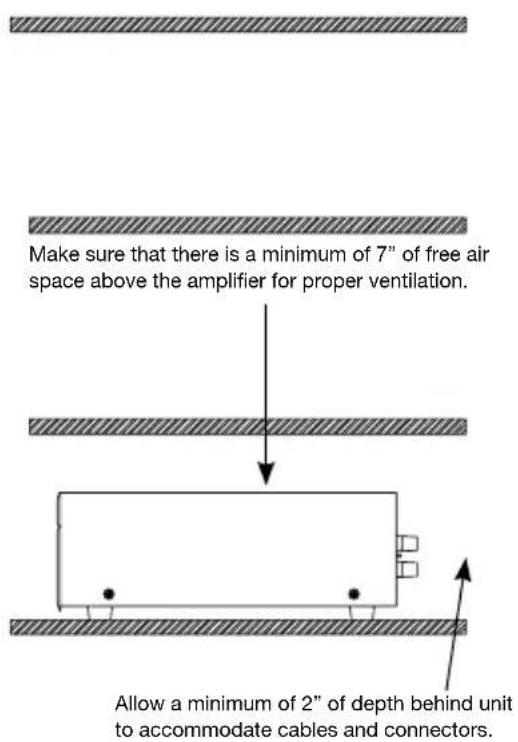
Figure 2

INSTALLATION CONSIDERATIONS
TURN-ON MODES
The Niles System Integration Amplifier® draws more current than a preamplifier's switched AC outlet can safely supply. Also, your preamplifier may “thump” at dangerous volumes if the amplifier is already on when the preamp turns on. It is usually best to turn the amplifier on only when it is needed. The Turn-On Mode selector switch gives you three options for turning the amplifier on and off. Audio sense is the factory default setting.

CoNsTANT - The auto turn-on circuitry is off. The front panel master power switch operates the amplifier. In is "On", out is "Off".
Audio seNse - The master switch on the front panel must be in the “On” position. The amplifier is off when there is no audio signal present at either the left or the right input, but the sensing circuitry is on. The turn-on sensing circuitry looks for a tiny amount of audio signal present at any of the audio inputs. If it detects a signal, the amplifier is turned on. Once the audio signal stops, the sensing circuit waits two minutes, then turns the amplifier off.
3-24 VoLT AC/dC oPTo-IsoLATed VoLTAGe TRIGGeR - The Power switch on the front panel must be in the “On” position for the voltage trigger to function. When a Trigger Plug is inserted into the rear panel connector and the sensing circuitry detects a voltage, the amplifier is turned on. Once the Trigger voltage is turned off, the sensing circuit instantly turns the amplifier off. The amplifier is off when there is no 3-24V AC or DC voltage detected at the trigger input. Voltage triggers can be supplied by Niles automated switchers, some video projectors, some surround sound processors, or something as simple as a 12 volt AC wall adapter plugged into the switched outlet of your stereo receiver. Linear DC wall adapters are not recommended; the long discharge time of the DC adapter’s filter capacitor will delay the turn-off of the amplifier. Trigger sources must be 3-24VAC or DC, 20mA or greater.
INSTALLATION CONSIDERATIONS
BRIDGED MODE
The Niles System Integration Amplifier ^® bridged mode switch allows you to create a more powerful amplifier by combining both channels into one (8 ohm minimum). Stereo mode is the factory default setting.
In the bridged mode, connect the speakers to the left red positive terminal and the right red positive terminal. In the bridged mode the right channel's red terminal becomes positive and the left channel's red terminal becomes negative.
DO NOT USE THE BLACK NEGATIVE (-) TERMINALS. THE SIGNAL IS AT THE RED POSITIVE (+) TERMINALS ONLY.
The line level input signal must connect to the left channel input of the amplifier when using bridged mode.
MULTIPLE SPEAKER LOADS
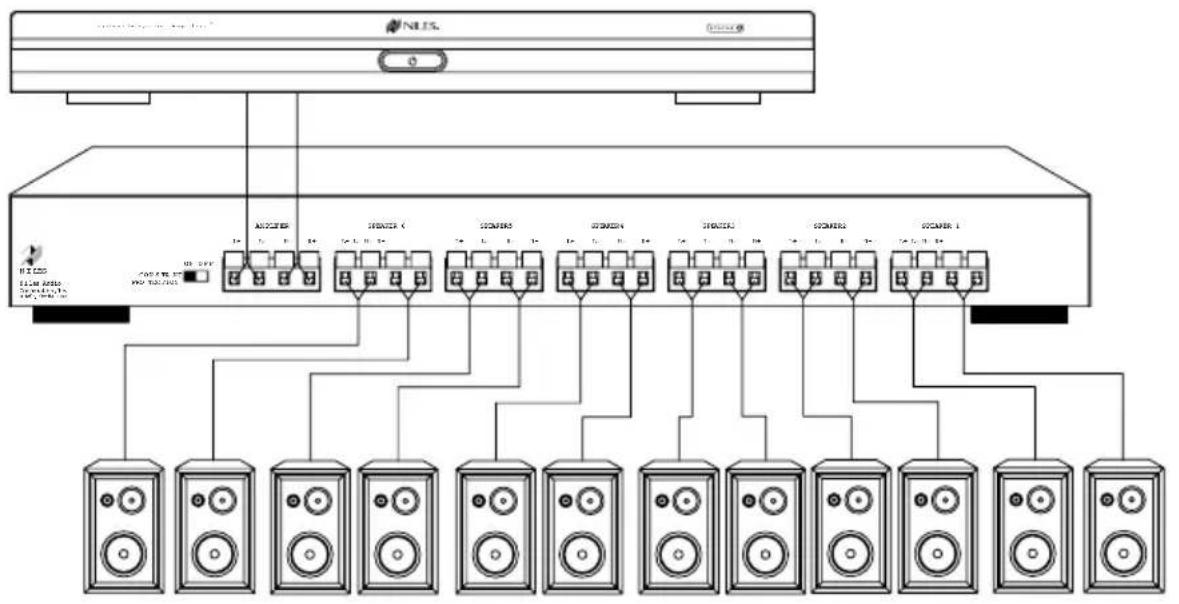
The Niles System Integration Amplifier® is stable into very low impedance loads. This means you can safely operate three pairs of 8 ohm speakers (a 2.67 ohm load) directly connected to the amplifier. Note that the System Integration Amplifier® does not have on/off speaker switching built in. When the amplifier is on, so are all of the speakers.

natural_image
Diagram of a server rack with multiple cylindrical connectors and connecting cables (no text or symbols)Niles makes a number of different speaker selection and impedance matching systems. Speaker selection systems allow each pair of speakers to be turned on and off from your equipment location (or even via remote control). That way, you know that the speakers in the bedroom are off so you can avoid waking a sleeping spouse! These speaker selectors provide an easy way to terminate all of the wires for more than three pairs. Testing and troubleshooting a new system is much easier with the individual room labels and on/off switches of a Niles speaker selection system. Additionally, Niles speaker selection systems offer impedance matching features which will allow you to connect up to ten pairs of speakers to your Niles System Integration Amplifier®.
INSTALLATION CONSIDERATIONS
flowchart
graph TD
    A["Server"] --> B["Antenna"]
    A --> C["Switcher 1"]
    A --> D["Switcher 2"]
    A --> E["Switcher 3"]
    A --> F["Switcher 4"]
    A --> G["Switcher 5"]
    A --> H["Switcher 6"]
    A --> I["Switcher 7"]
    A --> J["Switcher 8"]
    A --> K["Switcher 9"]
    A --> L["Switcher 10"]
    B --> M["Speaker 1"]
    C --> N["Speaker 2"]
    D --> O["Speaker 3"]
    E --> P["Speaker 4"]
    F --> Q["Speaker 5"]
    G --> R["Speaker 6"]
    H --> S["Speaker 7"]
    I --> T["Speaker 8"]
    J --> U["Speaker 9"]
    K --> V["Speaker 10"]
CABLE AND WIRE
It will be easier to reconfigure or troubleshoot your system in the future if you label the cables and wires for their destination or source, rather than which terminal of the Niles System Integration Amplifier® they are connected to.
The Niles System Integration Amplifier® connects to your sources via shielded line level audio cables with RCA phono plugs. Use high quality cables with your Niles amplifier for the lowest possible noise and best overall performance. Your Niles dealer can recommend the proper cable.
The Niles System Integration Amplifier® connects to your speakers using 2 conductor speaker wire. For most applications, we recommend you use 16 or 18 gauge wire. For wiring runs longer than 80 feet, we recommend 14 gauge wire. The binding posts of the Niles System Integration Amplifier® will accommodate up to 12 gauge wire. Larger sizes can be accommodated by attaching banana plugs to the wire. Note that the binding posts accept dual banana or single banana connectors.

natural_image
Cross-sectional illustration of a black cable with visible internal structure (no text or symbols)TECH TIP
Wire size is expressed by its AWG (American Wire Gauge) number. The lower the number, the larger the wire, i.e. twelve AWG is physically larger than fourteen AWG.
FRONT AND REAR PANEL DETAILS
![Main Inputs enable you to route a stereo line level source to the amplifier. 3.5 mm mini-jack for voltage input Cascade Outputs of the main input enable you to daisy chain multiple amplifiers SI-250 Systems Integration Amplifier° TURN ON MODE AUDIO SENSE CONSTANT 3-30V AC/DC TRIGGER INPUT 12V CONTROL OUT LEVELS This Class B digital apparatus complices with Canadian ICES-003. Cet appareil numérique de la classe B est conforme à la norme NM8-003 du Canada. L R FOR BRIDGED MODE R MAIN BUS INPUT L R BUS OUTPUT This device complices with Part 15 of the FCC Rules. Operation is subject to the following two conditions: [1] this device may not cause harmful interference, and [2] this device must accept any interference received, including interference that may cause undesired operation. STEREO BRIDGED LEFT "Turn-On Mode" switch Bridge mode switch 3.5 mm mini-jack for 12V DC control output Level Adjustment screws enable you to preset the maximum system volume (or match levels with another amplifier)](/content/2026/05/948983/images/c350ce457af9fcf1230ec50c3297315b61204f24babb2e3cf71ff0081720512b.jpg)
FRONT AND REAR PANEL DETAILS


INSTALLATION
SETTING THE TURN-ON MODE SWITCH
The Niles System Integration Amplifier ^® has three turn-on modes. Select which mode you desire by sliding the mode switch. See Installation Considerations on page 6 for more information about each of the turn-on modes. Audio sense is the factory default setting.
Slide the switch with your fingernail or a 1/8" slotted screwdriver blade
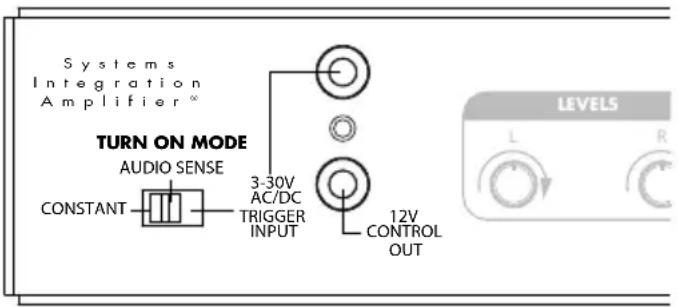
TIP: To conserve energy set the TURN ON mode to either AUDIO SENSE or TRIGGER INPUT. Use of the CONSTANT mode will prevent the amplifier from turning off when not in use wasting energy.
CONTROL OUTPUT
This terminal provides a 12V DC signal suitable for triggering Niles automated switchers, some motorized screens, some electric curtain controls, etc. The trigger voltage is present only when the amplifier is active or “on”. When the amplifier turns “off”, the 12 Volt signal is off.

| STEP DESCRIPTION | |
| 1. Check the requirements of the device you want to control. | The control output has a maximum current capability of 12V DC 150 mA. |
| 2. Connect the 3.5 mm Jack to the control output maintaining proper polarity (tip = +). | Niles makes an accessory cable plug FG00933. |
INSTALLATION
SPEAKER WIRE CONNECTIONS
CAUTION! All speaker wire connections must be made with the amplifier off.
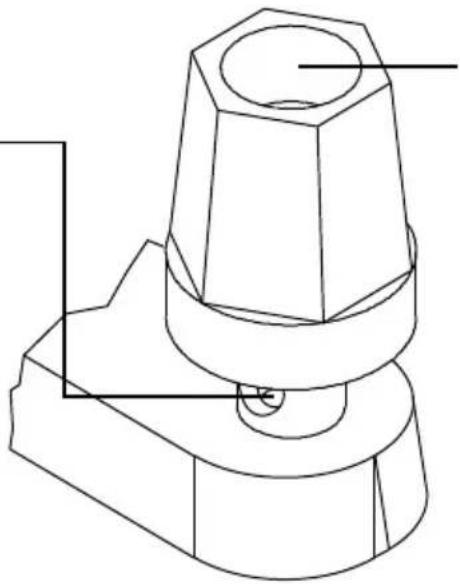
Bare Wire
Unscrew the red or black plastic knob, insert the bare wire end into the opening, and then tighten the knob until the wire is securely clamped
natural_image
Technical line drawing of a mechanical component with no visible text or symbolsBanana Plugs
There are many types of banana plugs, some crimp, some solder. The Niles gold banana plug has 3 quick-connect binding post for the bare wire on the body of the plug. A banana plug is simply inserted into the jack at the end of the amplifier's binding post. Dual banana plugs will fit the binding post.
| STEP DESCRIPTION | |
| 1. Label all wires. | If you label the wires for their destination, rather than which terminal of the Niles System Integration Amplifier® they are connected to, it will be easier to reconfigure your system in the future. |
| 2. Connect one stripped wire end or banana plug to the black terminal and one to the red terminal. | A. Split the speaker wire insulation so that at least two inches of each conductor are separated.B. Strip one half inch of insulation from the end of each conductor of the speaker wire.C. Attach banana plugs or twist the strands of wire together and insert them into the appropriate binding post. |
CAUTION! Avoid even a single strand of wire touching the chassis or another connector.
INSTALLATION
LINE LEVEL AUDIO INPUT
CAuTIoN! The amplifier must be off whenever you make changes to the input connections.
| STEP DESCRIPTION | |
| 1. Label all of the interconnecting cables for the sources they connect to. | Use audio patch cables with RCA phono plugs attached to the ends. |
| 2. Connect the sources by inserting the RCA plugs into the amplifier's jacks. | Connect outputs from your sources to inputs on the amplifier. Never connect a source or preamplifier's input (e.g., record inputs) to the inputs of your Niles System Integration Amplifier®. |
CASCADE AUDIO OUTPUTS
The “Cascade Audio Outputs” enable you to connect another amplifier to your preamplifier output. The connectors are gold-plated RCA phono jacks. Connect them to another amplifier’s inputs with a standard audio patch cable. The outputs are not buffered; if you wish to daisy-chain more than 5 Niles System Integration Amplifier® amplifiers you will need a Niles AVDA-3 buffered distribution amplifier. A single AVDA-3 will allow you to daisy-chain 5 amplifiers from each of its three outputs, allowing for as many as 30 Niles System Integration Amplifier® models to be fed from the same master preamplifier. If your preamp has a vacuum tube output stage, you must use a Niles AVDA-3 to drive more than a single Niles System Integration Amplifier®.
INSTALLATION
AC POWER PLUG
| STEP DESCRIPTION | |
| 1. Plug the female IEC socket of the supplied AC power cord (the supplied power cord is designed for 120V AC wall outlets), or use an appropriate IEC AC power cord to match the electrical wall outlet you are using (e.g. 240V AC), into the IEC receptacle on the rear of the amplifier. | Just like a computer or printer, the Niles System Integration Amplifier® has an AC cord which unplugs either at the amp or at the wall for your convenience. |
| 2. Plug the male end of the AC power cord into a correctly grounded wall outlet. | If you use a grounded power strip, surge suppressor or extension cord, verify that proper ground is maintained. |
CAuTloN! Typically a preamp/receiver's switched outlet is not rated for a power amplifier. The SI-250, the SI-2100 and the SI-2150 draw 200 watts, 300 watts, and 400 watts maximum from an AC wall outlet respectively. Use a dedicated AC wall outlet along with the amplifier's auto turn on circuit to ensure adequate power.
OPERATION
POWER SWITCH
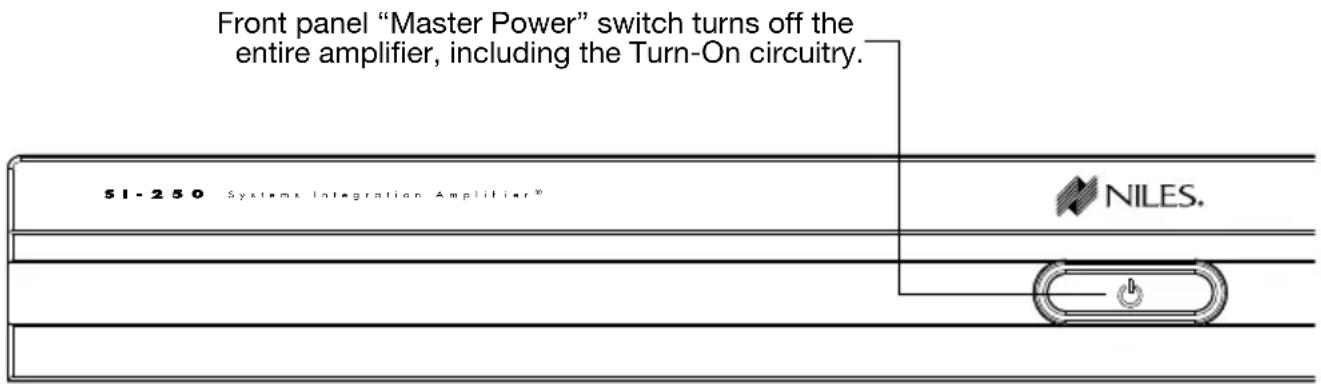
The front panel switch is a master or “vacation” power switch. No matter which turn-on mode you have selected, the master power switch will turn off all circuitry including the sensing circuitry. If you will not be using the amplifier for an extended period of time, turn the master power switch “Off” (push button switch out). When you would like to return to normal operation, turn the switch “On” (push button switch in).
Important Notes: Equipment is not completely disconnected from main power source when power switch is in the “OFF” position.
POWER LED
The power LED indicates that the AC cord is plugged into a working AC power receptacle and that the power switch is in the “On” position.
BICOLOR STATUS LED
The bicolor Status LED illuminates “green” when the amplifier circuitry has been turned on by the Turn-On circuits, and illuminates “red” to indicate activation of the amplifier’s built-in protection circuitry due to either a fault in the wiring or the speaker, or with the Niles System Integration Amplifier® itself.
LEVEL ADJUSTMENT SCREWS
The rear panel level adjustment screws allow you to adjust the level of the Niles System Integration Amplifier ^® relative to other amplifiers in your system. Use a 1/8" slotted screwdriver to adjust the screws. If the Niles System Integration Amplifier ^® is the only amplifier in your system, leave the screws at their factory default setting (12:00 position).
CLEANING AND MAINTENANCE
The internal parts of the Niles System Integration Amplifier ^® are electronic and require no maintenance. Once a year it is appropriate to twist the RCA connectors on each input to remove corrosion and improve conductivity. You can clean the amplifier with soft cloth or paper towel dampened with water or a mild detergent. Do not use any spray-type, abrasive cleaners on the amplifier.
TROUBLESHOOTING GUIDE
When there is a problem, consult this guide first. If the problem persists, or you have additional questions, call your local Niles dealer or Niles Technical Support at 1-800-BUY-HIFI (289-4434) or (760) 710-0992. The most common problems relate to hook up. Call from your telephone extension nearest the system.
| Symptom Possible Causes and Test Procedure | |
| No sound on one channel | Short circuit or loose wire at the speaker or amplifier terminals. Check that the connections are secure and that there are no loose strands of wire crossing from the positive to the negative terminals at the back of the amplifier and /or the speaker.Short circuit or a break in the speaker wire. Disconnect the speaker wire at both ends, separate the 2 conductors at both ends and test with a meter for a short circuit. If there is no short, connect the two conductors at one end and test with a meter for continuity.Speaker is not working. Connect the speaker to a channel that plays another speaker. Audio cable to input is bad. Connect another cable that is known to be good. |
| No sound on both channels | Audio cable to the main inputs is bad. Connect another cable that is known to be good. |
| Hum from the speakers | Hum may be caused by a ground loop between two of the other components in the system. To test for another ground loop, try reversing the ac plugs of each of the components in the system. |
TROUBLESHOOTING GUIDE
| Symptom Possible Causes and Test Procedure | |
| Hum from the speakers | Check for faulty cables, faulty source material, an ungrounded phono system or a defective component. |
| Amp will not turn on | AC power cord must be plugged into a working outlet. Master power switch must be on. |
| Bass sound is weak and the stereo image is “phasey” or “blurry” sounding in one room | The loudspeakers are wired out of phase. Reverse the connections at the back of one speaker. |
SPECIFICATIONS
| SI-250 SI-2100 SI-2150 | |||
| Design Principle | Fully discrete, high current bridgeable stereo amplifier | Digital, high current bridgeable stereo amplifier | Digital, high current bridgeable stereo amplifier |
| Continuous Average Power Output | 50 watts RMS per channel into 8 Ohms, 100 watts RMS per channel into 4 Ohms (all channels driven) | 100 watts RMS per channel into 8 Ohms, 220 watts RMS per channel into 4 Ohms (all channels driven) | 150 watts RMS per channel into 8 Ohms, 270 watts RMS per channel into 4 Ohms (all channels driven) |
| Continuous Average Power Output Bridged | 225 wats RMS per channel into 8 Ohms | 400 wats RMS per channel into 8 Ohms | 550 wats RMS per channel into 8 Ohms |
| Frequency Response | Bandwidth from 5 Hz to 25 kHz (=0dB/-3B) | Bandwidth from 5 Hz to 25 kHz (=0dB/-3B) | Bandwidth from 5 Hz to 25 kHz (=0dB/-3B) |
| Signal to Noise Ratio | 20Hz to 20kHz unweighted >102 dB | 20Hz to 20kHz unweighted >102 dB | 20Hz to 20kHz unweighted >102 dB |
| Total Harmonic Distortion | 0.2% THD from 20 Hz to 20 kHz | 0.2% THD from 20 Hz to 20 kHz | 0.2% THD from 20 Hz to 20 kHz |
| Channel Separation | @ 1kHz >70dB @ 1kHz | >70dB @ 1kHz >70dB | |
| Overall Dimensions | 17 1⁄4” (43.81 cm) wide2 1⁄4” (5.6 cm) high (including feet)13 1⁄2” (34.35 cm) deep | ||
| Weight | 10.7 lb., 4.8 kg. 10.8 lb., 4.9 kg. 10.8 lb., 4.9 kg. | ||
| AC Mains: | 100-120/220-240 V~, 50/60 Hz, 200 W | 100-120/220-240 V~, 50/60 Hz, 300 W | 100-120/220-240 V~, 50/60 Hz, 400 W |
BY PHONE (IN USA)
1-800-BUY-HIFI (289-4434)
BY PHONE (OUTSIDE USA)
1-760-710-0992
CUSTOMER SERVICE HOURS
8:00 AM to 5:30 PM PT
TECHNICAL SUPPORT HOURS
6:00 AM to 4:00 PM PT
ON THE WEB
www.nilesaudio.com
EMAIL TECHNICAL SUPPORT
techsupport@nilesaudio.com
EMAIL FOR PRODUCT SUGGESTIONS
productsuggestions@nilesaudio.com
LIMITED WARRANTY
Niles Audio Corporation ("NILES") warrants to the original retail purchaser only that this product will be free of manufacturing defects in material and workmanship for the following periods and subject to the limitations and exclusions set forth below:
Lifetime Warranty
All Passive Amplifier Products (those not requiring AC or battery power).
Ten years from the date of purchase
All Other Passive Products (those not requiring AC or battery power).
Two years from the date of purchase
All Active Products (those requiring AC or battery power).
This warranty is not transferable to subsequent purchasers of the product. To obtain warranty service, contact the authorized dealer where you purchased your product or take the unit to the nearest authorized NILES dealer (with proof of purchase – claims made without proof of purchase will be denied) who will test the product and if necessary, forward it to NILES for service. If there are no authorized NILES dealers in your area, you must contact NILES to receive a factory Return Authorization Number. DO NOT RETURN ANY UNIT WITHOUT FIRST RECEIVING WRITTEN AUTHORIZATION AND SHIPPING INSTRUCTIONS FROM NILES.
Upon examination, NILES will, at its sole option and expense, repair or replace any product found to be defective. NILES will return the repaired or replaced unit to you via its usual shipping method from the factory to your address in the United States of America or Canada only. Any shipping costs for addresses outside of the United States or Canada shall be the responsibility of the purchaser. In the event that this model is no longer available and cannot be repaired effectively, NILES, at its sole option, may replace it with a different model of equal or greater value, or refund the original purchase price paid. The FoReGoING ARe YouR eXCLuslVe ReMedles FoR BReACH oF WARRANTY.
This Warranty does not include service or parts to repair damage caused by improper use or handling, including but not limited to damage caused by accident, mishandling, improper installation, commercial use, abuse, negligence, or normal wear and tear, or any defect caused by repair to the product by anyone other than NILES.
This warranty does not cover reimbursement for your costs of removing and transporting the product for warranty service evaluation, or installation of any replacement product provided under this warranty.
This Warranty will be void if:
- the Serial Number on the product has been removed, tampered with or defaced.
- the product was not purchased from an authorized dealer or reseller.
THE FoReGoING WARRANTIES ARE eXCLuslVe AND IN Lieu of ALL oTHeR eXPressed AND IMPLIED WARRANTIES. NILes eXPressLY dlsCLAIMs ALL suCH oTHeR WARRANTIES, INCLUDING BuT NoT LIMITED To IMPLIED WARRANTIES of ME RCHANTABILITY, FITNESS FoR A PARTICuLAR PuRPose AND NoN-INFRINGeMeNT, WITH ResPeCT To THE PRoduCT. To THE MAXIMuM eXTeNT PeRMITTED BY LAW, NILes sHALL NoT Be ResPoNsIBLe FoR ANY INCIdeNTAL oR CoNseQueNTIAL dAMAGes eXCePT To THE eXTeNT PRoVIded (oR PRoHIBITed) BY APPLICABLE LAW, eVeN IF NILes HAs BeeN AdVIsed of THE PossIBILITY of suCH dAMAGes.
Notwithstanding the above, if you qualify as a “consumer” under the Magnuson-Moss Warranty Act, or applicable state laws, then you may be entitled to any implied warranties allowed by law for the Warranty Period. Further, some states do not allow limitations on how long an implied warranty lasts or allow the exclusion or limitation of consequential damages, so such limitations may not apply to you. This warranty gives you specific legal rights, and you may also have other rights which vary from state to state.
For the name of your nearest authorized NILES dealer, contact: THE AVC GROUP, 1969 Kellogg Avenue, Carlsbad, CA 92008, or call (800) BUY-HIFI (289-4434) or (760) 710-0992. Please be advised that NILES only sells its products via the Internet through a select group of authorized Internet dealers. These are listed on our website at www.nilesaudio.com. Products offered on the Internet through unauthorized Internet dealers are not covered by the NILES warranty and may be either:
1) goods acquired on a secondary or grey market
2) counterfeit or stolen goods
3) damaged, or defective goods
Please fill in your product information and retain for your records.
Model
Serial No.
Purchase Date
ATTENTIoN: To ouR VALued CoNsuMeRs:
To insure that consumers obtain quality pre-sale and after-sale support and service, NILES products are sold exclusively through authorized dealers. This warranty is VOID if the products have been purchased from an unauthorized dealer.
NOTES

NILES®
BLENDING HIGH FIDELITY AND ARCHITECTURE®
1690 Corporate Circle, Petaluma, CA 94954
1-760-710-0992
1-800-BUY-HIFI - www.nilesaudio.com


- CONGRATULATIONS!
- IMPORTANT SAFETY INSTRUCTIONS
- WARNING: To reduce the risk of fire or electric shock, do not expose this apparatus to rain or moisture.
- FCC Required Text:
- INTRODUCTION
- FEATURES AND BENEFITS
- REAL WORLD POWER
- TRANSPARENT SOUND
- FREEDOM FROM CROSSTALK
- CURRENT FOR REACTIVE LOADS
- FREEDOM FROM FAN NOISE
- INDEPENDENT LEVEL CONTROLS
- LIFETIME CONNECTIONS
- TURN-ON MODES
- AUTOMATIC PROTECTION
- STATUS DISPLAY FOR TROUBLESHOOTING
- CONTROL OUTPUT
- BRIDGED MODE
- COMPACT 1U DESIGN
- DESIGNED AND ENGINEERED IN THE USA
- INSTALLATION CONSIDERATIONS
- PLACEMENT
- MULTIPLE SPEAKER LOADS
- CABLE AND WIRE
- TECH TIP
- FRONT AND REAR PANEL DETAILS
- INSTALLATION
- SETTING THE TURN-ON MODE SWITCH
- SPEAKER WIRE CONNECTIONS
- Bare Wire
- Banana Plugs
- LINE LEVEL AUDIO INPUT
- CASCADE AUDIO OUTPUTS
- AC POWER PLUG
- OPERATION
- POWER SWITCH
- POWER LED
- BICOLOR STATUS LED
- LEVEL ADJUSTMENT SCREWS
- CLEANING AND MAINTENANCE
- TROUBLESHOOTING GUIDE
- SPECIFICATIONS
- LIMITED WARRANTY
- ATTENTIoN: To ouR VALued CoNsuMeRs:
- NOTES
- NILES®
Brand : Niles
Model : SI-2100
Category : Receiver