
Heat N' Brew HB - Coffee maker Bunn - Free user manual and instructions
Find the device manual for free Heat N' Brew HB Bunn in PDF.


| Product Type | Coffee maker (drip brew) |
| Brand | Bunn |
| Model | Heat N' Brew HB |
| Dimensions (W x D x H) | 12.5 x 10.5 x 14.5 inches |
| Weight | Approximately 10 lbs |
| Power Supply | 120 V, 60 Hz, 10 A |
| Water Tank Capacity | 64 oz (8 cups) |
| Carafe Capacity | 64 oz (8 cups) |
| Brewing System | Spray head with even extraction |
| Brew Temperature | 200°F (93°C) |
| Brew Time | Approximately 3-4 minutes per full carafe |
| Pause & Serve | Yes, removable carafe with drip stop |
| Auto Shut-off | Yes, after 2-hour warming cycle |
| Filter Type | Bunn paper filter or gold-tone reusable (sold separately) |
| Housing Material | Stainless steel and high-impact plastic |
| Water Filtration | Optional charcoal water filter (not included) |
| Warming Plate | Yes, keeps coffee hot for up to 2 hours |
| Cleaning | Regular descaling with white vinegar or Bunn cleaner; carafe and filter basket are dishwasher safe |
| Safety Features | Auto shut-off, thermal fuse, and one-way safety valve |
| Accessories Included | Glass carafe, carafe lid, filter basket (no filter) |
| Repairability | User-replaceable parts: carafe, filter basket, spray head; service manual available for DIY |
| Warranty | 3-year limited warranty (residential use) |
Frequently Asked Questions - Heat N' Brew HB Bunn
User questions about Heat N' Brew HB Bunn
0 question about this device. Answer the ones you know or ask your own.
Ask a new question about this device
Download the instructions for your Coffee maker in PDF format for free! Find your manual Heat N' Brew HB - Bunn and take your electronic device back in hand. On this page are published all the documents necessary for the use of your device. Heat N' Brew HB by Bunn.
USER MANUAL Heat N' Brew HB Bunn
natural_image
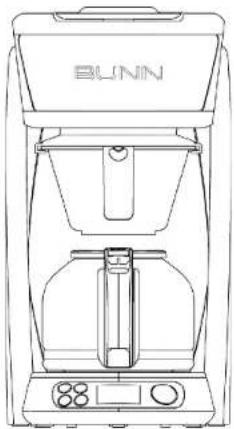
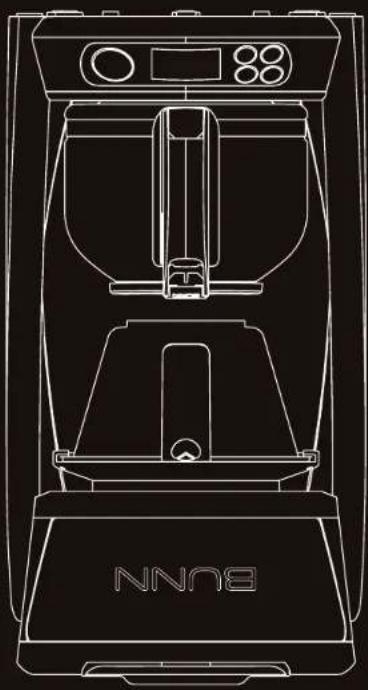
Line drawing of a BUNN coffee maker with control panel and tray (no text or symbols)
BUNN®
Quality Since 1840
USE & CARE MANUAL
Model HB: 10 cup Coffee Brewer
natural_image
Line drawing of a BUNN coffee maker with control panel and tray (no text or symbols)Congratulations on the purchase of this Golden Cup home coffee brewer as certified by the Specialty Coffee Association of America (SCAA).
Only coffeemakers that pass rigorous testing and requirements receive SCAA certification and BUNN is no stranger to these standards of coffee brewing. For sixty years BUNN commercial coffee brewing equipment has consistently delivered Golden Cup standards for restaurants and cafés around the world. This makes BUNN the ideal manufacturer to offer a home model that meets these same standards.
Building on our commercial brewing experience and scientific knowledge of coffee, BUNN has designed an exclusive brewing process that properly heats all water to the ideal brewing temperature of 200^ F before it is evenly sprayed over the grounds. In contrast, the average drip coffeemaker inconsistently heats water and then slowly "burps" or "spits" the water over the grounds, often resulting in a bitter tasting cup of coffee. This new home brewer consistently delivers optimal flavor extraction in a full carafe of exceptional tasting coffee in about 10 minutes.
From that single cup at home to a stadium full of people BUNN keeps it simple when engineering brewing solutions: respond to what a customer needs for a specific serving situation and deliver the best quality in the cup for that occasion. Just as you would enjoy great tasting coffee at your favorite restaurant that chooses BUNN equipment, we hope you enjoy this Golden Cup coffee in your home.
TABLE OF CONTENTS
Get To Know Your Brewer....1 Cleaning & Maintenance....5
Important Safeguards....2 Troubleshooting....6
Programming Your Brewer .... 3 Customer Support .... 7
How To Brew....4 Limited Warranty....8
SPECIFICATIONS
ELECTRICAL: UL and C-UL Listed for Household Use Only. This brewer has an attached, 3-prong grounded cord set and requires 2-wire service with ground, rated 120 volts AC, 11 amps, single phase, 60Hz, 1300 watts.
BREW CAPACITY: 4 – 10 cups per batch (20 – 50oz).
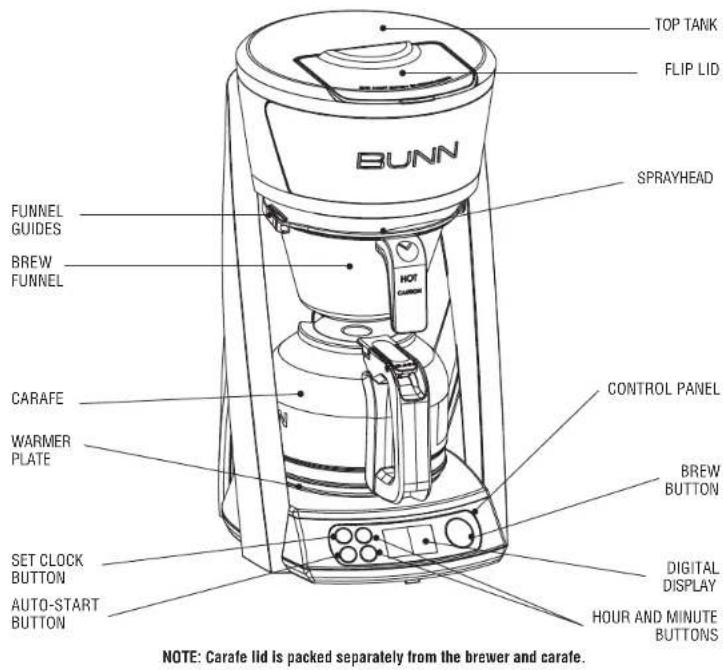
GET TO KNOW YOUR BREWER
IMPORTANT SAFEGUARDS
Follow basic safety precautions when using electrical appliances to reduce the risk of fire, electric shock, and/or personal injury:
- READ ALL INSTRUCTIONS.
- Do not touch hot surfaces. Use handles.
- To protect from electric shock, do not place cord, plugs, or brewer in water or other liquids.
- Do not open lid during heating or brewing.
- Close supervision is necessary when brewer is used by or around children.
- Unplug from outlet when not in use and before cleaning. Let brewer cool before removing or replacing parts, and before cleaning.
- Do not operate brewer with a damaged cord or plug or if the brewer malfunctions or is damaged in any way. Contact Customer Support (see page 7)
- Using an accessory not evaluated for use with this brewer may cause injury.
- Do not use outdoors.
-
Do not let cord hang over edge of table or counter or touch hot surfaces.
-
Do not place brewer on or near a hot gas or electric burner or in a heated oven.
- Do not use brewer for any purpose other than its intended use.
- Do not remove brew funnel or carafe while brewing.
- The carafe is designed for use with this appliance. Do not use carafe on a range top or in a microwave.
- Do not set a hot carafe on a wet or cold surface.
- Do not use a cracked carafe or a carafe with a loose or weakened handle.
- Do not pour any liquid into the water tank other than water or vinegar for cleaning, as specified in this manual.
- Do not clean carafe with cleansers, steel wool pads, or other abrasive materials.
- When brewer is not in use, keep lid in the closed position.
SAVE THESE INSTRUCTIONS
NOTE: Heating water to the ideal brewing temperatures naturally generates some steam. BUNN suggests using your Brewer in an open area, and never under cabinets that may be damaged over time by exposure to steam.
NOTE: The short power-supply cord supplied reduces the risk of becoming entangled in or tripping over a longer cord. Extension cords are available and may be used if care is exercised in their use. If an extension cord is used, its marked electrical rating must be at least as great as the electrical rating of the brewer. The longer cord should be arranged so it will not hang over the edge of a table or counter and that it cannot be pulled on by children or tripped over. The extension cord must be a 3-wire cord of the 3-prong, 3-socketed, grounding type (including grounding conductor).
Record the Model and Date code before using: The model is located on the lower back of your brewer. The date code is located on the metal prongs of your power cord - 4 digits are etched on each side of the metal prongs (Ex. 9999 99CH).
HB
MODEL:
DATE CODE:
Please have your Model and Date Code ready when calling for service.
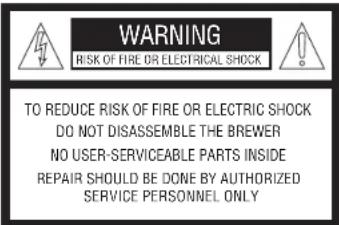
This symbol alerts you to the risk of fire or electric shock in the accompanying message. This symbol alerts you to important operating and service instructions.
Questions?
Visit www.bunn.com or call USA 1-800-352-BUNN (2866) Canada 1-800-263-2256
PROGRAMMING YOUR BREWER
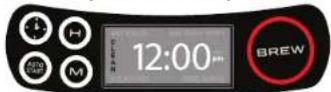
NOTE: You must set the clock to use the Auto-Start function. Remember to reset the clock for time changes and power outages.
SET CLOCK
- Plug power cord into standard electrical outlet.
-
Display will flash for 10 seconds before setting automatically. (If not set, 12:00 AM becomes default time.)
-
Set time using H (hour) and M (minute) buttons.
- Numbers scroll forward only.
- Take care to select correct AM/PM time.
- Press Clock button again to lock in time.
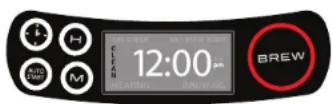
NOTE: The Auto-Start function must be activated each time you want to schedule a brew. If the Auto-Start button is not illuminated, the Auto-Start function is not activated.
AUTO-START (OPTIONAL)
- Press Auto-Start button. H (hour) and M (minute) buttons will light up, time will flash on digital display.
- Set time using H (hour) and M (minute) buttons. Numbers scroll forward only. Stop at desired Auto-Start time. Take care to select correct AM/PM time.
-
When desired time is on the digital display, press Auto Start button to activate. It will be set and Auto-Start will activate or wait 10 seconds and it will set automatically. Once activated, Auto-Start button will illuminate white.
-
Place BUNN coffee filter and coffee grounds into the Brew Funnel and slide into the Funnel Guides.
- Fill brewer with 20 – 50oz of water and place Carafe on base of brewer (failure to follow steps 4 and 5 may result in property damage).
NOTE: To check your Auto-Start setting at idle, press the Auto-Start button twice and the digital display will flash the programmed time. The flashing time will remain the set time unless you change it. After 10 seconds with no buttons pushed, the Auto-Start button will illuminate and Auto-Start is set. To cancel, press Auto Start again.
HOW TO BREW
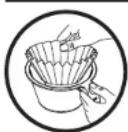
- Place BUNN coffee filter into the Brew Funnel.
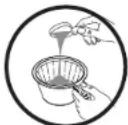
- Measure fresh coffee into the filter, shaking gently to level the grounds.
How to get your Golden Cup
Water Coffee
4 Cups/20 oz 32.5 grams \~2-3 tbsp
6 Cups/30 oz 48.9 grams \~3-4 tbsp
8 Cups/40 oz 64.9 grams \~4-5 tbsp
10 Cups/50 oz 81.4 grams \~5-6 tbsp
GOLDEN RATIO: 1 part coffee to 18 parts water
Note: if you are using whole beans, for better precision, weigh the coffee before it is ground. To more accurately fill the brewer, make sure the water meets (and not exceeds) the measuring step in the Top Tank.
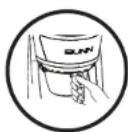
- Slide Brew Funnel into Funnel Guides.
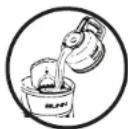
- Fill Carafe with water – minimum 4 cups (20oz), maximum 10 cups (50oz).
Open Flip Lid on top of brewer; pour water into Top Tank. Close Flip Lid. Do not open lid during heating or brewing.
TIP: Pour in warm or hot water to decrease heating time.
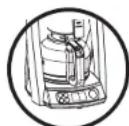
- Position Drip Free carafe on base under Brew Funnel.
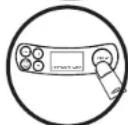
- Press Brew button to begin (\~6 minute) Heating.
Brewer is on when the red light around the Brew Button is illuminated. The Warmer Plate will turn on – and will automatically shut off after 2 hours.
Digital display will read 'Heating'.
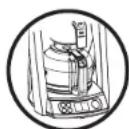
- Brewing begins immediately after Heating is complete.
Digital display will read 'Brewing'.
After final drip out, remove Brew Funnel and discard filter and grounds. Do not touch hot grounds.
To turn the Warmer Plate off when brewing completes, push the Brew Button (no red light visible).
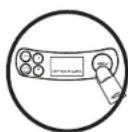
- Turning the Warmer Plate back ON.
Warmer plate will automatically shut off after 2 hours. Press & hold Brew Button for 3 seconds to turn back on.
CLEANING & MAINTENANCE
Wash the brew funnel and glass carafe after each use – both are top rack dishwasher safe. Occasionally wipe the outside of your brewer, including the area above the funnel, with a mild, non-citrus detergent and a damp cloth. While cleaning your brewer, check the glass carafe handle and tighten with a phillips screwdriver if it's loose.
This unique brewing system is sensitive to mineral build-up from the water you use.
Therefore, it is very important to clean the internal system at least every 3 months or whenever the digital displays shows
"CLEAN" after a brew cycle is done. The higher the mineral content in the water you
use, the more often you should clean. Regular internal system cleaning will prolong the life of your brewer and help guarantee an optimal brew result.
BUNN ACCESSORIES
BUNN offers a complete line of brewer accessories including paper filters, glass carafes, thermal carafes, replacement funnels, and more.
Visit www.bunn.com to order parts and accessories, or call the BUNN Home Products Team at 1-800-352-BUNN (2866).
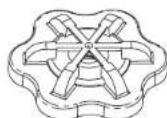
- Remove the Sprayhead located above the Brew Funnel by turning with your fingertips.
- Check the Sprayhead. If plugged with mineral deposits or white flakes, use a toothpick to remove. Clean the Sprayhead with a cloth and mild detergent. Rinse the Sprayhead with water.
- Slide empty Brew Funnel into the Funnel Guides under the Sprayhead.
- Open the Flip Lid on top of the brewer and fill brewer with equal parts of water and white vinegar solution (25 oz each).
- Close the Flip Lid.
- Place empty Carafe on the base Warmer Plate of brewer.
- Let solution set for a few minutes.
- Press the Brew button to cycle the vinegar solution through the brewer.
- Empty carafe at end of cycle.
- Run 3 or more additional cycles with full carafes of water to flush remaining vinegar solution from the brewer.
- Reinstall Sprayhead.
- To reset the "CLEAN" indicator, press and hold the "H" and "M" buttons for 3 seconds.
Note: For a stronger clean, 100% white vinegar (50oz) can be used. Press the Brew button and let the machine heat for 4 minutes. Then press the Brew button to pause the machine. Let the vinegar soak for 30 minutes. Press the Brew button to restart the machine and finish brew cycle. Run 3 or more cycles with full carafes of water to flush remaining vinegar from brewer.
TROUBLESHOOTING
NOTE: Our friendly Customer Service Group is ready to help at 1-800-352-BUNN (2866) or online at www.bunn.com
| PROBLEM SUGGESTIONS | PROBLEM | SUGGESTIONS | |
| Brewer does not turn on | Make sure brewer is plugged into a working outlet.Press the Brew button to begin brew and red light will illuminate. | ProgrammedAuto-Start did not work | Make sure AM/PM was accurately selected.Reprogram for Daylight Savings Time or a power outage if needed.Make sure Auto-Start button is illuminated. |
| Coffee is not brewing | Make sure brewer is plugged into a working outlet.Make sure brewer is filled with water. A minimum of 4 cups (20oz) is needed to begin brewing.Make sure brewer clock is set.Press the Brew button to begin brew and red light will illuminate.Check to see if Auto-Start time was programmed accurately. | 'CLEAN' indicator light appears on screen | Perform Brewer Maintenance, see instructions on page 5.To reset "CLEAN" indicator, press and hold "H" and "M" buttons for 3 seconds during idle. |
| Brew time is longer than usual | Check Sprayhead holes for debris. Clean Sprayhead and perform Brewer Maintenance, see instructions on page 5. | Water drips through prior to completing Heating or before programmed time | Lime or mineral build-up may prevent the valve between the Top Tank and Sprayhead from properly closing. Perform Brewer Maintenance, see instructions on page 5. |
| Brew funnel overflows | Be sure Brew Funnel is properly inserted.Use BUNN paper filters – they are taller to prevent overflow.Be sure Sprayhead is in place.If overflow continues, contact BUNN for a Flow Restrictor Sprayhead. | Off taste is detected | Perform Brewer Maintenance, see instructions on page 5. |
| Warmer plate stays on after brewing | Warmer Plate automatically shuts off after 2 hours. To shut off manually, push the Brew button (red light will turn off).To turn Warmer Plate back on, press & hold Brew button for 3 seconds. | Error Code EE:03 | The brewer did not detect water. Check the top tank to make sure brewer is filled with water.A minimum of 4 cups (20 oz) is needed to begin brewing. |
| Brewer did not brew all cups | Approximately 2 oz of water is absorbed for every 1 oz of coffee. | ||
CUSTOMER SUPPORT
WWW.BUNN.COM
BUNN-O-MATIC CORPORATION
IN THE UNITED STATES:
1400 Stevenson Drive, Springfield, IL 62703
900 E. Townline Rd., Creston, Iowa 50801
1-800-352-BUNN (2866)
IN CANADA:
280 Industrial Parkway S., Aurora, Ontario L4G 3T9
1-800-263-2256
To receive full assistance, have the Model and Date Code ready when calling.
Record the Model and Date code before using: The model is located on the label at the bottom of the brewer. The date code is located on the metal prongs of your power cord - 4 digits are etched on each side of the metal prongs (Ex. 9999 99CH).
LIMITED WARRANTY
Bunn-O-Matic ^® warrants the BUNN ^® HB Coffee Brewer, except glass carafe, to be free from defects in materials and workmanship existing at the time of manufacture and appearing within the later of the following warranty periods:
a) Three (3) years from the date of original purchase of a NEW BREWER; or
b) In the case of a REPAIRED OR REPLACEMENT BREWER returned to Bunn-O-Matic before the new Brewer warranty has expired (1) year from the date REPAIRED OR REPLACEMENT BREWER is received by customer.
If such a defect appears during the warranty period, we will (at our sole option) repair or replace the defective Brewer with no charge for service or parts, provided Brewer is delivered at the customer's expense to one of our authorized service centers (see page 6 for customer service info).
Warranty does not cover claims resulting from misuse, failure to follow instructions on installation and use, use with water having a high mineral content, neglect, use of unauthorized attachments, commercial use, use on a current or voltage other than specified on the Brewer, or unauthorized service during the warranty period on conditions otherwise covered by warranty.
THIS WARRANTY SHALL BE EXCLUSIVE AND SHALL BE IN LIEU OF ANY OTHER WARRANTY, WRITTEN, ORAL, OR IMPLIED INCLUDING BUT NOT LIMITED TO ANY IMPLIED WARRANTY OF MERCHANTABILITY OR FITNESS FOR A PARTICULAR PURPOSE. In any event, the duration of any implied warranties, including but not limited to any implied warranties of merchantability or fitness for a particular purpose, is expressly limited to the period of duration of this limited warranty.
Some states do not allow time limitations implied warranties, so the above limitation may not apply to you. The customer's exclusive remedy for breach of this warranty or of any implied warranty or of any other obligation arising by operation of law or otherwise shall be limited as specified herein to repair or replacement, at our sole option. In any event, responsibility for special, incidental and consequential damages is expressly excluded.
Some states do not allow limitation or exclusion of incidental or consequential damages, so the above limitation or exclusion may not apply to you.
This warranty gives you specific legal rights; you may have other rights, which vary from state to state.
TRADEMARKS
BUNN Pour-O-Matic, BUNN, BUNN with the stylized red line, The Horizontal Red Line, Bunn-OMatic, Bunn-O-Matic, Velocity Brew, My Café, Speed Brew, Phase Brew, trifecta, Air Infusion, Quality Beverage Equipment Worldwide, The Mark of Quality in Beverage Equipment Worldwide, A Partner You Can Count On, Brew Better Not Bitter, Brew better, not bitter., Coffee At Its Best, Nothing Brews Like a BUNN, Respect Earth, Respect Earth with the stylized leaf and coffee cherry design, are either trademarks or registered trademarks of Bunn-O-Matic Corporation.

BUNN®
Quality Since 1840
The BUNN logo is a trademark of Bunn-O-Matic Corporation. 52774.0000A 6/16©2016 BUNN-O-MATIC CORPORATION www.bunn.com
ENJOY
DISFRUATE
www.bunn.com
52774.0000A 6/16©2016 CORPORACION BUNN-0-MATIC
— Quality since 1840


Matrix.
Intr. tca. in inclusion. Quilty brevarge Equipment Worldwide. Brouw Better Not Hot, Berry, citter, coffee worldwide. Many you can count O.n. Brew Better Not Hot, Berry, citter, coffee worldwide. At last, wotting winds like a BUNN, Resort Earth. Respect that with the Shivald heat and coffee cherry design, son marcs comericles o marcas comericles registradas de la Corporacion Bunn-O
Bunn-O-Matic, Velocity Brew, My Gate, Speed Brew, Phase Brew.
BUNN Pour-O-Matic, BUNN. BUNN with the stylized red line, The Horizontal Red Line, BUNn-OMatic.
MARCAS REGISTRADAS
de estado a estado.
900 E. Townline Rd., Creston, Iowa 50801
1400 Stevenson Drive, Springfield, IL 62703
natural_image
Line drawing of a modern NMM8 air purifier with control panel and side-mounted unit (no text or symbols)MANUAL DE USO Y CUIDADO Modelo HB: 10 taza de cate percoladora
natural_image
Line drawing of a 3D printer with control panel and baseplate (no text or symbols)- USE & CARE MANUAL
- TABLE OF CONTENTS
- SPECIFICATIONS
- GET TO KNOW YOUR BREWER
- IMPORTANT SAFEGUARDS
- SAVE THESE INSTRUCTIONS
- HB
- PROGRAMMING YOUR BREWER
- SET CLOCK
- AUTO-START (OPTIONAL)
- HOW TO BREW
- How to get your Golden Cup
- Water Coffee
- CLEANING & MAINTENANCE
- BUNN ACCESSORIES
- TROUBLESHOOTING
- CUSTOMER SUPPORT
- LIMITED WARRANTY
- TRADEMARKS
- ENJOY
- DISFRUATE
- MANUAL DE USO Y CUIDADO Modelo HB: 10 taza de cate percoladora
Brand : Bunn
Model : Heat N' Brew HB
Category : Coffee maker