
AD1002 - Receiver AudioSource - Free user manual and instructions
Find the device manual for free AD1002 AudioSource in PDF.


| Product Type | Digital Stereo Power Amplifier |
| Brand | AudioSource |
| Model | AD1002 |
| Power Output (Stereo 8Ω) | 50W per channel, <1% THD+N |
| Power Output (Stereo 4Ω) | 75W per channel, <1% THD+N |
| Power Output (Bridged Mono 8Ω) | 160W @1kHz, <1% THD+N |
| Frequency Response | 10Hz - 30kHz, -2dB/+1dB |
| Signal-to-Noise Ratio | 100dB (ref. 50W into 8Ω, 20kHz LPF) |
| Channel Separation | 65dB @1kHz (ref. 50W into 8Ω) |
| Input Sensitivity | 700mV for rated 50W into 8Ω |
| Bass Control | ±12dB @100Hz |
| Treble Control | ±12dB @10kHz |
| Inputs | MAIN IN (RCA), INTERRUPT IN (RCA), 12V Trigger (3.5mm) |
| Outputs | MAIN OUT (RCA), Speaker A and B (binding posts) |
| Speaker Switching | Zone A, Zone B, or A+B (8Ω speakers required for A+B) |
| Auto On | Signal sensing or manual (front panel switch must be ON for auto) |
| Mode Select | Stereo or Bridged (rear panel switch) |
| Power Consumption | 200W maximum |
| Power Supply | 115V AC, 50Hz (North America) |
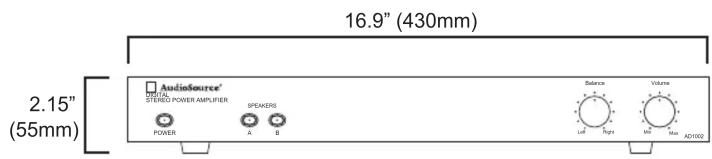
| Dimensions (W x H x D) | 430mm x 55mm x 194mm (16.9" x 2.15" x 7.65") |
| Net Weight | 2.2 kg (4.7 lbs) |
| Gross Weight | 3 kg (6.8 lbs) |
| Warranty | 2 years limited (original purchaser, US only) |
| Cleaning | Use a dry cloth; do not use liquids or aerosols. |
| Repairs | No user-serviceable parts; refer to qualified service personnel. |
| Spare Parts | Contact AudioSource or authorized dealer. |
| Safety Certifications | Class II double insulated |
Frequently Asked Questions - AD1002 AudioSource
User questions about AD1002 AudioSource
0 question about this device. Answer the ones you know or ask your own.
Ask a new question about this device
Download the instructions for your Receiver in PDF format for free! Find your manual AD1002 - AudioSource and take your electronic device back in hand. On this page are published all the documents necessary for the use of your device. AD1002 by AudioSource.
USER MANUAL AD1002 AudioSource
AD1002
Digital Stereo Power Amplifier
FEATURES:
MAIN / INTERRUPT priority input switching
MAIN auxiliary output
Speaker A/B switching
Front panel Balance and Volume controls
Signal sensing "Power On" and Trigger mode
Rear mounted treble and bass controls
SPECIFICATIONS
Stereo (8 ohm): 50W per channel, <1% THD+N
Stereo (4 ohm): 75W per channel, <1% THD+N
Bridged Mono (8 ohm): 160W, 1kHz, <1% THD+N
Frequency Response: 10Hz \~ 30kHz, -2dB/ +1dB
Signal to Noise Ratio: 100dB below 50W output into 8 ohms w/20kHz Lowpass filter
Channel Separation: 65dB @ 1kHz, referred to 50W output into 8 ohms
Input Sensitivity: 700mV input for rated 50W output into 8 ohms
Bass/Treble Control: +/- 12dB @ 100Hz and 10kHz
AC Power Consumption: 200W maximum
Net Weight: 4.7lbs / 2.2kgs
Gross Weight: 6.8lbs / 3kgs
Congratulations on your purchase of the AudioSource® AD1002. Please take a few moments to read this entire manual, and be sure to retain this document for future reference. Please read and observe all safety instructions detailed on page 2.
NOTE: If any part of this product is damaged or missing, please call your dealer or AudioSource® directly at 1.877.715.5439 or 503.914.4688.
Please read your warranty and retain your receipt and original carton for possible future use.
For more information about AudioSource® electronics, speakers and accessories please visit www.audiosource.net

AudioSource
AudioSource®
13970 SW 72nd Ave
Portland, OR 97223
503.914.4688
www.audiosource.net

CAUTION
RISK OF ELECTRICAL SHOCK DO NOT OPEN

CAUTION: TO REDUCE THE RISK OF ELECTRIC SHOCK, DO NOT REMOVE THE COVER. NO USER SERVICABLE PARTS INSIDE. REFER SERVICING TO QUALIFIED PERSONNEL!
EXPLANATION OF SAFETY SYMBOLS

The exclamation point within an equilateral triangle is intended to alert the user of the presence of important operating and maintenance (servicing) instructions in the literature accompanying the appliance.

The lightning flash with the arrowhead symbol within an equilateral triangle is intended to alert the user to the presence of uninsulated “dangerous voltage” within the products’ enclosure that may be of sufficient magnitude to constitute a risk of electric shock to persons.
IMPORTANT SAFETY INSTRUCTIONS
- WARNING: TO PREVENT FIRE OR SHOCK HAZARD, DO NOT EXPOSE THIS APPLIANCE TO RAIN OR MOISTURE. THE APPARATUS SHALL NOT BE EXPOSED TO DRIPPING OR SPLASHING AND THAT OBJECTS FILLED WITH LIQUIDS, SUCH AS VASES, SHALL NOT BE PLACED ON APPARATUS.
- WARNING: TO PREVENT FIRE OF SHOCK HAZARD, DO NOT USE THIS PLUG WITH AN EXTENSION CORD, RECEPTACLE OR OTHER OUTLET UNLESS THE BLADES CAN BE FULLY INSERTED TO PREVENT BLADE EXPOSURE.
- WARNING: THE MAINS PLUG IS USED AS DISCONNECT DEVICE. THE DISCONNECT DEVICE SHALL REMAIN READILY AVAILABLE.
-
WARNING: ONLY USE ATTACHMENTS OR ACCESSORIES SPECIFIED OR PROVIDED BY THE MANUFACTURER.
-
Read these instructions.
- Keep these instructions.
- Heed all warnings.
- Follow all instructions.
- Do not use this apparatus near water.
- Clean only with dry cloth.
- Do not block any ventilation openings. The ventilation should not be impeded by covering the ventilation openings with items such as newspaper, tablecloths, curtains etc. Install in accordance with the manufacturer's instructions.
- Do not install near heat sources such as radiators, heat registers, stoves, or other apparatus (including amplifiers) that produce heat. No open flame sources, such as lighted candles, should be placed on the apparatus.
- Do not defeat the safety purpose of the polarized or grounding type plug. A polarized plug has two blades with one wider than the other. A grounding type plug has two blades and a third grounding prong. The wide blade or third prong is provided for your safety. If the provided plug does not fit into your outlet, consult an electrician for replacement of the obsolete outlet.
- Protect the power cord from being walked on or pinched particularly at the plugs, convenience receptacles, and at the point of exit from the apparatus.
- Only use attacheements/accessories specified by the manufacturer.
- Use only with the cart, stand, tripod, bracket, or table specified by the manufacturer, or sold with the apparatus. When a cart or rack is used, use caution when moving the cart/apparatus combination to avoid injury from tip-over.

- Unplug the apparatus during lightning storms or when unused for long periods of time.
- Refer all servicing to qualified personnel. Servicing is required when the apparatus has been damaged in any way, such as power supply cord or plug is damaged, liquid has been spilled or objects have fallen into the apparatus has been exposed to rain or moisture, does not operate normally, or has been dropped.
- WARNING: To reduce the risk of fire or electric shock, do not expose this apparatus to rain or moisture. The apparatus shall not be exposed to dripping or splashing and that objects filled with liquids, such as vases, shall not be placed on apparatus.
- WARNING: The mains plug/appliance coupler is used as disconnect device, the disconnect device shall remain readily operable.
- This equipment is a Class II or double insulated electrical appliance. It is designed in such a way that it does not require a safety connection to electrical earth.

CAUTION


18.
- This lightning flash with arrowhead symbol within an equilateral triangle is intended to alert the user to the presence of non-insulated “dangerous voltage” within the product’s enclosure that may be of sufficient magnitude to constitute a risk of electric shock.
- Warning: to reduce the risk of electric shock, do not remove cover (or back) as there are no user-serviceable parts inside. Refer servicing to qualified personnel. - The exclamation point within an equilateral triangle is intended to alert the user to the presence of important operating and maintenance instructions in the literature accompanying the appliance.
MAGNETIC FIELD: !!CAUTION!! Do not locate sensitive high-gain equipment such as preamplifiers or tape decks directly above or below the unit. Because this amplifier has a high power density, it has a strong magnetic field, which can induce hum into unshielded devices that are located nearby. The field is strongest just above and below the unit. If an equipment rack is used, we recommend locating the amplifier(s) in the bottom of the rack and the preamplifier or other sensitive equipment at the top.

AudioSource®
DIGITAL
STEREO POWER AMPLIFIER

POWER

SPEAKERS

A


FRONT PANEL CONTROLS
1. Power Switch
Switches the AD1002 on or off. A red LED indicates connection to AC power while in standby mode. Turns green indicating audio signal is present.
2. Speaker Selector
Selects speaker zone A or B. For A + B zones push both buttons in.

Figure 1. Front Panel
3. Balance
Fades speaker output between the Right and Left Channels
4. Volume
Adjusts amplifier volume.

REAR PANEL CONTROLS
6. Bass and Treble Controls
These controls can adjust bass and treble frequencies +/- 12dB at 100Hz and 10kHz.
7. Interrupting Line Input
This is the secondary input, use MAIN IN for your main input. INTERRUPTING INPUT can be used if a second source is desired and takes over when signal is present and has at least a 5mV level. When there is no signal, or a signal with less than 5mV level, the amp switches back to MAIN IN after a brief delay.
8. Main Input/Output
MAIN IN should be used as the “primary” or main input for the amplifier. Connect your receiver or main source to this input. Use MAIN OUT to pass MAIN IN signal to another amplifier.
9. 12V Trigger
Allows the AD1002 to be powered on by other electronics or to power on other electronics via a 3.5mm mini phone plug cable.
10. Mode Select Switch
Switches the amplifier from Stereo mode to Bridged mode.
STEREO MODE
If you will be connecting one or two pair of speakers to the amplifier, place the switch in the “Stereo” position. NOTE: For playing 2 pairs of speakers (A plus B), make sure each speaker has an impedance of 8 ohms or greater.
BRIDGED MODE
When set to "Bridged" mode, the amplifier is a single channel mono amplifier.
BRIDGED MODE- MONO APPLICATION
For bridged mode, playing Right and Left together as mono output, plug RCA cables in to Right and Left RCA at MAIN input.
Set the MODE switch to BRIDGED and follow the instructions for bridged speaker connection in the SPEAKER TERMINALS section of this manual.
NOTE: The AD1002 supplies 160W in bridged mode, Please verify that your speakers are capable of handling such power to avoid possible damage!
11. AUTO ON Select Switch
Power can be turned on and off manually via the switch on the front panel or automatically by signal sensing. Set it to NORMAL for manual power on/off. Set to AUTO for signal sensing; the amp will turn on when audio signal is detected at the inputs. NOTE: The front panel power switch must be in the ON position (pushed in) for the AUTO ON feature to operate.
12. Speaker Zone A Output
Speaker output terminals for zone A. Minimum impedance: 8 ohm bridged or 4 ohm stereo.
13. Speaker Zone B Output
Speaker output terminals for zone B. Minimum impedance: 8 ohm bridged or 4 ohm stereo.
SPEAKER TERMINALS - STEREO MODE
For stereo output connect the speaker's positive (red) terminal to the amplifier's positive (red) terminal, and the speaker's negative (black) terminal to the amplifier's negative (black) terminal for each Right and Left speaker.
SPEAKER TERMINALS - BRIDGED MODE
Place the “MODE” switch in the “BRIDGED” position and use both red terminals to connect to the speaker. Connect the speaker’s positive (red) terminal to the amplifier’s red (+) terminal noted next to the bridging mark, and the speaker’s negative (black) terminal to the amplifier’s unmarked positive (red) terminal.
NOTE: Only one zone (A or B) can be bridged. Do not attempt to bridge both A and B speaker terminals! This may result in a lower impedance than the amplifier is designed for and may damage your amplifier. The minimum impedance for the total load connected in bridged mode is 8 ohms.
NOTE: Use Class 2 wiring for speaker connections.
To wire the output connector: 1. Strip the insulation off each speaker wire to expose 3/8" (10 mm) of bare conductor. 2. Unscrew the output terminal binding post several twists, insert each wire into the correct terminal. 3. Tighten binding post by twisting clock-wise until it is firmly clamping the speaker wire.
Warning: While the amplifier does self-protect under most improper output conditions, misconfiguration of loudspeaker mode and incorrect connection of loudspeakers could damage connected loudspeakers and/or amplifier. Please refer installation to a qualified installation professional, and always check state and local electrical codes when installing.
NOTE: To prevent sonic degradation in your speaker installation, total speaker wire resistance should be kept below 0.5 ohms. This table lists recommended speaker wire gauge versus wire run length.
50' or less - 16 Gauge 2-Cond. CL3 Rated
50' - 150' - 12 Gauge 2-Cond. CL3 Rated
150' - 200' - 10 Gauge 2-Cond. CL3 Rated
14. Power Cord
This amplifier is configured for operation at 115V (North America). A fuse located internally protection from fault conditions. Refer to qualified service personnel should this need to be replaced.
APPLICATIONS
STEREO SETUP
In this configuration, the mode switch is set to "Stereo". Connect the line out jacks from a stereo pre-amplifier or source to the MAIN input jacks of your AD1002. Next connect your speakers to the terminals marked "Speaker A" observing proper polarity. Select the "A" speakers using the front panel zone selection buttons. Connect a second (optional) pair of speakers to the terminals marked "Speaker B". If you are connecting 4 speakers to the AD1002 they must be 8 ohm speakers only. Press A and B together to use both zones.

SETUP FOR MULTIPLE SOURCE
In the multiple source set up, a distributed audio system is connected to the AD1002 as a local zone amplifier via the MAIN inputs. Normally the distributed audio system will be the audio source for the AD1002. The distributed audio is then passed on to be used by additional zones or sub zones in the distributed system via the MAIN outputs.

(From Local Source Line Out) (From Pre-amp Line Out) (Out to Additional Zones)
The audio output of a local source, such as an MP3 Player, CD, television, computer, etc., is connected to the AD1002 via the INTERRUPTING inputs, and whenever the local source is active its signal will take priority over the distributed audio signal present at MAIN input. However, the distributed audio signal will still be present at the MAIN input. In this circumstance the audio output of the local source will be heard via the AD1002. Once the local source is turned off or muted, the AD1002 will automatically switch back to the distributed audio system as an audio source, assuming the local source remains inactive. There is a delay of up to 6 seconds when switching from INTERRUPTING input back to MAIN inputs.
Limited Warranty
AudioSource® warrants its amplifier products against defects in materials and workmanship for a limited period of time. For a period of two years from date of original purchase, we will repair or replace the product, at our option, without charge for parts and labor. Customer must pay all parts and labor charges after the limited warranty period expires. The limited warranty period for factory refurbished products expires after ninety (90) days from date of original purchase.
This limited warranty applies only to purchases from authorized AudioSource® electronics retailers. This limited warranty is extended only to the original purchaser and is valid only to consumers in the United States.
Consumers are required to provide a copy of the original sales invoice from an authorized AudioSource® dealer when making a claim against this limited warranty. This limited warranty only covers failures due to defects in materials or workmanship that occur during normal use. It does not cover failures resulting from accident, misuse, abuse, neglect, mishandling, misapplication, alteration, faulty installation, modification, service by anyone other than AudioSource®, or damage that is attributable to Acts of God. It does not cover costs of transportation to AudioSource® or damage in transit. The customer should return his defective product, freight prepaid and insured, to AudioSource® only after receiving a Return Authorization.
This warranty will become void if the serial number identification has been wholly or partially removed, altered or erased. Repair or replacement under the terms of this warranty does not extend the terms of this warranty. Should a product prove to be defective in workmanship or material, the consumer's sole remedies will be repair or replacement as provided under the terms of this warranty. Under no circumstances shall AudioSource® be liable for loss or damage, direct, consequential or incidental, arising out of the use of or inability to use the product. There are no express warranties other than described above.


- AD1002
- FEATURES:
- SPECIFICATIONS
- CAUTION
- RISK OF ELECTRICAL SHOCK DO NOT OPEN
- CAUTION: TO REDUCE THE RISK OF ELECTRIC SHOCK, DO NOT REMOVE THE COVER. NO USER SERVICABLE PARTS INSIDE. REFER SERVICING TO QUALIFIED PERSONNEL!
- IMPORTANT SAFETY INSTRUCTIONS
- FRONT PANEL CONTROLS
- Power Switch
- Speaker Selector
- Balance
- Volume
- REAR PANEL CONTROLS
- Bass and Treble Controls
- Interrupting Line Input
- Main Input/Output
- 12V Trigger
- Mode Select Switch
- STEREO MODE
- BRIDGED MODE
- BRIDGED MODE- MONO APPLICATION
- AUTO ON Select Switch
- Speaker Zone A Output
- Speaker Zone B Output
- SPEAKER TERMINALS - STEREO MODE
- SPEAKER TERMINALS - BRIDGED MODE
- NOTE: Use Class 2 wiring for speaker connections.
- Power Cord
- APPLICATIONS
- STEREO SETUP
- SETUP FOR MULTIPLE SOURCE
- Limited Warranty
Brand : AudioSource
Model : AD1002
Category : Receiver