DX-40D510NA15 - Television Dynex - Free user manual and instructions
Find the device manual for free DX-40D510NA15 Dynex in PDF.


| Product Type | LED TV |
| Model | DX-40D510NA15 |
| Screen Size | 40 inches (16:9 aspect ratio) |
| Display Resolution | 1920 x 1080 (Full HD) |
| Refresh Rate | 60 Hz |
| Dimensions (W x H x D) without Stand | 35.5 x 21.5 x 3.5 inches |
| Dimensions (W x H x D) with Stand | 35.5 x 23.5 x 8.5 inches |
| Weight without Stand | 17.6 lbs (8 kg) |
| Weight with Stand | 19.8 lbs (9 kg) |
| Power Consumption (Typical) | 70 W |
| Power Supply | AC 120V, 60Hz |
| Inputs | HDMI x2, USB x1, Component, Composite, RF, VGA |
| Outputs | Optical Audio, Headphone |
| Built-in Tuner | ATSC |
| Speakers | 2 x 8W |
| Wall Mount Pattern | VESA 200 x 200 mm |
| Remote Control | Yes (included) |
| Cleaning Instructions | Wipe with a soft, dry cloth. Do not use liquid cleaners. |
| Safety Precautions | Place on a stable surface; secure with anti-tip strap. |
| Spare Parts Available | Remote control, stand base, screws |
| Repairability | Basic user-replaceable parts include remote and stand. Other repairs should be performed by qualified service personnel. |
Frequently Asked Questions - DX-40D510NA15 Dynex
User questions about DX-40D510NA15 Dynex
0 question about this device. Answer the ones you know or ask your own.
Ask a new question about this device
Download the instructions for your Television in PDF format for free! Find your manual DX-40D510NA15 - Dynex and take your electronic device back in hand. On this page are published all the documents necessary for the use of your device. DX-40D510NA15 by Dynex.
USER MANUAL DX-40D510NA15 Dynex
Important Safety Instructions 2
Warning 2
Caution 3
Introduction 4
Installing the stand or wall mount bracket 4
Installing the stand 4
Installing the wall-mount bracket 6
TV components 8
Package contents 8
Front 8
Side jacks 9
Back 10
Remote control 11
What connection should I use? 12
Connecting a cable or satellite box 13
HDMI (best) 13
DVI (same as HDMI but requires an audio connection) 14
Component video (better) 15
AV (composite video) (good).... 16
Coaxial (good)....17
Connecting an antenna or cable TV (no box) 18
Connecting a DVD or Blu-ray player 19
HDMI (best) 19
Component video (better) 20
Composite video (good) 21
Connecting a game console 22
HDMI (best) 22
Component video (better) 23
AV (composite video) (good)....24
Connecting a computer 25
HDMI (best) 25
DVI (same as HDMI but requires an audio connection) 26
VGA (good) 27
Connecting a USB flash drive 28
Connecting headphones 29
Connecting external speakers or a sound bar 30
Digital audio 30
Analog audio....31
Connecting a home theater system with multiple devices 32
Connecting power 33
Using the remote control 34
Installing remote control batteries 34
Aiming the remote control 34
Turning on your TV for the first time 34
Understanding the basics 36
Turning your TV on or off 36
Selecting the video input source 36
Using the on-screen menus 37
Navigating the menus 37
Selecting a channel 38
Adjusting the volume 38
Viewing channel information 38
Using a USB flash drive 39
Switching to USB mode 39
Browsing photos 39
Viewing your favorite photos 40
Viewing photos in a slideshow 41
Customizing slideshow settings 42
Adjusting the picture 43
Adjusting the TV picture 43
Automatically adjusting the aspect ratio 44
Setting the power on picture mode 44
Adjusting the computer image 45
Adjusting the sound 45
Adjusting sound settings 45
Playing TV audio only 46
Setting parental controls 46
Setting or changing the password 46
Locking control buttons 47
Setting the system lock 48
Blocking unrated TV 48
Setting parental control levels 49
Downloading rating information 50
Adjusting time settings 51
Setting the clock 51
Setting the sleep timer 52
Using closed captioning 52
Turning closed captioning on or off 52
Selecting the analog closed captioning mode 53
Selecting the digital closed captioning mode 53
Customizing digital closed captioning styles 54
Adjusting menu settings 54
Selecting the menu language 54
Labeling an input source 55
Changing channel settings 55
Automatically scanning for channels 55
Hiding channels 56
Setting up a favorite channel list 57
Viewing a favorite channel 57
Adding or changing a channel label 57
Checking the digital signal strength 58
Maintaining 58
Cleaning your TV 58
Troubleshooting 59
Restoring settings to default 59
Viewing system information 59
Video and audio 60
Remote control 62
General 62
Specifications 64
Programming universal remote controls 65
Common universal remote control codes 65
Legal notices 66
One-year limited warranty - Dynex Televisions 67
CHILD SAFETY
PROPER TELEVISION PLACEMENT MATTERS



THE CONSUMER ELECTRONICS INDUSTRY CARES
- Manufacturers, retailers and the rest of the consumer electronics industry are committed to making home entertainment safe and enjoyable.
- As you enjoy your television, please note that all televisions - new and old- must be supported on proper stands or installed according to the manufacturer's recommendations. Televisions that are inappropriately situated on dressers, bookcases, shelves, desks, speakers, chests, carts, etc., may fall over, resulting in injury.
TUNE IN TO SAFETY
- ALWAYS follow the manufacturer's recommendations for the safe installation of your television.
• ALWAYS read and follow all instructions for proper use of your television. - NEVER allow children to climb on or play on the television or the furniture on which the television is placed.
- NEVER place the television on furniture that can easily be used as steps, such as a chest of drawers.
• ALWAYS install the television where it cannot be pushed, pulled over or knocked down. - ALWAYS route cords and cables connected to the television so that they cannot be tripped over, pulled or grabbed.
WALL OR CEILING MOUNT YOUR TELEVISION
- ALWAYS contact your retailer about professional installation if you have any doubts about your ability to safely mount your television.
- ALWAYS use a mount that has been recommended by the television manufacturer and has a safety certification by an independent laboratory (such as UL, CSA, ETL).
• ALWAYS follow all instructions supplied by the television and mount manufacturers. - ALWAYS make sure that the wall or ceiling where you are mounting the television is appropriate. Some mounts are not designed to be mounted to walls and ceilings with steel studs or cinder block construction. If you are unsure, contact a professional installer.
- Televisions can be heavy. A minimum of two people is required for a wall or ceiling mount installation.
MOVING AN OLDER TELEVISION TO A NEW PLACE IN YOUR HOME
- Many new television buyers move their older CRT televisions into a secondary room after the purchase of a flat-panel television. Special care should be made in the placement of older CRT televisions.
- ALWAYS place your older CRT television on furniture that is sturdy and appropriate for its size and weight.
- NEVER place your older CRT television on a dresser where children may be tempted to use the drawers to climb.
- ALWAYS make sure your older CRT television does not hang over the edge of your furniture.
Important Safety Instructions

CAUTION RISK OF ELECTRIC SHOCK DO NOT OPEN


This symbol indicates that dangerous voltage constituting a risk of electric shock is present within your TV. This label is located on the back of your TV.

This symbol indicates that there are important operating and maintenance instructions in the literature accompanying your TV.
1 Read these instructions.
2 Keep these instructions.
3 Heed all warnings.
4 Follow all instructions.
5 Do not use this apparatus near water.
6 Clean only with dry cloth.
7 Do not block any ventilation openings. Install in accordance with the manufacturer's instructions.
8 Do not install near any heat sources such as radiators, heat registers, stoves, or other apparatus (including amplifiers) that produce heat.
9 Do not defeat the safety purpose of the polarized or grounding-type plug. A polarized plug has two blades with one wider than the other. A grounding type plug has two blades and a third grounding prong. The wide blade or the third prong are provided for your safety. If the provided plug does not fit into your outlet, consult an electrician for replacement of the obsolete outlet.
10 Protect the power cord from being walked on or pinched particularly at plugs, convenience receptacles, and the point where they exit from the apparatus.
11 Only use attachments/accessories specified by the manufacturer.
12 Use only with the cart, stand, tripod, bracket, or table specified by the manufacturer, or sold with the apparatus. When a cart is used, use caution when moving the cart/apparatus combination to avoid tip-over.
13 Unplug this apparatus during lightning storms or when unused for long periods of time.

14 Refer all servicing to qualified service personnel. Servicing is required when the apparatus has been damaged in any way, such as power-supply cord or plug is damaged, liquid has been spilled or objects have fallen into the apparatus, the apparatus has been exposed to rain or moisture, does not operate normally, or has been dropped.
15 The wall plug is the disconnecting device. The plug must remain readily operable.
16 Remote control batteries should not be exposed to excessive heat such as sunshine, fire, or the like.
17 The apparatus should not be exposed to dripping or splashing and no objects filled with liquids, such as vases, should be placed on the apparatus.
Warning
Electric shock hazard
To reduce the risk of fire or electric shock, do not remove any cover or expose the device to rain or moisture. No user-serviceable parts are inside. Refer servicing to qualified service technicians.
Lightning
For added protection for your device receiver during a lightning storm, or when it is left unattended and unused for long periods of time, unplug it from the power outlet and disconnect any antenna or cable system. This helps prevent property damage and personal injury from lightning and power line surges.
Power lines
An outside antenna system should not be located in the vicinity of overhead power lines or other electric light or power circuits, or where it can fall into such power lines or circuits. When installing an outside antenna system, extreme care should be taken to keep from touching such power lines or circuits as contact with them might be fatal.
Handling the LCD panel
- Your TV's screen is made of glass. Do not drop your TV or hit, jolt, or press hard against the LCD panel. If the screen breaks, be careful of broken glass.
- If the LCD panel is broken, make absolutely sure that you do not touch the liquid in the panel. This may cause skin inflammation.
- If the liquid gets in your mouth, immediately gargle, rinse, and consult with your doctor. Also, if the liquid gets in your eyes or touches your skin, consult with your doctor after rinsing for at least 15 minutes or longer in clean water.
Replacement parts
When replacement parts are required, make sure that the service technician uses replacement parts specified by the manufacturer that have the same characteristics as the original part. Unauthorized substitutions may result in fire, electric shock, personal injury, or other hazards.
Safety check
After completing any service or repair to this device, ask the service technician to perform routine safety checks to determine that your TV is in correct operating condition.
Power source
Operate your TV only from the type of power source indicated on the marking label. If you are not sure of the type of power supplied to your home, consult an electrician or your local power company.
Servicing
These servicing instructions are for use by qualified service personnel only. To reduce the risk of electric shock, do not perform any servicing other than that contained in the operating instructions unless you are qualified to do so.
Caution
Damage requiring service
Unplug this TV from the power outlet and refer servicing to qualified service personnel under the following conditions:
- When the power supply cord or plug is damaged or frayed.
- If liquid has been spilled or objects have fallen into your TV.
- If your TV has been exposed to rain or water.
- If your TV does not operate normally by following the operating instructions. Adjust only those controls that are covered by the operating instructions because incorrect adjustment of other controls may result in damage and will often require extensive work by a qualified technician to restore your TV to its normal operation.
- If your TV has been dropped or damaged in any way.
- When your TV exhibits a distinct change in performance.
Outdoor antenna grounding
If an outside antenna or cable system is connected to your TV, make sure that the antenna or cable system is grounded to provide some protection against voltage surges and built-up static charges. Article 810 of the National Electrical Code, ANSI/NFPA No. 70, provides information with respect to correct grounding of the mast and supporting structure, grounding of the lead-in wire to an antenna discharge unit, size of grounding conductors, location of the antenna-discharge unit, connection to grounding electrodes, and requirements for the grounding electrode.

① Antenna lead-in wire
② Grounding clamp
③ Antenna discharge unit
④ Grounding conductors
⑤ Ground clamps
⑥ Power service grounding electrode system
⑦ Electric service equipment
Note to CATV system installer
Article 820 of the National Electrical Code, ANSI/NFPA No. 40 provides guidance for correct grounding. Specifically, it states that the cable ground must be connected to the grounding system of the building as close to the point of cable entry as practical.
Condensation
Moisture will form on the TV if the TV is brought from cool surroundings into a warm room or if the temperature of the room rises suddenly. When this happens, the TV's performance may be impaired. To prevent this, let the TV stand in its new surroundings for about an hour before switching it on, or make sure that the room temperature rises gradually.
Condensation may also form during the summer if the TV is exposed to the breeze from an air conditioner. In such cases, change the location of the TV.
Mobile telephone warning
To avoid interference with your TV picture and sound, operating problems, or even damage, keep your cordless and cellular telephones away from the TV.
End of life directives
Your TV may contain materials that are regulated for environmental reasons. Your TV also contains materials that can be recycled and reused. To help protect the environment, contact your local authorities for information about disposal or recycling and about finding a recycler in your area before you dispose of your TV.
Non-active pixels
The LCD panel contains almost 3 million thin film transistors, which provide exceptionally sharp video quality. Occasionally, a few non-active pixels may appear on the screen as a fixed blue, green, or red point. These non-active pixels do not adversely affect the performance of your TV, and are not considered defects.
Dynex 40" LED TV
Introduction
Congratulations on your purchase of a high-quality Dynex product. Your DX-40D510NA15 represents the state of the art in LED TV design and is designed for reliable and trouble-free performance.
Installing the stand or wall mount bracket
Notes
- If you plan to wall-mount your TV, do not install the stand.
- Store the stand and stand screws in case you decide to use the stand in the future.
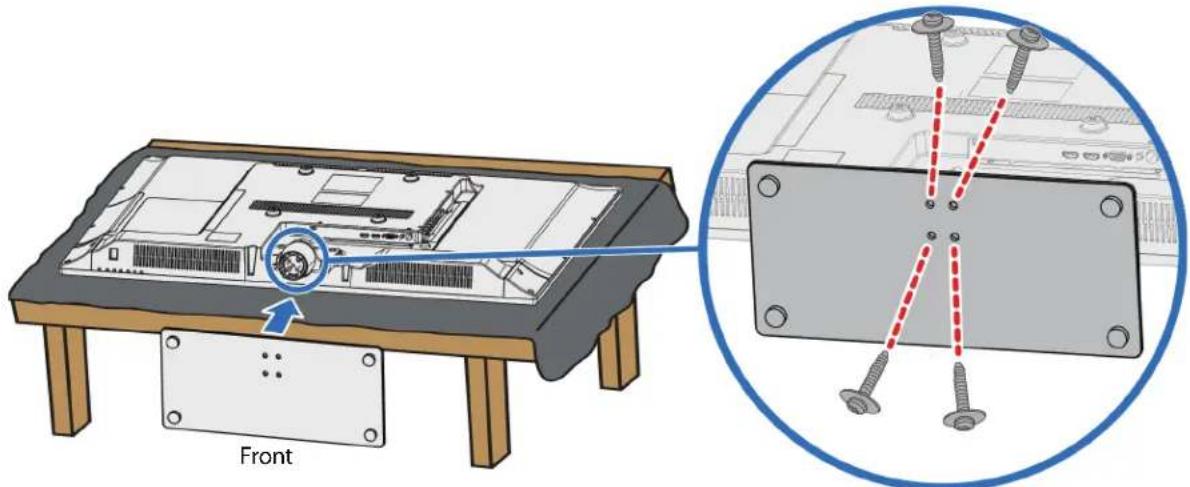
Installing the stand
1 Carefully place your TV face-down on a cushioned, clean surface to protect the screen from damages and scratches.

2 Secure the stand column to your TV with the four provided M4 × 14 mm screws (the longer ones).
Screw type Screw length # of screws
M4 14 mm 4

3 Find the front of the TV stand, then secure it to the stand column with the four provided ST4 × 12 mm screws (the shorter ones).
Screw type Screw length # of screws
ST4 12 mm 4
Installing the wall-mount bracket
Warning
This TV is intended to be supported by a UL Listed wall mount bracket with suitable weight/load. (See "Miscellaneous" on page 64.)
1 Carefully place your TV face-down on a soft surface to protect the screen from damages and scratches.
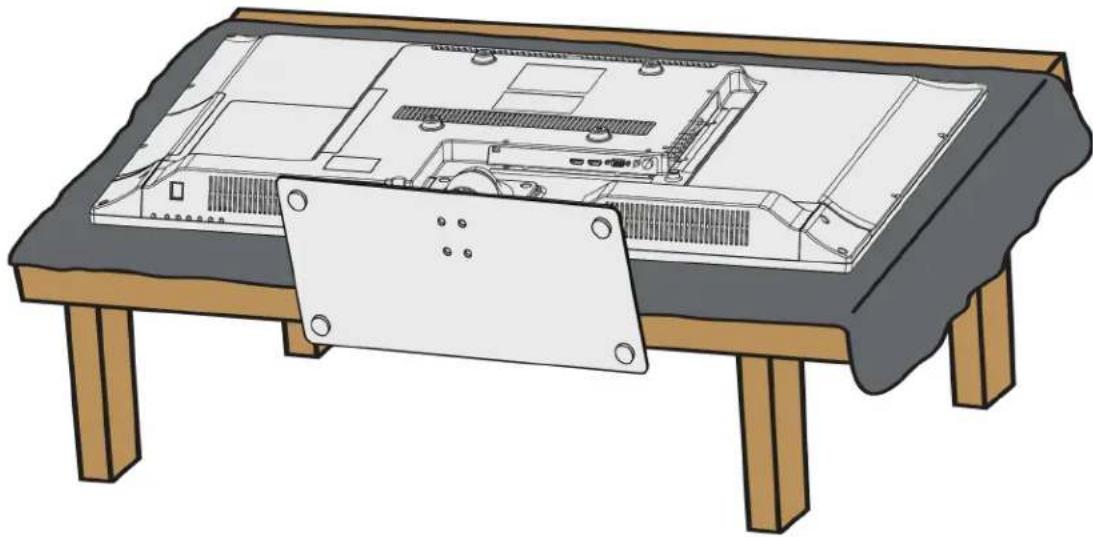
2 Remove the four screws that secure the stand column to your TV, then remove the stand assembly. If the stand is installed, you do not need to remove the stand.

3 Attach the wall-mount bracket to your TV using the mounting holes on the back of your TV. See the instructions that came with the wall-mount bracket for information about how to correctly hang your TV.
Notes
- The length of the wall-mount screws vary depending on the wall-mount bracket you purchased. See the instructions that came with the wall-mount bracket for screw lengths.
- The mounting holes on the back of your TV take type M5 screws.
7.87 in. (200 mm)

TV components
Package contents
- Remote control and batteries (2 AAA)
• TV stand column and screws (7)
• TV stand and screws (5)
• QUICK SETUP GUIDE
• IMPORTANT INFORMATION
Front
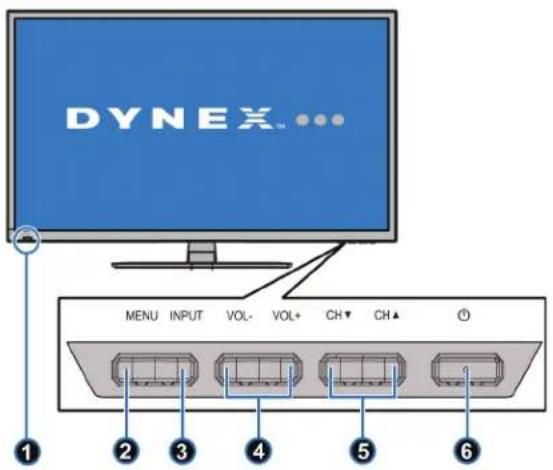
| # Item Description | ||
| 1 | Remote control sensor and Power indicator | The remote control sensor receives signals from the remote control. Do not block.The power indicator:Turns off when your TV is on.Lights red when your TV is off (standby mode). |
| 2 MENU | Press to open the on-screen menu. For more information, see “Using the on-screen menus” on page 37. | |
| 3 INPUT | Press to open the INPUT SOURCE list, press CH▲ or CH▼ to select the video input source, then press INPUT again. For more information, see “Selecting the video input source” on page 36.In menu mode, press to confirm selections. | |
| 4 VOL-/VOL+ | Press to increase or decrease the volume. | |
| 5 CH | ▼/CH▲ | Press to go to the next or previous channel in the channel list. For more information, see “Selecting a channel” on page 38. |
| 6 (power) | Press to turn your TV on or off (standby mode).Warning:When your TV is off, power still flows through it. To completely disconnect power, unplug the power cord. | |
Side jacks
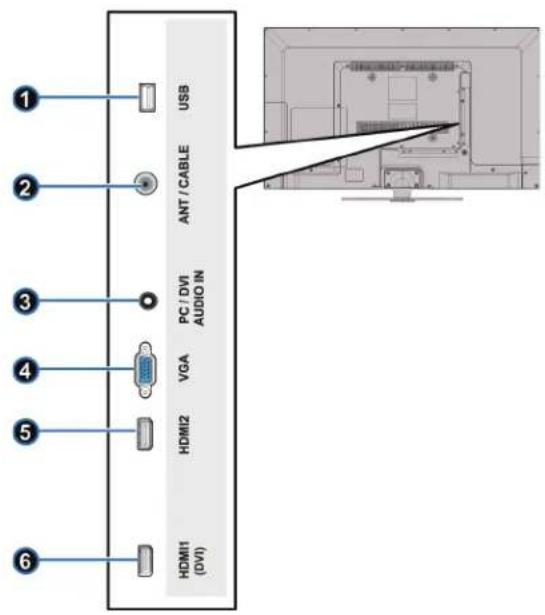
| # Item Description | ||
| 1 USB | Connect a USB flash drive to this jack to view compatible JPEG picture files. For more information, see “Connecting a USB flash drive” on page 28 and “Using a USB flash drive” on page 39. | |
| 2 ANT/CABLE | Connect an antenna or cable TV to this jack. For more information about connecting a cable box using coaxial, see “Coaxial (good)” on page 17. For information about connecting an antenna or direct cable, see “Connecting an antenna or cable TV (no box)” on page 18. | |
| 3 | PC/DVI AUDIO IN | Connect the audio for a computer to this jack. For more information see “VGA (good)” on page 27.ORConnect the audio for a DVI device to this jack. For more information see, “DVI (same as HDMI but requires an audio connection)” on page 14 or 26. |
| 4 VGA | Connect the video (VGA) for a computer to this jack. For more information, see “VGA (good)” on page 27. | |
| 5 HDMI2 | Connect an HDMI device to this jack. For more information, see “HDMI (best)” on page 13, 19, 22, or 25. | |
| 6 HDMI1 (DVI) | Connect an HDMI device to this jack. For more information, see “HDMI (best)” on page 13, 19, 22, or 25.ORConnect the video for a DVI device to this jack. For more information, see “DVI (same as HDMI but requires an audio connection)” on page 14 or 26. | |
Back
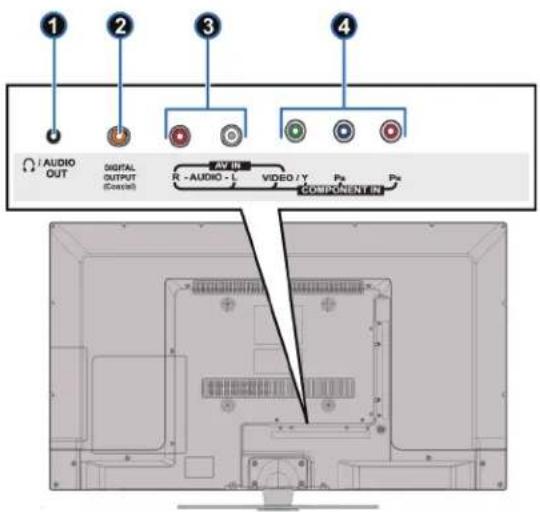
| # Item Description | ||
| 1/AUDIO OUT | Connect headphones, an analog speaker system or a sound bar to this jack. For more information, see “Analog audio” on page 31. | |
| 2 | DIGITAL OUTPUT (Coaxial) | Connect a digital speaker system or sound bar to this jack to listen to TV audio through the connected speakers. For more information, see “Digital audio” on page 30. |
| 3 AUDIO L and R | Connect the audio for a component video device to these jacks. For more information, see “Component video (better)” on page 15, 20, or 23.ORConnect the audio for a composite video device to these jacks. For more information, see “AV (composite video) (good)” on page 16, 21, or 24. | |
| 4 | VIDEO/Y, PB, PRORVIDEO/Y | The VIDEO/Y jack works as one of the component video jacks or as the AV (composite) video jack.Connect the video for a component video device to these jacks. For more information, see “Component video (better)” on page 15, 20, or 23.ORConnect the video for an AV (composite video) device to the VIDEO/Y jack. For more information, see “AV (composite video) (good)” on page 16, 21, or 24. |
Remote control

| # Button Description | ||
| 1 | (power) | Press to turn your TV on or off (Standby mode).Warning: When your TV is off, power still flows into it. To disconnect power, unplug the power cord. |
| 2 | ■ | Press to enter a digital sub-channel number. See "Selecting a channel" on page 38. |
| 3 | PICTURE | Press to select the picture mode. You can select Vivid, Standard, Energy Savings, or Custom. See "Adjusting the TV picture" on page 43. |
| 4 | AUDIO | Press to select an audio mode. You can select Standard, Theater, Music, News, or Custom. See "Adjusting sound settings" on page 45. |
| 5 | INPUT | Press to open the INPUT SOURCE list, then press ▲ or▼ to select a video input source. See "Selecting the video input source" on page 36. |
| 6 | VOL+/VOL- Press to increase or decrease the volume. | |
| # Button Description | ||
| 7 | CCD | Press to turn closed captioning on or off. You can select CC On, CC Off, or CC On When Mute. See “Turning closed captioning on or off” on page 52. |
| 8 | ASPECT | Press to change how the picture looks on the screen (aspect ratio). See the Aspect Ratio option in “Adjusting the TV picture” on page 43. |
| 9 | MENU Press to open the on-screen menu. | |
| 10 | ENTER Press to confirm selections or changes. | |
| 11 | /MUTE | Press to mute the sound. Press again to restore the sound. |
| 12 | Numbers | Press to enter channel numbers and the parental control password. |
| 13 | /RECALL Press to go to the last viewed channel. | |
| 14 | SLEEP | Press to set the sleep timer. See “Setting the sleep timer” on page 52. |
| 15 | MTS/SAP | In analog TV mode, press to select Stereo, Mono, or SAP.In digital TV mode , press to select an alternate audio language, if available. See “Adjusting sound settings” on page 45. |
| 16 | INFO* | Press to display TV status information, such as the channel number, channel name (if available), or signal source. See “Viewing channel information” on page 38. |
| 17 | CH+ / CH- | Press to go to the next or previous channel in the channel list. See “Selecting a channel” on page 38. |
| 18 | HOME Press to open the on-screen menu. | |
| 19 | FAV | Press to open the Favorites channel list. See “Setting up a favorite channel list” on page 57 and “Viewing a favorite channel” on page 57. |
| 20 | EXIT Press to close the on-screen menu. | |
| 21 | ▲ ▼◀▶ | Press to navigate through the on-screen menus and adjust settings. |
What connection should I use?
Your TV has several connection types for connecting devices to your TV.
For the best video quality, you should connect a device to the best available connection.
Use the following tables to identify cables:
| Video quality | Connection type and Jack | Cable connector |
| Best (use this if your devices have HDMI) | HDMI video/audio | |
| Better than composite or coaxial | Component video (requires an audio connection) | |
| Better than coaxial | Composite video (requires an audio connection) | |
| Good | Coaxial video/audio |

You can use the HDMI1 (DVI) jack on your TV to connect a DVI device to your TV. For more information, see "DVI (same as HDMI but requires an audio connection)" on page 14 or page 26.
Cautions
- Check the jacks for position and type before making any connections.
- Loose connections can result in image or color problems. Make sure that all connections are tight and secure.
• The external audio/video equipment shown may be different from your equipment. If you have questions, refer to the documentation that came with your equipment.
• Always unplug the power cord when connecting external equipment.
Connecting a cable or satellite box
Many cable or satellite TV boxes have more than one connection type. To get the best video, you should use the best connection type available. For more information, see "What connection should I use?" on page 12.
HDMI (best)

1 Make sure that your TV's power cord is unplugged and all connected equipment is turned off.
2 Connect the incoming cable from the cable wall jack to the cable-in jack on the cable or satellite box.
3 Connect an HDMI cable (not provided) to one of the HDMI jacks on the side of your TV and to the HDMI OUT jack on the cable or satellite box.
4 Plug your TV's power cord into a power outlet, turn on your TV, then turn on the cable or satellite box.
5 Press INPUT to open the INPUT SOURCE list.
6 Press ▲ or ▼ to highlight HDMI1 or HDMI2, then press ENTER.
Note
An HDMI cable carries both audio and video. You do not need to use any audio cables.
DVI (same as HDMI but requires an audio connection)
Notes
You must use the HDMI1 (DVI) jack to connect a cable or satellite box using DVI. If you use another HDMI jack, you will not hear sound from the TV speakers.

1 Make sure that your TV's power cord is unplugged and all connected equipment is turned off.
2 Connect the incoming cable from the cable wall jack to the cable-in jack on the cable or satellite box.
3 Connect an HDMI-DVI adapter (not provided) to one end of an HDMI cable (not provided), then connect the adapter to the DVI OUT jack on the cable or satellite box.
4 Connect the other end of the cable to the HDMI1 (DVI) jack on the side of your TV.
5 Connect an audio cable (not provided) to the PC/DVI AUDIO IN jack on the side of your TV and to the AUDIO OUT jacks on the cable or satellite box.
Note
When you connect the audio using the PC/DVI AUDIO IN jack, the audio output is analog.
6 Plug your TV's power cord into a power outlet, turn on your TV, then turn on the cable or satellite box.
7 Press INPUT to open the INPUT SOURCE list.
8 Press ▲ or ▼ to highlight HDMI1, then press ENTER.
Component video (better)
Note
Cables are often color-coded to match color-coded jacks.
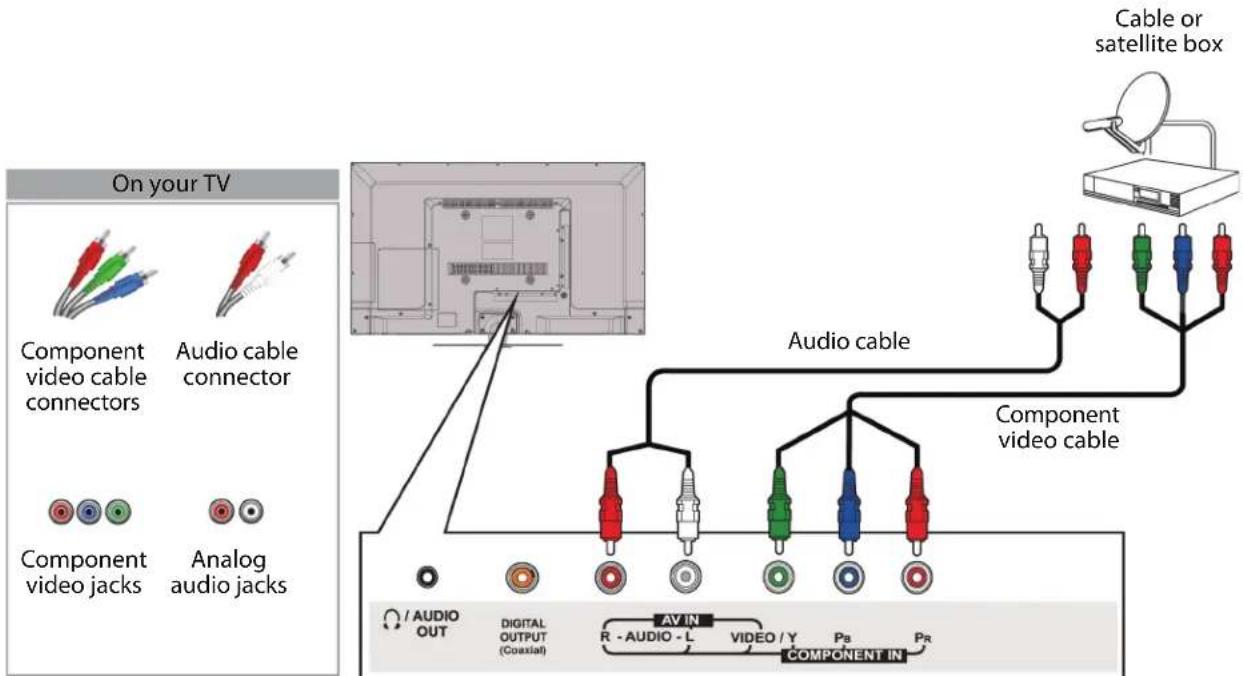
Back of TV
1 Make sure that your TV's power cord is unplugged and all connected equipment is turned off.
2 Connect the incoming cable from the cable wall jack to the cable-in jack on the cable or satellite box.
3 Connect a component video cable (not provided) to the VIDEO/Y, PB, and PR video jacks on the back of your TV and the component video out jacks on the cable or satellite box.
4 Connect an audio cable (not provided) to the AUDIO L and R jacks on the back of your TV and to the audio out jacks on the cable or satellite TV box.
Notes
- The VIDEO/AR PR video jacks (used to connect a component device) share the AUDIO L and R jacks with the VIDEO/Y jack (used to connect an AV device).
- When you connect the audio using the AUDIO L and R jacks, the audio output is analog.
5 Plug your TV's power cord into a power outlet, turn on your TV, then turn on the cable or satellite box.
6 Press INPUT to open the INPUT SOURCE list.
7 Press ▲ or ▼ to highlight Comp/AV, then press ENTER.
AV (composite video) (good)
Notes
- Cables are often color-coded to match color-coded jacks. - The yellow video connector on the AV cable connects to the green VIDEO/Y jack.

1 Make sure that your TV's power cord is unplugged and all connected equipment is turned off.
2 Connect the incoming cable from the cable wall jack to the cable-in jack on the cable or satellite box.
3 Connect an AV cable (not provided) to the VIDEO/Y jack and AUDIO L and R jacks on the back of your TV and to the composite video and audio out jacks on the cable or satellite box.
Notes
- The VIDEO/AR PR video jacks (used to connect a component device) share the AUDIO L and R jacks with the VIDEO/Y jack (used to connect a composite device).
- When you connect the audio using the AUDIO L and R jacks, the audio output is analog.
4 Plug your TV's power cord into a power outlet, turn on your TV, then turn on the cable or satellite box.
5 Press INPUT to open the INPUT SOURCE list.
6 Press ▲ or ▼ to highlight Comp/AV, then press ENTER.
Coaxial (good)

1 Make sure that your TV's power cord is unplugged and all connected equipment is turned off.
2 Connect the incoming cable from the cable wall jack to the cable-in jack on the cable or satellite box.
3 Connect a coaxial cable (not provided) to the ANT/CABLE jack on the side of your TV and to the antenna or cable TV wall jack.
4 Plug your TV's power cord into a power outlet, turn on your TV, then turn on the cable or satellite box.
5 Press INPUT to open the INPUT SOURCE list.
6 Press ▲ or ▼ to highlight TV, then press ENTER.
7 If you cannot tune to channels you know exist, scan for channels. See "Automatically scanning for channels" on page 55.
Notes
- Use a coaxial cable to eliminate interference and noise from radio waves.
- Do not bundle the coaxial cable with the power cord or other cables.
Connecting an antenna or cable TV (no box)

1 Make sure that your TV's power cord is unplugged and all connected equipment is turned off.
2 Connect a coaxial cable (not provided) to the ANT/CABLE jack on the side of your TV and to the antenna or cable TV wall jack.
3 Plug your TV's power cord into a power outlet, then turn on your TV.
4 Press INPUT to open the INPUT SOURCE list.
5 Press ▲ or ▼ to highlight TV, then press ENTER.
6 If you cannot tune to channels you know exist, scan for channels. See "Automatically scanning for channels" on page 55.
Notes
- Use a coaxial cable to eliminate interference and noise from radio waves.
- Do not bundle the coaxial cable with the power cord or other cables.
- If the antenna is not installed correctly, contact qualified service personnel to correct the problem.
- If the signal level for a channel is weak, the picture may be distorted. Adjust the antenna or use a highly directional outdoor or set-top antenna with a built-in amplifier.
- If the picture quality is good on some channels and poor on others, the problem may be caused by a poor or weak signal from the broadcaster or cable TV provider.
- If you connect to cable or satellite TV without a set-top box and experience poor picture quality, you may need to install a set-top box to improve signal reception and picture quality. Contact your cable or satellite TV provider about upgrading to a set-top box.
- Many high-definition (HD) channels upscale standard-definition (SD) content. The picture displayed on your TV is still displayed as SD, thus the picture quality will not be as clear or crisp as it would be if the content was originally recorded in HD.
Connecting a DVD or Blu-ray player
Many DVD or Blu-ray players have more than one connection type. To get the best video, you should use the best connection type available. For more information, see "What connection should I use?" on page 12.
HDMI (best)
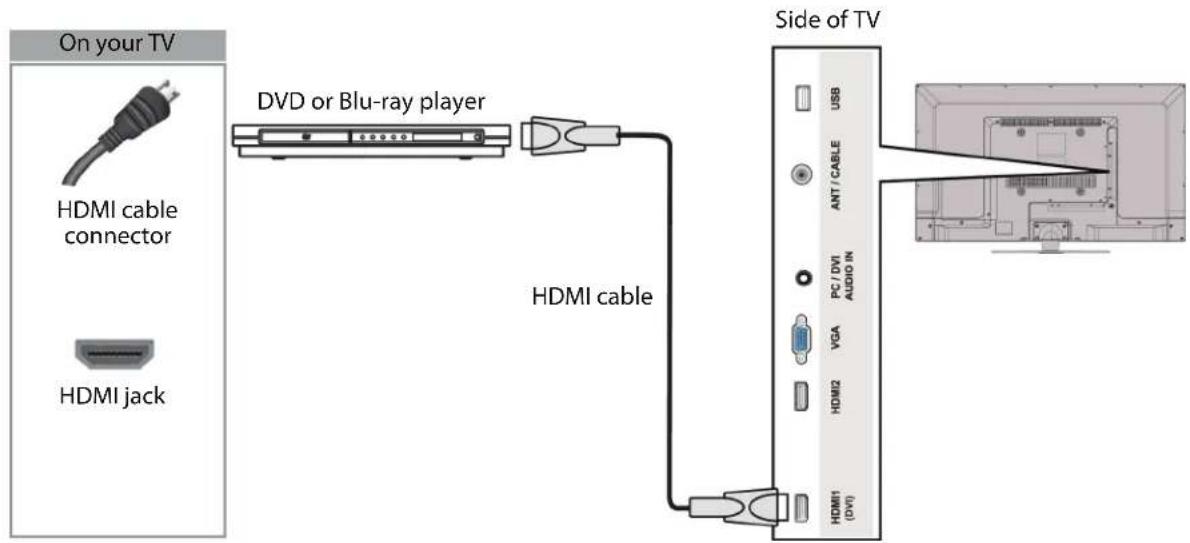
1 Make sure that your TV's power cord is unplugged and the DVD or Blu-ray player is turned off.
2 Connect an HDMI cable (not provided) to one of the HDMI jacks on the side of your TV and to the HDMI OUT jack on the DVD or Blu-ray player.
3 Plug your TV's power cord into a power outlet, then turn on your TV and DVD or Blu-ray player.
4 Press INPUT to open the INPUT SOURCE list.
5 Press ▲ or ▼ to highlight HDMI1 or HDMI2, then press ENTER.
Component video (better)
Note
Cables are often color-coded to match color-coded jacks.

Back of TV
1 Make sure that your TV's power cord is unplugged and the DVD or Blu-ray player is turned off.
2 Connect a component video cable (not provided) to the VIDEO/Y, PB, and PR jacks on the back of your TV and to the COMPONENT OUT jacks on the component video device.
3 Connect an audio cable (not provided) to the AUDIO L and R jacks on the back of your TV and to the L/R AUDIO OUT jacks on the DVD or Blu-ray player.
Notes
- The VIDEO/Y PR video jacks (used to connect a component device) share the AUDIO L and R jacks with the VIDEO/Y jack (used to connect a composite device).
- When you connect the audio using the AUDIO L and R jacks, the audio output is analog.
4 Plug your TV's power cord into a power outlet, then turn on your TV and DVD or Blu-ray player.
5 Press INPUT to open the INPUT SOURCE list.
6 Press ▲ or ▼ to select COMP/AV, then press ENTER.
Composite video (good)
Notes
- Cables are often color-coded to match color-coded jacks. - The yellow video connector on the AV cable connects to the green VIDEO/Y jack.

Back of TV
1 Make sure that your TV's power cord is unplugged and the DVD or Blu-ray player is turned off.
2 Connect an AV cable (not provided) to the VIDEO/Y jack and AUDIO L and R jacks on the back of your TV and to the AV OUT jacks on the DVD or Blu-ray player.
Notes
- The VIDEO/AR PR video jacks (used to connect a component device) share the AUDIO L and R jacks with the VIDEO/Y jack (used to connect a composite device).
- When you connect the audio using the AUDIO L and R jacks, the audio output is analog.
3 Plug your TV's power cord into a power outlet, then turn on your TV and DVD or Blu-ray player.
4 Press INPUT to open the INPUT SOURCE list.
5 Press ▲ or ▼ to select COMP/AV, then press ENTER.
Connecting a game console
HDMI (best)

1 Make sure that your TV's power cord is unplugged and the game console is turned off.
2 Connect an HDMI cable (not provided) to one of the HDMI jacks on the side of your TV and to the HDMI OUT jack on the game console.
3 Plug your TV's power cord into a power outlet, then turn on your TV.
4 Turn on the game console, then set it to the correct output mode. For more information, see the documentation that came with the console.
5 Press INPUT to open the INPUT SOURCE list.
6 Press ▲ or ▼ to highlight HDMI1 or HDMI2, then press ENTER.
Note
An HDMI cable carries both audio and video. You do not need to use any audio cables.
Component video (better)
Notes
- Your game console may require a special component video cable. See the documentation that came with your game console or check the manufacturer's Web site.
- Cables are often color-coded to match color-coded jacks.

Back of TV
1 Make sure that your TV's power cord is unplugged and the game console is turned off.
2 Connect the video and audio connectors on the component video cable (not provided) to the VIDEO/Y, PB, and PR video jacks and AUDIO L and R jacks on the back of your TV and to the component jack(s) on the game console.
Notes
- The VIDEO/Y PR video jacks (used to connect a component device) share the AUDIO L and R jacks with the VIDEO/Y jack (used to connect a composite device).
- When you connect the audio using the AUDIO L and R jacks, the audio output is analog.
3 Plug your TV's power cord into a power outlet, then turn on your TV.
4 Turn on the game console, then set it to the correct output mode. For more information, see the documentation that came with the console.
5 Press INPUT to open the INPUT SOURCE list.
6 Press ▲ or ▼ to select Comp/AV, then press ENTER.
AV (composite video) (good)
Notes
- Most game consoles come with a special AV (composite video) cable. See the documentation that came with your game console or check the manufacturer's Web site.
• Cables are often color-coded to match color-coded jacks. - The yellow video connector on the AV cable connects to the green VIDEO/Y jack.

1 Make sure that your TV's power cord is unplugged and the game console is turned off.
2 Connect the video and audio connectors on the game console's AV cable (not provided) to the VIDEO/Y jack and AUDIO L and R jacks on the back of your TV and to the composite jack(s) on the game console.
Notes
- The VIDEO/Y PR video jacks (used to connect a component device) share VIDEO/Y jacks with the VIDEO/Y jack (used to connect a composite device).
- When you connect the audio using the AUDIO L and R jacks, the audio output is analog.
3 Plug your TV's power cord into a power outlet, then turn on your TV.
4 Turn on the game console, then set it to the correct output mode. For more information, see the documentation that came with the player.
5 Press INPUT to open the INPUT SOURCE list.
6 Press ▲ or ▼ to select Comp/AV, then press ENTER.
Connecting a computer
HDMI (best)

1 Make sure that your TV's power cord is unplugged and the computer is turned off.
2 Connect an HDMI cable (not provided) to one of the HDMI jacks on the side of your TV and to the HDMI OUT jack on the computer.
3 Plug your TV's power cord into a power outlet, then turn on your TV and the computer.
4 Press INPUT to open the INPUT SOURCE list.
5 Press ▲ or ▼ to highlight HDMI1 or HDMI2, then press ENTER.
6 Adjust the display properties on the computer, if necessary.
DVI (same as HDMI but requires an audio connection)
Note
You must use the HDMI1 (DVI) jack to connect a computer using DVI. If you use another HDMI jack, you will not hear sound from the TV speakers.

1 Make sure that your TV's power cord is unplugged and the computer is turned off.
2 Connect an HDMI-DVI adapter (not provided) to one end of an HDMI cable (not provided), then connect the adapter to the DVI OUT jack on the computer.
3 Connect the other end of the cable to the HDMI1 (DVI) jack on the side of your TV.
4 Connect an audio cable (not provided) to the PC/DVI AUDIO IN jack on the side of your TV and to the AUDIO OUT (headphone) jack on the computer.
Note
When you connect the audio using the PC/DVI AUDIO IN jack, the audio output is analog.
5 Plug your TV's power cord into a power outlet, then turn on your TV and the computer.
6 Press INPUT to open the INPUT SOURCE list.
7 Press ▲ or ▼ to select HDMI1, then press ENTER.
8 Adjust the display properties on the computer, if necessary.
VGA (good)
![graph TD A["On your TV"] --> B["VGA cable connector"] A --> C["Audio cable connector"] A --> D["VGA jack PC/DVI AUDIO IN jack"] B --> E["Computer Laptop"] C --> E D --> E E --> F["VGA cable"] F --> G["Side of TV"] G --> H["Monitor"] style A fill:#f9f,stroke:#333 style H fill:#ccf,stroke:#333](/content/2026/05/945816/images/fcd95e46c986338b87aeb69fa49455909d3bc7ea066115d3868b06be9b491581.jpg)
1 Make sure that your TV's power cord is unplugged and the computer is turned off.
2 Connect a VGA cable (not provided) to the VGA jack on the back of your TV and to the VGA jack on the computer.
3 Connect an audio cable (not provided) to the PC/DVI AUDIO IN jack on the back of your TV and to the AUDIO OUT (headphone) jack on the computer.
4 Plug your TV's power cord into a power outlet, then turn on your TV and the computer.
5 Press INPUT to open the INPUT SOURCE list.
6 Press ▲ or ▼ to select VGA, then press ENTER.
7 Adjust the display properties on the computer, if necessary.
Connecting a USB flash drive

Caution
Do not remove the USB flash drive or turn off the TV while using the USB flash drive. You may lose data or damage the USB flash drive.
1 Plug a USB flash drive into the USB port on the side of your TV.
2 If your TV is turned on when you connect the USB flash drive, press USB menu opens.
▲ or ▼ to select Yes in the message that appears. The
OR
If you switch to a different video input source after you plug in the USB flash drive and want to switch back to the drive, press INPUT to open the INPUT SOURCE list, press ▲ or ▼ to select USB(Photos), then press ENTER. The USB menu opens.
Note
The Photos viewer only supports JPEG format images (with "jpg" file extensions) and not all JPEG files are compatible with your TV. For more information, see "Using a USB flash drive" on page 39.
Connecting headphones
When you connect headphones, audio plays through the headphones and the TV speakers are muted. See "Adjusting sound settings" on page 45.

Back of TV
Notes
- If you connect headphones when your TV is turned off, when you turn your TV on the TV speakers are muted and the audio plays through the headphones.
- You can also connect an amplifier, home theater system, or sound bar to the AUDIO OUT jack.
- Connect the headphones to the 📄/AUDIO OUT jack on the back of your TV.
Connecting external speakers or a sound bar
Digital audio
![graph TD A["On your TV"] --> B["Digital coaxial audio cable connector"] B --> C["Digital coaxial audio jack"] C --> D["Digital speaker system"] D --> E["Sound bar"] E --> F["Digital coaxial audio cable"] F --> G["Back of TV"] G --> H["Component IN"] H --> I["AV IN"] I --> J["R - AUDIO - L"] J --> K[…](/content/2026/05/945816/images/4e28268a89263d0dffbe6b4cc571ba6adc67b52f50004ae97374a64c78a28edd.jpg)
1 Make sure that your TV's power cord is unplugged and the digital speaker system or sound bar is turned off.
2 Connect a digital coaxial audio cable (not provided) to the DIGITAL OUTPUT (Coaxial) jack on the back of your TV and to the coaxial AUDIO IN jack on the digital speaker system or sound bar.
3 Plug your TV's power cord into a power outlet, then turn on your TV.
4 Turn on the digital speaker system or sound bar, then set it to the correct source. For more information, see the documentation that came with the digital speaker system or sound bar.
5 On your TV, set the Digital Audio/SPDIF option on the Audio menu to PCM. See the Digital Audio/SPDIF option in "Adjusting sound settings" on page 45.
Analog audio

1 Make sure that your TV's power cord is unplugged and the analog speaker system or sound bar is turned off.
2 Connect an audio cable (not provided) to the 📄/AUDIO OUT jack on the back of your TV and to the AUDIO IN jacks on the analog speaker system.
3 Plug your TV's power cord into a power outlet, then turn on your TV.
4 Turn on the analog speaker system or sound bar, then set it to the correct source. For more information, see the documentation that came with the analog speaker system or sound bar.
Connecting a home theater system with multiple devices
![graph TD A["Blu-ray player or DVD player"] --> B["AV receiver"] C["Cable or satellite TV box"] --> B D["Game console"] --> B E["USB flash drive"] --> F["Computer"] G["Antenna or cable TV connected directly to the wall jack"] --> F](/content/2026/05/945816/images/b665c98910d5121e61df4369101e5faaaa732f3a8ab4827e0204f448a9bb186f.jpg)
The connections you make depend on the video and audio jacks available on your devices. Refer to the documentation that came with your devices for connection information. Just remember to use the best connection types available for the best picture and sound. For information about connection types, see "What connection should I use?" on page 12.
Connecting power

- Plug the AC power cord into a power outlet.
Notes
- Your TV should only be operated from the power source indicated on the label.
• Always unplug the power cord from the power outlet when you will not be using your TV for an extended period of time.
• The power cord is permanently attached to your TV. Do not try to unplug it from the back of your TV.
Using the remote control
Installing remote control batteries
1 While pressing the release latch on the back of the remote control, lift the battery compartment cover off the remote control.

2 Insert two AAA batteries into the battery compartment. Make sure that you match the + and - symbols on the batteries with the + and - symbols in the battery compartment.
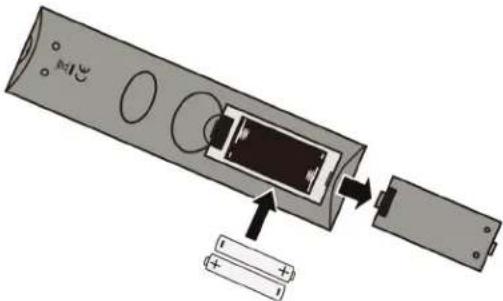
3 Replace the battery compartment cover.
Cautions
- Batteries should not be exposed to excessive heat, such as sunshine, heat registers, or fire.
- Battery chemicals can cause a rash. If the batteries leak, clean the battery compartment with a cloth. If chemicals touch your skin, wash immediately.
• Make sure that batteries are disposed of correctly. Do not burn or incinerate.
Notes
- Do not mix batteries of different types.
- Do not mix old and new batteries.
- Remove batteries when the charge is depleted.
- If the remote control is not going to be used for an extended period of time, remove the batteries.
Aiming the remote control
- Point the remote control towards the remote sensor on the front of your TV. For the location of the remote control sensor, see "Front" on page 8.
Turning on your TV for the first time
The first time you turn on your TV, the Setup Wizard opens. The Setup Wizard guides you through setting up basic settings including the menu language, time setting, picture mode, and the TV signal source.
1 Make sure that you have:
- Installed the remote control batteries. (See page 34 for details.)
- Connected an antenna, cable TV, or satellite TV. (See page 13 through 18 for details.)
- Connected the power cord. (See page 33 for details.)
2 Press ⏻ (power) to turn on your TV. The Choose Your Menu Language screen opens.
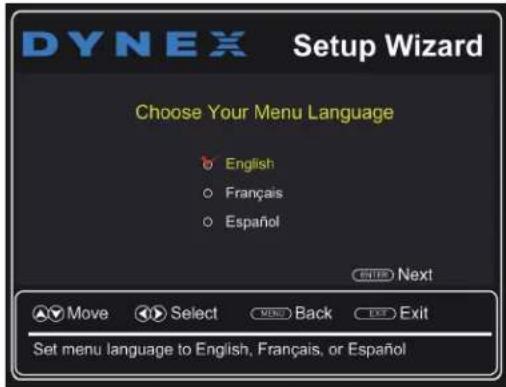
3 Press ▲ or ▼ to highlight the language you want, then press ENTER. The Choose Your Time Setting screen opens.

4 Press ▲ or ▼ to highlight Style, then press ◀ or ▶ to select Manual (to set the date and time manually) or Auto (to set the date and time automatically from a TV signal source based on the time zone you select).
Note
If you select Auto, the displayed time is incorrect until your TV gets the correct time from a TV signal source.
5 If you selected Auto for Style, press ▲ or ▼ to highlight Time Zone, then press ◀ or ▶ to select your time zone. You can select Eastern, Central, Mountain, Pacific, Alaska, Hawaii, Newfoundland, or Atlantic.
6 If you selected Auto for Style, press ▲ or ▼ to highlight Daylight Savings, then press ◀ or ▶ to select On (if your viewing area observes Daylight Savings Time) or Off (if your viewing area does not observe Daylight Savings Time).
7 If you selected Manual for Style, set the date by pressing ▲ or ▼ to highlight Year, Month, or Day, then pressing ◀ or ▶ to adjust the setting.
8 If you selected Manual for Style, set the time by pressing ▲ or ▼ to highlight Time, then pressing ◀ or ▶ to select the hour, minute, or AM/PM field. Press ▲ or ▼ to adjust the setting.
9 Press ENTER. The Choose Your Picture Mode screen opens.
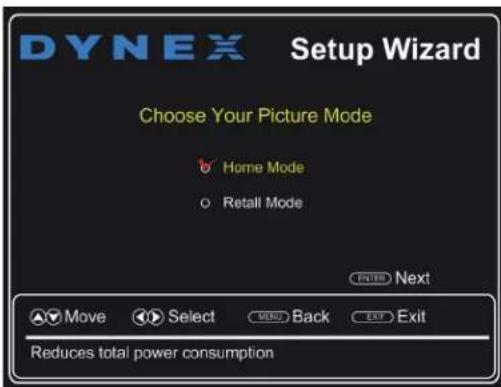
10 Press ▲ or ▼ to highlight Home Mode or Retail Mode, then press ENTER.
If you selected Retail Mode, a message asks you to confirm your selection. Retail Mode is not an energy savings mode. Select Yes to continue using Retail Mode, or select No to change your selection, then press ENTER.
The Choose Your TV Source screen opens.

11 Press ▲ or ▼ to highlight Antenna, Cable, or Cable/Satellite Box, then press ENTER.
A If you are using an antenna for a standard or HD TV signal, select Antenna. Your TV scans for available channels. The scan may take several minutes. During scanning your TV searches for digital channels first. When the digital channel search is complete, a message appears asking if you want to search for analog channels. Select Yes to continue searching for analog channels, or select No to stop searching for channels.
B If your cable is connected directly to the TV (using no tuner box), select Cable. Your TV scans for available channels. The scan may take several minutes.
Note
The channel scan can take up to 20+ minutes. You can press EXIT to stop the auto channel search, but you will need to run the auto channel search again to create a channel list.
C If your cable or satellite TV is connected to your TV through a tuner box, select Cable/Satellite Box. Your TV does not need to scan for channels. A message tells you to select the correct input source. Go to the next step.
4 To watch TV, press INPUT, press ▲ or ▼ to highlight the video input source for your TV in the INPUT SOURCE list, then press ENTER.
- If your TV is connected to an antenna, cable TV (no box), or cable or satellite TV box using a coaxial cable, select TV.
- If your TV is connected to a cable or satellite box using an HDMI cable or HDMI cable with a DVI adapter, select HDMI1 or HDMI2.
- If your TV is connected to a cable or satellite box using a component video cable, select COMP/AV.
- If your TV is connected to a cable or satellite box using a composite video cable, select COMP/AV.
Understanding the basics
Turning your TV on or off
1 Make sure that the power cord is plugged into a power outlet.
2 Press (power) to turn on your TV. The power indicator LED turns off.
3 Press (power) again to turn off your TV. Your TV enters Standby mode and the power indicator turns red.
Warning
When your TV is in standby mode, it is still receiving power. To completely disconnect power, unplug the power cord.
Note
If your TV does not receive an input signal for several minutes, it automatically goes into standby mode.
Selecting the video input source
1 Turn on your TV.
2 If you want to use a device connected to a video input (such as a DVD or Blu-ray player), turn on the device.
3 Press INPUT. The INPUT SOURCE list opens.

4 Press ▲ or ▼ to highlight the video input source, then press ENTER.
Using the on-screen menus
Notes
- Depending on the signal source selected, you may see different options on your screen. The following menus are shown in TV mode.
- Menu items that are not selectable are grayed out.
• The screens shown in this manual are for explanation purposes and may vary from the actual screens on your TV.
Picture menu (TV mode)
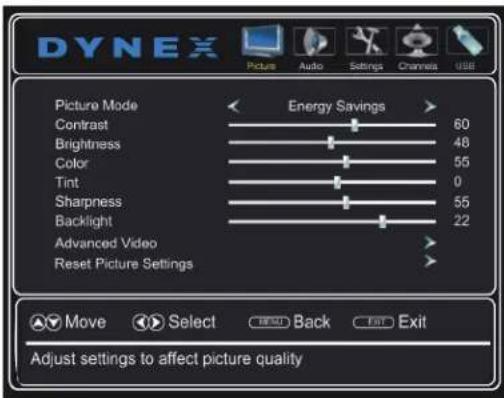
Audio menu (TV mode)

Settings menu (TV mode)

Channels menu (TV mode)
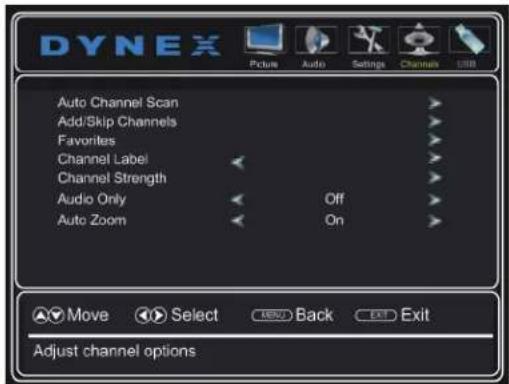
USB menu (USB mode)

Navigating the menus
![graph TD A["Press MENU to open the on-screen menu."] --> B["Enter"] B --> C["MENU"] B --> D["EXIT"] E["Press ▲ or ▶ to move the cursor on the screen or to adjust a selected item."] --> F["ENTER"] F --> G["MENU"] F --> H["EXIT"] I["Press ▲ or ▼ to select menu options."] --> J["ENTER"] J --> K["MENU"]…](/content/2026/05/945816/images/974341321b636436f8033a872c63300a08dd8ea8fb12d3ce952d85ba0c96e70f.jpg)
Selecting a channel
- Press CH+ or CH- to go to the next or previous channel on the memorized channel list.
- Press the number buttons to enter the analog or main digital channel number you want, then wait for the channel to change or press ENTER to immediately change the channel.
- To select a digital sub-channel, press the number buttons to select the main digital channel, press ■ then press the number button for the sub-channel. Wait for the channel to change, or press ENTER to immediately change the channel. For example, to tune to channel 5.1, press 5, ■, then 1.
Note
Button presses must be within three seconds of each other.
- Press (return) to go to the last viewed channel.
- Press FAV to open the favorite channel list, press ▲ or ▼ to highlight a channel, then press ENTER.
Note
If a list has more than one page, press ▲ or ▼ to scroll through the pages.
Adjusting the volume
- Press VOL+ or VOL− to increase or decrease the volume.
- Press (mute) to turn off the sound. Press (mute) again to turn the sound back on.
Viewing channel information
- Press INFO* to view an information banner. The information banner shows the current program information such as channel number, video input source, and resolution.
- Digital channel information—Displays the channel number, channel label, broadcast program name, TV rating, signal type, audio information, resolution, CC mode, and current time.
- Analog channel information—Displays channel number, channel label (if present), signal type, and audio information.
Using a USB flash drive
You can connect a USB flash drive to your TV to view compatible JPEG pictures.
Notes
- The JPEG picture viewer only supports JPEG format images (with ".jpg" file extensions).
- Not all JPEG files are compatible with your TV.
Switching to USB mode
1 Make sure that you have connected the USB flash drive to the USB port on your TV.
2 If your TV is turned on when you connect the USB flash drive, press ▲ or ▼ to highlight Yes in the message that appears, then press ENTER. The USB menu opens.
OR
If you connected the USB flash drive, then changed to a different video input source, press INPUT to open the INPUT SOURCE list, press ▲ or ▼ to highlight USB(Photos), then press ENTER. The USB menu opens.
Note
To exit USB mode, press INPUT to open the INPUT SOURCE list, then select another input source.
Browsing photos
1 Switch to USB mode (see "Switching to USB mode" on page 39).
2 Press MENU. The USB menu opens.

3 Press ▼ to access the menu. Photos is highlighted.

4 Press ENTER to access the menu. The photos menu opens with Browse Photos highlighted.

5 Press ENTER. The screen displays folder names and photo files stored on the USB flash drive in a thumbnail index with the first photo or folder highlighted. A control bar appears at the bottom of the screen.
Note
Photos are shown in the order they appear on the USB flash drive. They may not be listed in file name order.
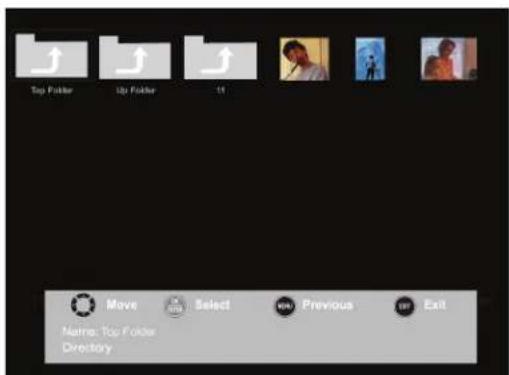
6 To navigate the thumbnail index screen, press:
- ▲▼◀ or ▶ to browse through the files and folders.
- ENTER to view a highlighted photo full screen, or open a highlighted folder.
- MENU to open the USB menu.
- FAV to add or remove a photo from the favorite photo list. A heart appears on a photo that has been added to the list.
- EXIT to return to the thumbnail index screen.
When a photo is displayed full screen, a control bar appears at the bottom of the photo. The file name, picture resolution, size, and date are displayed on the bottom of the control bar. If you do not press a button within 10 seconds, the control bar closes. Press INFO to open the control bar again.

7 To navigate the photo screen, press:
• ◀ to go to the previous photo.
• ▶ to go to the next photo.
- ENTER to rotate the photo clockwise.
- ASPECT one or more times to enlarge the image by x2 or x4, or to select Fill (to display the photo at its actual size). You can press ▲▼◀ or ▶ to pan the photo.
- EXIT to return to the thumbnail index.
- MENU to return to the USB menu.
Viewing your favorite photos
After you have created your favorite photo list, you can browse your favorite photos quickly.
1 Switch to USB mode (see "Switching to USB mode" on page 39).
2 Press MENU. The USB menu opens.
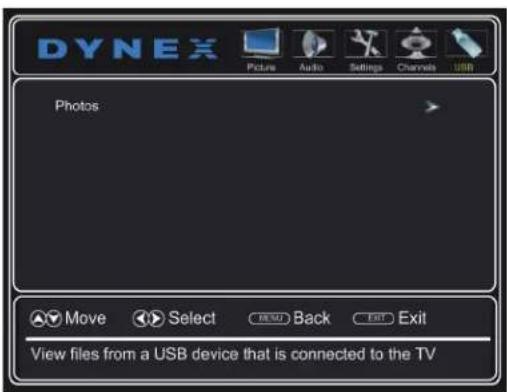
3 Press ▼ to access the menu. Photos is highlighted.
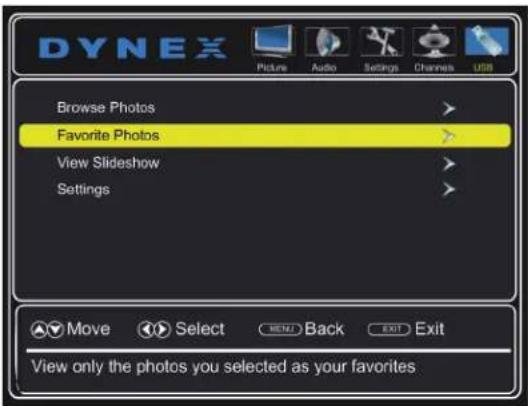
4 Press ENTER to access the menu. The photos menu opens.

5 Press ▲ or ▼ to highlight Favorite Photos, then press ENTER. A thumbnail index of your favorite photos opens with a control bar at the bottom of the screen.
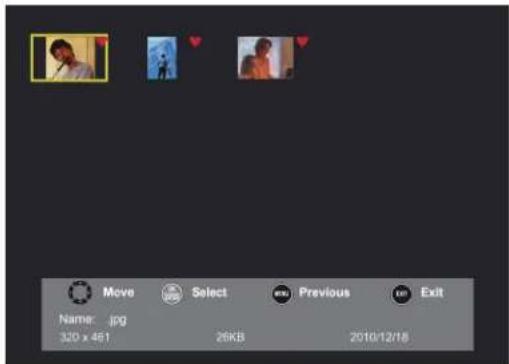
6 You can select photos and navigate on the photo screen the same way you browse photos. For information, see "Browsing photos" on page 39.
Viewing photos in a slideshow
1 Switch to USB mode (see "Switching to USB mode" on page 39).
2 Press MENU. The USB menu opens.
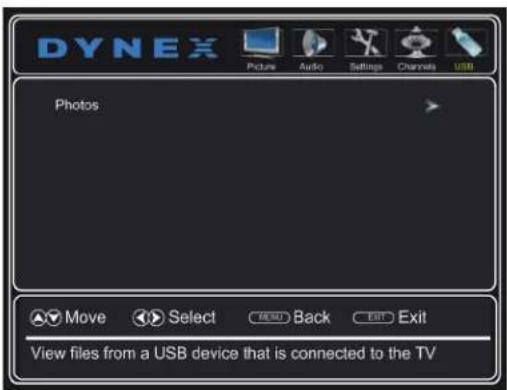
3 Press ▼ to access the menu. Photos is highlighted.
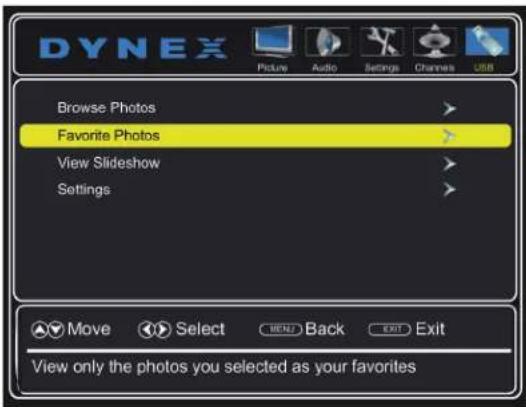
4 Press ENTER to access the menu. The photos menu opens.

5 Press ▲ or ▼ to highlight View Slideshow, then press ENTER. A slideshow begins with the first photo in the current folder.
6 To control the slideshow, press:
- ENTER to pause or start the slideshow.
- EXIT to exit the slideshow and return to the thumbnail index.
- MENU to return to the USB menu.
Customizing slideshow settings
You can customize the slideshow settings by selecting Repeat, Shuffle, Speed, and Transition settings.
1 Switch to USB mode (see "Switching to USB mode" on page 39).
2 Press MENU. The USB menu opens.
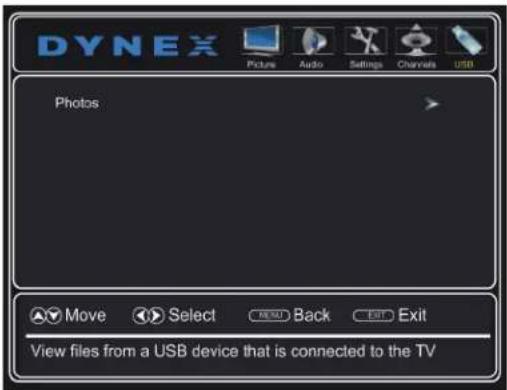
3 Press ▼ to access the menu. Photos is highlighted.
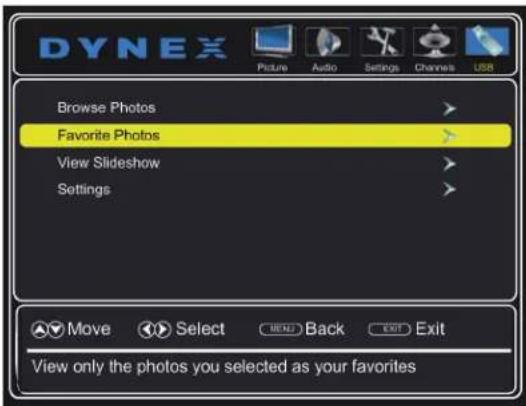
4 Press ENTER to access the menu. The photos menu opens.
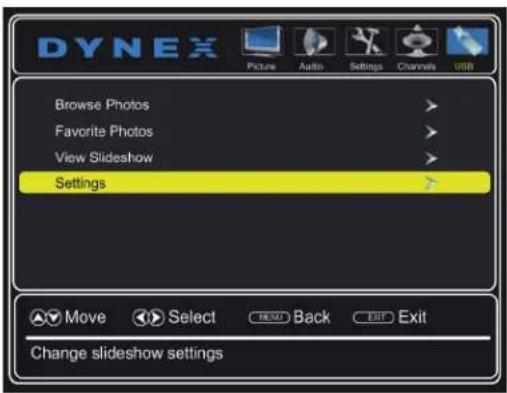
5 Press ▲ or ▼ to highlight Settings, then press ENTER. The photos settings menu opens.

6 Press ▲ or ▼ to highlight an option, then press ◀ or ▶ to select a setting. You can select:
- Repeat—To repeat the slideshow when it reaches the end. You can select On or Off.
- Shuffle—To display the photos in random order. You can select On or Off.
- Speed—To set the amount of time a photo is displayed before the next photo is shown. You can select 4 sec, 6 sec, or 8 sec.
-
Transition—To select the way photos transition when moving to the next file in the slideshow. You can select:
-
None—For no transition effect.
- Fade to Black—To fade the screen to black between photos.
• Vertical Wipe—To wipe the screen from top to bottom between photos.
• Horizontal Wipe—To wipe the screen from left to right between photos. - Random—To randomly select a transition effect.
7 Press EXIT to close the menu.
Adjusting the picture
Adjusting the TV picture
1 Press MENU. The on-screen menu opens with the Picture menu displayed.

2 Press ▼ or ENTER to access the menu.
3 Press ▲ or ▼ to highlight an option, press ◀ or ▶ to adjust the setting, or press ▶ or ENTER to go to the sub-menu. You can select:
• Picture Mode—Selects the picture mode. You can select:
- Vivid—(a bright and vivid picture). Significantly increases the contrast, brightness, and sharpness. This selection is good for video games, animation, and in bright light environments.
- Standard—(a standard picture). Moderately increases the contrast, brightness, and sharpness. This selection is good for standard TV broadcasts.
- Energy Savings—(the backlight brightness is decreased). Your TV has a backlight that provides light for displaying a picture. By reducing the amount of light, your TV uses less energy.
- Custom—(customized picture). Lets you manually adjust picture settings such as brightness, contrast, and sharpness.
Note
You can also press PICTURE on your remote control to select the picture mode.
- Contrast—Adjusts the brightness of the light areas of the picture.
- Brightness—Adjusts the brightness of the dark areas of the picture.
• Color—Adjusts the color intensity of the picture. A low setting may make the color look faded. A high setting may make the color look artificial. - Tint—Adjusts the color balance of the picture. Use this control to make skin tones look more natural.
- Sharpness—Adjusts the color detail of images. If you set this control too high, dark images may appear with light or white edges.
- Backlight—Increasing the backlight setting increases the brightness and display performance of the screen. The higher the setting, the higher the power consumption.
- Advanced Video—Opens a menu where you can adjust additional video options.

- Color Temperature—Selects the color temperature. You can select Cool (to enhance the blues), Normal, or Warm (to enhance the reds).
- Aspect Ratio—Adjusts how the picture fills the screen.
| Aspect ratio option Example | |
| Normal:Original aspect ratio is preserved. Black bars are present if content is not widescreen (16:9). |  |
| Zoom:Expands the image to fill the screen. The top and bottom of the image may be cropped. |  |
| Wide:Use this option to view content recorded in a 16:9 (wide-screen) aspect ratio. |  |
| Cinema:Stretches the image at the edges, but keeps a clear image in the center. |  |
| Auto:The picture display is adjusted to the correct aspect ratio automatically (TV mode only). This setting is only active when Auto Zoom in the Channels menu is set to On. |  |
Note
You can also press ASPECT to select the aspect ratio.
- Noise Reduction—Selects the noise reduction mode to reduce picture noise (snow). You can select Low, Middle, High, or Off.
- Overscan—When on, text and images extend past the screen edges to hide edge artifacts. You can select On or Off.
- Adaptive Contrast—Automatically adjusts picture detail and brightness. You can select On or Off.
- DCR (Dynamic Backlight)—Enhances the contrast ratio between light and dark areas of the picture. You can select Off, Low, or High.
- Reset Picture Settings—Resets all picture settings to factory mode.
4 Press ◀ or ▶ to adjust the option, or press ▲ or ▼ to select a setting.
5 Press MENU to return to the previous menu, or press EXIT to close the menu.
Automatically adjusting the aspect ratio
Auto Zoom automatically changes how the picture looks on the screen (aspect ratio) based on the TV program you are viewing.
1 Press MENU. The on-screen menu opens.
2 Press ◀ or ▶ to highlight Channels, then press ▼ or ENTER. The Channels menu opens.
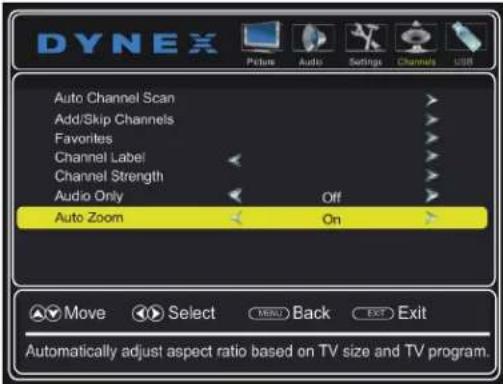
3 Press ▲ or ▼ to highlight Auto Zoom.
4 Press ◀ or ▶ to select On (automatically adjusts the aspect ratio) or Off (does not automatically adjust the aspect ratio).
5 Press MENU to return to the previous menu, or press EXIT to close the menu.
Setting the power on picture mode
You can set the picture mode your TV uses when you turn it on.
1 Press MENU. The on-screen menu opens.
2 Press ◀ or ▶ to highlight Settings, then press ▼ or ENTER. The Settings menu opens.

3 Press ▲ or ▼ to highlight Power on in Vivid Mode.
4 Press ◀ or ▶ to select On (when you turn on your TV, it will be in Vivid picture mode) or Off (when you turn on your TV, it will be in the picture mode it was in before you turned it off), then press ENTER.
5 Press MENU to return to the previous menu, or press EXIT to close the menu.
Adjusting the computer image
When you connect a computer to your TV using the VGA jack, you may need to adjust the computer image to improve the quality.
1 Press MENU. The on-screen menu opens.
2 Press ◀ or ▶ to highlight Settings, then press ▼. The Settings menu opens.

3 Press ▲ or ▼ to highlight Computer Settings, then press ENTER. The computer settings menu opens.

4 Press ▲ or ▼ to highlight an option, then press ENTER to access the option. You can select:
- Auto Adjust—Automatically adjusts the image settings such as position and phase.
• H. Position—Moves the image right or left.
• V. Position—Moves the image up or down. - Clock—Minimizes vertical stripes in the screen image.
- Phase—Adjusts the focus of stable images.
- Reset Computer Settings—Resets all computer settings to factory default.
5 Press ◀ or ▶ to adjust the option, or press ▲ or ▼ to select a setting.
6 Press MENU to return to the previous menu, or press EXIT to close the menu.
Adjusting the sound
Adjusting sound settings
1 Press MENU. The on-screen menu opens.
2 Press ◀ or ▶ to highlight Audio, then press ▼. The Audio menu opens.

3 Press ▲ or ▼ to highlight an option, then press ◀ or ▶ to adjust the option. You can select:
• Sound Mode—Selects the sound mode. You can select:
- Standard—Balances treble and bass. This setting is good for watching standard TV broadcasts.
- Theater—Enhances treble and bass for a rich sound experience. This setting is good for watching DVDs, Blu-ray discs, and HDTV.
• Music—Preserves the original sound. This setting is good for listening to music. - News—Enhances vocals for TV audio. This setting is good for watching news broadcasts.
-
Custom—Lets you manually adjust sound settings.
-
Treble—Adjusts the high sounds.
• Bass—Adjusts the low sounds.
• Balance—Adjusts the balance between the left and right audio channels. - Digital Audio/SPDIF—Sends digital audio to an external audio system. You can select PCM (to output audio in 2-channel stereo), or RAW (to pass through the original digital audio sound).
- Audio Language—(Digital channels only) Selects an alternate audio language, if available.
- MTS/SAP—(Analog channels only) Selects the audio mode. You can select:
- Mono—Select this option if there is noise or static on weak stereo broadcasts.
- Stereo—Select this option for programs broadcast in stereo.
• SAP—Select this option to listen to a secondary audio program, if available.
Note
You can also press MTS/SAP one or more times to select the audio mode.
- Reset Audio Settings—Reset all audio settings to factory defaults.
4 Press MENU to return to the previous menu, or press EXIT to close the menu.
Playing TV audio only
You can turn off the picture on your TV and listen to the program audio only.
1 Press MENU. The on-screen menu opens.
2 Press ◀ or ▶ to highlight Audio, then press ▼ or ENTER. The Channels menu opens.
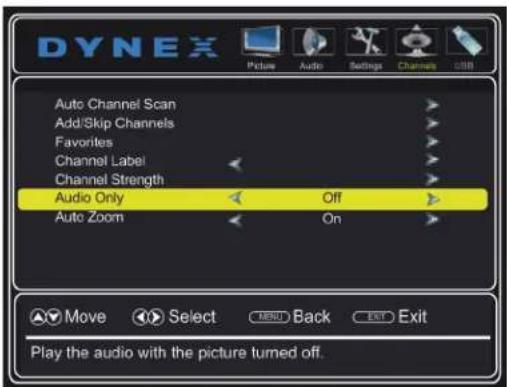
3 Press ▲ or ▼ to highlight Audio Only, then press ◀ or ▶ to select On.
4 Press MENU to return to the previous menu, or press EXIT to close the menu.
Notes
• The picture turns off in about five seconds.
• Audio Only works only when the input source is TV, and your TV is receiving a broadcast signal.
• To exit audio only mode, press any button. When you exit audio only mode, the Audio Only option is automatically reset to Off.
Setting parental controls
Parental controls let you prevent your children from watching inappropriate material on TV. When set, parental controls read the rating of the program (with some exceptions, such as news and sports) and deny access to programs that exceed the ratings level you select. To watch programs that exceed the selected rating, you must enter the password.
Setting or changing the password
1 Press MENU. The on-screen menu opens.
2 Press ◀ or ▶ to highlight Settings, then press ▼. The Settings menu opens with Parental Controls highlighted.

3 Press ENTER. The Enter Password screen opens.

4 Press the number buttons to enter the four-digit password. The default password is 0000. You should change the password to something you can remember. The parental controls menu opens.

5 Press ▲ or ▼ to highlight Change Password, then press ENTER. The password entry screen opens.

6 Press the number buttons to enter the old password, enter a new password, then enter the new password again. The password has been successfully changed.
Note
If you forget your password, enter 9999.
7 Press MENU to return to the previous menu, or press EXIT to close the menu.
Locking control buttons
When the button lock is turned On, the buttons on the side of your TV are locked, and you can only operate your TV using the remote control.
1 Press MENU. The on-screen menu opens.
2 Press ◀ or ▶ to highlight Settings, then press ▼. The Settings menu opens with Parental Controls highlighted.

3 Press ENTER. The Enter Password screen opens.

4 Press the number buttons to enter the four-digit password. The parental controls menu opens with Button Lock highlighted.
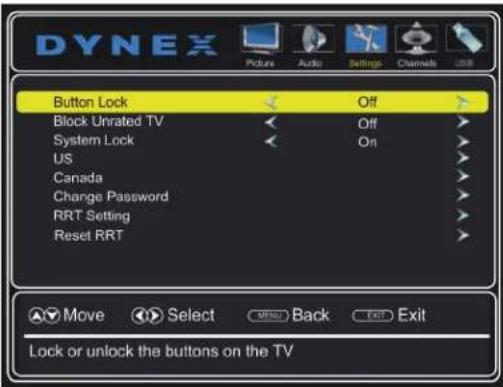
5 Press ENTER.
6 Press ◀ or ▶ to select On (locks the buttons) or Off (unlocks the buttons).
7 Press MENU to return to the previous menu, or press EXIT to close the menu.
Setting the system lock
You must turn on the system lock before you can select and change the Block Unrated TV, US, or Canada options.
1 Press MENU. The on-screen menu opens.
2 Press ◀ or ▶ to highlight Settings, then press ▼. The Settings menu opens with Parental Controls highlighted.
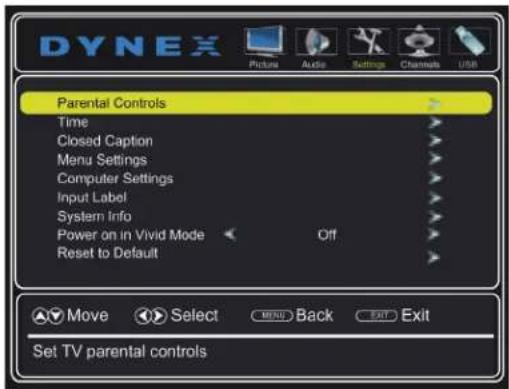
3 Press ENTER. The Enter Password screen opens.

4 Press the number buttons to enter the four-digit password. The parental controls menu opens.

5 Press ▼ to highlight System Lock.
6 Press ◀ or ▶ to select On (turns on parental controls) or Off (turns off parental controls).
7 Press MENU to return to the previous menu, or press EXIT to close the menu.
Blocking unrated TV
When Block Unrated TV is turned on, you block TV programs that do not have a rating. You will be prompted to enter the parental controls password to view the program.
1 Press MENU. The on-screen menu opens.
2 Press ◀ or ▶ to highlight Settings, then press ▼. The Settings menu opens with Parental Controls highlighted.

3 Press ENTER. The Enter Password screen opens.
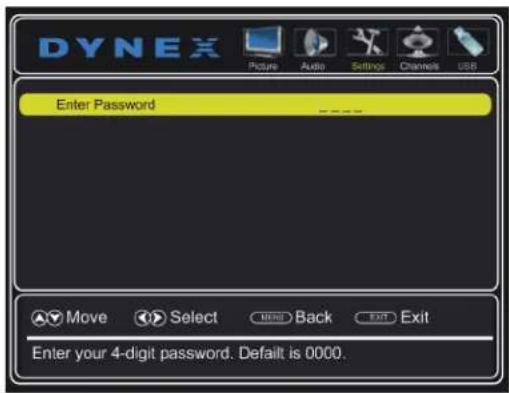
4 Press the number buttons to enter the four-digit password. The parental controls menu opens.

5 Press ▼ to highlight System Lock, then press ◀ or ▶ to select On.
6 Press ▲ to highlight Block Unrated TV.
7 Press ◀ or ▶ to select On (blocks unrated TV) or Off (does not block unrated TV).
8 Press MENU to return to the previous menu, or press EXIT to close the menu.
Setting parental control levels
You can set parental control levels for the U.S. and Canada. Parental control settings are only applicable to programs that have a rating signal.
U.S. rating levels
U.S. TV ratings
| NONE Not rated |
| TV-Y All children |
| TV-Y7 Suitable for children 7 and older |
| TV-G General audiences |
| TV-PG Parental guidance suggested |
| TV-14 Parental guidance strongly suggested |
| TV-MA Mature audiences only |
Some of the age-based TV Parental Guidelines ratings also have content-based ratings.
U.S. TV content ratings
| All All ratings are blocked | ||||
| FV Fantasy violence | ||||
| L Strong language | ||||
| S Sexual situations | ||||
| V | V | i | ole | nc |
| D | Suggestive dialog | |||
U.S. movie (MPAA) ratings
| None | Movie not rated |
| G | General audiences |
| PG | Parental guidance suggested |
| PG-13 Suitable for children 13 and older | |
| R | Parental guidance suggested for children under 17 |
| NC-17 Not suitable for children under 17 | |
| X | Adults only |
Canadian rating levels
Canadian English ratings
| E | Exempt programming |
| C | Suitable for all children |
| C8+ | Suitable for children 8 and older |
| G | General audiences |
| PG | Parental guidance suggested |
| 14+ | Suitable for children 14 and older |
| 18+ | Adult only |
Canadian French ratings
| E | Exempt programming |
| G | General audiences |
| 8ans+ | Suitable for children 8 and older |
| 13ans+ | Suitable for children 13 and older |
| 16ans+ | Suitable for children 16 and older |
| 18ans+ | Adult only |
1 Press MENU. The on-screen menu opens.
2 Press ◀ or ▶ to highlight Settings, then press ▼. The Settings menu opens with Parental Controls highlighted.
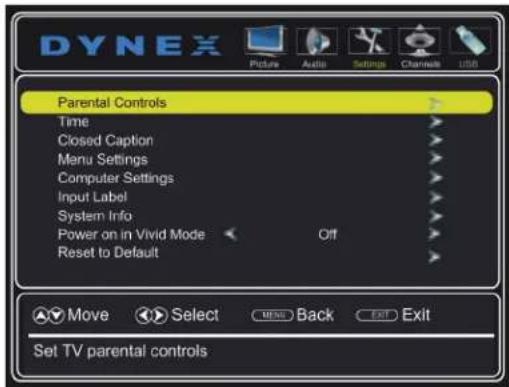
3 Press ENTER. The Enter Password screen opens.

4 Press the number buttons to enter the four-digit password. The parental controls menu opens.

5 Press ▲ or ▼ to highlight US (or Canada to set controls for Canada), then press ENTER. The ratings screen opens.
US ratings

Canadian ratings

6 Press ▲▼◀ or ▶ to highlight the rating you want to block, then press ENTER. A lock symbol appears when a rating is blocked.
Note
When you block a rating, that rating and all higher ratings are blocked.
7 Press EXIT to close the menu.
Downloading rating information
1 Press MENU. The on-screen menu opens.
2 Press ◀ or ▶ to highlight Settings, then press ▼. The Settings menu opens with Parental Controls highlighted.

3 Press ENTER. The Enter Password screen opens.
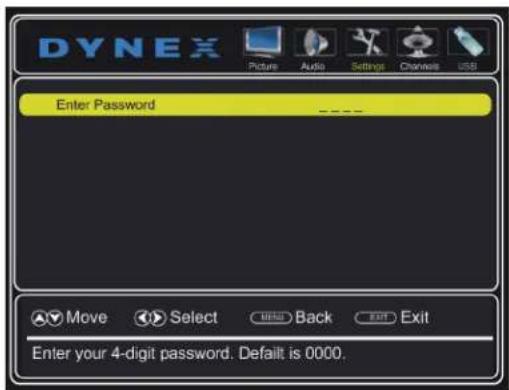
4 Press the number buttons to enter the four-digit password. The parental controls menu opens.
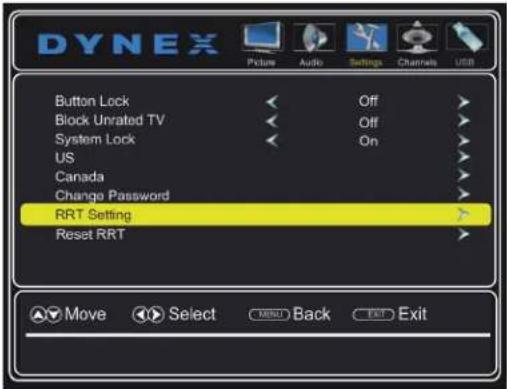
5 Press ▲ or ▼ to highlight RRT Setting, then press ENTER.
If the program is broadcast with RRT rating information, the information is downloaded automatically and can be used for parental controls.
6 To reset the RRT information to the factory default, press ▲ or ▼ to highlight Reset RRT, then press ENTER. A box opens. Follow the on-screen instructions.
7 Press EXIT to close the menu.
Adjusting time settings
Setting the clock
1 Press MENU. The on-screen menu opens.
2 Press ◀ or ▶ to highlight Settings, then press ▼. The Settings menu opens.
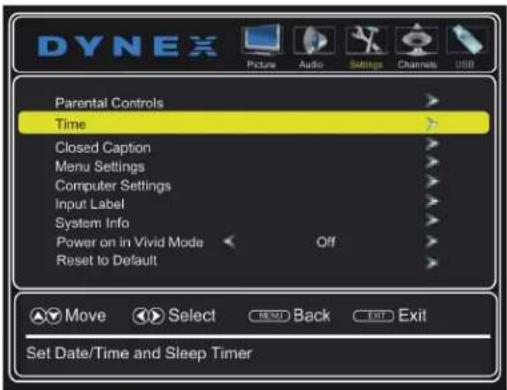
3 Press ▲ or ▼ to highlight Time, then press ENTER. The time menu opens.

4 Press ▲ or ▼ to highlight Style, then press ◀ or ▶ to select Manual (to set the date and time manually), or Auto (to have the date and time set automatically from a TV source signal, based on your time zone).
Note
If you select Auto, the displayed time is incorrect until your TV gets the correct time from a TV signal source.
5 If you selected Auto for Style, press ▲ or ▼ to highlight Time Zone, then press ◀ or ▶ to select your time zone. You can select Atlantic, Eastern, Central, Mountain, Pacific, Alaska, Hawaii, or Newfoundland.
6 If your viewing area observes daylight savings time, press ▲ or ▼ to highlight Daylight Savings, then press ◀ or ▶ to select On or Off.
7 If you selected Manual for Style:
- Press ▲ or ▼ to highlight Year, Month, or Day, then press ◀ or ▶ to adjust the setting.
- Press ▲ or ▼ to highlight Time, press ◀ or ▶ to highlight the hour, minute, or AM/PM field, then press ▲ or ▼ to adjust the setting.
8 Press EXIT to close the menu.
Setting the sleep timer
You can set the amount of time before your TV automatically turns off.
1 Press MENU. The on-screen menu opens.
2 Press ◀ or ▶ to highlight Settings, then press ▼. The Settings menu opens.
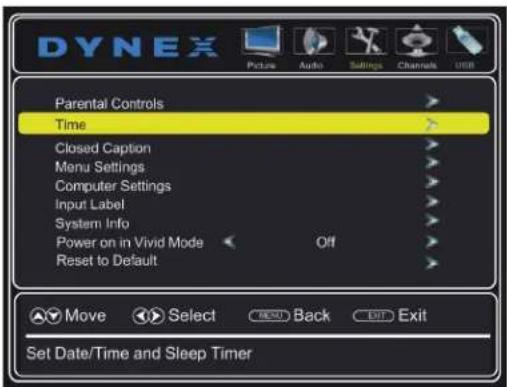
3 Press ▲ or ▼ to highlight Time, then press ▶ or ENTER. The time menu opens.

4 Press ▲ or ▼ to highlight Sleep Timer, then press ◀ or ▶ to select the amount of time before your TV turns off automatically. You can select Off, 5, 10, 15, 30, 60, 90, 120, 180, or 240 minutes.
5 To turn off the sleep timer, select Off.
6 Press EXIT to close the menu.
Note
You can also press SLEEP to set the sleep timer.
Using closed captioning
Closed captioning displays a text version of the TV program audio or displays information provided by the broadcaster.
Turning closed captioning on or off
1 Press MENU. The on-screen menu opens.
2 Press ◀ or ▶ to highlight Settings, then press ▼. The Settings menu opens.

3 Press ▲ or ▼ to highlight Closed Caption, then press ENTER. The closed caption menu opens.
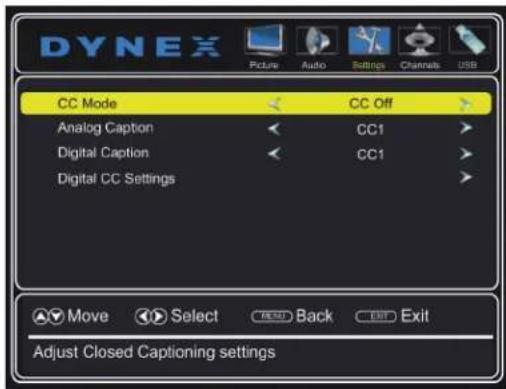
4 Press ▲ or ▼ to highlight CC Mode, then press ◀ or ▶ to select CC Off (turns off closed captioning), CC On (turns on closed captioning), or CC On When Mute (turns on closed captioning when the sound is muted).
5 Press MENU to return to the previous menu, or press EXIT to close the menu.
Note
You can also press CCD to turn closed captioning on or off.
Selecting the analog closed captioning mode
Analog channels usually have one or more closed captioning modes. The CC1 mode usually displays a text version of the TV program audio in a small banner. The other CC modes display information provided by the broadcaster. The Text modes display information in a box that covers half of the screen.
1 Press MENU. The on-screen menu opens.
2 Press ◀ or ▶ to highlight Settings, then press ▼. The Settings menu opens.
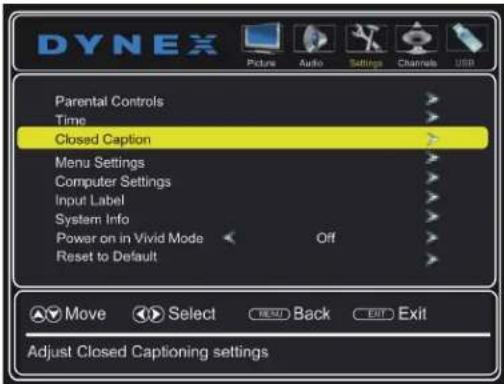
3 Press ▲ or ▼ to highlight Closed Caption, then press ENTER. The closed caption menu opens.

4 Press ▲ or ▼ to highlight Analog Caption, then press ◀ or ▶ to select an analog caption setting. You can select:
- CC1 through CC4—Closed captioning appears in a small banner across the bottom of the screen. CC1 is usually the "printed" version of the audio. CC2 through CC4 display content provided by the broadcaster.
- Text1 through Text4—Closed captioning covers half or all of the screen. Text1 through Text4 display content provided by the broadcaster.
Selecting the digital closed captioning mode
Digital channels usually have one or more closed captioning modes. The CC1 mode usually displays a text version of the TV program audio in a small banner. The other CC modes display information provided by the broadcaster. CS1 mode displays a text version of the audio in the same language as the audio.
1 Press MENU. The on-screen menu opens.
2 Press ◀ or ▶ to highlight Settings, then press ▼. The Settings menu opens.
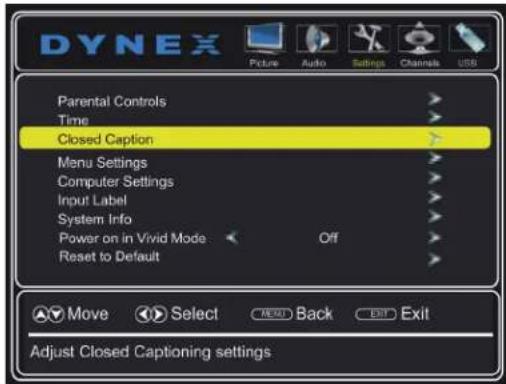
3 Press ▲ or ▼ to highlight Closed Caption, then press ENTER. The closed caption menu opens.

4 Press ▲ or ▼ to highlight Digital Caption, then press ◀ or ▶ to select a digital caption setting. You can select:
- CS1 through CS6—CS1 is usually the "printed" version of the audio. CS2 through CS6 display content provided by the broadcaster. You can change the way digital closed captioning is displayed on the screen. For more information, see "Customizing digital closed captioning styles" on page 54. - CC1 through CC4—Closed captioning appears in a small banner across the bottom of the screen. CC1 is usually the "printed" version of the audio. CC2 through CC4 display content provided by the broadcaster.
5 Press EXIT to close the menu.
Customizing digital closed captioning styles
1 Press MENU. The on-screen menu opens.
2 Press ◀ or ▶ to highlight Settings, then press ▼. The Settings menu opens.

3 Press ▲ or ▼ to highlight Closed Caption, then press ENTER. The closed caption menu opens.
4 Make sure that Digital Caption is turned on. For more information, see "Selecting the digital closed captioning mode" on page 53.
5 Press ▲ or ▼ to highlight Digital CC Settings.

6 Press ENTER. The digital CC settings menu opens.

7 Press ▲ or ▼ to select Mode, then press ◀ or ▶ to select Custom.
Note
To reset the closed caption styles to their defaults, set Mode to Default.
8 Press ▲ or ▼ to highlight an option, then press ◀ or ▶ to adjust the style. You can select:
- Font Style—Selects the font style.
- Font Size—Selects the font size.
- Font Edge Style—Selects the style of the window edge.
- Font Edge Color—Selects the color of the window edge.
- Font Color—Selects the color for the words.
- Background Color—Selects the color for the background.
- Font Opacity—Selects the opacity level for the words.
- Background Opacity—Selects the opacity level for the background.
9 Press EXIT to close the menu.
Adjusting menu settings
Selecting the menu language
1 Press MENU. The on-screen menu opens.
2 Press ◀ or ▶ to highlight Settings, then press ▼. The Settings menu opens.

3 Press ▲ or ▼ to highlight Menu Settings, then press ▶ or ENTER. A menu opens with Menu Language highlighted.
4 Press ◀ or ▶ to select the menu language. You can select English, Français, or Español.
5 Press EXIT to close the menu.
Labeling an input source
You can add a label to a video input source to make it easier to identify. These labels are displayed on the INPUT SOURCE list and on the banner that appears when you press INFO.
1 Press MENU. The on-screen menu opens.
2 Press ◀ or ▶ to highlight Settings, then press ▼. The Settings menu opens.

3 Press ▲ or ▼ to highlight Input Label, then press ENTER. A menu opens with Preset Label highlighted.

4 Press ◀ or ▶ to select a preset label from several options, or select Custom to enter your own label.
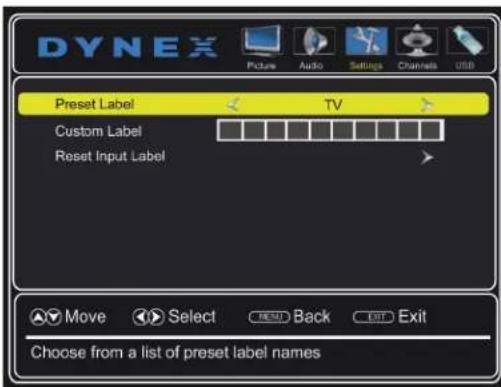
5 If you select Custom, press ▲ or ▼ to highlight Custom Label, then press ▶.

6 Press ▲ or ▼ to select a character.
7 Press ▶ to move to the next position. Repeat this step to enter additional characters. You can enter as many as 10 characters. If you need to delete a character, enter a blank space.
8 When you complete the label, press MENU. The next time you press INPUT, the new label appears in the INPUT SOURCE list.
9 Press EXIT to close the menu.
Changing channel settings
Automatically scanning for channels
When you scan for channels, your TV searches for channels with signals and stores the channel information in the channel list. When you press CH+ or CH-, your TV goes to the next or previous channel in the channel list.
If the TV signal source changes, for example you change from an outdoor antenna to cable TV (no box), you need to scan for channels.
1 Press MENU. The on-screen menu opens.
2 Press ◀ or ▶ to highlight Channels, then press ▼ or ENTER. The Channels menu opens.
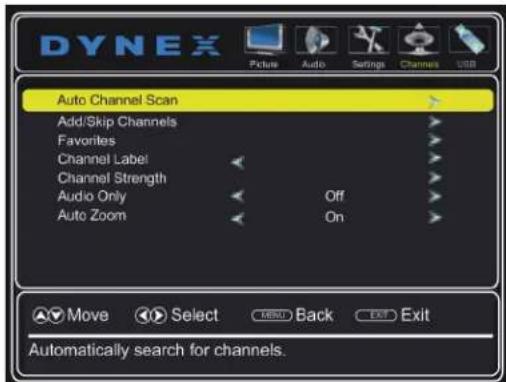
3 Press ▲ or ▼ to highlight Auto Channel Scan, then press ENTER. The Choose Your TV Source screen opens.

4 Press ▲ or ▼ to highlight Antenna, Cable, or Cable/Satellite Box, then press ENTER.
- If you are using an antenna for a standard or HD TV signal, select Antenna. Your TV scans for available channels. The scan may take several minutes. During scanning your TV searches for digital channels first. When the digital channel search is complete, a message appears asking if you want to search for analog channels. Select Yes to continue searching for analog channels, or select No to stop searching for channels.
- If your cable is connected directly to the TV (without a box), select Cable. Your TV scans for available channels. The scan may take several minutes.
- If your cable or satellite TV is connected to your TV through a box, select Cable/Satellite Box. Your TV does not need to scan for channels. A message tells you to select the correct input source. Press INPUT, press ▲ or ▼ to highlight the video input you connected your TV to, then press ENTER.
Note
You can press EXIT to stop the auto channel search, but you will need to run the auto channel search again to create a channel list.
Hiding channels
You can hide channels in the channel list. When you press CH+ or CH-, your TV skips the hidden channels. You can still tune to a hidden channel by pressing the number buttons for the channel.
1 Press MENU. The on-screen menu opens.
2 Press ◀ or ▶ to highlight Channels, then press ▼. The Channels menu opens.
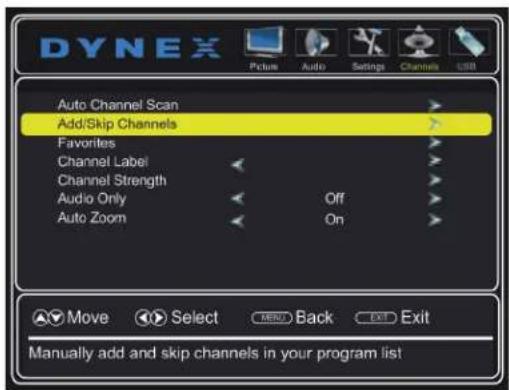
3 Press ▲ or ▼ to highlight Add/Skip Channels, then press ENTER. The channel list opens.

4 Press ▲ or ▼ to highlight the channel you want to hide, then press ENTER. The check mark disappears.
Notes
- When you highlight a channel in the list, your TV displays the channel in the background.
- A channel with a check mark is not hidden. A channel with no check mark is hidden.
- If the list has more than one page, press ▲ or ▼ to scroll through the pages.
5 Press MENU to return to the previous menu, or press EXIT to close the menu.
Setting up a favorite channel list
You can create a favorite channel list so you can quickly browse through your favorite channels by pressing FAV, then selecting a channel from the favorite channel list.
1 Press MENU. The on-screen menu opens.
2 Press ◀ or ▶ to highlight Channels, then press ▼ or ENTER. The Channels menu opens.
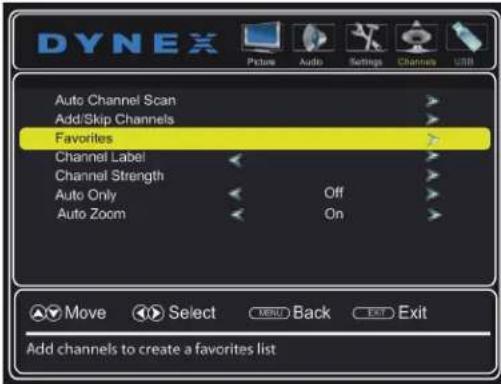
3 Press ▲ or ▼ to highlight Favorites, then press ENTER. The favorites list opens.
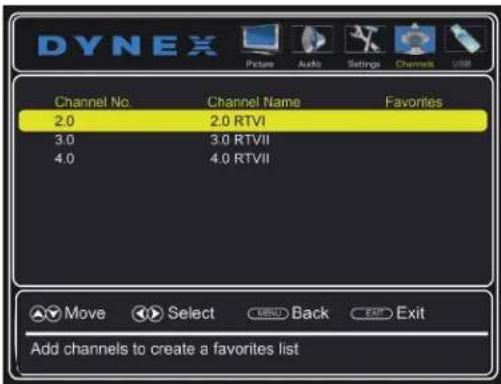
4 Press ▲ or ▼ to highlight the channel you want to add to the favorites list, then press ENTER. A check mark appears next to the channel.
Notes
- When you highlight a channel in the list, your TV displays the channel in the background.
• To remove a channel from the favorites list, highlight the channel, then press ENTER. The check mark disappears and the channel is removed from the list. - If the list has more than one page, press ▲ or ▼ to scroll through the pages.
5 Press MENU to return to the previous menu, or press EXIT to close the menu.
Viewing a favorite channel
1 Press FAV on your remote control. The Favorites channel list opens.
2 Press ▲ or ▼ to highlight a channel, then press ENTER to tune to the channel.
Adding or changing a channel label
If a channel is not already labeled, you can label the channel to make it easier to identify. You can also relabel a channel that is already labeled.
1 Press MENU. The on-screen menu opens.
2 Press ◀ or ▶ to highlight Channels, then press ▼ or ENTER. The Channels menu opens.

3 Press ▲ or ▼ to highlight Channel Label, then press ENTER. The channel label screen opens.
4 Press ▲ or ▼ to select the channel you want to label.

5 Press ▶ to move to the channel label field.

6 Press ▲ or ▼ to select a character, then press ◀ or ▶ to move to the previous or next position. Repeat this step to add more characters. You can enter as many as 11 characters. If you need to delete a character, enter a blank space, then press ENTER.
7 When you have completed the label, press ENTER.
8 Press EXIT to close the menu.
Checking the digital signal strength
You can check the digital signal strength to determine if you need to adjust your antenna or digital cable input. The higher the signal strength, the less likely you are to experience picture degradation.
1 Press MENU. The on-screen menu opens.
2 Press ◀ or ▶ to highlight Channels, then press ▼ or ENTER. The Channels menu opens.

3 Press ▲ or ▼ to highlight Channel Strength, then press ENTER. The DTV signal strength is indicated by the color bar.

4 Press MENU to return to the previous menu, or press EXIT to close the menu.
Maintaining
- Do not use your TV in areas that are too hot or too cold, because the cabinet may warp or the screen may malfunction. Your TV works best in temperatures that are comfortable to you.
- Storage temperatures are 32° to 122°F (0° to 50°C).
- Working temperatures are 41° to 104°F (5° to 40°C).
- Do not place your TV in direct sunlight or near a heat source.
Cleaning your TV
- Before cleaning the screen, unplug your TV from the power outlet.
- Clean your TV with a soft, lint-free cloth. If surfaces are extremely dirty, use a soft cloth dampened with a weak detergent solution.
- Use an eyeglass cleaner to clean the screen. Never use alcohol, paint thinner, or benzine.
- Before using a chemically treated cloth, read the instructions that came with the cloth.
- Do not spray insecticide liquid near your TV. Such chemicals may cause damage and discoloration to the exposed surfaces.
Troubleshooting
Warning
Do not try to repair your TV yourself. Contact authorized service personnel.
Restoring settings to default
Caution
When you restore default settings, all the settings you have customized are reset.
1 Press MENU. The on-screen menu opens.
2 Press ◀ or ▶ to highlight Settings, then press ▼. The Settings menu opens.

3 Press ▲ or ▼ to highlight Reset to Default, then press ENTER. A confirmation box opens.
4 Press ◀ or ▶ to select Yes (to reset all settings to factory default), or No (to not reset). If you select Yes, your TV turns off, then turns on again. The SETUP Wizard opens.
5 Go through the TV SETUP wizard. For more information, see "Turning on your TV for the first time" on page 34.
Viewing system information
You may need to view system information during troubleshooting.
1 Press MENU. The on-screen menu opens.
2 Press ◀ or ▶ to highlight Settings, then press ▼ or ENTER. The Settings menu opens.
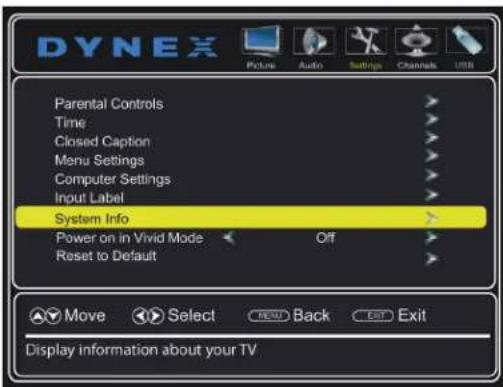
3 Press ▲ or ▼ to highlight System Info, then press ENTER. Information about the TV software version is displayed.
4 Press MENU to return to the previous menu, or press EXIT to close the menu.
Video and audio
| Problem Solution | |
| Picture does not fill the screen. There are black bars around the picture. | · Change the aspect ratio. An increasing amount of digital TV and movies are presented in wide screen (16:9). See “Adjusting the TV picture” on page 43. |
| No picture (screen is not lit) and no sound. | · Press (power) on the TV or the remote control.· Make sure that the video cables are connected securely to the side or back of your TV.· Adjust the contrast and brightness. See “Adjusting the TV picture” on page 43.· Make sure that the power cord is plugged into a working outlet.· Make sure that the correct video input source is selected. See “Selecting the video input source” on page 36.· Try another channel. The station may be experiencing problems.· Make sure that the incoming signal is compatible.· Make sure that the antenna or cable TV is connected correctly and securely. See “Connecting a cable or satellite box” on page 13 or “Connecting an antenna or cable TV (no box)” on page 18.· Check the closed caption settings. Some TEXT modes can block the screen. |
| Picture quality is good on some channels and poor on others. Sound is good. | · The problem may be caused by a poor or weak signal from the broadcaster or cable TV provider.· If you connect to cable or satellite TV without a set-top box and experience poor picture quality, you may need to install a set-top box to improve signal reception and picture quality. Contact your cable or satellite TV provider about upgrading to a set-top box. |
| Problem Solution | |
| Dark, poor, or no picture (screen is lit), but sound is good. | Try another channel. The station may be experiencing problems.Make sure that the antenna or cable TV is connected correctly and securely. See “Connecting a cable or satellite box” on page 13 or “Connecting an antenna or cable TV (no box)” on page 18.Adjust the brightness. See “Adjusting the TV picture” on page 43.Make sure that the correct picture mode is selected. See “Adjusting the TV picture” on page 43.If you are using an antenna, the digital channel signal may be low. To check the digital channel signal strength, see “Checking the digital signal strength” on page 58.If you are using an antenna and the signal strength is low, adjust the antenna or use a highly directional outdoor antenna or set-top antenna with a built-in amplifier.Make sure that the video cables are connected securely to the side or back of your TV.The video cable(s) you are using may be bad. Try a new set. |
| No color, dark picture, or color is not correct. | Try another channel. The station may be experiencing problems.Adjust the color saturation. See “Adjusting the TV picture” on page 43.Make sure that the video cables are connected correctly and securely to the side or back of your TV.Make sure that the antenna or cable TV is connected correctly and securely. See “Connecting a cable or satellite box” on page 13 or “Connecting an antenna or cable TV (no box)” on page 18.If you are using an antenna, the digital channel signal may be low. To check the digital channel signal strength, see “Checking the digital signal strength” on page 58.If you are using an antenna and the signal strength is low, adjust the antenna or use a highly directional outdoor antenna or set-top antenna with a built-in amplifier. |
| Only snow (noise) appears on the screen. | Try another channel. The station may be experiencing problems.Make sure that the antenna or cable TV is connected correctly and securely. See “Connecting a cable or satellite box” on page 13 or “Connecting an antenna or cable TV (no box)” on page 18.If you are using an antenna, the digital channel signal may be low. To check the digital channel signal strength, see “Checking the digital signal strength” on page 58.If you are using an antenna and the signal strength is low, adjust the antenna or use a highly directional outdoor antenna or set-top antenna with a built-in amplifier. |
| Dotted lines or stripes appear on the screen. | Make sure that the antenna or cable TV is connected correctly and securely. See “Connecting a cable or satellite box” on page 13 or “Connecting an antenna or cable TV (no box)” on page 18.If you are using an antenna, the digital channel signal may be low. To check the digital channel signal strength, see “Checking the digital signal strength” on page 58.If you are using an antenna and the signal strength is low, adjust the antenna or use a Highly directional outdoor antenna or set-top antenna with a built-in amplifier.Make sure that the video cables are connected securely to the side or back of your TV.The video cable(s) you are using may be bad. Try a new set.Other devices (for example, surround sound receiver, external speakers, fans, or hair dryers) may be interfering with your TV. Try turning off one device at a time to determine which device is causing interference. After you have determined which device is causing interference, move it further from the TV to eliminate the interference. |
| Double images. | Use a highly directional outdoor antenna, cable TV, or satellite TV. |
| Problem Solution | |
| The picture has a few bright or dark spots. | A few bright or dark spots on an LCD screen is normal. It does not affect the operation of this TV. |
| Good picture, but no sound. | Increase the volume.Unplug the headphones.Make sure that the sound is not muted.Make sure that the correct audio mode is selected.Make sure that the audio cables are connected correctly and securely to the back of your TV.Make sure that the antenna or cable TV is connected correctly and securely. See "Connecting a cable or satellite box" on page 13 or "Connecting an antenna or cable TV (no box)" on page 18.If you are using an antenna, the digital channel signal may be low. To check the digital channel signal strength, see "Checking the digital signal strength" on page 58.The audio cable(s) you are using may be bad. Try a new set. |
| Poor picture. | Make sure that the room is not too bright. Light reflecting off the screen can make the picture difficult to see.If an S-VHS camera or a camcorder is connected while another connected device is turned on, the picture may be poor. Turn off one or more devices. |
| Good sound but poor color. | Adjust the contrast, color, and brightness settings. See "Adjusting the TV picture" on page 43. |
| Audio noise. | Other devices (for example, surround sound receiver, external speakers, fans, or hair dryers) may be interfering with your TV. Try turning off one device at a time to determine which device is causing interference. After you have determined which device is causing interference, move it further from the TV to eliminate the interference. |
| No output from one of the speakers. | Adjust the audio balance. See "Adjusting sound settings" on page 45.Make sure that the audio cables are connected correctly and securely to the back of your TV. |
Problem Solution
| After images appear. | Do not display a still image, such as a logo, game, or computer image, for an extended period of time. This can cause a permanent after-image to be burned into the screen. This type of damage is not covered by your warranty. |
Remote control
| Problem Solution | |
| Remote control does not work. | Make sure that the power cord is plugged into a working outlet.Make sure that there are no obstructions between the remote control and the remote control sensor on the front of the TV.Point the remote control directly at the remote control sensor on your TV. For the location of the remote control sensor, see “Front” on page 8.Make sure that the batteries are installed correctly. See “Installing remote control batteries” on page 34.Replace dead batteries with new batteries. See “Installing remote control batteries” on page 34. |
| Trouble programming your existing universal remote control. | See instructions and a table of common codes in “Programming universal remote controls” on page 65.Codes are subject to change. For up-to-date codes, go to www.dynexproducts.com/remotecodesReplace dead batteries with new batteries. See the User Guide that accompanied the universal remote control.Refer to the User Guide that accompanied your universal remote control and contact the manufacturer if problems persist. |
General
| Problem Solution | |
| No power. | Make sure that the power cord is plugged into a working outlet.Unplug the power cord, wait 60 seconds, then plug the cord back in and turn on your TV.Other devices (for example, surround sound receiver, external speakers, fans, or hair dryers) may be interfering with your TV. Try turning off one device at a time to determine which device is causing interference. After you have determined which device is causing interference, move it further from the TV to eliminate the interference. |
| “No signal” error message is displayed. | Press INPUT and make sure that you have selected the correct input for the device or service you are trying to use.If you are using a cable or satellite box, use the remote that came with that box to change channels.Make sure that you have the correct input selected to view channels from the cable or satellite box. |
| After Auto Channel Search, there are no channels. | Reception can vary by channel depending on the broadcast power level of a given station. Contact your cable or satellite TV provider.Make sure that the antenna or cable/satellite box is connected securely to your TV.Try replacing the cable between the antenna/cable or cable/satellite box and your TV. |
| One or more channels do not display. | Make sure that the channels are not blocked. See “Setting parental control levels” on page 49.Make sure that the channels are not hidden. The channel may have been deleted from the channel list. You can tune to the channel by pressing the number buttons or you can add the channel back to the channel list. See “Hiding channels” on page 56.If you are using a cable or satellite box, use the remote that came with that box to change channels.Make sure that you have the correct input selected to view channels from the cable or satellite box.If you are using an antenna, the digital channel signal may be low. To check the digital channel signal strength, see “Checking the digital signal strength” on page 58. |
| Password is lost. | • Enter 9999 to access pa controls, then set a new password. See “Setting or changing the password” on page 46. |
| Some settings cannot be accessed. | • If a setting is grayed, the setting is not available in the current video input mode. |
| TV cabinet creaks. | • When the TV is in use, the temperature rises naturally and may cause the cabinet to expand or contract which can cause a creaking noise. This is not a malfunction. |
| Problem Solution | |
| Control buttons do not work. | Make sure that the Button Lock option is set to No. See “Locking control buttons” on page 47.Unplug the power cord, wait a few seconds, then plug the cord back in and turn on your TV. |
| TV keeps turning off. | Make sure that the sleep timer is not turned on. See “Setting the sleep timer” on page 52. |
Note
If the problem is not solved by using these troubleshooting instructions, turn off your TV, then turn it on again.
Specifications
Specifications are subject to change without notice.
Dimensions and weight
| Without stand | 35.9 × 3.0 × 20.9 in. (91.2 × 7.5 × 53.1 cm)14.1 lbs. (6.4 kg) |
| With stand | 35.9 × 9.6 × 22.6 in. (91.2 × 24.5 × 57.3 cm)18.5 lbs. (8.4 kg) |
Screen
| Screen size measured diagonally | 39.5 in. |
| Display type LED | |
| Panel 60 Hz vs.120 Hz 60Hz | |
| Display resolution 1080p | |
| Panel resolution 1920 (H) × 1080 (V) | |
| Aspect ratio 16:9 | |
| Contrast ratio (typical)-panel | 3,000:1 |
| Dynamic contrast ratio-list value | 9,000:1 |
| TV brightness (mlnimum) cd/m2 | 160 nits |
| Comb filter 3d y/c digital | |
| Response time 8.5 ms | |
| Horizontal viewing angle 176° | |
| Vertical viewing angle 176° | |
Display resolutions/VGA scan rates
| HDMI suggested resolutions 1080p, 1080i, 720p, 480p, 480i | |
| Component video suggested resolutions | 1080i, 720p, 480p, 480i |
| PC/VGA Suggested scan rates: | 640 × 480/60Hz,800 × 600/60Hz,1024 × 768/60Hz,1920 × 1080/60Hz |
Tuner
| Analog NTSC | |
| Digital ATSC, 8-VSB, Clear-QAM |
Inputs
| HDMI | 2 (side)E-EDID compliantHDCP compliant |
| Component video 1 (back) | |
| Composite video | 1 (back)Shared with component Y |
| Shared audio (component and composite) | Yes |
| PC/VGA | 1 (side) |
| 3.5mm PC/DVI audio input | 1 (side) |
| DVI | 1 (side)HDMI1 (DVI) jack |
| USB | 1 (side)Supports JPEG and firmware upgrade |
| Antenna/Cable | 1 (side) |
Outputs
| Video | No |
| Analog audio/Headphone | 1 (back) |
| Digital audio | 1 (coaxial) (back) |
| WiFi | No |
| Ethernet | No |
Audio
| Speakers | Number: 2Watts per channel: SW |
Power
| Power consumption | On: 75WStandby: <1W |
| Power input | AC 120 V, 60Hz |
Miscellaneous
| OSD languages English, French, Spanish | |
| INlink | No |
| Game Mode | No |
| ENERGY STAR qualified No | |
| Internet connectable | No |
| TV base screws | Stand column to TV:M4 type (14 mm length) 4pcsTV stand to stand column:ST4 type (12 mm length) 4pcs |
| V-Chip (version 2.0) | Yes |
| Sleep timer | Yes |
| Channel labeling | Yes |
| VESA mount (mm)(horizontal × vertical) | 200 × 200 |
| VESA mount screws | M5 type |
Note
The length of the wall-mount screws vary depending on the wall-mount bracket you purchased. See the instructions that came with the wall-mount bracket for screw lengths.
Programming universal remote controls
You can operate your Dynex TV with a new or existing universal remote control.
1 See the table below for common codes. If you have problems programming your remote or need a different remote control code, visit www.dynexproducts.com/remotecodes for the latest remote control code information.
2 Follow your universal remote control's instructions to enter the TV code you found in Step 1.
Tips
- If your universal remote control has a code search feature, run a code search to identify a code that matches your TV. See your universal remote control's instructions for details.
- If your universal remote control has a "Learn" feature, you can manually program it using the Dynex TV remote to "teach" the commands one at a time. See your universal remote control's instructions for details.
For additional help and information
- Visit http://www.dynexproducts.com/remotecodes
- Call technical support for the universal remote control or cable/satellite company of the remote/set-top box you are trying to program.
• Call the Dynex Customer Care Center 1-800-305-2204
Common universal remote control codes
Notes
- This note only goes with TV/Blu-ray or TVs.
- The following codes may not provide full functionality. You may need to use the remote control that came with your TV, especially to control the Blu-ray or DVD functions.
The following is a list of the most common remote control codes. Codes for other remote controls are available online at:
www.dynexproducts.com/remotecodes, or check with your cable or satellite TV provider for the remote control code.
Dynex TV codes for universal remote controls (for all Dynex TVs manufactured after Jan. 1, 2007)
| Universal remote control makes and models | |
| One for All 0054 | |
| Phillips 0198, 0490 | |
| RCA 135 | |
| Sony | 068, 069, 078, 096, 100, 164, 168, 229, 026 |
Set-top box makes and models
| Cablevision | 068, 069, 078, 096, 100, 164, 168, 229, 026 |
| Charter | 2002, 1204, 1423, 1517, 0171, 1963, 0463, 1463, 0842, 1326, 167, 415, 424, 450, 456, 461, 507, 523, 567, 577, 586 |
| Comcast | 10171, 11204, 11326, 11463, 11517, 11641, 11780, 11785, 11892, 11963, 12002 |
| Cox 1326, 1463 | |
| DirectTV | 10171, 11204, 11326, 11517, 11564, 11641, 11963, 12002 |
| Dish Network 720 | |
| Time Warner 400, 450, 461, 456, 11463, 1463, 0463 | |
| TiVo 0091 | |
| Verizon 0198, 0490 | |
Tips
- The brand name is often visible on the front of the universal remote control, and the model number is often visible on the back.
- If your universal remote control isn't listed on the chart, refer to your universal remote control's instructions and try codes for the brands Orion, Emerson, Memorex, Sansui, Sylvania, or Zenith. You may need to try several codes before finding a match.
Legal notices
FCC Statement
This device complies with Part 15 of the FCC Rules. Operation is subject to the following two conditions: (1) this device may not cause harmful interference, and (2) this device must accept any interference received, including interference that may cause undesired operation. This equipment has been tested and found to comply with the limits for a Class B digital device, pursuant to Part 15 of the FCC Rules. These limits are designed to provide reasonable protection against harmful interference in a residential installation. This equipment generates, uses and can radiate radio frequency energy and, if not installed and used in accordance with the instructions, may cause harmful interference to radio communications. However, there is no guarantee that interference will not occur in a particular installation. If this equipment does cause harmful interference to radio or television reception, which can be determined by turning the equipment off and on, the user is encouraged to try to correct the interference by one or more of the following measures:
- Reorient or relocate the receiving antenna.
- Increase the separation between the equipment and receiver.
- Connect the equipment into an outlet on a circuit different from that to which the receiver is connected.
- Consult the dealer or an experienced radio/TV technician for help.
Warning
Changes or modifications not expressly approved by the party responsible for compliance could void the user's authority to operate the equipment.
Cables
Connections to this device must be made with shielded cables with metallic RF/EMI connector hoods to maintain compliance with FCC Rules and Regulations.
Canadian Notice
CAN ICES-3 (B)/NMB-3(B)
This device complies with Industry Canada licence—exempt RSS standard(s).
Operation is subject to the following two conditions: (1) this device may not cause interference, and (2) this device must accept any interference, including interference that may cause undesired operation of the device.
This equipment complies with IC radiation exposure limits set forth for an uncontrolled environment.
HDMI

HIGH-DEFINITION MULTIMEDIA INTERFACE
The terms HDMI and HDMI High-Definition Multimedia Interface, and the HDMI Logo are trademarks or registered trademarks of HDMI Licensing LLC in the United States and other countries.
Dolby Laboratories

DOLBY®
DIGITAL
Manufactured under license from Dolby Laboratories. Dolby and the double-D symbol are trademarks of Dolby Laboratories.
Open Source
Font name: Arimo
Version 1.23
Copyright 2013 Steve Matteson
Licensed under the Apache License, Version 2.0 (the "License"); you may not use this file except in compliance with the License. You may obtain a copy of the License at
http://www.apache.org/licenses/LICENSE-2.0
Unless required by applicable law or agreed to in writing, software distributed under the License is distributed on an "AS IS" BASIS, WITHOUT WARRANTIES OR CONDITIONS OF ANY KIND, either express or implied. See the License for the specific language governing permissions and limitations under the License.
If you require additional information please call the Dynex support line at 1-800-305-2204.
One-year limited warranty - Dynex Televisions
Definitions:
Dynex Products ("Dynex") warrants to you, the original purchaser of this new Dynex-branded television ("Product"), that the Product shall be free of defects in the original manufacturer of the material or workmanship for a period of one (1) year from the date of your purchase of the Product ("Warranty Period"). For this warranty to apply, your Product must be purchased in the United States or Canada from a Best Buy or Future Shop authorized dealer of Dynex brand products only that are packaged with this warranty statement.
How long does the coverage last?
The Warranty Period lasts for 1 year (365 days) from the date you purchased the Product. Your purchase date is printed on the receipt you received with the Product.
What does this warranty cover?
During the Warranty Period, if the original manufacture of the material or workmanship of the Product is determined to be defective by an authorized Dynex repair center or store personnel, Dynex will (at its sole option): (1) repair the Product with new or rebuilt parts; or (2) replace the Product at no charge with new or rebuilt comparable products or parts. Products and parts replaced under this warranty become the property of Dynex and are not returned to you. If service of Products or parts are required after the Warranty Period expires, you must pay all labor and parts charges. This warranty lasts as long as you own your Dynex Product during the Warranty Period. Warranty coverage terminates if you sell or otherwise transfer the Product.
How to obtain warranty service?
If you purchased the Product at a Best Buy or Future Shop retail store location and your television Product has a screen size of less than 42 inches, please take your original receipt and the Product to any Best Buy or Future Shop store. Make sure that you place the Product in its original packaging or packaging that provides the same amount of protection as the original packaging. If you purchased the Product from a Best Buy or Future Shop online web site, mail your original receipt and the Product to the address listed on the web site. Make sure that you put the Product in its original packaging or packaging that provides the same amount of protection as the original packaging.
To obtain in-home warranty service for a television with a screen 42 inches or larger, in the United States call 1-888-BESTBUY, Canada call 1-866-BESTBUY for Future Shop call 1-800-663-2275. Call agents will diagnose and correct the issue over the phone or will have an Dynex-approved repair technician dispatched to your home.
Where is the warranty valid?
This warranty is valid only in the United States and Canada at Best Buy or Future Shop branded retail stores or websites to the original purchaser of the product in the county where the original purchase was made.
What does the warranty not cover?
This warranty does not cover:
- Customer instruction/education
- Installation
- Setup padjustments
- Cosmetic damage
- Damage due to acts of God, such as power surges
- A c c i d e n t ( s )
- Misuse, unintentional or intentional
• Abuse, unintentional or intentional
- Negligence
- Commercial purposes/use, including but not limited to use in a place of business or in communal areas of a multiple dwelling condominium or apartment complex, or otherwise used in a place of other than a private home.
- Modification of any part of the Product, including the antenna
- Plasma display panel damaged by static (non-moving) images applied for lengthy periods (burn-in).
- Damage due to incorrect operation or maintenance
- Connection to an incorrect voltage or power supply
- Outages, static or other problems with over-the-air reception of television broadcast signals.
- Attempted repair by any person not authorized by Dynex to service the Product
- Products sold "as is" or "with all faults"
- Consumables, including but not limited to batteries (i.e. AA, AAA, C etc.)
- Products where the factory applied serial number has been altered or removed
- Loss or Theft of this product or any part of the product
- Failures or Damage caused by any contact including but not limited to liquids, gels or pastes.
- Up to three (3) pixel failures (dots that are dark or incorrectly illuminated) grouped in an area smaller than one tenth (1/10) of the display size or up to five (5) pixel failures throughout the display. (Pixel based displays may contain a limited number of pixels that may not function normally.)
- Problems with delay in motion or action of video images while playing first-person style video games.
REPAIR REPLACEMENT AS PROVIDED UNDER THIS WARRANTY IS YOUR EXCLUSIVE REMEDY FOR BREACH OF WARRANTY. DYNEX SHALL NOT BE LIABLE FOR ANY INCIDENTAL OR CONSEQUENTIAL DAMAGES FOR THE BREACH OF ANY EXPRESS OR IMPLIED WARRANTY ON THIS PRODUCT, INCLUDING, BUT NOT LIMITED TO, LOST DATA, LOSS OF USE OF YOUR PRODUCT, LOST BUSINESS OR LOST PROFITS. DYNEX PRODUCTS MAKES NO OTHER EXPRESS WARRANTIES WITH RESPECT TO THE PRODUCT, ALL EXPRESS AND IMPLIED WARRANTIES FOR THE PRODUCT, INCLUDING, BUT NOT LIMITED TO, ANY IMPLIED WARRANTIES OF AND CONDITIONS OF MERCHANTABILITY AND FITNESS FOR A PARTICULAR PURPOSE, ARE LIMITED IN DURATION TO THE WARRANTY PERIOD SET FORTH ABOVE AND NO WARRANTIES, WHETHER EXPRESS OR IMPLIED, WILL APPLY AFTER THE WARRANTY PERIOD. SOME STATES, PROVINCES AND JURISDICTIONS DO NOT ALLOW LIMITATIONS ON HOW LONG AN IMPLIED WARRANTY LASTS, SO THE ABOVE LIMITATION MAY NOT APPLY TO YOU. THIS WARRANTY GIVES YOU SPECIFIC LEGAL RIGHTS, AND YOU MAY ALSO HAVE OTHER RIGHTS, WHICH VARY FROM STATE TO STATE OR PROVINCE TO PROVINCE.
Contact Dynex:
For customer service please call:
US & Canada 1-800-305-2204
www.dynexproducts.com
DYNEX is a trademark of Best Buy and its affiliated companies.
Registered in some countries.
Distributed by Best Buy Purchasing, LLC
7601 Penn Ave South, Richfield, MN 55423 U.S.A.
©2014 Best Buy. All rights reserved.
Made in China
DYNEX™
www.dynexproducts.com
US and Canada Market - (800) 305-2204
DYNEX is a trademark of Best Buy and its affiliated companies.
Registered in some countries.
Distributed by Best Buy Purchasing, LLC
7601 Penn Ave South, Richfield, MN 55423 U.S.A.
©2014 Best Buy. All rights reserved.
Made in China
V1 ENGLISH
14-0572
- IMPORTANT SAFETY INSTRUCTIONS 2
- INTRODUCTION 4
- INSTALLING THE STAND OR WALL MOUNT BRACKET 4
- TV COMPONENTS 8
- WHAT CONNECTION SHOULD I USE? 12
- CONNECTING A CABLE OR SATELLITE BOX 13
- CONNECTING AN ANTENNA OR CABLE TV (NO BOX) 18
- CONNECTING A DVD OR BLU-RAY PLAYER 19
- CONNECTING A GAME CONSOLE 22
- CONNECTING A COMPUTER 25
- CONNECTING A USB FLASH DRIVE 28
- CONNECTING HEADPHONES 29
- CONNECTING EXTERNAL SPEAKERS OR A SOUND BAR 30
- CONNECTING A HOME THEATER SYSTEM WITH MULTIPLE DEVICES 32
- CONNECTING POWER 33
- USING THE REMOTE CONTROL 34
- TURNING ON YOUR TV FOR THE FIRST TIME 34
- UNDERSTANDING THE BASICS 36
- USING A USB FLASH DRIVE 39
- ADJUSTING THE PICTURE 43
- ADJUSTING THE SOUND 45
- SETTING PARENTAL CONTROLS 46
- ADJUSTING TIME SETTINGS 51
- CHILD SAFETY
- PROPER TELEVISION PLACEMENT MATTERS
- THE CONSUMER ELECTRONICS INDUSTRY CARES
- TUNE IN TO SAFETY
- WALL OR CEILING MOUNT YOUR TELEVISION
- MOVING AN OLDER TELEVISION TO A NEW PLACE IN YOUR HOME
- IMPORTANT SAFETY INSTRUCTIONS
- CAUTION RISK OF ELECTRIC SHOCK DO NOT OPEN
- WARNING
- ELECTRIC SHOCK HAZARD
- LIGHTNING
- POWER LINES
- HANDLING THE LCD PANEL
- REPLACEMENT PARTS
- SAFETY CHECK
- POWER SOURCE
- SERVICING
- CAUTION
- DAMAGE REQUIRING SERVICE
- OUTDOOR ANTENNA GROUNDING
- NOTE TO CATV SYSTEM INSTALLER
- CONDENSATION
- MOBILE TELEPHONE WARNING
- END OF LIFE DIRECTIVES
- NON-ACTIVE PIXELS
- DYNEX 40" LED TV
- INTRODUCTION
- INSTALLING THE STAND OR WALL MOUNT BRACKET
- NOTES
- INSTALLING THE STAND
- SCREW TYPE SCREW LENGTH # OF SCREWS
- INSTALLING THE WALL-MOUNT BRACKET
- TV COMPONENTS
- PACKAGE CONTENTS
- WHAT CONNECTION SHOULD I USE
- CAUTIONS
- CONNECTING A CABLE OR SATELLITE BOX
- NOTE
- DVI (SAME AS HDMI BUT REQUIRES AN AUDIO CONNECTION)
- COMPONENT VIDEO (BETTER)
- AV (COMPOSITE VIDEO) (GOOD)
- COAXIAL (GOOD)
- CONNECTING AN ANTENNA OR CABLE TV (NO BOX)
- CONNECTING A DVD OR BLU-RAY PLAYER
- COMPOSITE VIDEO (GOOD)
- CONNECTING A GAME CONSOLE
- CONNECTING A COMPUTER
- CONNECTING A USB FLASH DRIVE
- CONNECTING HEADPHONES
- CONNECTING EXTERNAL SPEAKERS OR A SOUND BAR
- ANALOG AUDIO
- CONNECTING A HOME THEATER SYSTEM WITH MULTIPLE DEVICES
- CONNECTING POWER
- USING THE REMOTE CONTROL
- INSTALLING REMOTE CONTROL BATTERIES
- AIMING THE REMOTE CONTROL
- TURNING ON YOUR TV FOR THE FIRST TIME
- UNDERSTANDING THE BASICS
- TURNING YOUR TV ON OR OFF
- SELECTING THE VIDEO INPUT SOURCE
- USING THE ON-SCREEN MENUS
- NAVIGATING THE MENUS
- SELECTING A CHANNEL
- ADJUSTING THE VOLUME
- VIEWING CHANNEL INFORMATION
- USING A USB FLASH DRIVE
- SWITCHING TO USB MODE
- BROWSING PHOTOS
- VIEWING YOUR FAVORITE PHOTOS
- VIEWING PHOTOS IN A SLIDESHOW
- CUSTOMIZING SLIDESHOW SETTINGS
- ADJUSTING THE PICTURE
- ADJUSTING THE TV PICTURE
- AUTOMATICALLY ADJUSTING THE ASPECT RATIO
- SETTING THE POWER ON PICTURE MODE
- ADJUSTING THE COMPUTER IMAGE
- ADJUSTING THE SOUND
- ADJUSTING SOUND SETTINGS
- PLAYING TV AUDIO ONLY
- SETTING PARENTAL CONTROLS
- SETTING OR CHANGING THE PASSWORD
- LOCKING CONTROL BUTTONS
- SETTING THE SYSTEM LOCK
- BLOCKING UNRATED TV
- SETTING PARENTAL CONTROL LEVELS
- U.S. RATING LEVELS
- CANADIAN RATING LEVELS
- DOWNLOADING RATING INFORMATION
- ADJUSTING TIME SETTINGS
- SETTING THE CLOCK
- SETTING THE SLEEP TIMER
- USING CLOSED CAPTIONING
- TURNING CLOSED CAPTIONING ON OR OFF
- SELECTING THE ANALOG CLOSED CAPTIONING MODE
- SELECTING THE DIGITAL CLOSED CAPTIONING MODE
- CUSTOMIZING DIGITAL CLOSED CAPTIONING STYLES
- ADJUSTING MENU SETTINGS
- SELECTING THE MENU LANGUAGE
- LABELING AN INPUT SOURCE
- CHANGING CHANNEL SETTINGS
- AUTOMATICALLY SCANNING FOR CHANNELS
- HIDING CHANNELS
- SETTING UP A FAVORITE CHANNEL LIST
- VIEWING A FAVORITE CHANNEL
- ADDING OR CHANGING A CHANNEL LABEL
- CHECKING THE DIGITAL SIGNAL STRENGTH
- MAINTAINING
- CLEANING YOUR TV
- TROUBLESHOOTING
- RESTORING SETTINGS TO DEFAULT
- VIEWING SYSTEM INFORMATION
- SPECIFICATIONS
- PROGRAMMING UNIVERSAL REMOTE CONTROLS
- TIPS
- FOR ADDITIONAL HELP AND INFORMATION
- COMMON UNIVERSAL REMOTE CONTROL CODES
- LEGAL NOTICES
- FCC STATEMENT
- CABLES
- CANADIAN NOTICE
- HDMI
- DOLBY LABORATORIES
- OPEN SOURCE
- ONE-YEAR LIMITED WARRANTY - DYNEX TELEVISIONS
- DEFINITIONS
- HOW LONG DOES THE COVERAGE LAST
- WHAT DOES THIS WARRANTY COVER
- HOW TO OBTAIN WARRANTY SERVICE
- WHERE IS THE WARRANTY VALID
- WHAT DOES THE WARRANTY NOT COVER
Brand : Dynex
Model : DX-40D510NA15
Category : Television