
00415 - Environmental Thermometer AcuRite - Free user manual and instructions
Find the device manual for free 00415 AcuRite in PDF.


| Product Type | Environment Thermometer |
| Brand | AcuRite |
| Model | 00415 |
| Temperature Range | -40°F to 158°F (-40°C to 70°C) |
| Display Type | Digital LCD |
| Dimensions | 3.5 x 2.5 x 0.75 inches |
| Weight | 2.3 ounces (65 grams) |
| Power Source | 1 x AAA battery (included) |
| Battery Life | Up to 12 months |
| Functions | Current temperature, min/max memory, indoor/outdoor indicator |
| Placement | Indoor or outdoor (weather-resistant housing) |
| Mounting | Freestanding or wall-mountable |
| Accuracy | ±2°F (±1°C) |
| Update Interval | Every 30 seconds |
| Maintenance | Clean with a dry, soft cloth; avoid liquids |
| Safety Warnings | Keep away from direct heat sources; do not immerse in water |
| Included Accessories | Battery, user manual |
| Warranty | 1 year limited |
| Compliance | FCC, CE |
Frequently Asked Questions - 00415 AcuRite
User questions about 00415 AcuRite
0 question about this device. Answer the ones you know or ask your own.
Ask a new question about this device
Download the instructions for your Environmental Thermometer in PDF format for free! Find your manual 00415 - AcuRite and take your electronic device back in hand. On this page are published all the documents necessary for the use of your device. 00415 by AcuRite.
USER MANUAL 00415 AcuRite
natural_image
White remote control device with handle, buttons, and ventilation slots (no visible text or symbols)CONTENTS
Unpacking Instructions ...... 2
Package Contents ...... 2
Product Registration ...... 2
Features & Benefits......3
Setup 4
Install or Replace Batteries..... 4
Temperature Units 4
Clock Setup 5
Placement Guidelines ...... 6
Using the Thermometer......7
Troubleshooting 8
Care & Maintenance......9
Specifications....9
FCC Information 9
Customer Support 10
Warranty....10
Questions? Contact Customer Support at (877) 221-1252 or visit www.AcuRite.com
SAVE THIS MANUAL FOR FUTURE REFERENCE.
ACURITE®
Congratulations on your new AcuRite product. To ensure the best possible product performance, please read this manual in its entirety and retain it for future reference.
Unpacking Instructions
Remove the protective film that is applied to the LCD screen prior to using this product. Locate the tab and peel off to remove.
Package Contents
- Display unit
- Outdoor sensor
- Instruction Manual

Features & Benefits
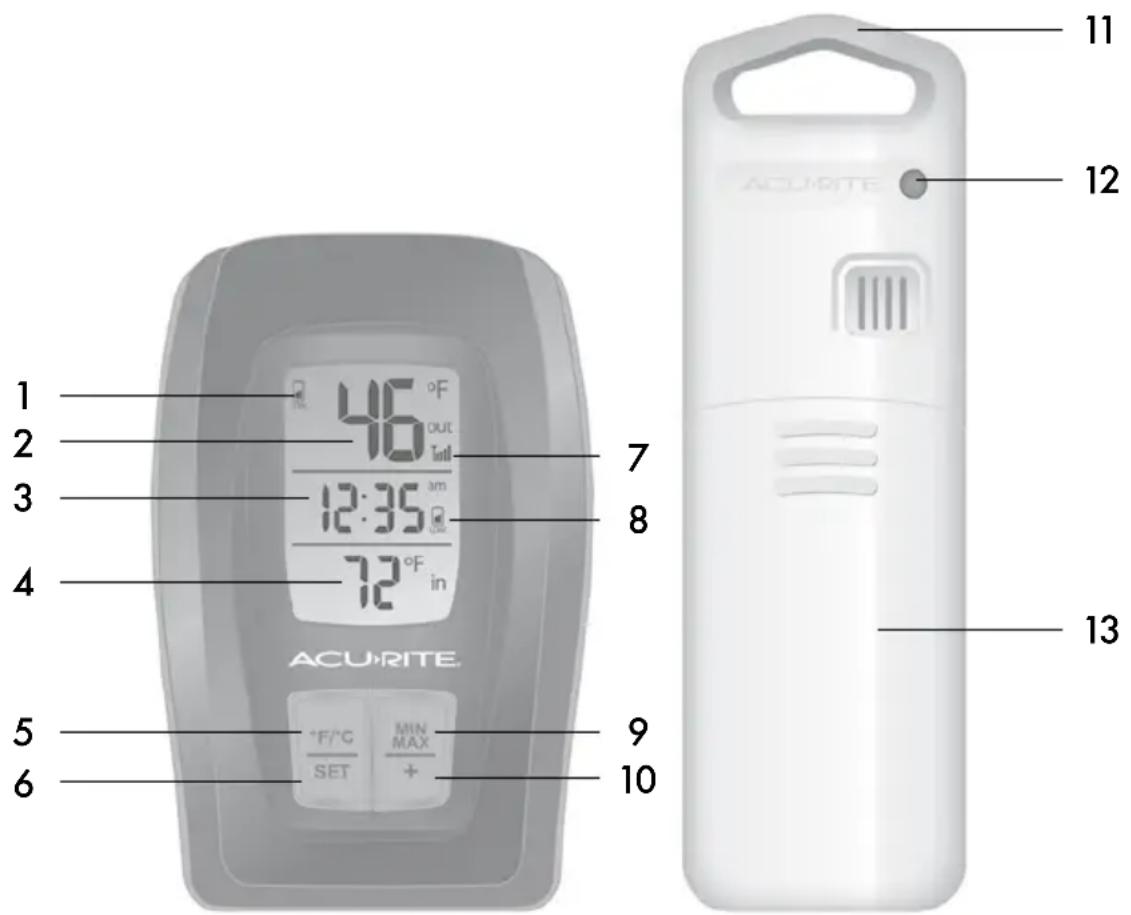
DISPLAY UNIT
- Sensor Low Battery Indicator
- Current Outdoor Temperature
- Clock
Displays time in either 12 hour or 24 hour formats.
- Current Indoor Temperature
- °F/°C Button
Press to select degrees Fahrenheit or degrees Celsius.
- Set Button
For setup preferences. - Wireless Sensor Signal Strength
-
Display Low Battery Indicator
-
MAX/MIN Button
Press to view high/low temperature records.
-
- Button
For setup preferences.
OUTDOOR SENSOR
- Integrated Hanger
For easy placement. - Wireless Signal Indicator
Flashes when data is being sent to the display unit. - Battery Compartment Cover
Install or Replace Batteries
AcuRite recommends high quality alkaline batteries for the best product performance. Heavy duty or rechargeable batteries are not recommended.
The outdoor sensor requires lithium batteries in low temperature conditions. Cold temperatures can cause alkaline batteries to function improperly. Use lithium batteries in the outdoor sensor for temperatures below -4°F / -20°C.

natural_image
Diagram showing battery casing and two batteries with one open, illustrating a process of adding or removing power (no text or symbols present)Outdoor Sensor
- Slide off the battery compartment cover.
- Insert 2 x AA batteries into the battery compartment, as shown. Follow the polarity (+/-) diagram in the battery compartment.
- Replace the battery cover.
LITHIUM BATTERIES
-40°F (-40°C) (70°C) 158°F
ALKALINE BATTERIES
-4°F (-20°C) (70°C) 158°F

natural_image
Exterior view of a gray remote control device with battery pack and power cord (no text or symbols visible)Display Unit
- Slide off the battery compartment cover.
- Insert 2 x AA batteries into the battery compartment, as shown. Follow the polarity (+/-) diagram in the battery compartment.
- Replace the battery cover.

PLEASE DISPOSE OF OLD OR DEFECTIVE BATTERIES IN AN ENVIRONMENTALLY SAFE WAY AND IN ACCORDANCE WITH YOUR LOCAL LAWS AND REGULATIONS.
BATTERY SAFETY: Clean the battery contacts and also those of the device prior to battery installation. Remove batteries from equipment which is not to be
used for an extended period of time. Follow the polarity (+/-) diagram in the battery compartment. Promptly remove dead batteries from the device. Dispose of used batteries properly. Only batteries of the same or equivalent type as recommended are to be used. DO NOT incinerate used batteries. DO NOT dispose of batteries in fire, as batteries may explode or leak. DO NOT mix old and new batteries or types of batteries (alkaline/standard). DO NOT use rechargeable batteries. DO NOT recharge non-rechargeable batteries. DO NOT short-circuit the supply terminals.
Clock Setup
Press and hold the "SET" button for 3 seconds to enter SET MODE. Once in set mode, the preference you are currently setting will blink on the display.
To adjust the currently selected (flashing) preference item, press the "+" button (press and HOLD to fast adjust).
To save your adjustments, press and release the "SET" button again to adjust the next preference.
The preference set order is as follows:
CLOCK HOUR MODE (12 hour or 24 hour)
CLOCK HOUR
CLOCK MINUTE
You will automatically exit SET MODE if no buttons are pressed for 30 seconds. Enter basic setup mode at any time by pressing and holding the "SET" button for 3 seconds.
Select Degrees Fahrenheit or Celsius
To select between degrees Fahrenheit (°F) or Celsius (°C) temperature units, press the "°F/°C" button located on the front of the display unit.
Placement for Maximum Accuracy
AcuRite sensors are sensitive to surrounding environmental conditions. Proper placement of both the display unit and outdoor sensor are critical to the accuracy and performance of this product.

Display Unit Placement
Place the display unit in a dry area free of dirt and dust. Display unit stands upright for tabletop use or is wall-mountable.
Outdoor Sensor Placement
Sensor must be placed outside to observe outdoor conditions. Sensor is water resistant and is designed for general outdoor use, however, to extend its life place the sensor in an area protected from direct weather elements.
Hang the sensor using the integrated hang holes or hanger, or by using string (not included) to hang it from a suitable location, like a well covered tree branch. The best location is 4 to 8 feet above the ground with permanent shade and plenty of fresh air to circulate around the sensor.
Important Placement Guidelines
- To ensure accurate temperature measurement, place units out of direct sunlight and away from any heat sources or vents.
- Display unit and outdoor sensor must be within 165 ft (50 m) of each other.
- To maximize wireless range, place units away from large metallic items, thick walls, metal surfaces, or other objects that may limit wireless communication.
- To prevent wireless interference, place both units at least 3 ft (.9 m) away from electronic devices (TV, computer, microwave, radio, etc.).

Setup is Complete
The sensor will now synchronize with the display unit. It may take a few minutes for synchronization to complete. Please refer to the troubleshooting section of this manual if anything appears to be functioning improperly.
Using the Thermometer
High/Low Records
Press the "MAX/MIN" button to view minimum and maximum outdoor and indoor temperature records. The temperature records are automatically cleared daily at midnight.
To view the MAXIMUM recorded outdoor and indoor temperature readings, press and release the "MAX/MIN" button. The "MAX" icon appears on the display.
To manually clear the MAXIMUM recorded values, press and hold the "MAX/MIN" button while in the MAX view mode. Dashes display to confirm you have cleared the MAXIMUM records.
To view the MINIMUM recorded outdoor and indoor temperature readings, press and release the "MAX/MIN" button until the "MIN" icon appears on the display.
To manually clear the MAXIMUM recorded values, press and hold the "MAX/MIN" button while in the MIN view mode. Dashes display to confirm you have cleared the MINIMUM records.
Troubleshooting
| No outdoor sensor receptionno bars | If the wireless signal indicator shows no bars:Relocate the display unit and/or the outdoor sensor.The units must be within 165 ft (50 m) of each other.Make sure both units are placed at least 3 feet (.9 m)away from electronics that may interfere with the wireless communication (such as TVs, microwaves, computers, etc).Use standard alkaline batteries (or lithium batteries in sensor when temperature is below -4°F/-20°C). Do not use heavy duty or rechargeable batteries. NOTE: It may take up to 20 minutes for display unit and sensor to synchronize after batteries are replaced. |
| Outdoor temperature is flashing or showing dashes | Flashing of the outdoor temperature is generally an indication of wireless interference.Bring both the sensor and display unit indoors and remove at least one battery from each.Reinstall the battery in the outdoor sensor.Reinstall the battery in the display unit.Let the units sit within a couple feet of each other for about 20 minutes to gain a strong connection. |
| Inaccurate temperature | Make sure both the display unit and sensor are placed out of direct sunlight and away from any heat sources or vents (see page 6). |
| Display screen not working | Check that the batteries are installed correctly.Batteries may need to be replaced. |
If your AcuRite product does not operate properly after trying the troubleshooting steps, visit www.AcuRite.com or call (877) 221-1252 for assistance.
Care & Maintenance
Display Unit Care
Clean with a soft, damp cloth. Do not use caustic cleaners or abrasives. Keep away from dust, dirt and moisture. Clean ventilation ports regularly with a gentle puff of air.
Outdoor Sensor Care
Clean with a soft damp cloth. Do not use caustic cleaners or abrasives.
Specifications
| TEMPERATURE RANGE | Outdoor: -40°F to 158°F; -40°C to 70°C |
| Indoor: 32°F to 122°F; 0°C to 50°C | |
| WIRELESS RANGE | 165 ft / 50 m depending on home construction materials |
| WIRELESS FREQUENCY | 433 MHz |
| POWER | Display: 2 x AA alkaline batteries |
| Sensor: 2 x AA alkaline or lithium batteries | |
| DATA REPORTING | 30 second updates |
FCC Information
This device complies with part 15 of FCC rules. Operation is subject to the following two conditions:
1- This device may NOT cause harmful interference, and
2- This device must accept any interference received, including interference that may cause undesired operation.
WARNING: Changes or modifications to this unit not expressly approved by the party responsible for compliance could void the user's authority to operate the equipment.
NOTE: This equipment has been tested and found to comply with the limits for a Class B digital device, pursuant to Part 15 of the FCC rules. These limits are designed to provide reasonable protection against harmful interference in a residential installation. This equipment generates, uses and can radiate radio frequency energy and, if not installed and used in accordance with the instructions, may cause harmful interference to radio communications. However, there is no guarantee that interference will not occur in a particular installation. If this equipment does cause harmful interference to radio or television reception, which can be determined by turning the equipment off and on, the user is encouraged to try to correct the interference by one or more of the following measures:
- Reorient or relocate the receiving antenna.
- Increase the separation between the equipment and the receiver.
- Connect the equipment into an outlet on a circuit different from that to which the receiver is connected.
- Consult the dealer or an experienced radio/TV technician for help.
NOTE: The manufacturer is not responsible for any radio or TV interference caused by unauthorized modifications to this equipment.
Such modifications could void the user authority to operate the equipment.
Customer Support
AcuRite customer support is committed to providing you with best-in-class service. For assistance, please have the model number of this product available and contact us in any of the following ways:

(877) 221-1252

info@chaney-inst.com
24/7 support at www.AcuRite.com
▶ Installation Videos
▶ Register your Product
▶ Instruction Manuals
▶ Support User Forum
▶ Replacement Parts
▶ Submit Feedback & Ideas
IMPORTANT
PRODUCT MUST BE REGISTERED TO RECEIVE WARRANTY SERVICE
PRODUCT REGISTRATION
Register online to receive 1 year warrantyprotection
www.AcuRite.com
SUPPORT
Support Forum
Archived Products
▶Register a Product
Limited One Year Warranty
At AcuRite, we proudly uphold our commitment to quality technology. Chaney Instrument Co. warrants that all products it manufactures to be of good material and workmanship, and to be free of defects when properly installed and operated for a period of one year from the date of purchase.
We recommend that you visit us at www.AcuRite.com for the fastest way to register your product. However, product registration does not eliminate the need to retain your original proof of purchase in order to obtain warranty benefits.
Chaney Instrument Co. warrants that all products it manufactures to be of good material and workmanship, and to be free of defects when properly installed and operated for a period of one year from the date of purchase. Remedy for breach of this warranty is limited to repair or replacement of the defective item(s). Any product which, under normal use and service, is proven to breach the warranty contained herein within ONE YEAR from date of sale will, upon examination by Chaney, and at its sole option, be repaired or replaced by Chaney. Transportation costs and charges for returned goods shall be paid for by the purchaser. Chaney hereby disclaims all responsibility for such transportation costs and charges. This
warranty will not be breached, and Chaney will give no credit for products it manufactures which have received normal wear and tear, been damaged (including by acts of nature), tampered, abused, improperly installed, damaged in shipping, or repaired or altered by others than authorized representatives of Chaney. The above-described warranty is expressly in lieu of all other warranties, express or implied, and all other warranties are hereby expressly disclaimed, including without limitation the implied warranty of merchantability and the implied warranty of fitness for a particular purpose. Chaney expressly disclaims all liability for special, consequential or incidental damages, whether arising in tort or by contract from any breach of this warranty. Some states do not allow the exclusion or limitation of incidental or consequential damages, so the above limitation or exclusion may not apply to you. Chaney further disclaims all liability from personal injury relating to its products to the extent permitted by law. By acceptance of any of Chaney's products, the purchaser assumes all liability for the consequences arising from their use or misuse. No person, firm or corporation is authorized to assume for Chaney any other liability in connection with the sale of its products. Furthermore, no person, firm or corporation is authorized to modify or waive the terms of this paragraph, and the preceding paragraph, unless done in writing and signed by a duly authorized agent of Chaney. This warranty gives you specific legal rights, and you may also have other rights which vary from state to state.
For in-warranty claims: Chaney Instrument Co. 965 Wells St., Lake Geneva, WI 53147
ACU▶RITE®

Weather Stations

Temperature & Humidity
Weather
Alert Radio
Kitchen
Thermometers
& Timers

Clocks
It's more than accurate, it's ACU-RITE.
AcuRite offers an extensive assortment of precision instruments, designed to provide you with information you can depend on to Plan your day with confidence™.
www.AcuRite.com
- CONTENTS
- ACURITE®
- Unpacking Instructions
- Package Contents
- Features & Benefits
- DISPLAY UNIT
- OUTDOOR SENSOR
- Install or Replace Batteries
- PLEASE DISPOSE OF OLD OR DEFECTIVE BATTERIES IN AN ENVIRONMENTALLY SAFE WAY AND IN ACCORDANCE WITH YOUR LOCAL LAWS AND REGULATIONS.
- Clock Setup
- Select Degrees Fahrenheit or Celsius
- Placement for Maximum Accuracy
- Display Unit Placement
- Outdoor Sensor Placement
- Important Placement Guidelines
- Setup is Complete
- Using the Thermometer
- High/Low Records
- Care & Maintenance
- Display Unit Care
- Outdoor Sensor Care
- Specifications
- FCC Information
- Customer Support
- 24/7 support at www.AcuRite.com
- IMPORTANT
- PRODUCT MUST BE REGISTERED TO RECEIVE WARRANTY SERVICE
- PRODUCT REGISTRATION
- SUPPORT
- Limited One Year Warranty
- ACU▶RITE®
- It's more than accurate, it's ACU-RITE.
Brand : AcuRite
Model : 00415
Category : Environmental Thermometer