Iris 06101 - Uncategorized AcuRite - Free user manual and instructions
Find the device manual for free Iris 06101 AcuRite in PDF.


Pick your language and provide your email: we'll send you a specifically translated version.
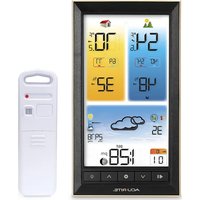
| Product Type | Indoor/Outdoor Thermometer with Humidity |
| Brand | AcuRite |
| Model | Iris 06101 |
| Display Type | Color LCD |
| Dimensions (Display Unit) | 3.5 x 5.0 x 1.5 inches |
| Weight (Display Unit) | 4.2 oz |
| Power Source | 2 AA batteries (not included) |
| Wireless Sensor Range | Up to 100 feet (30 meters) |
| Indoor Temperature Range | 32°F to 122°F (0°C to 50°C) |
| Outdoor Temperature Range | -40°F to 158°F (-40°C to 70°C) |
| Indoor Humidity Range | 1% to 99% RH |
| Outdoor Humidity Range | 1% to 99% RH |
| Transmission Frequency | 433 MHz |
| Number of Sensors Supported | Up to 3 (sold separately) |
| Memory | High and low records |
| Features | Color-coded comfort level indicator, 12/24 hour time display, trend arrows |
| Maintenance | Wipe gently with a dry, soft cloth; do not use water or cleaning agents |
| Safety | Do not immerse in water; keep away from direct sunlight and extreme temperatures |
| Spare Parts / Repairability | Replacement sensors available; display unit has no user-serviceable parts |
| Included in Box | Display unit, wireless sensor, instruction manual |
Frequently Asked Questions - Iris 06101 AcuRite
How do I set up the AcuRite Iris 06101?
Insert 2 AA batteries into the display unit and the wireless sensor. Press the 'SET' button to select time, date, and units. The sensor will automatically sync within 3 minutes.
Why is my outdoor sensor not showing data?
Ensure the sensor is within 100 feet of the display unit and that both have fresh batteries. Press and hold the 'SEARCH' button on the display for 5 seconds to force a resync.
What does the color-coded comfort indicator mean?
The display changes color based on humidity and temperature: blue for dry, green for comfortable, red for wet/humid.
How do I view high and low records?
Press the 'MAX/MIN' button repeatedly to cycle through indoor/outdoor high and low temperature and humidity readings. To clear records, press and hold the 'MAX/MIN' button for 3 seconds.
Can I add more sensors to the display?
Yes, the Iris 06101 can support up to 3 sensors (model 06002 sold separately). Each sensor will auto-pair within a few minutes.
How do I clean the display unit?
Use a soft, dry microfiber cloth to gently wipe the screen and casing. Do not use water, solvents, or abrasive cleaners as they may damage the device.
What type of batteries does the sensor use?
The sensor uses 2 AA alkaline batteries. Avoid rechargeable batteries as they may have lower voltage and affect performance.
Is the outdoor sensor weatherproof?
Yes, the sensor is designed to withstand rain and snow, but it should not be submerged. Install it under an eave or in a sheltered location for best results.
How far can the sensor be from the display?
The wireless signal can reach up to 100 feet (30 meters) in open air. Walls, windows, and metal objects may reduce range.
What does the 'Out of Range' icon mean?
This icon indicates the display has lost connection with the sensor. Move the sensor closer, replace batteries, or press the 'SEARCH' button to re-establish the link.
User questions about Iris 06101 AcuRite
0 question about this device. Answer the ones you know or ask your own.
Ask a new question about this device
No questions yet. Be the first to ask one.
Download the instructions for your Uncategorized in PDF format for free! Find your manual Iris 06101 - AcuRite and take your electronic device back in hand. On this page are published all the documents necessary for the use of your device. Iris 06101 by AcuRite.
USER MANUAL Iris 06101 AcuRite
Manual assistant
Powered by Anthropic
Waiting for your message
Product information
Brand : AcuRite
Model : Iris 06101
Category : Uncategorized