
PSP333_FD - Loudspeaker Proscan - Free user manual and instructions
Find the device manual for free PSP333_FD Proscan in PDF.


User questions about PSP333_FD Proscan
0 question about this device. Answer the ones you know or ask your own.
Ask a new question about this device
Download the instructions for your Loudspeaker in PDF format for free! Find your manual PSP333_FD - Proscan and take your electronic device back in hand. On this page are published all the documents necessary for the use of your device. PSP333_FD by Proscan.
USER MANUAL PSP333_FD Proscan
natural_image
Front view of a black electronic device with two side brackets and a central hub (no visible text or symbols)INSTRUCTION MANUAL
PLEASE READ BEFORE OPERATING THIS EQUIPMENT
PROSCAN™ IS A REGISTERED TRADEMARK OF TECHNICOLOR USA INC. AND USED UNDER LICENSE TO CURTIS INTERNATIONAL LTD.
SAFETY INSTRUCTIONS
voltage points or short out parts that could result in fire or electric shock. Never spill or spray any type of liquid on the product.
- OUTDOOR ANTENNA GROUNDING If an outside antenna is connected to the product, be sure the antenna system is grounded so as to provide some protection against voltage surges and built-up static charges. Section 810 of the National Electric Code, ANSINFPA 70, provides information with respect to proper grounding of the mast and supporting structure, grounding of the lead-in wire to an antenna discharge product, size of grounding conductors, location of antenna discharge product, connection to grounding electrodes and requirements for grounding electrodes.
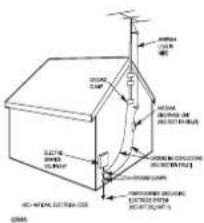
EXAMPLE OF ANTENNA GROUNDING AS PER NATIONAL ELECTRICAL CODE
18. SERVICING
Do not attempt to service this product yourself as opening or removing covers may expose you to dangerous voltage or other hazards. Refer all servicing to qualified service personnel.
19. REPLACEMENT PARTS
When replacement parts are required, be sure the service technician uses replacement parts specified by the manufacturer or those that have the same characteristics as the original part. Unauthorized substitutions may result in fire, electric shock or other hazards.
20. SAFETY CHECK
Upon completion of any service or repairs to this product, ask the service technician to perform safety checks to determine that the product is in proper operating condition.
21. WALL OR CEILING MOUNTING
The product should be mounted to a wall or ceiling only as recommended by the manufacturer.
22. DAMAGE REQUIRING SERVICE
Unplug the product from the wall outlet and refer servicing to qualified service personnel under the following conditions:
a. When the power-supply cord or plug is damaged.
b. If liquid has been spilled or objects have fallen into the product.
c. If the product has been exposed to rain or water.
d. If the product does not operate normally by following the operating instructions, Adjust only those controls that are covered by the operating instructions, as an adjustment of other controls may result in damage and will often require extensive work by a qualified technician to restore the product to its normal operation.
e. If the product has been dropped or the cabinet has been damaged.
- When the product exhibits a distinct change in performance this indicates a need for service.
23. HEAT
The product should be situated away from heat sources such as radiators, heat registers, stoves or other products (including amplifiers) that produce heat.
24. NOTE TO CATV SYSTEM INSTALLER
This reminder is provided to call the CATV system installer's attention to Article 820-49 of the NEC that provides guidelines for proper grounding and, in particular, specifies that the cable ground shall be connected to the grounding system of the building, as close to the point of cable entry as practicable.

"WARNING: Cancer and Reproductive harm - www.P65Warnings.ca.gov."
SAFETY INSTRUCTIONS
FCC WARNING:
This equipment may generate or use radio frequency energy. Changes or modifications to this equipment may cause harmful interference unless the modifications are expressly approved in the instruction manual. The user could lose the authority to operate this equipment if an unauthorized change or modification is made.
SURGE PROTECTORS:
It is recommended to use a surge protector for AC connection. Lightning and power surges ARE NOT covered under warranty for this product.
INFORMATION:
This equipment has been tested and found to comply with the limits for a Class B digital device, pursuant to Part 15 of the FCC Rules. These limits are designed to provide reasonable protection against harmful interference in a residential installation. This equipment generates, uses and can radiate radio frequency energy and, if not installed and used in accordance with the instructions, may cause harmful interference to radio communications. However, there is no guarantee that interference will not occur in a particular installation. If this equipment does cause harmful interference to radio or television reception, which can be determined by turning the equipment off and on, the user is encouraged to try to correct the interference by one or more of the following measures:
* Reorient or relocate the receiving antenna.
* Increase the separation between the equipment and receiver.
* Connect the equipment into an outlet on a circuit different from that to which the receiver is connected.
* Consult the dealer or an experienced radio/TV technician for help.
"FCC RF Radiation Exposure Statement Caution: This Transmitter must be installed to provide a separation distance of at least 20 cm from all persons."
1
SAFETY INSTRUCTIONS
Before using the unit, be sure to read all operating instructions carefully. Please note that these are general precautions and may not pertain to your unit. For example, this unit may not have the capability to be connected to an outdoor antenna.
1. READ INSTRUCTIONS
All the safety and operating instructions should be read before the product is operated.
2. RETAIN INSTRUCTIONS
The safety and operating instructions should be retained for future reference.
3. HEED WARNINGS
All warnings on the product and in the operating instructions should be adhered to.
4. FOLLOW INSTRUCTIONS
All operating and use instructions should be followed.
5. CLEANING
Unplug this product from the wall outlet before cleaning. Do not use liquid cleaners or aerosol cleaners. Use a dry cloth for cleaning.
6. ATTACHMENTS
Do not use attachments not recommended by the product's manufacturer as they may cause hazards.
7. WATER AND MOISTURE
Do not use this product near water-for example near a bathtub, washbowl, kitchen sink or laundry tub; in a wet basement; or near a swimming pool.
8. ACCESSORIES
Do not place this product on an unstable cart, stand, tripod, bracket or table.
The product may fall, causing serious injury and serious damage to the product. Use only with a cart, stand, tripod, bracket or table recommended by the manufacturer or sold with the
product. Any mounting of the product should follow the manufacturer's instructions, and should use a mounting accessory recommended by the manufacturer.
BA. An appliance and cart combination should be moved with care. Quick stops, excessive force and uneven surfaces may cause the appliance and cart combination to overturn.
9. VENTILATION
Slots and openings in the cabinet and in the back or bottoms are provided for ventilation, to ensure reliable operation of the product and to protect it from overheating. These openings must not be blocked or covered. The openings should never be blocked by placing the product

on a bed, sofa, rug or other similar surface. This product should never be placed near or over a radiator or heat source. This product should not be placed in a built-in installation such as a bookcase or rack unless proper ventilation is provided or the manufacturer's instructions have been adhered to.
10. POWER SOURCES
This product should be operated only from the type of power source indicated on the marking label. If you are not sure of the type of power supply to your home, consult your appliance dealer or local power company. For products intended to operate from battery power, or other sources, refer to the operating instructions.
11. GROUNDING OR POLARIZATION
This product is equipped with a polarized alternating-current line plug (a plug having one blade wider than the other). This plug will fit into the power outlet only one way. This is a safety feature. If you are unable to insert the plug fully into the outlet, try reversing the plug. If the plug should still fail to fit, contact your electrician to replace your obsolete outlet. Do not defeat the safety purpose of the polarized plug.
12. POWER-CORD PROTECTION
Power-supply cords should be routed so that they are not likely to be walked on or pinched by items placed upon or against them, paying particular attention to cords at plugs, convenience receptacles, and the point where they exit from the appliance.
13. LIGHTNING
To protect your product from a lightning storm, or when it is left unattended and unused for long periods of time, unplug it from the wall outlet and disconnect the antenna or cable system. This will prevent damage to the product due to lightning and power-line surges.
14. POWER LINES
An outside antenna system should not be located in the vicinity of overhead power lines or other electric light or power circuits, or where it can fall into such power lines or circuits. When installing an outside antenna system, extreme care should be taken to keep from touching such power lines or circuits as contact with them might be fatal.
15. OVERLOADING
Do not overload wall outlets and extension cords as this can result in a risk of fire or electric shock.
16. OBJECT AND LIQUID ENTRY
Never push objects of any kind into this product through openings as they may touch dangerous
2
Table of Contents
Your Bluetooth light up speaker 5
Features
Includes
Charging instructions 5
Charging the battery for first time
Recharging the internal battery
Battery Note and Care
Orientation 6
Features & Controls
Bluetooth operation 7
Getting connected
Playing music from an external Bluetooth device
Treble and Bass....7
Radio operation....7
Auxiliary operation....8
Specifications 8
Trouble Shooting 9
Warranty Card 10
Your Bluetooth Light up Speaker
Features
• Supports profile A2DP
● Supports automatic device pairing
- Wireless range: 30 feet
- Pairing button
- Play/pause button
- Skip forward/back button
- On/off switch
- Treble/Bass/Volume control
- Bluetooth/AUX/FM radio indicator
- Charge indicator
- 3.5mm AUX IN jack for player etc
- Internal rechargeable battery
- DC input for battery recharging
• Light up LED speaker
Includes
- USB Cable
- User manual
Charging instructions
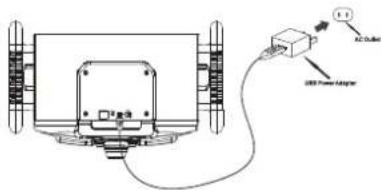
This unit operates on a internal Li-ion battery that can be recharged either using the USB port on your computer or from a USB power adaptor (not included) with a rated output of DC 5V/500mA and up.
Charging the battery for first time
1.) Charge the internal Li-ion battery a minimum of 3 hours prior to first use.
Plug the unit into the USB port on your computer or into a USB power adaptor (not included) using the included USB cable.
2.) The CHARGER indicator will light red while charging and light green when the unit is fully charged. Unplug the USB cable from the power source once the battery is fully charged.
Orientation
Features & Controls
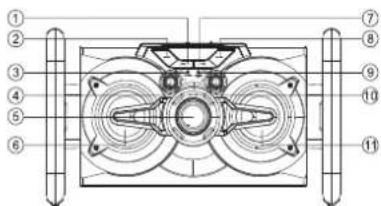
- Previous button
- SOURCE button
- CHARGER indicator
- BASS knob.
- VOLUME knob.
- SPEAKER (L)
-
Forward button.
-
▶/PAIR button.
- WORKING MODE indicator.
- TREBLE knob.
- SPEAKER (R).
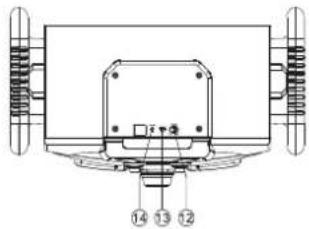
- POWER switch.
- DC IN socket.
- AUX IN jack.
6
Trouble Shooting
| PROBLEM | POSSIBLE CAUSE | REMEDY |
| GENERAL | ||
| No Charging | The USB power adaptor (not included) is not plugged into a wall outlet or the USB cable (included) is not plugged into the mini USB jack on the unit.Wall outlet is not functioning.Computer USB port is not functioning. | Plug the USB power adaptor (not included) into a wall outlet and plug the USB cable (included) into the mini USB jack on the unit.Plug another device into the same outlet to confirm the outlet is working.Make sure your computer power is turned on and try another USB port. |
| No Sound | The unit battery is exhausted.Volume set too low. | Recharge the unit battery.Press the volume+ button to increase the sound level. |
| BLUETOOTH | ||
| No sound when playing audio via Bluetooth | Your Bluetooth device has been paired properly.The unit placement out of range.The volume control of your Bluetooth device is set at too low.The volume control of the main unit is set at too low. | Paring your Bluetooth device according to the 'Pairing a Bluetooth Device for the First Time' section.Relocate the unit within Bluetooth operating range (30 feet).Increase the volume of your Bluetooth device.Increase the volume of the main unit to turn to your wish. |
| AUXILIARY | ||
| No sound in AUX mode | Volume at minimum.External device not connected property. | Adjust the volume knob.Clear contact pins and connect again. |
Bluetooth operation
External devices that have a built-in Bluetooth feature can connect wirelessly to the Blue Speaker.
GETTING CONNECTED
- Power on the unit by side the Power switch, WORKING MODE indicator will light blue and flash.
- Set the Bluetooth function of your external device to ON and begin searching for devices. NOTE: The effective distance between your external device and this apparatus is 10 meters(30 feet).
- Once "Pro PSP333_FD" appears on the paired device list of your external device, select it.
- If you are asked for a password, enter "0000".
- A beep will be heard and WORKING MODE indicator light blue steadily that indicates a connection has been established.
- A few seconds later your Bluetooth connection should be ready to used.
PLAYING MUSIC FROM AN EXTERNAL BLUETOOTH DEVICE
- Follow the "GETTING CONNECTED" steps above to pair your external device.
- Turn on the music player program on your external device and set it to play. Normally, you can control music playback with the ▶/PAIR, ▶ and ▶ buttons on the Bluetooth Speaker.
- Audio played through the connected Bluetooth Device will now be heard through the speakers.
- Adjust the VOLUME to obtain the desired volume level.
- Slide POWER switch to turn off the unit.
TREBLE AND BASS
Twist the TREBLE knob and BASS knob to adjust the treble and bass levels.
Radio operation
This device is built-in FM radio function.
- Slide POWER switch to turn the unit ON and then press SOURCE button twice to select the FM radio mode.
SOURCE Button sequence - Bluetooth -> AUX -> FM Radio - Under the FM radio mode, press the PLAY button in 3 seconds to start AUTO SCAN all available FM radio stations.
- Press the Previous/Forward button for tuning the previous or next scanned radio stations.
7
Family Dollar
500 Volvo Parkway
Chesapeake, VA 23320
Tel: 1-844-636-7687
http://www.familydollar.com
Auxiliary operation
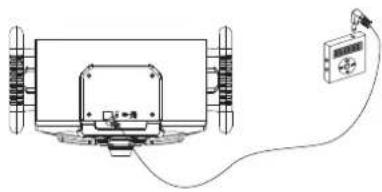
External (auxiliary) audio sources such as tablets smartphones or MP3 players can connect to the Bluetooth Light up Speaker via aux-in.
- Side POWER switch to turn the unit ON and then press SOURCE button to select the WORKING MODE indicator light red (AUX mode).
- Set the volume to the minimum level with the VOLUME knob.
- Plug in an AUX IN cable into the AUX IN jack on the top of the unit.
- Plug the other end of the cable into the headphone or Line-Out jack of the external source.
- Turn on the external audio device and set it to play. Turn the external audio device's volume up to 2/3 if necessary, adjust the volume on the main unit by turning the VOLUME knob.
natural_image
Technical line drawing of a mechanical assembly with a connected device (no text or symbols)TREBLE AND BASS
Twist the TREBLE knob and BASS knob to adjust the treble and bass levels.
Specification
Power Requirement
DC input: DC 5V = 500mA (Micro USB)
Battery: built-in rechargeable lithium battery
Bluetooth: Pro PSP333_FD
Support profile AZDP
Audio Power output: 3W x2
Speaker: 5 W Z Orange 3 PKT XZ Dimensions: 24.4 mm (100 x 47.6 cm)
Dimensions: 24.1 cm(H) x 42.1 cm(W) x 24.5 cm(D) Frequency range: FM 87.5 - 108MHz
8
To make a warranty claim, Please email http://www.familydollar.com or call Tel: 1-844-636-7687
90 day Warranty
This product is warranted to be free from defects in material and workmanship for a period of ninety (90) days from the date of original purchase. During this period, your exclusive remedy is repair or replacement of this product or component found to be defective, at our option; however, you are responsible for all costs associated with returning the product to us. If the product or component is no longer available, we will replace with a similar one of equal or greater value. Prior to a replacement being sent, the product must be rendered inoperable or returned to us.
This warranty does not cover glass, filters, wear from normal use, use not in conformity with the printed directions; or damage to the product resulting from accident, alteration, abuse, or misuse. This warranty extends only to the original consumer purchaser or gift recipient. Keep the original sales receipt, as proof of purchase is required to make a warranty claim. This warranty is void if the product is used for other than single-family household use or subjected to any voltage and waveform other than as on the specified rating on the label (e.g., 120V\~60Hz).
We exclude all claims for special, incidental, and consequential damages caused by breach of express or implied warranty. All liability is limited to the amount of the purchase price. Every implied warranty, including any statutory warranty or condition of merchantability or fitness for a particular purpose, is disclaimed except to the extent prohibited by law, in which case such warranty or condition is limited to the duration of this written warranty. This warranty gives you specific legal rights. You may have other legal rights that vary depending on where you live. Some states or provinces do not allow limitations on implied warranties or special, incidental, or consequential damages, so the foregoing limitations may not apply to you.
For faster service, locate the model, type, and serial numbers on your appliance.
ATTACH YOUR PROOF OF PURCHASE HERE, PROOF OF PURCHASE IS REQUIRED TO OBTAIN WARRANTY SERVICE.
Please have the following information available when you contact the Support Team:
• Name, address and telephone number.
- Model number and serial number.
• A clear, detailed description of the problem.
- Proof of purchase including dealer or retailer name, address and date of purchase.
- INSTRUCTION MANUAL
- SAFETY INSTRUCTIONS
- SERVICING
- REPLACEMENT PARTS
- SAFETY CHECK
- WALL OR CEILING MOUNTING
- DAMAGE REQUIRING SERVICE
- HEAT
- NOTE TO CATV SYSTEM INSTALLER
- FCC WARNING:
- SURGE PROTECTORS:
- INFORMATION:
- READ INSTRUCTIONS
- RETAIN INSTRUCTIONS
- HEED WARNINGS
- FOLLOW INSTRUCTIONS
- CLEANING
- ATTACHMENTS
- WATER AND MOISTURE
- ACCESSORIES
- VENTILATION
- POWER SOURCES
- GROUNDING OR POLARIZATION
- POWER-CORD PROTECTION
- LIGHTNING
- POWER LINES
- OVERLOADING
- OBJECT AND LIQUID ENTRY
- Table of Contents
- Your Bluetooth Light up Speaker
- Features
- Includes
- Charging instructions
- Charging the battery for first time
- Orientation
- Bluetooth operation
- GETTING CONNECTED
- PLAYING MUSIC FROM AN EXTERNAL BLUETOOTH DEVICE
- TREBLE AND BASS
- Radio operation
- Family Dollar
- Auxiliary operation
- Specification
- day Warranty
Brand : Proscan
Model : PSP333_FD
Category : Loudspeaker