
PSP667_FD - Loudspeaker Proscan - Free user manual and instructions
Find the device manual for free PSP667_FD Proscan in PDF.


| Product Type | Portable Bluetooth Speaker |
| Brand | Proscan |
| Model | PSP667_FD |
| Bluetooth Version | Bluetooth V5.5 |
| Operating Distance | 10 meters (free space) |
| Battery Type | Built-in rechargeable lithium battery |
| Battery Capacity | 3.7V / 1200mAh |
| Charging Input Voltage | DC 5V, 1A |
| Dimensions | Approximately 400 x 80 x 60 mm |
| Weight | Not specified, typical <1 kg |
| Audio Sources | Bluetooth, FM Radio, TF Card, USB Drive, AUX-In |
| Speaker Output | 2.1 channel (inferred) |
| Hands-free Calling | Yes, with built-in microphone |
| FM Radio | Yes, auto-scan and save |
| TF Card / USB Playback | Supports MP3 music files |
| Controls | Power, Mode, Volume, Play/Pause, Track selection, Call buttons |
| LED Indicators | Red light for charging, blue flashing for pairing |
| Cleaning Instructions | Turn off before cleaning; wipe with dry cloth |
| Storage | Turn off when not in use; store in cool dry place |
| Warranty | 90 days limited warranty |
| FCC Compliance | Part 15 of FCC Rules |
Frequently Asked Questions - PSP667_FD Proscan
User questions about PSP667_FD Proscan
0 question about this device. Answer the ones you know or ask your own.
Ask a new question about this device
Download the instructions for your Loudspeaker in PDF format for free! Find your manual PSP667_FD - Proscan and take your electronic device back in hand. On this page are published all the documents necessary for the use of your device. PSP667_FD by Proscan.
USER MANUAL PSP667_FD Proscan
Please read these instructions thoroughly
before use and retain for future reference
PROSCAN™ IS A REGISTERED TRADEMARK OF TECHNICOLOR USA INC. AND USED UNDER LICENSE TO CURTIS INTERNATIONAL LTD.
Instructions for use
Furned and all instructions carefully
Getting started
Remove the Portable container and accessories from the bus
Remove the packaging from the product
In the box
Felda Shetoff Spokes
USD charging mls
A
Features
-2.1 Industrials connection functionality
-2.5L/s refrigerable battery
AUX is collected to device without deamination
Supports TF
Call in pin and use for home how call answers to
Safety Instructions
- Keep the oil oven from fuel sources, direct sunlight, humidity water and any other liquid.
• Do not use the label of a form based to drop off or disenged in any way? - Repairs to electrical equipment trade only be borne by a trained vector. In proper hours they
- To act with claim in any of
- 2014年1月1日
Do not use this unit for anything either from its intended use. - Group Deviation Method of Assisted Solutions
- Thin product is not a tiny
- Dors of the above drawing canvas is great
- 2018年,公司与关联方不存在同业竞争,且不会以任何形式从事与本公司相同或相似的业务。
• Do not escape to successive heat such as molarize, heat ex- - Never increase the end in water of any other liquid for does
This product with 100 gm voltage 5.25V and electric current 2A for charging, and it will be charged if charging is
date beyond the rate village and corner
Product Diagram
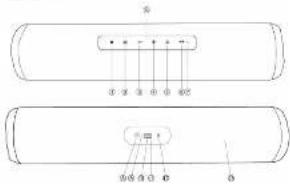
| 1 | Power switch ON/OP | Hold the power source by Toronto light on ON/OP |
| 2 | Main switch buttons | To switch blackboard / Malder / TC card / USD OAK card |
| 3 | Previous switch (Windows Open) | Short power switch is switch to the power switch. Long power switch is reduce the volume |
| 4 | Next switch (Volumes Up) | Short power switch is switch to the next track Long power switch to reverse the route |
| 5 | MHz | Short power switch from the switch to Bluetooth mode. |
| 6 | Knower / read a call / Ping / frazer / Auto phone and share all 40 channels | One call calling, long power switch to reduce the call. And then press the button to play (power / sensor) or link calls. Passive the button to reduce the load call. Long power the button, less open of TV radio and audio. |
| 7 | Message | Message |
| 8 | USB charging port | Used to charge the delivery. |
| 9 | indicate LED light | The red light beam/making charging. One to charge, the second light will be off. |
| 10 | USB port | USB port |
| 11 | TC card slot | TC card slot |
| 12 | AUD in jack | AUD / low speed |
| 13 | Speaker | Speaker |
| 14 | Motorful indicator type | Motorful, turn, and LCD lighting clearly visible. Great screen can be converted to the LCD lights will be solid. Poor mode, LCD light will be flashing down. |
2
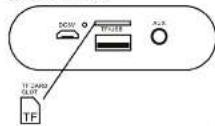
Direction of the TF card
INSTRUCTION FOR USE
Charging Instructions
This potato is colored, separated with a nail in rechargeable buffer.
Biomers asking it for the French new recommendation you have the Jard Date to change the sanitary party.
Cavender, 2017, 38: 1965.
In particular, the product being charged
When the battery is fully charged, the red LED inflection will switch OFF.
Pairing the portable Speaker with Bluetooth devices (phone or music device)
Press the Power switch (1) before for about 3 seconds you will wear a time and I will use ON in the Sketstein
pacing mode. The LED indicator light [14] will quickly learn.
Face 2# speaker and 2000s device (port of mode device) vs that exp are to X350 from 30 not ahead.
The following instructions in this section are to be a research and development of the research and development of the research and development of the research and development of the research and development of the research and development of the research and development of the research and development of the research and development of the research and development of the research and development of the research and development of the research and development of the research and development of the research and development of the research and development of the research and development of the research and development of the research and development of the research and development of the research and development of
Cenay bao shyad "Shu yiu an ayu aun hui guanu uua." Pro RS667. "bua to bu"
available a Bluetooth devices
Uncompared, order for purchased 1000 to orders in paying
Once paired successfully, you will hear above a 'indicating pairing has been successful.
You are now stated to have the possible question:
Green juice have paired the pollish speaker with a clean, 20000000000000000000000000000000000000000000000
pair automatically when the dawor's Bluetooth is activated and in range. You do not need to re-pair any previously
- 本说明仅供参考。
The speaker will attempt to act in the current year with other Bluetooth works from
or. If you want to part with a new device, please turn off from the Bluetooth device then are your new device to
which and see out the pulling rate.
Crist of the Canadian Association for the United States, 2013. The Canadian Association is a public
(四)本报告书的摘要
1
3
Function Summary
Order for question am paired with put devices. It can be seen music instead through the put speaker. Select
the track you wish to listen to and it will be dreamed to your Dharzoth speaker, and you can see your device to
Using the FM radio
Turn on the air, and press the Mode button to select the PM radio mode. Visit by inserted the charging cable as an
1) Along press on the Phone button, TV radio will automatic searching and can automatically save;
- A short press on the Waime up & Waime down button to select the desired radio station.
TF card playback & U disk play music
After the portable speaker is turned on, insert the TP Cord to U disk to the TFUSB port, it will switch to TP1.825 mode
a) in total buying price, the transaction includes an acquisition rate. Using the 100% of sales for short periods the returns to Egypt of the provisions which are not yet
Using AUX-in
After the particle operator in Al and an, named one was all the Al/Al/Al/Al ratio (prohibited) into SAGS to pass, the
Total and the case is bound to a 2-configuration in play, must. Use of a key or work, please have taken to equal two volumes level.
Note: Use prema Main India to change local remote sites after meeting AUS cable
Please Note
- Not all mobile phones support all the functions listed above. Please refer to your call phone's user's manual for
- Damsa hotfons and coldmum mays may cause damage to your mobile street.
Clearing & Maintenance
Eating & Sultorations
Turn OFF the spinover 3 to be evaluated and before blaming.
The following table provides the reference to the reference table.
Storage
Turn OFF the power when you not at use, clean and above solely
Do's and Don'ts
Read the following recommendations before using the agent. Following these you will be able to enjoy the
2017年4月9日
+ Do not overcome the speaker to determine high or low accuracy
device, direct within plants and
+ Don't dispose of the speaker in a fire as it will return to an explosion.
- Don't expose the speaker to contact with physical aspects of the all whose variables and damage. - Don't surprise temporarily to avoid any other issues not being involved.
- In all words he needs to make the hand when desired.
• Do not subject the speaker to mechanical work
- The not ad-harry funds or benefits to your spouse
Do not use the speaker if it has been damaged in any way.
References
| Bluetooth specification | Bluetooth V-5.5 |
| Operating distance | 10 meters (free space) |
| Other | 2 x 5V |
| Battery battery | 3.7V / 1200mAh |
| Charging input voltage | DC 5V = 1000mA |
| Product size | 400x80x60x64 |
Note: Before to a changing time may vary based on usage 5 types of devices once
00108: 15605
The quick brown fox jumps over the lazy dog.
| This appliance should not be used to store the domestic packaging at the cost of the retail line, but must be composed at a certain point for any day of October and December domestic appliances. This material is appliance, its contents natural and packaging put your customers in the important room. The materials used in this appliance are available. By receiving and domestic appliances we receive any other product or the provisions of our advertisement. Ask your local authorities from the market regarding the price or value of the |
Made in China

NOTE: This equipment has been tested and found to comply with the limits for a Gargo B final down, request in and 1st of the ECG Blies. Three industries
designed to provide reasonable protection against harmful interference in a
residential assistance. This equipment; general uses and can reduce radio frequency, energy and, I can be tested and used in accordance with the instructions.
may cause traffic interference to radio communications. However, there is
The government grant approval (reported) accordance to the of interest policy, which
can be determined by having the applied oil and gas, the use is encouraged to
By a research and administration by one of five to the following Phased
- Resident or relocate the receiving antenna.
- Increase the separation between the equipment and water.
-Connect the equipment into an outlet on a circuit offered from this to which the
Good file order is recommended solely by the author in info
Changes in staff/bathes not currently approved by the parts responsible for compliance
could void the users authority to operate the equipment
This review complies with Part 15 of the FCC Rules. Operations is subject to the following two conditions:
(1) This device may not cause harmful interference, and
(2) this device must accept any interference received, including interference that may
cause underred operation
For service assistance and product information, please call 1-830-888-0652
Cata International Ltd. 245 SPOCKET ORVE. UNIT 15, MERSISSUELA, DRL 195 243
www.cifco.com
To make a warranty claim, please email support@curitars.com or call 1-806-065-9853
90 day Warranty
This product is warranted to be free from defects in material and workman.
ship for a period of timely (90) days from the case of engine purchase. During this period, your exclusive remedy is repair or replacement of this
product or component found to be defective, at our option. However, you are
responsible for all costs associated with returning the product to us. If the
one of equal or greater ways. Prior to a replacement being sent, the product
must be rendered inoperable or returned to us,
This warranty does not cover glass, filters, wear from normal use, use not in
conformity with the printed directions, or damage to the product resulting from product, a location, abuse, or misuse. This warranty extends only to the
original consumer purchaser or gift recipient. Keep the original sales receipt,
as proof of purchase is required to make a warranty claim. This warranty is
We'll be produced in the other than single-family households of use or subjected to any voltage and waveform others than as on the specified ratio
on the late (e.g., 120N\~80Hz)
We exclude all claims for special, incidentor, and consequential damages.
deemed by breach of express or implied warranty. Affordability is limited to the amount of the purchase price. Even implied warranty, including any situation
warranty or condition of merchantability or fitness for a particular purpose, is
disclaimed except to the extent prohibited by law, in which case such
warranty of conclusion is limited to the duration of this written warranty. This warranty gives you specific legal rights. You may have other legal rights the
vary depending on where you live. Some states or provinces do not allow
limitations on implied warranties or special, incidental, or consequential dimensions, to the foregoing limitations would not apply in way.
For faster service, locate the model, type, and some numbers on your
8.43-10
ATTACH YOUR PROOF OF PURCHASE HERE, PROOF OF PURCHASE IS
REQUIRED TO OBTAIN WARRANTY SERVICE.
Please have the following information available when you contact the Support Team
Narsh, historical and historical numbers
A clear detailed description of the problem
Proof of purchase including dealer or retailer name, address and date of purchase.
- Please read these instructions thoroughly
- Instructions for use
- Getting started
- In the box
- Features
- Safety Instructions
- Product Diagram
- Direction of the TF card
- INSTRUCTION FOR USE
- Charging Instructions
- Function Summary
- Using the FM radio
- TF card playback & U disk play music
- Using AUX-in
- Please Note
- Clearing & Maintenance
- Eating & Sultorations
- Storage
- Do's and Don'ts
- day Warranty
Brand : Proscan
Model : PSP667_FD
Category : Loudspeaker