
PSP1500-ASST_FD - Loudspeaker Proscan - Free user manual and instructions
Find the device manual for free PSP1500-ASST_FD Proscan in PDF.


| Product Type | Portable Bluetooth Speaker |
| Model | PSP1500-ASST_FD |
| Brand | Proscan |
| Dimensions (approx.) | 10 x 10 x 5 cm |
| Weight | 0.5 kg |
| Power Source | Built-in rechargeable battery via USB-C |
| Battery Capacity | 1500 mAh |
| Playback Time | Up to 8 hours at moderate volume |
| Charging Time | Approximately 3 hours |
| Connectivity | Bluetooth 5.0, AUX 3.5mm input |
| Output Power | 5W RMS |
| Frequency Response | 80 Hz – 20 kHz |
| Controls | Power, Volume +/-, Play/Pause, Bluetooth pairing button |
| Additional Functions | Built-in microphone for hands-free calling, TWS pairing for stereo |
| Housing Material | ABS plastic with fabric grille |
| Water Resistance | IPX5 (splash-proof) |
| Included Accessories | USB charging cable, AUX cable, user manual |
| Cleaning Instructions | Wipe with a soft dry cloth. Do not use liquid cleaners. |
| Storage | Store in a cool, dry place away from direct sunlight. |
| Safety Warnings | Do not disassemble. Keep away from children under 3 years. Avoid extreme temperatures. |
| Spare Parts & Repairability | Contact Proscan customer service for battery replacement or repairs. No user-serviceable parts inside. |
Frequently Asked Questions - PSP1500-ASST_FD Proscan
User questions about PSP1500-ASST_FD Proscan
0 question about this device. Answer the ones you know or ask your own.
Ask a new question about this device
Download the instructions for your Loudspeaker in PDF format for free! Find your manual PSP1500-ASST_FD - Proscan and take your electronic device back in hand. On this page are published all the documents necessary for the use of your device. PSP1500-ASST_FD by Proscan.
USER MANUAL PSP1500-ASST_FD Proscan
BLUETOOTH SPEAKER-FM RADIO
Model No: PSP1500-ASST\_FD
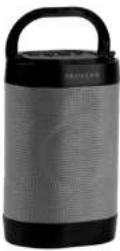
User Manual
PROSCAN™ IS A REGISTERED TRADEMARK OF TECHNICOLOR USA INC
AND USED UNDER LICENSE TO CURTIS INTERNATIONAL LTD.
DEAR CUSTOMER
In order to achieve the best performance of your product, please read this instruction manual carefully before using, and keep it for future reference.
NOTE
This unit may be submitted to changes in specifications, characteristics and/or operation without prior notice to the user, in order to continue improving and developing its technology.
Packing list
Upon opening the package, please check for the following items:
1 x Speaker
1 x Charging cable
1 x Instruction manual
Do's and Don'ts
- Do not play music at excessive levels as damage to hearing and / or equipment may result.
- Do not use outdoors in wet or in damp surroundings.
Specification
Speaker Driver: 3W
Battery: 3.7V 500mAh rechargeable battery
Power supplied: 5V/1A
Speaker units: 52mm
FM: 87.5-108.0MHz
Transmission Distance: 10m
Product size, W × H × D): 93×157×73mm
QDID #: 124562
Product overview
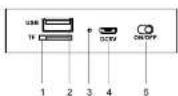
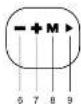
-
TF input
-
USB input
-
LED indication light
-
DC 5V
-
Power ON/OFF
-
Volume down/Previous song
-
Volume up/Next song
B. Mode (bluetooth, USB, TF, FM)/Light
- Play/pause, answer a call or reject a call.
INSTRUCTION FOR USE
Charging Instructions
This portable Bluetooth speaker has a built in rechargeable battery.
Before using it for the first time we recommend you use the USB cable to charge the battery fully.
Connect the USB cable to the computer USB port or USB wall charger (Not included).
Connect the other side to the USB charging slot of the portable Bluetooth Speaker. The red LED indicate light will be illuminated while the speaker is being charged.
When the battery is fully charged, the red LED indicator will switch OFF.
Pairing the portable Speaker with Bluetooth devices (phone or music device)
Push the on/off switch to on, it will have a tone coming out and will turn into the Bluetooth pairing mode.
Place the speaker and Bluetooth device (phone or music device) so that they are no further than 30 feet apart: Activate the
Bluetooth function on your Bluetooth device (phone or music device). Please refer to the manufacturer's instructions for instructions on enabling Bluetooth on your device
Once you have activated Bluetooth on your device, select the pairing name, Pro PSP1500 * from the list of available Bluetooth devices.
If required, enter the password '0000' to confirm to pairing. Once paired successfully, you will hear alone indicating pairing has been successful.
You can now start to use the portable speaker. Once you have paired the portable speaker with a device, the portable speaker will remember this device and will pair automatically when the device's Bluetooth is activated and in range. You do not need to re-pair any previously connected devices. The speaker will attempt to automatically connect to the last device it was paired with when Bluetooth mode turns on. If you want to pair it with a new device, please turn off from the Bluetooth device then use your new device to search and select the pairing name.
Once the speaker is paired with your device the music will transmit to the speaker directly. Please refer to your device's user manual for further information.
Mode
Short press to switch mode among Bluetooth/USB/TF/IN/FM. Long press to turn off the LED light.
Using the FM radio
Turn on the unit, and press the Mode button to select the FM radio mode.
1) A long press on the play button, FM radio will automatic searching and can automatically save;
2) A short press on the Volume up & Volume down button to select the desired radio station.
TF card playback & U disk play music After the portable speaker is turned on, insert the TF Card or U disk, it will switch to TF/USB mode and start playing the music, the Bluetooth mode will be disconnected. Long press the volume to adjust the volume level, short press the volume to adjust the previous track and next track.
PREVIOUS TRACK Short press to play the previous music under Bluetooth, TF and USB mode. Short press to play previous radio station under FM mode.
PLAY/PAUSE Short press for music play/pause. Long press for radio station automatic searching under FM mode. Short press to answer a call while there is an incoming call. Long press to reject a call while there is an incoming call.
NEXT TRACK Short press to play the next music under Bluetooth, TF and USB mode. Short press to play next radio station under FM mode.
FCC Statement
NOTE: This equipment has been tested and found to comply with the limits for a Class B digital device, pursuant to part 15 of the FCC Rules. These limits are designed to provide reasonable protection against harmful interference in a residential installation. This equipment generates uses and can radiate radio frequency energy and, if not installed and used in accordance with the instructions, may cause harmful interference to radio communications. However, there is no guarantee that interference will not occur in a particular installation. If this equipment does cause harmful interference to radio or television reception, which can be determined by turning the equipment off and on, the user is encouraged to try to correct the interference by one or more of the following measures: - Reorient or relocate the receiving antenna. - Increase the separation between the equipment and receiver. - Connect the equipment into an outlet on a circuit different from that to which the receiver is connected. - Consult the dealer or an experienced radio/TV technician for help Changes or modifications not expressly approved by the party responsible for compliance could void the user's authority to operate the equipment. This device complies with Part 15 of the FCC Rules. Operation is subject to the following two conditions: (1) this device may not cause harmful interference, and (2) this device must accept any interference received, including interference that may cause undesired operation
To make a warranty claim, please email support@curtiscs.com or call 1-800-968-9853.
90 day Warranty
This product is warranted to be free from defects in material and workmanship for a period of ninety (90) days from the date of original purchase. During this period, your exclusive remedy is repair or replacement of this product or component found to be defective, at our option; however, you are responsible for all costs associated with returning the product to us. If the product or component is no longer available, we will replace with a similar one of equal or greater value. Prior to a replacement being sent, the product must be rendered inoperable or returned to us.
This warranty does not cover glass, fillers, wear from normal use, use not in conformity with the printed directions, or damage to the product resulting from accident, alteration, abuse, or misuse. This warranty extends only to the original consumer purchaser or gift recipient. Keep the original sales receipt, as proof of purchase is required to make a warranty claim. This warranty is void if the product is used for other than sing e-family household use or subjected to any voltage and waveform other than as on the specified rating on the label (e.g., 120V-60Hz).
We exclude all claims for special, incidental, and consequential damages caused by breach of express or implied warranty. All liability is limited to the amount of the purchase price. Every implied warranty, including any statutory warranty or condition of merchantability or fitness for a particular purpose, is disclaimed except to the extent prohibited by law, in which case such
warranty or condition is limited to the duration of this written warranty. This warranty gives you specific legal rights. You may have other legal rights that vary depending on where you live. Some states or provinces do not allow limitations on implied warranties or special, incidental, or consequential damages, so the foregoing limitations may not apply to you
For faster service, locate the model, type, and serial numbers on your appliance.
For service assistance and product information, please call: 1-800-968-9853.
Curtis International Ltd.
7045 BECKETT DRIVE, UNIT 15, MISSISSAUGA, ON, L5S 2A3 www.curtisint.com
Family Dollar
500 Volvo Parkway
Chesapeake, VA 23320
Tel: 1-844-636-7687
http://www.familydollar.com
ATTACH YOUR PROOF OF PURCHASE HERE, PROOF OF PURCHASE IS REQUIRED TO OBTAIN WARRANTY SERVICE.
Please have the following information available when you contact the Support Team:
• Name, address and telephone number
• Model number and serial number
• A clear, detailed description of the problem.
• Proof of purchase including dealer or retailer name, address and date of purchase.
Brand : Proscan
Model : PSP1500-ASST_FD
Category : Loudspeaker