
S71-1500 - Inverter Xtreme - Free user manual and instructions
Find the device manual for free S71-1500 Xtreme in PDF.


| Product Type | Line Interactive Tower UPS |
| Model | S71-1500 |
| Power Rating | 1500 VA / 900 W |
| Input Voltage | 120 VAC (auto-sensing 60/50 Hz) |
| Output Voltage | 120 VAC |
| Output Waveform | Sine wave (normal), simulated sine wave (battery mode) |
| Transfer Time | 4 ms typical |
| Battery Type | Sealed, maintenance-free lead-acid |
| Battery Quantity & Size | 2 x 12V 9AH |
| Recharge Time | 4-6 hours to 90% capacity |
| Receptacles | 6 x 5-15R (battery backup outlets) |
| Line Cord | 6 ft, 5-15P |
| Cooling | Fan cooled |
| Dimensions (W x D x H) | 5.1 x 12.6 x 7.1 in |
| Weight | 23 lbs |
| Operating Temperature | 32-104°F (0-40°C) |
| Humidity | 0-90% |
| Altitude | 11,500 ft above sea level |
| Display | LCD touch screen showing AC mode, battery mode, load/battery level, input/output voltage, overload fault, low battery |
| Approvals | UL, cUL, RoHS, TAA |
| Warranty | 3 years electronics, 3 years battery (USA and Canada) |
| Communications | USB HID port (ViewPower software compatible) |
| Included Accessories | Shutdown/monitoring software, USB cable, user manual |
| Special Features | AVR (automatic voltage regulation), modem/phone line surge protection (RJ-11 port optional), overload protection, low battery alarm |
| Maintenance | Charge battery for 6 hours before first use; keep vents clear; avoid liquids; unplug before cleaning |
| Safety | Do not disassemble; use grounded outlet; do not connect laser printers or scanners to battery outlets; avoid medical or life-support equipment |
| Spare Parts | Battery: sealed lead-acid, 12V 9AH (replacement by qualified personnel) |
| Reparability | Battery replacement by qualified technician; no user-serviceable parts inside |
Frequently Asked Questions - S71-1500 Xtreme
User questions about S71-1500 Xtreme
0 question about this device. Answer the ones you know or ask your own.
Ask a new question about this device
Download the instructions for your Inverter in PDF format for free! Find your manual S71-1500 - Xtreme and take your electronic device back in hand. On this page are published all the documents necessary for the use of your device. S71-1500 by Xtreme.
USER MANUAL S71-1500 Xtreme
S71 Line Interactive Tower UPS
700VA, 1000VA, 1500VA Models
User & Installation Manual
Inspection
You should be receiving the following items inside the package:
- UPS Unit
- User Manual
Remove the UPS from its package and inspect it for damage that may have occurred during shipping. If any damage is discovered, re-pack the unit and return it to the place of purchase.
Connect to Utility Power
Connect AC power cord to utility power. Then, the UPS will start to charge inside battery. For best result, charge the battery for 6 hours prior to initial use.
Plug in Equipment
Plug your equipment to Battery Backup Outlets on the rear panel of the UPS.
NOTE: Make sure that the UPS is powered on to protect all
important devices from data loss during power failure.
CAUTION: NEVER connect a laser printer or scanner to the battery backup outlets of UPS. The equipment may draw significantly power to overload the UPS.

700VA
1000VA
1500VA
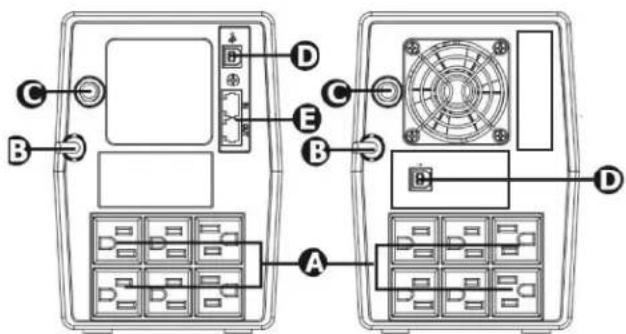
A. Battery backup outlets
B. AC input
C.Fuse/Circuit breaker (option)
D. USB com. port (option)
E.Modem/Phone line surge protection (option)
Connect Modem/Phone Line (only for the model with RJ-11 port)
This UPS protects a single line (1 in/1 out) phone, modem, or fax machine from surges when connected through the UPS. Plug in
conning Internet line into the "IN" socket. Use one more Internet line cable in the "OUT" socket and plug one other end to the modem input socket.
Connect Com. Port and Install Software (only for the model with USB port)
Connect one end of the USB cable to PC and the other to the USB
port at the rear of the UPS.
Download the latest version of ViewPower software from http://www.power-software-download.com to your hard drive.
Follow on-screen instructions to complete the software installation.
Operation Display
| UPS Mode LCD Description | ||
| UPS Power on When UPS | s powered, on, it will enter this  | mode for 4 seconds. |
| AC Mode | 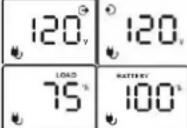 When AVR is functioning,icon will flash every second. When AVR is functioning,icon will flash every second. | LCD information will be displayed in the following order when LCD is touched.1. Output voltage2. Input voltage3. Load level4. Battery capacity |
| Overload in AC mode |  - icon will flash - icon will flash | When overload occurs, alarm will beep every 0.5 second. |
| Battery Mode | 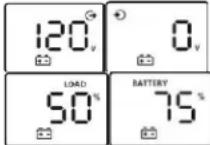 When battery level is low,icon will flash. When battery level is low,icon will flash. | Alarm will beep every 10 seconds and LCD information will be displayed in the following order when LCD is touched.1. Output voltage2. Input voltage3. Load level4. Battery capacity |
| Overload in battery mode |  - icon will flash. - icon will flash. | When overload occurs, alarm will beep every 0.5 second. |
Note: If backlight shuts off, you may activate it by touching the screen.
Fault Code Table:
| Fault condition LCD Solutions | ||
| Output short circuited |  | Disconnect short-circuited loads and restart the UPS again. |
| Overload fault | 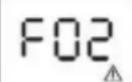 | Disconnect all output loads and restart the UPS again. |
| Overcharge | 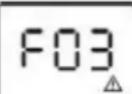 | Call for service immediately. |
| Bad or severely discharged battery | 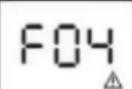 | Please replace the battery. |
| High output voltage fault |  | Call for service immediately. |
| Over-temperature |  | 1. Turn off the unit and wait for cooling.2. Or remove excessive loads and wait for cooling. |
If fault alarm occurs, please call for service immediately.
- This UPS utilizes voltage that may be hazardous. Do not attempt to disassemble the unit. The unit contains no user replaceable parts. Only factory service personnel may perform repairs.
- This pluggable type A equipment with battery already installed by the supplier is operator installable and may be operated by laymen.
- The mains socket outlet that supplies the UPS shall be installed
- near the UPS and shall be easily accessible.
- During the installation of this equipment it should be assured that the sum of the leakage currents of the UPS and the connected loads does not exceed 3.5mA.
- Connection to any other type of receptacle other than a
- two-pole, three-wire grounded receptacle may result in shock hazard as well as violate local electrical codes.
- In the event of an emergency, press the "OFF" button and
- disconnect the power cord from the AC power supply to properly disable the UPS.
- Do not allow any liquids or any foreign object to enter the UPS.
- Do not place beverages or any other liquid-containing vessels on or near the unit.
- This unit intended for installation in a controlled environment (temperature controlled, indoor area free of conductive contaminants). Avoid installing the UPS in locations where there is standing or running water, or excessive humidity.
- Do not plug the UPS input into its own output.
- Do not attach a power strip or surge suppressor to the UPS.
- Do not attach non-computer-related items, such as medical equipment, life-support equipment, microwave ovens, or vacuum cleaners to UPS.
- Do not dispose of batteries in a fire as they may explode.
- Unplug the UPS prior to cleaning and do not use liquid or spray detergent.
- A battery can present a risk of electrical shock and high short circuit current. The following precautions should be observed when working on batteries:
1) Remove watches, rings, or other metal objects from the hands.
2) Use tools with insulated handles.
3) Wear rubber gloves and boots.
4) Do not lay tools or metal parts on top of batteries.
5) Disconnect charging source prior to connecting or disconnecting batteries terminal.
6) Determine if battery is inadvertently grounded. If inadvertently grounded, remove source from ground. Contact with any part of a grounded battery can result in electrical shock. The likelihood of such shock can be reduced if such grounds are removed during installation and maintenance.
- Internal battery voltage is 12VDC.Sealed, lead-acid, 6-cell battery.
- Servicing of batteries should be performed or supervised by
- personnel knowledgeable of batteries and the required precautions. Keep unauthorized personnel away from batteries.
- When replacing batteries, replace with the same number and type of sealed lead-acid battery.
- Do not open or mutilate the battery or batteries. Release electrolyte is harmful to the skin and eyes. It may be toxic.
- Attention, hazardous through electric shock. Also with dis- connection of this unit from the mains, hazardous voltage still
- may be accessible through supply from battery. The battery supply should be therefore disconnected in the plus and minus pole at the connectors of the battery when maintenance or service work inside the UPS is necessary.
- To reduce the risk of overheating the UPS, do not cover the
- UPS' cooling vents and avoid exposing the unit to direct
- sunlight or installing the unit near heat emitting appliances such as space heater or furnaces.
- Unplug the UPS prior to cleaning and do not use liquid or spray detergent.
WARNING: Changes or modifications not expressly approved by the party responsible for compliance could void the user's authority to operate the equipment.
NOTE: This equipment has been tested and found to comply with the limits for a Class A digital device, pursuant to part 15 of the FCC Rules. These limits are designed to provide reasonable protection against harmful interference when the equipment is operated in a commercial environment. This equipment generates, uses, and can radiate radio frequency energy and, if not installed and used in accordance with the instruction manual, may cause harmful interference to radio communications. Operation of this equipment in a residential area is likely to cause harmful interference in which case the user will be required to correct the interference at his own expense.
Specifications
| MODEL NUMBER | S71-700 S71-1000 S71-1500 | |||
| CAPACITY Power rating | 700VA (420W) 1000VA (600W) 1500VA (900W) | |||
| INPUT | Voltage 120 VAC | |||
| Frequency 60/50 Hz (Auto-sensing) | ||||
| OUTPUT | Voltage 120VAC | |||
| Waveform Sine wave (normal), simulated sine wave (battery mode) | ||||
| Frequency 60Hz ± 1Hz | ||||
| Transfer time 4 ms (typical) | ||||
| BATTERY | Battery type Sealed, maintenance-free lead acid | |||
| Battery quantity and size | (1) 12V 9AH | (2) 12V 7AH | (2) 12V 9AH | |
| Recharge | 4-6 hours to 90% capacity | |||
| PHYSICAL | UPS dimensions (W x D x H) | 3.9 x 11.8 x 5.6 in | 5.1 x 12.6 x 7.1 in | |
| UPS weight | 11.2 lbs | 18 lbs | 23 lbs | |
| Line cord | 6ft, C13 to 5-15P* | 6 ft, 5-15P | 6 ft, 5-15P | |
| Receptacles | (4) 5-15R | (6) 5-15R | (6) 5-15R | |
| Cooling | Convection cooled | Fan cooled | ||
| ENVIRONMENT | Operating temperature | 32-104°F (0-40°C) | ||
| Humidity | 0-90% | |||
| Altitude | 11,500 ft above sea level | |||
| INDICATORS & ALARMS | LCD display | AC mode, battery mode, load/battery level, input/output voltage, overload fault, low battery | ||
| APPROVALS | UL, cUL, RoHS, TAA | |||
| WARRANTY | 3 years electronics, 3 years battery warranty (USA and Canada) | |||
| COMMUNICATIONS INTERFACE | USB HID | |||
| INCLUDED IN BOX | Shutdown and monitoring software, USB cable, user manual | |||
Obtaining Service
If the UPS requires Service:
- Use the TROUBLESHOOTING section in this manual to eliminate obvious causes.
- Verify there are no circuit breakers tripped.
-
Call your dealer for assistance. If you cannot reach your dealer, or if they cannot resolve the problem, call Xtreme Power Conversion Corp Technical Support at 800.582.4524. Technical support inquiries can also be made at support@xpcc.com. Please have the following information available BEFORE calling the Technical Support Department:
-
Your name and address.
- The serial number of the unit.
• Where and when the unit was purchased. - All of the model information about your UPS.
- Any information on the failure, including LED's that may or may not be illuminated.
- A description of the protected equipment, including model numbers if possible.
- A technician will ask you for the above information and, if possible, help solve your problem over the phone. In the event that the unit requires factory service, the technician will issue you a Return Material Authorization number (RMA).
If you are returning the UPS to Xtreme Power for service, please follow these procedures:
- Pack the UPS in its original packaging. If the original packaging is no longer available, ask the Technical Support Technician about obtaining a replacement set of packaging material. It is important to pack the UPS properly in order to avoid damage in transit. Never use Styrofoam beads for a packing material.
- Include a letter with your name, address, daytime phone number, RMA number, a copy of your original sales receipt, and a brief description of the problem.
- Mark the RMA number on the outside of all packages. Xtreme Power cannot accept any package without the RMA number marked on the outside of the boxes.
- Return the UPS by insured, prepaid carrier to the address provided by the Technician.
- Refer to the Warranty statements in this manual for additional details on what is covered.
Xtreme Power Conversion Limited Warranty
Xtreme Power Conversion (XPC) Corporation warrants Xtreme Power Conversion equipment, when properly applied and operated within specified conditions, against faulty materials or workmanship for a period of three years for S71-Series products from the date of purchase. XPC Corporation warrants internal batteries for a period of three years from the date of purchase. For equipment sites within the United States and Canada, this warranty covers repair or replacement, at the sole discretion of XPC Corporation. The customer is responsible for the costs of shipping the defective product to XPC Corporation. XPC Corporation will pay for ground shipment of the repaired or replacement product. This warranty applies only to the original purchaser.
If equipment provided by XPC Corporation is found to be Dead-on-Arrival (DOA), XPC Corporation will be responsible for the costs of shipping product to and returning equipment from the customer in a timely manner as agreed to with the customer, once the customer has requested and received a Return Material Authorization (RMA) number. DOA equipment is defined as equipment that does not properly function according to user documentation when initially received and connected in conjunction with proper procedures as shown in the user documentation or via support provided by XPC Corporation personnel or authorized agents.
This warranty shall be void if (a) the equipment is repaired or modified by anyone other than XPC Corporation or a XPC Corporation approved third party; (b) the equipment is damaged by the customer, is improperly used or stored, is subjected to an adverse operating environment, or is operated outside the limits of its electrical specifications; or (c) the equipment has been used or stored in a manner contrary to the equipment's operating manual, intended use or other written instructions. Any technical advice furnished by XPC Corporation or a XPC Corporation authorized representative before or after delivery with regard to the use or application of Xtreme Power Conversion equipment is furnished on the basis that it represents XPC Corporations best judgment under the situation and circumstances, but it is used at the recipient's sole risk.
EXCEPT AS STATED ABOVE, XPC Corporation DISCLAIMS ALL WARRANTIES, EXPRESSED OR IMPLIED, INCLUDING WARRANTIES OF MERCHANTABILITY AND FITNESS FOR A PARTICULAR PURPOSE.
EXCEPT AS STATED ABOVE, IN NO EVENT WILL XPC Corporation BE LIABLE FOR DIRECT, INDIRECT, SPECIAL, INCIDENTAL, OR CONSEQUENTIAL DAMAGES ARISING OUT OF THE USE OF Xtreme Power Conversion EQUIPMENT, including but not limited to, any costs, lost profits or revenue, loss of equipment, loss of use of equipment, loss of software, loss of data, cost of substitutes, or claims by third parties. Purchaser's sole and exclusive remedy for breach of any warranty, expressed or implied, concerning Xtreme Power Conversion equipment, and the only obligation of XPC Corporation under this warranty, shall be the repair or replacement of defective equipment, components, or parts; or, at XPC Corporations sole discretion, refund of the purchase price or substitution of an equivalent replacement product.
Xtreme Power Conversion Load Protection Policy
THIS POLICY IS NOT A WARRANTY. REFER TO THE XPC CORPORATION, INC. LIMITED WARRANTY FOR INFORMATION CONCERNING THE WARRANTY FOR YOUR XPC PRODUCT. THE LIMITATIONS AND CONDITIONS CONTAINED IN THIS POLICY DO NOT AFFECT THE TERMS OF THE XPC LIMITED WARRANTY.
Definitions:
- "Product" means a Standard 120, 208, or 240 Volt power protection device that is used in the United States and Canada. This policy does not include custom manufactured products.
- "Power Disturbance" means an AC power line transient (telephone line or Local Area Network, if applicable), spike or surge.
- "Connected Equipment" properly connected electronic equipment
- "Fair Market Value" of damaged Connected Equipment as determined by XPC shall be the lower of (a) the average price the same or similar items are being sold for on eBay, (b) the price list of Orion Blue Book (or if such price list is no longer published, a published or announced price list reasonably selected by XPC), (c) the lowest price the same or similar items can be purchased for in the United States or (d) the total amount of all payment(s) you have or are entitled to receive from insurance, other warranties, extended warranties, a legal liability claim or from other sources or persons for the damaged Connected Equipment.
- "Purchaser" means the person or entity that originally purchased the Product from an authorized reseller or distributor of XPC Products.
The Purchaser of this Product is protected, for the term of the XPC Limited Warranty, against certain losses caused by a Power Disturbance for properly connected electronic equipment (referred to as the "Connected Equipment") subject to certain terms and conditions provided below.
This policy applies only to the original purchaser of the Product. If the Product is transferred or sold to another person or entity, this policy is void.
Load Protection Policy Dollar and Period Limits
For purchasers that meet the qualifications and conditions set forth in this policy, XPC will provide reimbursement (cost of repair or fair market value as determined by XPC) during the period limits and up to the dollar limits stated as follows:
| PRODUCT DOLLAR LIMIT PERIOD OF | COVERAGE | |
| XVT 25,000 Term of XPC Limited Warranty | ||
| XST 25,000 Term of XPC Limited Warranty | ||
| S71 25,000 Term of XPC Limited Warranty | ||
| XPRT 6kVA & 10kVA 50,000 Term of XPC Limited Warranty | ||
| P90, P90L, P90g, P90Lg 50,000 Term of XPC Limited Warranty | ||
| T91 | 50,000 Term of XPC Limited Warranty | |
This Load Protection Policy is not deemed "first dollar" coverage. XPC's obligation is reduced by any amounts that the Purchaser is entitled to recover, from other sources regarding the Connected Equipment, including, but not limited to, insurance, other warranty, extended warranty, or legal liability, regardless of whether or not the Purchaser makes a claim for recovery.
Eligibility for Coverage Under the Load Protection Policy
- The Product must be registered on the XPC website, www.xpcc.com, within 10 days of purchase. All required information must be provided, and Purchaser should retain a copy for Purchaser's records. When registering on the website, Purchaser must list all connected equipment that is directly connected to the product. Only those devices registered in that manner will be covered.
- All Connected Equipment must be UL or CSA approved.
- The Product must be plugged into a properly wired and grounded outlet. Use of input surge devices, ex-
tension cords, adapters, ground wires, or electrical connections not manufactured by XPC voids the XPC Load Protection Policy. No other surge protection device may be connected to the output sockets of the Product. The installation must comply with all applicable electrical and safety codes set forth pursuant to the NEC.
- The Product must have undeniable physical evidence of a Power Disturbance that directly and proximately caused the damage;
- The Connected Equipment must have been damaged by a Power Disturbance on a properly installed, grounded, and National Electric Code, ("NEC"), code-compliant 120, 208, 240 Volt AC power line in the United States or Canada, by a Power Disturbance on standard telephone land line or PBX telephone equipment line that is properly installed and connected to an RJ11 port on the Product; or by a Power Disturbance on a standard Local Area Network connection that is properly installed and connected to an RJ45 port on the Product and (d) is directly plugged into, and properly connected to, the Product in its original condition which was properly operated when a Power Disturbance passed through the Product and (i) exhausts the protection capacity of the Product or (ii) damages the Product.
- The Load Protection Policy does not apply if the Product has been operated in a failure mode or not in compliance with XPC operating instructions in the Product user's manual, or if the Connected Equipment has not been operated in compliance with the instructions and manuals of its manufacturer/vendor.
- This policy is null and void if, XPC determines, in its sole discretion, that the Product has been tampered with or altered in any way.
What is Not Covered Under the Load Protection Policy:
The following damage is not covered by this Policy:
- Restoration of lost data and reinstallation of software.
- Damage from a cause other than AC power-line transients, except for damage due to telephone line, Local Area Network, or CATV transients, which is covered only if the Product offers such protection.
- DAMAGE CAUSED BY FAILURE TO PROVIDE A SUITABLE INSTALLATION ENVIRONMENT FOR THE PRODUCT (INCLUDING, BUT NOT LIMITED TO, LACK OF A PROPER SAFETY GROUND).
- Damage caused by the use of the Product for purposes other than those for which it was designed.
- Damage caused by accidents, or natural disasters, including but not limited to, fire, flood, and wind.
- Damage caused by abuse, misuse, alteration, modification, or negligence.
- Any labor costs or travel, room and board expenses associated with the repair and/or restoration of lost or damaged hardware, software or data.
EXCEPT AS EXPRESSLY PROVIDED IN THIS POLICY, XPC SHALL NOT BE LIABLE FOR ANY DAMAGES WHATSOEVER, INCLUDING, BUT NOT LIMITED TO, DIRECT, INDIRECT, SPECIAL, INCIDENTAL, CONSEQUENTIAL, OR MULTIPLE DAMAGES ARISING OUT OF THE USE OF THE PRODUCT OR DAMAGE TO THE CONNECTED EQUIPMENT, REGARDLESS OF THE LEGAL THEORY ON WHICH SUCH CLAIM IS BASED, EVEN IF ADVISED OF THE POSSIBILITY OF SUCH DAMAGE. SUCH DAMAGES INCLUDE, BUT ARE NOT LIMITED TO, LOSS OF PROFITS, LOSS OF SAVINGS OR REVENUE, LOSS OF USE OF THE PRODUCT OR THE CONNECTED EQUIPMENT OR ANY ASSOCIATED EQUIPMENT, LOSS OF SOFTWARE, COST OF CAPITAL, COST OF ANY SUBSTITUTE EQUIPMENT, FACILITIES OR SERVICES, DOWNTIME, THE CLAIMS OF THIRD PARTIES, INCLUDING CUSTOMERS, AND INJURY TO PROPERTY.
Submitting a Load Protection Policy Claim:
- Any claim under the Load Protection Policy must be made within 10 days of the date of alleged damage to the Connected Equipment.
- Call the XPC technical support department at 1-800-582-4524 and obtain a Load Protection Policy Returned Material Authorization (RMA) number. Have information on all applicable insurance or other resources of recovery/payment that is available to the Purchaser and the name of the power utility supplier for the location of the Connected Equipment. XPC will forward to the Purchaser a Load Protection Policy claims form, which must be completed and filed with XPC within 30 days.
• Mark the Load Protection Policy RMA number on the Product the Purchaser is returning.
- Pack the Product in its original packaging or similar packing materials if the original packaging has
been discarded. Enclose the completed Load Protection Policy claim form and a copy of the Purchaser's original sales receipt for the Product in the box.
- Mark the RMA number clearly on the outside of the box.
- Ship the Product (one-way shipping charges paid by the Purchaser) to:
XPC Corporation
230 Yuma Street
Denver, CO 80223
Attn: LPP RMA#
-
XPC will evaluate the Product to determine its level of functionality, and will examine the Product for evidence of damage from a Power Disturbance.
-
If XPCs' evaluation provides no evidence of damage from a Power Disturbance, XPC will send to the Purchaser (i) a report summarizing the tests performed and (ii) a rejection of claim notice.
-
If the Product shows evidence of damage from a Power Disturbance, XPC will request that all Connected Equipment for which a Load Protection Policy claim has been submitted, be sent for evaluation to either XPC or an authorized service center. If it is determined that the Connected Equipment has been damaged by a Power Disturbance, XPC will, in its sole discretion, issue payment to the Purchaser for either the cost of repair of the Connected Equipment or the Fair Market Value of the damaged Connected Equipment, up to the dollar limits stated above. XPC reserves the right to require the Purchaser to transfer title and deliver the Connected Equipment to XPC if it chooses to reimburse the Purchaser for the fair market value of the Connected Equipment. XPCs' maximum liability shall be reduced to reflect all such other payments or sources of recovery, whether applied for or not.
-
If XPC issues payment to the Purchaser to have the Connected Equipment repaired, the repair must be performed at a service center that is authorized by the manufacturer of the Connected Equipment. XPC reserves the right to contact the authorized service center directly to discuss repair costs and damage to the Connected Equipment to determine if it was caused by a Power Disturbance and the right to request that the service center forward the Connected Equipment or components of the Connected Equipment to XPC for inspection
-
Unless modified in writing signed by an officer of XPC and the Purchaser, the terms of this policy are the complete and exclusive agreement between the parties, superseding all prior agreements, oral or written, and all other communications between the parties relating to the subject matter of this agreement. No employee of XPC or any other party is authorized to make any representations beyond those made in this agreement concerning the Load Protection Policy.
XPC Corporation
230 Yuma Street
Denver, CO 80223
1.800.582.4524
- S71 Line Interactive Tower UPS
- Inspection
- Connect to Utility Power
- Plug in Equipment
- Connect Modem/Phone Line (only for the model with RJ-11 port)
- Connect Com. Port and Install Software (only for the model with USB port)
- Operation Display
- Obtaining Service
- If the UPS requires Service:
- Xtreme Power Conversion Limited Warranty
- Xtreme Power Conversion Load Protection Policy
- Definitions:
- Load Protection Policy Dollar and Period Limits
- Eligibility for Coverage Under the Load Protection Policy
- What is Not Covered Under the Load Protection Policy:
- Submitting a Load Protection Policy Claim:
Brand : Xtreme
Model : S71-1500
Category : Inverter