P80-1500 - Inverter Xtreme - Free user manual and instructions
Find the device manual for free P80-1500 Xtreme in PDF.


Pick your language and provide your email: we'll send you a specifically translated version.
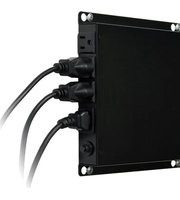
| Product Type | Inverter (UPS) |
| Brand | Xtreme |
| Model | P80-1500 |
| Power Rating | 1500 VA / 900 W |
| Input Voltage | 220-240 V AC |
| Output Voltage | 220-240 V AC (regulated) |
| Frequency | 50/60 Hz (auto-sensing) |
| Waveform | Simulated sine wave |
| Battery Type | Sealed lead-acid, maintenance-free |
| Battery Capacity | 12 V / 9 Ah |
| Dimensions (W x D x H) | 280 x 140 x 100 mm |
| Weight | 4.2 kg |
| Charging Time | 6-8 hours to full charge |
| Backup Time (half load) | Approx. 10-15 minutes |
| Protection Features | Overload, short circuit, overcharge, deep discharge |
| Cooling | Fan cooled (temperature controlled) |
| Display | LED indicators for power, battery, fault |
| Noise Level | < 40 dB (typical) |
| Operating Temperature | 0°C to 40°C |
| Spare Parts | Battery, fan, fuse available from manufacturer |
| Repairability | Replaceable battery and fan by qualified technician |
Frequently Asked Questions - P80-1500 Xtreme
What does the P80-1500 power rating mean?
The P80-1500 has a power rating of 1500 VA and a maximum output power of 900 watts. It can support devices with a total power consumption up to 900 W.
How long does the battery last on a full charge?
With a typical load of 450 W (half load), the backup time is approximately 10-15 minutes. Full load (900 W) reduces backup time to about 3-5 minutes.
Can I connect a laser printer or motor to the UPS?
It is not recommended to connect laser printers or motors directly to this UPS due to high startup power demands. Use the UPS for computers, monitors, and other sensitive electronics.
How do I replace the battery?
Disconnect the UPS from the mains. Open the battery compartment (usually at the back or bottom). Disconnect the old battery and replace it with a new 12V 9Ah sealed lead-acid battery. Reconnect and close. Recharge for 6-8 hours before use.
What does the red LED indicator mean?
A steady red LED typically indicates a battery fault or overload. Refer to the manual to identify the specific fault. Usually, it requires replacing the battery or reducing the load.
Can I use the UPS without battery?
No, the UPS requires a battery to function. Without a battery, the unit may not start or may not provide backup power. The battery acts as an energy storage for blackouts.
How often should I replace the battery?
The battery life is typically 3-5 years, depending on usage and temperature. Replace the battery when the backup time becomes insufficient or the battery test fails.
Is the UPS fan always on?
The fan is temperature controlled. It activates only when the internal temperature rises during charging or high loads. It may also run during battery operation.
What safety precautions should I take?
Ensure the UPS is placed in a well-ventilated area away from moisture. Do not cover the ventilation slots. Avoid connecting high-power appliances. Use a grounded outlet.
Where can I find spare parts like the fan or fuse?
Spare parts such as the cooling fan and fuse can be ordered from Xtreme authorized service centers or online retailers. Check the model number P80-1500 when ordering.
User questions about P80-1500 Xtreme
0 question about this device. Answer the ones you know or ask your own.
Ask a new question about this device
No questions yet. Be the first to ask one.
Download the instructions for your Inverter in PDF format for free! Find your manual P80-1500 - Xtreme and take your electronic device back in hand. On this page are published all the documents necessary for the use of your device. P80-1500 by Xtreme.
USER MANUAL P80-1500 Xtreme

Manual assistant
Powered by Anthropic
Waiting for your message
Product information
Brand : Xtreme
Model : P80-1500
Category : Inverter