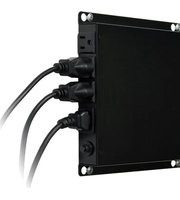
J60-350 - Inverter Xtreme - Free user manual and instructions
Find the device manual for free J60-350 Xtreme in PDF.


| Product Type | Inverter (DC to AC) |
| Model | J60-350 |
| Brand | Xtreme |
| Continuous Power Output | 350 W |
| Peak Power (Surge) | 700 W |
| DC Input Voltage | 12 V |
| AC Output Voltage | 230 V |
| Output Waveform | Modified Sine Wave |
| USB Output | 5 V, 2.1 A (1 port) |
| Dimensions (L x W x H) | 20 cm x 15 cm x 10 cm |
| Weight | 1.5 kg |
| Cooling Method | Fan |
| Protection Features | Overload, short circuit, over voltage, under voltage, over temperature |
| Display | LED indicators for power, fault, battery level |
| Audible Alarm | Yes, for low battery and overload |
| Remote Control | Not included |
| Operating Temperature | 0°C to 40°C |
| Storage Temperature | -20°C to 60°C |
| Housing Material | Metal casing with ventilation slots |
| Certifications | CE, RoHS |
| Warranty | 2 years |
| Package Contents | Inverter, user manual, battery cables, USB cable |
Frequently Asked Questions - J60-350 Xtreme
User questions about J60-350 Xtreme
0 question about this device. Answer the ones you know or ask your own.
Ask a new question about this device
Download the instructions for your Inverter in PDF format for free! Find your manual J60-350 - Xtreme and take your electronic device back in hand. On this page are published all the documents necessary for the use of your device. J60-350 by Xtreme.
USER MANUAL J60-350 Xtreme
Product Introduction......3
ProductOverview....3
Installation & Initial Startup....3
Indicators & Alarm Conditions......4
Important Safety Instructions: (Save These Instructions)......4
Troubleshooting....5
Specifications....6
Obtaining Service....7
Xtreme Power Conversion Limited Warranty......8
Package Contents
You should be receiving the following items inside the package:
- UPS Unit
- User Manual
- Local Monitoring Software CD
Product Introduction
Thank you for selecting this Uninterruptible Power Supply (UPS). It provides you with protection for connected equipment. Please read this manual before installing the J60 Series UPS as it provides important information that should be followed during installation and maintenance of the UPS and batteries, allowing you to correctly set up your system for the maximum safety and performance. Included is information on customer support and service, if it is required. If you experience a problem with the UPS, please refer to the Troubleshooting section in this manual to correct the problem. If the problem is not corrected, please collect information so that the Technical Support personnel can more effectively assist you.
Product Overview
Xtreme J60 advanced design combines the benefits of lithium powered UPS and advanced surge suppression technology. Slim form factor (just 1.25", J60(i)-350 only), wall mounting, and easy access receptacles make J60 ideal for mounting behind thin display screens used in hotels, restaurants, hospitals, campuses, airports and other commercial areas.
While J60's compact design is appealing to the digital signage industry, it is also excellent for providing protection to kiosks, gaming machines, computers, point-of-sale equipment, and small printers.
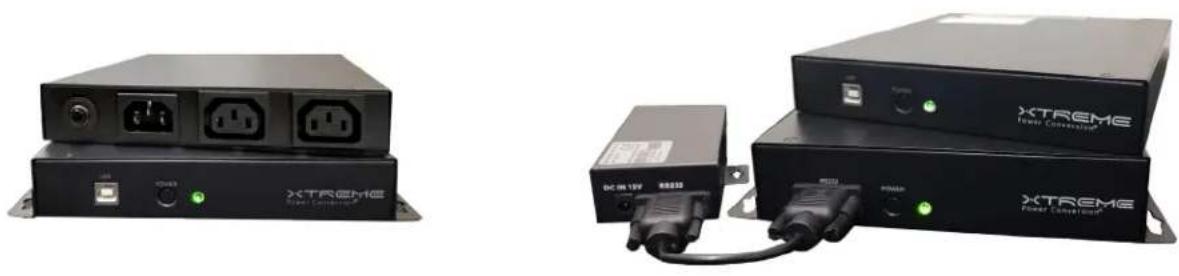
J60(i)-350
J60(i)-600
Installation & Initial Startup
Note: Before installation, inspect the unit and packaging to make sure that nothing inside has been damaged.
Connect UPS to Utility and Charging
Before the initial use of the UPS, plug the UPS input cord into a wall outlet and turn the UPS on by pressing the
Power switch on the back of the UPS. For best results, the batteries in the UPS should be charged for at least 8 hours before use. The UPS charges its battery while it is connected to AC utility power and powered on.
Connecting the Loads
Plug the loads to be supported by the UPS into the output receptacles on the front of the UPS. Simply turn the power switch on the UPS on and the devices connected to the UPS will be protected by the UPS unit.
Turn UPS ON / OFF
To turn the UPS unit on, press the power button on the UPS and hold for three seconds. To turn the UPS unit off, press the power button and hold for one second.
Connecting Local Monitoring Software (optional)
If it is desired to use the Local Monitoring Software, and if your UPS is equipped with USB communications, connect a USB cable from your computer to the UPS, and install the software from the CD.
Indicators & Alarm Conditions
| Condition Visual Indicator Alarm | ||
| AC mode LED illuminated No Audible | Alarm | |
| Battery mode LED flashes every 10 seconds | Audible Alarm sounds every 10 seconds | |
| Low battery mode LED flashes every 1 second | Audible Alarm sounds every 1 second | |
| Fault LED is illuminated Audible Alarm is continuous | ||
| Alarm for over temperature protection | LED flashes every 0.5 seconds No Audible Alarm |
Important Safety Instructions: (Save These Instructions)
- This manual contains important instructions for the J60-350, J60i-350, J60-600 and J60i-600 that should be followed during installation and maintenance of the UPS
CAUTION! (UPS having Internal Batteries): Risk of electrical shock – Hazardous live parts inside this unit are energized from the battery supply even when the input AC power is disconnected.
CAUTION! (No User serviceable Parts): Risk of electrical shock, do not remove cover. No user serviceable parts inside. Refer servicing to qualified service personnel.
CAUTION! (Non-isolated Battery supply): Risk of electric shock, battery circuit is not isolated from AC input, hazardous voltage may exist between battery terminals and ground. Test before touching.
WARNING! Unit intended for installation in a controlled environment.
CAUTION! Do not dispose of batteries in a fire, the battery may explode.
CAUTION! Do not open or mutilate the battery, released electrolyte is harmful to the skin and eyes.
CAUTION: A battery can present a risk of electrical shock and high short-circuit current. Contact with any
- part of a grounded battery can result in electrical shock. The following precautions should be observed
- when working on batteries:
• a) Remove watches, rings, or other metal objects.
• b) Use tools with insulated handles.
• c) Wear rubber gloves and boots.
• d) Do not lay tools or metal parts on top of batteries.
• e) Disconnect charging source and load prior to installing or maintaining the battery. - f) Remove battery grounds during installation and maintenance to reduce likelihood of shock.
Remove the connection from ground if any part of the battery is determined to be grounded.
EN 62040-2,C2:
WARNING: This is a category C2 UPS product. In a residential environment, this product may cause radio interference, in which case the user may be required to take additional measures.
FCC Notice: Class A
NOTE: This equipment has been tested and found to comply with the limits for a Class A digital device, pursuant to part 15 of the FCC Rules. These limits are designed to provide reasonable protection against harmful interference when the equipment is operated in a commercial environment. This equipment generates, uses, and can radiate radio frequency energy and, if not installed and used in accordance with the instruction manual, may cause harmful interference to radio communications. Operation of this equipment in a residential area is likely to cause harmful interference in which case the user will be required to correct the interference at his own expense.
WARNING: Changes or modifications not expressly approved by the party responsible for compliance could void the user's authority to operate the equipment.
To reduce the risk of electric shock, disconnect the UPS from the main supply before installing a computer interface signal cable. Reconnect the power cord only after signaling interconnections have been made.
Servicing of batteries should be performed or supervised by personnel with knowledge of batteries and the required precautions. Keep unauthorized personnel away from batteries.
The instructions contained within this safety manual are deemed important and should be closely followed at all times during installation and follow-up maintenance of the UPS and batteries.

CAUTION: The unit has a dangerous amount of voltage. If the UPS indicator is on, the unit's its may have a dangerous amount of voltage even when not plugged into the wall outlet be- the battery may continue to supply power.
Care should be taken to undertake installation indoors, free from electrically-conductive particles which are under temperature and humidity control, in order to reduce the risk of electric shock.
It is best to disconnect the device using the power supply cord. Ensure that the equipment is placed in a position near the outlet where easily accessible.
The socket-outlet shall be installed near the equipment an shall be easily accessible
CAUTION RISK OF EXPLOSION IF BATTERY IS REPLACED BY AN INCORRECT TYPE. DISPOSE OF USED BATTERIES ACCORDING TO THE INSTRUCTIONS
All servicing on this equipment must be carried out by qualified service personnel.
Before conducting any maintenance, repair, or shipment, first ensure that everything is turned off completely and disconnected.
| Condition Visual Indicator Alarm | ||
| No LED display on the front UPS panel | Low battery Charge the UPS at least 8 hours | |
| Battery fault Replace the battery with the same type of battery | ||
| The UPS is not turned on Press the Power Switch on the front of the UPS | ||
| Alarm continuously sounds when the AC input is normal | The UPS is overloaded Remove some of the load from the output of the UPS | |
| UPS fault Return the unit for service | ||
| Alarm continuously sounds when the AC input is normal | Battery defect Replace the battery with the same type of battery | |
| Charging circuit is damaged Return the unit for service | ||
| When power fails, backup time is shorter than expected | The UPS is overloaded Remove some of the load from the output of the UPS | |
| Battery voltage is too low Charge the UPS at least 8 hours | ||
| Battery defect Replace the battery with the same type of battery | ||
| The AC input is normal but the blue LED is flashing | Power cord is loose Reconnect the input power cord properly | |
Specifications
| MODEL NUMBER | J60-350 J60i-350 | J60-600 | J60i-600 | ||
| CAPACITY Power rating | 350VA (200W) 350VA | (200W) 600VA (360W) | 600VA (360W) | ||
| INPUT | Voltage 120VAC 230V | AC 120VAC 230VAC | |||
| Frequency 50/60Hz | |||||
| OUTPUT | Voltage 120VAC 230V | AC 120VAC 230VAC | |||
| Waveform Sine wave | (normal), simulated sine wave (battery mode) | ||||
| Frequency 50/60Hz | |||||
| Surge suppression 312 joules | |||||
| Transfer time 2-6 ms (typical) | |||||
| BATTERY | Battery type Lithium | Iron Phosphate (LiFePo4) | |||
| Battery quantity and size | (8) LiFePO4 18650 cells, 2400mAh (16) | LiFePO4 18650 cells, 4400mAh | |||
| PHYSICAL | Dimensions(W x D x H) | 6.9 x 8.5 x 1.25 in* (175 x 216 x 32 mm) 7.3 x 10.8 x 1.6 in (185 x 275 x 40 mm) | |||
| Weight | 3.4 lbs (1.5 kg) | 4.9 lbs (2.2 kg) | |||
| Line cord | Detachable 5–15P to C13 | C14 inlet | Detachable 5–15P to C13 | C14 inlet | |
| Receptacles | (3) 5–15R | (2) IEC C13 | (3) 5–15R | (2) IEC C13 | |
| ENVIRONMENT | Temperature | 32–104°F (0–40°C) | |||
| Humidity | 0–90% | ||||
| Altitude | 11,500 ft above sea level | ||||
| COMMUNICATIONS INTERFACE | Standard communications | USB Interface including cable and software | RS-232 Interface including cable and software | ||
| Web/SNMP card option | N/A | External Web/SNMP card providing UPS monitoring and receptacle On/Off control | |||
| Environmental monitoring device | N/A | Measures temperature and humidity (requires Web/SNMP card option) | |||
| APPROVALS | UL-1778, cTUVus, FCC, and RoHS | CE, RoHS | UL-1778, cTUVus, FCC, and RoHS | CE, RoHS | |
| WARRANTY | 5 years electronics, 5 years battery warranty (USA & Canada)** | ||||
| AVAILABLE OPTIONS | Web/SNMP adaptor (600VA), Environmental monitoring sensor (600VA), power cord with offset/right angle 5-15P plug (120V units only) | ||||
| INCLUDED IN BOX | ViewPower CD, user manual, 5–15P to C13 line cord (120VAC units only) | ||||
*Wall mount brackets add 15mm to each side **Warranty outside of USA & Canada is three years.
Obtaining Service
If the UPS requires Service:
- Use the TROUBLESHOOTING section in this manual to eliminate obvious causes.
- Verify there are no circuit breakers tripped.
-
Call your dealer for assistance. If you cannot reach your dealer, or if they cannot resolve the problem, call Xtreme Power Conversion Corp Technical Support at 800.582.4524. Technical support inquiries can also be made at support@xpcc.com. Please have the following information available BEFORE calling the Technical Support Department:
-
Your name and address.
• The serial number of the unit.
• Where and when the unit was purchased. - All of the model information about your UPS.
- Any information on the failure, including LED's that may or may not be illuminated.
- A description of the protected equipment, including model numbers if possible.
- A technician will ask you for the above information and, if possible, help solve your problem over the phone. In the event that the unit requires factory service, the technician will issue you a Return Material Authorization number (RMA).
If you are returning the UPS to Xtreme Power for service, please follow these procedures:
- Pack the UPS in its original packaging. If the original packaging is no longer available, ask the Technical Support Technician about obtaining a replacement set of packaging material. It is important to pack the UPS properly in order to avoid damage in transit. Never use Styrofoam beads for a packing material.
- Include a letter with your name, address, daytime phone number, RMA number, a copy of your original sales receipt, and a brief description of the problem.
- Mark the RMA number on the outside of all packages. Xtreme Power cannot accept any package without the RMA number marked on the outside of the boxes.
- Return the UPS by insured, prepaid carrier to the address provided by the Technician.
- Refer to the Warranty statements in this manual for additional details on what is covered.
Xtreme Power Conversion Limited Warranty
Xtreme Power Conversion (XPC) Corporation warrants Xtreme Power Conversion equipment, when properly applied and operated within specified conditions, against faulty materials or workmanship for a period of five years (USA & Canada) or three years (outside USA & Canada) for J60-Series products from the date of purchase. XPC Corporation warrants internal batteries for a period of five years from the date of purchase. For equipment sites within the United States and Canada, this warranty covers repair or replacement, at the sole discretion of XPC Corporation. The customer is responsible for the costs of shipping the defective product to XPC Corporation. XPC Corporation will pay for ground shipment of the repaired or replacement product. For equipment outside the US & Canada, the warranty does not include shipping to and from XPC service depot. This warranty applies only to the original purchaser.
If equipment provided by XPC Corporation is found to be Dead-on-Arrival (DOA), XPC Corporation will be responsible for the costs of shipping product to and returning equipment from the customer in a timely manner as agreed to with the customer, once the customer has requested and received a Return Material Authorization (RMA) number. DOA equipment is defined as equipment that does not properly function according to user documentation when initially received and connected in conjunction with proper procedures as shown in the user documentation or via support provided by XPC Corporation personnel or authorized agents.
This warranty shall be void if (a) the equipment is repaired or modified by anyone other than XPC Corporation or a XPC Corporation approved third party; (b) the equipment is damaged by the customer, is improperly used or stored, is subjected to an adverse operating environment, or is operated outside the limits of its electrical specifications; or (c) the equipment has been used or stored in a manner contrary to the equipment's operating manual, intended use or other written instructions. Any technical advice furnished by XPC Corporation or a XPC Corporation authorized representative before or after delivery with regard to the use or application of Xtreme Power Conversion equipment is furnished on the basis that it represents XPC Corporations best judgment under the situation and circumstances, but it is used at the recipient's sole risk.
EXCEPT AS STATED ABOVE, XPC Corporation DISCLAIMS ALL WARRANTIES, EXPRESSED OR IMPLIED, INCLUDING WARRANTIES OF MERCHANTABILITY AND FITNESS FOR A PARTICULAR PURPOSE.
EXCEPT AS STATED ABOVE, IN NO EVENT WILL XPC Corporation BE LIABLE FOR DIRECT, INDIRECT, SPECIAL, INCIDENTAL, OR CONSEQUENTIAL DAMAGES ARISING OUT OF THE USE OF Xtreme Power Conversion EQUIPMENT, including but not limited to, any costs, lost profits or revenue, loss of equipment, loss of use of equipment, loss of software, loss of data, cost of substitutes, or claims by third parties. Purchaser's sole and exclusive remedy for breach of any warranty, expressed or implied, concerning Xtreme Power Conversion equipment, and the only obligation of XPC Corporation under this warranty, shall be the repair or replacement of defective equipment, components, or parts; or, at XPC Corporations sole discretion, refund of the purchase price or substitution of an equivalent replacement product.

- Package Contents
- Product Introduction
- Product Overview
- Installation & Initial Startup
- Connect UPS to Utility and Charging
- Connecting the Loads
- Turn UPS ON / OFF
- Connecting Local Monitoring Software (optional)
- Indicators & Alarm Conditions
- Important Safety Instructions: (Save These Instructions)
- Obtaining Service
- Xtreme Power Conversion Limited Warranty
Brand : Xtreme
Model : J60-350
Category : Inverter