HUSB312TCPCX - Uncategorized Hamlet - Free user manual and instructions
Find the device manual for free HUSB312TCPCX Hamlet in PDF.


| Product Type | USB 3.0 Hub |
| Model | HUSB312TCPCX |
| Brand | Hamlet |
| Number of Ports | 4 |
| USB Standard | USB 3.0 (5 Gbps) |
| Dimensions (L x W x H) | 10 cm x 5 cm x 2 cm |
| Weight | 50 g |
| Power Supply | Bus-powered via USB |
| Input Voltage | 5 V DC |
| Compatible Operating Systems | Windows, macOS, Linux |
| Main Functions | Data transfer, peripheral connection |
| Maintenance and Cleaning | Wipe with a dry, soft cloth |
| Safety Precautions | Avoid exposure to liquids, excessive heat, and dust |
| Spare Parts Availability | Not available; device is non-serviceable |
| Repairability | Not repairable; replace unit if defective |
| General Information | Compact USB hub designed for expanding connectivity |
Frequently Asked Questions - HUSB312TCPCX Hamlet
User questions about HUSB312TCPCX Hamlet
0 question about this device. Answer the ones you know or ask your own.
Ask a new question about this device
Download the instructions for your Uncategorized in PDF format for free! Find your manual HUSB312TCPCX - Hamlet and take your electronic device back in hand. On this page are published all the documents necessary for the use of your device. HUSB312TCPCX by Hamlet.
USER MANUAL HUSB312TCPCX Hamlet
natural_image
Close-up of a green PCI expansion card with visible circuitry and ports (no text or symbols)USER MANUAL
HUSB312TCPCX
Rev. 1.0
www.hamletcom.com
Dear Customer,
thanks for choosing a Hamlet product. Please carefully follow the instructions for its use and maintenance and, once this item has run its life span, we kindly ask You to dispose of it in an environmentally friendly way, by putting it in the separate bin for electrical/electronic waste, or to bring it back to your retailer who will collect it for free.

We inform You this product is manufactured with materials and components in compliance with RoHS Directive 2011/65/EU, with WEEE Directive 2002/96/CE, 2003/108/CE Italian Legislative Decree 2005/151 and EMC Directive 2014/30/EU for the following standards:
EN 55032: 2012 + AC: 2013
EN 55024: 2010

The complete CE declaration of conformity of the product can be obtained by contacting Hamlet at info@hamletcom.com.
The information on the importer for your country are available in the "About Us" section of the Hamlet website at www.hamletcom.com.
Trademarks and changes
All trademarks and company names mentioned in this manual are used for description purpose only and remain property of their respective owners.
The material in this document is for information only and subject to change without notice.
Introduction
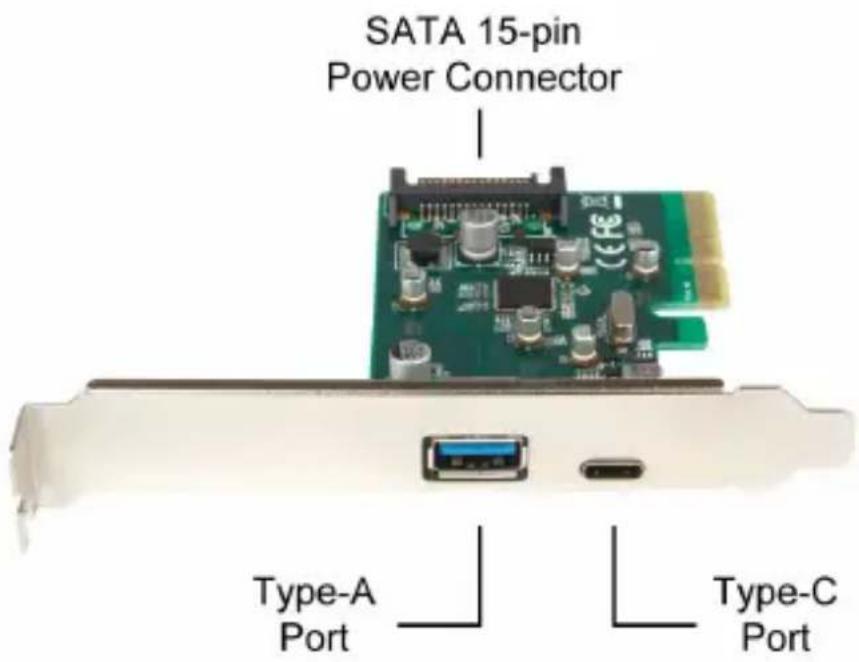
The USB 3.1 PCI Express card upgrades your computer with two USB 3.1 Gen 2 ports that provide data transfer rates up to 10 Gbps, 20 times faster than the USB 2.0 standard.
USB Type-C and Type-A ports provide full connectivity for all USB devices, both for devices with new generation USB-C connector and those equipped with standard USB connector. Included low profile bracket allows for installation in small form-factor desktop computers.
System Requirements
- Windows 7 and later
- Support various Linux Kernels*
- CD-Rom drive
• Available PCI Express slot (x4, x8, x16)
* Please check that kernel version of your system supports USB 3.1 SuperSpeed+ (10Gbps) protocol.
Package Contents
• USB 3.1 PCI Express card
- Low profile bracket
- User manual
• CD (Driver and Manual)
Caution!
Before handling and installing your Hamlet PCI Card, ensure that you have properly grounded yourself. Electrostatic discharge can quickly and easily damage your component or your computer.
To prevent electrostatic discharge damage, use an appropriate antistatic wrist strap and mat.
Hardware installation
- Turn off your computer and any peripherals connected to it. Unplug the power cable before installing the PCI card.
- Remove the cover from the computer case (refer to your computer's documentation for details).
- Locate an available PCI Express slot (x4 or higher) and remove the bracket cover.
- Insert the card into the open PCI Express slot and fasten the bracket to the rear of the case.
Note: If you install the card into a small form-factor computer, it may be necessary to replace the standard bracket with the low-profile bracket provided with the product.
- (Optional) It may be necessary to connect the SATA power connector of the card to computer's power supply to provide sufficient power to each USB 3.1 port (SATA-Molex power adapter cable not included).
- Place the cover back onto the computer case.
- Reconnect the power cable to your computer's power supply.
Driver installation on Windows
Windows operating system may install the driver automatically once the card is installed into the computer.
It if doesn't happen, please follow the instructions below to install the driver manually.
Before installing the driver, please check the latest driver available on hamletcom.com website.
- Turn on the computer. If the Found New Hardware dialog box appears on the screen, close the dialog box or click Cancel.
- Insert the provided CD into your disc drive.
- Locate and double-click the Setup.exe file in the CD folder to launch the setup program.
- Follow the on-screen instructions to complete the installation.
Note: You may be asked to restart your computer to complete the installation.
Specifications
• Supports PCI Express Card Specification Revision 2.0, Dual Lane (x2)
• Compliant with Universal Serial Bus 3.1 Specification Gen 2
• Compliant with xHCI Specifications Revision 1.1
• Supports USB 3.1 data transfer rate up to 10 Gbps*
• USB 3.1 Type-C reversible port
- USB 3.1 Type-A female port backward compatible with USB 3.0, USB 2.0 and USB 1.1 devices
- Chipset controller ASMedia ASM1142
• Supported speeds:
SuperSpeed+ (10 Gbps)
SuperSpeed (5 Gbps)
High Speed (480 Mbps)
Full Speed (12 Mbps)
Low-speed (1.5 Mbps)
- Internal 15-pin SATA power connector
• USB power output: +5V DC, 900mA maximum for each port
• Built-in over current protection on each USB port
• Plug & Play and Hot Swap functions
- Low profile bracket included
Product Dimensions
- Height: 120 mm
- Length: 18 mm
- Width: 92 mm
- Weight: 48 g
Environment
• Operating Temperature: 0 to 60 °C (32 to 140 °F)
• Operating Humidity: 5 to 95% RH (Non-condensing)
• Storage Temperature: -20 to 70 °C (-4 to 158 °F)
* The available bandwidth (10Gbps) is shared equally between the two ports.
Brand : Hamlet
Model : HUSB312TCPCX
Category : Uncategorized