
OMX-HDMI-2-IP - Audio/video converter Ocean Matrix - Free user manual and instructions
Find the device manual for free OMX-HDMI-2-IP Ocean Matrix in PDF.


User questions about OMX-HDMI-2-IP Ocean Matrix
0 question about this device. Answer the ones you know or ask your own.
Ask a new question about this device
Download the instructions for your Audio/video converter in PDF format for free! Find your manual OMX-HDMI-2-IP - Ocean Matrix and take your electronic device back in hand. On this page are published all the documents necessary for the use of your device. OMX-HDMI-2-IP by Ocean Matrix.
USER MANUAL OMX-HDMI-2-IP Ocean Matrix
IMPORTANT SAFETY INSTRUCTIONS
- Do not unplug the device, when it is in using, keep distance from inflammable and explosive devices.
- Power Supply :DC 5V ,Use only the supplied power supply unit ,Do not use the power supply if it is damaged.
I. Package Contents

1. HDMI Extender Sender

2. HDMI Extender Receiver

3. DC 5V/1A Power Adapter x 2pc

4. User Manual
II. Features
- Extends HDMI up to 100 meters for 1080p over one CAT5.
- Follow the standard of IEEE-568B
- Supports resolutions up to 1080p Full HD
- Supports Ethernet bandwidth: 100M
- HDCP compliant
- Extends by Router connection or LAN connection, Cable length requirements are as follows
● CAT5 Maximum 80 meters between two Devices
● CAT5e Maximum 100 meters between two Devices
● CAT6 Maximum 120 meters between two Devices
III. Installation Guide
-
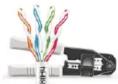
Cat5e/6 cable Follow the standard of IEEE-568B
-
General Connection Transmission distance can be up to 100 meters for 1080p over one CAT5
Disclaimer
The product name and brand name may be registered trademark of related manufacturer s.TM and ® may be omitted on the user manual. Design and specification ns of this unit are subject to change without prior notice. Pictures are for reference only. Produ cts may differ slightly from images shown.

flowchart
graph LR
    A["PS3\nHDMI Source"] -->|HDMI IN| B["HDMI Extender Sender"]
    B -->|Cat5e/6 ableC| C["HDMI Extender Receiver"]
    C -->|HDMI OUT| D["HDMI Display"]
- Router Connection
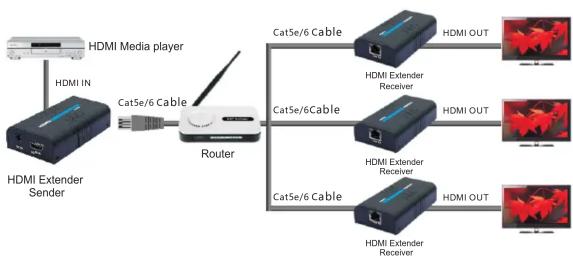
flowchart
graph LR
    A["HDMI Media player"] -->|Cat5e/6 Cable| B["Router"]
    C["HDMI IN"] -->|Cat5e/6 Cable| B
    B --> D["Cat5e/6 Cable"]
    D --> E["HDMI EXTender Receiver"]
    D --> F["HDMI EXTender Receiver"]
    D --> G["HDMI EXTender Receiver"]
    D --> H["HDMI OUT"]
    D --> I["HDMI OUT"]
    B --> J["Cat5e/6 Cable"]
    J --> K["HDMI EXTender Receiver"]
    J --> L["HDMI EXTender Receiver"]
    J --> M["HDMI EXTender Receiver"]
- LAN Connection
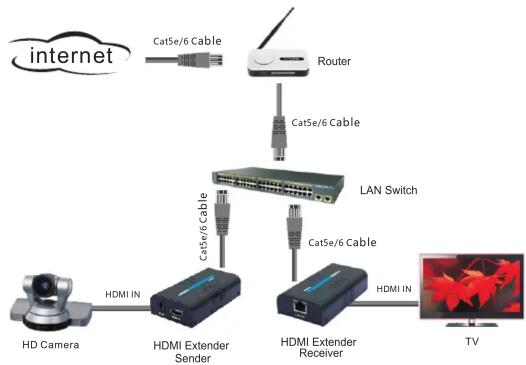
flowchart
graph TD
    A["HD Camera"] -->|HDMI IN| B["HDMI Extender Sender"]
    B -->|Cat5e/6 Cable| C["Router"]
    C -->|Cat5e/6 Cable| D["LAN Switch"]
    D -->|Cat5e/6 Cable| E["HDMI Extender Receiver"]
    E -->|HDMI IN| F["TV"]
    G["Internet"] --> H["Cat5e/6 Cable"]
IV. FAQ
Q: Yellow light of Lan port is flashing but slowly!
A: 1): Check whether HDMI Extender TX and HDMI Extender RX is reversed.
2): Check whether HDMI source device output HDMI signal correctly.
3): Change the HDMI cable of TX.
Q: Yellow light of Lan port is flashing quickly but no display?
A: 1): If HDMI source is graphics card, please set the resolution to be supported by display device.
2): Check whether HDMI cable of RX is well connected.
3): Change the HDMI cable of RX
Q: Yellow Led light of Lan port is not light?
A: 1): Check connection of network cable.
2): Network cable is too long.
Q: Abnormal color display or flashing after all the devices are well connected.
1): Pls press reset button of HDMI extender.
2): Follow the standard of IEEE-568B.
V. Technical Specifications
| Power Supply | 2pc X DC 5V/1A |
| Supports resolutions | 480i@60Hz,480p@60Hz,576i@50Hz,576p@50Hz,720p@50/60Hz,1080i@50/60Hz,1080p@50/60Hz |
| Working Temperature | -10°C ~60 °C |
| Link Connector (Sender/Receiver) | UTP/STP CAT5e/6 |
| Power Consumption | 3W (max) each |
| Relative Humidity | 20%~90% |
| Dimensions | 110 x 58 x 26 mm |
| Weight | 239 g |
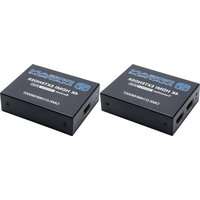

Brand : Ocean Matrix
Model : OMX-HDMI-2-IP
Category : Audio/video converter