OMX-HDMI-CAT6X - Audio/video converter Ocean Matrix - Free user manual and instructions
Find the device manual for free OMX-HDMI-CAT6X Ocean Matrix in PDF.


Pick your language and provide your email: we'll send you a specifically translated version.
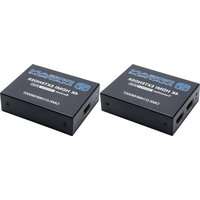
| Product Type | HDMI over CAT6 Extender (Audio/Video Converter) |
| Brand | Ocean Matrix |
| Model | OMX-HDMI-CAT6X |
| Compatibility | HDMI 1.3, HDCP 1.2 |
| Supported Resolutions | Up to 1080p (1920×1080) |
| Transmission Distance | Up to 60 meters (200 ft) over Cat6 cable |
| Unit Configuration | Transmitter and receiver pair |
| HDMI Connector | Type A (19-pin) on both units |
| Link Connector | RJ45 for CAT6/6A/7 cable |
| Power Supply | 5V DC 1A adapter per unit |
| Power Consumption | Less than 2.5W per unit |
| Dimensions (L×W×H) | 82 × 60 × 22 mm per unit |
| Weight | About 120 g per unit |
| Housing Material | Aluminum alloy |
| Signal Support | Digital audio and video |
| Audio Support | Multi-channel LPCM, DTS-HD, Dolby TrueHD |
| Remote Control Extension | IR signal pass-through via included IR blaster and receiver |
| LED Indicators | Power and signal status LEDs |
| Operating Environment | 0°C to 40°C, 20%–80% RH (non-condensing) |
| Certifications | FCC, CE, RoHS |
| Maintenance | Wipe with a soft dry cloth to clean exterior |
| Safety | Use only the provided power adapter; avoid moisture and direct sunlight |
| Spare Parts | Replacement power adapters and IR extender cables available from Ocean Matrix |
| Repairability | Not user-serviceable; contact Ocean Matrix support for repairs |
| Warranty | One year limited warranty |
Frequently Asked Questions - OMX-HDMI-CAT6X Ocean Matrix
What is the maximum transmission distance of the Ocean Matrix OMX-HDMI-CAT6X?
The OMX-HDMI-CAT6X can transmit HDMI signals up to 60 meters (200 feet) over a Cat6 cable. For best performance, use a shielded Cat6 cable.
Does this extender support 4K resolution?
No, the OMX-HDMI-CAT6X supports resolutions up to 1080p (1920×1080). It is designed for full HD distribution where reliable long-distance transmission is required.
How do I set up the OMX-HDMI-CAT6X?
Connect your HDMI source (e.g., Blu-ray player) to the transmitter unit. Run a Cat6 cable from the transmitter's RJ45 port to the receiver unit. Then plug the receiver's HDMI output into your display, and connect the power adapters to both units.
Do both the transmitter and receiver need power?
Yes, each unit must be powered with the included 5V DC 1A adapter for proper operation.
Can I use Cat5e cable instead of Cat6?
You can use Cat5e, but the maximum distance may be reduced. For full 60-meter range and reliable signal, a Cat6 cable or higher is recommended.
Does the OMX-HDMI-CAT6X support HDCP?
Yes, it is HDCP 1.2 compliant, so it can pass protected content such as Blu-ray discs and streaming services.
Can I transmit IR remote signals through this extender?
Yes, the unit includes an IR receiver and blaster. Connect them to the transmitter (IR input) and receiver (IR output) to control the source device remotely from the display location.
What maintenance does the OMX-HDMI-CAT6X require?
Keep the device clean by wiping it with a dry, soft cloth. Ensure the RJ45 and HDMI connectors are free of dust and securely seated. No internal maintenance is required.
Is this unit compatible with all HDMI devices?
It works with any device that has a standard HDMI output or input, including laptops, gaming consoles, cable boxes, and projectors. It supports deep color and multi-channel audio.
What should I do if there is no signal at the display?
First, check that both units are powered and the LEDs are lit. Verify that the CAT6 cable is correctly connected. Try a shorter cable or different power outlet. If the issue persists, power-cycle both units by unplugging them for 30 seconds and reconnecting.
User questions about OMX-HDMI-CAT6X Ocean Matrix
0 question about this device. Answer the ones you know or ask your own.
Ask a new question about this device
No questions yet. Be the first to ask one.
Download the instructions for your Audio/video converter in PDF format for free! Find your manual OMX-HDMI-CAT6X - Ocean Matrix and take your electronic device back in hand. On this page are published all the documents necessary for the use of your device. OMX-HDMI-CAT6X by Ocean Matrix.
USER MANUAL OMX-HDMI-CAT6X Ocean Matrix

Manual assistant
Powered by Anthropic
Waiting for your message
Product information
Brand : Ocean Matrix
Model : OMX-HDMI-CAT6X
Category : Audio/video converter