MX410 Mesh-G RGB - Computer Case Cougar - Free user manual and instructions
Find the device manual for free MX410 Mesh-G RGB Cougar in PDF.


User questions about MX410 Mesh-G RGB Cougar
0 question about this device. Answer the ones you know or ask your own.
Ask a new question about this device
Download the instructions for your Computer Case in PDF format for free! Find your manual MX410 Mesh-G RGB - Cougar and take your electronic device back in hand. On this page are published all the documents necessary for the use of your device. MX410 Mesh-G RGB by Cougar.
USER MANUAL MX410 Mesh-G RGB Cougar
MX410 Mesh-G RGB sports an attractive and compact design with a massive mesh front panel for better air flow performance. The integrated lighting button with built-in LED controller allows it to display amazing lighting effects. With a massive tempered glass left panel, MX410 Mesh-G RGB showcases a clean and tidy build. It has wider but more compact and powerful design, which allows you to have high-performance and abundant storage space.
MX410 Mesh-G RGB's front panel combines with excellent appearance and sufficient airflow. Let it breathe through the front panel!
Enjoy the Dazzling RGB Sho
The integrated lighting button with built-in LED controller allows MX410 Mesh-G RGB to display amazing lighting effects. It can also work to a compatible motherboards' 5V connection for system-wide lighting synchronization.
Elegant Design with Massive Tempered Glass Left Panel
With the full-length PSU cover hides cables and a massive tempered glass left panel presents a clean and tidy build, you can easily build a pro-level system.
Wider but More Compact and Powerful
MX410 Mesh-G RGB's 210mm width allows much larger interior space with better cooling performance and cable management. However, its compact exterior dimension takes up less desktop space. MX410 Mesh-G RGB can surely fit a full-sized ATX Motherboard, 300mm-length Graphic card, three 2.5" SSDs, and two 3.5" HDDs, which allow you to achieve the extreme operation and abundant storage space.
Abundant for Multiple USB Devices
The front panel is equipped with two USB 3.0 ports and two USB 2.0 ports, let you easily connect multiple peripheral devices and accessory charging. Not only optimize your processing experiences, but also keep all USB devices without limitations.
Strong Cooling Performance
MX410 Mesh-G RGB's interior space supports up to 165mm height CPU air cooler, a 240mm water cooling radiator, and high-end cooling components. It helps you to protect critical components from overheating.
| Model Name | MX410 Mesh-G-RGB |
| Model No. | CGR-SVM8-MSPG-G-RGB |
| Case Form Factor | Mid Power |
| Motherhood Type | Mini ETV / Micro ATV / ATV |
| Dimension | 230 mm x 65 mm x 380 (in) mm / 8.3 (in) x 17.9 (in) x 15 (in) inch |
| E/O Panel | USB 32 x 2, USB 2.0 x 2, Mix 1, Audio 1, RGB Control Button |
| Case Drive Bays | 3.5" x 2 Max. |
| 2.5" x 3 Max. | |
| Expansion Stris | 7 |
| Cooling Box Support | Front : 120mm x 3 (RGB fans x 3 pre-installed) |
| Top : 120mm x 2 | |
| Rear : 120mm x 1 (RGB fan x 1 pre-installed) | |
| Maximum Number of Bars | 6 Max. |
| Front : 240mm x 120mm | |
| Water Cooling Radiator Support | Top : 240mm x 120mm (Max. Component Height on Motherboard is 40mm ) |
| Rear : 120mm | |
| Max. Graphics Card Length | 300 (mm) x 11.8 (in) (Only fans at the front panel) |
| 270 (mm) x 10.6 (in) (Radiator with fans at the front panel) | |
| Max. CPU cooler Height | 160mm x 6/3inch |
| Max. PSU Length | 160mm x 6/3inch |
Specifications might vary depending on the country or region of sa *Please choose either of front or 100 to install a 240mm radiator.
Assembly Drawing

FEATURES
ENGLISH
- Mesh front panel combines with excellent appearance and sufficient airflow.
- Elegant design with massive tempered glass left panel - Integrated RCB system with E/(RCB) motherboard synchronization
- Integrated RGB system with 5V RGB motherboard synchronization - Support for up to six fans and a 240mm radiator
• Support for up to six lans and a 240mm radiator • Support for up to 300mm long graphics cards
• Support for two 3.5" HDDs and three 2.5" SSDs
“
DEUTSCH
D Tempered glass side panel
Right side panel
F 3.5" HDD cage
G 2.5" HDD/SSD drive bay
H Air filter for top panel
Air filter for bottom panel
J 3 x 120mm RGB fans for front panel (pre-installed)
K 2 x 120mm fans for top panel (optional)
L 120mm RGB fan for rear panel (pre-installed)
Installing the Front I/O Connectors
| USB 3.0 HD | AUBIK2 POWER | SW POWER | H.D.D LEDPOWER LED | ||
ACCESSORY KIT
| 3.5" HDD screws | X 8 | |
| Motherboard screws and 2.5" SSD screws | X 17 | |
| Power supply screws | X 12 | |
| Stand-off | X 3 | |
| Fan screws | X 8 | |
| Cable ties | X 6 |
GLOBAL WARRANTY POLICY
WARRANTY PERIODS OF COUGAR GAMING DEVICES Product: COUGAR MY410 Mesh G PCB
Warranty: 1 Year
- This warranty gives you specific legal rights. You may also have other rights granted under local law. These rights may vary. - Only for electrical components.
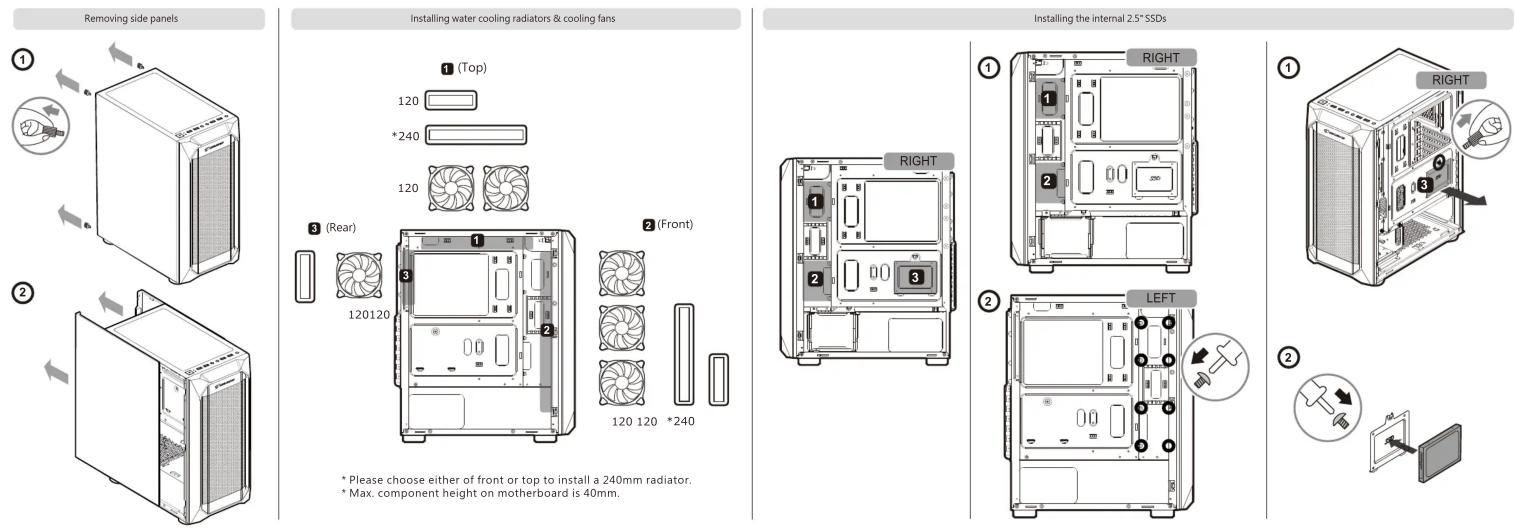
* Please choose either of front or top to install a 240mm radiator.
* Max. component height on motherboard is 40mm.
Installing the internal 3.5" HDDs

①
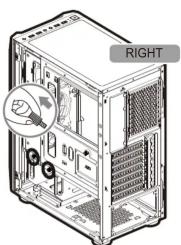
③
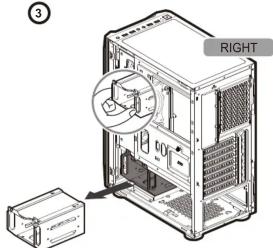
②
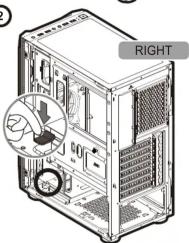

Controlling lighting modes

■ First Mode: 16 Preset Lighting Effects
You can use the front panel's RGB SW button to switch between the sixteen beautiful lighting effects we have preset for you.
■ Second Mode: Motherboard Synchronization
Please use the included adaptor to connect to a compatible motherboard's 3-pin 5V Addressable RGB header. Then, press and hold the RGB SW button for 3-5 seconds.
※If you press the RGB SW button for 1 second again.
It will be returned to the First mode: 16 Preset Lighting Effects

First Mode: 16 Preset Lighting Effects

Second Mode: Motherboard Synchronization
Installing PCI-E cards

■ Support for graphics card up to 300mm-long
* 300 (mm) / 11.8 (in) (Only fans at the front panel)
* 270 (mm) / 10.6 (in) (Radiator with fans at the front panel)
COUGAR USA Technical Service
Tel: (833) 256-3778
Mail: rma@compucaseusa.com
https://cougargaming.com/support/contact/upload/
Compucase Enterprise Co., Ltd.
No. 225, Lane 54, An Ho Road Sec. 2 Tainan, Taiwan, R.O.C
Tel:+886-6-356-0606
Service E-Mail:service@cougargaming.com
For more information, please visit
www.cougargaming.com
Compucase Enterprise Co., Ltd.
All rights reserved.

Made in China

