
Gemini S - Computer Case Cougar - Free user manual and instructions
Find the device manual for free Gemini S Cougar in PDF.


| Brand | Cougar |
| Model | Gemini S |
| Product Type | Mid-tower Gaming Case |
| Dimensions (W x H x D) | 240.2 x 450.0 x 603.2 mm |
| Weight | Approximately 8.5 kg |
| Motherboard Support | Mini ITX, Micro ATX, ATX, CEB, E-ATX |
| Drive Bays | 2 x 3.5" HDD or 4 x 2.5" SSD (combined); up to 7 x 2.5" SSD total |
| Front Ports | USB 3.0 x2, USB 2.0 x1, Mic, Audio |
| Fan Support (Top) | 3 x 120mm or 2 x 140mm |
| Fan Support (Front) | 3 x 120mm (optional) |
| Fan Support (Rear) | 1 x 120mm (pre-installed) |
| Radiator Support (Top) | Up to 360mm |
| Radiator Support (Front) | Up to 360mm |
| Max GPU Length | 420 mm |
| Max CPU Cooler Height | 250 mm |
| Max PSU Length | 250 mm |
| Lighting System | Integrated Trelux RGB; compatible with 5V RGB motherboard, dedicated button, or Core Box v2 (sold separately) |
| Materials | Brushed metal-like front panel, tempered glass side panel, steel body |
| Dust Filters | Removable filters on top, bottom, and front |
| Cleaning and Maintenance | Remove dust filters regularly and wipe with a soft dry cloth; avoid liquid cleaners |
Frequently Asked Questions - Gemini S Cougar
User questions about Gemini S Cougar
0 question about this device. Answer the ones you know or ask your own.
Ask a new question about this device
Download the instructions for your Computer Case in PDF format for free! Find your manual Gemini S - Cougar and take your electronic device back in hand. On this page are published all the documents necessary for the use of your device. Gemini S by Cougar.
USER MANUAL Gemini S Cougar
GEMINI S
GEMINI S IS AN ADVANCED GAMING MID-TOWER CASE WITH A FULL-SIZED
TEMPERED GLASS COVER AND AN INTEGRATED RGB LIGHTING SYSTEM THAT
DELIVERS EVERYTHING A GAMER NEEDS.
INTEGRATED RGB LIGHTING
Gemini S features COUGAR's exclusive Trelux integrated lighting system. This advanced design allows it to display fourteen amazing lighting effects without installing any additional devices in the case and control them through the integrated lighting button.
ELEGANT DESIGN
Gemini S' brushed metal-like front panel gives it a unique look that sets it apart from other compact cases. This texture is also a great companion to the integrated lighting since the powerful lights coming out of it benefit from the reflective surroundings that help reinforce the effects.
FULL SIDE VISIBILITY
To help you appreciate your system's full beauty, a full-sized tempered glass side window will allow you to contemplate your system's interior. GREAT SUPPORT FOR COMPONENTS
You won't believe how powerful a gaming beast you can build inside Gemini S. Its advanced support for graphics cards (up to three 410mm-long graphics cards) will allow you to enjoy the latest games with smooth framerates.
TOP-NOTCH COOLING
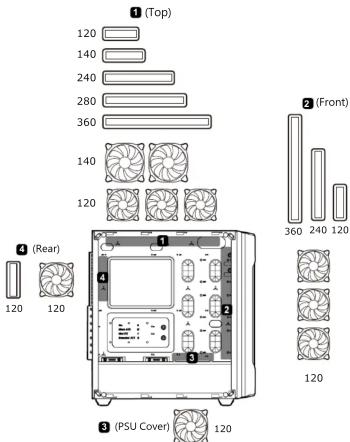
Gemini S' compact layout allows you to install eight fans and three water cooling radiators, with the front and top ones up to 360mm. This immense cooling potential will enable you to choose freely the components you want in your build.
INCREDIBLE STORAGE
Up to two 3.5" HDDs and five 2.5" SSDs or seven 2.5" SSDs will provide you with all the storage you need to install games and store all kinds of media.
| Case Type | Mid Tower |
| Motherboard Type | Mini ITX / Micro ATX / ATX / CEB / E-ATX |
| Dimensions | 210 (W) x 495 (H) x 463 (D)mm / 8.27 (W) x19.49 (H) x 18.23 (D)inch |
| Case Drive Bays | 35" : 2 |
| 25" : 5 x 2 (converted from 3.5" drive bays) | |
| I/O Panel | USB3.0 x 2, USB2.0 x 1, Mic x 1, Audio x 1, RGB Control Button |
| Cooling Fan Support | Front: 120mm x 3Top: 120mm x 3 / 140mm x 2Rear: 120mm x 1 (pre-installed)PSU Cover: 120mm x 1 (for HDD Cooling) |
| Maximum Number of Fans 8 Max. | |
| Front: 360mm / 240mm / 120mmTop: 360mm / 280mm / 240mm / 140mm / 120mmWater CoolieRear: 120mm | |
| Expansion Slots | 7 |
| Max. Graphic Card Length | 410mm / 16.14inch |
| Max. CPU Cooler Height 175mm | 6.89inch |
| Standard ATX PS2PSU | |
| 200 (mm) / 7.9 (inMax. PSU length | |
| Onboard Lighting System | Tekus Lighting with Addressable RGB LEDs and Dynamic LightingEffects in the Front Panel |
Specifications might vary depending on the country or region of sale.
Assembly Drawing

FEATURES
ENGLISH
- Trelux RGB System with 5V RGB Motherboard Synchronization
• Support for Mini ITX / Micro ATX / ATX / E-ATX Motherboards
• Up to Three 410mm Graphics Cards
• Up to Eight Fans (1 Standard Fan Preinstalled)
- Up to Three Water Cooling Radiators (Up to 360mm)
- Support for Two 3.5" HDDs and Five 2.5" SSDs or Seven 2.5" SSDs
DEUTSCH
| Motherboard/SSD screws | X 17 | |
| Power supply screws | X 5 | |
| 2.5" HDD / SSD EVA washers | X 12 | |
| Cable ties | X 5 | |
| Fan screws(on PSU cover for HDD cooling) | X4 | |
| Stand-off | X 3 |
WARRANTY PERIODS OF COUGAR GAMING DEVICES
Product : COUGAR
Warranty : 1 Year *This warranty gives you specific legal rights. You may also have other rights granted under local law. These rights may vary
*Only for electrical components
Removing the side panels Installing
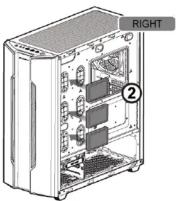
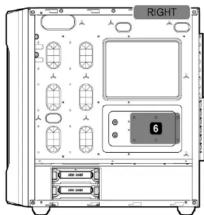
an internal 2.5" HDD/SSD Installing an internal 3.5" HDD


natural_image
Illustration of a desktop computer case with labeled components (no text or symbols on the device itself)Install with screws



Install with trays
(There are two SSD trays in this case. Please select two locations you prefer to install.)



④


Installing water cooling radiators & cooling fans
Gemini S's Trelux lighting system offers you several ways to control it:
Please connect the power cable of the I/O panel to an appropriate SATA connector from the PSU in order to use the case's lighting functionality.

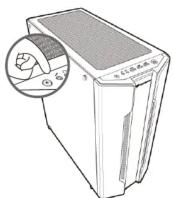
■ First Mode: Lighting Button
You can use the front panel's dedicated button to switch between the fourteen beautiful lighting effects we have preset for you.
■ Lighting Control Cable Instructions
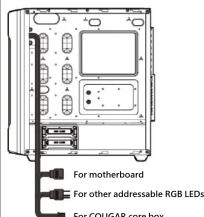
■ Second Mode: Motherboard Synchronization
Second, you can use the included adaptor (see picture below) to connect the Trelux system to a compatible motherboard's 3-pin 5V Addressable RGB header and enjoy system-wide RGB synchronization.
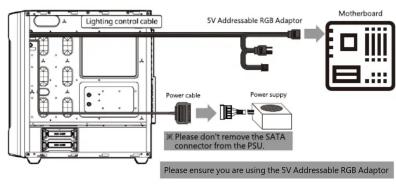
flowchart
graph LR
    A["Lighting control cable"] --> B["SV Addressable RGB Adaptor"]
    B --> C["Motherboard"]
    D["Power cable"] --> E["Power supply"]
    E --> F["Please ensure you are using the SV Addressable RGB Adaptor"]
    G["Please not remove the SATA connector from the PSU."] --> E
■ Third Mode: Core Box v2
You can also benefit from integrated control of Gemini S's Trelux lighting system, up to eight fans and two RGB LED Strips by connecting the case with the included adaptor to a COUGAR Core Box v2 (sold separately). This control box will allow you to enjoy 100 different synchronized lighting effects in all the above devices and manage them through the remote controller. As an alternative, you can also connect the Core Box v2 to a compatible motherboard's 3-pin 5V Addressable RGB header for system-wide synchronization.


flowchart
graph LR
    A["Power Supply"] --> B["Power Connector"]
    B --> C["Core Box v2 Adaptor"]
    C --> D["Core Box v2"]
    D --> E["SV Addressable Header Adapter"]
    E --> F["for Compatible Gigabyte Matherboards"]
    E --> G["for Compatible Asus or MSI Matherboards"]
Removing the dust filters
Air filter on top cover
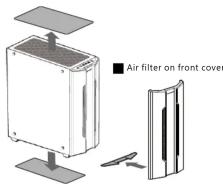
Air filter on bottom cover
Installing PCI-E cards
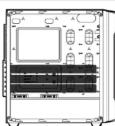
■ Up to three 410mm graphics cards
COUGAR USA Technical Service
Tel: (833) 256-3778
Mail: smal@compuscar
https://cougargaming.com/support/contact/upload/
(1) 2017年1月25日星期六
Compucase Enterprise Co., Ltd.
No. 225, Lane 54, An Ho Road Sec. 2, Tainan, Taiwan, R.O.C
Tel:+886-6-356-0606
Service E-Mail:service@cougargaming.com
For more information, please
www.cougargaming.com
Compucase Enterpr
All rights reserved.
CE Made in China

Brand : Cougar
Model : Gemini S
Category : Computer Case