
MX330 - Computer Case Cougar - Free user manual and instructions
Find the device manual for free MX330 Cougar in PDF.


| Product Type | Mid-Tower Gaming Computer Case |
| Brand | Cougar |
| Model | MX330 |
| Dimensions (W x H x D) | 200 x 470 x 400 mm (7.9 x 18.5 x 15.7 in) |
| Weight | 5.0 kg (11.0 lbs) |
| Power Supply Support | Standard ATX PS/2 (not included) |
| Motherboard Support | Mini-ITX, Micro-ATX, ATX |
| Drive Bays - 5.25" | 2 |
| Drive Bays - 3.5" | 2 (compatible with 2.5") |
| Drive Bays - 2.5" | 2 |
| Expansion Slots (PCI) | 7 |
| Maximum GPU Length | 350 mm (13.8 in) |
| Maximum CPU Cooler Height | 150 mm (5.9 in) |
| Maximum PSU Length | 150 mm (5.9 in) |
| Front Fan Support | 2 x 120 mm (optional) |
| Top Fan Support | 2 x 120 mm (optional) |
| Rear Fan Support | 1 x 120 mm (pre-installed) |
| Water Cooling Support (Front) | Up to 240 mm radiator |
| Water Cooling Support (Top) | Up to 240 mm radiator |
| I/O Ports | USB 3.0 x 2, USB 2.0 x 2, HD Audio (Mic & Headphone) |
| Side Panel | Full acrylic window |
| Dust Filters | Top, bottom, and front (removable) |
| Cleaning Instructions | Clean dust filters regularly with water; wipe exterior with a dry cloth. Do not use liquid cleaners inside. |
| Safety Instructions | Place on a stable surface; ensure adequate ventilation; do not block fans; keep away from liquids. |
| Spare Parts & Repairability | Replacement fans, filters, and screws available; contact Cougar support for genuine parts. |
Frequently Asked Questions - MX330 Cougar
User questions about MX330 Cougar
0 question about this device. Answer the ones you know or ask your own.
Ask a new question about this device
Download the instructions for your Computer Case in PDF format for free! Find your manual MX330 - Cougar and take your electronic device back in hand. On this page are published all the documents necessary for the use of your device. MX330 by Cougar.
USER MANUAL MX330 Cougar
MX330
GAMING MIDI TOWER


Features
MX330 is a elegant looks, functional design, and durable construction don't need to be pricey. you can get a styling, a full acrylic side panel window for admiring your components
• PSU & 3.5 BAY COVER
Tucking all cables and less-attractive drives behind a clean, refined PSU cover
• BEST COOLING SOLUTION
Water cooling radiator support up to 240mm on front
• FULL ACRYLIC SIDE PANEL WINDOW
• SUFFICIENT FLEXIBILITY FOR MULTIPLE GRAPHICS SOLUTIONS UP TO 350MM
• CABLE FEEDTHROUGH ON THE MB TRAY FOR EASY ROUTING AND HIDING OF CABLES
•7 PCI SLOTS PROVIDES FLEXIBILITY FOR MULTIPLE GRAPHICS CARDS SOLUTIONS
| Case Type Middle Tower | Expansion slots | 7 | |
| Mother board type | Mini ITX / Micro ATX / ATX | I/O Panel | USB 3.0 x/2 / USB 2.0 x/2 / MFC x 1, Audio x 1 |
| Dimension (mm) | 195(Wx473)(Wx427(D)) | ||
| 5.25" Drive Bay 1 | Cooling fan support | Front:120mm fan x 2Top:120mm x 2 Rear:120mm x 2 (Pre-installed) | |
| 3.5" Drive Bay | 2 (Internal) | ||
| 2.5" Drive Bay | 2+2 (converted from 1.5" drive bay) | ||
| Water cooling radiator support | Front:240mmTop:120mmRear:120mm | Max. Graphic Grids length | 350 mm |
| Max. CPU cooler height | 155mm | ||
▪ The specification may be varies depending on the country or region
Accessory Kit
| X7 | X6 | ||
| X5 | X1 | ||
| X3 | X4 | ||
| X14 | X2 |
MX330 Assembly Drawing
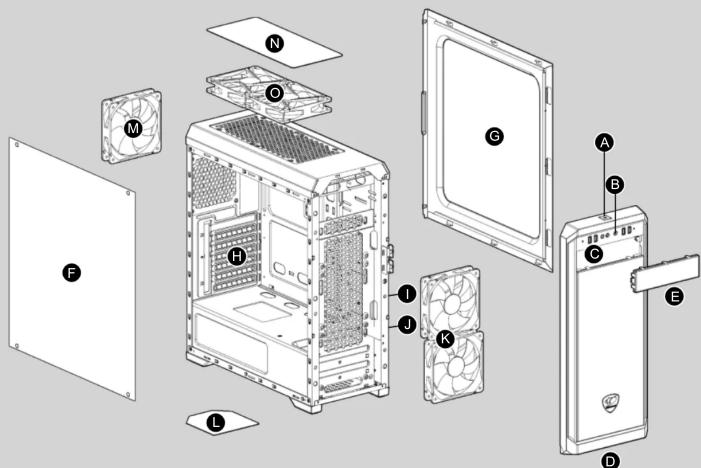
• The specification maybe varies depending on the country or region
ITALIANO
How to install the 5.25" devices
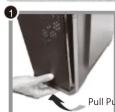


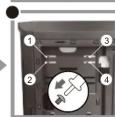
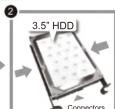
How to install the 3.5" HDD
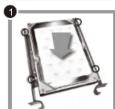

How to install the 2.5" HDD/SSD


A Power button
B Reset button
USB 3.0 / USB 2.0 / HD audio ports
D Front panel, removable to easily install 5.25" devices
E 5.25" shield
F Full arcrylic side panel window
G Right side cover
H Vented slot covers for better cooling performance
2.5" HDD/SSD drive bays
J 3.5" HDD trays (compatible for 2.5" HDD/SSD)
K 120mm fans x 2 for front panel (optional), effectively cool the HDD & graphics cards
Air filter on bottom cover to prevent dust from entering the power supply
M 120mm fan for rear panel (pre-installed)
N Top panel fan filter can prevent dust from entering the chassis
120mm fans x 2 for top cover (optional)
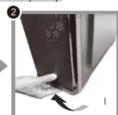
How to install a water cooler (front)


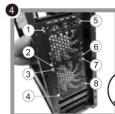
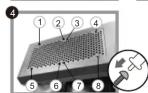
How to install a water cooler (top)


Compucase Enterprise Co., Ltd. No. 225, Lapa SA, An Ho Road Sec
2 Tainan, Taiwan, R.O.
Tel:+886-6-356-0606 www.cougargaming.com Service E-Mail: service@cougargaming.com Copyright © Compucase Enterprise Co.,Ltd
Made in China
