
EXT1106 - Network switch ENGENIUS - Free user manual and instructions
Find the device manual for free EXT1106 ENGENIUS in PDF.


User questions about EXT1106 ENGENIUS
0 question about this device. Answer the ones you know or ask your own.
Ask a new question about this device
Download the instructions for your Network switch in PDF format for free! Find your manual EXT1106 - ENGENIUS and take your electronic device back in hand. On this page are published all the documents necessary for the use of your device. EXT1106 by ENGENIUS.
USER MANUAL EXT1106 ENGENIUS
Switch Extender 3GE 4 PoE 1SFP
3xGE, 4xGE PoE, 1xGE PD Switch Extender with 1 SFP Port
Overview
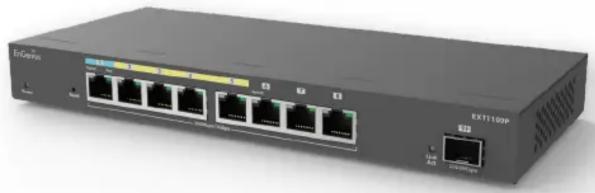
EnGenius Switch Extender, EXT1109P is a reliable 4-Port GE PoE, 1-Port GE PD PoE, 3 GE Ports and 1 SFP slot switch that excels in diversifying network expansion. Its SFP interface extends data transmission beyond the traditional 100-meter RJ45 limit, ensuring robust network performance. Its optimized Voice-VLAN feature, zero-touch provisioning, and easy-to-use cloud-based management provide SMBs with a hassle-free network solution.
natural_image
Exterior view of a network switch device (no visible text or labels)Features & Benefits
- 1x GE PD PoE port allows the device be powered by PoE.
- 4x GE PoE ports deliver power to other PD devices.
- 3x GE ports for high-speed connections..
- 1x SFP uplink port for bandwidth-intensive applications.
-
Zero touch provisioning, centralized cloud configuration and visualized monitoring improve the efficiency of network installation and management.
-
Voice VLAN function ensure the security and quality of VoIP traffic.
- Cloud manage switch extenders from anywhere with the EnGenius Cloud App. A Pro license for Cloud To-Go offers more features to fulfill advanced management requirements.
- EnGenius FitXpress (cloud-managed) is a cost-effective management option for Switch Extender series products.
Technical Specifications
Technical Specifications
Port Standards
802.3u 100Base-TX Ethernet
802.3ab 1000Base-T Ethernet
Network Port - Gigabit Ethernet Ports
8x10/100/1000 Mbps Ports
Network Port - SFP Ports
1x SFP Port
Switching Capacity
18Gbps
Flash Memory
32 MB
PoE Capable Ports
Ports 2-5 (802.3 af/at)
Total PoE Budget
Power Input: 802.3at Type 2(30W); Power Budget: up to 15W
Power Input: 802.3bt Type 3(60W); Power Budget: up to 40W
Power Input: 802.3bt Type 4(90W); Power Budget: up to 60W
Power Source
PoE PD
Recommend EnGenius PoE adapters (EPA5060GBT, EPA5090GBT),
Optional DC-Jack (100 to 240 VAC, 50/60Hz)
Physical Interface
System Indicators
Power LED
PoE LED
Port Indicators
Link/Activity/Speed (per Ethernet port)
Link/Activity (per SFP slot)
L2 Software Features
Network Management
EnGenius Cloud
MAC Address Table
8K
Jumbo frame size
10K
Multicast Group
Max 8 groups
QoS-number of Priority Queues Supported
8
QoS Trust Mode
Cos/802.1p
DSCP
CoS/802.1p-DSCP
Bandwidth Control
Port-based bandwidth control (Ingress/Egress)
Web Graphical User Interface (GUI)
LSP(Local status page)
System Time
Time Setting/Daylight saving
Common L2 Features
802.1w Rapid Spanning Tree
Domain Name System (DNS) settings
Multicast Filitering
IGMP Snooping
IGMPv2
IGMP Snooping Fast Leave
Port Statistics
802.1Q VLAN
Voice VLAN
Port-based VLAN
Jumbo Frame
IPv4 Settings
Link Layer Discovery Protocol (LLDP)
Weighted Round Robin Queue(WRR)
Simple Network Time Protocol (SNTP)
SYSLOG
Factory Default
Reboot Switch
Find Me
Environmental & Physical
Temperature Range
Operating: 32^ F to 122^ F ( 0^ C to 50^ C)
Humidity (Non-Condensing)
Operating: 5% - 95%
Device Dimensions & Weight
Device Dimensions & Weights
Weight: 620g
Length: 9,45" (240 mm)
Width: 4.13" (105 mm)
Height: 1.06" (27 mm)
Package Contents
1x EXT Switch Extender
1x Product Card
1x Wall Mount Kit
1x Adhesive label
1x Rubber Feet Cushion
Hardware Overviews

EnGenius Technologies | Costa Mesa, California, USA
Email: support@engeniustech.com
Website: www.engeniustech.com
Local contact: (+1) 714 432 8668
EnGenius Networks Singapore Pte Ltd. | Singapore
Email: techsupport@engeniustech.com.sg
Website: www.engeniustech.com.sg
Local contact: (+65) 6227 1088
EnGenius Technologies Canada | Ontario, Canada
Email: support@engeniustech.com
Website: www.engeniustech.com
Local contact: (+1) 905 940 8181
EnGenius Networks Dubai | Dubai, UAE
Email: support@engenius-me.com
Website: www.engenius-me.com
Local contact: (+971) 4 339 1227
EnGenius Networks Europe B.V. | Eindhoven, Netherlands
Email: support@engeniusnetworks.eu
Website: www.engeniusnetworks.eu
Local contact: (+31) 40 8200 887
Local contact: (+886) 933 250 628
Features and specifications subject to change without notice. Trademarks and registered trademarks are the property of their respective owners. These limits are designed to provide reasonable protection against harmful interference in a residential installation. This equipment generates, uses, and can radiate radio frequency energy and, if not installed and used in accordance with the instructions, may cause harmful interference to radio communications. Operation of this equipment in a residential area is likely to cause harmful interference in which case the user will be required to correct the interference at his/her own expense. Prior to installing any surveillance equipment, it is your responsibility to ensure the installation is in compliance with local, state and federal video and audio surveillance and privacy laws.
Version 1.0 03/22/2024
EnGenius®


- Switch Extender 3GE 4 PoE 1SFP
- 3xGE, 4xGE PoE, 1xGE PD Switch Extender with 1 SFP Port
- Overview
- Features & Benefits
- Technical Specifications
- Port Standards
- Network Port - Gigabit Ethernet Ports
- Network Port - SFP Ports
- Switching Capacity
- Flash Memory
- PoE Capable Ports
- Total PoE Budget
- Power Source
- Physical Interface
- System Indicators
- Port Indicators
- L2 Software Features
- Network Management
- MAC Address Table
- Jumbo frame size
- Multicast Group
- QoS-number of Priority Queues Supported
- QoS Trust Mode
- Bandwidth Control
- Web Graphical User Interface (GUI)
- System Time
- Common L2 Features
- Environmental & Physical
- Temperature Range
- Humidity (Non-Condensing)
- Device Dimensions & Weight
- Device Dimensions & Weights
- Package Contents
- Hardware Overviews
Brand : ENGENIUS
Model : EXT1106
Category : Network switch