
ECS1528 - Network switch ENGENIUS - Free user manual and instructions
Find the device manual for free ECS1528 ENGENIUS in PDF.


| Product Type | Network Switch |
| Brand | EnGenius |
| Model | ECS1528 |
| Switch Class | Layer 2+ |
| Ports | 24 x 10/100/1000 Mbps + 4 x SFP+ |
| Switching Capacity | 128 Gbps |
| Packet Forwarding Rate | 95.23 Mpps |
| MAC Address Table | 16K |
| Jumbo Frame | 10K |
| Power Consumption (Full Load) | 24.41 Watts |
| Power Source | 100~240VAC, 50/60Hz |
| Dimensions | 440 x 200 x 44 mm (1U Rackmount) |
| Weight | 1.9 kg |
| Operating Temperature | 0°C to 50°C (32°F to 122°F) |
| Humidity | 5% - 95% non-condensing |
| Management | EnGenius Cloud, ezMaster, SkyKey, Local Web GUI, CLI, SNMP |
| Security Features | 802.1X, ACL, ARP Inspection, DHCP Snooping, Port Security |
| VLAN Support | 802.1Q VLAN, Voice VLAN, Protocol-Based VLAN |
| Quality of Service | 8 priority queues, CoS/DSCP, Strict/WRR scheduling |
| Warranty | 2 years |
| Package Contents | Switch, Quick Installation Guide, Power Cord, RJ45 Console Cable, Rack Mount Kit |
Frequently Asked Questions - ECS1528 ENGENIUS
User questions about ECS1528 ENGENIUS
0 question about this device. Answer the ones you know or ask your own.
Ask a new question about this device
Download the instructions for your Network switch in PDF format for free! Find your manual ECS1528 - ENGENIUS and take your electronic device back in hand. On this page are published all the documents necessary for the use of your device. ECS1528 by ENGENIUS.
USER MANUAL ECS1528 ENGENIUS
natural_image
Blue cloud logo with a white 'G' symbol inside, no text or numbers present.EnGenius Cloud-enabled Switch Series
Optimal Performance, Enterprise Features & Cloud Management
ECS series switches can be managed by EnGenius Cloud and on-premises ezMaster or can be worked as standalone switches, providing enterprise-class features for simplifying network configuration and monitoring at prices affordable to small and mid-sized businesses. With advanced management, EnGenius Switches enhance network performance to allow companies to focus on growing their business.
Simple – With easy-to-deploy design, EnGenius Managed Gigabit Non-PoE and PoE Switches are operational within minutes. Organizations with limited IT support and budgets can create a reliable, efficiently managed network in no time.
Flexible – Choose the port and physical configuration that meets your network and space requirements for optimal performance. Select the management method most effective for the network – either via cloud, on-premises or standalone.
Reliable — EnGenius Cloud's reliable Gigabit or Multi-Gigabit access for networked devices reduces delays that interrupt communications.
Secure – Keep your network safe with port and server-based security in addition to two factor authentication and encryption. By setting up event-based alerts, receive push notifications through the EnGenius Cloud app when potential issues arise.
Features & Benefits
• Real-time system metrics, deep-dive analytics, and remote configuration
• Full-featured layer 2+ switching
- 1G/2.5G/10G Base-T Ethernet ports provide high-band width aggregation connectivity to support high-speed access to the backbone of your network
- A wide range of PoE/PoE+/PoE++ switches that support 802.3af/at/bt on all ports, supporting PoE budgets from 55W to 740W
- First 8-Port 10G switch and 4 x SFP+ uplink ports from EnGenius
- Up to Four SFP+ fiber ports with 1-Gigabit or 10-Gigabit speeds to extend connectivity via fiber uplinks, redundancy, and failover
• Network troubleshooting, monitoring, and e-mail alerts
- Advanced view displays network topology with devices and relationships
- Hybrid switch mode supports multiple management options
- Advanced PoE features for Surveillance: PoE extended mode, PD lifeguard, and Continuous PoE power
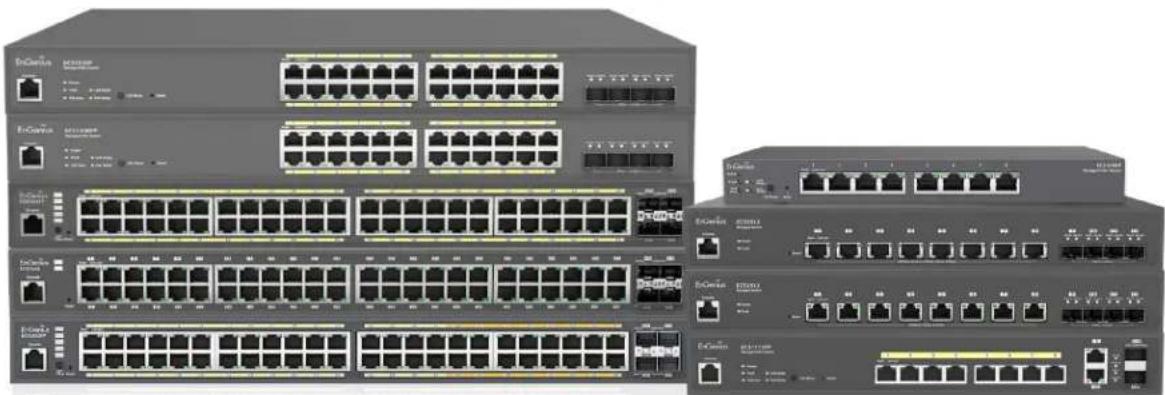
natural_image
Exterior view of multiple network switches and Ethernet ports (no text or labels visible)Benefits to Help Grow Your Business
Increased Flexibility for Network Design
Select either 8,10,24, or 48 Gigaport ports and Power-over-Ethernet layer 2 switches with 1 Gbps SFP or 10 Gbps SFP+ ports. Cloud Managed Switch model options also include desktop and rack mountable, fanless, and SmartFan designs.
High Performance up of 10G Ethernet Capacity
The EnGenius Cloud-enabled switch series comes with multi-gigabit models that support 1G/2.5G/10G Base-T Ethernet ports that can transmit and receive data traffic without any loss. Capable of powering the performance of 802.11ax access points to support bandwidth larger than one gigabit per second, EnGenius switches provides faster overall network performance.
Maximum power supply capabilities to future-proof devices with 802.3bt
By providing a wide range of PoE/PoE+/PoE++ models that support 802.3af/803.at/802.3bt on all ports, companies can regulate power budgets according to device requirements and remotely power cycle individual ports. The 802.3bt standard of EnGenius switches delivers up to 60W of power to optimize the power management and longevity of your network devices, such as Wi-Fi 6 access points, outdoor surveillance cameras with heaters, and emerging power-hungry IoT devices.
High-Speed Gigabit with Fiber
The switch's 1 Gbps SFP or 10 Gbps SFP+ slots options connect wired network segments throughout buildings extending beyond the limitations of Ethernet cabling. By reducing delays, businesses experience more consistent and uninterrupted communications.
Increased Access Control and Security
Protect the network with 802.1X port-based client authentication with dynamic VLAN and security through a RADIUS server. Administrators can use Access Control Lists (ACLs) to see who has access to network segments while screening traffic from unauthorized MAC or IP addresses. By establishing a guest VLAN to grant and limit Internet resources for visitors, guests can use the network while also keeping the network secure.
Improved VLAN/Voice and Quality of Service
Segment the network by departments or traffic types for increased performance and security with 802.1Q VLAN statically or dynamically. While 802.1p Class of Service prioritizes compliant VoIP and video traffic ensuring bandwidth intensive, time-sensitive data is forwarded immediately for clear, smooth voice and video delivery.

Provides In-Depth Network Visibility
The Network Topology View automatically maps the network deployment and displays device relationships across the infrastructure. No more manual tracking required – simply use Network Topology view to troubleshoot switches or access points directly from the cloud management interface. Grab high-level information by hovering over the device icon or click on details to take you right to the cloud device page.
Advanced Authentication
With EnGenius Cloud, your network devices are protected with two-factor authentication and non-sequential serial numbers and MAC address verification to ensure only authorized cloud devices are on the network. Once devices are authenticated, a secure tunnel is established between the device and the cloud management system with a unique certificate to encrypt transmissions.
Advanced PoE Features Designing for Surveillance
The ECS1008P/ECS1112FP/ECS1528P/ECS1528FP/ECS1552P/ECS-1552FP/ECS2528FP/ECS2552FP switches feature surveillance friendly functions to relieve the pain points of deployment and management for IP cameras. These advanced features are all based on the Power-over-Ethernet technology. The PoE extended mode allows you to deploy the camera over Ethernet cable at a more extended range up to 250 meters. PD lifeguard real-timely monitors the status of the camera and auto-reboot the camera when it is down. The continuous PoE power supplies the IP camera in operation without interruption of the switch rebooting during switch firmware upgrading.
Cloud Improves Setup, Registry and Device Management of Gigabit Switches
For quick and simple setup manage your switches using EnGenius Cloud. Scan and assign switches into an organization and network for device registration and configuration using the EnGenius Cloud To-Go app. Simply refine configurations under the list view for switches in the switch's detail page after initial setup and registration.
EnGenius Cloud's dashboard provides a quick health check status of all your switches in an organization and network and quick access into detailed switch configurations and system information.
Conveniently & easily monitor and troubleshoot all of your network switches in one location using switch list and detail view to compare resources, check overall configurations and real-time meters, and configure detailed system and port settings.
Set maintenance schedules across times zones to improve up-time, enable remote system log to track system modifications or configuration changes, establish event-based email alerts and receive push notifications via the EnGenius Cloud To-Go app.
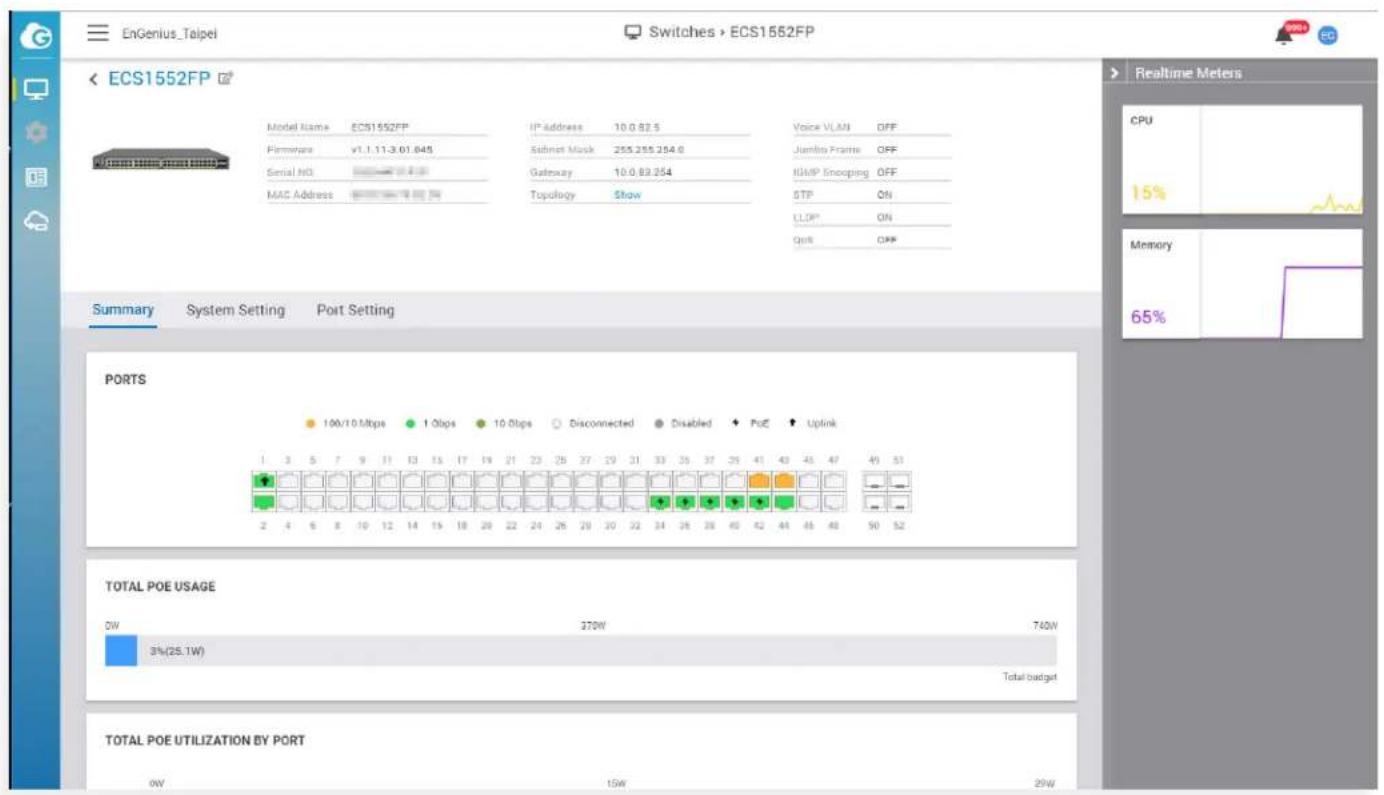
Simplified Switch Management, Visibility, and Troubleshooting
By using multiple methods to manage switches, EnGenius decreases administration time through remote management, visibility, and troubleshooting. Select the most effective management approach based on network architecture, administrative permissions, technical aptitude, or even budget.
Locally Manage – manage each EnGenius switch in a standalone setup from its intuitive user interface that provides full access into all the Layer 2 switching features.
Cloud Management – remotely or locally manage EnGenius switches with EnGenius Cloud, a true license-free cloud management solution that provides quick deployment from anywhere, deep-dive analytics to review system performance, and custom device alerts through a simple to use smart phone app.
On-Premises Management – SkyKey
Manage up to 100 EnGenius switches with the plug-and-play SkyKey device, which provides on-premises and subscription-free remote access capability through EnGenius Cloud under single-pane-of-glass capabilities.
On-Premises Management - ezMaster
Manage 1,000s of EnGenius switches with ezMaster network software, an on-premises solution utilizing a Virtual Machine server or a private-cloud AWS account that easily configures and maintains multiple customer sites and thousands of devices via ezMaster network management software, all with no license or subscription fees.
Advanced Topology to monitor the whole network including 3rd-Party Devices
Besides Engenius Switch and AP to be discovered in the Topology, in professional mode, the Topology can discover 3rd party devices to have a holistic view of the Networking Topology. The topology view displays the actual connection of the devices in your network. You can see Access Points and Switches' real-time status and check the detailed information of PoE status, IP and MAC address, and throughput. In professional mode, you can also view the device name, capability, vendor, and IP address of third-party devices to have overall control of network status.

flowchart
graph TD
    A["Internet"] --> B["DenR750"]
    B --> C["SIP-T48G"]
    C --> D["Ruckus AP"]
    D --> E["ECS1552FP"]
    D --> F["ECS1552FP"]
    D --> G["ECS1552FP"]
    D --> H["ECS1552FP"]
    E --> I["ECW230"]
    F --> J["ECW230"]
    G --> K["ECW230"]
    H --> L["ECW230"]
    I --> M["ECW230"]
    J --> N["ECW230"]
    K --> O["ECW230"]
    L --> P["ECW230"]
    M --> Q["ECW230"]
    N --> R["ECW230"]
    O --> S["ECW230"]
    P --> T["ECW230"]
    Q --> U["ECW230"]
    R --> V["ECW230"]
    S --> W["ECW230"]
    T --> X["ECW230"]
    U --> Y["ECW230"]
    V --> Z["ECW230"]
    W --> AA["ECW230"]
    X --> AB["ECW230"]
    Y --> AC["ECW230"]
    Z --> AD["ECW230"]
    AA --> AE["ECW230"]
    AB --> AF["ECW230"]
    AC --> AG["ECW230"]
    AD --> AH["ECW230"]
    AE --> AI["ECW230"]
    AF --> AJ["ECW230"]
    AG --> AK["ECW230"]
    AH --> AL["ECW230"]
    AI --> AM["ECW230"]
    AJ --> AN["ECW230"]
    AK --> AO["ECW230"]
    AL --> AP["ECW230"]
    AM --> AQ["ECW230"]
    AN --> AR["ECW230"]
    AO --> AS["ECW230"]
    AP --> AT["ECW230"]
    AQ --> AU["ECW230"]
    AR --> AV["ECW230"]
    AS --> AW["ECW230"]
    AT --> AX["ECW230"]
    AU --> AY["ECW230"]
    AV --> AZ["ECW230"]
    AW --> BA["ECW230"]
    AX --> BB["ECW230"]
    AY --> BC["ECW230"]
    BB --> BD["ECW230"]
    BC --> BE["ECW230"]
    BD --> BF["ECW230"]
    BE --> BG["ECW230"]
    BF --> BH["ECW230"]
    BG --> BI["ECW230"]
EnGenius Cloud Switches
| Gigabit Switch | ||||||||
 |  |  |  |  |  |  |  | |
| Model ECS1008P ECS1112FP ECS1528 ECS1528P ECS1528FP ECS1552 ECS1552P ECS1552FP | ||||||||
| Switch Class Layer 2+ Layer 2+ Layer 2+ Layer 2+ Layer 2+ Layer 2+ Layer 2+ | ||||||||
| Gigabit Ethernet Ports | 8 10 24 24 | 24 48 48 48 | ||||||
| Multi-Gigabit Ethernet Ports | ---- | |||||||
| SFP Ports - 2 ---- | ||||||||
| SFP+ Ports -- 4 4 4 4 4 4 | ||||||||
| RJ45 Console Port | ● | ● | ● | ● | ● | ● | ● | |
| Form Factor 9.45" (desktop) 13" 1U 19" 1U 19" 1U 19" 1U 19" 1U 19" 1U | ||||||||
| Power-over-Ethernet | 802.3af | 802.3af/at | 802.3af/at | 802.3af/at | 802.3af/at | 802.3af/at | ||
| Total PoE Budget | 55W | 130W | - | 240W | 410W | - | 410W | 740W |
| PoE Capable Ports | Ports 1-8 | Ports 1-8 | - | Ports 1-24 | Ports 1-24 | - | Ports 1-48 | Ports 1-48 |
| Switching Capacity | 16Gbps | 24Gbps | 128Gbps | 128Gbps | 128Gbps | 176Gbps | 176Gbps | 176Gbps |
| Packet Forwarding Rate (Mpps) | 11.904Mpps | 17.856Mpps | 95.23Mpps | 95.23Mpps | 95.23Mpps | 130.95Mpps | 130.95Mpps | 130.95Mpps |
| MAC Address Table | 8K | 8K | 16K | 16K | 16K | 32K | 32K | 32K |
| Packet Buffer Memory | 512KB | 512KB | 1.5MB | 1.5MB | 1.5MB | 2MB | 2MB | 2MB |
| Full-load Power Consumption | 62.05 Watts | 152.8 Watts | 24.41 Watts | 297.6 Watts | 500.46 Watts | 43.92 Watts | 476.3 Watts | 885 Watts |
| *PoE Extended Mode | ● | ● | - | ● | ● | - | ● | ● |
| PD Lifeguard | ● | ● | - | ● | ● | - | ● | ● |
| Continuous PoE Power | ● | ● | - | ● | ● | - | ● | ● |
| Dimension | 240mm x 105mm x 27mm | 330mm x 230mm x 44mm | 440mm x 200mm x 44mm | 440mm x 260mm x 44mm | 440mm x 260mm x 44mm | 440mm x 260mm x 44mm | 440mm x 310mm x 44mm | 440mm x 310mm x 44mm |
Multi-Gigabit Switch
 |  |  |  |  |  | |
| Model ECS2512 ECS2512FP ECS2528FP ECS2552FP ECS5512 ECS5512FP | ||||||
| Switch Class Layer 2+ Layer 2+ Layer 2+ Layer 2+ Layer 2+ Layer 2+ | ||||||
| Gigabit Ethernet Ports -- 16 32 -- | ||||||
| Multi-Gigabit Ethernet Ports | 8 x 2.5G 8 x 2.5G | 8 x 2.5G 16 x 2.5G | 8 x 10G | |||
| SFP Ports ---- | ||||||
| SFP+ Ports 4 4 4 4 4 4 | ||||||
| RJ45 Console Port | ● | ● | ● | ● | ● | ● |
| Form Factor | 13" 1U | 13" 1U | 19" 1U | 19" 1U | 13" 1U | 13" 1U |
| Power-over-Ethernet | 802.3af/at/bt | 802.3af/at | 802.3af/at | 802.3af/at/bt | ||
| Total PoE Budget | - | 240W | 410W | 740W | - | 420W |
| PoE Capable Ports | - | Ports 1-8 | Ports 1-24 | Ports 1-48 | - | Ports 1-8 |
| Switching Capacity | 120Gbps | 120Gbps | 152Gbps | 224Gbps | 240Gbps | 240Gbps |
| Packet Forwarding Rate (Mpps) | 89.29 Mpps | 89.29 Mpps | 113.10 Mpps | 166.67 Mpps | 178.57 Mpps | 178.57 Mpps |
| MAC Address Table | 16K | 16K | 16K | 32K | 32K | 32K |
| Packet Buffer Memory | 512KB | 512KB | 1.5MB | 2MB | 2MB | 2MB |
| Full-load Power Consumption | 23.52 Watts | 299 Watts | 499.85 Watts | 913 Watts | 29.22 Watts | 506.7 Watts |
| *PoE Extended Mode | -- | ● | ●-- | |||
| PD Lifeguard -- | ● -- | ● | ||||
| Continuous PoE Power | -- | ● | ●-- | |||
| Dimension | 330mm x 230mm x 44mm | 330mm x 230mm x 44mm | 440mm x 260mm x 44mm | 440mm x 310mm x 44mm | 330mm x 230mm x 44mm | 330mm x 230mm x 44mm |
Technical Specifications
Port Standards
ECS1008P/ECS1112FP/ECS1528/ECS1528P/ECS1528FP/ECS1552/ECS1552P/ECS1552FP
802.3 10Base-T Ethernet
802.3u 100Base-TX Ethernet
802.3ab 1000Base-T Ethernet
802.3x Full-Duplex Flow Control
ECS2512/ECS2512FP
802.3u 100Base-TX Ethernet
802.3ab 1000Base-T Ethernet
802.3b/ 2.5G/Base-T Ethernet
802.3x Full-Duplex Flow Control
ECS2528FP/ECS2552FP
802.3u 100Base-X Ethernet
802.3ab 1000Base-T Ethernet
802.3bz 2.5G/Base-T Ethernet
802.3x Full-Duplex Flow Control
Network Ports
ECS1008P
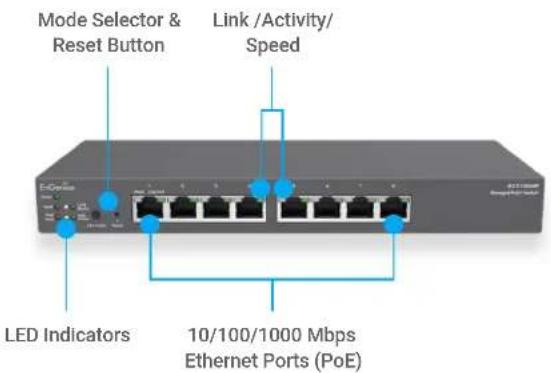
8 x 10/100/1000 Mbps Ports
ECS1112FP
10 x 10/100/1000 Mbps Ports + 2x SFP Ports
ECS1528/ECS1528P/ECS1528FP
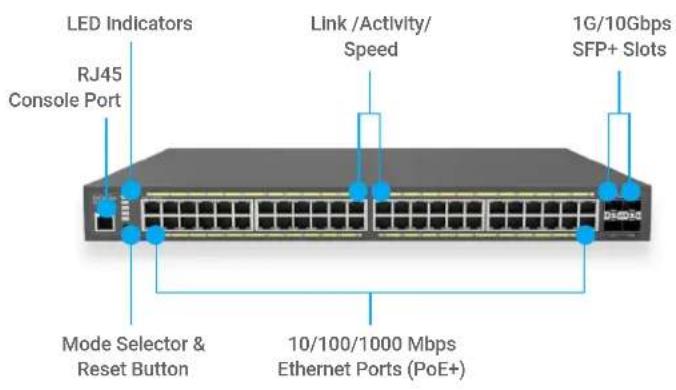
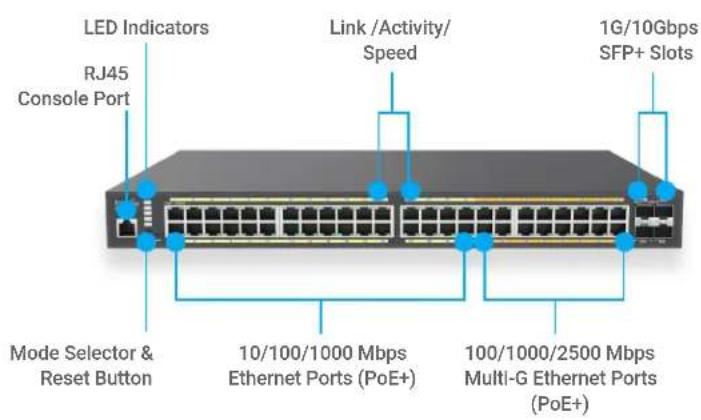
24×10/100/1000 Mbps Ports + 4x SFP+ Ports
ECS1552/ECS1552P/ECS1552FP
48 x 10/100/1000 Mbps Ports + 4x SFP+ Ports
ECS2512/ECS2512FP
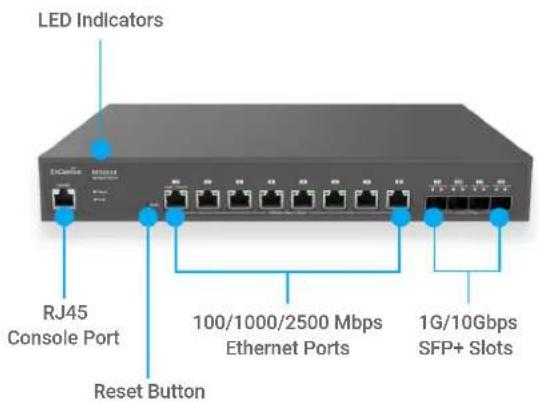
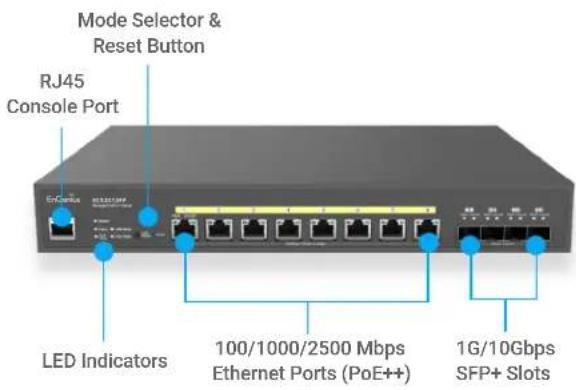
8 x 100/1000/2500 Mbps Ports + 4x SFP+ Ports
ECS2528FP
16x10/100/1000 Mbps Ports + 4x SFP+ Ports
8x100/1000/2500 Mbps Ports
4x SFP+ Ports
ECS2552FP
32x10/100/1000 Mbps Ports + 4x SFP+ Ports
16x100/1000/2500 Mbps Ports
4x SFP+ Ports
ECS5512/ECS5512FP
8 x100/1000/2500/5000/10000 Mbps Ports + 4x SFP+ Ports
Switching Capacity
ECS1008P
16 Gbps
ECS1112FP
24 Gbps
ECS1528/ECS1528P/ECS1528FP
128 Gbps
ECS1552/ECS1552P/ECS1552FP
176 Gbps
ECS2512/ECS2512FP
120 Gbps
ECS2528FP
152 Gbps
ECS2552FP
224 Gbps
ECS5512/ECS5512FP
240 Gbps
SDRAM
ECS1008P/ECS1112FP
256MB
ECS1528/ECS1528P/ECS1528FP/ECS1552/ECS1552P/ECS1552FP/ECS2512/ECS2512FP/ECS2528FP/ECS2552FP/ECS5512/ECS5512FP
512MB
Flash Memory
ECS1008P/ECS1112FP
32MB
ECS1528/ECS1528P/ECS1528FP/ECS1552/ECS1552P/ECS1552FP/ECS2512/ECS2512FP/ECS2528FP/ECS2552FP/ECS5512/ECS5512FP
128MB
PoE Capable Ports
ECS1008P
1-8 (802.3af only)
ECS1112P
1-8 (802.3af/at)
ECS2512FP/ECS5512FP
1-8 (802.3af/at/bt)
ECS1528P/ECS1528FP/ECS2528FP
1-24 (802.3a/f/at)
ECS1552P/ECS1552FP/ECS2552FP
1-48 (802.3af/at)
Total PoE Budget
ECS1008P
55W
ECS1112FP
130W
ECS1528P
240W
ECS1528FP
410W
ECS1552P/ECS2528FP
410W
ECS1552FP/ECS2552FP
740W
ECS2512FP
240W
ECS5512FP
420W
Power Source
ECS1008P/ECS1112FP/ECS1528/ECS1528P/ECS1528FP/ECS1552/ECS1552P/ECS1552FP/ECS2512/ECS2512FP/ECS2528FP/ECS2552FP/ECS5512/ECS5512FP
100\~240VAC,50/60Hz
Physical Interface
LED Indicators
ECS1008P/ECS1112FP/ECS1528P/ECS1528FP/ECS1552P/ECS1552FP/ECS2528FP/ECS2552FP/ECS2512FP/ECS5512FP
Power LED
Fault LED
PoE Max LED
LAN Mode LED
PoE Mode LED
ECS1528/ECS1552/ECS2512/ECS5512
Power LED
Fault LED
Ports
ECS1008P/ECS1112FP/ECS1528/ECS1528P/ECS1528FP/ECS1552/ECS1552P/ECS1552FP/ECS2512/ECS2512FP/ECS2528FP/ECS2552FP/ECS5512/ECS5512FP
Link/Activity/Speed (per Ethernet port)
Link/Activity/Speed (per SFP slot)
Software Features(L3 Feature)
Multiple IP Interface
ECS1008P/ECS1112FP/ECS1528/ECS1528P/ECS1528FP/ECS1552/ECS1552P/ECS1552FP/ECS2512/ECS2512FP/ECS2528FP/ECS2552FP/ECS5512/ECS5512FP
20 IPv6 address
ARP Table
ECS1008P/ECS1112FP/ECS1528/ECS1528P/ECS1528FP/ECS1552/ECS1552P/ECS1552FP/ECS2512/ECS2512FP/ECS2528FP/ECS2552FP/ECS5512/ECS5512FP
Max 192 ARP entries
Static ARP
ECS1008P/ECS1112FP/ECS1528/ECS1528P/ECS1528FP/ECS1552/ECS1552P/ECS1552FP/ECS2512/ECS2512FP/ECS2528FP/ECS2552FP/ECS5512/ECS5512FP
Static 192 ARP entries
IPv4 Static Route
ECS1008P/ECS1112FP/ECS1528/ECS1528P/ECS1528FP/ECS1552/ECS1552P/ECS1552FP/ECS2512/ECS2512FP/ECS2528FP/ECS2552FP/ECS5512/ECS5512FP
Max. 63 entries
IPv6 Static Route
ECS1008P/ECS1112FP/ECS1528/ECS1528P/ECS1528FP/ECS1552/ECS1552P/ECS1552FP/ECS2512/ECS2512FP/ECS2528FP/ECS2552FP/ECS5512/ECS5512FP
Max. 21 entries
Software Features(L2 Feature)
Network Management
ECS1008P/ECS1112FP/ECS1528/ECS1528P/ECS1528FP/ECS1552/ECS1552P/ECS1552FP/ECS2512/ECS2512FP/ECS2528FP/ECS2552FP/ECS5512/ECS5512FP
EnGenius Cloud
ezMaster/SkyKey
Local Web GUI
Technical Specifications
MAC Address Table
ECS1008P/ECS1112FP
8K
ECS1528/ECS1528P/ECS1528FP/ECS2512/ECS2512FP/ECS2528FP
16K
ECS1552/ECS1552P/ECS1552FP/ECS5512/ECS5512FP/ECS2552FP
32K
Jumbo Frame
ECS1008P/ECS1112FP/ECS1528/ECS1528P/ECS1528FP/ECS1552/ECS1552P/ECS1552FP/ECS2512/ECS2512FP/ECS2528FP/ECS2552FP/ECS5512/ECS5512FP
10K
Multicast Group
ECS1008P/ECS1112FP/ECS1528/ECS1528P/ECS1528FP/ECS1552/ECS1552P/ECS1552FP/ECS2512/ECS2512FP/ECS2528FP/ECS2552FP/ECS5512/ECS5512FP
Max 256 groups
MLD Snooping
ECS1008P/ECS1112FP/ECS1528/ECS1528P/ECS1528FP/ECS1552/ECS1552P/ECS1552FP/ECS2512/ECS2512FP/ECS2528FP/ECS2552FP/ECS5512/ECS5512FP
MLD Snooping: v1
QoS-Number of Priority Queues Supported
ECS1008P/ECS1112FP/ECS1528/ECS1528P/ECS1528FP/ECS1552/ECS1552P/ECS1552FP/ECS2512/ECS2512FP/ECS2528FP/ECS2552FP/ECS5512/ECS5512FP
Queue 8
Trust Mode
ECS1008P/ECS1112FP/ECS1528/ECS1528P/ECS1528FP/ECS1552/ECS1552P/ECS1552FP/ECS2512/ECS2512FP/ECS2528FP/ECS2552FP/ECS5512/ECS5512FP
Cos/802.1p
DSCP
CoS/802.1p-DSCP
Scheduling Mechanism
ECS1008P/ECS1112FP/ECS1528/ECS1528P/ECS1528FP/ECS1552/ECS1552P/ECS1552FP/ECS2512/ECS2512FP/ECS2528FP/ECS2552FP/ECS5512/ECS5512FP
Strict / WRR/ Strict + WRR
Bandwidth Control
ECS1008P/ECS1112FP/ECS1528/ECS1528P/ECS1528FP/ECS1552/ECS1552P/ECS1552FP/ECS2512/ECS2512FP/ECS2528FP/ECS2552FP/ECS5512/ECS5512FP
Port-based bandwidth control (Ingress/Egress)
Port Security
ECS1008P/ECS1112FP/ECS1528/ECS1528P/ECS1528FP/ECS1552/ECS1552P/ECS1552FP/ECS2512/ECS2512FP/ECS2528FP/ECS2552FP/ECS5512/ECS5512FP
Max. 256 Entries
Access Control List (ACL)
ECS1008P/ECS1112FP/ECS1528/ECS1528P/ECS1528FP/ECS1552/ECS1552P/ECS1552FP/ECS2512/ECS2512FP/ECS2528FP/ECS2552FP/ECS5512/ECS5512FP
MAC Based ACL
IPv4/IPv6 Based ACL
ACL Binding
Time base ACL
Web Graphical User Interface(GUI)
ECS1008P/ECS1112FP/ECS1528/ECS1528P/ECS1528FP/ECS1552/ECS1552P/ECS1552FP/ECS2512/ECS2512FP/ECS2528FP/ECS2552FP/ECS5512/ECS5512FP
HTTP IPv4 / IPv6
HTTPS IPv4 / IPv6
SSL Certificate
ECS1008P/ECS1112FP/ECS1528/ECS1528P/ECS1528FP/ECS1552/ECS1552P/ECS1552FP/ECS2512/ECS2512FP/ECS2528FP/ECS2552FP/ECS5512/ECS5512FP
Certificate/Key Import
SNMP
ECS1008P/ECS1112FP/ECS1528/ECS1528P/ECS1528FP/ECS1552/ECS1552P/ECS1552FP/ECS2512/ECS2512FP/ECS2528FP/ECS2552FP/ECS5512/ECS5512FP
SNMP v1/v2c/v3 Support
RMON
ECS1008P/ECS1112FP/ECS1528/ECS1528P/ECS1528FP/ECS1552/ECS1552P/ECS1552FP/ECS2512/ECS2512FP/ECS2528FP/ECS2552FP/ECS5512/ECS5512FP
RMON 1,2,3,9
System Time
ECS1008P/ECS1112FP/ECS1528/ECS1528P/ECS1528FP/ECS1552/ECS1552P/ECS1552FP/ECS2512/ECS2512FP/ECS2528FP/ECS2552FP/ECS5512/ECS5512FP
Time Setting/Daylight saving
Common L2 Features
ECS1008P/ECS1112FP/ECS1528/ECS1528P/ECS1528FP/ECS1552/ECS1552P/ECS1552FP/ECS2512/ECS2512FP/ECS2528FP/ECS2552FP/ECS5512/ECS5512FP
802.1d Spanning tree
Loopback Detection
Multicast Filitering
IGMP Multicast Forwarding
IGMP Snooping
MLD Multicast Forwarding
802.1Q VLAN tagging
802.3x flow control
802.3ad Link Aggregation
IPv4 DHCP Relay
IPv4 DHCP Snooping
IPv4 DHCP Snooping Source MAC Address Check-up
ARP Inspection
ARP Packet Validation (additional validation checks)
Voice VLAN
Port-based VLAN
Protocol-Based VLAN
CoS Mapping
- 1X Radius Authentication Protocol
IPv4 Settings
IPv6 Settings
IEEE 802. 3az Energy Efficient Ethernet (EEE)
Command Line Interface (CLI)
SSH Server
Telnet Server
TFTP Client
Configuration Upgrade/ Backup
Simple Network Time Protocol (SNTP)
SYSLOG
802.1d Spanning tree
Environmental & Physical
Temperature Range
ECS1008P
Operating: 32°F to 104°F (0°C to 40°C)
ECS1112FP/ECS1528/ECS1528P/
ECS1528FP/ECS1552/ECS1552P/ECS1552FP/ECS2512/ECS2512FP/ECS2528FP/ECS2552FP/ECS5512/ECS5512FP
Operating: 32°F to 122°F (0°C to 50°C)
Humidity (Non-Condensing)
ECS1008P/ECS1112FP/ECS1528/ECS1528P/ECS1528FP/ECS1552/ECS1552P/ECS1552FP/ECS2512/ECS2512FP/ECS2528FP/ECS2552FP/ECS5512/ECS5512FP
Operating: 5% - 95%
Package Contents
ECS1008P
1x ECS Managed Gigabit Switch
1x Quick Installation Guide
1x Power Adapter
1x Power Cord
1x Wall Mount Kit
1x Ground Screw Set
ECS1112FP/ECS1528/ECS1528P/ECS1528FP/ECS1552/ECS1552P/ECS1552FP/ECS2512/ECS2512FP/ECS5512/ECS5512FP
1x ECS Managed Gigabit Switch
1x Quick Installation Guide
1x Power Cord
1x RJ45 Console Cable
1x Rack Mount Kit
Technical Specifications
Device Dimensions & Weights
ECS1008P
Weight: 0.6 kg
Width: 105 mm
Length: 240 mm
Height: 27 mm
ECS1112FP
Weight: 1.9 kg
Width: 330 mm
Length: 230 mm
Height: 44 mm
ECS1528
Weight: 1.9 kg
Width: 200 mm
Length: 440 mm
Height: 44 mm
ECS1528P/ECS1528FP/ECS1552/ECS2528FP
Weight: 4.7 kg
Width: 260 mm
Length: 440 mm
Height: 44 mm
ECS1552P/ECS1552FP/ECS2552FP
Weight: 5.9 kg
Width: 310 mm
Length: 440 mm
Height: 44 mm
ECS2512
Weight: 2.6 kg
Width: 230 mm
Length: 330 mm
Height: 44 mm
ECS2512FP/ECS5512/ECS5512FP
Weight: 3.1 kg
Width: 230 mm
Length: 330 mm
Height: 44 mm
Warranty
ECS1008P/ECS1112FP/ECS1528/ECS1528P/
ECS1528FP/ECS1552/ECS1552P/ECS1552FP/
ECS2512/ECS2512FP/ECS2528FP/ECS2552FP/
ECS5512/ECS5512FP
2 year
Desktop
ECS1008P
Rackmount
ECS1112FP

Rackmount
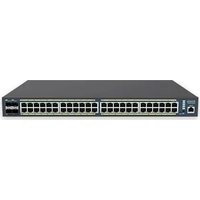
ECS1528

ECS1528P

ECS1528FP

ECS1552

Rackmount
ECS1552P
ECS1552FP

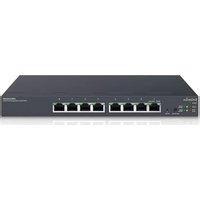
ECS2512
ECS2512FP
Rackmount
ECS2528FP ECS2552FP

ECS5512

ECS5512FP

EnGenius Technologies | Costa Mesa, California, USA
Email: partners@engeniustech.com
Website: www.engeniustech.com
EnGenius Networks Europe B.V. | Eindhoven, Netherlands (Europe)
Email: sales@engeniusnetworks.eu
Website: www.engeniusnetworks.eu
EnGenius Networks Singapore Pte Ltd. | Singapore (Asia Pacific)
Website: www.engeniustech.com.sg
Features and specifications subject to change without notice. Trademarks and registered trademarks are the property of their respective
owners. For United States of America: Copyright ©2021 EnGenius Technologies, Inc.
Version 21 20220217

- EnGenius Cloud-enabled Switch Series
- Features & Benefits
- Benefits to Help Grow Your Business
- Increased Flexibility for Network Design
- High Performance up of 10G Ethernet Capacity
- Maximum power supply capabilities to future-proof devices with 802.3bt
- High-Speed Gigabit with Fiber
- Increased Access Control and Security
- Improved VLAN/Voice and Quality of Service
- Provides In-Depth Network Visibility
- Advanced Authentication
- Advanced PoE Features Designing for Surveillance
- Cloud Improves Setup, Registry and Device Management of Gigabit Switches
- Simplified Switch Management, Visibility, and Troubleshooting
- Advanced Topology to monitor the whole network including 3rd-Party Devices
- EnGenius Cloud Switches
- Technical Specifications
- Port Standards
- ECS2512/ECS2512FP
- ECS2528FP/ECS2552FP
- Network Ports
- ECS1008P
- ECS1112FP
- ECS1528/ECS1528P/ECS1528FP
- ECS1552/ECS1552P/ECS1552FP
- ECS2528FP
- ECS2552FP
- ECS5512/ECS5512FP
- Switching Capacity
- SDRAM
- ECS1008P/ECS1112FP
- Flash Memory
- PoE Capable Ports
- ECS1112P
- ECS2512FP/ECS5512FP
- ECS1528P/ECS1528FP/ECS2528FP
- ECS1552P/ECS1552FP/ECS2552FP
- Total PoE Budget
- ECS1528P
- ECS1528FP
- ECS1552P/ECS2528FP
- ECS1552FP/ECS2552FP
- ECS2512FP
- ECS5512FP
- Power Source
- Physical Interface
- LED Indicators
- ECS1528/ECS1552/ECS2512/ECS5512
- Ports
- Software Features(L3 Feature)
- Multiple IP Interface
- ARP Table
- Static ARP
- IPv4 Static Route
- IPv6 Static Route
- Software Features(L2 Feature)
- Network Management
- MAC Address Table
- Jumbo Frame
- Multicast Group
- MLD Snooping
- QoS-Number of Priority Queues Supported
- Trust Mode
- Scheduling Mechanism
- Bandwidth Control
- Port Security
- Access Control List (ACL)
- Web Graphical User Interface(GUI)
- SSL Certificate
- SNMP
- RMON
- System Time
- Common L2 Features
- Environmental & Physical
- Temperature Range
- Humidity (Non-Condensing)
- Package Contents
- Device Dimensions & Weights
- ECS1528
- ECS1528P/ECS1528FP/ECS1552/ECS2528FP
- ECS2512
- ECS2512FP/ECS5512/ECS5512FP
- Warranty
- Desktop
- Rackmount
Brand : ENGENIUS
Model : ECS1528
Category : Network switch