
HR72X - Receiver ROLLS - Free user manual and instructions
Find the device manual for free HR72X ROLLS in PDF.


| Product Type | CD/MP3 Player with XLR Outputs |
| Brand | Rolls |
| Model | HR72X |
| Power Supply | Rolls PSU115/PS15 switching power supply (included), 5.5mm x 2.1mm DC plug, tip negative |
| Output Connectors | Stereo XLR balanced (left & right), stereo RCA (unbalanced) |
| Input Media | CD (12 cm & 8 cm), USB flash disk, SD/MMC card |
| Playable Discs | Standard audio CDs, CD-R, CDs with MP3 files |
| Supported File Formats | CD-DA, MP3 |
| Dimensions (W x H x D) | 6.75" x 1.7" x 8" (17.15 cm x 4.32 cm x 20.32 cm) |
| Weight | 2.5 lbs (1.13 kg) |
| Output Level | -10 dBV nominal, adjustable via front panel LEVEL control |
| Front Panel Controls | Power, SD/USB/CD selector, Folder, Prog, Repeat, Skip-Rew (fast back), Skip-Fwd (fast forward), Play/Pause, Skip-Rev (previous track), Skip-Fwd (next track), Level, Stop/Eject |
| Remote Control | Optional Rolls #172R (sold separately), required for track programming and some functions |
| Playback Modes | Normal, Repeat All, Repeat 1, Shuffle (random) |
| Programming | Custom track programming via remote control only |
| Display | LCD showing disc type, play status, repeat/shuffle mode, folder number, track number, track time |
| Disc Load | Slot-load mechanism, do not force disc; place disc carefully until mechanism takes it |
| Notes | USB port for thumb drives only, do not connect to computer; supports 12 cm and 8 cm discs |
Frequently Asked Questions - HR72X ROLLS
User questions about HR72X ROLLS
0 question about this device. Answer the ones you know or ask your own.
Ask a new question about this device
Download the instructions for your Receiver in PDF format for free! Find your manual HR72X - ROLLS and take your electronic device back in hand. On this page are published all the documents necessary for the use of your device. HR72X by ROLLS.
USER MANUAL HR72X ROLLS
2 - XLR balanced outputs
JACK SIZE: 5.5mm X 2.1mm DC TIP NEG.
OUTPUT LEVEL: -10dbv NOMINAL
SIZE: 6.75" X 1.7" X 8" (W-H-D)
SOFT TACT BUTTONS: Power, SD/USB, Shu. Enter, Repeat, Mute, Stop/Eject, Folder, Play/Pause, Reverse, Forward, Prog.
LINE OUT VOLUME CONTROL
ACCEPTS 12 CM AND 8 CM DISCS LIKE (CD-R)
MV-CD3 : ACCEPTS 12 cm AND 8 cm DISCS
Weight: 2.5 lbs. (1.3 kg)
ROLLS
www.rolls.com
Rolls Corporation
Salt Lake City, UT
09/15
ROLLS
HR72X
CD/MP3/USB/SD/MMC CARD Player With XLR Outputs
QUICK START
OPPERATION GUIDE
INTRODUCTION
Thank you for your purchase of the Rolls HR72X CD/MP3 Player. The HR72X is a 1/2 rack space CD/MP3 disc player. Intended mainly for installation applications, the HR72X plays standard audio CDs as well as CDs formatted with MP3 files. The single rack space height makes it convenient to install in almost any professional audio rack.
FEATURES:
- Plays standard CDs as well as discs with MP3 files
- Plays files from SD cards
- Plays USB flash disk
- XLR Balanced line lever left and right outputs
• RCA Output - Track programming with optional remote
- Repeat All, 1, and Shuffle play
- Output Level control
INSPECTION
- Unpack and Inspect the HR72X package
Your HR72X was carefully packed at the factory in a protective carton. Nonetheless, be sure to examine the unit and the carton for any signs of damage that may have occurred during shipping. If obvious physical damage is noticed, contact the carrier immediately to make a damage claim. We suggest saving the shipping carton and packing materials for safely transporting the unit in the future.
- For complete Warranty information and registration, please visit our web site; www.rolls.com. Click on the REGISTER YOUR WARRANTY HERE line. Or, complete the Warranty Registration Card and return it to the factory.
SPECIFICATIONS:
SOFT TACT BUTTONS: Power, SD/USB, Shu. Enter, Repeat, Mute, Stop/Eject, Folder, Play/Pause, Reverse, Forward, Prog.
ACCEPTS 12 CM AND 8 CM DISCS LIKE (CD-R)
MV-CD3 : ACCEPTS 12 cm AND 8 cm DISCS
Connectors: Stereo XLR balanced, and stereo RCA Outputs
Dimensions: 6.75" X 1.7" X 8" (W-H-D)
Weight: 2.5 lbs. (1.3 kg)
ROLLS PSU115/PS15 switching power supply included
OPTIONAL ROLLS #172R REMOTE SOLD SEPARATELY
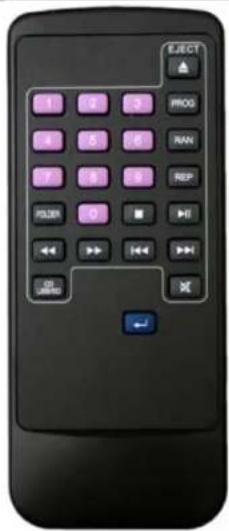
Some functions can only be accessed by the optional remote ROLLS part #172R.
-The Custom Program option can only be accessed by the optional remote.
To access the Custom Program feature insert a disc and press the PROG button on the remote. The display will show PROGRAM in the top right corner of the display. Enter the first track number on the remote you wish to play. If this is the only track you wish to play press the PLAY button and the unit will play only that track. If you are programing more than one track use the blue arrow button on the remote to program other tracks after selecting the track number. The LCD Display will show you what number you are programing. If you want the HR72X to repeat the Custom Programed tracks you must, after Programing the tracks and pressing PLAY press the REP (Repeat) button to REPEAT ALL.
- Repeat / Shuffle
-Normal operation of the HR72X will play through all folders (MP3) and tracks, then stop.
-To play the disc over and over, press the REP button on the remote once. The display will show the REPEAT ALL in the display.
-To play one track continuously, press the REP button until the Track Play Status reads REPEAT 1. If the REPEAT status is on alone (MP3 mode) the current folder will repeat.
For Shuffle (random on the optional remote) play, press the RAN button until the Track Play Status reads SHUFFLE.
-If the Track Play Status displays none of the above, the disc will play through one time and stop.
DISPLAY DESCRIPTION
HR72X DISPLAY
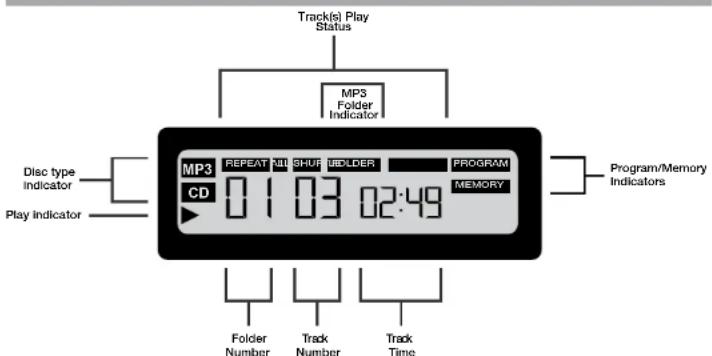
- Disc Type Indicators: Indicates whether the inserted disc is a CD disc, or MP3 disc.
- Play Indicator: Shows that the disc is playing.
- Track Play Status: Indicates the repeating status of the disc. The "Repeat" indicator is on, either "1" or "ALL" will be on. A "1" indicates the current track will be repeated, "ALL" indicates the disc will play repeatedly. "SHUFFLE" play indicates random play, and if no Track Play Status indicators are on, the disc will play through one time and stop.
- MP3 Folder Indicator: Displays the number of folders on the MP3 disc.
- Program/Memory Indicators: When "Program" is on, the HR72X is in track programming mode. When the "Memory" indicator is on, there are tracks programmed into memory, and the HR72 will play those tracks.
- Folder Number: Indicates which MP3 disc folder is currently selected.
- Track Number: Indicates the current selected track.
- Track Time: Indicates, in minutes and seconds, the amount of time the current track has played.
REAR PANEL
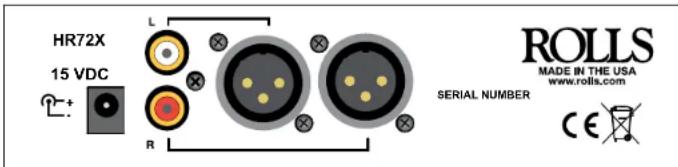
- DC Jack: Connect the ROLLS PSU115/PS15 adaptor to the HR72X only.
- XLR Balanced line lever left and right outputs
• Stereo Outputs: RCA Stereo output.
Connect the Rolls PSU115/PS15 Power Adapter to the power jack of the HR72X and to an AC outlet with the proper voltage.
Connect the XLR or RCA Left and Right outputs to a mixer, amplifier, or other audio device.
OPERATION
Press in the POWER button to apply power to the HR72X. "NO DISC" if there is no disc inside. If there is a CD disc or MP3 disc inside, the HR72X scans the disc and will display the disc type, folder (if MP3), track and time information. The disc then begins to play. Adjust the LEVEL control for a comfortable listening or proper volume
BASIC FUNCTIONS:
IMPORTANT: DO NOT FORCE DISCS INTO THE DISC OPENING. PLACE THE DISC INTO THE OPENING AND CAREFULLY PRESS IN UNTIL THE HR72X DISC LOAD MECHANISM TAKES THE DISC.
When a disc is inserted, the display reads"LOAD", then disc type, folder (if MP3) track and time info. The disc then begins to play.
- Playing tracks
To temporarily pause the Play mode, press the PLAY/PAUSE button.
To advance to the next track, press the FWD button, to go back to a previous track press the REV button. To stop disc operation, press the STOP button.
- Fast Forward / Rewind
To fast forward through a track, press the SKIP-FF button. Press the play button to stop the forward function and to play from the selected spot.
To rewind (reverse) through a track, press the SKIP-FB button. Press the play button to stop the rewind function and to play from the selected spot.
OPPERATION
FRONT PANEL DESCRIPTION
CD DISC OPERATION
- Disc Play
If a CD type disc is inserted into the HR72X, the Disc Type Indicator will read "CD", and the number of tracks will display. The disc will then begin to play.
- CD Track Programming see page 6 of this guide.
MP3 DISC OPERATION
Insert an MP3 formatted disc. The HR72X will read the disc and display the number of folders, total tracks, and time status.
MP3 track play, pause, FWD track, REV track, and Repeat/Shuffle functions all operate the same as the CD Disc Operation.
- Folders:
Since MP3 formatted discs are often arranged in folders (ie: the same way folders are arranged on a computer), the HR72X provides a way to access these folders individually. Accessing other files/folders on the drive can be done by selecting them from the FOLDER button. The FOLDER button only accesses the next folder. Once you get to the end of all folders it will go back to the first. You can also press stop button twice and then the play button to get to the first folder again.
• MP3 Programming see page 6 of this guide.
USB OPERATION
IMPORTANT NOTE THE USB FROM THE HR72X SHOULD NEVER BE PLUGGED INTO A COMPUTER IT IS FOR THUMB DRIVE DEVICES ONLY. DAMAGE WILL BE DONE TO THE HR72X AND YOUR COMPUTER IF YOU PLUG THEM TOGETHER!!!!!!!!!
To use a Thumb drive simply plug it in to the HR72X. Select the USB option on the HR72X by pressing the SD/USB/CD button.
To use an SD card to play tracks simply plug it in to the HR72X. Select the SD option on the HR72X by pressing the SD/USB/CD button. You will have all the functions of a CD when playing from the card. Accessing other files/folders on the card can be done by selecting them from the FOLDER button. The FOLDER button only accesses the next folder. Once you get to the end of all folders it will go back to the first. You can also press stop button twice and then the play button to get to the first folder again.
FRONT PANEL
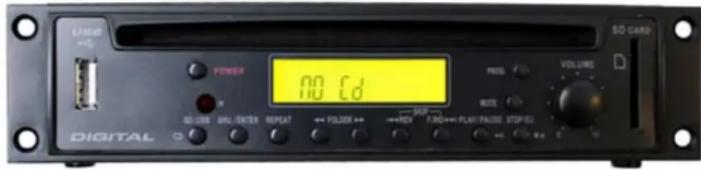
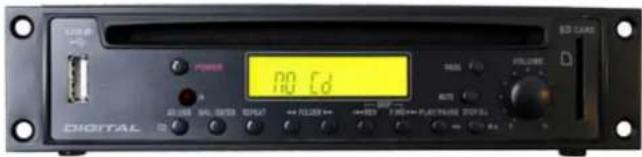
- POWER: When pressed, applies power to the HR72X
- SD/USB/CD: Used to select between the different input options. PLEASE NOTE THAT YOU MUST SELECT THE PROPER FUNCTION BEFORE PLAYING. THE DISPLAY WILL SHOW WHAT OPTION HAS BEEN SELECTED.
- LCD DISPLAY: Displays the type and play status of the current disc.
- FOLDER: Button pressed to increment or decrement the current selected folder (MP3 discs only)
- PROG: This is used to "custom Program" tracks to play and must be used with the optional remote control to program tracks.
- REPEAT: Described in the Repeat/Shuffle section of manual.
- SKIP-REW: (Fast Back) PRESS AND HOLD BUTTON
- SKIP-F.WD: (Fast forward) PRESS AND HOLD BUTTON
- PLAY/PAUSE: This button begins or temporarily suspends "Play" mode.
- SKIP-REV: Selects the previous track.
- SKIP-F.WD: Selects the next track.
- LEVEL: Adjusts the output. PLEASE NOTE: FOR A LINE LEVEL OUTPUT OF THE HR72 SET THIS LEVEL CONTROL AT MAX.
- STOP/EJ: If this button is pressed when a selection is playing, the disc will stop - and in MP3 mode will display the number of folders, and total number of tracks. In CD mode, the number of tracks will be displayed. If disc play has stopped, pressing this button again will eject the disc.
- ROLLS
- HR72X
- CD/MP3/USB/SD/MMC CARD Player With XLR Outputs
- INTRODUCTION
- FEATURES:
- INSPECTION
- SPECIFICATIONS:
- OPTIONAL ROLLS #172R REMOTE SOLD SEPARATELY
- - Repeat / Shuffle
- REAR PANEL
- OPERATION
- BASIC FUNCTIONS:
- IMPORTANT: DO NOT FORCE DISCS INTO THE DISC OPENING. PLACE THE DISC INTO THE OPENING AND CAREFULLY PRESS IN UNTIL THE HR72X DISC LOAD MECHANISM TAKES THE DISC.
- OPPERATION
- FRONT PANEL DESCRIPTION
- CD DISC OPERATION
- MP3 DISC OPERATION
- USB OPERATION
- IMPORTANT NOTE THE USB FROM THE HR72X SHOULD NEVER BE PLUGGED INTO A COMPUTER IT IS FOR THUMB DRIVE DEVICES ONLY. DAMAGE WILL BE DONE TO THE HR72X AND YOUR COMPUTER IF YOU PLUG THEM TOGETHER!!!!!!!!!
- FRONT PANEL
Brand : ROLLS
Model : HR72X
Category : Receiver