
MiniMix A/V MX56c - Hand blender ROLLS - Free user manual and instructions
Find the device manual for free MiniMix A/V MX56c ROLLS in PDF.


| Product Type | Hand Blender |
| Brand | Rolls |
| Model | MiniMix A/V MX56c |
| Power Consumption | 300 W |
| Voltage | 220-240 V, 50/60 Hz |
| Dimensions (L x W x H) | 25 x 6 x 6 cm |
| Weight | 0.8 kg |
| Cord Length | 1.2 m |
| Material | Stainless steel shaft, plastic handle |
| Speed Settings | 2 speeds + turbo |
| Functions | Blending, pureeing, mixing, emulsifying |
| Accessories Included | Whisk attachment, blending beaker |
| Cleaning | Detachable shaft; hand wash recommended |
| Safety Features | Overheat protection, non-slip grip |
| Spare Parts Availability | Shaft, whisk, motor unit |
| Repairability | Motor unit serviceable by authorized centers |
| Storage | Wall mount bracket included |
Frequently Asked Questions - MiniMix A/V MX56c ROLLS
User questions about MiniMix A/V MX56c ROLLS
0 question about this device. Answer the ones you know or ask your own.
Ask a new question about this device
Download the instructions for your Hand blender in PDF format for free! Find your manual MiniMix A/V MX56c - ROLLS and take your electronic device back in hand. On this page are published all the documents necessary for the use of your device. MiniMix A/V MX56c by ROLLS.
USER MANUAL MiniMix A/V MX56c ROLLS
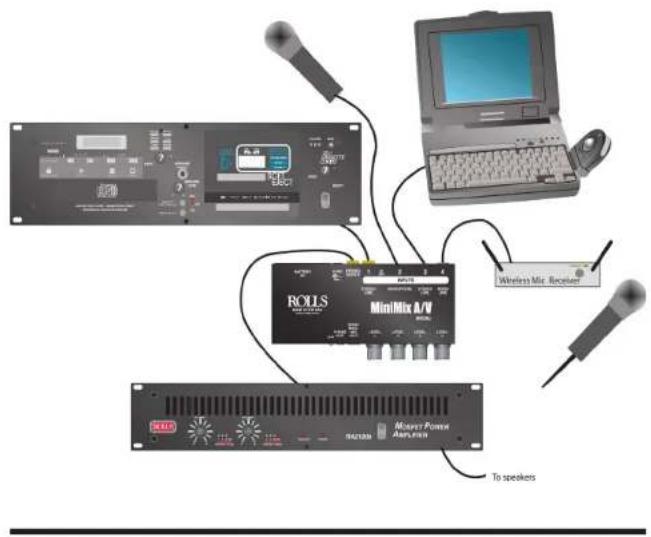
Connect your various devices such as a laptop computer, wireless microphone, or other line level devices to Inputs 3 and 4. Remember Channel 4 is MONO, and Channel 3 is STEREO.
Connect a stereo signal source such as a CD player, cassette player, or a video player's audio output to Channel 1, and a microphone to Channel 2. If the microphone requires phantom power, move the phantom power jumper as described on the previous page.
Adjust the levels of each channel for a desired balance of signals. Since the MX56c has no master level, you will need to be aware of the setting of your amplifier. Check each mic/source level individually first for proper level, then adjust them for a desired mix.

ROLLS
Rolls Corporation Salt Lake City, UT 10/05

ROLLS
MX56c MiniMix A/V 4-Channel Mixer
Owners Manual
INTRODUCTION
Thank you for your purchase of the MX56c MiniMix A/V. The unit is ideal for A/V presentations where a microphone must be mixed with a variety of sources such as a CD player, MP3 player, laptop computer, etc
INSPECTION
- Unpack and Inspect the MX56c package
Your MX56c was carefully packed at the factory in a protective carton. Nonetheless, be sure to examine the unit and the carton for any signs of damage that may have occurred during shipping. If obvious physical damage is noticed, contact the carrier immediately to make a damage claim. We suggest saving the shipping carton and packing materials for safely transporting the unit in the future.
- Please visit our website at www.rolls.com, and follow the Register Your Warranty Here link, or complete the Warranty Registration Card and return it to the factory.
SPECIFICATIONS
Connectors: Input: 1/4" unbal.
1/8" (3.5 mm) stereo
XLR bal
Stereo RCA
Output: Stereo RCA Line Level
1/8" TRS Stereo Phone
1/4" TRS Instrument or Mic Level, bal.
Max Gain: Ch 1; 15 dB
Ch 2; 60 dB
Ch 3; 15 dB
Ch 4; 40 dB
Channel Crosstalk: -70 dB
Phantom Power: 9 - 16 VDC depending on power source
Max Output: + 12 dB
S/N Ratio: >80 dB
THD: <.05%
Box Size: 6.5" x 2.7" x 1.55"
Weight: 2 lbs.
LIMITED WARRANTY
For warranty information and registration, see our website at www.rolls.com.
DESCRIPTION
FRONT PANEL


natural_image
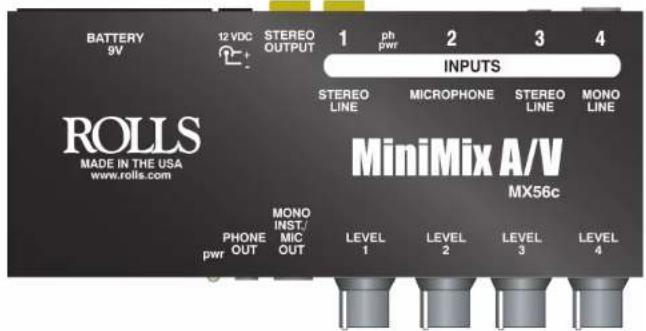
Gray-scale navigation control buttons with a yellow circle highlighting one (no text or symbols)pwr SWITCH: When pressed IN, applies power to the MX56c pwr LED: Located just below the Power Switch, this LED Indicates the MX56c is connected to a power source (battery or AC adapter), and the unit is on. PHONE OUT: 1/8" (3.5mm) TRS stereo jack for connection to stereo headphones or earphones. NOTE: DO NOT CONNECT A MONO PLUG TO THIS JACK. DO-ING SO WILL DAMAGE THE MX56c. MONO INST / MIC OUT 1/4" TRS balanced mic level output jack for connection to another mixer's microphone input, or to an instrument amplifier.
LEVEL 1 - LEVEL 4: Adjusts the signal level of the corresponding input channel.
REAR PANEL
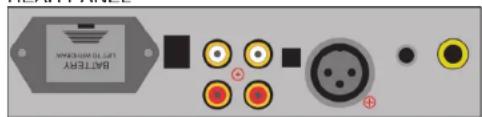
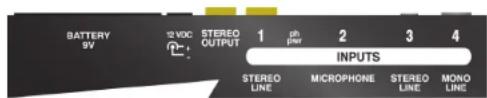
BATTERY 9V Compartment for housing the 9V alkaline battery.
DC POWER INPUT Connects to the Rolls PS27; 12 - 16 VDC 150 mA power supply. The inside of the jack (the post) is negative, the outside is positive.
STEREO OUT: Stereo RCA jacks with the main mixed signal at line level. STEREO LINE (Ch 1): Stereo RCA jacks for connection to a line-level source such as a CD, cassette or video player
PHANTOM POWER: The square hole between Line In 1 and Mic In 2 has the phantom power jumper. To engage the phantom power, carefully pull out the jumper with a pair of needle-nose pliers and replace it in a horizontal position so the jumper shorts the two pins together.
MICROPHONE (Ch 2): XLR input jack for connection to a dynamic or condenser microphone. If you are using a condenser type microphone make sure the Phantom Power jumper is shorted together as described above.
STEREO LINE (Ch 3): 1/8" (3.5mm' Tip-Ring-Sleeve stereo jack for connection to a line-level stereo signal source such as a laptop computer
MONO LINE (Ch 4): 1/4" Tip-Sleeve mono jack for connection to a mono line-level source such as the output of an instrument, or wireless microphone receiver
Brand : ROLLS
Model : MiniMix A/V MX56c
Category : Hand blender