
RA63b - Receiver ROLLS - Free user manual and instructions
Find the device manual for free RA63b ROLLS in PDF.


| Product Type | Audio Receiver / Amplifier |
| Brand | Rolls |
| Model | RA63b |
| Dimensions (W x H x D) | 19" x 1.75" x 6" (483 x 44 x 152 mm) |
| Weight | 5.5 lbs (2.5 kg) |
| Power Output | 60W RMS per channel into 4 ohms |
| Total Harmonic Distortion | < 0.1% |
| Frequency Response | 20 Hz - 20 kHz ±0.5 dB |
| Inputs | 3x RCA line inputs, 1x 3.5mm aux input |
| Outputs | Speaker terminals (binding posts), 1x RCA line output |
| Power Supply | AC 100-240V, 50/60Hz (internal switching) |
| Protection Circuitry | Overload, short-circuit, and thermal protection |
| Cooling | Passive (no fan) |
| Mounting | 1U rack-mountable (brackets included) or desktop use |
| Front Panel Controls | Volume knob, input selector, power switch, headphone jack (1/4") |
| Rear Panel Features | IEC power inlet, fuse holder, ground lift switch |
| Construction | Steel chassis, black anodized aluminum front panel |
| Operating Temperature | 0°C to 40°C |
| Safety Certifications | CE, RoHS compliant |
| Included Accessories | Power cord, rack-mount ears, user manual |
| Maintenance & Cleaning | Keep vents clear; clean with dry cloth; avoid liquids |
| Repairability & Spare Parts | Replaceable fuse; contact Rolls support for service |
Frequently Asked Questions - RA63b ROLLS
User questions about RA63b ROLLS
0 question about this device. Answer the ones you know or ask your own.
Ask a new question about this device
Download the instructions for your Receiver in PDF format for free! Find your manual RA63b - ROLLS and take your electronic device back in hand. On this page are published all the documents necessary for the use of your device. RA63b by ROLLS.
USER MANUAL RA63b ROLLS
• Stereo 4 channel, Mono 8 channel audio distribution
- Screw driver adjustable front panel volume controls
• Balanced inputs and outputs
SPECIFICATIONS
Input Impedance:
Max Input Level:
I/O Connectors:
Output Impedance:
Max Output Level:
Max Gain:
S/N Ratio:
Frequency Response:
THD:
Power:
Size:
Weight:
100 KΩ balanced
+22 dBV
5 pin Pluggable Phoenix screw
terminals; + -, and ground
50 Ω balanced
+24 dB
20 dB
90 dB
10 Hz - 40 kHz, +/- 1 dB
<.008%
120 VAC 50-60 Hz, 15VA
19"×1.75"×6.5
(48×4.5×17cm)
7 lbs. (3 kg)
Quick Start Guide
ROLLS
ROLLS CORPORATION
SALT LAKE CITY, UTAH
10/19
Install the RA63b in a standard 19" rack. The unit is intended for installations where a high level balanced signal is required to drive multiple input lines.


FRONT PANEL
Mono 1 - 8 / Stereo 1 - 4: These screwdriver-adjustable controls vary the level of signal for each indicated output.
+20dB/0dB Gain switch: Pressing this switch in provides 20 dB of gain to the input signal.
pwr: LED indicating the unit's power status. STEREO/MONO CONFIGURATION
To change the stereo/mono configuration of the RA63b, use the switch on the front panel to select the desired configuration.
REAR PANEL
120 VAC 50/60 HZ 15 VA: Power Cord. Connect to a properly grounded AC source.
INPUTS Right/Mono and Left: These five terminals, labeled + for the positive or "hot" connection, - for the negative connection, and the ground symbol for earth ground connection are for connection to the balanced or unbalanced input signal(s) to be distributed.
MONO 1 - 8, STEREO 1 - 4: For each channel; the two terminals labeled + for the positive or "hot" portion of the output signal, and the - for negative or neutral portion. The ground signal indicates the terminal to be connected to ground.
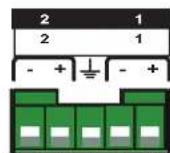
- = In-phase or "Hot"
- = Out-of-phase or "Negative"
± (NOTE: This is NOT an earth ground connection) = Ground
Brand : ROLLS
Model : RA63b
Category : Receiver