
TuneXbuds - Headphones Klip Xtreme - Free user manual and instructions
Find the device manual for free TuneXbuds Klip Xtreme in PDF.


| Product type | True Wireless Stereo (TWS) in-ear earbuds |
| Model | KTE-007 (TuneXbuds) |
| Dimensions (earbud) | 52 × 25 × 46 mm |
| Weight (total set) | Approx. 30.2 g |
| Bluetooth version | 5.3 |
| Wireless range | Up to 10-15 m (33-49 ft) |
| Water resistance | IPX4 (splash proof) |
| Battery capacity (earbud) | 30 mAh each (lithium-ion) |
| Battery capacity (charging case) | 260 mAh (lithium-ion) |
| Charging time (earbuds only) | About 1.5 hours |
| Charging time (case only) | About 2 hours |
| Charging time (case + earbuds) | About 3 hours |
| Playback time (earbuds per charge) | Up to 6.5 hours |
| Total playback time (with case) | Up to 20 hours |
| Standby time | Approx. 100 hours |
| Driver | 15 mW, 50 Hz - 20 kHz, 32 Ω |
| Microphone | Built-in HD omnidirectional (-38 dB) |
| Controls | Smart Touch (tap, double/triple tap, press and hold) |
| Voice assistant support | Siri and Google Assistant |
| Charging port | USB-C (5V/1A) |
| Cleaning | Use a cotton swab with alcohol to clean ear tips and charging pins; dry before use |
| Safety precautions | Do not disassemble, drop, or use in extreme conditions. Avoid magnetic storage media near earbuds. |
| Spare parts and repairability | Battery not user-replaceable; no spare parts available. Contact support for repairs. |
| Package contents | Earbuds (2), charging case, USB-C cable, user guide, cleaning instructions |
Frequently Asked Questions - TuneXbuds Klip Xtreme
User questions about TuneXbuds Klip Xtreme
0 question about this device. Answer the ones you know or ask your own.
Ask a new question about this device
Download the instructions for your Headphones in PDF format for free! Find your manual TuneXbuds - Klip Xtreme and take your electronic device back in hand. On this page are published all the documents necessary for the use of your device. TuneXbuds by Klip Xtreme.
USER MANUAL TuneXbuds Klip Xtreme
natural_image
Abstract green logo with white interlocking X-like shape (no text or symbols)
natural_image
Black wireless earbuds with charging case, set against a solid green background (no text or symbols visible)klipxtreme
TuneXbuds
KTE-007
I. Introduction
Thank you for purchasing Klip Xtreme's True Wireless Stereo (TWS) earbuds with HD microphone KTE-007. We encourage you to read this quick installation guide thoroughly to get the most out of this wireless device.
Main features
- True wireless stereo (TWS) technology is designed to stream audio wirelessly through two separate units simultaneously from the same audio source.
- 20 hours of total playback + call time** and approximately 100 hours in standby mode.
- Smart Touch technology and design to manage music, calls, and activate the voice assistant with just a tap.
- Compatible with Google and Siri voice assistants for true hands-free control.
- IPX4 water and sweat resistant rating for protection against water splashing from all angles. Keep listening to music or calling, even in the rain or at the gym.
-
Experience outstanding sound technology with full audio details and musical textures.
-
Experience the ultimate freedom with the most reliable connectivity of the Bluetooth® v5.3 streaming technology. *
- Ergonomic design for secure fit and steady use.
- Features an HD built-in microphone for taking calls with crystal clear sound quality.
- It can run three charging cycles and includes an LED indicator to notify battery charging status.
Package content
Earbuds with TWS technology (2) Charging case (1) Type C charging cable (1) Quick installation guide (1)
2. Product overview
Front
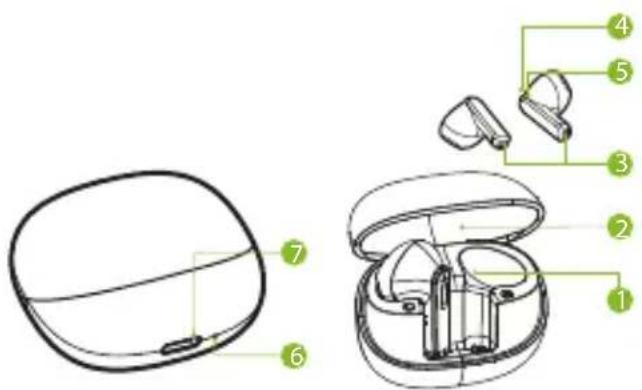
I. Magnetic charging socket for earbuds
2. Case cover
3. HD microphone
4. Multifunction touch button
5. Earbud LED indicator
6. Charging case LED indicator
7 USB-C charging port
Multifunction button
| Mode | Function |
| Pairing | The earbuds should pair automatically when removed from the charging case. If not, press and hold 5 seconds to enter pairing mode. |
| Playback mode | Tap the right or left button to play and pause audio |
| Volume + | Tap the right button 3 times. |
| Volume - | Tap the left button 3 times. |
| Next track | Tap the right button twice. |
| Previous track | Tap the left button twice. |
| Voice assistant | Press and hold the button on either earbud for 2 seconds and release when a tone is heard. |
| Hands-free mode | Answer – Tap the button on either earbud during incoming phone call.Hang up – Tap the button on either earbud to end the phone call.Reject or ignore – Press and hold the button on either earbud during incoming phone call. |
| Music/Game Mode | Tap the button on either earbud 4 times to toggle between the two modes. |
| Reset function | 4 taps and hold for 2 seconds* |
*Device must be unpaired to perform reset
LED indicators on the charging case or earbuds
| Part Status LED Function | ||
| Earbuds LED signals | Charging | Blinking red |
| Charged | Off | |
| Fully charged (inside charging case when the USB power cable is disconnected) | Blue light for a few moments and then off | |
| Paring | Blinking red/blue LED until paired or timed out. Once paired, LED will turn off. | |
| Paired | Off | |
| Power off | Blink in red momentarily and then turn off | |
| Charging case LED signals (at the bottom of the case) | Charging | Blinking red |
| Charged (with charging cable connected) | Solid red | |
| Charged (with charging cable disconnected) | Blue light for a few moments and then off | |
| Charging earbuds autonomously (with charging cable disconnected) | Solid blue | |
3. Basic operation
3.1 Charging the case and earbuds.
- To charge the case, plug the supplied USB cable into a power source and the Type C end in the case's charging port. The case starts charging automatically. The LED indicator at the bottom of the case will start blinking red.
- Once the case is fully charged the LED indicator will turn solid red.
- Unplug the charging case from the power source.
- When the earbuds are being charged inside the case, their LED indicators light up in red. When fully charged, the LED indicators on the earbuds turn off.
Note: The total charging time for the charging case and the earbuds, when they are both connected to a power outlet, is around three hours. It will take about 1.5 hours for the earbuds to fully charge inside the case, when it is already fully charged and disconnected.
-
The fully charged earbuds have up to 6.5 hours of playtime or up to 100 hours of standby time. However, these runtimes may vary depending on the mobile device being used, the usage profile, and the type of files being played.
-
A low battery prompt will be heard to let you know that the battery is below the acceptable level to continue operating properly.
IMPORTANT: The multifunction button on the earbuds is highly sensitive. When the earbuds are turned on, avoid tapping the button by accident.
3.2 Turning your earbuds on or off
- Press and hold the button on each earbud for about 5 seconds. The "power on" prompt is heard and the LED in both earbuds starts blinking red.
- As both earbuds synchronize, a prompt is heard indicating that they are connected.
- To turn the earbuds off, put them back in the charging case or press and hold the multifunction button on either earbud for about 5 seconds to turn off that specific earbud. The “power off” prompt is heard and the LED blinks briefly in red, before shutting off.
4. Advanced operation
4.1 TWS pairing
Simply take the earbuds out of the charging case or turn them on as previously indicated. The earbuds sync with each other automatically and then enter mobile pairing mode.
Note: Before installing this product, please make sure your device is Bluetooth® compatible.
4.2 Pairing the earbuds with your mobile device
I. Turn both earbuds on by removing them from the charging case or pressing the multifunction button for about 5 seconds. Both earbuds will automatically set on pairing mode.
2. Make sure to place the earbuds and your phone no more than three feet from each other.
3. Set the Bluetooth® on your mobile device to "discover". The KTE-007 will appear on the list of available, ready-to-pair devices. The LED light blinking on one of the earbuds will indicate it has entered pairing mode.
4. Tap on KTE-007 and click YES or OK when the mobile device asks if you want to pair with it.
5. If pairing is successful the “connected” prompt is heard, after which the earbud LED indicator will turn off.
6. If after 60 seconds the pairing process fails, please repeat steps I through 4.
Note: The earbuds automatically go into standby mode after a short period of inactivity to save battery life.
7. You only need to pair the earbuds with your mobile device once, as they will reconnect automatically every time you turn them back on.
4.3 Using the wireless earbuds
4.3.1 Answering and ending a call
- When there is an incoming call, your phone will ring along with a tone through your earbuds.
- Press the multifunction button once on either earbud to pick it up. You may also press the answer button on your mobile phone to receive the incoming communication in your earbuds.
- To end a call, press the multifunction button once again on either earbud. Likewise, you may also finish the call directly using the end key on your smartphone.
- To ignore an incoming call and send the caller to voicemail, press, and hold the multifunction button on either earbud for about two seconds.
4.3.2 Music playback and voice commands using your earbuds
- Single tap the button on either earbud to play and pause audio reproduction.
-
Double tap the right button to go to the next track.
-
Double tap the left button to go to the previous track.
- Triple tap the left button to lower the volume.
- Triple tap the right button to increase the volume.
- When audio is being played or paused, press and hold the button on either earbud for 2 seconds to enable the voice assistant for Google or Siri. Press and hold the button on either earbud again to turn the voice assistant off.
5. Troubleshooting
If you can't connect the earbuds to your mobile phone, try the following:
- Make sure that the earbuds are charged, turned on, paired with, and connected to your mobile phone.
- Make sure the Bluetooth® feature is activated on your phone.
- Check that the earbuds are within 30 feet of your mobile phone and that there are no obstructions between the earbuds and the phone, such as walls or other electronic devices.
5.1 Restore to factory settings.
-
Put both earbuds into the charging case.
-
Erase the Bluetooth ID from the paired Bluetooth device (make sure the earbuds are no longer discoverable once inside the charging case).
-
Tap four times and hold for 2 seconds. Put earbuds back in the case and then remove them once more. They should then be ready to pair.
6. Cleaning the device.
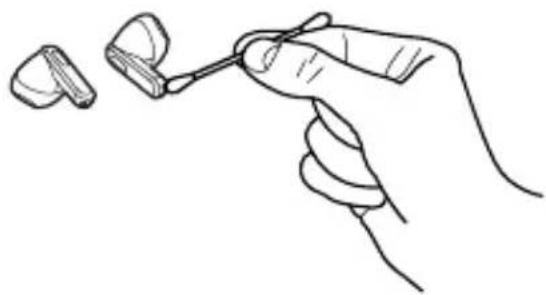
Use a clean cotton swab slightly moistened with alcohol to:
-
Remove earwax and dirt from the ear tips on your earbuds.
-
Clean the charging pins on your earbuds and in the charging case. Then, use a dry and soft cotton to rub down dust and lint.
natural_image
Line drawing of a hand holding an earbell with a small earband nearby (no text or symbols)- Clean the grooves and the bottom of the charging case. After cleaning, make sure the charging case and earbuds are dry before putting the earbuds back into the charging case.

natural_image
Line drawing of a hand inserting a small electronic device into an earbuds (no text or symbols)Tip: Repeat the operation every two weeks to keep your earbuds clean and not affect charging quality and the device's overall performance.
7. Precautions
- Do NOT use cleaning solvents or strong chemicals to clean the device.
- Your earbuds are powered by a rechargeable battery. The battery can be charged and discharged hundreds of times, but it will eventually wear out. Recharge your battery only with compatible chargers.
- Unplug the USB charger from the source when not in use.
- Parts of the earphones are magnetic. Metallic materials may be attracted to the earbuds. Do not place credit cards or other magnetic storage media near the earbuds, as information stored on them may be erased.
- Do NOT drop, hit, or shake the device.
- Do NOT disassemble, repair or modify the earbuds yourself.
Technical specifications
| MPN KTE-007 | |
| Device | |
| Type | TWS sport earbuds |
| Form factor | In ear |
| Chipset | JL AD6973D4 |
| Special features | |
| IPX rating | IPX4 (protected against water splashing) |
| Touch button | Yes (Smart Touch) |
| Voice assistant | Siri and Google Voice assistant compatible |
| Charging case battery LED indicator | Yes (at the bottom of the charging case) |
| Built-in microphone | Yes |
| Volume control | Yes |
| Speaker | |
| RMS power output | 15mW |
| Frequency | 50Hz-20kHz |
| Impedance | 32Ω ± 15% |
| Sensitivity | 108db±3db |
| Microphone | |
| Form factor | Built-in. |
| Directivity | Omnidirectional |
| Frequency | 50Hz-10KHz |
| Impedance | 300Ω |
| Sensitivity | -38dB±1dB |
| Volume control | Yes |
| Connectivity | |
| Connection type | Bluetooth®, V5.3 |
| Profiles supported | HFP, A2DP, AVRCP |
| Wireless RF frequency | 2.402-2.480GHZ |
| Wireless range | Up to 33ft-49ft* (Up to 10m-15m*) |
| Battery | |
| Single earbud battery | 30mAhx2 Lithium battery |
| Charging case battery | 260mAh Lithium battery |
| Charging connection type | Type C charging port |
| Wired charging rate | 5V/1A, 5W |
| Charging case + earbud charging total time | 3 hrs |
| Earbud only battery charging time | 1.5 hrs |
| Charging case only battery charging time | 2 hrs |
| # of charging case cycles before battery runs out | 3 cycles |
| Earbuds total run time (including cycles) | Up to 20 hours** (Music & 10 hours of calls) |
| Earbud only battery runtime | Up to 6.5 hours (50% volume)*** |
| Battery standby time | About 100 hrs |
| Additional information | |
| Dimensions (WxH) | 2 × 0.98 × 1.8 in (52 × 25 × 46 mm) |
| Weight | 1.06 oz (30.2gs±1gs) |
| Cable length | 11.8 in (30 cm) |
| Package contents | Earbuds, charging case, user guide, Type C charging cable, insert with cleaning instructions |
* Range estimate is based on an area free and clear of obstacles and interference, and within the line of sight between devices.
** Battery runtime can last 6.5 hours per charging cycle (3) for an estimated total of 20 hours combined.
*** Depending on the volume level and type of music file being played.
FCC statement
This equipment has been tested and found to comply with the limits for a Class B digital device, pursuant to part 15 of the FCC Rules. These limits are designed to provide reasonable protection against harmful interference in a residential installation. This equipment generates, uses, and can radiate radio frequency energy and, if not installed and used in accordance with the instructions, may cause harmful interference to radio communications. However, there is no guarantee that interference will not occur in a particular installation. If this equipment does cause harmful interference to radio or television reception, which can be determined by turning the equipment off and on, the user is encouraged to try to correct the interference by one or more of the following measures:
- Reorient or relocate the receiving antenna.
- Increase the separation between the equipment and receiver.
- Connect the equipment into an outlet on a circuit different from that to which the receiver is connected.
- Consult the dealer or an experienced radio/TV technician for help.
1. Introducción
natural_image
Line drawing of a hand holding an earbell with a small earband nearby (no text or symbols)natural_image
Line drawing of a hand inserting a small electronic device into an earbuds (no text or symbols)KlipXtreme® is a registered trademark. All rights reserved. The Bluetooth® brand is a registered trademark owned by Bluetooth SIG, Inc. Siri and all related logos are trademarks of Apple.com, Inc. Google Assistant is a trademark of Google LLC. All other brand names and trademarks are the property of their respective owners. Any mention of such is only intended for identification purposes, and therefore shall not be construed as a claim to any or all rights pertaining to those brands. Made in China.
- TuneXbuds
- Introduction
- Main features
- Package content
- Product overview
- LED indicators on the charging case or earbuds
- Basic operation
- Charging the case and earbuds.
- Turning your earbuds on or off
- Advanced operation
- TWS pairing
- Pairing the earbuds with your mobile device
- Using the wireless earbuds
- Answering and ending a call
- Music playback and voice commands using your earbuds
- Troubleshooting
- Restore to factory settings.
- Cleaning the device.
- Precautions
- FCC statement
- Introducción
Brand : Klip Xtreme
Model : TuneXbuds
Category : Headphones