
ABP27K-0724 - Mobile Device Charger Bauhn - Free user manual and instructions
Find the device manual for free ABP27K-0724 Bauhn in PDF.


User questions about ABP27K-0724 Bauhn
0 question about this device. Answer the ones you know or ask your own.
Ask a new question about this device
Download the instructions for your Mobile Device Charger in PDF format for free! Find your manual ABP27K-0724 - Bauhn and take your electronic device back in hand. On this page are published all the documents necessary for the use of your device. ABP27K-0724 by Bauhn.
USER MANUAL ABP27K-0724 Bauhn
Have you got everything?


A. Power Bank
B. USB-C Cable
C. User Guide
D. Warranty Certificate
E. Pouch


Product Overview

A. Power Button
B. USB-A output
C. USB-C input/output
D. Micro USB input
E. LED Display
• Battery percentage
- Quick charging indicator

Operation
Power on/off
- Press the power button to turn on the power bank. The LED display will light up and show the remaining power.
- Press and hold the power button to turn off the power bank.
Charging your devices
- Connect the supplied USB-C cable or your devices cable to the relevant port and the other one to your device.
• The LED display shows the power remaining as a percentage from 0%-100% - When the remaining power drops lower than 5%, the LED display starts blinking to display the low power warning.
- When fast charging mode is activated, the indicator will light up green.
- If no devices are being charged, the power bank will turn off after 30 seconds.
- When charging multiple devices at same time, the power bank will exit fast charging mode and it will share charging power to your connected devices.
Trickle Charging Mode
- Double-click the power button to activate trickle charging mode for charging low-power devices such as smart watches, smart bands and carbuds. The "%" symbol will flash to indicate this mode.
- The power bank will auto turn off the trickle charging mode after approximately 2 hours.
- Press the power button to manually turn off toggle charging mode
- If high-power devices are connected, the power bank will
automatically turn off trickle charging mode.
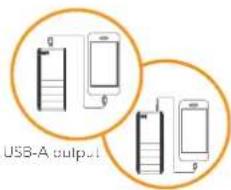
USB C output
Charging your power bank
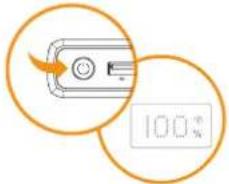
- Connect the supplied USB-C cable to the USB-C port of the power bank and the other end to your power source.
• The LED display shows the power remaining as a percentage from 0%-100%. - When the fast charging mode is activated, the indicator will light up green.
- When the display indicates 100% the power bank's full
- Please use either USB C cable (included) or Micro USB cable (not included) for charging the power bank.
- If you connect devices to the power bank while it is charging. Power will be shared and charging time will be extended.
Note: PD (Power Delivery) is supported via the correct USB-C cables and devices. If you want to charge your devices to exceed 60W (20V=3A), recommend using USB-C cable with E-Marker (not included).
Troubleshooting
Carrot charge device
- Make sure the USB cable is plugged into the output port, or plug the USB cable and try again.
• Try another USB cable and/or USB port. - Some devices require higher outputs to charge. Please check with your devices spec to confirm compatibility.
- The power bank will turn off automatically when an minimum load (about 50mA) is not detected.
- The power bank has built-in temperature protect sensor. Keep the power bank away from heat, high temperatures and direct sunlight.
Carrot charge device whilst
charging power bark
- The power bank can not support the output whilst being charged. - Please wait until the power bank is fully charged.
No Digital Display when charging device
- Connect the power bank to your power source to ensure the power bank has sufficient battery
Capacity drops
- Press the battery status button to check battery status.
Capacity drops
is normal for the capacity to slowly drop after a certain usage cycle.

Give us a call
What? You mean this User Guide didn't have ALL the answers? Speak to us! We'd love to help you get up and running as quickly as possible.
Call our After Sales Support on 1300 002 534
Operating hours: Monday Friday, 8:30am 6pm; Saturday, 9am 6pm AEST
| Input | Micro USB Input: 5V=2A, 9V=2A, 12V=1.5AUSB-C Input: 5V=3A, 9V=3A, 12V=3A, 15V=3A, 20V=3.25A (65W Max) |
| Output | USB-C Output: 5V=3A, 9V=3A, 12V=3A, 15V=3A, 20V=3.25A (65W Max)USB-A Output: 5V=3A, 9V=2A, 10V=2.25A, 12V=1.5A (22.5W Max)(Total output 15W Max if more than 1 output use) |
| Battery | Battery: Li-ion 11.1V, 9000mAh, 99.9Wh |
| Dimensions | 180.5 x 80 x 25.5mm |
| Weight | 540g |
* Output is dependent on the mobile device's input power and the charging cable.
General Safety Warnings
For the safety of yourself and others, follow all instructions and take notice of all the warnings. When adhered to, these safety precautions can reduce the risk of fire, electric shock and injury.
This product complies with Australian Safety standard A\/NZ\ 62368.1 to ensure the safety of the product.

The RCM is a visible indication of a product's compliance with all applicable ACMA regulatory arrangements, including all technical and record-keeping requirements.
IMPORTANT
Plastic wrapping can be a suffocation hazard for babies and young children, so ensure all packaging materials are out of their reach.
To prevent environmental factors (dampness, dust, food, liquid etc.) harming the power bank, only use it in a well-ventilated, clean and dry environment, away from excessive heat or moisture.
Keep the product away from direct sunlight or heat sources.
In case of damage, do not disassemble, repair or modify the product yourself. Contact After Sales Support for advice on repair or replacement, or refer servicing to qualified personnel only.
Children should be supervised to ensure they do not play with the product.
Do not put any object on top of the product.
Do not place or store appliance where it can fall or be pulled into a bath or sink.
This product is not intended for use by persons (including children) with reduced physical, sensory or mental capabilities, or lack of experience and knowledge, unless they have been given supervision or instruction concerning use of the product by a person responsible for their safety.
Do not expose the product to microwaves.
Clean using a dry cloth only - do not use water or chemicals.
Keep the product away from oils, chemicals or any other organic liquids.
Use this appliance only for its intended purpose as described in this guide.
Responsible disposal of the packaging
The packaging of your product has been selected from environmentally friendly materials and can usually be recycled. Please ensure these are disposed of correctly. Plastic wrapping can be a suffocation hazard for babies and young children, please ensure all packaging materials are out of reach and are safely disposed of. Please recycle these materials rather than throwing them away.
Responsible disposal of the product
At the end of its working life, do not throw this product out with your household rubbish. An environmentally friendly method of disposal will ensure that valuable raw materials can be recycled. Electrical and electronic items contain materials and substances which, if handled or disposed of incorrectly, could potentially be hazardous to the environment and human health.
This product may not be allowed on an aircraft, please check with the airline's requirements.


Brand : Bauhn
Model : ABP27K-0724
Category : Mobile Device Charger