
ACRWC-0424-M - Mobile Device Charger Bauhn - Free user manual and instructions
Find the device manual for free ACRWC-0424-M Bauhn in PDF.


| Product Type | Mobile Device Charger |
| Brand | Bauhn |
| Model | ACRWC-0424-M |
| Dimensions (approx.) | 10 × 6 × 2 cm |
| Weight (approx.) | 80 g |
| Input Voltage | AC 100-240V, 50/60Hz |
| Output Voltage/Current | DC 5V / 2A |
| Compatible Devices | Smartphones, tablets, and other USB devices |
| Charging Port | USB-A |
| Fast Charging Support | Standard charging (5V/2A) |
| LED Indicator | Yes, power status LED |
| Safety Features | Overcurrent, overvoltage, short circuit protection |
| Materials | ABS plastic |
| Cleaning Instructions | Unplug and wipe with dry cloth; do not use liquids |
| Spare Parts Available | Cable (USB to micro-USB or USB-C) and power adapter |
| Repairability | Not user-serviceable; consult professional |
| Certifications | CE, RoHS |
| Operating Temperature | 0°C to 40°C |
| Package Contents | Charger, USB cable, user manual |
| Usage | Indoor use only |
Frequently Asked Questions - ACRWC-0424-M Bauhn
User questions about ACRWC-0424-M Bauhn
0 question about this device. Answer the ones you know or ask your own.
Ask a new question about this device
Download the instructions for your Mobile Device Charger in PDF format for free! Find your manual ACRWC-0424-M - Bauhn and take your electronic device back in hand. On this page are published all the documents necessary for the use of your device. ACRWC-0424-M by Bauhn.
USER MANUAL ACRWC-0424-M Bauhn
1 Have you got everything?


Unpack the box (be gentle) and make sure all of these items are there:
A. Clock Radio With Dual Wireless Charging
B. Power Adaptor
C. User Guide
D. Warranty Certificate
2

Product Overview

Top base

Bottom base
- : dress to turn the light on/off and adjust the brightness
- DC PORT (rear of product) : plug in the supplied power adaptor to the DC port and the other end to a power socket with a power source to power on the unit
- LCD DISPLAY SCREEN
- Backup Battery (underside of product): use a screwdriver to remove the screw and insert a CR2032 battery (not included)
- 5W WIRELESS CHARGING LED INDICATOR
- 5W WIRELESS CHARGING PAD
- FM ANTENNA
8 TEMPERATURE SENSOR - 10W WIRELESS CHARGING LED INDICATOR
-
10W WIRELESS CHARGING PAD
-
Volume control : scroll left to decrease volume level. Scroll right to increase volume level
- center alarm settings
- Enter clock settings
- SNOOZE: press to enter snooze mode
- ☑ press to adjust the LCD display screen brightness
- press to enter FM radio mode
- Settings button: press left or right to set time/day/month/year/alarm time/play previous or next FM station.
3 Operation
Connect the supplied power adaptor to the DC port on the unit and the other end to a power socket with a power source. The LCD display screen will light up and a beep sound will be heard.
To set the time, press and hold the Ⓧ button. The hour on the LCD display screen will flash. Use the Settings button to set the hour. Press the Ⓧ button again and the minutes on the LCD display screen will flash. Use the Settings button to set the minutes. Press the Ⓧ button again and the year on the LCD display screen will flash. Use the Settings button to set the year. Press the Ⓧ button again and the month on the LCD display screen will flash. Use the Settings button to set the month. Press the Ⓧ button again and the day on the LCD display screen will flash. Use the Settings button to set the day. Press the Ⓧ button again to save the above settings (the setting will automatically exit after 1 minute of no operation). Once set, press the Ⓧ button to switch between 12 hour/24hour display mode.
To set the 1st alarm, press the button to enter alarm mode. Press and hold the button and the hour on the LCD display screen will flash. Use the Settings button to set the hour. Press the button again and the minutes on the LCD display screen will flash. Use the Settings buttons to set the minutes. Press the button to store the alarm setting (the alarm setting will automatically exit after 1 minute of no operation).
Press the 📄 button to display the 1st alarm. The ⏱icon on the LCD display screen will flash. Use the Settings button to turn the alarm on and the 📋on will light up solid.
Press the 📊 button to display the 2nd alarm. The Ⓤ icon on the LCD display screen will flash. Use the Settings button to turn the alarm on and the 📊 icon will light up solid. Press the Ⓤ button to save the settings and go back to clock mode.
Press the 📋 button to save the settings and go back to clock mode.
To set the 2nd alarm, repeat the above steps.
When an alarm rings, press the SNOOZE button to enter snooze mode. Press the SNOOZE button again to cancel snooze. When an alarm rings, press any of the 🎥/ 🔒/ Settings buttons to turn off the alarm. The alarm will automatically stop ringing after 10 minutes of no operation.
Press the button repeatedly to adjust the brightness of the LCD display screen (high/medium/low/off).
FM Operation:
Press the 🔒 button to enter FM radio mode.
Use the Volume control button to decrease/increase the volume.
Use the Settings button to switch between the previous and next radio station.
Press the "button again to switch back to clock mode.
Setting Preset Stations:
Press the button to show the frequency.
Press and hold the Settings buttons to the right to scan the available radio stations.
Press and hold the (9) button to store the radio station (up to 8 stations can be stored).
Use the Settings button to switch between previous and next radio station.
To use the dual wireless chargers, place your smart phone facing up on the 5W/10W wireless charging pads. The 5W/10W wireless charging LED indicator will light up red when charging. If the smart phone doesn't start charging, adjust the position and/or remove your smart phone case. Also ensure that there are no metal or other objects between the smart phone and the wireless charging pad.
Notes:
The wireless charging function works only on wireless charging compatible smart phones.
Note: this unit uses a button or coin cell battery (not included) as a backup system. Using a screwdriver, remove the battery compartment cover on the underside of the unit and insert the battery, ensuring the positive (+) is facing up.
When replacing the battery, do not disconnect the power adaptor otherwise the clock/alarm settings/preset stations will be lost.
Troubleshooting
Wireless chargers not working
- Check that your smart phone supports wireless charging.
- Adjust the position of your smart phone to the centre of the wireless charging pad.
- Remove the smart phone case.
- Check and remove any metal or other objects between the mobile phone and wireless charging pad (the LED indicator will flash red).
LCD display screen not showing
- Check that the power adaptor is plugged into the DC port
and the other end to a power socket with a power source. - Press the ⏻ button to check whether the screen is on lowest brightness setting.
Specifications
Power adaptor input AC 100-240V, 50/60Hz 0.8A Max.
Power adaptor output 12VDC, 2.5A
Radio frequency range 87-108MHz
Power consumption 30W
Top base wireless charging 5W
Bottom base wireless charging 10W
Dimensions (W x H x D) 225 x 191 x 111 mm
Weight 850g (approx.)


Give us a call
What? You mean this User Guide didn't have ALL the answers? Speak to us! We'd love to help you get up and running as quickly as possible.
After Sales Support on 1300 002 534.
Operating hours: Monday-Friday, 8:30am-6pm; Saturday, 9am-6pm AEST
General Safety Warnings
For the safety of yourself and others, follow all instructions and take notice of all the warnings. When adhered to, these safety precautions can reduce the risk of fire, electric shock and injury.
This product complies with Australian Safety standard AS/NZS 62368.1 to ensure the safety of the product.

The RCM is a visible indication of a product's compliance with all applicable ACMA regulatory arrangements, including all technical and record-keeping requirements.
IMPORTANT
Plastic wrapping can be a suffocation hazard for babies and young children, so ensure all packaging materials are out of their reach.
To prevent environmental factors (dampness, dust, food, liquid etc.) harming the product, only use it in a well-ventilated, clean and dry environment, away from excessive heat or moisture.
Keep the product away from direct sunlight or heat sources.
In case of damage, do not disassemble, repair or modify the product yourself. Contact After Sales Support for advice on repair or replacement, or refer servicing to qualified personnel only.
This product is not intended for use by persons (including children) with reduced physical, sensory or mental capabilities, or lack of experience and knowledge, unless they have been given supervision or instruction concerning use of the product by a person responsible for their safety.
Children should be supervised to ensure they do not play with the product.
This product is not suitable for use in locations where children are likely to be present.
Do not put any object on top of the product
Do not place or store appliance where it can fall or be pulled into a bath or sink.
Do not place the product into water or any other liquids.
Do not expose the product to microwaves.
Do not place speakers too close to ears. Damage may occur to ear drums, especially in young children.
Do not dispose the battery into a fire or hot oven, and mechanically crush or cut the battery as this can lead to an explosion.
Do not place the product in a high temperature surrounding environment that can that can result in an explosion or the leakage of flammable liquid/gas.
Do not use the product at a low air pressure environment at high altitude as battery subjected to low air pressure can result in an explosion or the leakage of flammable liquid/gas.
Clean using a dry cloth only - do not use water or chemicals.
Keep the product away from oils, chemicals or any other organic liquids.
Use this appliance only for its intended purpose as described in this guide.
Responsible disposal of the packaging
The packaging of your product has been selected from environmentally friendly materials and can usually be recycled. Please ensure these are disposed of correctly. Plastic wrapping can be a suffocation hazard for babies and young children, please ensure all packaging materials are out of reach and are safely disposed of. Please recycle these materials rather than throwing them away.
Responsible disposal of the product
At the end of its working life, do not throw this product out with your household rubbish. An environmentally friendly method of disposal will ensure that valuable raw materials can be recycled. Electrical and electronic items contain materials and substances which, if handled or disposed of incorrectly, could potentially be hazardous to the environment and human health.

WARNING! WARNING! This product co
This product contains a coin/button cell battery KEEP BATTERIES OUT OF REACH OF CHILDREN
KEEL BATTERIES OUT OF REACH OF CHILDREN Swallowing may lead to serious injury or death in
as little as 2 hours due to internal burns.
If swallowed, immediately call the 24-hour Poisions Information Centre on 13 11 26 for fast expert advice. Dispose of used batteries immediately.
This product has been designed so that the coin/button cell battery is not accessible to young children, as the battery compartment cover is secured with a screw or mechanical fastener. Always ensure that the compartment is secured before use.

WARNING: Uses button
or coin cell battery as backwind (not included).
backup (not included). Hazardous if swallowed
WARNING
Batteries must not be exposed to sources of excessive heat such as direct sunlight.
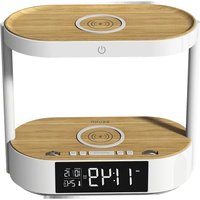
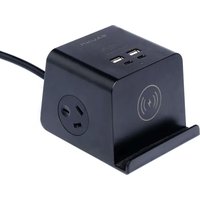

Brand : Bauhn
Model : ACRWC-0424-M
Category : Mobile Device Charger