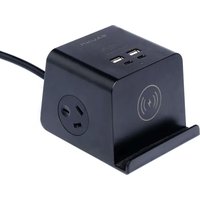
ADWC-0624 - Mobile Device Charger Bauhn - Free user manual and instructions
Find the device manual for free ADWC-0624 Bauhn in PDF.


| Product Type | Desktop Charging Cube |
| Brand | Bauhn |
| Model | ADWC-0624 |
| Dimensions (W x H x D) | 92 x 71 x 99 mm |
| Weight | 400 g (approx.) |
| Input Voltage | AC 100-240V, 50/60Hz |
| Maximum Power Load | 2400W |
| Wireless Charger Output | 10W Max. |
| USB-A Output | 5V DC, 2A Max. |
| USB-C Output | 5V DC, 2A Max. |
| Combined USB Output (USB-A + USB-C) | 5V DC, 3.4A Max. |
| AC Outlets | 2 |
| Wireless Charging | Yes, 10W |
| LED Indicator | Green (ready), Red (charging) |
| Safety Certifications | AS/NZS 3105, AS/NZS 62368.1, RCM |
| Indoor Use Only | Yes |
| Cleaning | Use a soft, dry cloth; no chemicals |
| Warranty | 1 year (automatic) |
| Package Contents | Desktop Charging Cube, User Guide, Warranty Certificate |
| After Sales Support | Phone 1300 002 534, Mon-Fri 8:30am-6pm, Sat 9am-6pm AEST |
Frequently Asked Questions - ADWC-0624 Bauhn
User questions about ADWC-0624 Bauhn
0 question about this device. Answer the ones you know or ask your own.
Ask a new question about this device
Download the instructions for your Mobile Device Charger in PDF format for free! Find your manual ADWC-0624 - Bauhn and take your electronic device back in hand. On this page are published all the documents necessary for the use of your device. ADWC-0624 by Bauhn.
USER MANUAL ADWC-0624 Bauhn
1 Have you got everything?


A. Desktop Charging Cube
B. User Guide
C. Warranty Certificate
Product Overview
2
A Wireless Charge LED Indicator
The LED indicator will light up green when ready to charge and red while charging.
B USB-C Charging Ports
For charging devices that support USB-C.
C USB-A Charging Ports
For charging phones, tablets or other devices.
D AC Sockets
Dual sockets are the same sockets and can be used interchangeably.
E 10W Wireless Charger
Place your phone on the built-in phone cradle for wireless charging. If the phone is charging correctly, the wireless charge LED indicator will light up red.


Troubleshooting
No power output from one of the sockets
- Try the other sockets. If the other sockets have power output, it's probably the contact of one faulty socket that is loose or not connected; avoid using that socket.
No power output from any of the sockets
- Make sure the input socket for the powerboard has power output.
No output from the USB-A/USB-C ports
- Check that the USB-A/USB-C cable is connected securely to the USB-A/USB-C port and/or try a different USB-A/USB-C port. - Remove devices using the other USB-A/USB-C ports. - Use another USB-A/USB-C cable.
Wireless charger not working
- Ensure that your phone supports wireless charge. - Remove the phone's case. - Check that the wireless charge LED indicator is green. - Shift the position of the phone to the centre of the wireless charger.
Give us a call
#
What? You mean this User Guide didn't have ALL the answers? Speak to us! We'd love to help you get up and running as quickly as possible. Call our After Sales Support on 1300 002 534.
Operating hours: Monday-Friday, 8:30am-6pm; Saturday, 9am-6pm AEST
Enjoy using your product!
Well done, you made it.
Now sit back and relax... your product is
automatically covered by a 1-year warranty.
How nice!

Input AC 100-240V, 50/60Hz
Max. Power Load 2400W
Wireless Charger Output 10W Max.
USB-A Output 5V DC, 2A Max.
USB-C Output 5V DC, 2A Max.
USB-A + USB-C Output DC 5V, 3.4A Max.
Mass 400g (approx.)
Dimensions (W x H x D) 92 x 71 x 99 mm
General Safety Warnings
For the safety of yourself and others, follow all instructions and take notice of all the warnings. When adhered to, these safety precautions can reduce the risk of fire, electric shock and injury.
This product complies with Australian Safety standard AS/NZS 3105 and AS/NZS 62368.1 to ensure the safety of the product. This product is especially used for IT/AV devices.

The RCM is a visible indication of a product's compliance with all applicable ACMA regulatory arrangements, including all technical and record-keeping requirements.
IMPORTANT
- Damage: If the product or cord is damaged, contact the After Sales Support line for advice. Do not attempt to open the board or replace the cord. The cord must be replaced by appropriately qualified personnel.
- Repair: If the product requires repair, contact the After Sales Support line; never disassemble or modify the product or attempt to service it yourself.
- Run the power supply cord in such a way that there will be no risk of anyone pulling it inadvertently or tripping over it.
- The product is not intended for use by persons (including children) with reduced physical, sensory or mental capabilities, or lack of experience and knowledge, unless they have been given supervision or instruction by a person responsible for their safety.
- Young children should be supervised to ensure they do not play with the product. Close supervision is always necessary when any appliance is used by or near children.
- The product is not suitable for use in locations where children are likely to be present.
- The product is designed for indoor use in dry places only.
- Do not exceed a maximum loading of 2400 watts.
- For safety reasons, always use earth connections.
- Only use the product with the power supply cord fully unwound.
- Before installing the product, make sure to place it away from: heat sources, radiators or other products that produce heat; areas with high temperatures, high humidity or direct sunlight; excess dirt and dust; open windows and any place where water may get to the unit.
- Do not immerse the cord, plug or the product in water or other liquid, or expose the electrical connections to water or other liquid.
- Unpack the product and keep the original packaging carton and materials in a safe place. It will help prevent any damage if the product needs to be transported in the future, and you can use it to store the product when it is not in use.
- The product should always be repacked in its original packaging whenever transporting to prevent any possible damage to the product.
- When not in use: Disconnect from the power source and store in a cool, dry and well ventilated location out of direct sunlight, and not subject to humidity.
- Warning: The socket outlet should be located near the equipment and should be easily accessible.
Responsible disposal of the product
At the end of its working life, do not throw this product out with your household rubbish. An environmentally friendly method of disposal will ensure that valuable raw materials can be recycled. Contact your local authority for your nearest recycling centre. Electrical and electronic items contain materials and substances which, if handled or disposed of incorrectly, could potentially be hazardous to the environment and human health.
Responsible disposal of the packaging
The packaging of the product has been selected from environmentally friendly materials and can usually be recycled. Please ensure these are disposed of correctly. Plastic wrapping can be a suffocation hazard for babies and young children, please ensure all packaging materials are out of reach and are safely disposed of. Please ensure they are offered for recycling rather than throwing these materials away.
Cleaning the product
Only use a soft, dry cloth for cleaning the product; do not use a damp cloth. Never clean with industrial strength polish, wax, benzene, paint thinner, air freshener, lubricant, detergent or other chemicals. Wipe off any moisture, dirt or dust on the power sockets and plug pins with a clean, dry cloth.


- Have you got everything?
- Product Overview
- 2
- A Wireless Charge LED Indicator
- B USB-C Charging Ports
- C USB-A Charging Ports
- D AC Sockets
- E 10W Wireless Charger
- Troubleshooting
- Give us a call
- #
- Enjoy using your product!
- General Safety Warnings
- IMPORTANT
- Responsible disposal of the product
- Responsible disposal of the packaging
- Cleaning the product
Brand : Bauhn
Model : ADWC-0624
Category : Mobile Device Charger