KDS350 - Fridge Khind - Free user manual and instructions
Find the device manual for free KDS350 Khind in PDF.


User questions about KDS350 Khind
0 question about this device. Answer the ones you know or ask your own.
Ask a new question about this device
Download the instructions for your Fridge in PDF format for free! Find your manual KDS350 - Khind and take your electronic device back in hand. On this page are published all the documents necessary for the use of your device. KDS350 by Khind.
USER MANUAL KDS350 Khind
natural_image
Abstract grayscale illustration of a globe with Earth and oceans, no text or symbols present
Display Chiller/冷冻陈列柜/Peti Pendingin
Instruction Manual / 说明指示书/Buku Panduan
Please read this manual carefully before operating this product. Keep this manual handy for further reference.
- All repairs, disassembly and modifications must be performed by qualified technicians. Attempting to perform these operations by yourself can result in fire, mal-function and injury.
- If the supply cord is damaged, it must be replaced by the manufacturer, its service agent or similarly qualified persons in order to avoid a hazard.
- This appliance is not intended for use by persons (including children) with reduced physical, sensory or mental capabilities, or lack of experience and knowledge, unless they have been given supervision or instruction concerning use of the appliance by a person responsible for their safety.
Children should be supervised to ensure that they do not play with the appliance. - Do not splash water directly onto unit or wash unit with water. These actions can result in short circuit or electrical leakage.
- Do not put inflammable liquids or volatile substances into unit. Fire or explosion may occur.
- Do not modify, damage, excessively bend, strain, twist or bundle power cord.
- Do not place heavy objects on power cord.
- This unit is intended to cool or store bottled water or canned beverages. Do not use this unit for other purposes as it can adversely affect performance.
- Do not attempt to insert fingers or objects into air suction compartment.
- Do not place objects or items containing water on top of unit.
- If gas leakage is detected near or around unit, do not touch or open unit's door. Open windows or door to ventilate air. Find gas and plug leakage before operating the unit.
- Should the unit need to be placed in temporary storage, ensure that the location is not accessible to children. And lock or tape the door from opening. This will minimize risk of children trapped in the air tight compartment.
- When moving unit to another location, always unplug from mains.
- Do not place more than 20 kg on top of each shelf.
- Connecting the power to check the showcase before using. The showcase can be used when the temperature decreases obviously after 30 minutes.
- If power cut-off is needed, you should wait for at least 5 min before plugging in again to avoid damage to the compressor.
- Adjust the dial according to the real room temperature, the quantity of the foodstuff stored.
- Hot food should be stored only after it is completely cold.
- Packing foods with plastic bag to avoid tastes mixing and frost.
- WARNING: Keep ventilation opens, in the appliance enclosure or in the built-in strutre, clear of obstruction.
- WARNING: Do not use mechanical devices or other means to accelerate the defrosting process, other than those recommended by the manufacturer.
- WARNING: Do not damage the refrigerant circuit.
- WARNING: Do not use electrical appliances inside the food storage compartments of the appliance, unless they are of type recommended by the manufacturer.
Cleaning & Maintenance
- Do not open the door frequently and too long to save energy.
- Never leave heavy or hot objects on top panel or the showcase to avoid deforming.
- Cut off the power before cleaning.
- To clean the showcase, please use soft cloth dampened in some moderate detergent. After cleaning, wipe in dry, never use all kinds of detergent and hot water.
- Use warm water to clean oil fruit juice stain on the magnetic gasket in order to keep its elasticity.
- The showcase should not be left unused for a long time. To stop using the showcase, disconnect the main power first, then clean the inside and leave the door open for 2-3 days to dry it.
Product Identification
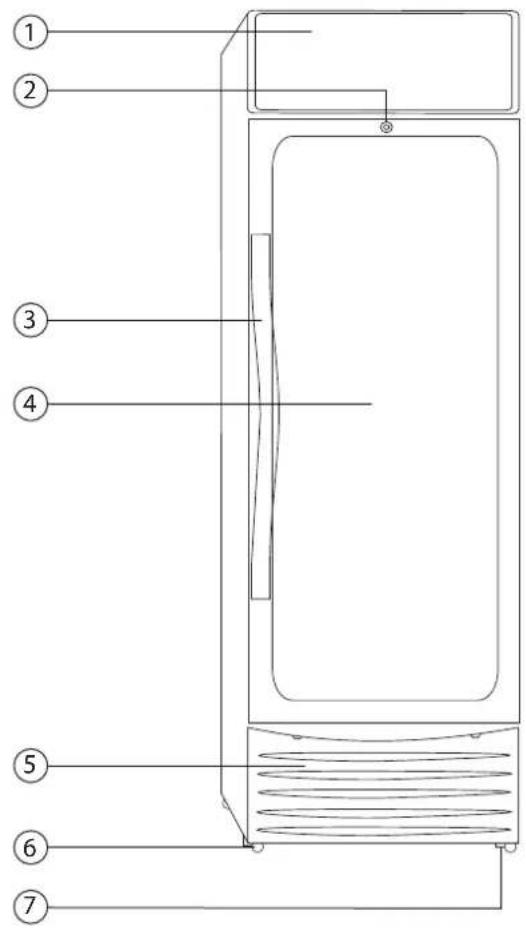
① Display Light Box
② Key Lock
③ Handle
④ Door
⑤ Door Pad
⑥ Wheel
⑦ Adjustable Foot Screw
⑧ Evaporator Fan
⑨ Thermostat Box Knob
⑩ Display Light Box Button
⑪ Compartment Light Button
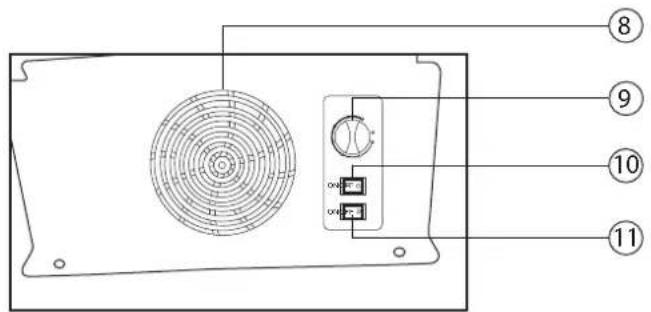
*Pictures are for illustration purpose only.
Specifications
| Model | KDS250 | KDS350 |
| Voltage | 220-240V~ 50Hz | 220-240V ~ 50Hz |
| Power | 220W | 230W |
| Lamp Power | 5W + 5W | 5W + 5W |
| Current | 1.4A | 1.45A |
| Capacity | 250L | 350L |
| Refrigerant | R134a(110g) | R134a(127g) |
| Number of Shelves | 4 | 5 |
| Temperature Controller Type | Manual | Manual |
| Inner Temperature Range | 0-10°C | 0-10°C |
| Lock & Key | Yes | Yes |
| Net Weight | 60.4kg | 71.4kg |
| Gross Weight | 64.9kg | 76.4kg |
| Product Dimension (LxWxH) | 545 x 620 x 1727mm | 600 x 675 x 1877mm |
| Box Dimension (LxWxH) | 585 x 630 x 1756mm | 645 x 675 x 1916mm |
* Specifications are subject to change without prior notice.
WARNING! INSTALLATION SHOULD BE PERFORMED BY THE DEALER OR A QUALIFIED EXPERT. ATTEMPTING TO INSTALL THE UNIT YOURSELF COULD RESULT IN WATER LEAKAGE, REFRIGERANT LEAKAGE, ELECTRIC SHOCK OR FIRE.
- When you transport the showcase, the angle between the compartment body and the ground should be no less than 45^ and you should never place the showcase upside down.
- Do not use any of the external part as loading points, such as the door.
- When the showcase is installed or used, the entire package(Including board and foam plastic) should be got rid of.
- Keeping the showcase stable to avoid vibration and noise.
- The showcase should be installed in the place with good ventilation. A space of at least 10cm (4 inches) should be allowed between the surrounding wall and the cabinet wall for air circulation.
- It should be placed far from heating resource and not under direct sunshine to avoid decrease of the efficiency of refrigeration.
- Install the showcase in a dry place so as to prevent rust on the compartment body, which may affect the electric insulation.
- Water condensation may appear on the exterior and on the glass door during hot and humid days or depending on the place of installation. This is normal. Wipe away condensation with a dry soft cloth.
WARNING! DO NOT SWITCH ON THE DISPLAY CHILLER FOR 12 HOURS AFTER RECEIVING IT.
WARNING! RESTARTING THE UNIT IMMEDIATELY AFTER SWITCHING OFF POWER MAY CAUSE THE UNIT TO MAL-FUNCTION. WAIT 5 MINUTES BEFORE RESTARTING THE UNIT.
How to Use Wheel & Foot Screw
- You can use the wheels and the foot screws to stop moving of the showcase.
- Remember to lift the foot screws when moving the showcase.
Notes :
- There will be sound of flowing water when the refrigerant is running.
- When the environment humidity is too high, there will be dew condensed on the surface of the showcase.
- While working, the condenser and the compressor will be hot.
Tip
- Do not allow items to obstruct the cold air inlets or the suction outlets.
- Placed items should not protrude from shelves.
- Make sure that there are adequate gaps between shelves for air circulation.
- Place items evenly on all shelves
- All items must be placed on shelves and not on bottom of compartment.
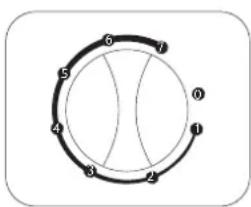
The cabinet temperature is controlled by the thermostat on the panel. The thermostat can set a suitable temperature range according to different ambient temperatures and different kinds and quantity of goods.
flowchart
graph TD
    A["1"] --> B["2"]
    B --> C["3"]
    C --> D["4"]
    D --> E["5"]
    E --> F["6"]
    F --> G["7"]
    G --> A
On the thermostat knob, there are positions from 0 to 7.
(Note: Position 0 - 7 identify refrigerations, not temperatures.)
Position 1 = Highest setting temperature
Position 7 = Lowest setting temperature (keep cooling all the time)
Position 0 = The compressor stops working
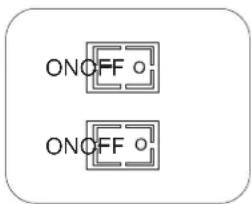
The display light box button and compartment light button are placed under the panel.
Press"O" to off
Press“I” to on
Tip
- Adjust the thermostat knob to maximum position, to cool down the display chiller.
- Do not put in any food-stuff for 4\~5 hours.
Troubleshooting
| Trouble | Reason Solution | |
| Do not cooling - The plug does not fit the socket well- The protector or the fuse has broken off- The power is off | Fit the plug wellChange the fuse | |
| Loud noise - The placing base is too soft, or the unit is inclining- The wheels do not touch the floor well- The cabinet is too close to the wall- There are other objects directly touching the unit | Mount wood at the bottomAdjust the wheel screwKeep a certain distance from the wallTake the objects away | |
| There are smells inside the unit | - The cool air exit is blocked- Food with strong smell is not packed | Take away the food near to the exitPack the food well |
| The compressor does not stop | - The food temperature is too high or there are too much food inside- Open the door too frequently or the door is not well closed- Directly under the sunshine or too close to the heat resource- The ventilation is not good | Put the food in after cooling or reduce the quantityClose the door tightlyKeep off the heat resourceKeep certain space for ventilation |
- Cleaning & Maintenance
- Product Identification
- WARNING! INSTALLATION SHOULD BE PERFORMED BY THE DEALER OR A QUALIFIED EXPERT. ATTEMPTING TO INSTALL THE UNIT YOURSELF COULD RESULT IN WATER LEAKAGE, REFRIGERANT LEAKAGE, ELECTRIC SHOCK OR FIRE.
- WARNING! RESTARTING THE UNIT IMMEDIATELY AFTER SWITCHING OFF POWER MAY CAUSE THE UNIT TO MAL-FUNCTION. WAIT 5 MINUTES BEFORE RESTARTING THE UNIT.
- How to Use Wheel & Foot Screw
- Notes :
- Tip
Brand : Khind
Model : KDS350
Category : Fridge