MO-S20D - Microwaves Imarflex - Free user manual and instructions
Find the device manual for free MO-S20D Imarflex in PDF.


| Product Type | Digital Programmable Microwave Oven |
| Brand | Imarflex |
| Model | MO-S20D |
| Color | White |
| Rated Voltage | 230 V a.c. 60 Hz |
| Input Power | 1050 W |
| Microwave Output Power | 700 W |
| Microwave Frequency | 2450 MHz |
| Oven Capacity | 20 L (0.7 cu. ft.) |
| Outside Dimensions (H x W x D) | 355 mm x 439.5 mm x 257.6 mm |
| Oven Cavity Dimensions (H x W x D) | 360 mm x 306.6 mm x 208.2 mm |
| Control Type | Digital with LED Display |
| Power Levels | 5 levels (10%, 30%, 50%, 80%, 100%) |
| Functions | Weight Defrost, Multi-stage Cooking, Express Cooking, Preset Cooking, Delayed Cooking, Child Lock |
| Turntable | Glass turntable with roller ring |
| Clock Setting | 24-hour format |
| Weight Defrost Range | 100 g – 1200 g |
| Preset Cooking Menus | 9 menus (Reheat, Vegetable, Fish, Meat, Pasta, Potato, Pizza, Soup, Porridge) |
| Safety Features | Door safety interlock system, child lock |
| Cleaning Instructions | Wipe with damp cloth; avoid harsh cleaners; clean turntable with soap and water |
| Service | Contact Imarflex Authorized Service Center for repairs |
| Accessories Included | Glass turntable, roller ring, user manual |
Frequently Asked Questions - MO-S20D Imarflex
User questions about MO-S20D Imarflex
0 question about this device. Answer the ones you know or ask your own.
Ask a new question about this device
Download the instructions for your Microwaves in PDF format for free! Find your manual MO-S20D - Imarflex and take your electronic device back in hand. On this page are published all the documents necessary for the use of your device. MO-S20D by Imarflex.
USER MANUAL MO-S20D Imarflex
MICROWAVE OVEN
L.E.D. DISPLAY • WEIGHT DEFROST • MULTI-STAGE COOKING EXPRESS COOKING • PRESET FUNCTION • CHILD-LOCK FEATURE

20 Liter CAPACITY
5 Microwave POWER LEVELS

natural_image
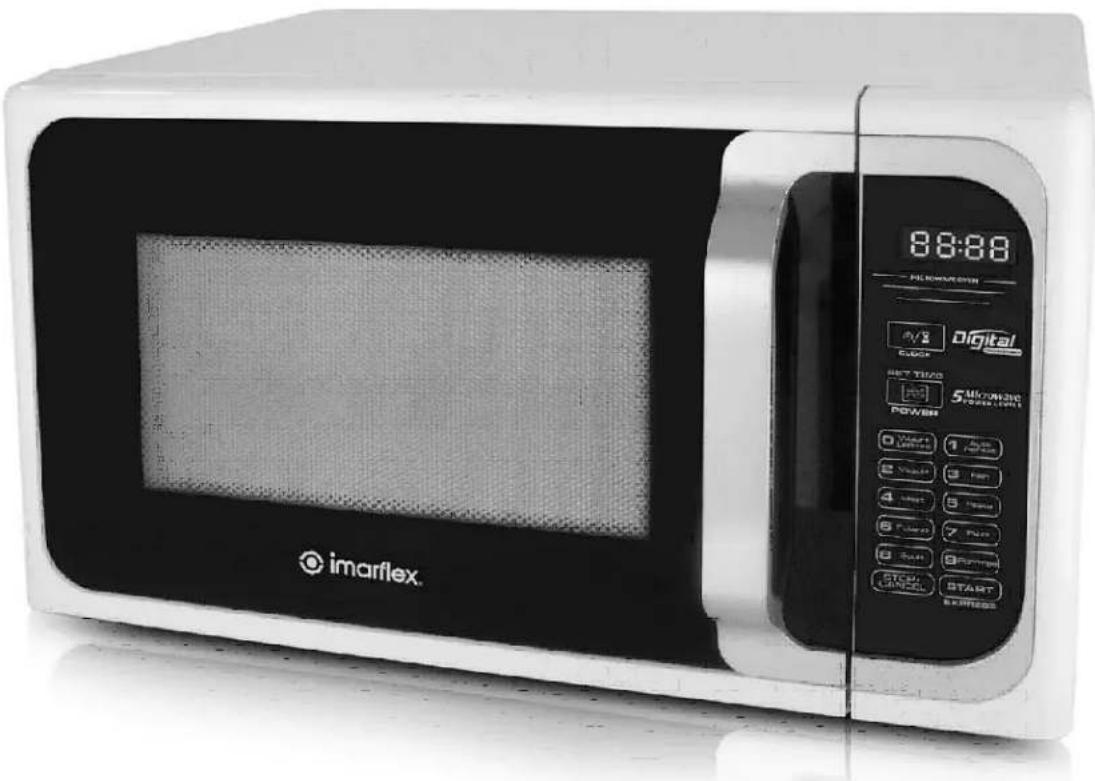
Exterior view of a modern microwave oven with digital display and control buttons (no readable text beyond branding)SPECIFICATION
Model No. : MO-S20D
Rated Voltage : 230Va.c. 60Hz
Input Power : 1050W
Microwave Output Power : 700W
Microwave Frequency : 2450MHz
Outside Dimension : 355mm(H)x439.5mm(W)x257.6mm(D)
Oven Cavity Dimension : 360mm(H)x306.6(W)x208.2mm(D)
Oven Capacity : 20 liters/0.7 cu. ft.
IMPORTANT SAFEGUARDS
When using electrical appliance, basic safety precaution should be followed, including the following:
- Read all instructions carefully.
- Before using the unit, check if the voltage indicated corresponds with the convenience outlet (230Va.c.).
- Do not use any appliance with a damaged cord or plug. If the cord is damaged it must be replaced with the same type and size or bring the unit to the nearest lmarflex Authorized Service Center.
- Do not place the unit near gas stove, electric stove or in a heated oven.
- Put the unit on flat surface; keep it away from the edge of the counter to avoid accident.
- Use the oven only for its intended use or as described in this manual. Do not use corrosive chemicals. This oven is not designed for industrial and laboratory use.
- Do not operate the microwave oven if empty.
- Children should be supervised to ensure that they do not play with the appliance.
- The contents of feeding bottles and baby food jars are to be stirred or shaken and the temperature is to be checked before consumption, in order to avoid burns.
- Eggs in their shell and the whole hard-boiled eggs shall not be heated in microwave ovens since they may explode.
- This appliance is not intended for use by persons (including children) with reduced physical, sensory or mental capabilities, or lack of experience and knowledge, unless they have been given supervision or instruction concerning use of the appliances by a person responsible for their safety.
-
To reduce the risk of fire in the oven cavity:
-
When heating food in plastic or paper containers, check the oven frequently for possible ignition.
- Remove wire twist-ties from paper or plastic bags before placing the bag in the oven.
- Do not use the cavity for storage purposes.
- Do not leave paper products, cooking utensils or food in the cavity when not in use.
-
If smoke is observed, switch off or unplug the oven and keep the door closed in order to stifle any fumes.
-
Do not use sealed containers since they may burst, use only microwavable containers.
- Contents of feeding bottles and baby food jars are to be stirred or shaken and check the temperature before consumption, in order to avoid burns.
- Eggs in their shell and whole hard-boiled eggs shall not be heated in microwave oven since they may explode.
- Microwave heating of the beverages can result in delayed eruptive boiling; therefore care has to be taken when handling the container.
- Heat from the food may transfer to the container, use path holders to avoid burns.
- Cookware/containers should be checked to ensure that they are suitable for microwave use.
- The door or the outer surface may get hot when the appliance is operating.
- For household use only: not intended for any business purposes.
- Save this instruction manual for future reference.
PRECAUTIONS TO AVOID POSSIBLE EXPOSURE TO EXCESSIVE MICROWAVE ENERGY
- Do not place any object between the door safety lock system or allow small solid particles or cleaner residue to accumulate on sealing surfaces.
- Do not operate the oven if it is damaged. It is important that the oven is properly closed and there are no damages like:
- Bent doors
- Broken or loosened hinges and latches
-
Leaks on door seals and sealing surfaces
-
The oven should not be adjusted or repaired by anyone aside from an authorized lmarflex service technician.
-
Do not tamper the safety interlocks.
RADIO INTERFERENCE
-
Operation of microwave oven can cause interference to radio, TV or similar appliance.
-
When there is interference, it may be eliminated by:
-
Cleaning the door and sealing surface of the oven
- Plugging the oven into a different outlet so that the oven and receiver are on different branch circuit.
INSTALLATION INSTRUCTION
- Remove all packaging materials. Check the condition of the unit after taking out from the box. Ensure that all parts are in good condition.
- WARNING: Check for any damages, such as misaligned or bent door, damaged door seals and sealing surface, broken or loose door hinges and latches. If there is any damages do not use the oven.
- Do not place the unit near gas stove, electric stove or a heated oven.
- The oven must have sufficient airflow; allow 20cm of space above the oven, 10cm at the back and 5cm on both sides. Do not cover or block any openings of the oven. Do not remove the stand.
- Do not use the oven without the turntable, roller ring and shafting in their proper positions.
- The socket should be accessible so that it can be easily unplugged in case of emergency.
- This oven is not for outdoor use.
COOKWARE GUIDE
- Ideal material should be transparent to microwave. Use clear or plain white cookware. It allows energy to pass through the container and heat food.
- Do not use reflective materials such as stainless steel, aluminum foil, etc.
- Do not use recycled paper products as they may contain small metals that can cause sparks or fire.
- Use round containers rather than oblong and square containers because food in corners tend to be overcooked.
- Use the table in next page as reference "YES" is applicable, "NO" is not applicable.
| COOKWARE | |
| Heat Resistant Glass | YES |
| Ordinary Glass | NO |
| Heat Resistant Ceramics | YES |
| Microwave-safe Plastic Dish | YES |
| Kitchen Paper | YES |
| Metal Tray | NO |
| Metal Rack | NO |
| Aluminum Foil & Foil Containers | NO |
DESCRIPTION OF PARTS
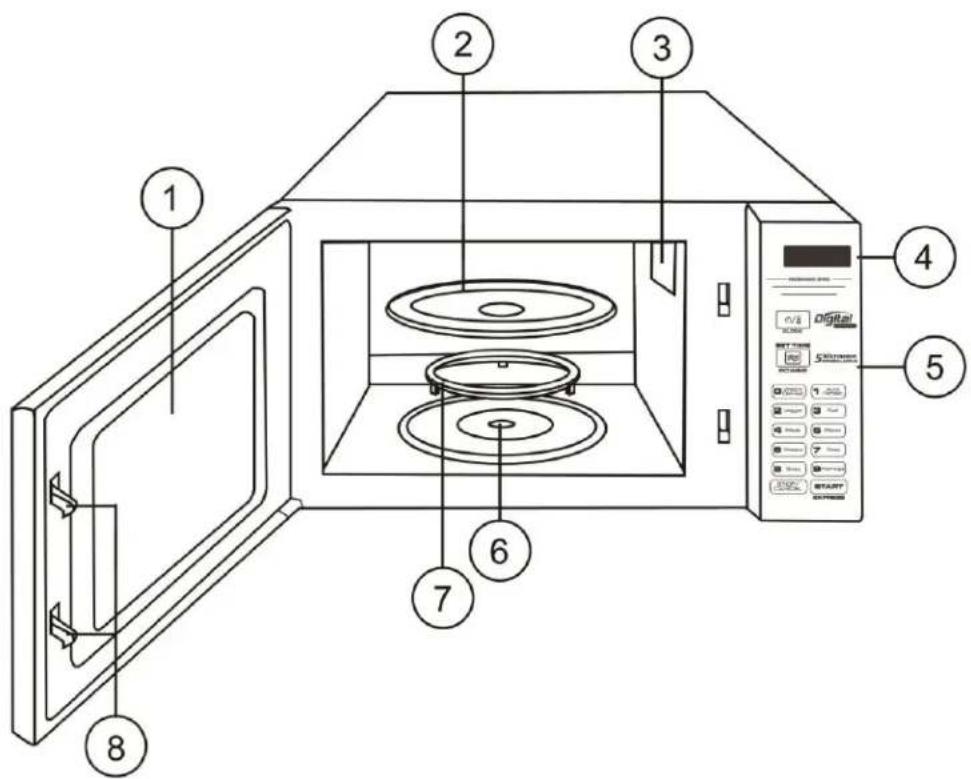
- Glass Windows
- Glass Turntable
- Wave Guide Cover
- LED Display
- Control Panel
- Shafting
- Roller Ring
- Door Safety Interlock System
CONTROL PANEL
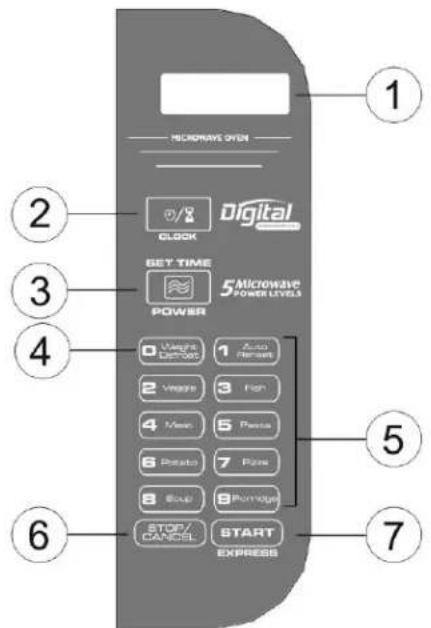
- LED Display:
Power light indicators display the cooking program and present time.
- CLOCK Key:
Use to set time and for Delay Cooking
- POWER Key:
Use to set power level from 10% to 100% power output.
- WEIGHT DEFROST Key:
It can be used for defrosting frozen poultry, fish and seafood by setting the weight (range of the weight is 100g – 1200g).
NOTE: The Weight Defrost key will only function in standby mode.
- NUMBER Keys:
Use to set time, cooking time, weight etc., Weight Defrost and Preset key.
NOTE: The Weight Defrost and Preset key will only function in standby mode.
- STOP/CANCEL Key:
Use to stop and cancel the cooking program.
- START/EXPRESS Key:
Use to begin the cooking program.
When the oven is plugged, the LED indicator is 0:00
Example: To set the clock to 12:35
-
Press the CLOCK key, the hour figures will blink.
-
Press the NUMBER key of "1", "2" for hours and "3", "5" for minutes in order.
-
Press CLOCK key again, and the time is set.
NOTE: This is 24 hour clock setting.
STOP/CANCEL
-
Press STOP/CANCEL key once to stop cooking procedure.
-
Press STOP/CANCEL key twice to clear the cooking procedure.
MICROWAVE COOKING
Power Level Table Guide
| Press "POWER" | Microwave Power | Display |
| Once | 100% | P100 |
| Twice | 80% | P 80 |
| Thrice | 50% | P 50 |
| 4 times | 30% | P 30 |
| 5 times | 10% | P 10 |
A. One-stage Cooking
- Press POWER key to choose desired Microwave Power
- Press the NUMBER keys to set the cooking time.
- Press the START/EXPRESS key to start cooking
Example: To cook 10 min and 30 sec in 50% power level
- Press POWER key 3 times to choose 50% power level
- Press the NUMBER key "1,0,3,0" in order to set the cooking time.
- Press the START/EXPRESS key to start cooking.
B. Two-stage Cooking
Some recipes require different stages of cooking at different temperatures.
- SET STAGE 1:
- Follow step 1 and 2 in "One-stage Cooking"
Note: Do not press the START/EXPRESS key
-
SET STAGE 2
-
Press the POWER key again to choose desired Microwave Power level
-
Press the NUMBER keys to set the cooking time.
-
Press START/EXPRESS key to start cooking.
Example: You want to cook food with 100% power level for 3 min then 30% power level for 9 min.
STAGE 1
- Press POWER key once to choose 100% power level
- Press the NUMBER key "3,0,0" in order to set the cooking time.
Note: Do not press the START/EXPRESS key.
STAGE 2
- Press again the POWER key 4 times to choose 30% power level
- Press the NUMBER key "9,0,0" in order to set the cooking time.
- Press the START/EXPRESS key to start cooking.
NOTE: The maximum cooking time is 99 min. and 99 sec.
EXPRESS COOKING
Every press of the START/EXPRESS key, the oven is programmed for:
- Press once 30 sec
- Press twice 1 min
- Press 3 times 1 min & 30 sec
- Press 4 times 2 min
- Up to 12 min
NOTE: If the express cooking requirement is more than 2min., 1 min. will be automatically added each time you press the START/EXPRESS key.
WEIGHT DEFROST
The WEIGHT DEFROST can be use to defrost poultry, fish and seafood
- Press WEIGHT DEFROST key "dEF2" will display
- Press the NUMBER key to set the weight of the food.
- Press the START/EXPRESS key to start cooking.
Note: The weight range is 100g – 1200g.
DELAYED COOKING FUNCTION
The oven has the ability to be program to do several functions.
Example: You want to program the microwave oven to start cooking at 11:00AM for 9 minutes and 30 seconds.
- Set the current time (page 4 Setting the Clock)
-
Set the cooking procedure and time when the cooking procedure will start.
a. Press POWER to set the desired power level.
b. Press NUMBER key "9,3,0" to set cooking time.
c. Press the CLOCK key to set the time when the cooking procedure will start. -
Press the CLOCK key.
- Press NUMBER key "1,1,0,0" to set the time.
-
Then press the START/EXPRESS key.
-
Check the programmed time by pressing the CLOCK key.
CHILD LOCK FUNCTION
This feature prevents the unsupervised operation by children.
-
Press and hold the STOP/CANCEL key for 3 seconds or until the sign appears on the display.
-
To unlock. Press and hold STOP/CANCEL key for 3 sec. or until the sign disappear on the display.

PRESET COOKING
The Number Pads 1 - 9 has an equivalent nine different Preset Cooking respectively.
| Pad | Display | Cook | Pad | Display | Cook | Pad | Display | Cook |
| 1 | A-1 | Reheat | 4 | A-4 | Meat | 7 | A-7 | Pizza |
| 2 | A-2 | Veggie | 5 | A-5 | Pasta | 8 | A-8 | Soup |
| 3 | A-3 | Fish | 6 | A-6 | Potato | 9 | A-9 | Porridge |
Note: The Preset Cooking will only function in standby mode.
| Menu | Weight(g) | Display |
| A-1Reheat | 150 | 150 |
| 250 | 250 | |
| 350 | 350 | |
| 400 | 400 | |
| A-2Vegetable | 150 | 150 |
| 350 | 350 | |
| 500 | 500 | |
| A-3Fish | 150 | 150 |
| 250 | 250 | |
| 350 | 350 | |
| 400 | 400 | |
| 450 | 450 | |
| A-4Meat | 150 | 150 |
| 300 | 300 | |
| 450 | 450 | |
| 600 | 600 | |
| A-5Pasta | 50(with cold water 450g) | 50 |
| 100(with cold water 800g) | 100 | |
| 150(with cold water 1200g) | 150 | |
| A-6Potato | 1(approximately230g) | 1 |
| 2(approximately460g) | 2 | |
| 3(approximately690g) | 3 | |
| A-7Pizza | 1(approximately80g) | 1 |
| 2(approximately160g) | 2 | |
| 3(approximately250g) | 3 | |
| A-8Soup | 500 | 500 |
| 750 | 750 | |
| 1000 | 1000 | |
| A-9Porridge | 550 | 550 |
| 1100 | 1100 |
Example: Cook fish of 350g
- Press the NUMBER key once "3" for fish, A-3 will display.
- Press again the NUMBER key "3" until the 350 will display in the screen.
- Press START/EXPRESS to start cooking.
COOKING TIPS
- Arrange food carefully, place thickest areas toward outside of dish. Watch cooking time, cook for the shortest amount of time indicated and add more time as needed.
- Slightly cover foods before cooking, covers prevent spattering and help foods to cook evenly.
- Check recipe for suggestions on proper use of paper towels, microwave plastic wrap or a lid.
- Stir foods from outside to center of dish once or twice during cooking, foods such as chicken, hamburgers or steaks should be turned over once during cooking.
- Rearrange foods, like meatballs halfway through cooking both from top to bottom and from the center of the dish to the outside.
- After cooking ensures adequate standing time, heated liquid or beverage may result in delayed eruptive boiling. Remove food from oven and stir if possible. Covered food during standing time allows the food to finish cooking without overcooking.
- Check for the cooking status; look for signs indicating that cooking temperature has been reached. Doneness signs include:
- Food steams throughout, not just at edge.
- Poultry thigh joints move easily.
- Pork and poultry show no pinkness.
- Fish is opaque and flakes easily with fork.
- When using microwave safe plastic wrap as cover for cooking food with high fat content, do not allow the wrap touch the food as it may melt. Some microwave safe plastic cookware is not suitable for cooking foods with high fat and sugar content.
- Potatoes, sausage must be pierced or peeled before cooking.
CLEANING & MAINTENANCE
- Unplug the oven from the convenience outlet before cleaning.
- Do not allow food splatters or spilled liquids adhere to oven walls. Baking soda may be used if the oven gets very dirty. Avoid using spray and other harsh cleaners as this may stain, streak, or dull the door surface.
- Use damp cloth in cleaning the glass window and the surface of the oven.
- Do not allow water to seep into the ventilation openings to avoid damages on the operating parts.
- Do not allow the control panel to become wet.
- When cleaning the control panel, leave oven door open to prevent oven from accidentally turning on.
- If the steam accumulates inside or around the oven door, dry it using soft cloth. This may occur when the oven is operated under high humid conditions, but this is normal.
- If the glass turntable becomes dirty, remove it and wash it with soap and water.
- The roller rest and oven floor should be cleaned regularly to avoid excessive noise. Simply wipe the bottom part of the oven with mild detergent. The roller ring can be washed with soap and water. If the roller rest is removed from the oven, be sure to return it properly.
- MICROWAVE OVEN
- SPECIFICATION
- IMPORTANT SAFEGUARDS
- PRECAUTIONS TO AVOID POSSIBLE EXPOSURE TO EXCESSIVE MICROWAVE ENERGY
- RADIO INTERFERENCE
- INSTALLATION INSTRUCTION
- COOKWARE GUIDE
- DESCRIPTION OF PARTS
- CONTROL PANEL
- STOP/CANCEL
- MICROWAVE COOKING
- One-stage Cooking
- Two-stage Cooking
- STAGE 1
- STAGE 2
- EXPRESS COOKING
- WEIGHT DEFROST
- DELAYED COOKING FUNCTION
- CHILD LOCK FUNCTION
- PRESET COOKING
- Example: Cook fish of 350g
- COOKING TIPS
- CLEANING & MAINTENANCE
Brand : Imarflex
Model : MO-S20D
Category : Microwaves