CVO-680DB - Deep fryer Imarflex - Free user manual and instructions
Find the device manual for free CVO-680DB Imarflex in PDF.


| Product Type | Digital Air Turbo Fryer (Deep Fryer) |
| Brand | Imarflex |
| Model | CVO-680DB |
| Voltage | 230V a.c. |
| Power Consumption | Approx. 1500W |
| Temperature Range | 80°C to 200°C (adjustable); Dry Fruit: 35°C to 80°C |
| Timer Range | 1 minute to 1 hour (except Dry Fruit: 2 to 24 hours) |
| Preset Programs | Vegetable, Frozen Fries, Bake, Chicken, Fish, Steak, Dry Fruit, Shrimp |
| Capacity | Max 2/3 full of basket; Fresh vegetables up to 3 cups |
| Control Panel | Digital with ON/OFF, Function, Time/Temp, Up/Down, Start/Pause |
| Indicators | Power light, Fan icon, Heater icon |
| Safety Features | Auto shut-off after 10 minutes idle; automatic stop when basket removed; cool-down before cleaning |
| Cleaning | Wipe body with damp cloth; wash basket and grill tray with hot water and mild detergent; do not immerse body in water |
| Accessories Included | Frying basket, grill tray |
| Usage | Household only |
Frequently Asked Questions - CVO-680DB Imarflex
User questions about CVO-680DB Imarflex
0 question about this device. Answer the ones you know or ask your own.
Ask a new question about this device
Download the instructions for your Deep fryer in PDF format for free! Find your manual CVO-680DB - Imarflex and take your electronic device back in hand. On this page are published all the documents necessary for the use of your device. CVO-680DB by Imarflex.
USER MANUAL CVO-680DB Imarflex
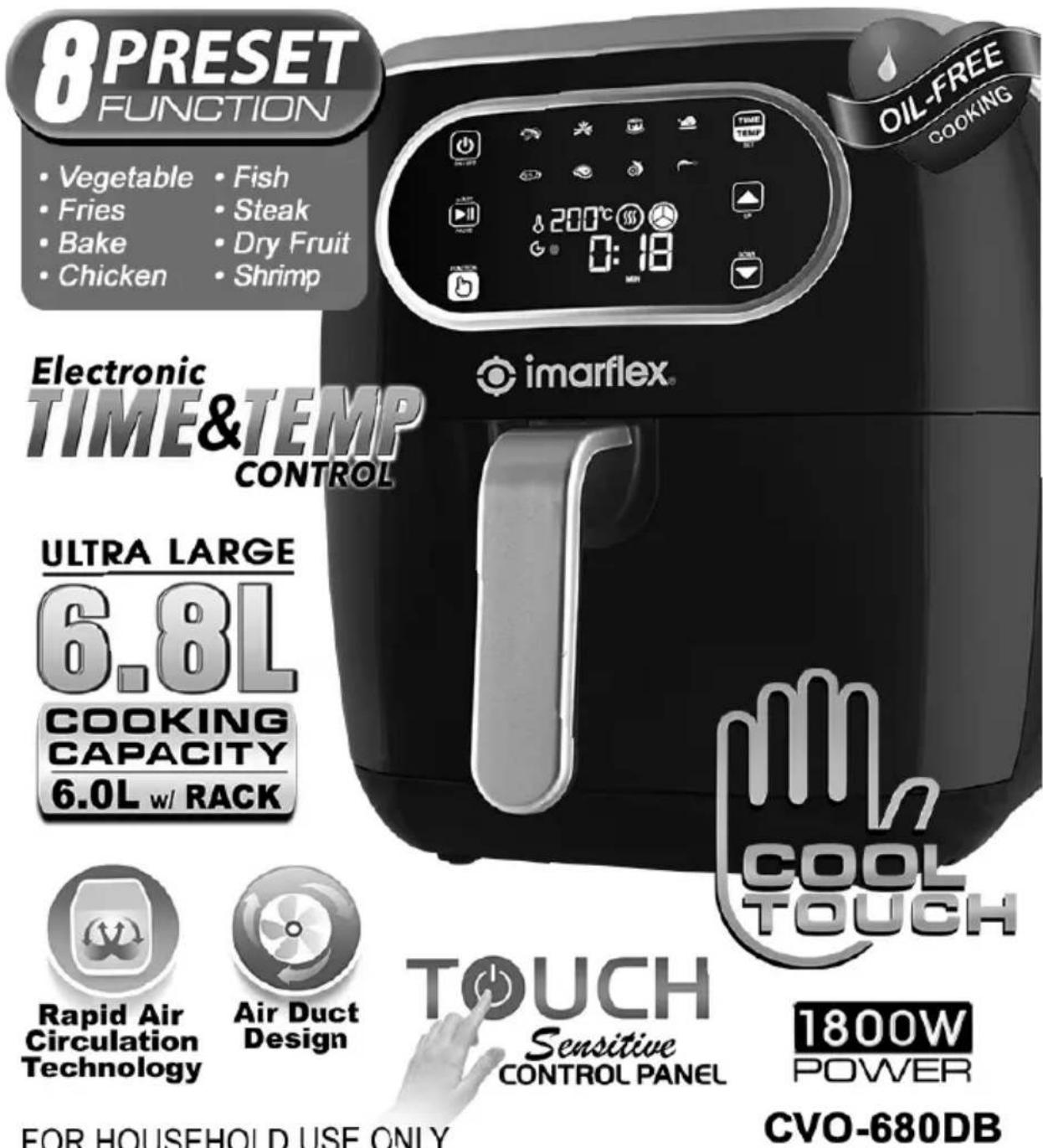
DIGITAL AIR TURBO FRYER
When using electrical appliances, basic safety precautions should always be followed, including the following:
- Read all instructions carefully.
- Before using the unit, check the voltage indicated corresponds with the convenience outlet (230Va.c.).
- Do not use any appliance with a damage cord or plug. If the cord is damaged it should be replaced with the same type and size or bring the unit to the nearest Imarflex Authorized Service Center.
- Do not use the two-way socket with another appliance.
- Place the Turbo rFome a dry, stable surface.
- Do not place on or near gas stove, electric burner or in a heated oven.
- Keep curtains, furniture, flammable materials, etc. for a the unit and from the convenience outlet where the unit is plugged.
- Do not move the unit while cooking is in progress.
- Children should be supervised to ensure that they do not play with the appliance.
- This appliance is not intended for use y persons (including children) with reduced physical, sensory or mental capabilities, or lack of experience and knowledge, unless they have been given supervision or instruction concerning use of the appliances by a person responsible for their safety.
- Do not cover the air inlet and outlet opening while the appliance is operating.
- Do not pool into theingrpan that ycause fire hazard.
- Keep the turbo fryer at least 4 inches away from walls or other objects during operation.
- CAUTION: Never leave the unit unattended while cooking.
- Keep the unit in a dry and cool place.
- For household use only; not intended for any business purposes.
- Save this instruction fufore reference.
DESCRIPTION OF PARTS:
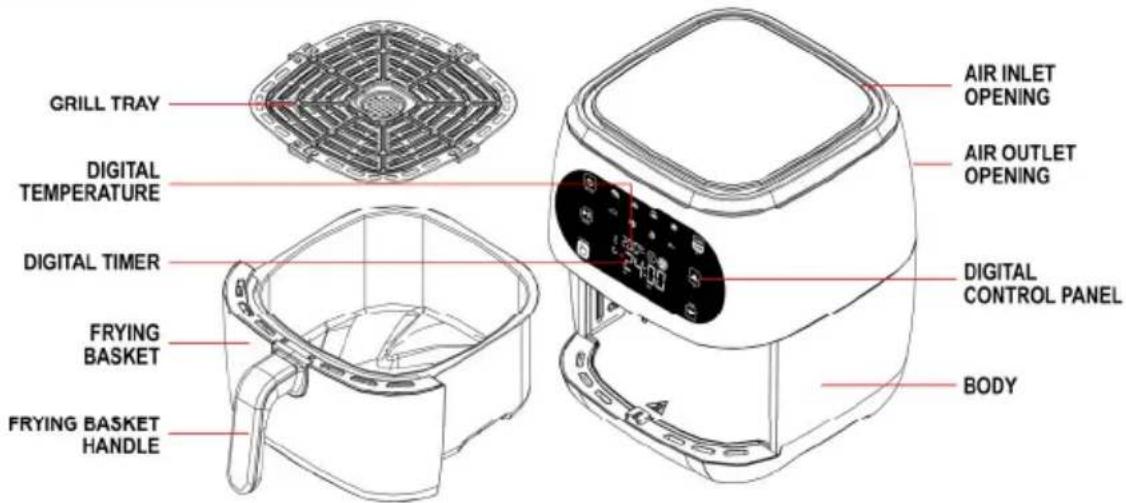
CONTROL PANEL:
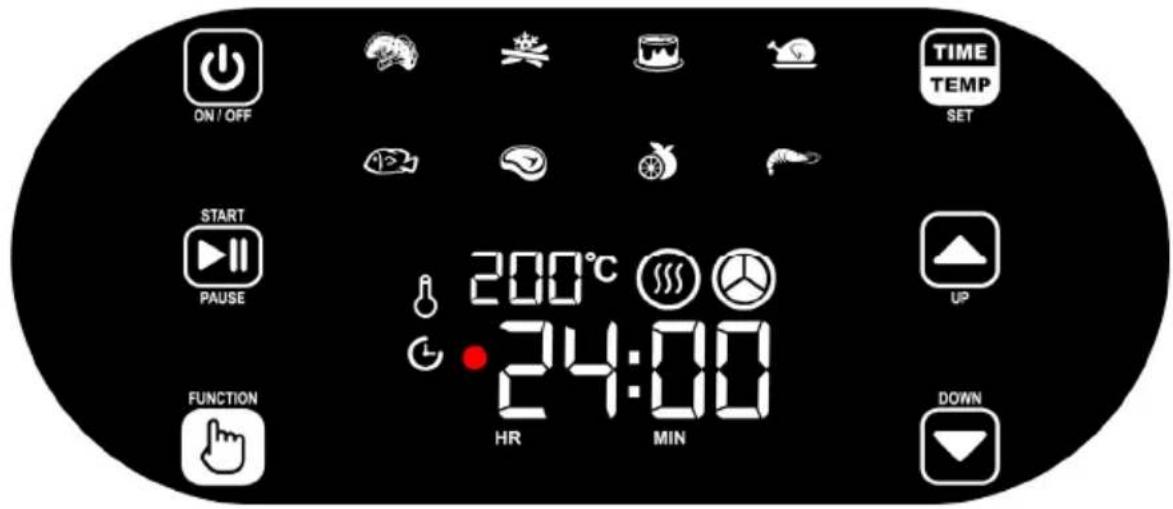
PRE-SET ICONS
| ICON | DESCRIPTION | DEFAULT TEMP | DEFAULT TIME | ADJUSTABLE TEMP | ADJUSTABLE TIME |
 | Vegetable | 180°C | 00:12mins. | 80°C to 200°C | 00:01 min to 1:00 hour |
 | Frozen Fries | 200°C | 0:18mins | 80°C to 200°C | 00:01 min to 1:00 hour |
 | Bake | 180°C | 0:30mins | 80°C to 200°C | 00:01 min to 1:00 hour |
 | Chicken | 200°C | 0:20mins | 80°C to 200°C | 00:01 min to 1:00 hour |
 | Fish | 200°C | 0:10mins | 80°C to 200°C | 00:01 min to 1:00 hour |
 | Steak | 200°C | 0:10mins | 80°C to 200°C | 00:01 min to 1:00 hour |
 | Dry Fruit 35°C 4:00 | hours 35°C | to 80°C | 2:00 hours to 24:00 hours | |
 | Shrimp 180°C 0:12mins | 80°C to | 200°C | 00:01 min to 1:00 hour |
CONTROL ICONS
| ICON | DESCRIPTION |
 | ON/OFFON:Press ‘ON/OFF’ button to turn ON the unitA beep sound will be heard to indicate that the unit is in standby modeOFF:Press ‘ON/OFF’ button to twice ofinitA beep sound will be heard to indicate that the unit is turned off while the power light indicator and on/off icon will remain on the digital display after turning off the unit*Note: If no operation for 10 minutes, the unit will automatically switch to standby mode |
FUNCTION | Function SelectorPress function button repeatedly to select the desired function |
 | Time & Temperature SelectorPress ‘time/temp’ button to select the desired time and temperatureTime Setting G: Press ‘time/temp button’ once, the default time display will be flashing to indicate that you may now select the desired time. Time will appear by ‘hour / min’TemperatureSetting &Press ‘time/temp’ button twice, the default temp display will be flashing to indicate that you may now select the desired temperature. |
 | Up & Down SelectorPress ‘up’r ‘down’ button to many adjust the desired time and temperature |
| ICON | DESCRIPTION |
 | Start & PauseStart Function: Press ‘start/pause’ button to start the cooking processPause Function: Press ‘start/pause’ button to pause. The timer will stop and heat icon will disappear indication that the unit is in p*Note: Once you remove the frying basket in the middle of the cooking process, the unit will automatically turn off and the cooking process will only resume upon placing the fr yingbasketinsidetheunit. |
 | FanFan icon will appear on the display to indicate is working to help hot air circulate evenly |
 | HeaterHeater icon will appear on the display to indicate that the heater is working |
FOR INITIAL USE:
- Remove the POP sticker.
- Clean the frying basket and grill tray thoroughly with hot water, detergent and non-abrasive sponge.
- Wipe the appliance with wet cloth.
*Note: Donotimmersetheturbofryerbodyinwater.
- After cleaning, return the mill trainto theyinig basket.
HOW TO USE:
- Place the unit on a flat surface.
- Place the food into yithebasket.
*Note:
- To ensure proper cooking and air circulation, do not fill the unitmorethan2/3full.
- Maximumfryingcapacityoffreshvegetableis3cups.Donot exceedwiththemaximumcapacity.
-
Makesurethatthefryingbasketisfullyclosed.
-
Plug the unit into a convenience outlet. A beep sound will be heard and power light indicator will light up to indicate that the unit is in standby mode
- Select the desired function by pressing 'FUNCTION' icon repeatedly.
- Then select the desired time and temperature by pressing 'TIME/TEMP' icon followed by 'UP' and 'DOWN' icon to manually adjust the desired time and temperature.
- For better cooking result, open the frying basket halfway of its cooking time then shake the food inside the frying ba *Note: Theheatwillautomaticallystopwhenthefryingbasketis removedfromtheunit.
- Five beep sound will be heard once the cooking is done. Power and heat light indicator will be automatically switched
- Unplug the unit after every use.
COOKING CHART:
| MENU TEMP. TIME (mins) ACTION | |||
| Mixed Vegetables (Roasted) | 160-200°C 8-10 Shake | ||
| Broccoli (Roasted) | 160-200°C 8-15 Shake | ||
| Onion Ring (Frozen) | 200°C 12-18 Shake | ||
| Cheese Sticks (Frozen) | 180°C | 8-12 | - |
| Fried Sweet Potato Chips | 180°C 10-15 Shake | ||
| French Fries (Frozen) | 200-220°C | 15-20 | Shake |
| Meat Ida | 180°C 35-40 | - | |
| Hamburger | 180°C 10-14 | - | |
| Hotdog/ Sausage | 180°C 10-15 Turnover | ||
| Chicken Wigs | 200-220°C | 15-20 | Shake |
| Chicken Tenders Fingers | / 200°C | 5-10 Shake | |
| Chicken Pieces | 200-220°C | 15-20 | Turnover |
| Chicken Nuggets (Frozen) | 180°C 10-15 Shake | ||
| Whole Chicken (1kg) | 180-200°C | 40-50 | Turnover |
| Catfish Fingers | 200°C 10-15 Turnover | ||
| Donuts 180°C | 8 Turnover | ||
| Cookies | 180°C | 8-10 | Turnover |
| Bacon | 200°C | 8-10 | - |
| Steak | 180-200°C | 10-20 | Turnover |
| Fish | 180-200°C | 15-20 | Turnover |
| Bake | 160-180°C | 10-25 | - |
| Shrimp 180°C | 10-15 | - | |
| Dry Fruit | 35°C | 180-240 | - |
CLEANING AND MAINTENANCE:
- Unplug and wait until the unit cool down before moving or cleaning the unit.
- Wipe the roof the turboyer with moist cloth.
- Clean the grill tray and frying basket with hot water and liquid detergent.
- Do not use abrasive materials to avoid scratches.
REMINDER: Please do not forget to fill up and send the wari card with receipt to our email address imarflexfb@evergoodinc.com
Distributed By: Xelframe Enterprises Inc.
Unit 711 IPI Buendia Tower Condo 501, Gil Puyat Ave., Pasay
Made in China
Brand : Imarflex
Model : CVO-680DB
Category : Deep fryer