IRS-500E - Iron Imarflex - Free user manual and instructions
Find the device manual for free IRS-500E Imarflex in PDF.


User questions about IRS-500E Imarflex
0 question about this device. Answer the ones you know or ask your own.
Ask a new question about this device
Download the instructions for your Iron in PDF format for free! Find your manual IRS-500E - Imarflex and take your electronic device back in hand. On this page are published all the documents necessary for the use of your device. IRS-500E by Imarflex.
USER MANUAL IRS-500E Imarflex
- The iron has an anti-drip function: while ironing for an extended period, soleplate temperature will drop, the iron will automatically stop the water from coming out, thus, no water droplets will come-out of the soleplate.
- Steam Burst can also be used when holding the iron in a vertical position (see fig 4).
- After use, discard the remaining water from the water tank.
TABLE GUIDE:
| Symbol | Fabric | Temp. | Variable steam | Steam Burst | Water Spray |
 | Nylon | × | × | √ | |
 | Silk Wool | √ | × | √ | |
 | Cotton Linen | MÁX | √ | √ | √ |
CLEANING AND MAINTENANCE
- Unplug the iron after every use.
- Allow the iron to cool OFF.
- Wipe the soleplate with soft damp cloth.
- From time to time clean the water tank by filling it with water and shake well, and then discard the water.
- Never leave the water inside the water tank for long period of time.
SELF-CLEAN FUNCTION
- Fill water through the water inlet (half-full). Press down the cover.
- Plug into the convenience outlet. Make sure that the variable steam selector is in "o" position.
- Set the thermostat control knob to max temperature, power light indicator will turn ON.
- Once the power light indicator turns OFF, unplug the unit, bring to the sink and press the SELF-CLEAN button. Water steam will come out from the soleplate holes while impurities and flakes flushed out.
- Release the button as soon as the water from the water tank evaporates.
Reminder: Please do not forget fill up and send the warranty card.
SPECIFICATION
Model No : IRS-500E
Input Voltage : 230 Va.c. 60Hz
Power : 2200W
IMPORTANT SAFEGUARDS
When using electrical appliances, basic safety precautions should always be followed, including the following:
-
Read all instruction carefully.
-
Before using the unit, check if the voltage indicated corresponds with convenience outlet (230Va.c.).
-
Do not use any appliance with a damaged cord or plug. If the cord is damaged it should be replaced with the same type and size or bring the unit to the nearest authorized service center.
-
Do not leave the iron unattended while it is connected to the convenience outlet.
-
Children should be supervised to ensure that they do not play with the appliance.
-
This appliance is not intended for use by persons (including children) with reduced physical, sensory or mental capabilities, or lack of experience and knowledge, unless they have been given supervision or instruction concerning use of the appliances by a person responsible for their safety.
-
Do not use two-way socket with other appliance.
-
To protect against electric shock, do not immerse the iron in water.
-
Unplug the iron when filling with water; emptying the tank or after using the iron.
-
The iron should always be turned OFF before plugging or unplugging from the outlet.
-
Do not allow cord to touch hot surface of the iron. Loop cord loosely around the iron before storing.
-
For household use only; not intended for any business purposes
-
Save this instruction for future reference.
DESCRIPTION OF PARTS:
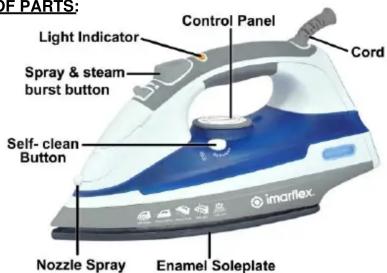
- Steam Burst Button- pressing this button provides steam to eliminate stubborn wrinkles
- Spray Button- pressing this button provides a fine mist spray to dampen hard to iron fabrics.
- Variable Steam Button- slide this button to select the desired continuous water output: "o" position indicates ironing without steam.
- Water Inlet
- Spray Nozzle
- Thermostat Control Knob- to select desired fabric temperature.
For initial use:
-
Remove protective cover on the soleplate.
-
Heat up the iron to maximum temperature and iron a piece of damp cloth for several minutes to remove any residue on the soleplate.
Note: It is normal that strange odor comes out from the unit during the Initial use.

BURNS CAN OCCUR FROM TOUCHING HOT METAL PARTS, HOT WATER OR STEAM. EXERCISE CARE WHEN HANDLING!
Using as Dry Iron:
- Plug the iron to the convenience outlet.
- Set thermostat control knob at desired temperature setting (see table guide).
- Allow the iron to heat for two minutes on heel rest position before ironing.
- The power light indicator will turn ON when the iron is switch ON, the power light indicator will turn OFF once the temperature has been attained. The power light indicator will remain OFF as long as the iron keeps the selected temperature, as the temperature decreases, the thermostat will start working; the power light indicator will turn ON again.
- First, iron synthetic fabric at low temperature, and then as the temperature rises, iron wool, cotton, and linen accordingly. The iron heats more quickly than it cools.
- Allow time for the iron to heat when changing from a low temperature to high.
Using as Steam Iron
- At ironing position, fill water through the water inlet. Make sure that the water should not exceed the MAX level indicator (350ml) (see fig 1). Press down the cover.
- Plug into the convenience outlet and turn thermostat control knob to desired temperature setting (see fig 2 & table guide). Position the unit on a heel rest position.
FIG.1

FIG.2
- Set the variable steam selector to desire steam output (see fig 3) and begin ironing.
a. Use steam burst button for intermittent steam, or b. Use spray button for water spray.
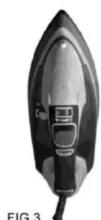
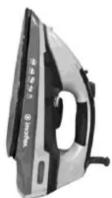
FIG.4
Brand : Imarflex
Model : IRS-500E
Category : Iron