OT803RW - Household Fan Omega Altise - Free user manual and instructions
Find the device manual for free OT803RW Omega Altise in PDF.


| Product Type | Tower Fan with Remote Control |
| Model | OT803RW |
| Brand | Omega Altise |
| Dimensions (HxWxD) | 800 x 225 x 225 mm |
| Weight | 2.4 kg |
| Power Supply | 220-240V ~ 50Hz, 40W |
| Speeds | 3 speeds (Low, Medium, High) |
| Oscillation | Yes, with OSC button on panel and remote |
| Timer | 0-7 hours (1-hour increments) |
| Remote Control | Included, uses CR2032 battery |
| Control Panel | Top-mounted with Power, Speed, OSC, Timer buttons |
| Filter Type | Rear mesh filter, washable |
| Cleaning | Wipe body with damp cloth; wash filter under water; do not immerse in water |
| Safety Features | Overheat protection, grounded plug, no automatic start |
| Usage Location | Indoor domestic use only, on flat stable surface |
| Storage | Store in original packaging, cool dry place |
| Warranty | Contact Omega Altise Australia 1300 795 572 or NZ (09) 415 6000 |
Frequently Asked Questions - OT803RW Omega Altise
User questions about OT803RW Omega Altise
0 question about this device. Answer the ones you know or ask your own.
Ask a new question about this device
Download the instructions for your Household Fan in PDF format for free! Find your manual OT803RW - Omega Altise and take your electronic device back in hand. On this page are published all the documents necessary for the use of your device. OT803RW by Omega Altise.
USER MANUAL OT803RW Omega Altise
OPERATION, MAINTENANCE AND SAFETY INSTRUCTIONS
FOR OMEGA ALTISE TOWER FAN

MODELS INCLUDE:
OT803RW
omega altise
IMPORTANT SAFETY INSTRUCTIONS
IMPORTANT: Read the safety precautions of this booklet carefully before attempting to assemble, install, operate or maintain the product described. Protect yourself and others by observing all safety information. Failure to comply with instructions could result in personal injury and/or property damage. If you are unsure about anything regarding your fan or these instructions, please contact Omega Altise on 1300 795 572 in Australia or (09) 415 6000 in New Zealand before operating your appliance.
- Read all instructions carefully before using the tower fan.
- Use this tower fan only as described in this manual. Any other use not recommended by the manufacturer may cause fire, electrical shock, or injury to persons. Do not modify this appliance. Do not try to repair this appliance – there are no user serviceable parts within.
- Remove the packaging and ensure that the appliance is undamaged (keep packing box for later storage). In case of doubt do not use the appliance and contact Omega Altise Service. Do not let children play with any parts of the packaging.
- This appliance is not intended for use by persons (including children) with reduced physical, sensory or mental capabilities, or lack of experience or knowledge, unless they have been given supervision or instruction concerning the use of the appliance by a person responsible for their safety. Children should be supervised to ensure that they do not play with the appliance. Extreme caution is necessary when the tower fan is used by or near children or individuals with decreased mental and physical capacity and whenever the tower fan is left operating unattended.
- Before you use the appliance, check if the voltage marked on the rating label corresponds to the mains in your home. The appliance must be connected to a grounded power supply.
- Do not use this appliance with a programmer, timer or any other device that switches the appliance on automatically, since a fire risk exists if the appliance is covered or positioned incorrectly.
- Do not pull the power cord to disconnect with the power source. Always grasp the plug to pull it out.
- Do not run power cords under rugs or other combustible materials. Do not place power cords in areas where they can be a tripping hazard. Do not operate directly below a power outlet.
- Do not insert any objects into the appliance as it may cause an electric shock or fire or damage to the appliance. Do not block or tamper with the appliance in any manner while it is in operation. To prevent a possible fire, do not cover the appliance in any manner. Do not place on soft surfaces, like a bed, where openings may become blocked.
- Do not leave the appliance unattended. Always unplug the appliance when not in use. Take care that it is not obstructed when oscillating.
WARNING: The Function Switch should not be used as the sole means of disconnecting power. Always unplug the power cord before servicing or moving the appliance.
- Keep materials such as hair, net curtains, tablecloths & clothes away from the openings of the tower fan, as material may be sucked into the appliance causing injury, damage to property or the appliance.
- The appliance has hot and arcing or sparking parts inside. It must NOT be used in potentially dangerous locations such as flammable, explosive, chemical-laden, corrosive, salty or wet atmospheres. This appliance is intended for general indoor domestic use ONLY.
- This appliance is not intended for use in wet or damp locations. Never locate it where it may fall into a bathtub or other water container.
- Do not use the tower fan outdoors. Do not use close to windows or in direct sunlight.
- Always place the appliance on flat, stable surfaces before use. Always place the appliance vertically on its base.
- NOTE that over time, the filters at the rear of the appliance, and the grill at the front, will build up dust & dirt. This should be cleaned regularly to maintain optimum efficiency. Follow the cleaning procedure within this instruction.
WARNING: To avoid danger of electric shock, unplug from outlet when not in use and before cleaning. If the supply cord is damaged, it must be replaced by the manufacturer, its Service Agent or similarly qualified persons in order to avoid a hazard. In order to avoid overheating, do not cover the appliance. Do not use the appliance in the immediate surrounding of a bath, shower or swimming pool.
TECHNICAL DETAILS
Model: OT803RW Tower fan with remote control.
Power: 220-240V 50Hz, 40W.
Weight: 2.4kg.
Dimensions (HxWxD): 800x225x225mm
GENERAL TOWER FAN PARTS

GETTING STARTED
- Carefully remove the appliance from the plastic bag and the carton, and unwind the cord to its full length.
- Assemble the base of the fan onto the bottom of the body:
A) Remove the 3 thumb screws on the bottom of the main body.
B) Place the power cord between the two halves of the base and bring them together (plug end should be on the side of the base feet).
C) Push the base into the bottom of the fan body and align the 3 holes. Attach using the 3 thumb screws.
D) Fix the cord to the underside of the base in the 2 small clips and through the slot that exits close to the rear of the appliance.

- Place the appliance onto a stable, flat and dry surface.
- Plug the cord set into a 220-240V\~A.C. 50Hz earthed electrical outlet. Turn the power on at the electrical outlet. The blue Power indicator (next to the Power button) will light up and a beep will sound.
Note: The remote control uses battery type CR2032. To replace, push clip at bottom of remote inwards & pull out battery holder, replace battery and push holder back in.
CONTROLS
CONTROLS:
There are 4 control buttons on the control panel (top of tower fan body) and the remote control.
A) Power button: Once the power has been connected, press this button to start the tower fan on low speed (the low (L) speed indicator will light up). Press again to turn off the fan.
B) Speed button: Once the fan is running (low), press the Speed button once to increase the fan speed to medium. Pressing again will increase the speed to high, and once more will return the fan speed to low. The set speed is indicated on the control panel display.
C) OSC button: Once the fan is running, pressing the OSC button will start the tower fan oscillating (OSC indicator on control panel will light up). Press a second time to stop the oscillation.
D) Timer button: A timer can be set for 0-7 hours (in 1 hour increments). Press this button to cycle up from 1 to 7 and then back to 0 (selected timer option is displayed on the control panel – add the times up to determine the full time). All other buttons continue to work while the timer is in operation. To stop the timer function, set the time to 0. Once the time has elapsed, the fan will turn off.
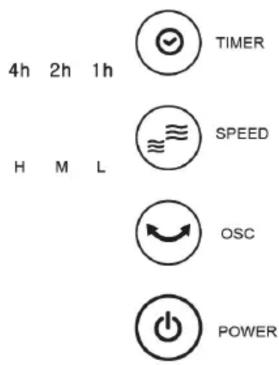
CONTROL PANEL
With the power cord plugged in, it is time to turn the tower fan on by pressing the power button once.
a) Choose a fan speed by pressing the speed button.
b) If required, turn on the oscillation with the OSC button.
c) If required, set up the timer by pressing the timer button (a sequence of 0-7 hours).
Turn the tower fan off by pressing the power button a second time.
CLEANING & MAINTENANCE
WARNING: ALWAYS UNPLUG THE CORD BEFORE MOVING OR SERVICING, DO NOT IMMERSE APPLIANCE IN WATER!
The fan should be cleaned periodically (at least once a month depending on the build-up of dust).
Clean the body of the tower fan with a soft damp cloth. Always make sure that the appliance is completely dry before connecting back to the mains supply.
CAUTION: Do not use gasoline, benzene, thinner, harsh cleaners, etc. as they will damage the tower fan. NEVER use ALCOHOL OR SOLVENTS.
Open the rear cover and take out the mesh filter. Wash under water, rinse & dry. Replace filter & close rear cover. Do not disassemble the fan in any other manner.
STORAGE: Store the tower fan with these instructions in the original packaging, in a cool, dry place.
It is important that you retain these instructions, proof of purchase as well as other important documents about this product for future reference. Due to continual product development, Omega Altise reserves the right to alter specifications or appearances without notice. Dispose of packaging responsibly – recycle where facilities are available.
A division of Shriro Australia Pty Ltd 104 Vanessa St Kingsgrove NSW 2208 In Australia: 1300 795 572 In New Zealand: (09) 415 6000 www.omegaaltise.com IM Ref: OT803RW 20/2014/06
omega altise
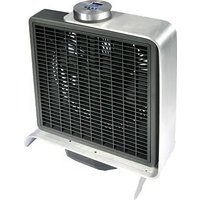

Brand : Omega Altise
Model : OT803RW
Category : Household Fan