OT600E - Household Fan Omega Altise - Free user manual and instructions
Find the device manual for free OT600E Omega Altise in PDF.


| Type | Tower fan |
| Model | OT600E |
| Brand | Omega Altise |
| Rated Voltage | 220-240V / 50Hz |
| Power Consumption | 45W |
| Weight | 4.3 kg |
| Controls | Electronic (control panel) + Remote control |
| Speed Settings | 3 speeds (Low, Medium, High) |
| Modes | Normal, Natural, Sleep |
| Timer | Off timer: 0.5 to 12 hours |
| Oscillation | Yes (wide breeze distribution) |
| Height Adjustment | No (fixed height) |
| Remote Control Battery | 2 x AAA (not included) |
| Display | Digital display on control panel |
| Warranty | 2 year replacement |
| Assembly Required | Yes (base attachment) |
| Safety Features | Overload protection (not specified); guards must be fastened; auto shut-off (not specified) |
| Cleaning Instructions | Unplug; wipe with soft cloth and mild soap; no immersion |
| Intended Use | Indoor domestic use only |
| Accessories Included | Remote control, base parts, screws |
Frequently Asked Questions - OT600E Omega Altise
User questions about OT600E Omega Altise
0 question about this device. Answer the ones you know or ask your own.
Ask a new question about this device
Download the instructions for your Household Fan in PDF format for free! Find your manual OT600E - Omega Altise and take your electronic device back in hand. On this page are published all the documents necessary for the use of your device. OT600E by Omega Altise.
USER MANUAL OT600E Omega Altise
natural_image
Exterior view of a modern office building (no signage)Instruction Manual
Important Safety Instructions
- Read all instructions.
- Disconnect the power plug before dismantling, assembling or before cleaning.
-
Avoid touching mobile parts of the unit.
-
Make sure the fan is on a dry and even surface.
-
Never insert fingers, pencils or any other objects through the guards whenever the power plug is connected, especially while running.
-
The appliance is not intended for use by persons (including children) with reduced physical, sensory or mental capabilities, or lack of experience and knowledge, unless they have been given supervised or instruction concerning use of the appliance by a responsible person for their safely.
-
Young children or infirm persons should be supervised to ensure that they do not play with the appliance.
-
Do not use the appliance for any other purpose than its intended use.
-
The fan must not be used if the guards are not fastened according to instructions.
-
When the power cord is damaged, it must be replaced by the manufacturer or its service agent or a similarly qualified person in order to avoid a hazard.
-
Do not use your appliance with an extension cord unless it has been checked and tested by a qualified electrician or electrical supplier.
Read all instructions before using this unit. Keep them for future reference.
Specifications
| Model OT600E | Settings |
| Rated Voltage | 220-240V / 50Hz |
| Watts | 45W |
| Weight | 4.3kg |
| Controls | Electronic / Remote |
| 3 speed, Normal, Sleep and Natural Breeze modes | |
| Timer | Timer Off |
| Height adjustable | No |
| Oscillation | Yes |
| Warranty | 2 year replacement |
Parts List
- Control panel with remote control compartment
- Digital display
- Safety grille
- Base
- Remote control

Assembly Instructions
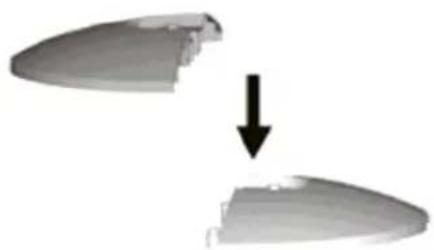
- Remove all items of packaging from the tower fan.
- Pass the power cord through the middle of the two base pieces.
- Position base piece onto the support posts of the other base piece to create the base assembly.
- Turn the tower body upside down position the base assembly onto the pedestal tube. Ensure that the pedestal tube is sitting flush in the base assembly.
- Screw the base assembly onto the pedestal tube with the supplied screws.
- Position the power cord into the provided cord track in the rear base.
- Turn the tower fan back to an upright position. It is now ready for use.
natural_image
Two gray plastic or plastic components with a downward arrow indicating transformation (no text or symbols)
natural_image
Circular mechanical component with radial arrows indicating force or direction (no text or symbols)Operating Instructions
- Use in a dry place, free of excessive humidity and water.
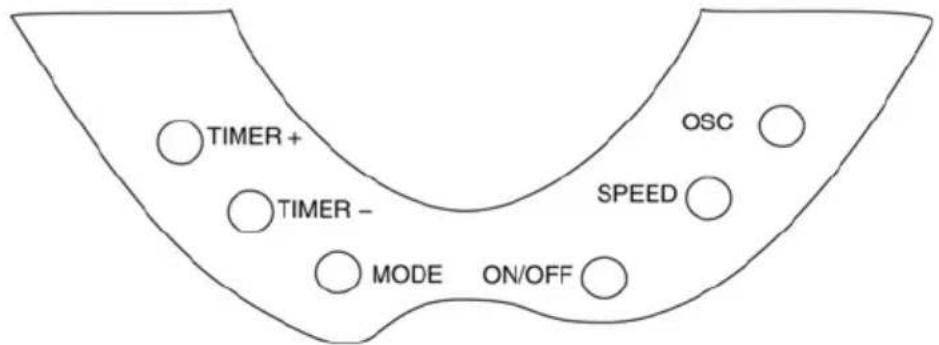
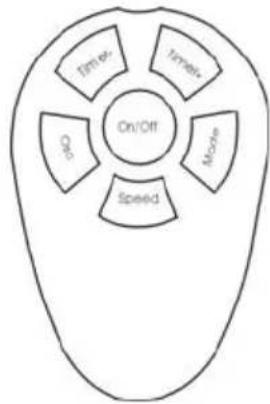
- This unit can be operated by the control panel on the fan or by remote control in the same manner.
flowchart
graph TD
    A["On/Off"] --> B["Speed"]
    A --> C["Mode"]
    A --> D["Time"]
    A --> E["On/OFF"]
    B --> F["On/OFF"]
    C --> G["On/OFF"]
    D --> H["On/OFF"]
    E --> I["On/OFF"]
ON/OFF: Press this button to turn the fan on or off.
SPEED: Press these buttons to adjust the speed of the fan between 3 comfort settings: High, Medium and Low. The speed will be indicated on the display panel.
OSC: Press the oscillation button to activate the oscillation function for widespread breeze distribution. Press again to turn the oscillation function off.
MODE: Choose from 3 different breeze patterns: Normal, Natural and Sleep. The function selected will be shown on the front display.
When Natural or Sleep airflows are selected the fan will continually cycle through Low, Medium and High fan settings.
TIMER +: Press the timer + button to activate the timer-off function. Each time the button is pressed the timer will be increased by 0.5hrs up to a maximum of 12 hours.
TIMER – : Each time the timer – button is pressed the timer will be decreased by 0.5hrs.

Remote Control
- The remote control requires 2 x AAA batteries
- Ensure the batteries are installed correctly according to the indicated polarities.
Care and Maintenance
- Always disconnect the cord from the electrical outlet when cleaning your fan.
- Light accumulated dust may be removed from the fan with a soft cloth or vacuum cleaner using the dusting brush attachment.
- Wipe the exterior surfaces of the fan occasionally with a cloth moistened (not dripping wet) with a mild soap solution. Dry the case thoroughly with a soft dry cloth before operating the fan.
- Avoid the use of gasoline, benzine, thinner etc as they may result in damage to the fan.
- Store the fan in a clean dry place when not in use.

CAUTION! Do not immerse the unit in water or allow water to drip into the interior of the fan housing as this could create a fire or electric shock hazard.

WARNING! Do not attempt to open or repair the unit yourself. Doing so could void the warranty and cause damage or personal injury.
Omega Altise products are distributed in Australia by MEA,
(A Division of Hagemeyer Brands Australia Pty Ltd)
ABN 28 001 375 686
Locked Bag 4013, Kingsgrove NSW 2208
Phone: 1300 739 033
Fax: 1800 838 899
Email: customerservice@meaappliances.com.au
Web: meaappliances.com.au
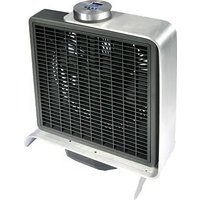

Brand : Omega Altise
Model : OT600E
Category : Household Fan