WH31SM - Weather Ambient Weather - Free user manual and instructions
Find the device manual for free WH31SM Ambient Weather in PDF.


| Product Type | Soil Moisture Sensor |
| Model | WH31SM |
| Brand | Ambient Weather |
| Dimensions | 6 inches length x 3.5 inches width x 1 inch diameter |
| Power Supply | 1 x AA battery (not included) |
| Battery Life | Approximately 1 year |
| Moisture Measurement Range | 0 – 100% |
| Resolution | 1% |
| Update Rate | 71 seconds |
| Wireless Frequency | 915 MHz |
| Wireless Range | Up to 300 feet (100 meters) line of sight; 100 feet under most conditions |
| Number of Channels | Up to 8 |
| Sensor Type | Ceramic cap for soil moisture exchange |
| Waterproof Rating | IP66 |
| Calibration | Two-point linear calibration for different soil types |
| Compatibility | Requires WS-2000 or WS-5000 console (firmware V1.6.0 or later) |
| Cloud Service | AmbientWeather.net for alerts, graphing, and IFTTT integration |
| Safety Certifications | FCC Part 15 compliant; California Prop 65 warning for lead, BPA, and phthalates |
Frequently Asked Questions - WH31SM Ambient Weather
User questions about WH31SM Ambient Weather
0 question about this device. Answer the ones you know or ask your own.
Ask a new question about this device
Download the instructions for your Weather in PDF format for free! Find your manual WH31SM - Ambient Weather and take your electronic device back in hand. On this page are published all the documents necessary for the use of your device. WH31SM by Ambient Weather.
USER MANUAL WH31SM Ambient Weather
Ambient Weather WH31SM Soil Moisture Sensor

ambient weather
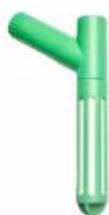
Table of Contents
- Introduction......1
- Features....2
- Getting Started....3
- Setup Guide....3
4.1 Batteries....3
4.2 Pre-installation 3
4.3 Sensor Placement 4
- Console 5
5.1 Display 5
5.2 Sensor Channel Designation 5
5.3 Calibration....6
5.3.1 0% Soil Moisture Set Point....6
5.3.2 100% Soil Moisture Set Point....6
- AmbientWeather.net....7
- Specifications....8
7.1 Sensor Specifications 8
7.2 Wireless Specifications 8
7.3 Power Consumption 8
- Troubleshooting 8
- Liability Disclaimer 8
- FCC Statement....9
- Warranty Information 9
- California Prop 65....10
1. Introduction
Thank you for your purchase of the Ambient Weather WH31SM Soil Moisture sensor. The following user guide provides step by step instructions for installation, operation, and troubleshooting. To download the latest manual and additional troubleshooting tips, please visit:
https://ambientweather.com/faqs/question/tags/tag/WH31SM/
The soil moisture sensor is not a stand-alone device and requires a WS-2000 or WS-5000 weather station console to view and upload the data to our cloud hosting service at AmbientWeather.net.
To see if your weather station is compatible, please visit:
https://ambientweather.com/faqs/question/tags/tag/WH31SM/
The following WS-2000 and WS-5000 console firmware versions or greater support the soil moisture sensor:
- Firmware revision number: V1.6.0
• Wi-Fi Firmware: AMBWeatherV4.2.0
For details on updating the firmware, consult your weather station user manual.
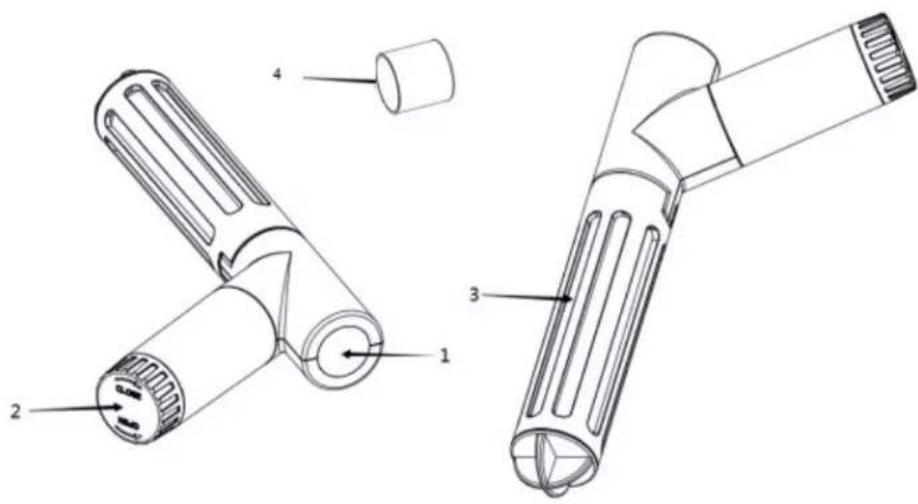
| No Item | |
| 1 LED Indicator (RF transmission) | |
| 2 Battery Cap | |
| 3 Soil Moisture Sensor cap | |
| 4 Green | Waterproof End Cap |
Figure 1
2. Features
The sensor features a ceramic cap, which acts like a breathing filter for exchanging soil moisture to the internal sensor. This filter makes the sensor less sensitive to soil density (clay, sand, soil, potting soil, etc.).
Other features include:
• Measures soil moisture content every 71 seconds.
• Ceramic coded for more accurate measurement.
- Calibration for different soil types (WS-2000 and WS-5000 only).
- Long wireless range, up to 300 feet (100 meters) line of sight (100 feet under most conditions).
• Supports up to 8 channels.
3. Getting Started
The Ambient Weather WH31SM soil moisture sensor includes the following:
| QTY Item | |
| 1 Soil Moisture Sensor: 6" length x 3.5 width x 1" diameter | |
| 1 | User Manual |
| 1 | Green Waterproof End Cap |
4. Setup Guide
4.1 Batteries
The soil moisture requires 1 x AA batteries (not included). We recommend Energizer Lithium batteries for longer life and a wider operating temperature range.
- Remove the battery cap as shown in Figure 2A and insert 1 x AA battery. Close the battery door.
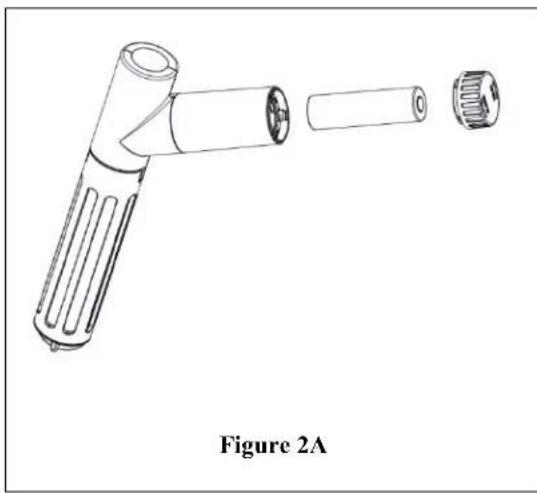
natural_image
Line drawing of a handheld device with two ports and a cylindrical body, labeled Figure 2A (no text or symbols on the diagram itself)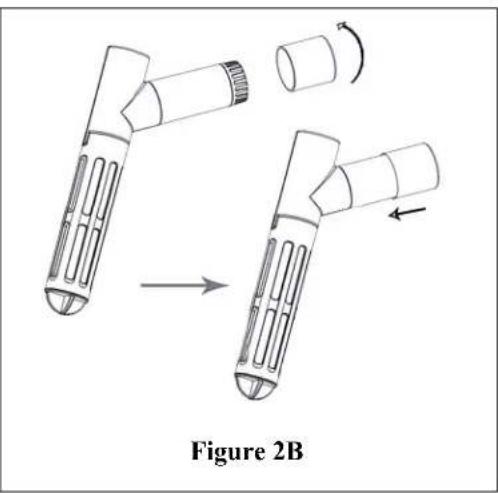
natural_image
Diagram of a mechanical device with two stages, showing a transformation from a left-side component to an upper-right section (no text or symbols)- After inserting the AA battery (positive side first), install the battery cap. Then, while turning the green waterproof end cap clockwise, slide the waterproof cap over the battery compartment securing the battery compartment from moisture as in figure 2B
Note: Remove the green waterproof end cap by twisting it clockwise to prevent battery cap from becoming lodged in the waterproof cap.
4.2 Pre-installation
Before installing the sensor into its permanent location, we recommend verifying proper operation.
• In open air, verify the sensor reads 0% (reference Section 5 for the console display).
- Submerge the sensor cap completely into a cup of water. Fill the water to the top of the sensor slots (just below the battery compartment). Wait one hour for complete sensor saturation and verify the sensor reads about 90% or greater.
4.3 Sensor Placement
Use a tool to dig a hole in the soil for the sensor to be placed in and gently push the sensor into the soil, covering the sensing barrier. The hole depth and diameter should be same as the sensing barrier (Figure 1, above)
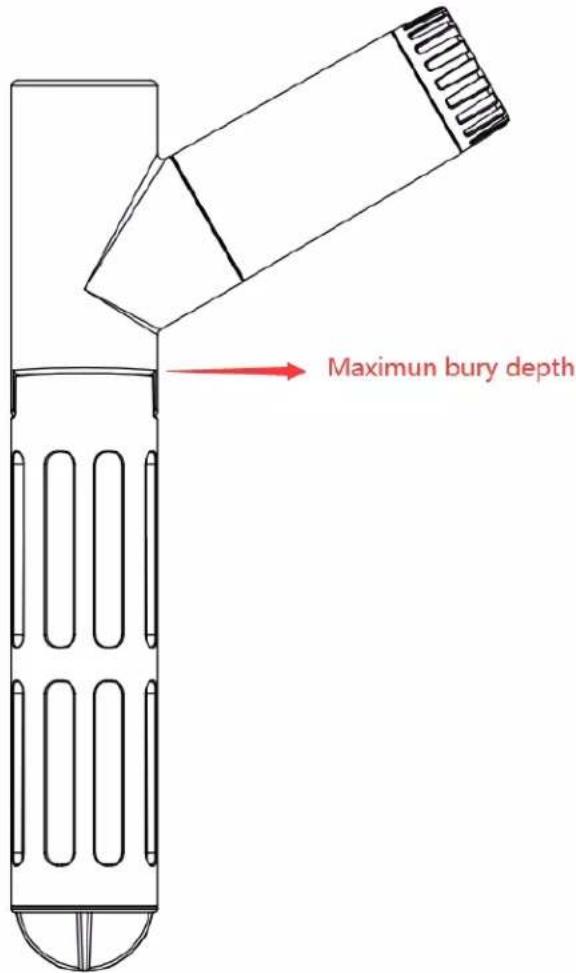
Figure 3
Please do not use excessive force to push the sensor into the soil, as this might damage the sensor tip. Note: If sensor is submerged past the Max Bury Depth this may cause premature failure.
The following is a table of reception loss vs. the transmission medium. Each “wall” or obstruction decreases the transmission range by the factor shown below.
| Medium RF Signal Strength Reduction | |
| Glass (untreated) | 5-15% |
| Plastics | 10-15% |
| Wood | 10-40% |
| Brick | 10-40% |
| Concrete | 40-80% |
| Metal | 90-100% |
5. Console / Receiver
The soil moisture sensor is currently supported by the following models:
• OBSERVERIP2.0 / WEATHERHUB
- WS-2000
- WS-5000
5.1 Display
The console displays soil moisture in the upper right-hand corner, and each channel automatically scrolls every 5 seconds on the display. The scrolling feature cannot be disabled.
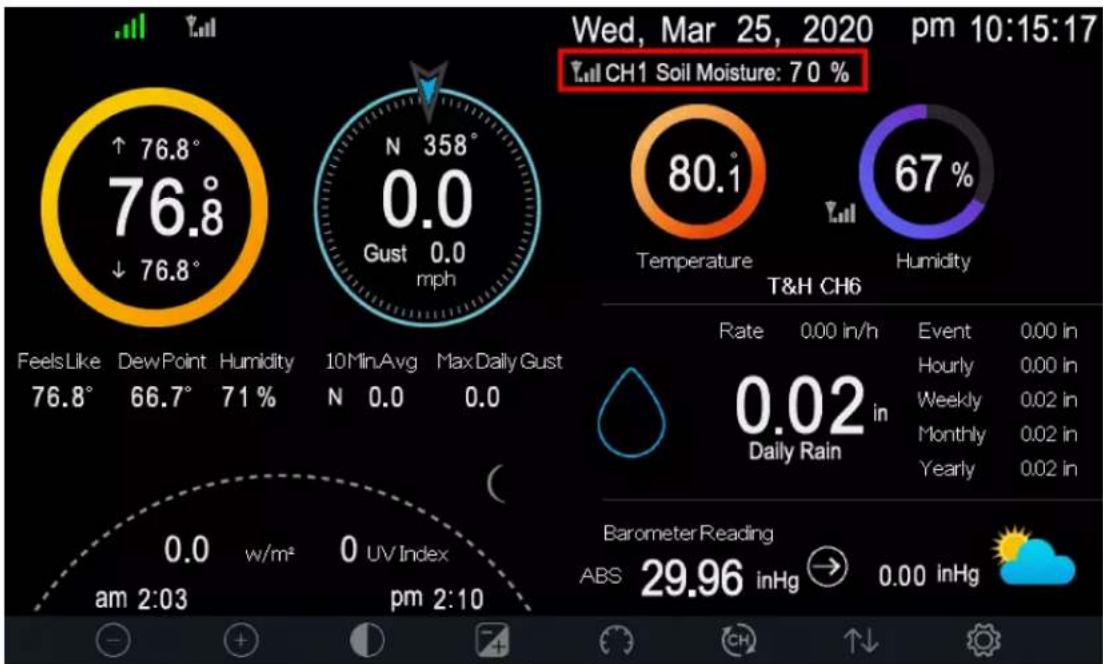
Figure 4
5.2 Sensor Channel Designation
Each WH31SM sensor has a hexadecimal sensor ID (Figure 5) printed near the LED indicator (Figure 1, above).
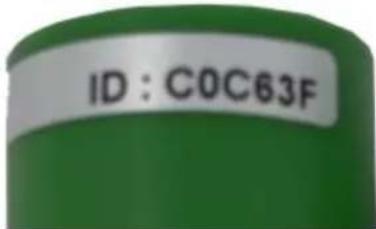
Figure 5
The sensor channel designation (1-8) is based on the order in which they were powered up and recognized by the console. Thus, we recommend you power up each sensor individually and verify they are read by the console, rather than all at the same time. Each time a sensor is recognized by the console note the channel assigned by the console.
Note: You may want to mark each sensor with the channel number it is assigned to
5.3 Calibration
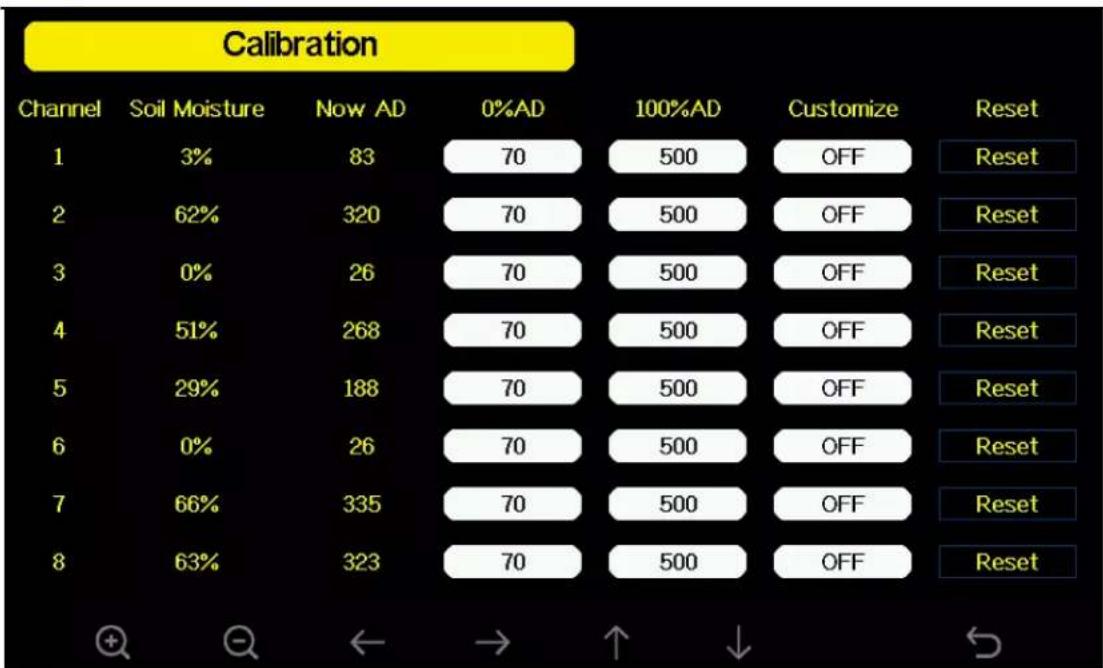
The soil moisture sensor provides for optional two-point linear calibration. This is useful, due to different soil types and density.
The calibration equation is defined as:
$$ \% \text { Soil Moisture (calibrated)} = (\text { Now AD } - 0 \% \mathrm{AD}) * 1 0 0 / (1 0 0 \% \mathrm{AD} - 0 \% \mathrm{AD}) $$
Where AD stands for “analog to digital” and is the unscaled digital value measured by the sensor, Now AD is the currently measured AD and the other parameters are described below.
5.3.1 0% Soil Moisture Set Point
To determine the 0% soil moisture, collect a soil sample in a cup from where the sensor will be installed, and allow the soil to completely dry out. Next, place the soil sensor in the medium and allow the sensor to stabilize for 24 hours.
Next, set the 0%AD calibration set point to the Now AD value.
5.3.2 100% Soil Moisture Set Point
To determine the 100% soil moisture, collect a soil sample in a cup from where the sensor will be installed, and add water and mix until the soil is saturated, and there is no standing water. Next, place the soil sensor in the medium and allow the sensor to stabilize for 24 hours.
Next, set the 100%AD calibration set point to the Now AD value.
other
Calibration | Channel | Soil Moisture (%) | Now AD | 0%AD | 100%AD | Customize | Reset | | :--- | :--- | :--- | :--- | :--- | :--- | :--- | | 1 | 3 | 83 | 70 | 500 | OFF | Reset | | 2 | 62 | 320 | 70 | 500 | OFF | Reset | | 3 | 0 | 26 | 70 | 500 | OFF | Reset | | 4 | 51 | 268 | 70 | 500 | OFF | Reset | | 5 | 29 | 188 | 70 | 500 | OFF | Reset | | 6 | 0 | 26 | 70 | 500 | OFF | Reset | | 7 | 66 | 335 | 70 | 500 | OFF | Reset | | 8 | 63 | 323 | 70 | 500 | OFF | Reset | + + ← → ↑ ↓ ↺Figure 6
Once the 0%AD and 100%AD are entered, set Customize to ON. To return to the non-calibrated settings, set Customize to OFF. Select Reset to restore to factory default.
For more information on accessing the calibration panel, please reference your weather station user manual.
6. AmbientWeather.net
Once the sensor(s) are reporting to the display console, a tile will appear on your dashboard automatically:
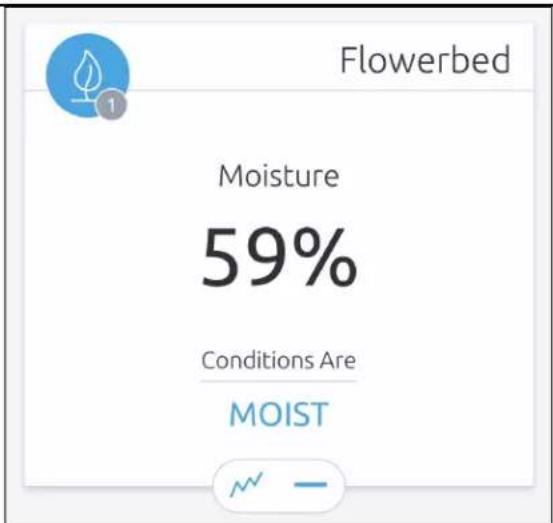
Figure 7
With the soil sensor and AmbientWeather.net, you can set email and text alerts, graph and download data, connect to external devices using IFTTT as well as connect to Amazon Alexa and Google Home.
7. Specifications
7.1 Sensor Specifications
- Moisture Range: 0 – 100%
- Resolution: 1%
• IP66 waterproof sensor
7.2 Wireless Specifications
- Line of sight wireless sensor array RF transmission (in open air): 330 feet, 100 feet under most conditions
- Update Rate: Outdoor Sensor: 71 seconds
• RF Frequency: 915 MHz
7.3 Power Consumption
• 1 x AA battery (not included). Alkaline or Lithium recommended.
- Battery life: About one year.
8. Troubleshooting
• Email Support: support@ambientweather.com
• Technical Support: 480-346-3380 (M-F 8am to 4pm Arizona Time)
9. Liability Disclaimer
Please help in the preservation of the environment and return used batteries to an authorized depot. The electrical and electronic wastes contain hazardous substances. Disposal of electronic waste in
wild country and/or in unauthorized grounds strongly damages the environment.
Reading the “User manual” is highly recommended. The manufacturer and supplier cannot accept any responsibility for any incorrect readings and any consequences that occur should an inaccurate reading take place.
This product is designed for use in the home only as indication of weather conditions. This product is not to be used for medical purposes or for public safety information.
The specifications of this product may change without prior notice.
This product is not a toy. Keep out of the reach of children.
No part of this manual may be reproduced without written authorization of the manufacturer.
Ambient, LLC WILL NOT ASSUME LIABILITY FOR INCIDENTAL, CONSEQUENTIAL, PUNITIVE, OR OTHER SIMILAR DAMAGES ASSOCIATED WITH THE OPERATION OR MALFUNCTION OF THIS PRODUCT.
10. FCC Statement
Statement according to FCC part 15.19:
This device complies with part 15 of the FCC rules. Operation is subject to the following two conditions:
- This device may not cause harmful interference.
- This device must accept any interference received, including interference that may cause undesired operation.
Statement according to FCC part 15.21:
Modifications not expressly approved by this company could void the user's authority to operate the equipment.
Statement according to FCC part 15.105:
NOTE: This equipment has been tested and found to comply with the limits for a Class B digital device, pursuant to Part 15 of the FCC Rules. These limits are designed to provide reasonable protection against harmful interference in a residential installation. This equipment generates, uses and can radiate radio frequency energy and, if not installed and used in accordance with the instructions, may cause harmful interference to radio communications.
However, there is no guarantee that interference will not occur in a particular installation. If this equipment does cause harmful interference to radio or television reception, which can be determined by turning the equipment off and on, the user is encouraged to try to correct the interference by one or more of the following measures:
• Reorient or relocate the receiving antenna.
- Increase the separation between the equipment and receiver.
- Connect the equipment into an outlet on a circuit different from that to which the receiver is connected.
- Consult the dealer or an experienced radio/TV technician for help.
11. Warranty Information
Ambient, LLC provides a 1-year limited warranty on this product against manufacturing defects in materials and workmanship.
This limited warranty begins on the original date of purchase, is valid only on products purchased and only to the original purchaser of this product. To receive warranty service, the purchaser must contact Ambient, LLC for problem determination and service procedures.
Warranty service can only be performed by a Ambient, LLC. The original dated bill of sale must be presented upon request as proof of purchase to Ambient, LLC.
Your Ambient, LLC warranty covers all defects in material and workmanship with the following specified exceptions: (1) damage caused by accident, unreasonable use or neglect (lack of reasonable and necessary maintenance); (3) damage resulting from failure to follow instructions contained in your owner's manual; (4) damage resulting from the performance of repairs or alterations by someone other than an authorized Ambient, LLC authorized service center; (5) units used for other than personal use (6) applications and uses that this product was not intended (7) the products inability to receive a signal due to any source of interference or metal obstructions and (8) extreme acts of nature, such as lightning strikes or floods.
This warranty covers only actual defects within the product itself, and does not cover the cost of installation or removal from a fixed installation, normal set-up or adjustments, claims based on misrepresentation by the seller or performance variations resulting from installation-related circumstances.
12. California Prop 65
WARNING: Use of the Ambient Weather Products can expose you to chemicals, including lead and lead compounds, which are known to the State of California to cause cancer and bisphenol A (BPA), and phthalates DINP and/or DEHP, which are known to the State of California to cause birth defects or other reproductive harm.
Can I Trust that Ambient Weather Products are Safe Despite this Warning?
In 1986, California voters approved the Safe Drinking Water and Toxic Enforcement Act known as Proposition 65 or Prop 65. The purpose of Proposition 65 is to ensure that people are informed about exposure to chemicals known by the State of California to cause cancer, birth defects and/or other reproductive harm. A company with ten or more employees that operates within the State of California (or sells products in California) must comply with the requirements of Proposition 65. To comply, businesses are: (1) prohibited from knowingly discharging listed chemicals into sources of drinking water; and (2) required to provide a "clear and reasonable" warning before knowingly and intentionally exposing anyone to a listed chemical. Proposition 65 mandates that the Governor of California maintain and publish a list of chemicals that are known to cause cancer, birth defects and/or other reproductive harm. The Prop 65 list, which must be updated annually, includes over 1,000 chemicals, including many that are commonly used in the electronics industry.
Although our manufacturing process is "lead-free" and RoHS compliant, it remains possible that trace amounts of lead could be found in components or subassemblies of Ambient Weather Products. Bisphenol A (BPSA) could conceivably be present in minute amounts in our plastic housings, lenses, labels or adhesives, and DEHP & DINP (phthalates) could possibly be found in PVC wire coatings of our cables, housings, and power cords. Unlike RoHS, Prop 65 does not establish a specific threshold for reporting on the substances of concern and instead sets forth a much less definitive standard requiring that the business demonstrate with certainty that there is "no significant risk" resulting from exposure. With respect to carcinogens, the "no significant risk" level is defined as the level which is calculated to result in not more than one excess case of cancer in 100,000 individuals exposed over a 70-year lifetime. In other words, if you are exposed to the chemical in question at this level every day
for 70 years, theoretically, it will increase your chances of getting cancer by no more than 1 case in 100,000 individuals so exposed. With respect to reproductive toxicants, the "no significant risk" level is defined as the level of exposure which, even if multiplied by 1,000, will not produce birth defects or other reproductive harm. In other words, the level of exposure is below the "no observable effect level," divided by 1,000. (The "no observable effect level" is the highest dose level which has not been associated with observable reproductive harm in humans or test animals.) Proposition 65 does not clarify whether exposure is to be measured only in normal operation, or in the event of misuse such as intentionally damaging, incinerating or consuming an Ambient Weather Product or component and Ambient Weather has not attempted to evaluate the level of exposure.
A Proposition 65 warning means one of two things: (1) the business has evaluated the exposure and has concluded that it exceeds the "no significant risk level"; or (2) the business has chosen to provide a warning simply based on its knowledge about the presence of a listed chemical without attempting to evaluate the exposure. The California government has itself clarified that "The fact that a product bears a Proposition 65 warning does not mean by itself that the product is unsafe." The government has also explained, "You could think of Proposition 65 more as a 'right to know' law than a pure product safety law."
While using Ambient Weather Products as intended, we believe any potential exposure would be negligible or well within the "no significant risk" range. However, to ensure compliance with California law and our customers' right to know, we have elected to place the Proposition 65 warning signs on Ambient Weather Products.
For further information about California's Proposition 65, please visit https://ochha.ca.gov/prop65/background/p65plain.html
- Ambient Weather WH31SM Soil Moisture Sensor
- Table of Contents
- Introduction
- Features
- Getting Started
- Setup Guide
- Batteries
- Pre-installation
- Sensor Placement
- Console / Receiver
- Display
- Sensor Channel Designation
- Calibration
- 0% Soil Moisture Set Point
- 100% Soil Moisture Set Point
- AmbientWeather.net
- Specifications
- Sensor Specifications
- Wireless Specifications
- Power Consumption
- Troubleshooting
- Liability Disclaimer
- FCC Statement
- Statement according to FCC part 15.19:
- Statement according to FCC part 15.21:
- Statement according to FCC part 15.105:
- Warranty Information
- California Prop 65
- Can I Trust that Ambient Weather Products are Safe Despite this Warning?
Brand : Ambient Weather
Model : WH31SM
Category : Weather