
MT-TT03 - Turntable MONSTER - Free user manual and instructions
Find the device manual for free MT-TT03 MONSTER in PDF.


| Product Type | Vinyl Turntable |
| Model | MT-TT03 |
| Brand | Monster |
| Drive System | Belt Drive |
| Speeds | 33 1/3 and 45 RPM |
| Cartridge Type | Moving Magnet (MM) |
| Stylus | Diamond Tip |
| Output | RCA Line Out |
| Power Supply | AC 100-240V, 50/60Hz |
| Dimensions (W x D x H) | 420 x 350 x 120 mm |
| Weight | 3.5 kg |
| Platter Material | Aluminum |
| Tonearm | Straight, Counterweight and Anti-Skate |
| Strobe | Built-in For Speed Adjustment |
| Cover | Removable Dust Cover |
| Care Instructions | Clean with a soft, dry cloth; avoid liquids |
| Safety | Place on a stable, level surface; keep away from moisture |
| Spare Parts | Stylus, Belt, Cartridge available from manufacturer |
| Repairability | Modular design; user-replaceable belt and stylus |
Frequently Asked Questions - MT-TT03 MONSTER
User questions about MT-TT03 MONSTER
0 question about this device. Answer the ones you know or ask your own.
Ask a new question about this device
Download the instructions for your Turntable in PDF format for free! Find your manual MT-TT03 - MONSTER and take your electronic device back in hand. On this page are published all the documents necessary for the use of your device. MT-TT03 by MONSTER.
USER MANUAL MT-TT03 MONSTER
natural_image
Black and white photo of a vintage radio with a circular disc, placed on two black speaker units (no visible text or symbols)MODEL: MT-TT03
User Manual

Welcome
Premium connectivity that fuels modern lifestyle and empowers innovation.
A better everyday experience through amazing products.
The user manual will provide everything you need to know about using your new product.
All our products are produced and tested to stringent standards of performance and safety, and are pleased to provide a 2 Year Warranty with your purchase.
We hope you enjoy your purchase.
MONSTER®
Always Lead. Never Follow.
Contents
Welcome 2
Product Overview 4
Controls and Connections 8
Operation 10
Bluetooth 12
Troubleshooting 13
Specifications 14
Compliance and Responsible Disposal 15
Product Overview
What's in the box:
A. Turntable
B. Speakers (2)
C. AC Adaptor
D. Speaker Cables (2)
E. 3.5mm to RCA Audio Cable
F. RCA Audio Cable
G. Warranty Certificate
H. General Safety Warnings
I. User Manual

Important Tips
- Place the turntable on a level surface.
- Place the turntable away from any source that may generate heat or vibrations.
- Make sure there is enough space around the turntable for airflow. Leave at least 10cm clearance around the product.
- Unplug the turntable before cleaning it.
- Clean using a dry cloth only - do not use water or chemicals.
- Only use the provided power supply.
- Keep liquid, children and pets away from the turntable at all times.
- Repack in its original packaging when transporting the turntable.
Before first use
- Unpack the product but keep all packaging materials until you have made sure your new product is undamaged and in good working order. Plastic wrapping can be a suffocation hazard for babies and young children, so ensure all packaging materials are out of their reach.
- Unwind the cord to its full length and inspect it for damage. Do not use the product if the product or its cord have been damaged or are not working properly. In case of damage, contact our after sales support line for advice on examination or repair or return of the damaged product.
- Read this manual to familiarise yourself with all the parts and operating principles of the product.
- Do not connect the unit to the mains power socket before checking the mains voltage and before all other connections have been made.
Connect to power

Make sure the turntable is switched off at the power outlet until you have finished connecting your cables.

natural_image
Illustration of a mechanical device with a power outlet connected to a cable, featuring three red and white buttons (no text or symbols)- Connect the DC plug into the DC IN power jack of the turntable.
- Plug in the adaptor into the AC power outlet.

Don't forget to plug in the turntable to the power outlet. Leave the power switched off until installation is finished.
Controls and Connections
Product Overview
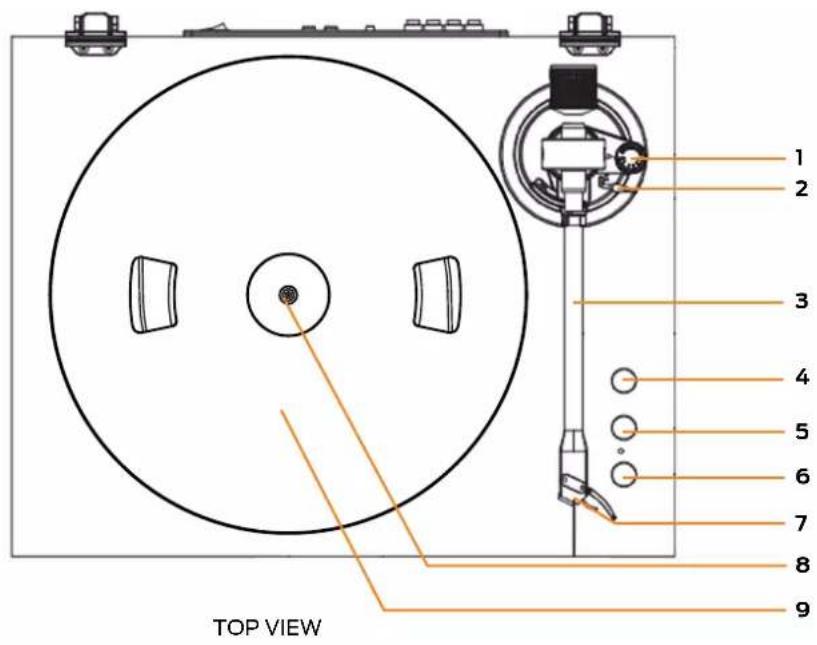
- Anti-skating - slightly rotate to adjust
- Lift lever
- Tonearm
- Auto Stop switch
- Bluetooth/speed control knob
- Volume control knob
- Stylus
- Turntable shaft
- Turntable platter

- Speaker out - connect the supplied speaker cables to the ports and the other end to the R/L speaker ports on the turntable for audio playback
- Speaker in - connect the supplied speaker cables to the R/L speaker ports on the turntable and the other end to the speaker out ports on the speakers for audio playback
- RCA output - use a RCA audio cable (included) to connect to amplifiers or other external speakers for audio playback
- DC port - use the supplied AC adaptor to connect to the DC port and the other end to a power source
- On/Off switch
- Acrylic dust cover
Operation
Power On and Mode selection
- Flick the On/Off switch to turn the turntable on.
- Set the Bluetooth/Speed control knob to BT for Bluetooth ^2 mode. Adjust the knob to 33 or 45 for Phono mode for 33/45RPM playback.
Playing a Record
- Place a record on the turntable platter and select the correct playing speed: 33, 45 RPM (according to the vinyl being played).
- Remove the stylus guard and unlock the tone arm lock. Push the lift lever upward to raise the tone arm and then gently move the tone arm to the desired position over the record. The platter will begin to spin when the tone arm is moved toward the record.
- Push the lift lever forward to lower the tone arm slowly onto the desired position on the record and begin playing the record.
- The turntable will automatically stop if you set the Auto Stop switch to on.
- When you have finished playing the record, push the lift lever backward to raise the tone arm and gently move it back to its rest.
- When you have finished playing records, engage the tone arm lock to protect it from accidental movement. Flick the On/Off switch to turn the turntable off. Unplug it from the power supply if you are not going to use it for a while.
To avoid damaging the stylus, ensure that the included stylus guard is in place whenever the turntable is being installed, moved or cleaned.

* Illustration for reference only.
Connect the speakers for audio playback
- Connect the supplied speaker cables to the Speaker out port on both speakers and the other ends to the R/L speaker ports on the turntable.
- Ensure the red cable is plugged into the red port and the black cable is plugged into the black port on both the speakers and the turntable.
Tips to better performance
- When opening or closing the turntable cover, handle it gently, moving it either at the center or equally from both sides.
• Do not touch the stylus tip with your fingers; avoid bumping the stylus on the turntable mat or on the edge of the record - Clean the stylus tip frequently, using a soft brush with a back-to-front motion only.
- If you use a stylus cleaning fluid, use it very sparingly.
- Wipe the dust cover and turntable housing gently with a soft cloth. Clean the unit only with a dry, clean cloth. Do not use liquid or aerosol cleaners.
- Never apply harsh chemicals or solvents to any part of the turntable system.
- Prior to moving the turntable, always unplug it from the AC power outlet and fasten the tone arm on the tone arm rest with the vinyl twist-tie.
Bluetooth®
You can listen to tracks from a media device if connected to the unit via Bluetooth® wireless technology.
Pairing Bluetooth ^® Devices
- Set the Bluetooth/Speed control knob to BT for Bluetooth mode
- The first time you use your Bluetooth ^® device with the turntable, you will need to pair them with one another.
- Activate Bluetooth ^® on your compatible device, and set it to search for compatible devices.
- Select the speaker name: 'MT-TT03' from the list of found devices.
- If your device asks for a passkey (depending on the device manufacturers, model, and software version), then enter digits "0000" and press OK.
- You can also use the control buttons on the right side of the turntable to play, play previous/next and pause the music.

The operational range between this turntable and a Bluetooth ^® device is approximately 10 metres (without any object between the Bluetooth ^® enabled device and the unit). Any obstacle between the devices can reduce the operational range.
Before you connect a Bluetooth® enabled device to this unit, ensure you know the device's capabilities. Compatibility with all Bluetooth® devices is not guaranteed.
If the signal strength is weak, your Bluetooth ^® receiver may disconnect, but it will re-enter pairing mode automatically.

If a mobile phone on which you are playing music receives a call, the music will be interrupted. The phone call audio however is not played via the speakers. Once you end the call, the devices are connected to each other again and playback resumes.
Your device will also be disconnected when your device is moved beyond the operational range. If you want to reconnect your device, place it within the operational range.
If the connection is lost, follow the instructions (left) to pair your device to the player again.
Troubleshooting
If you have problems with the turntable, check below for advice. If you don't find a solution here, contact After Sales Support on 1300 886 649.
| Problem Solution | |
| No power | ·Ensure that the power adaptor is properly connected.·Ensure that there is power at the AC outlet. |
| No sound | ·Rotate the volume control knob clockwise to increase the volume.·Check that the turntable is in the correct mode. If in Bluetooth®mode, check the Bluetooth®source device to make sure that it's not muted or stopped playing. |
| The vinyl record will not play | ·Make sure you have selected the correct speed (33, 45rpm).·Check whether the vinyl has already played to the end. |
For Technical and Warranty Support
1300 886 649
monster@tempo.org
monsterproducts.com.au
Distributed by Tempo (Aust) Pty Ltd,
PO Box 132, Frenchs Forest NSW 1640
Specifications
| Power Adaptor Input AC | 100-240V, 50/60Hz 0.2A Max. | |
| Power Adaptor Output DC 12V/2.0A | ||
| Dimensions (Turntable) | 434 x 333 x 136 mm | |
| Speaker 179 x 160 x 250 mm (each) | ||
| Stylus Cartridge Audio Technica ATN3600 | ||
| Vinyl Records | Speed | Supports playback speed33 / 45 RPM |
| Record size support | 7" = 17.7cm10" = 25.5cm SP12" = 30cm LP | |
| Speaker 2 x 10W | ||
| Net Weight 8.9kg | ||
Compliance and Responsible Disposal

Packaging
The packaging of your product has been selected from environmentally friendly materials and can usually be recycled. Please ensure these are disposed of correctly. Plastic wrapping can be a suffocation hazard for babies and young children, please ensure all packaging materials are out of reach and are safely disposed of. Please recycle these materials rather than throwing them away.
Product
At the end of its working life, do not throw this product out with your household rubbish. An environmentally friendly method of disposal will ensure that valuable raw materials can be recycled. Electrical and electronic items contain materials and substances which, if handled or disposed of incorrectly, could potentially be hazardous to the environment and human health.
Compliance
This product complies with the Australian Safety Standard AS/NZS 62368.1 to ensure the safety of the product.

MONSTER®
Always Lead. Never Follow.™


- Welcome
- Contents
- Product Overview
- Important Tips
- Before first use
- Connect to power
- Controls and Connections
- Operation
- Power On and Mode selection
- Playing a Record
- Connect the speakers for audio playback
- Tips to better performance
- Bluetooth®
- Pairing Bluetooth ® Devices
- Troubleshooting
- For Technical and Warranty Support
- Compliance and Responsible Disposal
- Packaging
- Product
- Compliance
- MONSTER®
Brand : MONSTER
Model : MT-TT03
Category : Turntable