
MT-TT01 - Turntable MONSTER - Free user manual and instructions
Find the device manual for free MT-TT01 MONSTER in PDF.


| Product Type | Turntable |
| Brand | Monster |
| Model | MT-TT01 |
| Dimensions (W x H x D) | 397 x 97 x 337 mm |
| Net Weight | 2.8 kg |
| Gross Weight | 4.2 kg |
| Power Input | AC 100-240V, 50/60Hz, 0.2A Max |
| Power Adaptor Output | DC 12V, 0.2A |
| Playback Speeds | 33 and 45 RPM |
| Record Sizes Supported | 7", 10", 12" |
| Stylus Cartridge | Audio Technica AT3600 |
| Included Accessories | 45 RPM adaptor, AC adaptor, 3.5mm to RCA cable, RCA cable, USB cable, Driver CD, protective cover, warranty card, safety warnings, user manual |
| Audio Output | RCA (via included 3.5mm to RCA cable) |
| USB Port | Yes, for PC recording (not for USB playback) |
| Tone Arm | Manual with lift and return button |
| Automatic Tone Arm Return | Yes, at end of record |
| Dust Cover | Acrylic dust cover included |
| Recording Software | Audacity (on CD, also downloadable from audacityteam.org) |
| Warranty | 2 Years |
| Placement Requirements | Level surface, away from heat/vibrations, at least 10cm clearance |
| Cleaning Instructions | Dry cloth only; no liquids or chemicals |
| Safety Precautions | Keep away from liquids, children, pets; unplug before cleaning |
| Compliance | AS/NZS 62368.1 |
Frequently Asked Questions - MT-TT01 MONSTER
User questions about MT-TT01 MONSTER
0 question about this device. Answer the ones you know or ask your own.
Ask a new question about this device
Download the instructions for your Turntable in PDF format for free! Find your manual MT-TT01 - MONSTER and take your electronic device back in hand. On this page are published all the documents necessary for the use of your device. MT-TT01 by MONSTER.
USER MANUAL MT-TT01 MONSTER
natural_image
Black MGNDERTA radio tab with open lid and clear plastic case (no visible text or symbols on device body)
Welcome
Premium connectivity that fuels modern lifestyle and empowers innovation.
A better everyday experience through amazing products.
The user manual will provide everything you need to know about using your new product.
All our products are produced and tested to stringent standards of performance and safety, and are pleased to provide a 2 Year Warranty with your purchase.
We hope you enjoy your purchase.
MONSTER®
Always Lead. Never Follow.
Contents
Welcome 2
Product Overview 4
Controls and Connections 8
Operation 10
Troubleshooting 15
Specifications 16
Compliance and Responsible Disposal 17
Product Overview
What's in the box:
A. Turntable
B. Adaptor for 45RPM records
C. AC Adaptor
D. 3.5mm to RCA Audio Cable
E. RCA Audio Cable
F. USB Cable
G. Driver CD
H. Protective Cover
I. Warranty Certificate
J. General Safety Warnings
K. User Manual
4 | PRODUCT OVERVIEW

Important Tips
- Place the turntable on a level surface.
- Place the turntable away from any source that may generate heat or vibrations.
- Make sure there is enough space around the turntable for airflow. Leave at least 10cm clearance around the product.
- Unplug the turntable before cleaning it.
- Clean using a dry cloth only - do not use water or chemicals.
- Only use the provided power supply.
- Keep liquid, children and pets away from the turntable at all times.
- Repack in its original packaging when transporting the turntable.
Before first use
- Unpack the product but keep all packaging materials until you have made sure your new product is undamaged and in good working order. Plastic wrapping can be a suffocation hazard for babies and young children, so ensure all packaging materials are out of their reach.
- Unwind the cord to its full length and inspect it for damage. Do not use the product if the product or its cord have been damaged or are not working properly. In case of damage, contact our after sales support line for advice on examination or repair or return of the damaged product.
- Read this manual to familiarise yourself with all the parts and operating principles of the product.
- Do not connect the unit to the mains power socket before checking the mains voltage and before all other connections have been made.
Connect to power

Make sure the turntable is switched off at the power outlet until you have finished connecting your cables.

natural_image
Simple line drawing of a mechanical device with a cable and plug, no text or symbols present- Connect the DC plug into the DC IN power jack of the turntable.
- Plug in the adaptor into the AC power outlet.

Don't forget to plug in the turntable to the power outlet. Leave the power switched off until installation is finished.
Controls and Connections
Product Overview
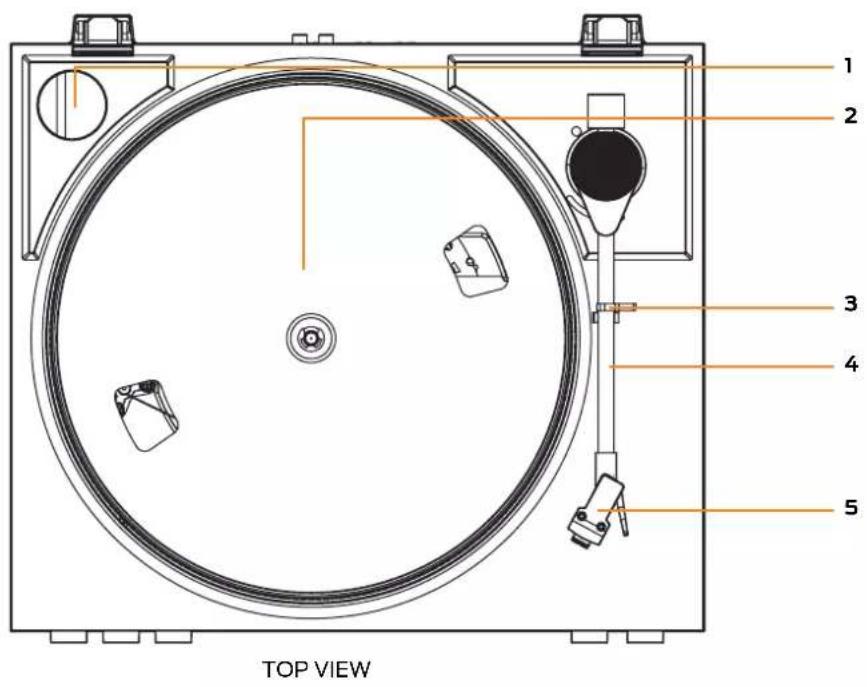
- 45 RPM adaptor
- Turntable platter
- Tone arm lock
- Tone arm
- Stylus

FRONT VIEW

11 12 13
REAR VIEW
- POWER : press to turn the turntable on. Press again to turn the turntable off.
- 33/45: press to switch between 33 and 45RPM playback.
- START/STOP: press to start the turntable. Press again to stop (pause) the record.
- RETURN: press to return the tone arm to its resting position.
- Tone arm lift: press to raise the tonearm up/down.
- USB port : use the supplied USB cable and connect to your PC to record the vinyl music to your PC. NOTE: USB port is not for USB playback
- DC port - use the supplied AC adaptor to connect to the DC port and the other end to a power source.
- RCA output - use the supplied 3.5mm to RCA audio cable to connect to your external speakers (not included) for audio playback
- Acrylic dust cover
Operation
Power On and Mode selection
- Press the POWER button to turn the turntable on.
- Once you place the tonearm on the vinyl, place the tone arm lift button to raise the tone arm up/down. Press the RETURN button to return the tone arm to its resting position.
Playing a Record
- Place a record on the turntable platter and select the correct playing speed: 33, 45 RPM (according to the vinyl being played). Press the START/STOP button to start the turntable. Press again to stop (pause) the record.
- Remove the stylus guard and unlock the tone arm lock. Press the tone arm lift button to raise the tone arm. The platter will begin to spin when the tone arm is moved toward the record.
- Press the tone arm lift button to put the tone arm down onto the desired position on the record and begin playing the record.
- When you have finished playing the record, press the RETURN button to return the tone arm to its resting position.
When you have finished playing records, press the RETURN button to return the tone arm to its resting position. Unplug it from the power supply if you are not going to use it for a while.
- Note: the tone arm will automatically return when the vinyl has played to the end.

Connect to an External Amplifier using the Line Out Port
- Use the supplied 3.5mm to RCA audio cable to connect to the RCA output at the back of the turntable, and then connect to the your external amplifier.
Connect to a PC for encoding
- You can digitalise sound from the turntable to the computer.
- Connect the supplied USB cable to the PC port on the turntable and the other end to your computer's USB port. Insert the supplied Driver CD into the computer's disc and follow the on screen instruction to install the Audacity software. Alternatively, you can download the software and user manual from www.audacityteam.org/download/
OPERATION | 11

PC Recording
Installing the Software
Using the included CD software and cable, you can connect the turntable to your computer, so that you may record your vinyl records onto the computer.
- Insert the enclosed software CD into your computer.
- If the CD does not load automatically, browse the CD and double click on the executable file called 'audacity-xxx-yyyy.exe' to run it. Follow the instructions on the computer screen to install the software.
Recording Vinyl Records to your Computer
- Connect the square end of the USB cable to the USB port on the side of the turntable.
- Connect the other end to a USB port on your computer.
- On your computer, open the audacity software, you will see the following window:
![Audiocity File Edit View Project Generate Effect Analyze Help 36 24 .12 0 立体声波音 30 0 30 1:00 1:30 2:00 2:30 3:00 3:30 Stereo, 441.00Hz 33.1st beat mode : Sub L R 1.0 0.5 0.0 -0.5 -1.0 1.0 0.5 0.0 -0.5 -1.0 Project mode: 441.00 Current: 0.00.000000 sec [Snap-To-Off]](/content/2026/05/894574/images/c0f51ebe20236bfc4b1bf406b619f44b6780cc6a7088fe716e5c78a071f8dfe5.jpg)
NOTE: images for reference only. The software UI may differ due to updates.
12 | OPERATION
- Click on the Microphone list and select 'USB Audio Device'.
- Play the song that you want to record, then click the record button to start recording.
- Click the Stop button to stop recording.
- Go to menu 'File – Export – Export as WAV (or MP3)' and then choose the location where you want the file to be saved. Click once on the file to rename it and then click 'Save'.
- Go to menu 'File – New' to start a new window and record another song.
NOTE: Each recording creates one file, so you may record multiple songs in the same file. If you want to record each song as a separate file, stop the recording once the song is finished and start a new file to record the next song. The volume of the song being recorded is not affected by the volume setting on the turntable.
You can download the software and user manual from www.audacityteam.org/download/
Audacity Logo Copyright © 2022 by Audacity. All rights reserved.
Tips to better performance
- When opening or closing the turntable cover, handle it gently, moving it either at the center or equally from both sides.
- Do not touch the stylus tip with your fingers; avoid bumping the stylus on the turntable mat or on the edge of the record.
- Clean the stylus tip frequently, using a soft brush with a back-to-front motion only.
- If you use a stylus cleaning fluid, use it very sparingly.
- Wipe the dust cover and turntable housing gently with a soft cloth. Clean the unit only with a dry, clean cloth. Do not use liquid or aerosol cleaners.
- Never apply harsh chemicals or solvents to any part of the turntable system.
- Prior to moving the turntable, always unplug it from the AC power outlet and fasten the tone arm on the tone arm rest with the vinyl twist-tie.
Troubleshooting
If you have problems with the turntable, check below for advice. If you don't find a solution here, contact After Sales Support on 1300 886 649.
Problem Solution
| No power | ·Ensure that the power adaptor is properly connected. ·Ensure that there is power at the AC outlet. |
| No sound | ·Check that the volume of the external amplifier is not muted/increase the volume. |
| The vinyl record will not play | ·Make sure you have selected the correct speed (33, 45 rpm). ·Check whether the vinyl has already played to the end. |
For Technical and Warranty Support
1300 886 649
monster@tempo.org
monsterproducts.com.au
Distributed by Tempo (Aust) Pty Ltd,
PO Box 132, Frenchs Forest NSW 1640
Specifications
| Power Adaptor Input AC | 100-240V, 50/60Hz 0.2A Max. | |
| Power Adaptor Output DC 12V/0.2A | ||
| Dimensions (Turntable) | 397 x 97 x 337mm (W x H x D) | |
| Stylus Cartridge Audio Technica AT3600 | ||
| Vinyl Records | Speed | Supports playback speed33 / 45 RPM |
| Record size support | 7" = 17.7cm10" = 25.5cm SP12" = 30cm LP | |
| Net Weight 2.8kg | ||
| Gross Weight 4.2kg | ||
Compliance and Responsible Disposal

Packaging
The packaging of your product has been selected from environmentally friendly materials and can usually be recycled. Please ensure these are disposed of correctly. Plastic wrapping can be a suffocation hazard for babies and young children, please ensure all packaging materials are out of reach and are safely disposed of. Please recycle these materials rather than throwing them away.
Product
At the end of its working life, do not throw this product out with your household rubbish. An environmentally friendly method of disposal will ensure that valuable raw materials can be recycled. Electrical and electronic items contain materials and substances which, if handled or disposed of incorrectly, could potentially be hazardous to the environment and human health.
Compliance
This product complies with the Australian Safety Standard AS/NZS 62368.1 to ensure the safety of the product.
Notes
Notes

MONSTER®
Always Lead. Never Follow.™


- Welcome
- Contents
- Product Overview
- Important Tips
- Before first use
- Connect to power
- Controls and Connections
- Operation
- Power On and Mode selection
- Playing a Record
- Connect to an External Amplifier using the Line Out Port
- Connect to a PC for encoding
- PC Recording
- Tips to better performance
- Troubleshooting
- For Technical and Warranty Support
- Compliance and Responsible Disposal
- Packaging
- Product
- Compliance
- Notes
- MONSTER®
Brand : MONSTER
Model : MT-TT01
Category : Turntable